1. Introduction: Computer Graphics and the CG Engineer Exam
Welcome to the Graphics Theory series.
In the Linear Algebra for Graphics Programming series we learned the math: vectors, matrices, coordinate spaces and projection.
This series is about what graphics people do with that math.
How does a computer turn a pile of triangles into a picture?
Why do shadows, reflections and soft light cost so much?
How are curves, characters, cameras and colors described with numbers?
The series follows the scope of the CG Engineer Certification, Expert level (CGエンジニア検定 エキスパート), a Japanese exam run by CG-ARTS.
So it works as a study companion if you're preparing for that exam.
But you don't need to take any exam to follow along.
If you've ever wondered how the images in games, films or design software are made, this series is for you as well.
In this first chapter we'll look at what computer graphics is, how a CG image is made from start to finish, what the CG Engineer exam is and how this series maps to its syllabus.
Then I'll explain how the series is organized and which conventions we'll use in every chapter.
There's not much math yet; we'll start computing for real in chapter 2.
Note: This series is community supplementary material for the CG Engineer Certification.
It is not a replacement for the official textbook, and it is not affiliated with or endorsed by CG-ARTS.
The full credits and disclaimer are in section 1.4.
1.1 What is computer graphics?
Computer graphics (コンピュータグラフィックス), or CG, means generating images with a computer.
The input is a description of a scene: shapes, materials, lights, a camera, maybe how things move.
The output is an image, or a sequence of images (a video).
The process of turning the description into an image is called rendering (レンダリング).
That's a short definition, but it covers a huge field.
Some CG images are drawn in a few milliseconds, 60 times every second, on a game console.
Others take hours per image on hundreds of computers for a feature film.
Some try to look exactly like a photograph, others like a watercolor painting or a technical drawing.
They all share the same theory, and that theory is what this series is about.
Where CG is used
Here are the main fields where CG shows up every day:
- Games: real-time 3D and 2D graphics; every frame is computed while you play.
- Film and VFX: visual effects (VFX) blended with live-action footage, digital doubles, explosions, entire digital sets.
- Animation: fully CG animated films and series, and also 2D anime that uses 3D backgrounds, crowds or vehicles.
- Design and CAD: product design, cars, machines; CAD (computer-aided design) needs exact shapes and drawings.
- Architecture: visualizing buildings before they exist, walk-throughs, lighting studies.
- Medicine and science: CT and MRI volumes shown in 3D, simulations, scientific visualization (可視化, kashika) of data you can't see directly.
- VR and AR: virtual reality headsets and augmented reality software that draw CG over the camera image.
- User interfaces: fonts, icons, windows, maps and charts on your phone and PC are all CG, too.
The last one is easy to forget.
Every letter you're reading right now was turned from a curve description into pixels by a rasterizer.
CG isn't only 3D.
CG, image processing and computer vision
Three fields work with images, and it helps to separate them by what goes in and what comes out:
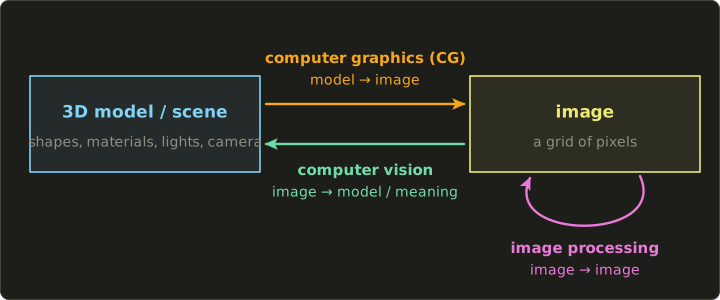
- Computer graphics: model → image. We describe a scene and compute what a camera would see.
- Image processing (画像処理, gazō shori): image → image. Sharpening, blurring, color correction, resizing, compression.
- Computer vision (コンピュータビジョン): image → model or meaning. Recognizing faces or text, measuring the 3D shape of an object from photos, tracking a camera's motion.
In a sense, computer vision is CG run backwards: CG goes from the scene to the picture, vision goes from the picture back to the scene.
In practice the three meet all the time.
A VFX shot tracks the real camera's motion from the footage (vision), renders CG elements with that camera (graphics), and blends and color-corrects everything together (image processing).
Textures are often made from photos, and 3D scanners build models from images.
The exam's first syllabus area is called "CG and the digital camera model", and its item "CG and image processing" is exactly about this relationship.
We'll go into the details in chapter 2.
1.2 How a CG image is made: the big pipeline
Making CG, especially a 3D animated shot, is a chain of stages.
Each stage takes the result of the previous one and adds something.
This is the big picture, with the chapters of this series that cover each stage:
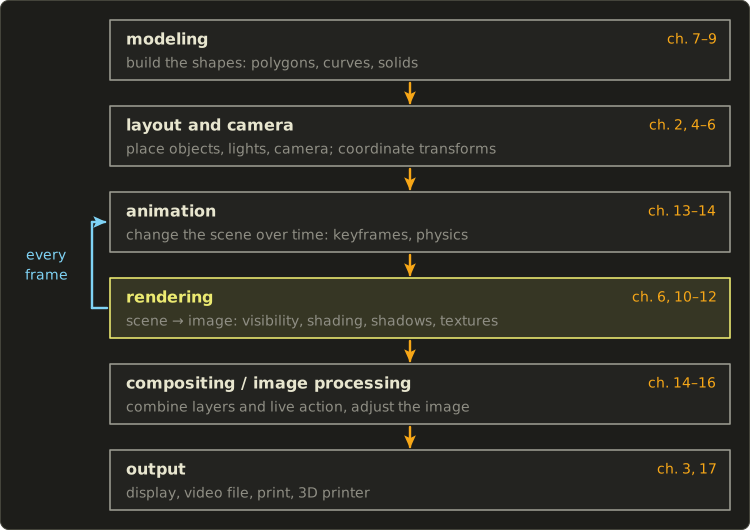
- Modeling (モデリング): building the shapes. Polygon meshes, curves and curved surfaces, solids, volumes. Chapters 7–9.
- Layout and camera (レイアウト): placing objects, lights and the camera in the scene. This is where coordinate transformations (座標変換, zahyō henkan) come in: every object has its own coordinate system, and we move between them with matrices. Chapter 2 introduces the camera model; chapters 4–6 cover the transformations, projection and the viewing pipeline.
- Animation (アニメーション): changing the scene over time. Keyframes, skeletons and characters, physics simulation, procedural motion. Chapters 13–14.
- Rendering (レンダリング): computing the image the camera sees. Which surfaces are visible (hidden surface removal, 隠面消去), how bright and what color they are (shading, シェーディング), shadows, textures, reflections and indirect light. Chapter 6 covers how triangles become pixels; chapters 10–12 cover the rest.
- Compositing and image processing (合成・画像処理): combining rendered layers with each other and with live-action footage, then adjusting the final image. Chapters 14–16.
- Output (出力): showing or storing the result. Displays, video files, printers, even 3D printers. Color for displays is in chapter 3; devices and media are in chapter 17.
Animation and rendering are connected by a loop.
A video is a sequence of still images, and for each one the scene is posed for that moment in time and then rendered.
In this series (like in most courses) we'll learn rendering before animation, because you need to know how to make one still image before you make 24 of them per second.
In an actual production the work happens roughly in the order of the picture above, often with many iterations back and forth.
A few topics don't belong to one stage, because they're about the whole process: color and how we see it (chapter 3, and perception again in chapter 18), stylized non-photorealistic rendering and visualization (chapter 16), the hardware and software of CG systems (chapter 17), and intellectual property and the history of CG (chapter 18).
Real-time vs offline rendering
There are two very different worlds of rendering, and the difference is time.
Real-time rendering (リアルタイムレンダリング) computes each image while the user is watching and interacting: games, VR, CAD viewers, UIs.
The number of images per second is the frame rate (フレームレート), measured in frames per second (fps) or hertz (Hz).
At a given frame rate, the time available for one frame (the frame budget) is:
Let's compute it for the common rates:
So a 60 fps game has less than 17 milliseconds to do everything for a frame: animation, physics, and drawing every object.
VR headsets commonly refresh at 90 Hz or more, which leaves only about 11 ms.
Real-time renderers therefore mostly use rasterization (ラスタライズ, chapter 6) on the GPU, plus a lot of clever approximations and precomputed data.
Since around 2018, consumer GPUs also have hardware support for ray tracing, and games increasingly mix the two.
Offline rendering (オフラインレンダリング, also called pre-rendering, プリレンダリング) computes the images ahead of time; nobody is waiting for a frame in real time.
Film and high-end animation use it.
The renderer can spend minutes or hours per frame on physically based light transport, such as path tracing (chapter 12).
Let's see why that still needs a lot of computers.
A 90-minute film at 24 frames per second has:
If every frame took 1 hour on one computer, the whole film would take 129,600 computer-hours:
With a render farm (レンダーファーム) of 1,000 computers working in parallel it's 129.6 hours, or about 5.4 days.
And that's for a single version of every shot; in a real production shots are rendered many times while the artists iterate.
| Real-time rendering | Offline rendering | |
|---|---|---|
| Time per frame | a few ms to about 33 ms | minutes to hours |
| Main technique | rasterization on the GPU, increasingly with ray tracing | ray tracing / path tracing, often on CPU or GPU render farms |
| Typical uses | games, VR/AR, CAD viewers, UIs | films, VFX, high-quality stills and product images |
| Priority | speed and stable frame rate | image quality and physical accuracy |
The theory is the same for both.
Hidden surface removal, shading, shadows and global illumination are the same ideas in a game engine and in a film renderer; only the trade-off between quality and time differs.
1.3 The CG Engineer Certification
CG-ARTS
CG-ARTS is the short name of 公益財団法人画像情報教育振興協会, a Japanese public-interest foundation that promotes education in the field of image and visual information (the English name on its website is "Computer Graphic Arts Society").
Among other things, it publishes textbooks and runs a family of certification exams (CG-ARTS検定).
At the time of writing, these are the CG Creator (CGクリエイター検定), CG Engineer (CGエンジニア検定), Web Designer (Webデザイナー検定), Image Processing Engineer (画像処理エンジニア検定) and Multimedia (マルチメディア検定) certifications.
The CG Engineer exam: Basic and Expert
The CG Engineer Certification is aimed at engineers and programmers who develop and design software and systems in the CG field: CG and game programmers, technical directors, software engineers, CAD engineers and similar.
It tests the knowledge behind animation, film, games, AR/VR and other applications, not the use of one particular tool.
It has two levels:
- Basic (ベーシック): a basic understanding of CG technology and the ability to use that knowledge, for example in programming.
- Expert (エキスパート): a specialist understanding of CG technology and the ability to apply it to the development of software, hardware and systems.
This series follows the Expert syllabus.
The Basic level has its own syllabus that covers many of the same topics at a more basic level, arranged differently.
If you're aiming for Basic, the series is still useful, but compare the official Basic syllabus with the table below so you know which parts to focus on.
The syllabus and this series
The Expert syllabus (出題範囲, shutsudai han'i) is published as a PDF on the official site: CGエンジニア検定 出題範囲.
It is divided into nine areas, the last of which is related knowledge (関連知識); the area numbers in the table are mine, for easy reference.
This table shows the areas, their items, and where each is covered in Part 1 of this series:
| Syllabus area | Items | Chapters |
|---|---|---|
| 1. CG and the digital camera model (CGとディジタルカメラモデル) | digital camera model, basics of digital images, CG and image processing | 2, 3 |
| 2. Coordinate transformations and pipelines (座標変換とパイプライン) | 2D coordinate transformations, 3D transformations, projection, viewing pipeline, drawing pipeline | 4, 5, 6 |
| 3. Modeling (モデリング) | shape models, solid representations, boundary representation data structures and local deformation, curves and surfaces, polygon surfaces, volume-based shapes, other shape representations | 7, 8, 9 |
| 4. Rendering (レンダリング) | photorealistic rendering, hidden surface removal, shading, shadows, mapping, image-based rendering, global illumination | 10, 11, 12 |
| 5. Animation (アニメーション) | structure of CG animation, physically based, keyframe, real-time, procedural, compositing with live action, character animation | 13, 14 |
| 6. Image processing (画像処理) | representing digital images, generating and drawing 2D images, per-pixel tone and color conversion, spatial filtering, geometric transformation of images, image editing | 15 (basics in 2 and 3) |
| 7. Graphics that appeal to the eye (視覚に訴えるグラフィックス) | computational photography, non-photorealistic rendering, visualization | 16 |
| 8. CG systems (CGシステム) | CG systems, CG software, real-time 3D CG systems, 3D input devices, 3D output devices, recording media | 17 |
| 9. Related knowledge (関連知識) | perception, intellectual property, history of CG | 18 (perception also in 3) |
The English names of the areas and items are my own translations.
The Japanese names are the ones the syllabus uses, so they're the ones worth knowing for the exam.
That's why every chapter of this series gives the Japanese term next to the English one.
The exam at the time of writing
Facts about the exam itself change from year to year, so please always check the official site, https://www.cgarts.or.jp/, before you plan anything.
At the time of writing (2026):
- The CG-ARTS exams are held twice a year, in a first-half session (前期, in July in 2026) and a second-half session (後期, in November in 2026).
- The exam is a paper mark-sheet exam: you choose answers from given options (10 main problems with about 40 questions in total).
- Basic exams are held in the morning and Expert exams in the afternoon, so you can take both levels on the same day.
- The pass line is 70 out of 100 points.
- The fee is 6,050 yen for Basic and 7,150 yen for Expert (tax included).
- Application periods and venues are listed on the official site, and the questions and answers of the last two sessions can be downloaded there.
1.4 Credits and disclaimer
Credits and disclaimer
This series follows the syllabus (出題範囲) of the CG Engineer Certification, Expert level (CGエンジニア検定 エキスパート), run by CG-ARTS (公益財団法人画像情報教育振興協会, Computer Graphic Arts Society).
The official textbook for the Expert level is 『コンピュータグラフィックス[改訂新版]』, published by CG-ARTS (first printed in 2015, ISBN 978-4-903474-49-6; CG-ARTS lists it as CGエンジニア検定エキスパート対応).
This series is community supplementary material. It is not a replacement for the official textbook, and it is not affiliated with, reviewed or endorsed by CG-ARTS. The names CG-ARTS and CGエンジニア検定 and the book titles are used only to say what this series follows.
All text, figures, diagrams and questions in this series are original. Nothing is copied from the official textbook, the official problem collections or past exams, and the series makes no claims about what the textbook says on any particular page.
The technical terms follow the syllabus so that you can recognize them on the exam.
If you're preparing for the exam, please get the official textbook and the official problem collection (公式問題集; at the time of writing 『CGエンジニア検定エキスパート公式問題集[第四版]』), and work through the past exams published on the official site. For the Basic level, CG-ARTS publishes 『CGエンジニア検定ベーシック公式問題集[第四版]』 and the textbook 『ビジュアル情報処理 -CG・画像処理入門-[改訂新版]』.
Any mistakes in this series are mine. If you find one, please let me know.
1.5 How to use this series
Prerequisite: the Linear Algebra series
The Linear Algebra for Graphics Programming series is a mandatory prerequisite.
I won't re-derive vectors and matrices here; when we need them, I'll link to the chapter that explains them.
These are the chapters that matter most:
| Linear Algebra chapter | Where we'll need it |
|---|---|
| 2. Vectors | positions, directions, colors: everywhere |
| 4. The Dot Product | shading, back-face culling, projections of vectors |
| 5. The Cross Product | surface normals, building camera axes |
| 6. Matrices and 7. Matrix Multiplication | all coordinate transformations and their composition |
| 9. Homogeneous Coordinates | translation as a matrix, projection, the 4×4 pipeline |
| 10. Determinants and Inverse Matrices | undoing transforms, transforming normals |
| 11. Coordinate Spaces and the Camera | local, world and view space; the view transform |
| 12. Projection | parallel and perspective projection, the frustum |
| 13. Rotations and Quaternions | rotation in 3D, interpolating orientations in animation |
Part 1, Part 2 and the mini-exam
The series has two parts:
- Part 1 (chapters 1–18) covers the whole Expert syllabus in a beginner-friendly way. If you're studying for the exam, this is the part to read first.
- Part 2 (the chapters after that) goes deeper into the advanced techniques behind modern graphics: projection and rasterization in depth, physically based shading, Monte Carlo rendering, real-time shadows and global illumination, advanced animation and physics, HDR and advanced image processing, and modern GPU systems.
- The last two chapters are a mini-exam in the style of the real one, weighted by syllabus area, and its answers with explanations.
These are the chapters of Part 1:
- Introduction: Computer Graphics and the CG Engineer Exam — this chapter.
- The Digital Camera Model and Digital Images — cameras, pixels, sampling and quantization.
- Color and Visual Perception — light, color spaces, gamma and how we see.
- 2D Coordinate Transformations — moving, rotating and scaling in 2D, and what each class of transform preserves.
- 3D Transformations and Projection — 3D transforms, the camera, parallel and perspective projection.
- The Viewing and Drawing Pipelines — from a vertex to a pixel: clipping and rasterization.
- Shape Models and Solid Representations — how shapes are stored.
- Curves and Surfaces — Bézier, B-splines and friends.
- Polygon Meshes, Volumes and Other Shape Representations — meshes, voxels and more.
- Hidden Surface Removal and Shading — what is visible and how bright it is.
- Shadows and Mapping — shadows and textures.
- Photorealistic Rendering and Global Illumination — ray tracing and indirect light.
- Animation 1: Keyframes, Kinematics and Characters — making things move.
- Animation 2: Physics, Procedural Animation and Compositing — simulation and blending CG with live action.
- Image Processing — tone curves, filters and geometric image transforms.
- Computational Photography, NPR and Visualization — beyond photorealism.
- CG Systems — GPUs, software, input and output devices, media.
- Perception, Intellectual Property and the History of CG — the related knowledge area.
What every chapter looks like
Every chapter follows the same pattern:
- An opening that says what we'll learn, why it matters, and which syllabus items it covers.
- Sections that start with a picture and the intuition, then give the definition or formula, then a fully worked example with numbers, then how real software, hardware, games and films use it.
- "Exam points": the distinctions and traps worth being sure about.
- A summary, and a key terms table with every important term in English and Japanese.
- Challenges, from ★ (recall and calculation) to ★★ (apply and derive) and ★★★ (think deeper), including 2–3 multiple-choice questions written in the style of the exam. There's no answer key in the chapters; the answers to the exam-style questions come with the mini-exam at the end.
- A practical assignment as the last section: a pen-and-paper exercise (paper, ruler, graph paper and a calculator are all you need) with a way to check your own result.
Code and the hands-on series
This is a theory series, so code is optional.
Where a few lines make an algorithm concrete, I'll show them in C++ (using the linalg.hh header from the Linear Algebra series) and as shader code in Slang, GLSL and HLSL.
You never need to run any code to do the challenges.
If you want to implement these ideas yourself, the GLSL and OpenGL series come after this one.
There you'll write shaders and a renderer, and much of the theory from here (the pipeline, shading, textures, shadows, gamma) turns into working code.
1.6 Conventions used in this series
The series uses the same conventions as the Linear Algebra series:
- Column vectors. A transform is applied as , and a composition reads right to left: in we scale first, then rotate, then translate.
- A right-handed coordinate system (右手系, migite-kei): +X right, +Y up, +Z towards the viewer. The camera looks down −Z in view space.
- Positive rotation is counter-clockwise when looking from the positive end of the axis towards the origin (right-hand rule).
- Angles are in radians in formulas and code ( radians = 180°). In prose I'll sometimes give degrees too, like a 60° field of view.
- Scene lengths have no particular unit unless I say so (think of meters). Image coordinates are in pixels, and the image (device) coordinate system usually has its origin at the top left with y pointing down; each chapter says which one it uses.
- Color components are numbers from 0 to 1 in formulas, and 0 to 255 when we talk about 8-bit image files.
Other books, other conventions
Other books, papers, APIs and exam figures don't all use these conventions.
That's not a problem as long as you can recognize and translate them.
The two differences you'll meet most often are row vectors and left-handed systems.
Row vectors.
Some books write a point as a row vector (行ベクトル) and multiply the matrix from the right: .
Because (Linear Algebra chapter 7), the row-vector matrix is just the transpose of ours, :
And the order of a composition reverses, so it reads left to right:
Let's check it with a 2D translation by in homogeneous coordinates (Linear Algebra chapter 9), applied to the point .
With column vectors, the translation sits in the last column:
With row vectors, the matrix is transposed and the translation sits in the last row:
Same point, .
A quick way to tell which convention a figure uses: if the translation numbers are in the last column, it's column vectors; if they're in the bottom row, it's row vectors.
For example, Microsoft's DirectXMath library uses the row-vector convention.
Chapter 4 (section 4.6) goes through row vectors in more detail, including what happens to rotation matrices.
Shading languages can do both styles.
In Slang and HLSL, mul(M, p) treats p as a column vector and mul(p, M) as a row vector; in GLSL the same is M * p and p * M:
// this series: column vector, p' = M p
float4 transformPoint(float4x4 M, float4 p) {
  return mul(M, p);
}

// row-vector style: p' = p M, the same as mul(transpose(M), p)
float4 transformPointRow(float4x4 M, float4 p) {
  return mul(p, M);
}
// this series: column vector, p' = M p
vec4 transformPoint(mat4 M, vec4 p) {
return M * p;
}
// row-vector style: p' = p M, the same as transpose(M) * p
vec4 transformPointRow(mat4 M, vec4 p) {
return p * M;
}// this series: column vector, p' = M p
float4 transformPoint(float4x4 M, float4 p) {
return mul(M, p);
}
// row-vector style: p' = p M, the same as mul(transpose(M), p)
float4 transformPointRow(float4x4 M, float4 p) {
return mul(p, M);
}
Left-handed systems.
A left-handed system (左手系, hidarite-kei) has +X right and +Y up like ours, but +Z points away from the viewer, into the screen.
Unity and Unreal Engine both use left-handed coordinate systems (Unreal with Z up).
To convert between the two, flip the sign of z:
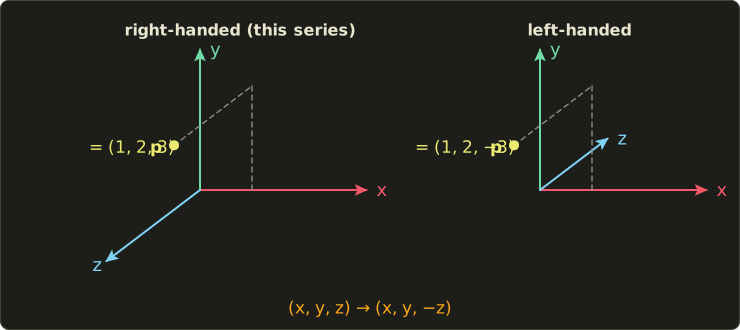
The point doesn't move; only its description changes.
As a matrix, the flip is the reflection (with a 1 added for w in 4×4 form).
A transform written for the right-handed system becomes, in the left-handed system:
Read it right to left: convert the point to right-handed coordinates, apply the original transform, convert back.
( is its own inverse, because flipping twice changes nothing.)
For example, "move 5 units towards the viewer" is a translation by in our system and by in a left-handed one.
One more consequence: a reflection reverses orientation, so a triangle whose vertices go counter-clockwise in one system appears clockwise in the other.
That matters for back-face culling, which decides front and back by the vertex order (chapter 6).
Note: I won't claim which convention any particular textbook or exam figure uses.
When you read one, look at where the translation is and which way z points, and translate with the two rules above: transpose (and reverse the order) for row vectors, flip z for left-handed systems.
1.7 The units of a picture: pixels, frames and the camera
Before we dive into the theory in chapter 2, let's name the three things every CG image is built from.
Pixels.
A digital image is a grid of small cells called pixels (画素, gaso, also ピクセル), and each pixel stores one color.
The number of pixels across and down is the resolution (解像度, kaizōdo).
Here is the same tiny scene (a sun over a hill) computed at three resolutions, one color per pixel:
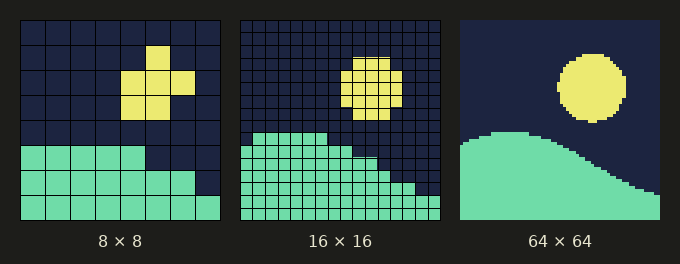
At 8 × 8 the sun is a blocky cross; at 64 × 64 it's clearly round, but the edges are still staircases.
A Full HD image has pixels.
A game running at 60 fps in Full HD therefore has to produce
pixel colors every second, over 124 million.
How the continuous world is turned into this grid (sampling, 標本化, and quantization, 量子化), and why the staircases appear, is the topic of chapter 2.
Frames.
Motion is an illusion made from still images shown quickly one after another.
Each still image is a frame (フレーム).
Film traditionally uses 24 frames per second, so one frame lasts s, about 41.7 ms.
Here is a falling ball, computed with real gravity for six consecutive frames:
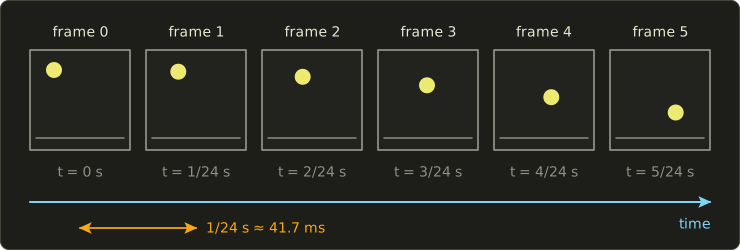
Notice that the ball moves farther between later frames: it's accelerating.
Animation (chapters 13–14) is all about computing where everything is in each frame.
The camera.
Every CG image is taken by a camera that doesn't exist.
The renderer asks "what would a camera at this position, looking in this direction, with this lens, record?", and the answer is the image.
This idea, the digital camera model (ディジタルカメラモデル), ties the whole field together: modeling is preparing the subject, lighting is setting up the lights, rendering is taking the shot, and image processing is developing and editing the photo.
That's exactly where chapter 2 begins.
Exam points
- Know the direction of each field: CG is model → image, image processing is image → image, computer vision (image recognition) is image → model or meaning.
- Know the order of the stages of making CG (modeling → layout → animation → rendering → compositing → output) and what each stage does.
- Real-time rendering trades quality for a fixed time budget per frame; offline rendering trades time for quality. The frame budget is ms.
- The syllabus uses ディジタル (not デジタル) in its official terms, like ディジタル画像 and ディジタルカメラモデル. Both mean "digital"; デジタル is just the everyday spelling.
- When a figure uses row vectors, its matrices are the transposes of ours and the order of composition is reversed.
1.8 Summary
- Computer graphics means generating images with a computer from a description of a scene; rendering is the step that computes the image.
- CG is used in games, film and VFX, animation, design and CAD, architecture, medicine and science, VR/AR and user interfaces.
- CG (model → image), image processing (image → image) and computer vision (image → model or meaning) are different directions, but they meet constantly in practice.
- Making CG is a pipeline: modeling, layout and camera, animation, rendering, compositing and image processing, output. Animation and rendering repeat for every frame.
- Real-time rendering has a budget of about 16.7 ms per frame at 60 fps; offline rendering can spend hours per frame on a render farm.
- The CG Engineer Certification by CG-ARTS has Basic and Expert levels; this series follows the Expert syllabus, with Part 1 (chapters 1–18) covering all of its areas.
- This series is community supplementary material, not a replacement for the official textbook, and not affiliated with or endorsed by CG-ARTS.
- We use column vectors, a right-handed system and radians; row-vector books use transposed matrices in reversed order, and left-handed systems flip z.
- A picture is made of pixels, an animation of frames, and every CG image is taken by a virtual camera.
1.9 Key terms
| English | 日本語 | Note |
|---|---|---|
| computer graphics (CG) | コンピュータグラフィックス | generating images from a scene description |
| image processing | 画像処理 | image → image |
| computer vision | コンピュータビジョン | image → model or meaning |
| visualization | 可視化 | making invisible data visible |
| modeling | モデリング | building shapes |
| layout | レイアウト | placing objects, lights and camera |
| coordinate transformation | 座標変換 | moving between coordinate systems |
| animation | アニメーション | changing the scene over time |
| rendering | レンダリング | computing the image |
| compositing | 合成(コンポジット) | combining layers and live action |
| real-time rendering | リアルタイムレンダリング | games, VR; a few ms per frame |
| offline rendering, pre-rendering | オフラインレンダリング、プリレンダリング | film; minutes to hours per frame |
| rasterization | ラスタライズ | turning primitives into pixels (chapter 6) |
| render farm | レンダーファーム | many computers rendering in parallel |
| frame | フレーム | one still image of an animation |
| frame rate | フレームレート | frames per second (fps) |
| pixel | 画素(ピクセル) | one cell of a digital image |
| resolution | 解像度 | number of pixels across and down |
| digital camera model | ディジタルカメラモデル | CG as a virtual camera (chapter 2) |
| syllabus | 出題範囲 | the official list of exam topics |
| column vector | 列ベクトル | our convention, p' = M p |
| row vector | 行ベクトル | other convention, matrices transposed |
| right-handed system | 右手系 | +Z towards the viewer (ours) |
| left-handed system | 左手系 | +Z away from the viewer |
1.10 Challenges
- ★ Classify each task as CG, image processing or computer vision: (a) drawing a 3D model of a house as an image, (b) removing noise from a photo, (c) reading license plate numbers from a traffic camera, (d) building a 3D model of a statue from 50 photos, (e) turning a color photo into grayscale.
- ★ Compute the frame budget in milliseconds at 30, 120 and 144 fps.
- ★ A 2-minute short film runs at 24 fps and every frame takes 20 minutes to render on one computer. How many frames are there, how many computer-hours does it take, and how long does it take on a render farm of 100 computers?
- ★★ Write the 3×3 homogeneous matrix for a 2D translation by in both the column-vector and the row-vector convention, and transform the point with each; both must give .
- ★★ Convert the point and the translation from our right-handed system to a left-handed one, and check that "translate, then convert" gives the same point as "convert, then translate".
- ★★★ An AR software shows a CG character standing on your real desk through the phone camera. Describe which parts of the software are computer vision, which are CG and which are image processing, in the order they happen in each frame.
Multiple choice
Q1 ★ Which of the following best describes computer vision?
| A | Finding the shapes, positions or meaning of objects from an input image |
| B | Converting an input image into another image, such as a sharper one |
| C | Generating an image from a 3D model and a camera |
| D | Compressing an image to store it in a file |
| E | Computing the motion of objects according to the laws of physics |
Q2 ★ Which of the following is the most appropriate order of work for producing one shot of a 3D CG animation?
| A | rendering → modeling → layout → animation → compositing |
| B | compositing → modeling → animation → layout → rendering |
| C | layout → rendering → modeling → compositing → animation |
| D | modeling → rendering → compositing → layout → animation |
| E | modeling → layout → animation → rendering → compositing |
Q3 ★★ With column vectors, a point is transformed as . Which of the following is the same transform in the row-vector convention?
| A | |
| B | |
| C | |
| D | |
| E |
1.11 Practical assignment
In this assignment you'll take apart one CG image on paper and make your own study plan.
You need paper, a pen and, if you like, a ruler.
- Pick one still image that contains CG: a screenshot from a game, a frame from a CG animated film, a VFX shot from a movie, or a product image from a catalog.
- On a sheet of paper, draw a table with the columns "thing in the image", "modeled", "lit and shaded", "animated", "composited or processed" and "chapter".
- Fill in at least 8 rows. For each visible thing (a character, the ground, the sky, a shadow, a reflection, fog, text on the screen, a lens flare…), mark which stages were needed to make it.
- In the "chapter" column, write the chapter of this series that covers it, using the pipeline picture in section 1.2 and the syllabus table in section 1.3.
- Below the table, write one sentence saying whether the image was most likely rendered in real time or offline, and why.
- On a second sheet, make a study plan table with the columns "syllabus area", "chapters" and "date I'll finish them", with one row for each of the nine syllabus areas.
What you should end up with: a table of at least 8 rows in which every row has at least one mark and a chapter number, and a study plan with all nine syllabus areas.
To check yourself: every one of the nine areas must appear in your plan, the chapter numbers must match the table in section 1.3, and the dates must be in order and leave you at least two weeks before the exam (or before your own deadline) for the mini-exam and review.
If there's something in your image you couldn't classify, circle it and come back to it after chapter 12; you'll know what it is by then.
コメント(0)
まだコメントはありません。
ログインするとコメント出来ます。