4. The Dot Product
So far we can add vectors, scale them, measure them and normalize them.
But we can't yet answer a very natural question: how much do two vectors point the same way?
The dot product answers exactly that, with a single number.
It's probably the most used operation in all of graphics programming.
Every lit pixel you have ever seen in a 3D game was computed with at least one dot product, and it also gives us angles, projections, reflections, "is it in front of me?" tests and wall sliding.
If you only remember one chapter of this series, make it this one.
4.1 The idea: how much do two arrows agree?
Imagine you are pulling a sled with a rope.
If you pull straight forward, all your effort moves the sled.
If the rope goes up at an angle, part of your effort is wasted lifting the sled instead of moving it forward.
If you pull straight up, the sled doesn't move forward at all.
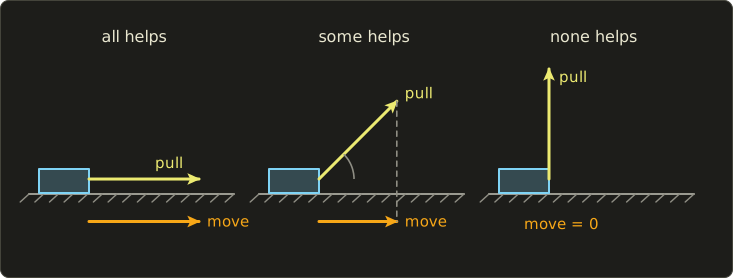
The dot product measures this "how much of one arrow goes along the other arrow".
It is big and positive when the arrows point the same way, zero when they are at a right angle, and negative when they point in opposite directions.
4.2 What the formula is
The dot product of two vectors and is written (read "a dot b").
The result is a single number (a scalar), not a vector.
There are two formulas, and the whole magic of this chapter is that they always give the same answer.
The algebraic formula: multiply matching components, then add everything up.
In 2D, you just leave out the z term; in general, with the sigma notation from chapter 1:
The geometric formula: multiply the two lengths and the cosine of the angle (theta) between the arrows.
The first formula is how a computer calculates it.
The second one is what it means.
4.3 How it works
4.3.1 Calculating it
Let and .
Three multiplications and two additions.
That's cheap, which is one reason GPUs can do billions of them per second.
4.3.2 Properties
A few rules follow directly from the algebraic formula, because they are true for ordinary multiplication and addition of each component:
- Commutative: . The order doesn't matter, since .
- Distributive: .
- Scalars move out: .
- Dot with itself is the squared length: .
The last one connects this chapter with chapter 3.
For : , and .
So the squared length from chapter 3 is just dot(v, v).
4.3.3 Why the two formulas agree
This is the most important "why" in this chapter, so let's take it slowly.
We'll do it in three steps.
Step 1: the dot product only depends on lengths.
Look at .
By the last property, it equals , and we can multiply it out with the distributive rule just like :
Rearranging gives:
Let's check with our numbers.
, , so .
Then . Same as before.
Why is this useful?
Draw and as arrows starting at the origin.
Together with the arrow between their tips, they form a triangle, and the formula only uses the lengths of its three sides.
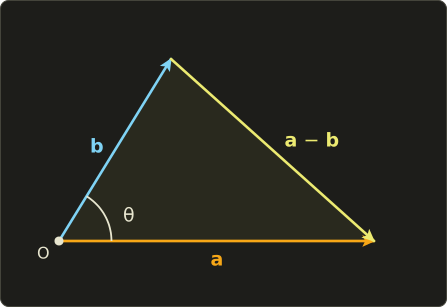
Step 2: turning the picture doesn't change the dot product.
If you rotate the whole triangle, the side lengths stay the same.
So the dot product stays the same, too.
That means we may rotate the picture into the most convenient position: with lying on the positive x axis.
Step 3: calculate in the convenient position.
Now .
And makes the angle with the x axis, so by the unit circle from chapter 1 (scaled by the length of , see chapter 3) it is .
Apply the algebraic formula:
Done.
In 3D it works the same way: two arrows starting at the origin always lie in one flat plane, and we can turn that plane until it is the xy plane.
Bonus: if you substitute the geometric formula into step 1, you get , the "law of cosines" from trigonometry. At the cosine is 0 and it becomes Pythagoras.
4.3.4 The sign tells the direction
Lengths are never negative, so the sign of is the sign of .
From the unit circle we know what that means:
| Dot product | Angle | Meaning |
|---|---|---|
| less than 90° | roughly the same direction | |
| exactly 90° | perpendicular | |
| more than 90° | roughly opposite directions |
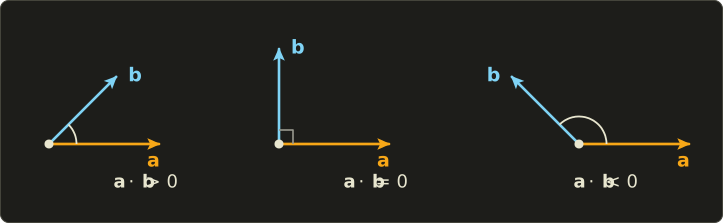
This is why the dot product is the standard test for perpendicular vectors: if it is 0, they are at a right angle.
Example: , so these two vectors are perpendicular, even though that's hard to see by looking at the numbers.
4.3.5 Finding the angle
If we know both formulas give the same number, we can solve for the angle:
Here ("arc cosine", acos in code) is the inverse of the cosine: you give it a cosine value between −1 and 1, it gives you back the angle between 0 and .
Worked example: , .
Another example in 2D: and give , which is 45°.
The really useful special case: if both vectors are unit vectors, the dot product IS the cosine, because both lengths are 1:
That's why graphics code normalizes everything before taking dot products: then you get the cosine for the price of three multiplications.
The clamping pitfall.
Floating-point numbers are not exact.
Two unit vectors that point in the same direction may give a dot product of 1.0000001 instead of 1.
acos is only defined for values from −1 to 1, so acos(1.0000001) returns NaN, and we already know from chapter 3 how poisonous NaN is.
Always clamp the value into [−1, 1] before calling acos.
In practice you often don't need the angle at all.
If you want to know "is the angle smaller than 30°?", compare the dot product of unit vectors with instead.
A bigger cosine means a smaller angle, and you have saved an expensive acos.
4.3.6 Projection: the shadow of one vector on another
Back to the sled: "how much of the pull goes forward" is called the projection of the pull onto the forward direction.
Picture a light shining straight down onto : the shadow of on the line of is the projection.
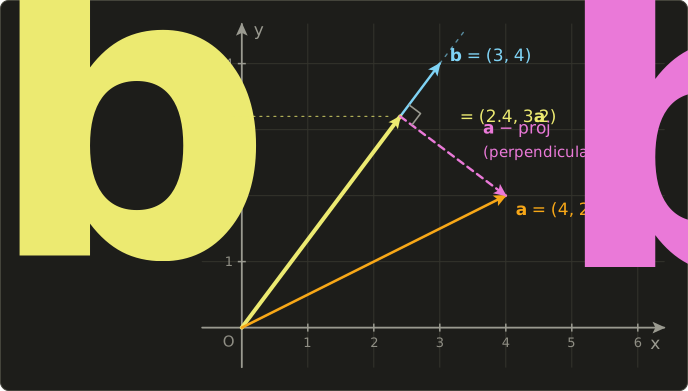
The scalar projection is the signed length of that shadow.
It's the length of times , which is the dot product with the unit vector of :
The vector projection is the shadow as an arrow: that length times the direction of :
The second form avoids the square root, since .
Worked example: project onto .
What's left over, , should be perpendicular to .
Check: . Yes.
So every vector can be split into a part along and a part perpendicular to it.
That split is the basis of the next two tricks.
4.3.7 Removing a component: wall sliding
When a character walks into a wall at an angle, we don't want them to stop dead.
We want them to slide along the wall.
In other words: keep the part of the movement that goes along the wall, throw away the part that goes into it.
The wall's direction "out of the wall" is its unit normal .
The part of the velocity that goes along is the projection , so we subtract it:
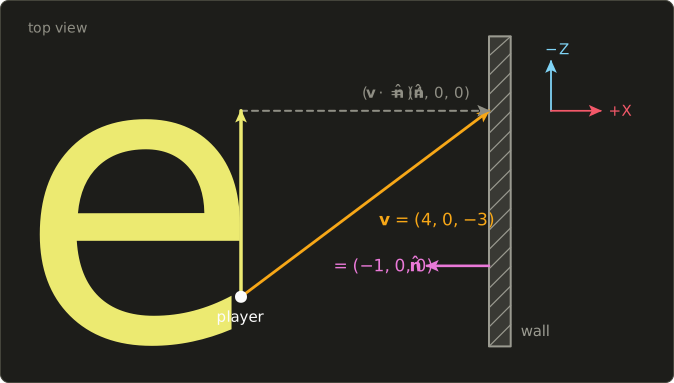
Worked example: the player moves with (right and forward), and there is a wall to the right whose normal points left, .
The sideways part is gone and the player keeps walking forward along the wall.
Note the negative dot product: it tells us the player is moving into the wall.
If , the player is moving away from the wall and you should leave the velocity alone.
4.3.8 Reflection
A bouncing ball, a laser hitting a mirror, a reflection of the sky on water: we need to mirror a direction off a surface with unit normal .
Sliding removed the normal part once.
Reflecting removes it twice: once to get to the surface, and once more to come back out on the other side.
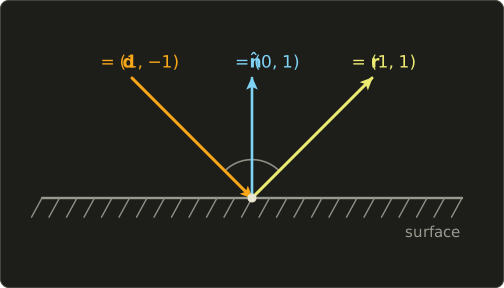
Worked example 1: a ball moving with hits the floor, .
, so .
The horizontal motion stays, the vertical motion flips. Exactly what a bounce looks like.
Worked example 2: a ray going straight down, , hits a tilted surface with (which is a unit vector: ).
Check: .
Reflection doesn't change the length, as it should be for a mirror.
The formula only works if is a unit vector; with a longer normal you'd subtract too much.
GLSL, Slang and HLSL all have this built in as reflect(d, n), with exactly this formula.
The normal must be normalized, and d points towards the surface (it's the incoming direction).
4.4 Use in graphics programming
4.4.1 Lambert diffuse lighting
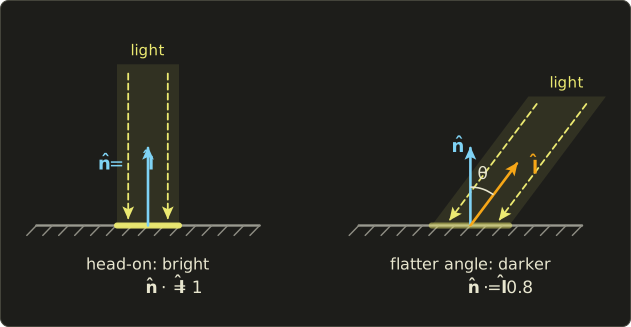
A matte surface (paper, clay, a wall) is brightest when the light hits it head-on and gets darker as the light comes in at a flatter angle.
Johann Heinrich Lambert described this in 1760: the brightness is proportional to , where is the angle between the surface normal and the direction to the light.
Why the cosine?
A beam of light of a fixed width spreads over a larger area when it hits the surface at a flat angle, so each square centimeter gets less light.
And if both vectors are unit vectors, the cosine is just a dot product.
If the light is behind the surface, the dot product is negative; negative light makes no sense, so we clamp it to 0:
Numbers: a floor with and light coming from (the direction towards the light).
, so the floor gets 80% of the light's brightness.
If the light were below the floor, , the dot product would be −0.8, and max turns that into 0: completely unlit.
Here is a full, small fragment shader:
struct Scene {
  float3 lightDir;   // unit vector from the surface towards the light
  float3 lightColor;
  float3 albedo;     // surface color
};
ConstantBuffer<Scene> scene;

[shader("fragment")]
float4 fragmentMain(float3 normal : NORMAL) : SV_Target {
  float3 n = normalize(normal); // interpolation made it shorter (chapter 3)
  float diffuse = max(dot(n, scene.lightDir), 0.0);
  float3 color = scene.albedo * scene.lightColor * diffuse;
  return float4(color, 1.0);
}
#version 450
layout(location = 0) in vec3 normal;
layout(location = 0) out vec4 outColor;
layout(set = 0, binding = 0) uniform Scene {
vec3 lightDir; // unit vector from the surface towards the light
vec3 lightColor;
vec3 albedo; // surface color
};
void main() {
vec3 n = normalize(normal); // interpolation made it shorter (chapter 3)
float diffuse = max(dot(n, lightDir), 0.0);
vec3 color = albedo * lightColor * diffuse;
outColor = vec4(color, 1.0);
}struct Scene {
float3 lightDir; // unit vector from the surface towards the light
float3 lightColor;
float3 albedo; // surface color
};
ConstantBuffer<Scene> scene;
float4 fragmentMain(float3 normal : NORMAL) : SV_Target {
float3 n = normalize(normal); // interpolation made it shorter (chapter 3)
float diffuse = max(dot(n, scene.lightDir), 0.0);
float3 color = scene.albedo * scene.lightColor * diffuse;
return float4(color, 1.0);
}
Two things to watch out for.
First, n and lightDir must be in the same coordinate space (usually world space or view space; chapter 11 explains the spaces).
Second, the light direction points from the surface towards the light; if your engine stores it as "the direction the light travels", negate it first, or every lit side becomes dark and the other way round.
Real renderers also add a small constant "ambient" term so that the unlit side isn't pitch black.
4.4.2 Blinn-Phong specular highlights
Shiny surfaces show a bright spot (a highlight) where the light is reflected towards the eye.
The Blinn-Phong model computes it with the half vector : the direction exactly halfway between the direction to the light and the direction to the viewer :
If the surface normal points exactly along the half vector, the surface acts like a perfect mirror between light and eye, and the highlight is at full strength.
The exponent (the "shininess") controls how fast the highlight falls off: a big gives a small, sharp highlight (polished metal), a small a broad one (plastic).
Worked example with and :
- Viewer at the mirror position, : , so , , specular = 1.
- Viewer straight above, : with length .
- So and , whose square is exactly .
- With : . With : .
Same angle, but the shinier surface has already lost most of its highlight.
float blinnPhong(float3 n, float3 l, float3 v, float shininess) {
  float3 h = normalize(l + v);
  return pow(max(dot(n, h), 0.0), shininess);
}
float blinnPhong(vec3 n, vec3 l, vec3 v, float shininess) {
vec3 h = normalize(l + v);
return pow(max(dot(n, h), 0.0), shininess);
}float blinnPhong(float3 n, float3 l, float3 v, float shininess) {
float3 h = normalize(l + v);
return pow(max(dot(n, h), 0.0), shininess);
}4.4.3 Rim lighting
Rim lighting makes the outline of an object glow, a popular effect for characters, ghosts and force fields.
The outline is where the surface turns away from the camera, that is, where the normal is perpendicular to the view direction, so is close to 0.
In the middle of the object, facing us, is close to 1.
So is 0 in the middle and 1 at the edges, which is exactly a rim mask:
float rim(float3 n, float3 v, float power) {
  return pow(1.0 - saturate(dot(n, v)), power);
}
float rim(vec3 n, vec3 v, float power) {
return pow(1.0 - clamp(dot(n, v), 0.0, 1.0), power);
}float rim(float3 n, float3 v, float power) {
return pow(1.0 - saturate(dot(n, v)), power);
}
For example with : a normal facing the camera gives , a normal gives , and a normal at the silhouette gives .
The power makes the rim thinner (bigger power) or wider.
4.4.4 Facing tests: front or behind?
Because the sign of the dot product says "same side or other side", it's the standard way to ask whether something is in front of something else.
Is the enemy in front of me?
Take my forward direction and the arrow from me to the enemy, .
If their dot product is positive, the enemy is in front of me; if negative, behind.
I don't even need to normalize anything for this, because lengths never change the sign.
Example: I stand at the origin looking down −Z, .
An enemy at : , in front.
An enemy at : , behind.
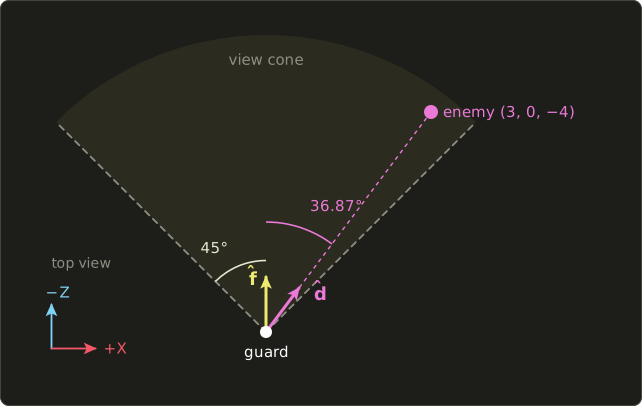
Is the enemy inside my view cone?
A guard in a stealth game can see 45° to each side.
Now we do normalize, because we want the cosine.
Let be the normalized arrow from me to the enemy.
The enemy is inside the cone if .
For the enemy at : the length is 5, so and .
, so the guard sees the enemy (the actual angle is , but we never needed to compute it).
Compute once when the game starts, not every frame.
Is this triangle facing the camera?
A surface point with normal faces a camera at if .
The back sides of a closed model can never be seen, so we can skip drawing them ("backface culling").
GPUs actually decide this with the triangle's winding order on screen instead, which we'll meet in chapter 5, but the idea is the same.
4.4.5 Reflections and sliding in shaders
The reflect built-in is used for mirror-like effects: compute the direction from the camera to the surface, reflect it about the normal, and use the result to look up a sky texture (a cube map).
float3 mirrorDirection(float3 cameraPos, float3 worldPos, float3 normal) {
  float3 d = normalize(worldPos - cameraPos); // incoming: from the eye to the surface
  return reflect(d, normalize(normal));
}
vec3 mirrorDirection(vec3 cameraPos, vec3 worldPos, vec3 normal) {
vec3 d = normalize(worldPos - cameraPos); // incoming: from the eye to the surface
return reflect(d, normalize(normal));
}float3 mirrorDirection(float3 cameraPos, float3 worldPos, float3 normal) {
float3 d = normalize(worldPos - cameraPos); // incoming: from the eye to the surface
return reflect(d, normalize(normal));
}Wall sliding usually lives on the CPU in the physics or character controller code, but it's the same projection formula as above; you'll see it in the C++ test program below.
4.5 Other uses
The dot product is one of the most common operations in all of science and engineering.
- Work in physics: the work done by a force moving an object by is . Pulling the sled with newtons over meters gives joules. With the geometric formula: , , and . Same answer.
- Cosine similarity: search engines, recommendation systems and AI "embeddings" turn documents, products or sentences into long vectors and compare them with . Count the words "cat", "dog", "car" in three documents: , , . Then and have similarity exactly 1 (same topic, one is just longer), while and give (not similar).
- Statistics: the correlation coefficient of two data series is the cosine similarity of the two series after subtracting each one's average.
- Weighted sums: a shopping receipt is a dot product. Buying quantities of items costing yen costs yen. A final grade with weights and scores is .
- Neural networks: a single artificial neuron computes the dot product of its weights with its inputs (plus a constant). We'll see the matrix version in chapter 7.
- Audio: comparing a signal with a sine wave of a given frequency is a dot product. That's the core idea of the Fourier transform, which tells you which frequencies (notes) are in a sound.
4.6 Code
The dot product goes into linalg.hh, for all three vector sizes.
Put it right after the scalar multiplication from chapter 2:
// 内積 / dot product (chapter 4)
inline float dot(Vec2 a, Vec2 b) { return a.x * b.x + a.y * b.y; }
inline float dot(Vec3 a, Vec3 b) { return a.x * b.x + a.y * b.y + a.z * b.z; }
inline float dot(Vec4 a, Vec4 b) { return a.x * b.x + a.y * b.y + a.z * b.z + a.w * b.w; }
The Vec4 version will become important in chapter 6, where every row of a matrix gets dotted with a vector.
The angle, projection and reflection helpers are short enough that I define them right in the test program instead of the header.
reflect takes a unit normal, like the shader built-in.
degrees() is the helper from chapter 1.
#include "linalg.hh"
#include <cstdio>

// Angle between two vectors, in radians.
float angleBetween(Vec3 a, Vec3 b) {
  float c = dot(normalize(a), normalize(b));
  if (c > 1.0f) c = 1.0f;   // rounding can push c slightly
  if (c < -1.0f) c = -1.0f; // outside [-1, 1]; acos would return NaN
  return std::acos(c);
}

// Vector projection of a onto b (b must not be zero).
Vec3 project(Vec3 a, Vec3 b) {
  return (dot(a, b) / dot(b, b)) * b;
}

// Reflect direction d off a surface with unit normal n.
Vec3 reflect(Vec3 d, Vec3 n) {
  return d - 2.0f * dot(d, n) * n;
}

int main() {
  Vec3 a{1.0f, 2.0f, 3.0f};
  Vec3 b{4.0f, -5.0f, 6.0f};
  printf("dot(a, b)       = %g\n", dot(a, b));
  printf("dot(a, a)       = %g\n", dot(a, a));

  float angle = angleBetween({1.0f, 1.0f, 0.0f}, {0.0f, 1.0f, 1.0f});
  printf("angle           = %.4f rad = %.2f deg\n", angle, degrees(angle));

  Vec3 p = project({4.0f, 2.0f, 0.0f}, {3.0f, 4.0f, 0.0f});
  printf("projection      = (%g, %g, %g)\n", p.x, p.y, p.z);

  // Wall sliding: remove the part of v that goes into the wall
  Vec3 v{4.0f, 0.0f, -3.0f};
  Vec3 wall{-1.0f, 0.0f, 0.0f};
  Vec3 slide = v - dot(v, wall) * wall;
  printf("slide           = (%g, %g, %g)\n", slide.x, slide.y, slide.z);

  Vec3 r = reflect({0.0f, -1.0f, 0.0f}, {0.6f, 0.8f, 0.0f});
  printf("reflect         = (%.2f, %.2f, %.2f)\n", r.x, r.y, r.z);

  // Lambert: brightness = max(dot(n, l), 0)
  Vec3 n{0.0f, 1.0f, 0.0f};
  Vec3 l{0.6f, 0.8f, 0.0f};
  float diffuse = dot(n, l);
  printf("diffuse         = %g\n", diffuse > 0.0f ? diffuse : 0.0f);

  // Is the enemy in front of me, and inside a 45 degree view cone?
  Vec3 forward{0.0f, 0.0f, -1.0f};
  Vec3 toEnemy = Vec3{3.0f, 0.0f, -4.0f} - Vec3{0.0f, 0.0f, 0.0f};
  float c = dot(forward, normalize(toEnemy));
  printf("cos to enemy    = %g -> %s\n", c, c > 0.7071f ? "inside cone" : "outside cone");

  // Shopping: quantities . prices
  Vec3 quantity{3.0f, 2.0f, 5.0f};
  Vec3 price{120.0f, 250.0f, 80.0f};
  printf("total           = %g yen\n", dot(quantity, price));
  return 0;
}
Expected output:
dot(a, b)       = 12
dot(a, a)       = 14
angle           = 1.0472 rad = 60.00 deg
projection      = (2.4, 3.2, 0)
slide           = (0, 0, -3)
reflect         = (0.96, 0.28, 0.00)
diffuse         = 0.8
cos to enemy    = 0.8 -> inside cone
total           = 1260 yen
One detail in reflect: 2.0f * dot(d, n) * n is calculated from left to right, so first two floats are multiplied, and then the float * Vec3 operator from chapter 2 does the rest.
4.7 Summary
- The dot product multiplies matching components and adds them up. The result is a number.
- Geometrically, . Both formulas agree because the dot product only depends on lengths, and lengths don't change when you rotate.
- .
- Positive: same general direction. Zero: perpendicular. Negative: opposite.
- For unit vectors, the dot product is the cosine of the angle. Clamp to [−1, 1] before
acos, or better, compare cosines directly. - Projection: . Wall sliding: . Reflection: .
- Graphics: Lambert
max(dot(n, l), 0), Blinn-Phong with the half vector, rim lighting, front/behind tests and view cones.
4.8 Challenges
- ★ Compute and . Which pair is perpendicular?
- ★ Find the angle between and , and between and , in degrees.
- ★ Project onto , then onto . In both cases check that the leftover part is perpendicular.
- ★ A ball moving with bounces off the floor . What is its new direction? What would wall sliding give instead?
- ★★ Write
float lambert(Vec3 n, Vec3 l)in C++ that normalizes both inputs and returnsmax(dot, 0). Forn = {0, 2, 0}andl = {3, 4, 0}it should print0.8, and forl = {3, -4, 0}it should print0. - ★★ Write
bool inViewCone(Vec3 pos, Vec3 forward, Vec3 target, float halfAngle)(angle in radians). For a guard at the origin looking along{0, 0, -1}with a half angle of 30°, the targets{1, 0, -3},{2, 0, -2}and{0, 0, 5}should givetrue,false,false. - ★★★ Using only the dot product, explain why is always perpendicular to (hint: take its dot product with and use ). Then show that the reflection has the same length as .
コメント(0)
まだコメントはありません。
ログインするとコメント出来ます。