5. The Cross Product
The dot product from chapter 4 takes two vectors and gives back a number.
The cross product takes two vectors and gives back a new vector that sticks out at a right angle from both of them.
That sounds like an odd thing to want, but it solves one of the most common problems in 3D graphics: "which way is this surface facing?"
Every triangle normal, every camera "right" vector and every winding-order check comes from the cross product.
It also tells us the area of a triangle, and in 2D it tells us whether a point is to the left or right of a line, which is how a GPU decides which pixels a triangle covers.
5.1 The idea: an arrow standing up from a surface
Put two pencils on a table, both starting at the same point, pointing in different directions.
Together they define the flat surface of the table.
Now hold a third pencil straight up from the point where they meet, perpendicular to both of them.
That third pencil is the direction of the cross product.
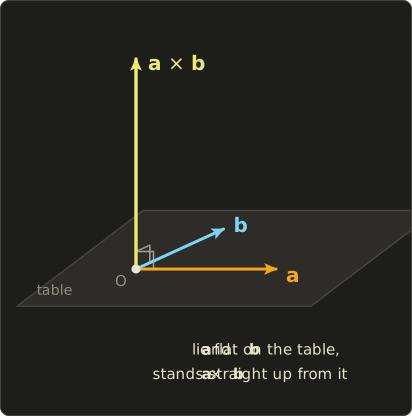
Two questions remain: does the third pencil point up or down, and how long is it?
The answers are "the right-hand rule" and "the area of the parallelogram spanned by a and b".
We'll get to both.
One important limitation first: the cross product only exists in 3D.
In 2D there is no third direction to stick out into, and in 4D there are infinitely many directions perpendicular to two vectors, so there is no single answer.
(As a mathematical curiosity, a similar product exists in 7D, but you'll never need it for graphics.)
5.2 What the formula is
For and , the cross product (read "a cross b") is:
Its length is:
where is the angle between and (between 0 and 180°).
Compare with the dot product, which had instead: the dot product measures how much two vectors agree, the cross product measures how much they disagree.
5.2.1 Remembering the formula
Nobody remembers this formula by staring at it.
Here is the trick I use, sometimes called "xyzzy".
The x component uses only y and z, and it reads "y z minus z y":
For the next component, shift every letter one step forward in the cycle x → y → z → x:
And once more:
So you only need to remember "x = yz − zy" and keep rotating the letters.
In each line, the component you are computing never appears on the right side.
If you already know determinants, you may have seen the cross product written as a 3×3 determinant with in the top row. That's only a memory aid, not a real determinant (the top row contains vectors, not numbers). We'll learn determinants properly in chapter 10, so if this note means nothing to you yet, just skip it.
5.3 How it works
5.3.1 A worked example
Let and .
So .
Is it really perpendicular to both?
In chapter 4 we learned the test: perpendicular vectors have a dot product of 0.
Both zero.
It's always worth doing this check when you compute a cross product by hand; it catches almost every mistake.
5.3.2 Why it is perpendicular
This isn't luck.
Let's take the dot product of with using letters instead of numbers:
Look at the six terms.
(first) and (fourth) are the same product with opposite signs, so they cancel.
The second and fifth cancel, and the third and sixth cancel.
Everything adds up to 0, for any vectors.
The same thing happens with .
The formula was built exactly so that this cancellation happens.
5.3.3 The basis vectors
Let's cross the basis vectors from chapter 2, , and :
In the same way you can check:
Going the other way around the cycle gives the negative:
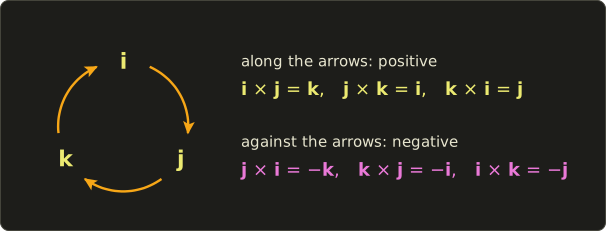
And any vector crossed with itself gives zero: .
5.3.4 Which way it points: the right-hand rule
Two vectors have two perpendicular directions: "up" and "down" from their plane.
The formula always picks the one given by the right-hand rule:
- Point the fingers of your right hand along .
- Curl them towards (the short way around).
- Your thumb points along .
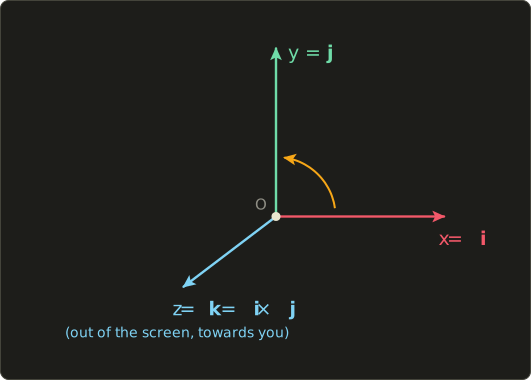
Try it with : fingers to the right along x, curl them up towards y, and your thumb points out of the screen towards you, which is +Z in our right-handed system.
That matches .
This is not a coincidence: a coordinate system is called right-handed exactly because follows your right hand.
A warning for later: the formula itself is the same in every engine, but in a left-handed system (DirectX convention, Unity, Unreal) the result visually follows the left hand. If you port code between engines and your normals come out inside-out, this is often why.
5.3.5 Order matters
Swap and and your hand has to curl the other way, so the thumb flips:
This is called anti-commutative.
With our numbers: , exactly the negative of .
This is very different from ordinary multiplication and from the dot product, where order doesn't matter.
In graphics, swapping the two arguments of a cross product turns a normal inside-out, and that is one of the most common bugs there is.
5.3.6 The length: area of a parallelogram
Now the length.
There is an identity (called Lagrange's identity) that you can check by multiplying everything out, if you are patient:
Let's at least check it with our example.
.
On the right side: , , , so . It matches.
Now replace the dot product with its geometric form from chapter 4, :
From the unit circle in chapter 1 we know (that's Pythagoras on the unit circle), so .
Taking the square root (for between 0 and 180°, is never negative):
What does that number mean?
Draw the parallelogram with sides and .
Its area is base times height.
The base is , and the height is how far the tip of is above the base line, which is :
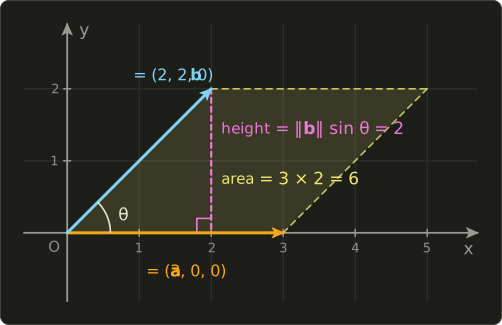
So the length of the cross product is the area of the parallelogram spanned by and .
A triangle with sides and is half of that parallelogram, so its area is .
Worked example: and .
The length is 6.
Check with the picture: the base is 3 long and the tip of is 2 above the x axis, so the parallelogram has area .
Check with the formula: , , , , so .
The triangle O, a, b has area 3.
5.3.7 Parallel vectors give zero
If and point in the same (or exactly opposite) direction, is 0 or 180°, , and the cross product is the zero vector.
That makes sense: two parallel pencils don't define a table, so there is no "up".
Remember this, because it causes a real bug in camera code (section 5.4.3).
5.3.8 What about 2D?
In 2D there is no real cross product, but there is a very useful leftover.
Put two 2D vectors into 3D with and cross them:
Only the z component survives.
That single number is often called the "2D cross product" (or perp-dot product):
Its sign says which way you turn to get from to : positive means counter-clockwise (left turn), negative means clockwise (right turn), zero means parallel.
We'll use it in section 5.4.5.
5.4 Use in graphics programming
5.4.1 The face normal of a triangle
A triangle is given by three points .
Two of its edges, both starting at , lie flat in the triangle's surface:
Their cross product is perpendicular to the surface: that's the face normal.
Normalize it (chapter 3) and you have the unit normal needed for lighting (chapter 4):
Worked example: , , .
This triangle cuts diagonally across the corner of the positive octant, like the corner of a box being sliced off.
Check: and . Perpendicular to both edges.
The length is , so:
It points away from the origin, out of the "box corner", as you'd expect.
And as a bonus, the triangle's area is half the length of the cross product: .
(Each side of this triangle is long, and an equilateral triangle with side has area . It matches.)
5.4.2 Winding order and backface culling
Which of the two sides of a triangle is the "front"?
The cross product decides it from the order of the vertices.
If you look at the triangle and its vertices go around counter-clockwise, then points towards you (right-hand rule: fingers along the first edge, curl towards the second, thumb towards you).
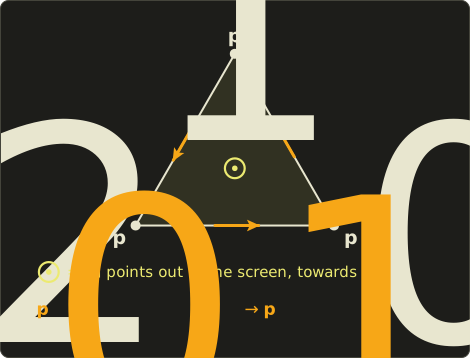
If you list the same three points in the other order, , the cross product flips (anti-commutative!) and the normal points away from you.
With our example triangle: .
This order is called the winding order, and 3D models are usually exported so that every triangle is counter-clockwise when seen from the outside.
The GPU uses this to skip the triangles facing away from the camera (backface culling), which in a closed model are always hidden behind the front side, so roughly half the triangles never need to be shaded.
- In OpenGL, the front face is counter-clockwise by default (
glFrontFace(GL_CCW)), and culling is enabled withglEnable(GL_CULL_FACE)plusglCullFace(GL_BACK). - In Vulkan, you set
frontFaceandcullModein the pipeline's rasterization state. With the y-flipping Vulkan projection from chapter 12,VK_FRONT_FACE_COUNTER_CLOCKWISEgives the same convention as OpenGL.
The GPU does this test on screen, in 2D, after projection, using the 2D cross product from section 5.3.8: the sign of the triangle's screen-space area tells it the winding.
If your model suddenly looks "inside-out" (you see the inner walls and not the outer ones), the winding order is reversed somewhere: in the exporter, in a mirrored transform (chapter 10 explains why mirroring flips the winding), or in a swapped cross product.
5.4.3 Building a basis: right and up from forward
A camera (or a character, or a missile) needs three perpendicular unit vectors: forward, right and up.
Usually we only know where it should look, the forward direction , and which way is roughly "up" in the world, .
The cross product builds the rest:
The first line gives a "right" vector perpendicular to forward and to world up.
The second line gives the camera's own "up", which is perpendicular to forward and right (if the camera looks a bit down, its up tilts forward, unlike the world's up).
Since and are perpendicular unit vectors, and their cross product already has length 1, so no second normalization is needed.
Three perpendicular unit vectors like these are called an orthonormal basis.
Worked example: the camera looks along (mostly into the screen, a bit to the right).
That makes sense: the camera isn't tilted up or down, so its up is the world's up.
For the plain case (looking straight down −Z) you get , the +X axis, exactly as our coordinate system says.
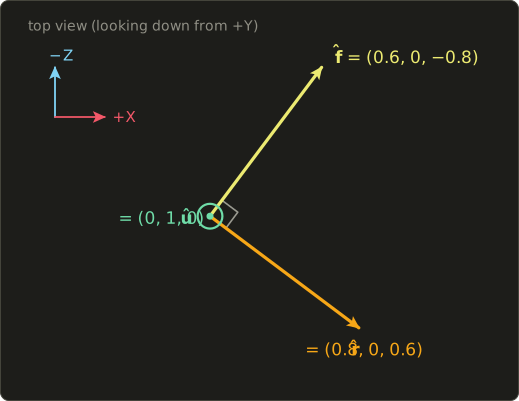
This is the core of the lookAt function, which builds the view matrix in chapter 11.
What goes wrong when forward is parallel to up.
If the camera looks straight up, , then forward and world up are parallel, and from section 5.3.7 we know the cross product is .
There is no "right" anymore: if you look straight up at the sky, any direction could be your right, depending on how you turned.
Our normalize returns the zero vector (shaders would give NaN), the basis collapses, and the screen shows garbage or nothing.
The usual fixes are to stop the camera from ever looking exactly straight up or down (clamp the pitch to something like ±89°, chapter 11), or to switch to a different helper "up" vector, such as , when forward gets too close to world up.
5.4.4 Triangle areas
Because half the length of the cross product is a triangle's area, it's handy whenever area matters:
- Scattering things on a mesh: to place grass, particles or random sample points evenly over a model, you pick each triangle with a probability proportional to its area. If a mesh has two triangles with areas 3 and 1, the first should get 75% of the points and the second 25%. Otherwise small triangles get crowded and large ones look empty.
- Surface area of a whole model is the sum of all triangle areas.
- Weighted normals: a smooth vertex normal is often the sum of the unnormalized face normals around the vertex. Since an unnormalized cross product is "normal times twice the area", bigger triangles automatically get more say, for free.
- Mesh cleanup: triangles with (almost) zero area are degenerate; they have no usable normal and should usually be removed.
5.4.5 Left or right of a line, and inside a triangle
Take a line going from point to point in 2D.
Is a point to its left or its right?
Compute the 2D cross product of the line direction with :
Positive means left, negative means right, zero means on the line.
Worked example: the line from to , so .
| Point | Result | ||
|---|---|---|---|
| left | |||
| right | |||
| on the line |
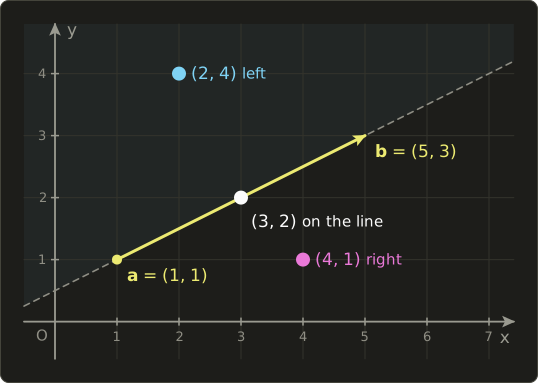
Do this for all three edges of a counter-clockwise triangle, and a point is inside the triangle exactly when it is on the left of all three edges.
For the triangle the point gives (all positive, inside), while gives (one negative, outside).
This is, in essence, how GPUs rasterize: for every pixel near a triangle they evaluate these three "edge functions" and fill the pixel if all three agree.
Games use the same test for "is the mouse over this 2D shape?", for AI steering ("is the target to my left or right, so which way do I turn?") and for checking whether a polygon is convex.
5.4.6 Flat shading in a shader
Sometimes you want the faceted, low-poly look where every triangle has one flat color.
One elegant way to do it needs no normals at all in the mesh: the fragment shader reconstructs the face normal with a cross product.
The functions ddx/ddy (Slang and HLSL) and dFdx/dFdy (GLSL) tell you how much a value changes from this pixel to its neighbor one pixel to the right, and one pixel row further.
GPUs can compute this because they always shade pixels in small 2×2 blocks.
If the value is the world position, both differences are small steps along the triangle's surface, so their cross product is the face normal.
struct Scene {
  float3 lightDir;  // unit vector towards the light
  float3 cameraPos;
  float3 albedo;
};
ConstantBuffer<Scene> scene;

[shader("fragment")]
float4 fragmentMain(float3 worldPos : TEXCOORD0) : SV_Target {
  // two steps along the surface -> their cross product is the face normal
  float3 n = normalize(cross(ddx(worldPos), ddy(worldPos)));
  // the sign depends on the window's y direction, so make n face the camera
  if (dot(n, scene.cameraPos - worldPos) < 0.0) n = -n;
  float diffuse = max(dot(n, scene.lightDir), 0.0);
  return float4(scene.albedo * diffuse, 1.0);
}
#version 450
layout(location = 0) in vec3 worldPos;
layout(location = 0) out vec4 outColor;
layout(set = 0, binding = 0) uniform Scene {
vec3 lightDir; // unit vector towards the light
vec3 cameraPos;
vec3 albedo;
};
void main() {
// two steps along the surface -> their cross product is the face normal
vec3 n = normalize(cross(dFdx(worldPos), dFdy(worldPos)));
// the sign depends on the window's y direction, so make n face the camera
if (dot(n, cameraPos - worldPos) < 0.0) n = -n;
float diffuse = max(dot(n, lightDir), 0.0);
outColor = vec4(albedo * diffuse, 1.0);
}struct Scene {
float3 lightDir; // unit vector towards the light
float3 cameraPos;
float3 albedo;
};
ConstantBuffer<Scene> scene;
float4 fragmentMain(float3 worldPos : TEXCOORD0) : SV_Target {
// two steps along the surface -> their cross product is the face normal
float3 n = normalize(cross(ddx(worldPos), ddy(worldPos)));
// the sign depends on the window's y direction, so make n face the camera
if (dot(n, scene.cameraPos - worldPos) < 0.0) n = -n;
float diffuse = max(dot(n, scene.lightDir), 0.0);
return float4(scene.albedo * diffuse, 1.0);
}
Why the if?
In OpenGL the window's y axis points up, but in Vulkan the framebuffer's y axis points down, so "one pixel row further" goes in opposite directions and the cross product flips sign between the two APIs.
Instead of remembering which is which, I simply flip the normal towards the camera using the dot-product facing test from chapter 4.
The other common way to get flat shading is to compute face normals on the CPU with triangleNormal (below) and pass them without interpolation (the nointerpolation modifier in Slang and HLSL, the flat qualifier in GLSL).
5.5 Other uses
The cross product was used in physics long before computer graphics existed.
- Torque: turning a wrench. If you push with force at a point from the bolt, the torque is . Its direction is the axis the bolt turns around (right-hand rule) and its length is how hard it turns. A wrench meters long, pushed with newtons, gives newton-meters: a counter-clockwise turn around the z axis. The explains why pushing at a right angle to the wrench works best, and pushing along it does nothing.
- Angular momentum and the velocity of a point on a spinning object (, omega, is the rotation axis scaled by the spinning speed). Physics engines use both every frame for rigid bodies.
- Lorentz force: a charged particle moving with velocity through a magnetic field feels the force . The force is always perpendicular to the motion, so the particle moves in circles. Electric motors, particle accelerators and old CRT televisions all rely on this.
- GIS and maps: the area of a polygon (a country, a field, a building footprint) is half the sum of the 2D cross products of consecutive corner points, the "shoelace formula". For the rectangle : , half of it is 12, which is indeed . The sign tells you whether the corners are listed counter-clockwise (positive) or clockwise (negative), which many map file formats care about.
- Robotics: each joint of a robot arm turns around an axis, and how fast the hand moves when a joint turns is (joint axis) × (vector from joint to hand).
- Navigation and aviation: the "right wing" direction of an aircraft is forward × up, exactly like our camera basis.
5.6 Code
The cross product goes into linalg.hh, after normalize:
// 外積 / cross product (chapter 5)
inline Vec3 cross(Vec3 a, Vec3 b) {
  return {
    a.y * b.z - a.z * b.y,
    a.z * b.x - a.x * b.z,
    a.x * b.y - a.y * b.x,
  };
}
It's the formula, line by line: "yz − zy", "zx − xz", "xy − yx".
Only a Vec3 version exists, because the cross product only exists in 3D.
The triangle helpers and the 2D side test are small enough to define in the test program:
#include "linalg.hh"
#include <cstdio>

// Unit normal of the triangle abc (counter-clockwise = front side).
Vec3 triangleNormal(Vec3 a, Vec3 b, Vec3 c) {
  return normalize(cross(b - a, c - a));
}

// Area of the triangle abc.
float triangleArea(Vec3 a, Vec3 b, Vec3 c) {
  return 0.5f * length(cross(b - a, c - a));
}

// 2D: > 0 if p is left of the line a->b, < 0 if right, 0 if on it.
float side(Vec2 a, Vec2 b, Vec2 p) {
  Vec2 ab = b - a;
  Vec2 ap = p - a;
  return ab.x * ap.y - ab.y * ap.x;
}

void print(const char *name, Vec3 v) {
  printf("%-16s = (%g, %g, %g)\n", name, v.x, v.y, v.z);
}

int main() {
  Vec3 a{1.0f, 2.0f, 3.0f};
  Vec3 b{4.0f, 5.0f, 6.0f};
  Vec3 c = cross(a, b);
  print("cross(a, b)", c);
  print("cross(b, a)", cross(b, a));
  printf("dot(c, a), dot(c, b) = %g, %g\n", dot(c, a), dot(c, b));
  print("i x j", cross({1.0f, 0.0f, 0.0f}, {0.0f, 1.0f, 0.0f}));
  print("a x 2a", cross(a, 2.0f * a));

  // Triangle with counter-clockwise vertices seen from (1, 1, 1)
  Vec3 p0{1.0f, 0.0f, 0.0f};
  Vec3 p1{0.0f, 1.0f, 0.0f};
  Vec3 p2{0.0f, 0.0f, 1.0f};
  Vec3 n = triangleNormal(p0, p1, p2);
  printf("normal           = (%.4f, %.4f, %.4f)\n", n.x, n.y, n.z);
  Vec3 nf = triangleNormal(p0, p2, p1); // swapped winding
  printf("swapped winding  = (%.4f, %.4f, %.4f)\n", nf.x, nf.y, nf.z);
  printf("area             = %.4f\n", triangleArea(p0, p1, p2));

  // Right and up vectors from a forward vector
  Vec3 forward{0.6f, 0.0f, -0.8f};
  Vec3 worldUp{0.0f, 1.0f, 0.0f};
  Vec3 right = normalize(cross(forward, worldUp));
  Vec3 up = cross(right, forward);
  print("right", right);
  print("up", up);
  print("right if f = up", normalize(cross(worldUp, worldUp)));

  // Left or right of the line from (1, 1) to (5, 3)?
  Vec2 l0{1.0f, 1.0f};
  Vec2 l1{5.0f, 3.0f};
  printf("side (2, 4)      = %g\n", side(l0, l1, {2.0f, 4.0f}));
  printf("side (4, 1)      = %g\n", side(l0, l1, {4.0f, 1.0f}));
  printf("side (3, 2)      = %g\n", side(l0, l1, {3.0f, 2.0f}));
  return 0;
}
Expected output:
cross(a, b)      = (-3, 6, -3)
cross(b, a)      = (3, -6, 3)
dot(c, a), dot(c, b) = 0, 0
i x j            = (0, 0, 1)
a x 2a           = (0, 0, 0)
normal           = (0.5774, 0.5774, 0.5774)
swapped winding  = (-0.5774, -0.5774, -0.5774)
area             = 0.8660
right            = (0.8, -0, 0.6)
up               = (0, 1, 0)
right if f = up  = (0, 0, 0)
side (2, 4)      = 10
side (4, 1)      = -6
side (3, 2)      = 0
Yes, that says -0.
Floating-point numbers have a separate "negative zero": the y component of right is computed as , and is −0 in floating point.
It is equal to 0 in every comparison (-0.0f == 0.0f is true), so it's harmless; printf just shows the sign.
5.7 Summary
- The cross product of two 3D vectors is a new vector perpendicular to both. It only exists in 3D.
- Formula: . Remember "x = yz − zy" and rotate the letters.
- Check your result: its dot product with both inputs must be 0.
- Direction: right-hand rule. , , .
- Order matters: . Swapping the arguments flips normals.
- Length: = area of the parallelogram; half of it is the triangle area. Parallel vectors give the zero vector.
- In 2D, tells left from right (counter-clockwise from clockwise).
- Graphics: face normals, winding order and backface culling, right/up vectors for cameras (watch out when forward is parallel to up), triangle areas, point-in-triangle tests, flat shading.
5.8 Challenges
- ★ Compute and check that the result is perpendicular to both vectors.
- ★ Using only the rules for and the distributive rule (it holds for the cross product too), compute . Then check your answer with the component formula.
- ★ Find the area of the triangle with corners , and with the cross product, then check it with "base times height divided by 2".
- ★ Is the point to the left or right of the line from to ? And the point ?
- ★★ Use
triangleNormalon the triangle , , . Which way does this floor triangle face? It should print(0, 1, 0)(some zeros may show as-0, see section 5.6). Then swap the last two vertices and confirm it prints(0, -1, 0). - ★★ Write
bool pointInTriangle(Vec2 p, Vec2 a, Vec2 b, Vec2 c)using thesidefunction (assume a, b, c are counter-clockwise). For the triangle{0, 0},{4, 0},{0, 4}, the points{1, 1},{3, 3}and{0.5, 3}should givetrue,false,true. - ★★★ The function
pointInTrianglefrom challenge 6 fails if the triangle is given clockwise. How can you use the 2D cross product of the triangle's own edges to detect the winding and make the function work for both orders? What should it do for a triangle whose three points lie on one line?
コメント(0)
まだコメントはありません。
ログインするとコメント出来ます。