12. Projection
In chapter 11 we moved the whole world in front of the camera.
Everything is now in view space: the eye at the origin, looking down −Z.
But a monitor is flat, so one step is still missing: squashing 3D onto 2D.
That's projection, the P in .
In this chapter we'll derive the projection matrices of linalg.hh line by line, see why homogeneous coordinates from chapter 9 were worth the trouble, look at the differences between OpenGL and Vulkan, and finally take a 3D point all the way to a pixel.
12.1 What projection does
Projection turns 3D positions into 2D positions on the screen (plus a depth value, so the GPU knows what's in front).
There are two kinds you'll use all the time.
Orthographic projection keeps parallel lines parallel, and things don't get smaller when they're far away.
The visible region is a box.
Technical drawings, 2D games, UI and the classic "isometric" look use it.
Perspective projection is how eyes and cameras work: far things look smaller, and parallel lines (like railway tracks) meet at a vanishing point.
The visible region is a pyramid with its tip cut off, called a frustum.
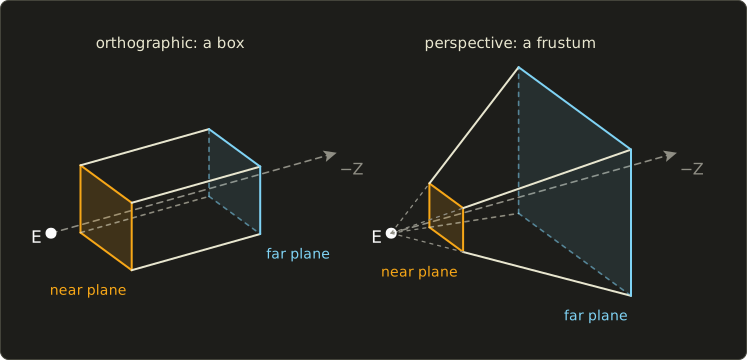
Both are described by two planes in front of the camera: the near plane at distance and the far plane at distance .
Anything closer than or further than is cut away.
Because the camera looks down −Z, the near plane is at and the far plane at , while and themselves are positive numbers.
The job of a projection matrix is to take that region and squeeze it into a fixed box called NDC (normalized device coordinates).
In OpenGL that box is , with y pointing up.
We'll get to Vulkan's box in section 12.7.
12.2 Orthographic projection: the formula
The visible box goes from to (left, right) in x, from to (bottom, top) in y, and from to in z.
The orthographic matrix maps it onto the NDC cube:
It's an affine matrix (chapter 9): a scale on the diagonal and a translation in the last column, with the usual bottom row.
Nothing new, just the right numbers.
12.3 How orthographic projection works
Let's do x alone.
We want to become and to become .
Do it in two moves:
- Shift the center of the range to 0: subtract . Now the range is to .
- Scale the half-width to 1: multiply by .
That's exactly the first row: the scale on the diagonal and the shift in the last column.
The y row is the same with and .
The z row has one extra twist: the near plane is at and should become , and the far plane at should become .
So bigger distance means bigger NDC z, which means the direction flips, and that's where the minus sign in comes from.
(Yes, this means OpenGL's NDC is actually left-handed: +z points into the screen.)
Let's check both ends:
A worked example
A UI camera for an 800×600 window, in pixel units: , , , , and to get clean numbers , .
The matrix entries are:
Now transform the point :
So it lands at in NDC: three quarters of the way across, a quarter of the way up, and halfway in depth.
Notice that is exactly halfway between the near plane (−1) and the far plane (−11), and it landed exactly at the middle, 0.
With orthographic projection depth is linear.
Keep that in mind, because perspective is different.
12.4 Perspective projection: the formula
The perspective matrix in linalg.hh takes four numbers: the vertical field of view (how wide the camera sees, top to bottom, in radians), the aspect ratio (width divided by height), and the near and far distances.
Let
(in the code this is the variable t).
Then the OpenGL perspective matrix is:
Look at the bottom row: .
For the first time in this series a matrix doesn't have there, and the output w won't be 1.
That's the whole trick, so let's see why.
12.5 How perspective works: similar triangles and w
Similar triangles
Look at the camera from the side.
A point is somewhere in front of the eye, at distance .
Draw a line from the eye to P.
Where does it cross the near plane, at distance ?
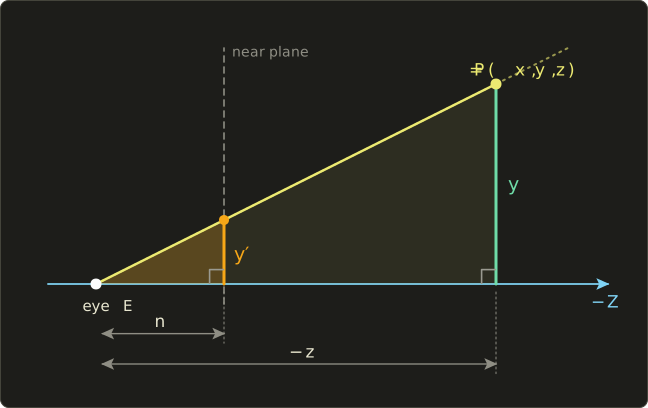
The small triangle (eye, n, y') and the big one (eye, −z, y) have the same shape, so their sides have the same ratio:
That's perspective in one line: divide by the distance.
A point twice as far away ends up half as far from the center.
For example with : the point lands at , and the point , same x and y but twice as far, lands at .
We can't divide in a matrix
Here's the problem.
A matrix can only multiply coordinates by constants and add them up.
It can't divide by z, because isn't linear.
This is where the homogeneous coordinates from chapter 9 pay off.
In chapter 9 we always had w = 1.
But a 4D vector with any nonzero w stands for the 3D point .
And the GPU does exactly that division for us, after the vertex shader.
It's called the perspective divide.
So the plan is: let the matrix put the distance into w, and let the GPU divide.
The bottom row does precisely that: .
Field of view and aspect ratio
Now x and y.
Instead of the near plane, it's simpler to say what we want in NDC: the top edge of the visible region should land at .
At distance in front of the eye, half of the visible height is (a right triangle with angle at the eye, chapter 1).
So we need
Since the GPU will divide by , the matrix only has to produce .
That's the in the second row.
The screen is wider than tall by the aspect ratio , so the visible half-width is times bigger, and x gets divided by too: .
The z row
We still need a depth value for the depth buffer.
The z row can only produce (it can't use x or y, they have nothing to do with depth), and after the divide we get
We pick and so that the near plane goes to −1 and the far plane to +1.
Two conditions, two unknowns:
Subtract the first equation from the second: , so and
Put it back into the first equation:
Those are exactly the two entries in the third row of perspectiveGl.
A worked example
Field of view 90°, aspect ratio 2 (say a 1600×800 window), , .
Take the view-space point from above:
Then the GPU divides by :
12.6 Depth is not linear
In the example the point at distance 4 got the depth 0.6875.
Distance 4 is less than halfway between 1 and 9, yet its depth is more than halfway between −1 and 1.
Because the z row is divided by , NDC depth is : it follows , not .
Most of the depth range is used up right in front of the camera.
Here is a typical game setup, and , with the value that ends up in a 0 to 1 depth buffer:
| Distance | NDC z (OpenGL) | Depth buffer |
|---|---|---|
| 0.1 (near) | −1 | 0 |
| 0.2 | 0.001 | 0.5005 |
| 0.5 | 0.6016 | 0.8008 |
| 1 | 0.8018 | 0.9009 |
| 10 | 0.982 | 0.991 |
| 100 (far) | 1 | 1 |
Half the depth buffer is spent between 0.1 m and 0.2 m!
Everything from 10 m to 100 m has to share less than 1% of it.
With limited precision, two surfaces far away can end up with the same stored depth and flicker through each other, which is called z-fighting.
Two practical rules follow: push the near plane out as far as you can (0.1 is much better than 0.001), and don't make the far plane bigger than needed.
There's also a popular trick called reversed-Z: map near to 1 and far to 0 instead, and use a floating point depth buffer.
Floating point numbers have lots of precision near 0, which happens to cancel out the crowding near the near plane, so depth precision becomes nearly even over the whole range.
You then clear the depth buffer to 0 and use a "greater" depth test.
It works best with a 0 to 1 depth range, which Vulkan has by default and OpenGL gets with glClipControl (OpenGL 4.5).
12.7 OpenGL vs Vulkan
Vulkan's NDC is different from OpenGL's in two ways:
| Range | OpenGL | Vulkan |
|---|---|---|
| NDC x | −1 (left) to 1 (right) | −1 (left) to 1 (right) |
| NDC y | −1 (bottom) to 1 (top), y up | −1 (top) to 1 (bottom), y down |
| NDC z | −1 (near) to 1 (far) | 0 (near) to 1 (far) |
So perspectiveVk changes exactly two things.
1. Negate the y scale. , so a point above the center ends up with negative NDC y, which is the top in Vulkan.
2. A new z row. Same idea as before, but the targets are now 0 and 1:
Same example as before (90°, aspect 2, , ): and .
The point gives , and , so
Same place on the screen as in OpenGL (above the center is now negative y), and a depth in 0 to 1.
There's a second way to deal with the y direction in Vulkan: keep the y scale positive like OpenGL (but still use the 0 to 1 z row from above), and give the viewport a negative height (set its y to the window height and its height to minus the window height).
That flips the picture during the viewport transform instead.
Negative viewport heights are allowed since Vulkan 1.1 (before that through the VK_KHR_maintenance1 extension).
Pick one of the two, never both, or your image is upside down again.
12.8 Clip space, NDC and the viewport
Let's name the stages properly.
The vertex shader outputs clip space coordinates , before any division.
The GPU clips triangles here, because the test is easy: a point is inside the visible region when
(in Vulkan the last one is ).
Clipping has to happen before the divide: a point behind the camera has , and dividing by a negative w would flip it to the front, upside down, and would divide by zero.
Our example point is inside, because 1, 1 and 2.75 are all between −4 and 4.
Then comes the perspective divide into NDC, and finally the viewport transform stretches NDC onto the window's pixels.
For a window pixels wide and pixels high:
For y it depends on the API.
Vulkan's framebuffer starts at the top-left with y going down, matching its NDC: .
OpenGL's window coordinates start at the bottom-left, matching its y-up NDC.
But mouse positions and most image formats count pixels from the top-left, so when you do it yourself for OpenGL-style NDC you flip y:
Depth goes from NDC to the depth buffer too: OpenGL stores (by default), Vulkan stores as it is (with the default depth range 0 to 1).
12.9 Use in graphics programming
From a 3D point to a pixel
Health bars, name tags and quest markers are drawn in 2D, at the screen position of a 3D object.
Let's do the whole pipeline by hand once.
Camera from chapter 11: eye looking at the origin.
Projection: perspectiveGl with 90°, aspect 2, , , window 1600×800.
The enemy's head is at world position .
- View matrix (chapter 11): the point becomes in view space.
- Projection: , , , .
- Clip test: , so it's in front of the camera, and 2.5, 2 and 4 are all between −5 and 5, so it's visible.
- Divide: NDC is .
- Viewport: , .
The name tag goes at pixel .
If the point is behind the camera and you simply don't draw the tag.
From a pixel back into the world: mouse picking
Clicking on an object goes the other way.
The mouse gives a pixel, which turns back into NDC by undoing the viewport transform:
For pixel that's again.
But a pixel is not a point, it's a whole line of points behind each other.
So take two NDC points on it, one on the near plane () and one on the far plane (), and multiply both by (chapter 10), then divide by the resulting w.
For our camera that gives on the near plane and on the far plane.
The ray from the first to the second goes through everything under the mouse.
Check: halfway along it is , the enemy's head.
Now you'd test that ray against your objects' bounding boxes or spheres.
More uses
- Shadow maps. The sun is so far away that its rays are parallel, so the shadow map for a directional light is rendered with an orthographic projection. Spot lights use a perspective projection instead.
- 2D and UI.
orthographicGl(0, width, 0, height, -1, 1)lets you place sprites in pixel units. Swap bottom and top,orthographicGl(0, width, height, 0, -1, 1), and y goes down like in an image editor. - Zoom. Making the field of view smaller makes bigger, which magnifies everything. Going from 90° () to 30° () zooms in about 3.7 times, a sniper scope in one line. Lower the mouse sensitivity by the same factor.
- Isometric games. An orthographic camera turned 45° around Y and tilted about 35.26° down gives the classic isometric look.
Linear depth in a shader
Effects like fog, soft particles and screen-space ambient occlusion need the real distance, not the non-linear depth buffer value.
Solving for the distance gives, for Vulkan's 0 to 1 depth:
and for OpenGL, where :
Check with the Vulkan example: depth 0.84375 with , gives , the distance we started with.
// depth: a value from a Vulkan depth buffer (0 at near, 1 at far)
float linearizeDepth(float depth, float n, float f) {
  return (f * n) / (f - depth * (f - n));
}
// depth: a value from a Vulkan depth buffer (0 at near, 1 at far)
float linearizeDepth(float depth, float n, float f) {
return (f * n) / (f - depth * (f - n));
}// depth: a value from a Vulkan depth buffer (0 at near, 1 at far)
float linearizeDepth(float depth, float n, float f) {
return (f * n) / (f - depth * (f - n));
}12.10 Other uses
- Computer vision. The pinhole camera model is the same similar triangles. A camera's intrinsic matrix holds the focal lengths in pixels (, ) and the image center (, ), and a pixel is . Camera calibration (for example OpenCV's
calibrateCamera) measures those numbers from photos of a checkerboard. Note that computer vision usually lets the camera look down +Z with y down. - Photography. A lens's focal length decides the field of view: for sensor height and focal length . On a full-frame sensor (36×24 mm), a 50 mm lens sees about 27° vertically and 39.6° horizontally, a 24 mm lens about 53° vertically, and a 200 mm telephoto lens only about 6.9°.
- Art. Renaissance painters worked out linear perspective with vanishing points in the 15th century. It's the same "divide by distance".
- Maps. Map projections flatten the round Earth onto paper. They aren't linear (Mercator stretches the poles), but the idea of trading some distortion for a flat picture is the same.
- Architecture and engineering. Plans, elevations and sections are orthographic so you can measure lengths straight off the drawing, and perspective renderings are for showing clients what it will look like.
12.11 Code
Here are the three projection functions in linalg.hh.
Match them against sections 12.2, 12.5 and 12.7: t is our , and Mat4 m; starts as all zeros, so only the five nonzero entries of a perspective matrix are set.
// 正射影(OpenGL:NDCのzは-1〜1) / orthographic projection (OpenGL: NDC z in -1..1)
inline Mat4 orthographicGl(float left, float right, float bottom, float top, float n, float f) {
  Mat4 m = Mat4::identity();
  m.at(0, 0) = 2.0f / (right - left);
  m.at(1, 1) = 2.0f / (top - bottom);
  m.at(2, 2) = -2.0f / (f - n);
  m.at(0, 3) = -(right + left) / (right - left);
  m.at(1, 3) = -(top + bottom) / (top - bottom);
  m.at(2, 3) = -(f + n) / (f - n);
  return m;
}

// 透視投影(OpenGL:NDCのzは-1〜1、yは上向き) / perspective (OpenGL: NDC z in -1..1, y up)
// fovY:縦の視野角(ラジアン) / vertical field of view in radians
inline Mat4 perspectiveGl(float fovY, float aspect, float n, float f) {
  float t = 1.0f / std::tan(fovY * 0.5f);
  Mat4 m;
  m.at(0, 0) = t / aspect;
  m.at(1, 1) = t;
  m.at(2, 2) = -(f + n) / (f - n);
  m.at(2, 3) = -(2.0f * f * n) / (f - n);
  m.at(3, 2) = -1.0f;
  return m;
}

// 透視投影(Vulkan:NDCのzは0〜1、yは下向き) / perspective (Vulkan: NDC z in 0..1, y down)
inline Mat4 perspectiveVk(float fovY, float aspect, float n, float f) {
  float t = 1.0f / std::tan(fovY * 0.5f);
  Mat4 m;
  m.at(0, 0) = t / aspect;
  m.at(1, 1) = -t;
  m.at(2, 2) = f / (n - f);
  m.at(2, 3) = (f * n) / (n - f);
  m.at(3, 2) = -1.0f;
  return m;
}
And a test program with a worldToScreen helper that does steps 2 to 5 of section 12.9.
It expects an OpenGL-style matrix (NDC y up).
For a perspectiveVk matrix you'd use for y instead.
#include <cstdio>
#include "linalg.hh"

// Projects a world-space point to pixel coordinates (origin at the top-left).
// viewProj must be an OpenGL-style matrix (NDC y up), e.g. perspectiveGl(...) * view.
// Returns false if the point is behind the camera.
inline bool worldToScreen(const Mat4 &viewProj, Vec3 p, float width, float height, Vec2 *out) {
  Vec4 clip = viewProj * Vec4{p.x, p.y, p.z, 1.0f};
  if (clip.w <= 0.0f) return false;
  float ndcX = clip.x / clip.w;
  float ndcY = clip.y / clip.w;
  out->x = (ndcX + 1.0f) * 0.5f * width;
  out->y = (1.0f - ndcY) * 0.5f * height; // pixel y grows downwards
  return true;
}

static void printVec(const char *name, Vec4 v) {
  printf("%-6s (%7.4f, %7.4f, %7.4f, %7.4f)\n", name, v.x, v.y, v.z, v.w);
}

int main() {
  Vec4 p{2, 1, -4, 1}; // a point in view space

  Mat4 gl = perspectiveGl(radians(90.0f), 2.0f, 1.0f, 9.0f);
  Vec4 clip = gl * p;
  printVec("clip", clip);
  printVec("ndc", (1.0f / clip.w) * clip);

  Mat4 vk = perspectiveVk(radians(90.0f), 2.0f, 1.0f, 9.0f);
  clip = vk * p;
  printVec("vk", (1.0f / clip.w) * clip);

  Mat4 ortho = orthographicGl(0.0f, 800.0f, 0.0f, 600.0f, 1.0f, 11.0f);
  printVec("ortho", ortho * Vec4{600, 150, -6, 1});

  // name tag above an enemy: camera from chapter 11, 1600x800 window
  Mat4 view = lookAt({3, 0, 4}, {0, 0, 0}, {0, 1, 0});
  Mat4 viewProj = gl * view;
  Vec2 px;
  if (worldToScreen(viewProj, {4, 2, -3}, 1600.0f, 800.0f, &px))
    printf("pixel  (%.1f, %.1f)\n", px.x, px.y);
  if (!worldToScreen(viewProj, {6, 0, 8}, 1600.0f, 800.0f, &px))
    printf("behind the camera\n");

  // mouse picking: back from NDC to world space
  Mat4 invViewProj = inverse(viewProj);
  Vec4 nearH = invViewProj * Vec4{0.5f, 0.4f, -1.0f, 1.0f};
  Vec4 farH = invViewProj * Vec4{0.5f, 0.4f, 1.0f, 1.0f};
  printVec("near", (1.0f / nearH.w) * nearH);
  printVec("far", (1.0f / farH.w) * farH);
  return 0;
}
Expected output:
clip   ( 1.0000,  1.0000,  2.7500,  4.0000)
ndc    ( 0.2500,  0.2500,  0.6875,  1.0000)
vk     ( 0.2500, -0.2500,  0.8438,  1.0000)
ortho  ( 0.5000, -0.5000,  0.0000,  1.0000)
pixel  (1200.0, 240.0)
behind the camera
near   ( 3.2000,  0.4000,  2.6000,  1.0000)
far    ( 4.8000,  3.6000, -8.6000,  1.0000)
Every line matches a number we computed by hand in this chapter.
The point is on the far side of the eye from the target, so worldToScreen refuses it.
12.12 Summary
- Projection maps the visible region to NDC. Orthographic uses a box and keeps sizes, perspective uses a frustum and makes far things smaller.
- The orthographic matrix is "shift the center to 0, then scale the half-width to 1" on each axis. Its depth is linear.
- Perspective is similar triangles: divide by the distance . A matrix can't divide, so it puts into w with the bottom row and the GPU does the perspective divide.
- scales y, and scales x. The z row comes from two conditions, near and far.
- Perspective depth follows , so precision is crowded near the near plane. Keep as large as possible. Reversed-Z helps a lot.
- Vulkan's NDC has y down and z in 0 to 1:
perspectiveVknegates the y scale and uses a different z row. A negative viewport height is the alternative for y. - Clipping happens in clip space (), then the divide gives NDC, then the viewport transform gives pixels.
- turns a mouse pixel back into a ray for picking.
12.13 Challenges
- ★ For
orthographicGl(100, 300, 0, 100, 2, 6), where does the point land in NDC? - ★ With the near plane at , where does the point cross the near plane (similar triangles)? Where does cross it?
- ★ Write down
perspectiveGl(90°, 1, 1, 3)andperspectiveVk(90°, 1, 1, 3)and project the view-space point with both, all the way to NDC. The point is exactly halfway between near and far: where does it land in depth? - ★ A 1920×1080 window shows OpenGL-style NDC . Which pixel is it, counting from the top-left?
- ★★ Write
orthographicVk(NDC y down, z from 0 at near to 1 at far) by deriving its y and z rows. FororthographicVk(-2, 2, -1, 1, 0.1f, 10)the point should map to , and should map to . - ★★ Write a function that turns a mouse pixel into a ray: an origin on the near plane and a normalized direction. For the camera and projection of section 12.9 and pixel you should get the origin and a direction of about .
- ★★★ Derive a reversed-Z perspective matrix for Vulkan, where the near plane maps to depth 1 and the far plane to 0. Then let go to infinity: what happens to the z row, and why can a game now have no far plane at all?
コメント(0)
まだコメントはありません。
ログインするとコメント出来ます。