18. Perception, Intellectual Property and the History of CG
This is the last chapter of Part 1.
It covers the syllabus area called related knowledge (関連知識, kanren chishiki), which has three parts that look unrelated at first: how people perceive images, who owns the images and the code that make them, and how computer graphics got to where it is today.
All three are about the world around the algorithms: the viewer who looks at the pixels, the law that decides what you may do with them, and the history that explains why our tools look the way they do.
Why does this matter?
Every rendering trick in this series works because of the way the eye and brain work: a frame rate is "enough" because of how we perceive motion, a shadow only needs to be roughly right because of how we judge lightness, and a VR headset works because of how two eyes see depth.
Intellectual property decides what you may ship: the texture you downloaded, the font in your UI, the library you linked and the algorithm you implemented all come with rights attached.
And the history ties Part 1 together: almost every method of chapters 6 to 12 has a date, and in order they show how each method solved the problem the previous one left open.
For the exam, this chapter covers the three items of syllabus area 9: perception (知覚, chikaku), intellectual property rights (知的財産権, chiteki zaisanken) and the history of CG (CGの歴史).
Chapter 3 (section 3.9) already covered the color and brightness side of perception (Weber–Fechner, Mach bands, simultaneous contrast, acuity, flicker and the depth cues), so this chapter builds on it instead of repeating it.
The chapter ends with a wrap-up of Part 1: what you've covered, how to prepare for the exam, and what Part 2 will deepen.
18.1 Perception beyond color
Perception (知覚) is not a camera.
The brain doesn't measure the image, it interprets it, using assumptions about the world: light comes from one source, surfaces keep their color, objects move smoothly.
CG works because it feeds those assumptions consistent evidence, and it fails, sometimes badly, when the evidence contradicts itself.
This chapter goes beyond chapter 3 in four directions: depth from two eyes (with numbers), motion, constancy and attention, and techniques that save work by computing only what a viewer can see.
18.2 Seeing depth with two eyes
Binocular disparity
Our eyes are a few centimeters apart, so each sees the scene from a slightly different position.
When both eyes look at a point F (the fixation point, 注視点), their lines of sight meet there at the vergence angle (輻輳角, fukusōkaku).
A farther point P is seen at a smaller angle, a nearer one at a larger angle.
The difference is the binocular disparity (両眼視差, ryōgan shisa), and turning disparity into depth is stereopsis (立体視, rittaishi).
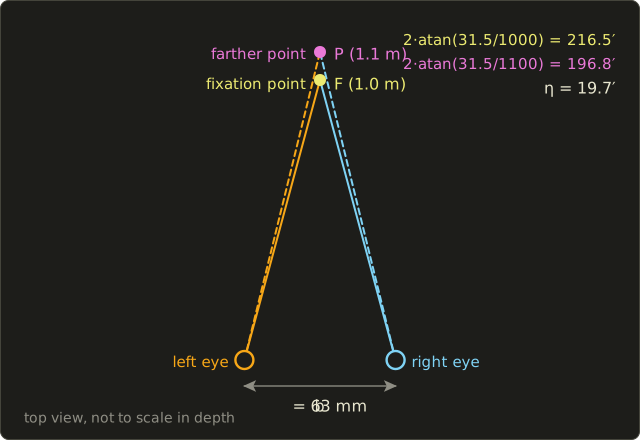
With the eye separation (the interpupillary distance) and a point straight ahead at distance , the vergence angle and the disparity between points at are (in radians; the approximations hold when is much larger than ):
Worked example. The average adult interpupillary distance is about 63 mm (most adults lie between about 50 and 75 mm), so take m, F at 1.0 m and P at 1.1 m, as in the figure.
- Exact: rad (arcminutes), rad , so .
- Approximation: rad . Same answer.
How small a disparity can we detect?
Stereoacuity (立体視力) varies between people; clinical tests count about 40 arcseconds or better as normal, so take rad.
Differentiating gives the smallest visible depth difference at distance :
At 1 m that's m (3 mm), at 10 m 0.31 m, at 100 m about 31 m.
The is the important part: stereopsis is extremely precise within arm's reach and almost useless for distant scenery, where the one-eyed cues of chapter 3 take over.
That's why stereo matters most for close objects in VR (hands, tools, a cockpit).
Random-dot stereograms
Is disparity enough on its own, or must the brain first recognize objects in each eye's image?
Béla Julesz answered this at Bell Labs with computer-generated random-dot stereograms (ランダムドットステレオグラム), published in 1960.
Here is an original pair made by this chapter's script:
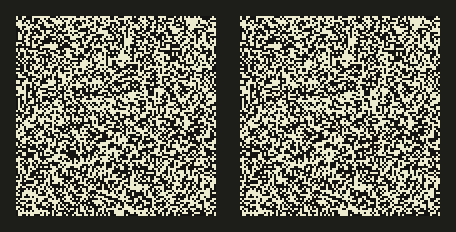
Each image alone is pure noise, without any outline or shading.
The only difference is that a central square of the right image has been moved 4 dots (8 pixels) to the left, and the strip it uncovered refilled with new random dots.
If you can free-fuse the pair (look "through" the screen until the two images merge; the parallel method), the square floats in front of the background; with the crossed method it sinks behind it.
So depth is computed from disparity alone, before any object is recognized.
The vergence–accommodation conflict
A stereo display shows each eye its own image, rendered from two cameras one eye separation apart.
Section 17.6 covers the displays and the screen parallax (with the eye separation, our ) that places a point at distance behind (uncrossed parallax) or in front of (crossed parallax) a screen at distance .
Every such screen shares one perceptual problem.
Take a screen at 0.6 m and a point drawn with mm, so that it appears at 1.2 m.
The eyes converge at 1.2 m, but the light comes from the screen, so they must focus (accommodate) at 0.6 m.
In the real world the two always agree, and the visual system links them; here they don't: the vergence–accommodation conflict (輻輳調節矛盾), which chapter 3 named as a cause of eye strain.
The mismatch is usually measured in diopters (1 / distance in meters): here D.
That's why stereo content keeps most of the scene near the screen plane and limits how far objects pop out; in a head-mounted display the "screen" is the fixed optical distance set by its lenses.
VR sickness
A head-mounted display adds a second conflict.
The inner ear (the vestibular system) senses how the head really moves, and the eyes see how the virtual camera moves.
When the two disagree (the camera moves while the body stands still, or the image lags behind a head turn), many people feel dizzy or sick: VR sickness (VR酔い), a form of motion sickness usually explained by this sensory conflict.
The design rules follow: track the head with very low latency (the motion-to-photon latency of section 17.4), keep a high and stable frame rate, and avoid camera motion the body didn't make (artificial acceleration, forced rotation).
18.3 Seeing motion
Apparent motion
Show a ball at one position and, a moment later, at a slightly different position, and you see one ball moving, not two balls.
This is apparent motion (仮現運動, kagen undō), the effect that makes film, animation and games possible.
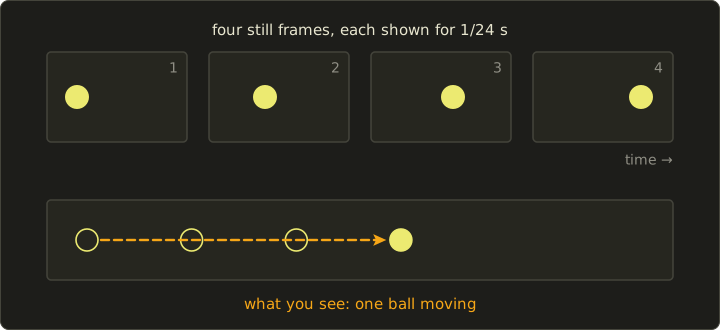
Max Wertheimer studied it in 1912 with two lights flashing one after the other; his paper is often seen as a starting point of Gestalt psychology.
Two names are worth keeping apart: in beta movement (ベータ運動) the two flashes are seen as one object moving from the first position to the second (this is what animation uses), while in the phi phenomenon (ファイ現象), at faster alternation, people sense motion between the lights without seeing an object travel.
("Phi phenomenon" is also often used loosely for apparent motion in general.)
How smooth the motion looks depends on how far the object jumps between frames.
A frame lasts ms at 24 fps, 16.7 ms at 60 fps and 11.1 ms at 90 fps.
An object crossing a 1920-pixel screen in 2 seconds moves 960 px/s: a jump of 40 px per frame at 24 fps, but only 16 px at 60 fps.
Large jumps break apparent motion into stutter (judder) or a row of copies, which is why film limits how fast the camera pans and why motion blur is added.
Flicker and frame rate are different things
Chapter 3's critical flicker frequency (臨界融合周波数) is a limit on flicker (フリッカー, brightness pulsing), not on motion.
A 24 fps film is projected with each frame flashed two or three times, so the screen flickers at 48 or 72 Hz (fast enough to look steady), but the picture still changes only 24 times a second.
Keep the refresh rate (how often the screen redraws or flashes) and the frame rate (how often a new picture is rendered) apart.
Hold-type blur
Modern LCD and OLED screens don't flash: they show each frame for the whole frame time, as sample-and-hold displays (ホールド型表示).
When you follow a moving object, your eyes rotate smoothly, but the image stands still for a frame and then jumps.
During the frame the image slides across your retina, and you see a smear, hold-type blur (ホールドボケ), of about the distance the eye travels while one image is held:
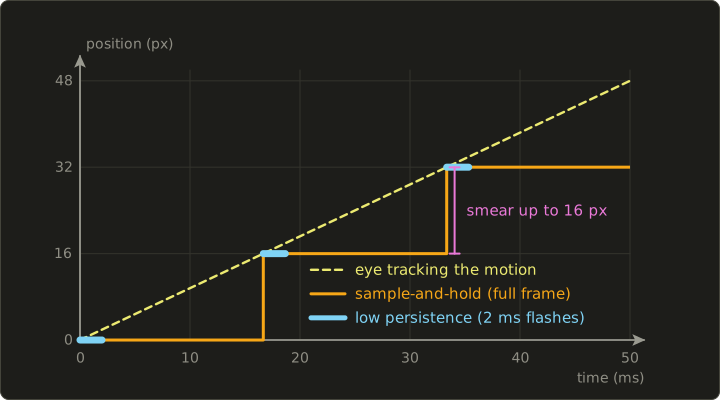
Worked example for px/s: at 60 Hz with full hold, px; at 120 Hz 8 px; at 240 Hz 4 px.
At 60 Hz with the image lit for only 2 ms per frame (low persistence, 低残光), px.
That's why VR headsets use low-persistence displays and many gaming monitors offer a strobed backlight; the price is less brightness and, at low refresh rates, visible flicker again.
Motion blur
A camera keeps its shutter open for a while, so moving objects are smeared (chapter 2); rendered motion blur (モーションブラー) imitates that and hides the jumps between frames, which is why film CG at 24 fps always has it.
At high frame rates the eye itself integrates over time, so games at 120 Hz or more often use little of it.
One trap: blurring an object the viewer is tracking with their eyes (the player's own car) looks wrong, because in reality it would be sharp on the retina; renderers therefore blur by motion relative to the camera.
18.4 Constancy, shape from shading and attention
Perceptual constancy
A friend walking away from you doesn't seem to shrink, although their image on the retina halves every time the distance doubles.
An opening door doesn't seem to turn from a rectangle into a trapezoid.
White paper looks white in the sun and in the shade, although in the shade it may send less light to the eye than black paper in the sun.
These are the constancies (恒常性, kōjōsei): size constancy (大きさの恒常性), shape constancy (形の恒常性) and lightness constancy (明るさの恒常性).
The brain estimates the properties of the object (real size, shape, reflectance) and discounts the conditions (distance, angle, illumination).
This produces some of the strongest illusions there are; Edward Adelson published a well-known one in 1995, a checkerboard partly in shadow.
Below is an original scene of the same kind, ray-traced by this chapter's script: a checkerboard, a sphere and a soft shadow.
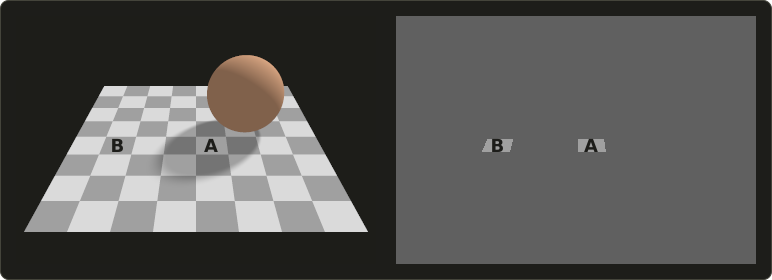
Square A looks clearly lighter than square B, yet both have exactly the same pixel value, (160, 160, 160), as the right panel shows.
The numbers come straight from the shading of chapter 10:
- The light squares have the albedo 0.70 and the dark ones 0.35 (linear light).
- An unshadowed floor point receives the factor 1.0 (ambient 0.5 plus direct 0.5), a point in the umbra only the ambient 0.5.
- A, light square in the umbra: . B, dark square in full light: .
- With the sRGB curve of chapter 3, linear 0.35 is encoded as about 0.626, the 8-bit value 160.
Your visual system recognizes the soft-edged dark region as a shadow (its blurry penumbra, its shape and the sphere that could cast it) and divides it out.
Two lessons for CG follow.
The viewer judges surfaces, not pixels, so texture colors must be judged under neutral light, and a shadow with the wrong shape or darkness is not discounted and makes the surface look dirty instead.
And shadows only need to be plausible: soft, attached to their caster and consistent with one light direction (chapter 11).
Shape from shading and the light-from-above prior
The brain also reads shape from shading (陰影からの形状知覚).
Every disc below is a plain linear gradient, but on the left they look like bumps and on the right like dents.
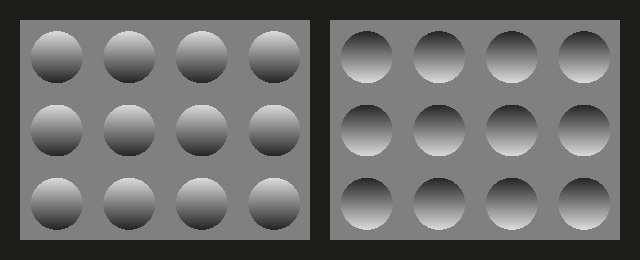
Turn the picture upside down and they swap.
The image is ambiguous (a bump lit from above looks like a dent lit from below), and the brain resolves it with assumptions: there is one light source for the whole image (Ramachandran showed this in a 1988 study of shape from shading), and light comes from above, like the sun.
That's why lighting a face from below looks unnatural, why bump and normal maps (chapter 11) can flip from bumps to dents when the light moves below them, and why user interfaces draw raised buttons with a light top edge.
Visual attention and change blindness
We feel that we see the whole scene in detail, but we see detail only where we look and what we attend to.
In an experiment by Rensink, O'Regan and Clark (1997), a photo and a modified version of it alternated with a short blank between them; people often needed many seconds to find even large changes, and found them at once when told where to look.
This is change blindness (変化盲): without focused visual attention (視覚的注意) a change is not perceived, especially when a blank, a cut or a blink hides the motion signal that would draw the eye.
A related effect, inattentional blindness (非注意盲), is failing to notice an unexpected object at all while busy with a task.
CG uses this all the time: LOD switches and texture streaming are least visible during fast camera moves, editors hide continuity errors behind cuts, and, the other way round, important game events are signaled with motion, sound or contrast because players miss what lies outside their attention.
Optical illusions relevant to CG
An optical illusion (錯視, sakushi) is a systematic difference between perception and the physical stimulus.
The ones worth connecting to CG:
| Illusion | What happens | Where it matters in CG |
|---|---|---|
| Mach bands (chapter 3) | Stripes where the slope of brightness changes | Visible polygon edges with Gouraud shading |
| Simultaneous contrast (chapter 3) | Gray looks lighter on dark, darker on light | Judging colors next to a UI; color grading |
| Lightness constancy | Shadows are divided out | Shadows, texture authoring |
| Shape from shading | Light from above is assumed | Lighting design, bump and normal maps |
| Size constancy and perspective | Size is judged with distance | A wrong field of view makes scenes look like miniatures |
| Apparent motion | Stills become motion | Frame rates, animation timing |
| Wagon-wheel effect (chapter 2) | Wheels seem to turn backward | Temporal aliasing, motion blur |
The uncanny valley
In 1970 the Japanese roboticist Masahiro Mori published a short essay in the magazine Energy about how people react to increasingly human-like robots.
He suggested that affinity rises as a robot becomes more human-like, but drops into an eerie, unpleasant feeling close to full human likeness before rising again for a real human: the uncanny valley (不気味の谷, bukimi no tani); an authorized English translation appeared in IEEE Spectrum in 2012.
It's a hypothesis, not a measured law, and later studies disagree about its exact shape, but it's the standard way to talk about digital humans: small errors in skin, eyes or the timing of facial motion disturb far more on a nearly real face than on a cartoon.
That's one reason many animated films choose stylized characters, and why digital humans need very careful skin (subsurface scattering, chapter 12), eyes and facial animation (chapter 13).
18.5 Perception-driven techniques
If the eye can't see something, there is no need to compute it.
Foveated rendering
Only a tiny central area of the retina, the fovea (中心窩, chūshinka), sees fine detail; the highest acuity covers only the central couple of degrees.
In peripheral vision (周辺視) the smallest resolvable detail grows roughly linearly with the angle from the gaze point, the eccentricity (偏心度) :
Here for visual acuity 1.0 (chapter 3), and in Guenter and colleagues' 2012 study of foveated rendering the slope came out between about 1.3 and 1.7 arcminutes per degree; take .
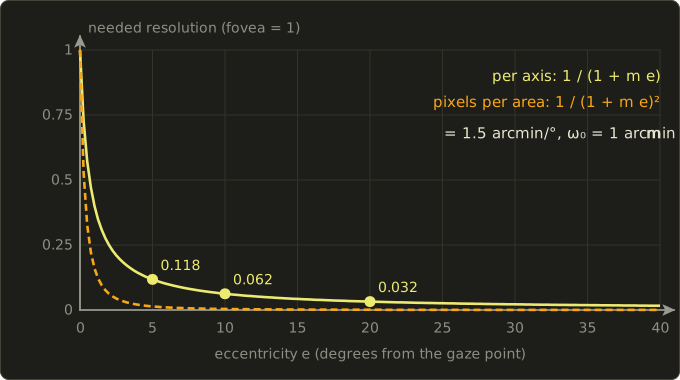
Worked example.
At , , so the needed resolution is of the foveal one per axis and per area; at , : per axis, per area.
Foveated rendering (フォービエイテッドレンダリング) tracks the gaze with an eye tracker and renders full detail only around it, usually in a few zones.
Take a VR display of per eye at 20 pixels per degree, pixels, and render:
- within 5° of the gaze at full resolution: deg² px/deg² pixels;
- from 5° to 15° at half resolution per axis (a quarter of the pixels): deg² pixels;
- everywhere else at a quarter per axis: deg² pixels.
That's about 326,600 pixels, 8.2% of the full image or roughly 12 times fewer, and each zone is still sharper than the curve requires; Guenter and colleagues reported 10–15 times fewer shaded pixels.
Without an eye tracker, fixed foveated rendering lowers the resolution near the lens edges, where the optics blur the image anyway.
Level of detail by on-screen error
The level of detail (LOD, 詳細度) of chapter 9 should really be chosen by the geometric error in pixels.
With a 60° vertical field of view and 1080 pixels, a length at distance covers about pixels.
A simplified mesh that deviates by 5 cm is off by pixels at 10 m (keep the detailed mesh) but only 0.47 pixels at 100 m (the coarse mesh is indistinguishable).
The same idea drives mipmapping (chapter 11) and variable rate shading, and lossy compression is perception-driven by design: JPEG (chapter 2) keeps less color than luminance detail and quantizes fine, low-contrast detail coarsely, and the gamma curve of chapter 3 spends codes where the eye can tell them apart.
Hearing and audio-visual sync
CG is often combined with sound, and the brain checks whether the two belong together.
ITU-R Recommendation BT.1359 (1998) gives, from subjective tests for television, detectability thresholds of about 45 ms with the sound early and about 125 ms with the sound late: at 60 fps about 2.7 frames early or 7.5 frames late.
The asymmetry makes sense: in nature light arrives first, and sound needs s (29 ms) to travel 10 m.
So keep sound at most slightly late, never early, remembering that audio and video pipelines have different latencies.
Exam points
- Disparity ; depth resolution worsens with ; random-dot stereograms (Julesz, 1960) show that stereopsis works without recognizable objects.
- Vergence–accommodation conflict: converging at the virtual depth, focusing on the screen; VR sickness: visual and vestibular signals disagree.
- Apparent motion makes animation work; refresh rate (flicker) and frame rate (motion) differ; hold-type displays smear tracked motion by .
- Constancy (size, shape, lightness) discounts the conditions; shape from shading assumes one light from above; change blindness: no attention, no perceived change.
- Uncanny valley: Mori, 1970. Foveated rendering, screen-error LOD and compression skip what can't be perceived.
18.6 Intellectual property: the map
Not legal advice.
This section explains the system mainly under Japanese law, because the exam is Japanese, with short notes where other countries differ.
It describes the law at the time of writing (2026), based on the statutes on e-Gov and the explanations of the Agency for Cultural Affairs (文化庁) and the Japan Patent Office (特許庁).
Laws and their interpretation change and real cases depend on details: for a real decision, read the current official sources and ask a qualified professional (in Japan, for example a lawyer, 弁護士, or a patent attorney, 弁理士).
Intellectual property rights (知的財産権) protect creations of the mind and the marks that identify businesses.
In Japan they fall into two big groups, plus protection from other laws and from case law:
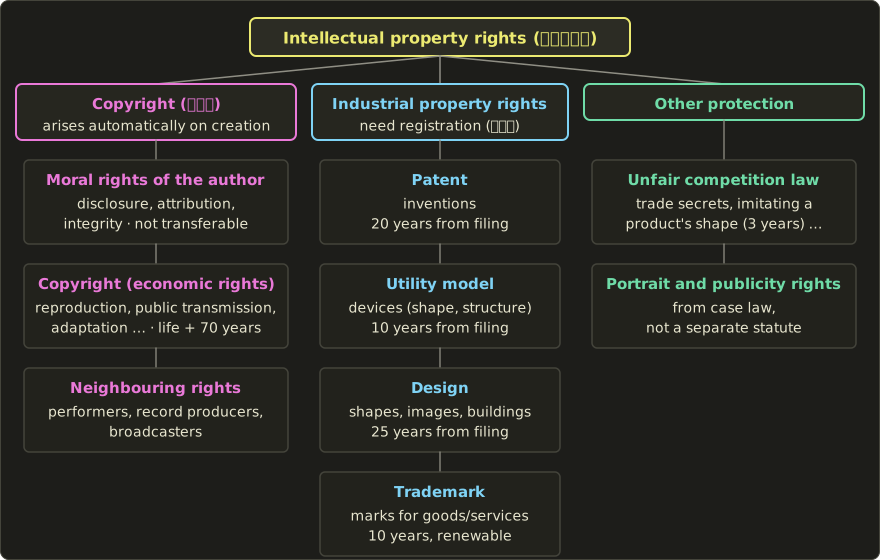
- Copyright (著作権, chosakuken) protects creative expression: images, films, music, text, programs. It belongs to the Agency for Cultural Affairs' area and arises automatically, without registration.
- Industrial property rights (産業財産権, sangyō zaisanken) are the four rights handled by the Japan Patent Office: patents (特許権), utility models (実用新案権), designs (意匠権) and trademarks (商標権). They arise only by registration.
- Other protection: the Unfair Competition Prevention Act (不正競争防止法), for example for trade secrets and against imitating a product's shape, and portrait and publicity rights (肖像権, パブリシティ権) from case law.
One more difference: the Japan Patent Office describes the four industrial property rights as absolute monopoly rights, infringed even by someone who developed the same thing independently, while copyright is a relative right that doesn't extend to a work someone else created independently.
That's why copyright infringement needs reliance on the original (依拠性, ikyosei).
18.7 Copyright
What a work is
The Copyright Act (著作権法) defines a work (著作物, chosakubutsu) in Article 2 as a creative expression of thoughts or feelings that belongs to the literary, scientific, artistic or musical domain.
Its examples include language works, music, artistic works (paintings, sculpture, manga), architecture, maps and technical drawings, films (including animation), photographs and computer programs (プログラムの著作物).
The key words of the definition:
- Expression, not idea: an idea, a style, a method or an algorithm as such is not protected, only its concrete expression.
- Creative: plain facts and data, and ordinary expressions anyone would write the same way, are not works.
- No formalities (無方式主義, mu-hōshiki shugi): Article 17 says enjoying the rights requires no formality at all. Protection begins when the work is created; registration and the © mark are not needed (Japan has an optional registration system, for example for a transfer of rights, but protection doesn't depend on it).
The author's rights
The author (著作者, chosakusha) gets two bundles of rights:
- Moral rights of the author (著作者人格権, chosakusha jinkakuken): the right to make the work public (公表権: whether, when and how an unpublished work is published), the right of attribution (氏名表示権: whether and under which name the author is credited) and the right to integrity (同一性保持権: no alteration against the author's will). Article 59 says they belong exclusively to the author and cannot be transferred.
- Economic rights (著作権(財産権), also 著作財産権): reproduction (複製権), performance, screening, public transmission (公衆送信権, including putting a work on the internet), exhibition, distribution, transfer, rental, translation and adaptation (翻訳権・翻案権), and the original author's rights over a derivative work (二次的著作物, such as a game based on a manga). These can be transferred or licensed, in whole or in part.
So a studio that buys "all rights" to an illustration gets the economic rights, but the moral rights stay with the illustrator; contracts in Japan therefore usually add a promise not to exercise them (著作者人格権の不行使).
The people who convey works to the public have neighbouring rights (著作隣接権, chosaku rinsetsuken): performers (実演家, such as singers, musicians, actors and voice actors), producers of phonograms (レコード製作者), broadcasters and cable broadcasters.
They are separate from the copyright in the work: a recorded song in a game needs permission for the song and for the recording.
How long protection lasts
Since 30 December 2018 (the extension that came with the TPP11 amendment), the Japanese rules are:
| Work | Protection ends |
|---|---|
| Work by a known individual author | 70 years after the author's death (the last surviving author, for joint works) |
| Anonymous or pseudonymous work | 70 years after publication (or after death, if that is known to end earlier) |
| Work under the name of an organization; film | 70 years after publication (70 years after creation if not published within 70 years) |
| Performance; phonogram | 70 years after the performance; 70 years after publication of the phonogram |
| Broadcast, cable broadcast | 50 years after the broadcast |
The term runs in whole calendar years, from 1 January of the year after the death (or publication or creation), and ends on 31 December (Article 57).
The 2018 extension revived nothing: works whose protection had already ended stayed in the public domain (パブリックドメイン).
Worked example.
- An illustrator died on 10 May 2000: counting starts on 1 January 2001, and protection ends on 31 December 2070.
- A game company published a game under its own name in 2010: protected until 31 December 2080.
- An author who died in 1967 was protected for 50 years, until 31 December 2017, before the extension started: the work stays free.
- An author who died in 1968 was still protected on 30 December 2018, so the term became 70 years: until 31 December 2038.
Works made for hire
Who is the author of a game made by 200 employees?
Article 15 answers with works made for hire (職務著作, shokumu chosaku, also 法人著作): the employer (法人等) is the author when
- the work is made on the employer's initiative (発意);
- by a person engaged in the employer's business;
- in the course of their duties (職務上);
- and published under the employer's name (for programs, this condition doesn't apply: Article 15(2));
- and no contract or work rule at the time of creation says otherwise.
Then the employer is the author from the start, with the economic and the moral rights, and the term is the organization one.
A freelancer under contract generally doesn't meet these conditions, which is why outsourcing contracts spell out a transfer of the rights.
Limitations: using a work without permission
Japan lists specific cases (権利制限規定) where a work may be used without permission; unlike the United States, with its general fair use clause (Section 107 of the US Copyright Act), Japan has no general clause.
Three cases matter most here.
Reproduction for private use (私的使用のための複製, Article 30): copying for personal use or use within the family or a similarly limited circle.
Work use is not private use, and even at home there are exceptions: copying by circumventing copy protection, and downloading audio or video (and, under conditions, other works) while knowing it was uploaded illegally.
Quotation (引用, Article 32): a published work may be quoted in accordance with fair practice and within a justified scope for reporting, criticism, research or similar purposes.
The Agency for Cultural Affairs explains this with conditions from court decisions: there is a need to quote (必然性); the quoted part is clearly distinguished (quotation marks, a frame); your work is the main part and the quotation subordinate (主従関係), no longer than necessary; and the source is indicated (出所の明示, also required by Article 48).
A screenshot in a review that discusses that screenshot can be quotation; the same screenshot as a decorative header is not.
Uses not intended to enjoy the work (Article 30-4): a work may be used, as far as necessary, when the purpose is not to enjoy the thoughts or feelings expressed in it, for example in technology tests or information analysis (情報解析) of large amounts of data, unless this would unreasonably prejudice the copyright holder's interests.
Programs, fonts, 3D models and textures
- Programs are works, but protection doesn't extend to the programming language, the protocols (規約) or the algorithm (解法) (Article 10(3)). Copyright protects your source code, not the idea of the Z-buffer; an algorithm can be protected, if at all, by a patent.
- Typefaces are rarely works: in the Gona typeface case (2000), the Supreme Court required remarkable originality compared with existing typefaces and aesthetic qualities that make the typeface an object of artistic appreciation in itself. Font files come with licenses, and in practice the license (for example, whether you may embed the font in a game) is what you must follow.
- 3D models, textures, renders and animations can be artistic or cinematographic works when they show creative expression, decided case by case. Ripping a model from someone else's game, or tracing a photo into a texture, is generally reproduction or adaptation and needs permission.
Generative AI and copyright
At the time of writing, the official Japanese guidance is 「AIと著作権に関する考え方について」 (its English overview is titled "General Understanding on AI and Copyright in Japan"), published on 15 March 2024 by the Legal System Subcommittee of the Copyright Subdivision of the Council for Cultural Affairs, with a checklist and guidance by the Agency for Cultural Affairs on 31 July 2024; the document says itself that it is not legally binding.
In short: using works to train AI is in general a non-enjoyment use under Article 30-4, but not when a purpose of enjoyment coexists (for example, training to output the creative expression of particular works) or when the proviso applies.
Whether a generated output infringes is judged like ordinary infringement, by similarity (類似性) and reliance (依拠性) on an existing work.
And material the AI generates autonomously is not a work; a person who uses AI as a tool with a creative contribution (創作的寄与, such as instructions that specify the expression, or their own edits) can be the author of what they contributed.
Other countries differ
Most countries also protect copyright without formalities, and many use the life-plus-70-years term, but not all; the United States has fair use where Japan has listed exceptions; and works made for hire, moral rights and AI are treated differently from country to country.
A product sold worldwide is subject to the law of each country where it's used.
18.8 Industrial property rights and other protection
Patents
A patent (特許, tokkyo) protects an invention, defined in the Patent Act (特許法) as a highly advanced creation of technical ideas utilizing the laws of nature.
It must be industrially applicable, new (新規性: not publicly known, used or published anywhere before filing) and not obvious (進歩性: not easily made by a person skilled in the field), and it is examined at the Japan Patent Office.
A patent lasts 20 years from the filing date (Article 67; extendable by up to five years for products, such as medicines, that need a government approval).
A program can be the subject of a patent, so a new technical method implemented in software can be patented, while a mathematical formula as such is not an invention.
Patents are territorial: a Japanese patent works in Japan, a US patent in the US.
CG algorithms have been patented, and their patents have run out:
- The marching cubes algorithm of chapter 9 (Lorensen and Cline, 1987) was patented in the United States; the patent expired in 2005.
- The S3TC texture compression format was covered by a patent with the earliest filing date 2 October 1997; 20 years later, in October 2017, it expired, and open-source drivers such as Mesa could support the format freely.
Utility models, designs and trademarks
- A utility model (実用新案, jitsuyō shin'an) protects a smaller device (考案) concerning the shape or structure of an article; it is registered without substantive examination and lasts 10 years from filing.
- A design right (意匠権, ishōken) protects the appearance of an article. The 2019 amendment of the Design Act, in force from 1 April 2020, extended it to images (画像) not recorded on an article (limited to images used to operate a device or displayed as the result of its function, such as GUI screens and icons), to buildings and to interiors, and changed the term to 25 years from filing. Images that are content in themselves, such as the pictures of a game or film, are generally outside this definition.
- A trademark (商標, shōhyō) protects a mark (a name, a logo) for goods or services, lasts 10 years from registration and can be renewed again and again.
Unfair competition, portraits and publicity
The Unfair Competition Prevention Act protects, among other things, trade secrets (営業秘密: source code, unreleased assets, customer data kept secret) and prohibits imitating the shape of another's product (商品形態の模倣) for 3 years from its first sale in Japan; an amendment in force from 1 April 2024 extended this to imitations provided over networks, that is, to products in digital space such as 3D items sold for virtual worlds.
The portrait right (肖像権) and the publicity right (パブリシティ権) have no separate statute in Japan; they come from case law.
The portrait right protects a person against having their likeness used without good reason, judged by weighing purpose, manner and necessity.
The publicity right protects the commercial value of a name or likeness, its power to attract customers: in the Pink Lady case (2 February 2012), the Supreme Court recognized it as part of the personality rights and held that a use is unlawful when it aims solely at that power, for example selling the likeness itself as merchandise, putting it on goods to differentiate them, or using it in advertising.
So a digital double of an actor, a 3D scan of a person or a real athlete in a sports game generally needs the person's (or their agency's) permission, whoever made the 3D model.
18.9 Licenses in CG practice
Almost everything you use in a CG project comes with a license (ライセンス): a permission from the right holder, with conditions; it doesn't transfer the rights.
Asset store and stock licenses typically let you use purchased models, textures, sounds and fonts inside your own products but not redistribute the raw files, so you may ship them inside a compiled game but not in a public repository; always read the actual terms (seats, embedding, attribution, editorial-only use).
Creative Commons (クリエイティブ・コモンズ) licenses, in version 4.0 at the time of writing, combine four elements: BY (credit the author), SA (ShareAlike: adaptations under the same license), NC (NonCommercial) and ND (NoDerivatives).
The six licenses, from most to least permissive, are CC BY, CC BY-SA, CC BY-ND, CC BY-NC, CC BY-NC-SA and CC BY-NC-ND; separately, CC0 gives up the rights as far as the law allows.
For a commercial game, NC assets are out, ND assets can't be shipped in modified form (not even recolored), and an adaptation of an SA asset must itself be shared under SA.
Open-source licenses come in two families:
- Permissive licenses (寛容型ライセンス) such as MIT, BSD and Apache 2.0 allow use in closed products if you keep the copyright notice and license text (Apache 2.0 also includes an explicit patent license).
- Copyleft licenses (コピーレフト) such as the GPL require that software you distribute based on the code be released under the same license with its source; weaker forms such as the LGPL and MPL limit this to the library or the modified files.
A habit worth keeping: list every third-party asset and library with its license and source, and ship the required notices.
Exam points
- Copyright (no registration) vs the four industrial property rights (registration at the Japan Patent Office): patent, utility model, design, trademark.
- Moral rights (公表権, 氏名表示権, 同一性保持権) can't be transferred; economic rights (複製権, 公衆送信権, 翻案権 …) can.
- Terms: life + 70 years (organization works and films: 70 years after publication), counted from 1 January of the next year; patent 20 years from filing; utility model 10; design 25 from filing; trademark 10 from registration, renewable.
- Works made for hire: employer's initiative, employee, in the course of duties, employer's name (not needed for programs), no rule to the contrary.
- Quotation: published work, necessity, clear distinction, main and subordinate, source indicated; private copying excludes circumvention and knowingly downloading illegal uploads.
- A program's copyright doesn't cover its algorithm (解法); since 2020 GUI images can be designs; infringement needs similarity and reliance; per the 2024 guidance, autonomously AI-generated material is not a work.
18.10 The history of CG
The history of CG is a history of ideas meeting hardware: many methods were known decades before machines could run them every frame.
The timeline collects the milestones of this series and some others; every date was checked against primary or reliable sources, and the linked chapters tell the technical story.
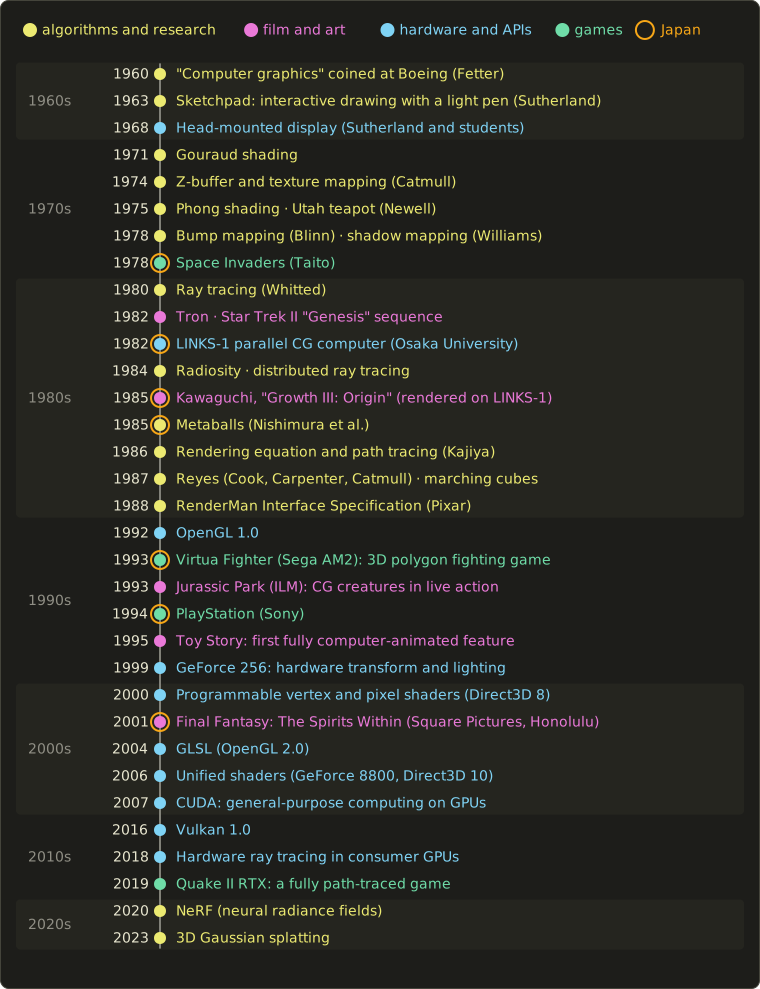
The 1960s: the beginnings
The term "computer graphics" dates from around 1960, when William Fetter, an art director at Boeing, used it for his work (he later said his superior, Verne Hudson, used the words first).
In 1963 Ivan Sutherland's Sketchpad, his PhD work at MIT on the TX-2 computer, let a user draw on the screen with a light pen, with constraints and reusable master drawings: the ancestor of interactive graphics, the GUI and CAD.
In 1968 Sutherland and his students built a head-mounted display whose wire-frame graphics followed the head, the ancestor of VR headsets (section 17.4).
Hidden-line work by Roberts (1963) and Appel (1967) and Appel's ray casting (1968) also belong here (chapter 10).
The 1970s: shading and the Utah school
Much of 3D rendering was founded at the University of Utah and by its students.
Gouraud shading (1971) and Phong shading (1975) made polygons look smooth, followed by Blinn's modified Phong model (1977) (chapter 10).
Ed Catmull described the Z-buffer and texture mapping in 1974; environment mapping (Blinn and Newell, 1976), bump mapping (Blinn, 1978), shadow volumes (Crow, 1977) and shadow mapping (Williams, 1978) followed (chapters 10 and 11).
In 1975 Martin Newell modeled a teapot with Bézier patches (chapter 8): the Utah teapot became CG's standard test object, and the real teapot is now in the Computer History Museum.
And Taito's Space Invaders (1978) became one of the best-known Japanese arcade games.
The 1980s: the quest for realism
Turner Whitted's ray tracing (1980) unified reflections, refractions and shadows; distributed ray tracing (Cook, Porter and Carpenter, 1984) added soft shadows, motion blur and depth of field; radiosity (Goral, Torrance, Greenberg and Battaile, 1984) brought diffuse interreflection; and Kajiya's rendering equation (1986), with path tracing, unified them all (chapter 12).
Production rendering took its own path: at Lucasfilm, Cook, Carpenter and Catmull developed the Reyes architecture (published in 1987), and Pixar published the RenderMan Interface Specification in 1988.
Disney's Tron (1982) used computer animation from several companies, and Star Trek II: The Wrath of Khan (1982) contained the "Genesis" sequence, the first sequence of a feature film made entirely with computer graphics, which introduced particle systems (chapter 9).
Japan was active too.
Osaka University's LINKS-1, completed in 1982, computed pixels in parallel with ray tracing on many processors; it rendered a full-sky planetarium film for the Fujitsu pavilion at the 1985 Tsukuba Expo, and Yoichiro Kawaguchi used it for Growth III: Origin, shown at SIGGRAPH 1985.
In 1985 Nishimura and colleagues introduced the name metaball (chapter 9), and in 1987 marching cubes turned volume data into meshes (chapters 9 and 16).
The 1990s: CG films, 3D games and the GPU
OpenGL 1.0 (1992) gave real-time 3D a cross-platform API (chapter 6).
In 1993 ILM's dinosaurs in Jurassic Park convinced the film industry that CG creatures could live in live-action footage (chapter 14), and Sega AM2's Virtua Fighter became the first arcade fighting game with fully 3D polygon graphics; Doom (1993) and Quake (1996) made BSP trees and light maps famous (chapters 10 and 11).
Sony's PlayStation (Japan, 3 December 1994) brought 3D polygons into homes, with the wobbling affine textures of chapter 11.
Pixar's Toy Story (1995) was the first feature film made entirely with computer animation.
NVIDIA's GeForce 256 (1999) moved transform and lighting onto the graphics chip and was marketed as the first "GPU".
The 2000s and 2010s: programmable and general-purpose GPUs
Programmable vertex and pixel shaders arrived with Direct3D 8 (2000), and GLSL with OpenGL 2.0 (2004) (chapter 6).
Final Fantasy: The Spirits Within (2001), made in Honolulu by Square Pictures, a studio of the Japanese game company Square, is often called the first feature film to aim at photorealistic computer-generated humans, and it comes up in most discussions of the uncanny valley.
Unified shaders, with the same processors running every shader stage, reached PCs with NVIDIA's GeForce 8800 (November 2006) and Direct3D 10, after ATI's Xenos chip for the Xbox 360.
CUDA (2007) opened the GPU to general-purpose computing (GPGPU), later powering simulation, image processing and machine learning.
Vulkan 1.0 (2016) gave explicit, low-level access to GPUs, and in 2018 consumer GPUs gained hardware ray tracing (NVIDIA's Turing architecture with RT cores), which the ray tracing APIs of chapter 12 build on.
Today: real-time path tracing and neural rendering
In 2019 Quake II RTX became, in NVIDIA's words, the first fully path-traced game: Kajiya's 1986 idea in real time, made practical by ray tracing hardware and denoising.
Learning entered rendering too: NeRF (2020) represents a scene as a neural network learned from photos, and 3D Gaussian splatting (2023) as millions of small Gaussian blobs rasterized in real time (chapters 9 and 12).
Exam points
- Sketchpad (Sutherland, 1963): interactive graphics with a light pen; Sutherland's head-mounted display (1968).
- Order: Gouraud (1971) → Z-buffer and texture mapping (1974) → Phong (1975) → bump mapping (1978) → ray tracing (1980) → radiosity and distributed ray tracing (1984) → rendering equation and path tracing (1986).
- Utah teapot: Newell, 1975, Bézier patches. Reyes (1987), RenderMan (1988).
- Film: Tron and Star Trek II (1982), Jurassic Park (1993), Toy Story (1995, first fully CG feature film).
- Hardware: hardware T&L (1999) → programmable shaders (2000–2004) → unified shaders (2006) → CUDA (2007) → hardware ray tracing (2018).
- Japan: LINKS-1 (1982), metaballs (1985), Virtua Fighter (1993), PlayStation (1994).
18.11 Part 1 wrap-up
You've now been through the whole Expert syllabus once.
Here is the map again, with what you should be able to explain and calculate without notes:
| Syllabus area | Chapters | Be able to explain and calculate |
|---|---|---|
| 1. CG and the digital camera model | 2, 3 | field of view, thin lens, f-number; sampling vs quantization, Nyquist, aliasing; image size; RGB/CMY, XYZ and xy, HSV, YCbCr, gamma |
| 2. Coordinate transformations and pipelines | 4, 5, 6 | homogeneous matrices and their order; what affine and projective maps preserve; view and projection transforms; clipping; rasterization |
| 3. Modeling | 7, 8, 9 | CSG, B-reps, Euler's formula, half-edges; Bézier and B-spline properties; subdivision, voxels, implicit surfaces, fractals |
| 4. Rendering | 10, 11, 12 | hidden surface methods; Lambert, Phong, Blinn–Phong; flat, Gouraud, Phong shading; shadows; texture filtering and mipmaps; BRDF, Fresnel, ray tracing, radiosity, IBR |
| 5. Animation | 13, 14 | keyframes and interpolation, forward and inverse kinematics, skinning; physics simulation; procedural animation; compositing |
| 6. Image processing | 15 | histograms and tone curves, color conversion, convolution filters, edge detection, geometric image transforms, editing |
| 7. Graphics that appeal to the eye | 16 | HDR and computational photography, NPR, visualization |
| 8. CG systems | 17 | GPUs and software, real-time systems, 3D input and output devices, recording media |
| 9. Related knowledge | 3, 18 | perception, intellectual property, history of CG |
How to prepare for the exam
- Use the official material. The official textbook 『コンピュータグラフィックス[改訂新版]』 and the official Expert problem collection are the reference; this series supplements them and doesn't replace them. Check the current exam facts on the official CG-ARTS site (chapter 1, section 1.3, describes them at the time of writing).
- Work through past exams. The official site publishes recent ones with answers; do one under exam conditions to learn the pace, then return to the chapters for each question you missed.
- Practice the calculations by hand. The exam is on paper: transformation matrices and their composition, a perspective projection, field of view and thin lens, image size in bytes, RGB to HSV or YCbCr, Lambert and Phong values, a reflection vector, a bilinear sample and a mipmap level, a point on a Bézier curve, and this chapter's disparity and copyright terms.
- Learn the Japanese terms. The key-terms table of every chapter is a ready-made vocabulary list: cover the Japanese column and test yourself.
- Know the distinctions. Many questions ask which statement is correct, so the "Exam points" lists are the best review material.
- Take the mini-exam. The last two chapters of this series are a mini-exam in the style of the real one, weighted by syllabus area, and its answers, including those of every multiple-choice question in the chapters.
What Part 2 deepens
Part 1 gave you every syllabus keyword at a beginner-friendly depth.
Part 2 goes deeper into the techniques behind modern graphics: projection and modern rasterization with anti-aliasing; mesh processing and signed distance fields; physically based shading and Monte Carlo rendering; real-time shadows, ambient occlusion and global illumination; advanced animation, skinning and physics simulation; advanced image processing and HDR; volume rendering and advanced NPR; and modern GPU systems and neural rendering.
For hands-on practice, the GLSL series and the OpenGL series let you implement what Part 1 described.
18.12 Summary
- Perception interprets images with assumptions (one light from above, constant surfaces, smooth motion); CG works by feeding them consistent evidence.
- Disparity gives depth with a resolution that falls with ; random-dot stereograms show that disparity alone suffices; stereo screens make the eyes converge and focus at different distances (vergence–accommodation conflict); VR sickness comes from visual–vestibular conflict.
- Apparent motion turns frames into motion; flicker depends on the refresh rate, smoothness on the frame rate; hold-type displays smear tracked motion by .
- Constancy discounts distance, angle and illumination, so equal pixel values can look very different; shape from shading assumes one light from above; without attention changes go unnoticed; near-human characters risk the uncanny valley.
- Foveated rendering, screen-error LOD, perceptual compression and audio-visual sync limits put the work where perception needs it.
- Copyright arises automatically and protects expression, not ideas or algorithms; moral rights stay with the author, economic rights can be transferred; life + 70 years; works made for hire, private copying, quotation and Article 30-4 have precise conditions.
- Industrial property rights need registration: patent 20 years from filing, utility model 10, design 25 (GUI images since 2020), trademark 10 renewable; unfair competition law and portrait and publicity rights add protection; licenses (asset stores, Creative Commons, permissive vs copyleft) decide what you may ship.
- History: Sketchpad (1963) → Utah shading and mapping (1970s) → ray tracing, radiosity, the rendering equation, Reyes and RenderMan (1980s) → Toy Story and the GPU (1990s) → programmable and unified shaders, CUDA → hardware ray tracing (2018), real-time path tracing and neural rendering.
18.13 Key terms
| English | 日本語 |
|---|---|
| perception | 知覚 |
| binocular disparity | 両眼視差 |
| stereopsis | 立体視 |
| vergence angle | 輻輳角 |
| fixation point | 注視点 |
| stereoacuity | 立体視力 |
| random-dot stereogram | ランダムドットステレオグラム |
| vergence–accommodation conflict | 輻輳調節矛盾 |
| VR sickness | VR酔い |
| apparent motion | 仮現運動 |
| beta movement, phi phenomenon | ベータ運動、ファイ現象 |
| flicker | フリッカー(ちらつき) |
| sample-and-hold display, hold-type blur | ホールド型表示、ホールドボケ |
| low persistence | 低残光 |
| perceptual constancy (size, shape, lightness) | 恒常性(大きさの恒常性、形の恒常性、明るさの恒常性) |
| shape from shading | 陰影からの形状知覚 |
| visual attention | 視覚的注意 |
| change blindness, inattentional blindness | 変化盲、非注意盲 |
| optical illusion | 錯視 |
| uncanny valley | 不気味の谷 |
| fovea, peripheral vision | 中心窩、周辺視 |
| eccentricity | 偏心度 |
| foveated rendering | フォービエイテッドレンダリング |
| intellectual property rights | 知的財産権 |
| copyright | 著作権 |
| industrial property rights | 産業財産権 |
| patent, utility model, design, trademark | 特許権、実用新案権、意匠権、商標権 |
| Unfair Competition Prevention Act | 不正競争防止法 |
| work (copyrighted work), author | 著作物、著作者 |
| no formalities principle | 無方式主義 |
| moral rights of the author | 著作者人格権 |
| right to make public, right of attribution, right to integrity | 公表権、氏名表示権、同一性保持権 |
| economic rights | 著作権(財産権)、著作財産権 |
| reproduction, public transmission, adaptation rights | 複製権、公衆送信権、翻案権 |
| derivative work | 二次的著作物 |
| neighbouring rights | 著作隣接権 |
| term of protection, public domain | 保護期間、パブリックドメイン |
| work made for hire | 職務著作(法人著作) |
| reproduction for private use | 私的使用のための複製 |
| quotation, indication of the source | 引用、出所の明示 |
| information analysis | 情報解析 |
| similarity, reliance | 類似性、依拠性 |
| creative contribution | 創作的寄与 |
| novelty, inventive step | 新規性、進歩性 |
| trade secret | 営業秘密 |
| portrait right, publicity right | 肖像権、パブリシティ権 |
| license, Creative Commons | ライセンス、クリエイティブ・コモンズ |
| permissive license, copyleft | 寛容型ライセンス、コピーレフト |
| history of CG | CGの歴史 |
18.14 Challenges
- ★ With an eye separation of 63 mm, compute (exactly and with the approximation) the disparity in arcminutes between points at 0.5 m and 0.6 m, and the smallest depth difference a viewer with a stereoacuity of 40 arcseconds can see at 2 m and at 20 m.
- ★ An object moves at 1200 px/s. Compute the hold-type smear on a full-persistence display at 60, 90 and 144 Hz, and on a 90 Hz display lit for 25% of each frame. At which of these does the frame-to-frame jump exceed 10 px?
- ★ Under the Japanese rules at the time of writing, in which year does protection end for: a painting by an artist who died in 1985; a novel by an author who died in 1960; a film published in 1999; a character sheet published under a studio's name in 2015; a patent filed in 2010; a design filed in 2021?
- ★★ For each item, name the right (or rights) that could protect it in Japan and whether registration is needed: a game's soundtrack recording, its title logo, the source code of its engine, a new shadow-filtering method in the engine, the icons of its editor's GUI, a 3D scan of a famous actor used as a character, and the shape of a new game controller.
- ★★★ Predict, and explain with lightness constancy, how the illusion of section 18.4 changes if the shadow had a perfectly hard edge, if the sphere were removed (a dark region with no possible cause), and if the dark region were a sharp rectangle aligned with the squares. What does this tell a renderer about which shadow errors viewers notice?
Multiple choice
Q1 ★ Which of the following statements about visual perception and CG is correct?
| A | Random-dot stereograms show that stereopsis works only after each eye has recognized the outlines of the objects. |
| B | Apparent motion lets a sequence of still frames with small differences be seen as continuous motion, which is what film and animation rely on. |
| C | Foveated rendering renders the periphery of the visual field at a higher resolution than the area around the gaze point. |
| D | According to the uncanny valley hypothesis, people's affinity for a character rises steadily all the way as it becomes more human-like. |
| E | Because of lightness constancy, the perceived lightness of a surface is determined only by the luminance of its own pixels. |
Q2 ★ Which of the following statements about copyright under Japanese law at the time of writing is correct?
| A | Copyright arises automatically when a work is created, without registration or a © notice. |
| B | The moral rights of the author can be transferred to a company by contract together with the economic rights. |
| C | The copyright in a work by an individual author lasts in principle until 50 years after the author's death. |
| D | The protection of a program as a work also extends to the algorithm (解法) that the program implements. |
| E | An unpublished work may be quoted freely as long as the source is indicated. |
Q3 ★ Which of the following statements about the history of CG is correct?
| A | Gouraud shading was proposed as an improvement of Whitted's ray tracing. |
| B | The rendering equation was introduced by Phong in 1975, together with his reflection model. |
| C | Toy Story (1995) is known as the first feature film made entirely with computer animation. |
| D | Programmable vertex and pixel shaders appeared in consumer hardware before the first chips with hardware transform and lighting. |
| E | Hardware ray tracing in consumer GPUs appeared in the early 2000s, together with programmable shaders. |
18.15 Practical assignment
Put the three parts of this chapter into practice with paper, a ruler, a pencil and a calculator: a stereo and motion experiment, a rights checklist for an imaginary game, and your own to-scale timeline.
Part A: stereo and motion on paper.
- Draw. On graph paper, draw a top view with the two eyes 63 mm apart (1:1 across, 1 cm = 10 cm in depth), and mark points straight ahead at 40 cm, 60 cm and 120 cm.
- Compute. For each point compute the vergence angle in degrees, and the disparity of the other two points relative to the 60 cm point in arcminutes.
- Parallax. Treat the 60 cm point as the screen. Compute the screen parallax of the 40 cm and 120 cm points with of section 17.6, draw both pairs of image points on the screen line, and check that the lines from each eye through its image point meet at the right depth.
- Flip book. On 12 small cards draw a dot moving left to right, 2 mm per card on cards 1–6 and 8 mm per card on cards 7–12. Flip them at an even speed and note where the motion looks smooth and where it jumps.
Part B: a rights checklist.
Your imaginary indie game uses: (a) a character model you made, (b) a tree model bought in an asset store, (c) a CC BY-SA texture, (d) a CC BY-NC sound, (e) a font bought with a desktop license, (f) an MIT-licensed physics library, (g) a GPL-licensed tool used only to convert files during development, (h) a photo of a real person found on the internet, used as a poster on a wall in the game.
- Table. Make a table with the columns item, kind of right, who holds it, what the license allows, what you must do (credit, share alike, keep the notice …) and "OK to ship commercially?" (yes / with conditions / no / check the license).
- Fix. For every "no", write a replacement plan.
Part C: a to-scale timeline.
- Axis. Draw an axis from 1960 to 2025 at 1 cm per 2 years (32.5 cm; tape two sheets together if needed).
- Events. Place at least 15 events of section 18.10 at their true positions, algorithms and research above the axis, film, games and hardware below, each with the number of the chapter that explains it.
How to check yourself:
- Part A: the vergence angles are about 9.01°, 6.01° and 3.01°; both disparities relative to 60 cm are about (exactly and ; the approximation gives for both, because ), crossed for 40 cm and uncrossed for 120 cm; the parallaxes are mm and mm, and no parallax behind the screen may exceed 63 mm.
- Part A: at the same flipping speed, the 8 mm steps should look clearly less smooth than the 2 mm steps.
- Part B: (d) can't ship commercially (NC); (h) needs permission (portrait and publicity rights, and the photographer's copyright); (c) can ship, but your modified texture must be shared under BY-SA with credit; (e) depends on whether the license allows embedding; (f) is fine with its notice; (g) doesn't affect the game as long as you don't distribute the tool with it.
- Part C: the order must agree with the "Exam points" list of section 18.10, and the gap between ray tracing (1980) and the first fully path-traced game (2019) must measure 19.5 cm.
コメント(0)
まだコメントはありません。
ログインするとコメント出来ます。