4. 2D Coordinate Transformations
In the last two chapters we looked at what a picture is made of: pixels, samples and colors.
From this chapter on we look at how the shapes in a scene get to their place in that picture.
The tool for that is the coordinate transformation (座標変換, zahyō henkan): a rule that takes every point of a shape and gives it new coordinates.
We start in 2D, where everything fits on a sheet of graph paper, and go to 3D in chapter 5.
This chapter covers the syllabus item 2次元座標変換 (2D coordinate transformations) of the area 座標変換とパイプライン.
It's also the foundation for everything after it: the 3D transforms of chapter 5 are the same ideas with one more coordinate, and the viewing pipeline of chapter 6 is a chain of exactly these matrices.
For the exam, 2D transforms are worth knowing cold, because they are easy to ask about with small numbers: "where does this point go", "which order", "what is preserved".
The Linear Algebra series already built the matrices themselves: scale, rotation, shear and reflection in chapter 8, homogeneous coordinates and translation in chapter 9, determinants and inverses in chapter 10.
I won't derive them again.
Instead I'll recap them briefly and then look at them the way CG people and the exam look at them: coordinate systems, order, classes of transforms, and the mapping onto the screen.
4.1 Coordinate systems in 2D
A coordinate system (座標系, zahyōkei) is an origin plus axes, so that every point can be named with numbers.
The trick of CG is that we don't use just one.
Each part of the job has the coordinate system that makes it easiest, and transforms carry points from one to the next.
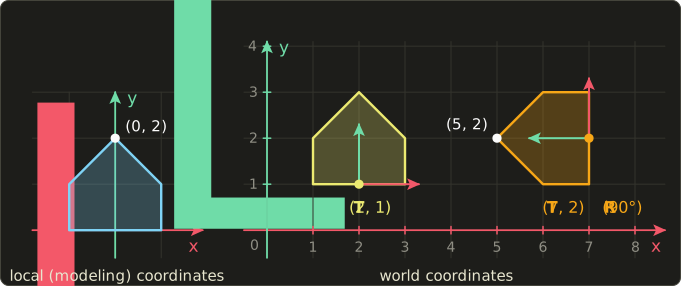
- Local coordinates (ローカル座標系), also called modeling coordinates (モデリング座標系): the coordinate system a single object is designed in. The house on the left was drawn with its origin at the middle of its floor, which makes it easy to model and easy to rotate.
- World coordinates (ワールド座標系): the one shared coordinate system of the whole scene. Every object is placed into it by its own transform, the modeling transformation (モデリング変換). The same house appears twice, once moved by and once turned and moved by . The small red and green arrows are each copy's own local axes, seen from the world.
- Device coordinates (デバイス座標系), also called screen coordinates (スクリーン座標系): the pixel coordinates of the output device. They are usually whole numbers, the origin is in the top-left corner, and y grows downwards, because that's the order in which a display (and most image files) store the rows.
The y-down device system is the one that catches people.
World coordinates follow math (y up), device coordinates follow the monitor (y down), so somewhere along the way the picture has to be flipped; section 4.5 shows where.
Not every system agrees, either: OpenGL's window coordinates put the origin at the bottom-left with y up.
So whenever you see "screen coordinates", check which corner the origin is in.
Why not just model everything directly in world coordinates?
Because then one house drawn in a hundred places would be a hundred copies of the same numbers, and moving a house would mean rewriting all of its points.
With a local coordinate system, an object is stored once, and placing, moving or animating it only changes one small matrix.
The same idea, stacked several levels deep, gives you hierarchies: a wheel in a car in a world (chapter 13 uses this for character skeletons).
4.2 The basic transforms as homogeneous matrices
All 2D transforms in this chapter are written as 3×3 matrices acting on homogeneous coordinates (同次座標, dōji zahyō).
A point gets a third coordinate , and then even translation becomes a matrix multiplication (linalg chapter 9 explains why that works):
The upper-left 2×2 block is the linear part (scale, rotation, shear, reflection), the right column is the translation, and the bottom row stays .
Like the Linear Algebra series, I use column vectors with the matrix on the left; section 4.6 shows how to read books that do it the other way around.
Here are the basic transforms side by side:
| Transform | Matrix | What it does |
|---|---|---|
| Translation | adds to every point | |
| Scaling | multiplies x by and y by , about the origin | |
| Rotation | turns counter-clockwise by about the origin | |
| Shear in x | slides each point sideways by times its height | |
| Shear in y | slides each point up by times its x | |
| Reflection about the x axis | ||
| Reflection about the y axis | ||
| Reflection about |
To see what each one does, we'll apply all of them to the same small triangle: , , .
It has a right angle at , and going runs counter-clockwise.
Every picture below was drawn by multiplying the real matrices, so you can check each point against the arithmetic.
Translation
Translation (平行移動, heikō idō) moves every point by the same vector .
With :
The same for the other two corners gives and .
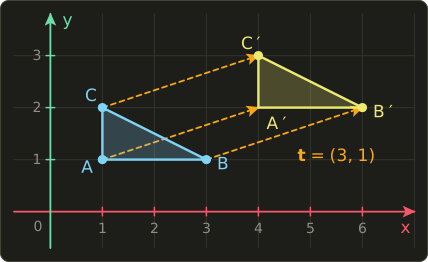
All three arrows are the same vector, so the triangle keeps its size, its shape and its direction.
Translation is the only basic transform that is not linear: it moves the origin, which no 2×2 matrix can do.
That's the whole reason for the extra coordinate.
Scaling
Scaling (拡大縮小, kakudai shukushō, also スケーリング) multiplies each coordinate by its own factor.
If it's uniform (the shape stays the same, only the size changes), otherwise it's non-uniform (the shape gets stretched).
With the uniform the triangle becomes , , .
With the non-uniform :
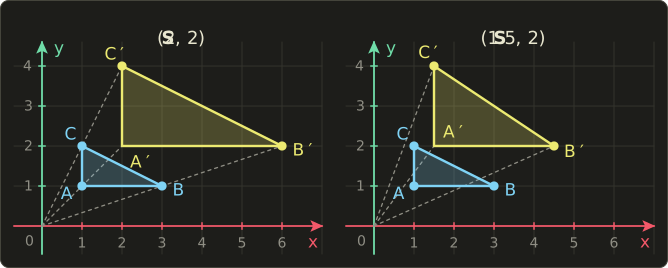
Look at the dashed lines: every point slides along the line through the origin.
A scaling matrix always scales about the origin, so a shape that isn't sitting at the origin also moves away from it (or towards it, for factors below 1).
On the left, the legs of the triangle went from 2 and 1 to 4 and 2: same shape, twice the size.
On the right they went to 3 and 2, so the triangle got a different shape.
To scale a shape "in place", around its own center or corner, we need a composite transform (section 4.3).
A factor of 0 squashes everything onto an axis, and a negative factor mirrors; that's where reflections come from.
Rotation
Rotation (回転, kaiten) by an angle turns every point about the origin.
In a y-up coordinate system a positive means counter-clockwise, and a clockwise turn by is simply .
With we have and , so :
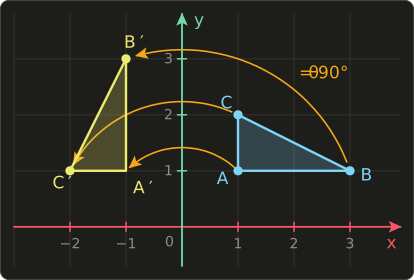
Each corner travels along a circle around the origin, and the triangle keeps its size and shape.
Let's do a less friendly angle too, , with and :
The side was 2 long.
After the rotation it runs from to , a difference of , and .
Same length, as it must be for a rotation.
Shear
Shear (せん断, sendan; also called skew, スキュー) slides points parallel to an axis, by an amount proportional to their distance from that axis, like pushing over a stack of cards.
With , each point moves right by its height: , .
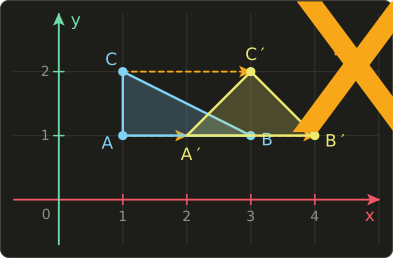
Points at the same height all move by the same amount, so horizontal lines stay where they are (only shifted along themselves).
The right angle at is gone: the triangle leans over.
But the base is still 2 long and the height is still 1, so the area is unchanged.
is the same thing with the roles of x and y swapped: .
Reflection
Reflection (鏡映, kyōei; also called 反転 or 対称変換) mirrors points across a line.
Mirroring across the x axis flips the sign of y, mirroring across the y axis flips the sign of x, and mirroring across the diagonal swaps the two coordinates:
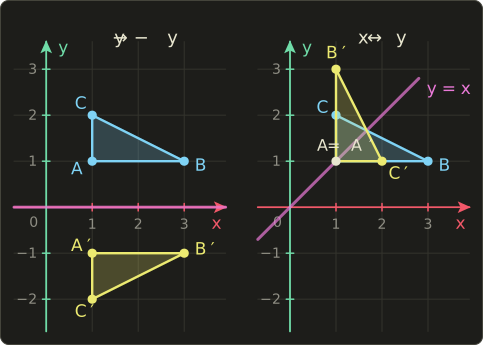
lies on the line , so that mirror leaves it where it is: points on the mirror line never move.
Now walk around the mirrored triangle in the order .
In both pictures it runs clockwise, while the original ran counter-clockwise.
That's the signature of a reflection: it reverses orientation (向き), turning a left hand into a right hand.
No rotation can do that.
One trap: "reflection about the origin", , sounds like a mirror, but its matrix is .
It's a half turn, and it keeps the orientation.
In 2D, flipping both axes is a rotation; flipping one is a mirror.
The determinant: area and orientation
The determinant of the linear 2×2 block, (linalg chapter 10), summarizes two of the observations above in one number.
Its absolute value is the factor by which every area gets multiplied, and its sign says whether orientation is kept (positive) or reversed (negative).
| Transform | Determinant | Area | Orientation |
|---|---|---|---|
| unchanged | kept | ||
| times | kept if | ||
| unchanged | kept | ||
| , | unchanged | kept | |
| Reflection | unchanged | reversed |
Our triangle has area .
After its legs are 4 and 2, area 4, and indeed .
After the legs are 3 and 2, area 3, and .
4.3 Composite transforms and order
Real transforms are rarely a single basic one.
"Turn the sprite, then put it at its position" is two transforms, and a composite transformation (合成変換, gōsei henkan) is their product:
With column vectors, the matrix nearest the point acts first, so "first , then " is written , and a product is read from right to left.
Once multiplied, the whole chain is a single 3×3 matrix, no matter how many steps it had.
That's exactly why we packed translation into a matrix: one matrix per object, applied to thousands of vertices.
Order matters
Matrix multiplication is not commutative (linalg chapter 7), and here is what that looks like.
Take and and multiply them both ways:
The linear part is the same rotation in both, but the translation column differs.
In the translation was itself rotated by 90° into , because the rotation came after it.
Applied to :
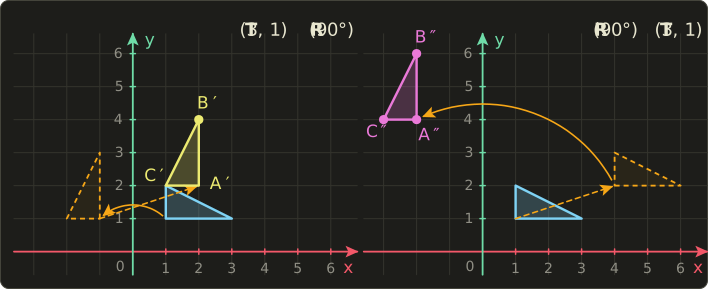
On the left, the triangle first turns in place near the origin (dashed orange) and is then moved by to , , .
On the right, it's first moved to to (dashed orange) and then the rotation swings it around the world origin, on a big arc, to , , .
Same two transforms, different result.
That's the usual rule for placing an object: scale and rotate it while it still sits at the origin, translate it last, so (linalg chapter 9 has the 3D version).
Some pairs do commute: two translations, two rotations about the origin, two scalings, or a rotation and a uniform scaling.
But that's the exception, so treat every order as important unless you've checked.
Rotating and scaling about an arbitrary point
Rotation and scaling always happen about the origin.
To turn a shape about some other point (a hinge, the center of a sprite, the corner of a window), use the three-step sandwich:
Read from the right: move to the origin, rotate there, move it back.
Let's turn our triangle by 90° about its own corner and follow :
- : .
- : .
- : .
Multiplying the three matrices gives the same thing in one step.
The linear part is , and the translation is :
Check with all three corners: , , .
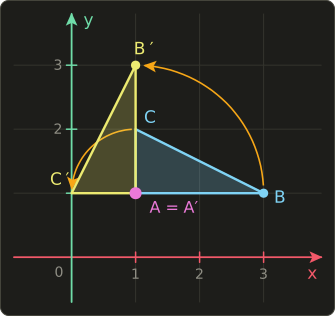
The pivot stays put, and the other corners turn around it.
Scaling about a point works the same way: , and so does a reflection across a line that doesn't go through the origin.
Inverse transforms
The inverse transformation (逆変換, gyaku henkan) undoes a transform.
For the basic transforms you can write it down without any calculation, because you only have to undo the action:
| Transform | Inverse |
|---|---|
| , only if no factor is 0 | |
| Reflection | itself (mirroring twice gives the original) |
For a composite, undo the steps in reverse order, like taking off your shoes before your socks (linalg chapter 10):
For our pivot rotation: , a turn back about the same point.
Its matrix has , which sends to , as linear part and as translation:
goes back to .
Moving the shape, or moving the coordinate system
There are two ways to read every transform, and both appear in CG.
- Moving the shape (geometric transformation): the coordinate system stays, the points move. "Turn the triangle by 90°."
- Changing the coordinate system: the points stay where they are, and we describe them in another coordinate system. "What are this point's coordinates as seen from the house?"
The two are inverses of each other.
The house on the right of the first picture was placed with .
Read as moving a shape, takes the roof tip from local to world .
Read as a change of coordinates, converts local coordinates into world coordinates, and converts world into local.
First , then , which sends to :
That's how a game asks "is the mouse inside this rotated button?": convert the mouse position into the button's local coordinates, where the button is a plain rectangle.
A rule worth remembering: rotating the coordinate axes by changes the coordinates of every point as if the points had been rotated by .
A book that says "rotate the coordinate system" and gives a matrix with the sine signs swapped isn't wrong; it's using this second reading.
The camera of chapter 5 is the 3D version of the same idea (linalg chapter 11).
4.4 Classes of transforms and what they preserve
So far we've collected individual transforms.
For the exam (and for understanding what a transform can and can't do to your picture), it's more useful to sort them into classes, each one bigger than the last, and to know which properties of a figure each class preserves (保存する).
Here is the unit square under one example of each class:
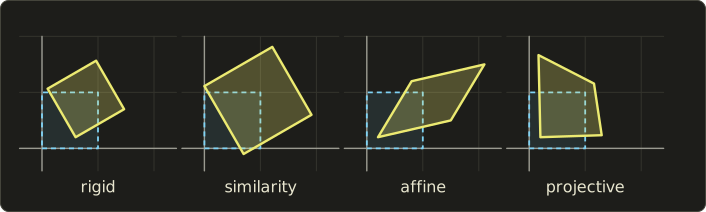
- A rigid transformation (剛体変換, gōtai henkan), also called a Euclidean transformation, is any combination of rotations and translations. It moves a shape like a solid object on a table: lengths, angles and areas all stay the same. Some books also count reflections here and call the bigger group isometries (等長変換) or congruence transformations (合同変換); strictly, a real rigid object can't be mirrored, so "rigid" usually means rotation and translation only.
- A similarity transformation (相似変換, sōji henkan) adds uniform scaling. Lengths change, but all by the same factor, so angles and the ratios of lengths survive: the shape stays the same, only the size changes.
- An affine transformation (アフィン変換) is any linear transform followed by a translation, so it adds non-uniform scaling and shear: the bottom row of the matrix is and the other six numbers are free. Squares become parallelograms. Lengths and angles are lost, but straight lines stay straight, parallel lines stay parallel, and the ratio in which a point divides a segment is kept (a midpoint stays a midpoint). All areas are multiplied by the same factor (the absolute value of the determinant), so ratios of areas are kept too.
- A projective transformation (射影変換, shaei henkan), also called a homography, uses a general 3×3 matrix, including the bottom row, followed by the division by . Straight lines still stay straight, but parallel lines may meet, and equal spacing gets squeezed. What survives is the cross ratio (複比, fukuhi) of four points on a line, explained below.
The classes are nested: every rigid transform is a similarity, every similarity is affine, and every affine transform is projective (with bottom row ).
The linear transforms of linalg chapter 8 sit inside the affine ones as the special case without translation, and they are the only ones that are guaranteed to keep the origin in place.
| Class | Built from | Degrees of freedom (2D) | Preserves | Does not preserve |
|---|---|---|---|---|
| Rigid (剛体) | rotation, translation | 3 | lengths, angles, areas, orientation | position, direction |
| Similarity (相似) | + uniform scaling | 4 | angles, ratios of lengths, shape | lengths, areas |
| Affine (アフィン) | + non-uniform scaling, shear | 6 | straight lines, parallelism, division ratios on a line, area ratios | lengths, angles |
| Projective (射影) | + general bottom row, divide by w | 8 | straight lines, incidence, cross ratio | parallelism, division ratios |
The degrees of freedom (自由度) count the independent numbers: an angle and a 2D translation make 3, the scale factor adds a 4th, the affine matrix has 6 free entries, and the projective matrix has 9 entries but only 8 degrees of freedom (challenge 5 asks you why).
That's also why an affine transform is fixed by 3 point pairs (not on one line) and a projective transform by 4 (no three on one line): each point pair gives two equations.
An affine example: what survives a shear
Take the shear from section 4.2.
The midpoint of is .
The shear sends it to , and the midpoint of , from to , is .
Same point: the midpoint survived.
But the length of was , and the length of is .
And the angle at , between and , is instead of 90°.
Lengths and angles are gone, ratios along a line are kept: that's affine.
A projective example: a floor in perspective
A projective transform uses the bottom row too, so after the multiplication is usually not 1, and we divide by it (linalg chapter 9, section 9.8).
Take this matrix, which puts into :
Apply it to the square with corners , , , .
The bottom corners have , so and they stay where they are.
The top corners have : and .
The square has become a trapezoid that looks like a tiled floor seen in perspective:
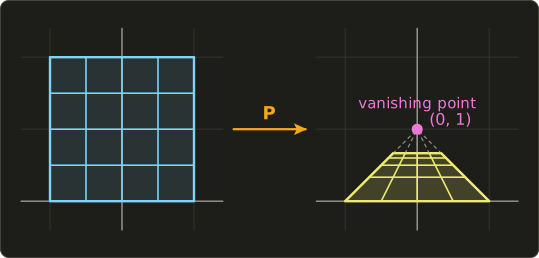
- Every straight line stayed straight.
- The vertical lines and were parallel, but their images meet at , a vanishing point (消失点). That point is the image of the "point at infinity" in the y direction: . Parallelism is not preserved.
- The horizontal lines happen to stay horizontal here, but their equal spacing is gone: land at . Far rows get squeezed together (foreshortening).
What survives is the cross ratio.
For four points on a line at positions , it is
On the y axis take .
Before: .
After, at : .
The spacing changed, the cross ratio didn't.
(Books order the four points differently, so you'll see several versions of the formula, but every version is preserved.)
Where each class shows up in CG
- Rigid: placing and animating solid objects and cameras, rigid-body physics, moving a character without deforming it.
- Similarity: uniform scaling of models, zooming a map or a UI, resizing an image while keeping its aspect ratio.
- Affine: sprite and model transforms with non-uniform scale, texture coordinate transforms, italic text made by shearing, the "free transform" of image editors, rotating and resizing images in image processing (chapter 15), the transform attributes of SVG, PDF and CSS.
- Projective: perspective projection (chapter 5), the "perspective" tool of image editors, keystone correction of projectors, straightening a photographed document, stitching photos into a panorama.
4.5 The window–viewport transformation
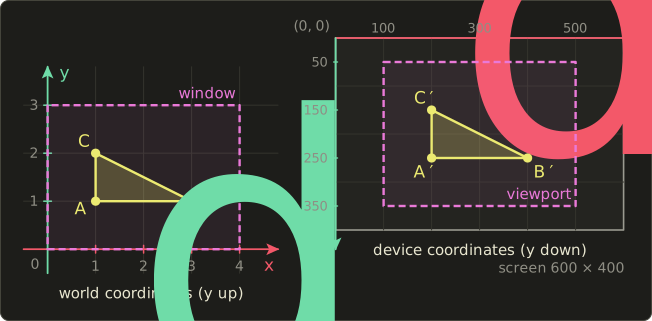
To draw a 2D scene we pick a rectangle of the world we want to see, the window (ウィンドウ), and a rectangle on the device where it should appear, the viewport (ビューポート).
The window–viewport transformation (ウィンドウ・ビューポート変換) maps one onto the other.
(Careful: this "window" is a region of the world, not a window of the operating system.)
The formula
Let the window be , (y up), and the viewport , in device pixels (y down).
The scale factors are the ratio of the sizes:
and the mapping is
The y formula measures from the top of the window, because the device's y starts at the top.
If the device had y up, it would be , just like x.
As a matrix it's three basic transforms: move the window's corner to the origin, scale (with for the flip), move to the viewport's corner:
The bottom of the window () lands on the bottom of the viewport (, the largest pixel row), which is where the flip comes from.
A worked example
Window: , .
Viewport: , on a 600 × 400 screen.
Then and , and
Our triangle:
is higher than in the world and gets a smaller row number on the device, so on the screen it's drawn above : the picture comes out upright.
Without the flip you'd get at row 250 and at row 150, an upside-down picture, which is one of the most common bugs in hand-written 2D renderers.
Notice that is negative.
In pixel numbers, is now clockwise, even though it looks counter-clockwise on the screen, because the screen's y axis points down.
The same thing happens to rotations: applied directly in device coordinates looks clockwise on the monitor.
That's why 2D libraries with y-down coordinates (such as the HTML canvas) describe positive angles as clockwise.
Aspect ratio
The aspect ratio (アスペクト比) is width divided by height.
The window above is and the viewport is , so and nothing gets distorted.
Now suppose the viewport is a square, , .
Then but , and a circle of radius 1 in the world becomes an ellipse 200 pixels wide and about 266.7 pixels tall.
Since , the window–viewport transform is no longer a similarity, so shapes are distorted.
The usual fix is to use one scale for both axes, the smaller one, .
The window then fills pixels, and the remaining rows are split into empty bars of 50 pixels above and below (letterboxing).
The other fix is to make the window wider or taller until its aspect ratio matches the viewport, so that you see more of the world instead of getting bars.
In practice
In 3D, the same mapping is the last step of the pipeline: the GPU maps normalized device coordinates, which run from −1 to 1, onto the viewport you set with glViewport in OpenGL or a VkViewport in Vulkan (linalg chapter 12; chapter 6 follows a vertex through it).
In 2D, panning a map moves the window, zooming makes the window smaller or bigger, and split-screen multiplayer draws the same world into several viewports.
4.6 Row vectors versus column vectors
Not every book, API or exam figure writes transforms the way we do.
The other common convention uses row vectors (行ベクトル) with the matrix on the right:
The two describe the same transforms; each matrix is just the transpose of the other, .
So in row form the translation sits in the bottom row, and the minus sign of the rotation moves to the other corner:
The order flips too.
Because (linalg chapter 7), "first , then " is for column vectors but for row vectors, read from left to right.
Our model matrix becomes .
Let's check that both give the same point.
Rotate by 90° and then translate by ; with column vectors that's , as in section 4.3.
With row vectors:
Same point , just written sideways.
How to tell which convention a book or a figure uses:
- Is the vector a column to the right of the matrix, or a row to its left?
- Is the translation in the last column (column vectors) or in the bottom row (row vectors)?
- For a rotation, don't judge the direction by where the minus sign is until you know the convention: is counter-clockwise for row vectors but clockwise for column vectors.
OpenGL's documentation, GLSL and this series use column vectors; Direct3D's traditional math libraries use row vectors.
Whether a matrix is stored in memory row by row or column by column is a separate question (Linear Algebra chapter 6 touches on it); it doesn't change the math.
4.7 In practice and for the exam
Where you meet 2D transforms
2D transforms are everywhere, not just in 2D games.
A sprite has a position, a rotation and a scale, combined into , and a scene graph multiplies a parent's matrix into its children, so a sword follows the hand that holds it.
Vector graphics formats store affine matrices directly: SVG's matrix(a, b, c, d, e, f), PDF's and PostScript's current transformation matrix, the canvas setTransform(a, b, c, d, e, f) and CSS matrix() all describe the same affine map, and .
Font renderers scale glyph outlines to the requested size, and fake italics with a shear.
Texture coordinates are routinely rotated, scaled and shifted in shaders, and image processing warps whole images with affine and projective transforms (chapter 15).
You'll build the shader side of this yourself in the GLSL series, chapter 7, and sprites in the OpenGL series, chapter 25.
C++: 2D transforms with linalg.hh
Our C++ header from the Linear Algebra series only has a Mat4, but that's no problem: a 2D transform is a 3D transform that happens to leave z alone.
The 3×3 matrix sits inside the 4×4 one in rows and columns 1, 2 and 4, so translate({tx, ty, 0}), scale({sx, sy, 1}) and rotateZ(angle) are exactly our , and , and a 2D point is Vec4{x, y, 0, 1}.
This program repeats the worked examples of this chapter:
#include "linalg.hh"
#include <cmath>
#include <cstdio>
#include <numbers>

// A 2D point (x, y) lives on the plane z = 0, with w = 1.
Vec4 point2(float x, float y) { return {x, y, 0.0f, 1.0f}; }

// Round to 2 decimals so that tiny float errors (and -0) print as 0.
float tidy(float v) {
  float r = std::round(v * 100.0f) / 100.0f;
  return r == 0.0f ? 0.0f : r;
}

void printTriangle(const char *name, const Mat4 &m) {
  const Vec4 tri[3] = {point2(1, 1), point2(3, 1), point2(1, 2)};
  printf("%-10s", name);
  for (const Vec4 &p : tri) {
    Vec4 q = m * p;
    printf(" (%g, %g)", tidy(q.x), tidy(q.y));
  }
  printf("\n");
}

// Window [wx0, wx1] x [wy0, wy1] in world coordinates (y up)
// -> viewport [vx0, vx1] x [vy0, vy1] in device pixels (y down).
Mat4 windowToViewport(float wx0, float wy0, float wx1, float wy1,
                      float vx0, float vy0, float vx1, float vy1) {
  float sx = (vx1 - vx0) / (wx1 - wx0);
  float sy = (vy1 - vy0) / (wy1 - wy0);
  return translate({vx0, vy1, 0.0f}) * scale({sx, -sy, 1.0f}) * translate({-wx0, -wy0, 0.0f});
}

int main() {
  const float quarter = std::numbers::pi_v<float> / 2.0f; // 90 degrees
  Mat4 r = rotateZ(quarter);
  Mat4 t = translate({3.0f, 1.0f, 0.0f});

  printTriangle("T * R", t * r);   // rotate first, then translate
  printTriangle("R * T", r * t);   // translate first, then rotate

  Mat4 pivot = translate({1.0f, 1.0f, 0.0f}) * r * translate({-1.0f, -1.0f, 0.0f});
  printTriangle("pivot A", pivot);
  printTriangle("undo", inverse(pivot) * pivot);

  printTriangle("viewport", windowToViewport(0, 0, 4, 3, 100, 50, 500, 350));
  return 0;
}
Expected output:
T * R      (2, 2) (2, 4) (1, 2)
R * T      (-2, 4) (-2, 6) (-3, 4)
pivot A    (1, 1) (1, 3) (0, 1)
undo       (1, 1) (3, 1) (1, 2)
viewport   (200, 250) (400, 250) (200, 150)
Every line matches a worked example: the two orders of section 4.3, the rotation about and its inverse, and the window–viewport mapping of section 4.5.
std::numbers::pi_v is C++20's built-in ; tidy is there because in float is not exactly 0.
A shader function: rotation about a point
In a shader, the pivot rotation is a handy little function, for example to spin a texture or a 2D shape about its center.
It builds directly from the formula of section 4.3: linear part , translation .
Watch the constructors: Slang's and HLSL's float3x3(...) fill row by row, GLSL's mat3(...) column by column, so the numbers are listed in a different order for the same matrix.
float3x3 rotateAbout(float2 c, float angle) {
  float co = cos(angle);
  float si = sin(angle);
  // translation part: c - R c
  float2 t = c - float2(co * c.x - si * c.y, si * c.x + co * c.y);
  // float3x3(...) fills row by row
  return float3x3(
     co, -si, t.x,
     si,  co, t.y,
    0.0, 0.0, 1.0);
}

float2 transformPoint(float3x3 m, float2 p) {
  return mul(m, float3(p, 1.0)).xy;
}
mat3 rotateAbout(vec2 c, float angle) {
float co = cos(angle);
float si = sin(angle);
// translation part: c - R c
vec2 t = c - vec2(co * c.x - si * c.y, si * c.x + co * c.y);
// mat3(...) fills column by column
return mat3(
co, si, 0.0,
-si, co, 0.0,
t.x, t.y, 1.0);
}
vec2 transformPoint(mat3 m, vec2 p) {
return (m * vec3(p, 1.0)).xy;
}float3x3 rotateAbout(float2 c, float angle) {
float co = cos(angle);
float si = sin(angle);
// translation part: c - R c
float2 t = c - float2(co * c.x - si * c.y, si * c.x + co * c.y);
// float3x3(...) fills row by row
return float3x3(
co, -si, t.x,
si, co, t.y,
0.0, 0.0, 1.0);
}
float2 transformPoint(float3x3 m, float2 p) {
return mul(m, float3(p, 1.0)).xy;
}
With c = (1, 1) and angle = , transformPoint sends (3, 1) to (1, 3), like in section 4.3.
Remember that in Slang and HLSL m * v would multiply component by component; the matrix product is mul(m, v).
Exam points
- Order. With column vectors, "first , then " is . Translating and rotating don't commute: rotation after translation also rotates the translation.
- About the origin. Scaling and rotation matrices act about the origin, so a shape away from the origin also moves. About a point : .
- Inverses. , , , a reflection is its own inverse, and composites are undone in reverse order.
- Rotation sign. is counter-clockwise for column vectors in a y-up system. The same numbers look clockwise on a y-down screen, and in row-vector books the minus sign sits in the other corner.
- Reflection vs rotation. One sign flipped (determinant −1) is a mirror and reverses orientation; both signs flipped is a 180° rotation.
- What each class keeps. Rigid: lengths and angles. Similarity: angles and ratios of lengths. Affine: straight lines, parallelism, division ratios along a line. Projective: straight lines and the cross ratio, but not parallelism. Each class keeps everything the next bigger class keeps.
- Window–viewport. Scale = viewport size ÷ window size per axis; y-down devices need the flip; different scales for x and y distort shapes.
- Conventions. Row-vector matrices are transposes, read left to right, with the translation in the bottom row.
4.8 Summary
- CG uses several coordinate systems: local (modeling) coordinates for each object, world coordinates for the scene, device (screen) coordinates for pixels, usually with the origin at the top-left and y down.
- With homogeneous coordinates , translation, scaling, rotation, shear and reflection are all 3×3 matrices, and any chain of them is a single matrix.
- Scaling and rotation act about the origin; positive rotation is counter-clockwise in a y-up system; reflections reverse orientation, and the determinant gives the area factor and its sign.
- Composite transforms are products read right to left; the order matters. Transforms about a point use , and inverses are undone in reverse order.
- Moving a shape and changing the coordinate system are inverse readings of the same matrix: converts local to world, world to local.
- Rigid ⊂ similarity ⊂ affine ⊂ projective, with 3, 4, 6 and 8 degrees of freedom. Affine keeps parallelism and ratios along lines; projective keeps only straight lines and the cross ratio.
- The window–viewport transformation scales and shifts a world rectangle onto a device rectangle, flipping y for y-down devices; unequal scales distort the aspect ratio.
- Row-vector conventions use transposed matrices and read left to right.
4.9 Key terms
| English | 日本語 | Note |
|---|---|---|
| coordinate transformation | 座標変換 | a rule giving each point new coordinates |
| coordinate system | 座標系 | origin plus axes |
| local (modeling) coordinate system | ローカル座標系(モデリング座標系) | the coordinates an object is designed in |
| world coordinate system | ワールド座標系 | the coordinates of the whole scene |
| device (screen) coordinate system | デバイス座標系(スクリーン座標系) | pixels, often origin top-left, y down |
| modeling transformation | モデリング変換 | local to world |
| homogeneous coordinates | 同次座標 | , divide by w |
| translation | 平行移動 | the only basic transform that isn't linear |
| scaling | 拡大縮小(スケーリング) | uniform or non-uniform, about the origin |
| rotation | 回転 | counter-clockwise for positive angles in y-up |
| shear | せん断(スキュー) | identity plus one off-diagonal number |
| reflection | 鏡映(反転) | determinant −1, reverses orientation |
| composite transformation | 合成変換 | a product of matrices, order matters |
| inverse transformation | 逆変換 | undoes a transform, reverse order for products |
| linear transformation | 線型変換 | keeps the origin fixed |
| rigid transformation | 剛体変換 | rotation and translation |
| similarity transformation | 相似変換 | rigid plus uniform scaling |
| affine transformation | アフィン変換 | linear plus translation |
| projective transformation | 射影変換 | general 3×3 matrix with division by w |
| cross ratio | 複比 | preserved by projective transforms |
| vanishing point | 消失点 | where images of parallel lines meet |
| degrees of freedom | 自由度 | number of independent parameters |
| window | ウィンドウ | the region of the world to show |
| viewport | ビューポート | the region of the device to draw into |
| window–viewport transformation | ウィンドウ・ビューポート変換 | maps the window onto the viewport |
| aspect ratio | アスペクト比 | width divided by height |
| row vector / column vector | 行ベクトル/列ベクトル | the two notational conventions |
4.10 Challenges
- ★ Write the homogeneous 3×3 matrices of , , , the reflection about the y axis and , apply each one to the point , and write down the inverse of each matrix.
- ★★ Build the matrix that scales the triangle , , by 2 about its own corner , and compute the new corners. Check that didn't move and that the area became 4 times larger.
- ★★ Multiply the matrix of the reflection about by the matrix of the reflection about the x axis, in both orders. Show that both products are rotations, say which angles, and explain with the determinant why two reflections always give a rotation.
- ★★ A transform sends the square , , , to , , , . Find its 3×3 matrix, name the smallest class it belongs to (rigid, similarity, affine or projective), and give one property of the square that it does not preserve.
- ★★★ A projective 3×3 matrix has 9 entries but only 8 degrees of freedom. Explain why, using what happens when you multiply the whole matrix by 2 and apply it to a point, and then explain why 4 pairs of corresponding points are enough to determine it.
Multiple choice
Q1 ★ Which of the following is preserved by every affine transformation but not by every projective transformation?
| A | Straight lines remain straight lines. |
| B | Parallel lines remain parallel. |
| C | The cross ratio of four points on a line. |
| D | The angle between two lines. |
| E | The distance between two points. |
Q2 ★★ Using column vectors, the point is first rotated by 90° counter-clockwise about the origin and then translated by . Where does it end up?
| A | |
| B | |
| C | |
| D | |
| E |
Q3 ★★ A window , in world coordinates (y up) is mapped onto a whole 800 × 600 pixel screen whose origin is the top-left corner with y pointing down. Where does the world point appear?
| A | |
| B | |
| C | |
| D | |
| E |
4.11 Practical assignment
Transform an L on paper, from local coordinates to the screen.
You need graph paper, a pencil, a ruler and a calculator.
The shape is an L with six corners: , , , , , .
It is not symmetric in any way, so every rotation and every mirror is visible.
- Draw the axes from −4 to 6 in both directions and draw the L. Write down its six side lengths and its area (it should be 4).
- Build , a quarter turn about the corner , by multiplying the three matrices by hand. Apply it to all six corners and draw the result in another color.
- Check : must not move, all six side lengths and the area must be unchanged, and the order must still run the same way around (counter-clockwise).
- Build , apply it and draw it. Check that every side doubled, every corner is still a right angle, and the area is 16; compare with of its 2×2 block. Its last column should be .
- Separately, apply the shear to the original L and draw it. Check that the vertical sides became slanted but still parallel to each other, the right angles are gone, and the area is still 4.
- Name the smallest class of , and , and justify each with one property from your drawings.
- Write as a product of basic inverses in the right order, multiply it out, and use it to send the image of back. You must get again.
- Take a second sheet as a "screen" of 16 × 12 squares with the origin at the top-left and y going down. Build the window–viewport matrix for the window , onto the whole screen, compute , and draw the six screen points.
What you should end up with: three drawings in world coordinates, one drawing on the screen sheet, and a small table of matrices.
Check the screen drawing yourself: all six points lie inside the 16 × 12 screen, the L looks exactly like your drawing (not upside down, not mirrored), every side is 2 squares per world unit long, and the area is 64 squares.
Finally, compute of the 2×2 block of : it's negative, even though the drawing isn't mirrored. Write one sentence explaining why.
コメント(0)
まだコメントはありません。
ログインするとコメント出来ます。