7. Transformations and Patterns
In the previous chapter every shape sat at the origin, and to put it somewhere else we subtracted a position from p without really explaining why.
In this chapter we fix that, and then go much further.
We will move, rotate and scale shapes, animate them with time, and repeat them hundreds of times with a single line: grids, checkerboards, brick walls, mirror images and radial patterns.
The trick behind all of it is one idea from the linear algebra series: a fragment shader never moves a shape; it moves the coordinates instead, and moving the coordinates is the inverse of moving the shape.
At the end of the chapter we put everything together in a working wall clock that hangs on a brick wall.
As in chapter 6, only shader/playground.glsl changes.
I'll reuse the functions from chapter 6 (sdCircle, sdBox, sdSegment, sdRoundBox, fill, smin, paint) without repeating them each time.
7.1 Moving a shape means moving the coordinates
Think about what the fragment shader actually does.
It runs once for each pixel, receives the pixel's position , and asks a distance function "how far is this point from the shape?".
sdCircle(p, r) only knows one circle: the one centred at the origin.
Now we want a circle centred at .
For a pixel at , the question "how far am I from a circle at ?" is the same question as "how far is from a circle at the origin?".
We describe the pixel's position relative to the shape's own centre, and then ask the original function:
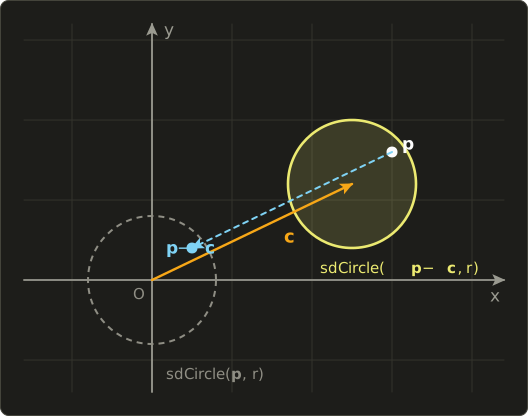
So to move the shape by , we move the coordinates by .
This is the general rule.
If is the transformation we want to apply to the shape, we evaluate the distance function at , using the inverse transformation (linear algebra chapter 10).
The inverse of "move by " is "move by ", which is why we wrote p - c all through chapter 6.
To see the direction clearly, I'll use an L-shaped piece made from two boxes, so we can tell up from down and left from right:
// an L shape (so we can see which way it points)
float sdL(vec2 p) {
  return min(sdBox(p - vec2(0.0, 0.1), vec2(0.05, 0.25)),
             sdBox(p - vec2(0.15, -0.1), vec2(0.2, 0.05)));
}

void main() {
  vec2 p = (2.0 * gl_FragCoord.xy - uResolution) / uResolution.y;
  vec3 color = vec3(0.10, 0.10, 0.12);

  vec2 c = vec2(0.6, 0.3);              // where we want the shape
  float d0 = sdL(p);                    // original position
  float d = sdL(p - c);                 // subtract c from the coordinates: the shape moves by +c

  color = mix(color, vec3(0.45), outline(d0));
  color = mix(color, vec3(1.00, 0.75, 0.20), fill(d));
  out_color = vec4(color, 1.0);
}
outline is the helper from chapter 6.9: 1.0 - smoothstep(0.0, 1.5 * fwidth(d), abs(d)).

Make c depend on time and the shape moves.
vec2 c = 0.5 * vec2(cos(uTime), sin(uTime)); sends it around a circle of radius 0.5 once every seconds.
7.2 Rotation
The rotation matrix from linear algebra chapter 8 rotates a point counter-clockwise by the angle :
7.2.1 Building a mat2
GLSL has a 2×2 matrix type, mat2.
Its constructor takes the four numbers column by column, not row by row (GLSL matrices are column-major, as we saw in chapter 2).
The first column of is and the second is , so:
// rotation matrix (angle a in radians, counter-clockwise); mat2 takes its values column by column
mat2 rot(float a) {
  float c = cos(a), s = sin(a);
  return mat2(c, s, -s, c);  // first column (c, s), second column (-s, c)
}
If you write it the way it looks on paper, mat2(c, -s, s, c), you get the transpose, which rotates the other way.
This is one of the most common GLSL bugs, and it is easy to miss because the result is still a rotation.
M * v is the real matrix–vector product (linear algebra chapter 6).
Let me check with ( radians), where and , applied to :
The point on the x axis turns to the y axis: a quarter turn counter-clockwise.
In code, rot(1.5708) * vec2(1.0, 0.0) gives vec2(0.0, 1.0) (up to rounding).
7.2.2 Rotating the coordinates rotates the shape the other way
Now the inverse rule again.
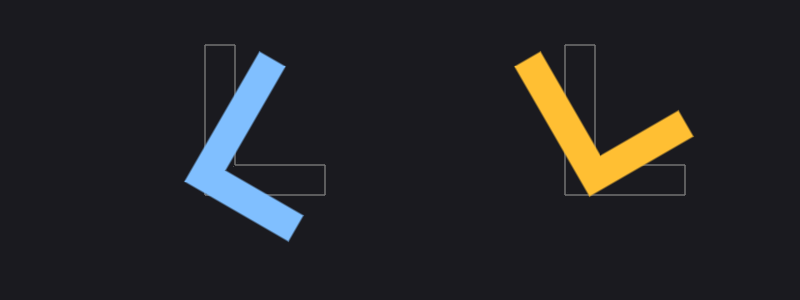
rot(a) * p rotates the coordinates counter-clockwise, so the shape turns clockwise.
To turn the shape counter-clockwise by a, use the inverse rotation, rot(-a):
  float a = 0.5236;                     // 30 degrees
  vec2 pl = p - vec2(-0.6, 0.0);
  vec2 pr = p - vec2(0.6, 0.0);
  float d0 = min(sdL(pl), sdL(pr));     // before rotating
  float d1 = sdL(rot(a) * pl);          // left: rot(a) on the coordinates, turns clockwise
  float d2 = sdL(rot(-a) * pr);         // right: rot(-a), turns counter-clockwise
You will also often see p * rot(a) in shader code.
In GLSL, a vector on the left of a matrix is treated as a row vector, and v * M equals transpose(M) * v.
For a rotation the transpose is the inverse (linear algebra chapter 10), so p * rot(a) is the same as rot(-a) * p.
Both are fine; I'll write rot(-a) * p because it says what it means.
Rotations always turn around the origin of the coordinates we give them.
To spin a shape around its own centre, it must be centred at the origin of its own coordinates first, which brings us to combining transformations (7.4).
7.3 Scaling
To make a shape times bigger, the inverse rule says: divide the coordinates by .
But there is a catch that rotation and translation did not have.
Take a circle of radius 0.2, scaled by , so it should become a circle of radius 0.4.
At the point :
The edge is in the right place, but the distance is measured in the small shape's units.
Every distance in the scaled world is times larger, so we multiply back:
Does it matter?
For a plain fill with our fill helper, hardly: fwidth measures how d really changes per pixel, so the edge stays one pixel wide either way.
But everything that uses the distance as a length breaks: outlines, rounding, glows, shadows.
Here is a ring of thickness 0.04 (abs(d) - 0.02) on a scaled circle, without and with the correction:
  float s = 2.0;
  vec2 pl = p - vec2(-0.65, 0.0);
  vec2 pr = p - vec2(0.65, 0.0);

  float dl = abs(sdCircle(pl / s, 0.2)) - 0.02;      // left: not corrected, twice as thick
  float dr = abs(sdCircle(pr / s, 0.2) * s) - 0.02;  // right: multiply the distance by s

Non-uniform scaling (different factors in x and y, p / vec2(sx, sy)) turns a circle into an ellipse, but there is no single factor to multiply back with, because distances are stretched differently in different directions.
Multiplying by min(sx, sy) gives a distance that is never too large, which is usually good enough for 2D drawing.
Exact ellipse distances are surprisingly hard; for most uses the approximation is fine.
7.4 Combining transformations: order matters
In linear algebra we wrote a transformation as a product like : first rotate, then translate (chapter 7 and chapter 9).
To draw the shape we need the inverse, and the inverse of a product is the product of the inverses in reverse order:
Read right to left: first undo the translation (subtract ), then undo the rotation (rotate by ).
In code: rot(-a) * (p - c).
The shape spins in place around .
The other order, (first move the shape away from the origin, then rotate everything around the origin), has the inverse : rot(-a) * p - c.
Now the shape travels around the origin in a circle, like a planet in orbit.
This shader draws both, eight times each at angles 45° apart, with later copies brighter:
  vec2 c = vec2(0.35, 0.0);
  vec2 pl = p - vec2(-0.75, 0.0);
  vec2 pr = p - vec2(0.6, 0.0);

  // draw at 8 angles, newer copies brighter
  for (int i = 0; i < 8; i++) {
    float a = float(i) * 0.7854;              // 45 degrees each
    float k = 0.3 + 0.7 * float(i) / 7.0;
    float dl = sdL(rot(-a) * (pl - c) * 2.0) / 2.0;   // left: rotate, then move: spins in place
    float dr = sdL((rot(-a) * pr - c) * 2.0) / 2.0;   // right: move, then rotate: orbits the origin
    color = mix(color, vec3(0.50, 0.75, 1.00) * k, fill(dl));
    color = mix(color, vec3(1.00, 0.75, 0.20) * k, fill(dr));
  }
  // the centres of rotation
  color = mix(color, vec3(1.0), fill(min(sdCircle(pl - c, 0.02), sdCircle(pr, 0.02))));
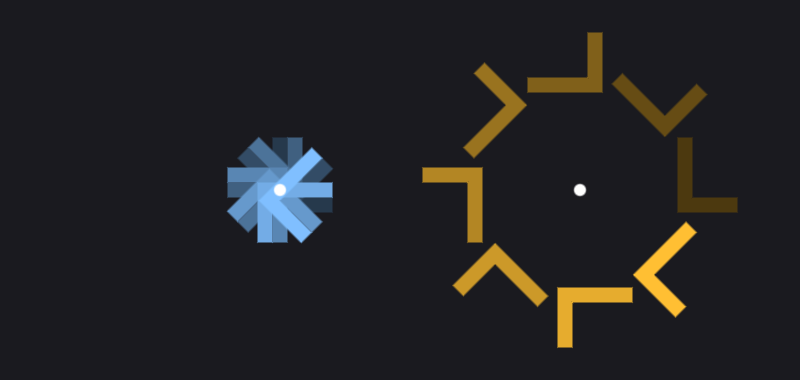
The * 2.0 and / 2.0 are a scale by one half, using the rule from 7.3 with : divide the coordinates by 0.5 (multiply by 2) and multiply the distance by 0.5 (divide by 2).
float(i) converts the loop counter to a float. Desktop GLSL would also convert it automatically (chapter 2), but writing the conversion keeps the shader valid in GLSL ES, which never converts.
Replace float(i) * 0.7854 with uTime and drop the loop, and you have a spinning shape and an orbiting shape.
In general, when you describe a movement in words ("scale it, rotate it, then move it there"), the code applies the inverse steps in the opposite order: rot(-a) * (p - c) / s, and the distance is multiplied by s at the end.
7.5 Repetition: floor and fract
Here is where coordinate tricks become really powerful.
Instead of drawing a shape many times, we fold the coordinates so that every part of the screen thinks it is near the origin.
7.5.1 floor and fract
floor(x): the largest whole number that is not larger than .floor(2.7)= 2,floor(-0.3)= −1.fract(x): the part after the decimal point, . It is always in .fract(2.7)= 0.7,fract(-0.3)= 0.7 (because ).
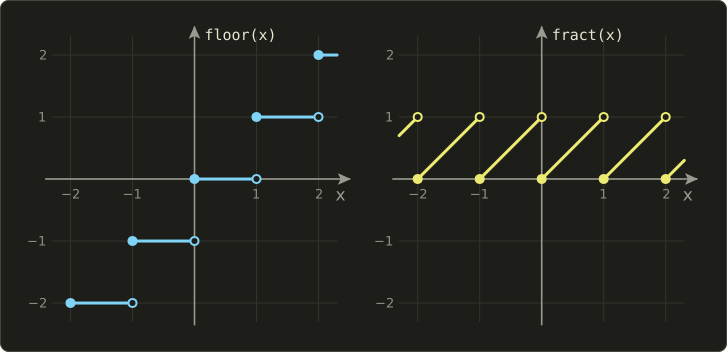
Both work component-wise on vectors.
So for a point q, floor(q) is the number of the grid cell it is in, and fract(q) is its position inside that cell.
7.5.2 A grid of shapes
Scale the coordinates by so that one unit holds cells, split into cell number and position in the cell, and centre the cell's position (subtract 0.5, so it goes from −0.5 to 0.5):
  float n = 4.0;              // 4 cells per unit (8 cells from bottom to top)
  vec2 q = p * n;             // one cell = one unit
  vec2 id = floor(q);         // the cell number (whole numbers)
  vec2 f = fract(q) - 0.5;    // position inside the cell (-0.5 to 0.5)
A worked example with :
The point is in cell (1, −1), towards that cell's lower left corner.
Every cell now has its own little coordinate system with the origin in its centre, so sdCircle(f, r) draws a circle in every cell at once.
The distance is in cell units, so by the scaling rule we divide it by to get back to p units.
The cell number id is the same for every pixel in a cell, so we can use it to give each cell its own colour and size:
// fill without fwidth (at the seams of fract the difference to the neighbour pixel is meaningless)
float fillPx(float d) {
  float px = 2.0 / uResolution.y;
  return 1.0 - smoothstep(-px, px, d);
}

void main() {
  vec2 p = (2.0 * gl_FragCoord.xy - uResolution) / uResolution.y;
  vec3 color = vec3(0.10, 0.10, 0.12);

  float n = 4.0;              // 4 cells per unit (8 cells from bottom to top)
  vec2 q = p * n;             // one cell = one unit
  vec2 id = floor(q);         // the cell number (whole numbers)
  vec2 f = fract(q) - 0.5;    // position inside the cell (-0.5 to 0.5)

  // a different colour and size for every cell
  vec3 cellColor = 0.5 + 0.5 * cos(6.2832 * (id.x * 0.13 + id.y * 0.29) + vec3(0.0, 2.0, 4.0));
  float r = 0.25 + 0.15 * sin(id.x * 1.7 + id.y * 2.3);
  float d = sdCircle(f, r) / n;   // back from cell units to p units

  color = mix(color, cellColor, fillPx(d));
  // the cell borders
  vec2 g = abs(f);
  float grid = 0.5 - max(g.x, g.y);
  color = mix(color, vec3(0.3), fillPx(abs(grid / n) - 0.002) * 0.6);
  out_color = vec4(color, 1.0);
}
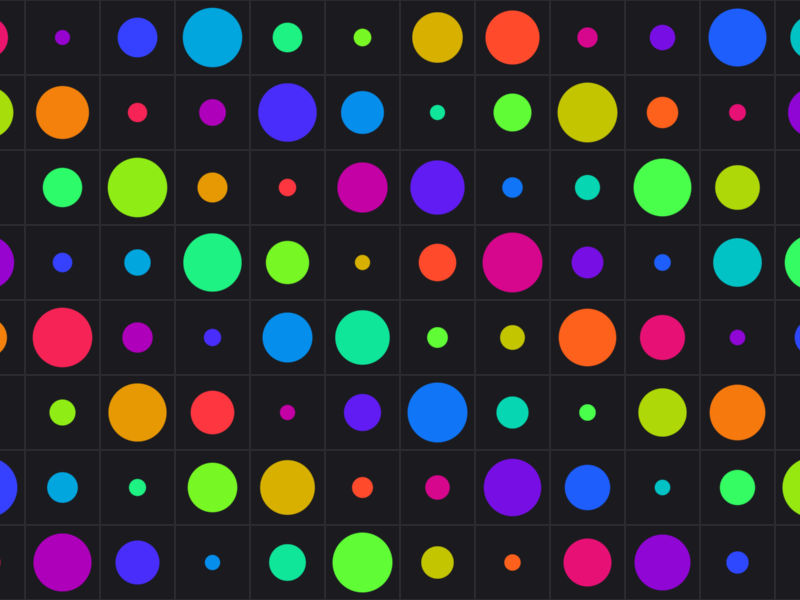
The colour formula 0.5 + 0.5 * cos(6.2832 * t + vec3(0.0, 2.0, 4.0)) is the same cosine palette as in chapter 5's playground: as t changes, the red, green and blue cosines are out of step, so it runs through the rainbow.
Mixing id.x and id.y with different factors gives every cell a different t.
It is not random (chapter 8 does real randomness), but it is varied enough to look interesting.
The grid lines use the box trick from chapter 6: max(g.x, g.y) is how far the point is from the cell centre in the "box" sense, so 0.5 - max(g.x, g.y) is the distance to the cell's border.
7.5.3 A pitfall: fwidth at the seams
Why fillPx instead of our fill from chapter 6?
fwidth compares a value with the neighbouring pixel.
At the border between two cells, fract jumps from almost 1 back to 0, and id changes.
In this example the circle radius depends on id, so the distance jumps from one cell to the next, fwidth reports a huge change, and fill blurs the edge over many pixels.
The result is a faint coloured line along the cell borders.
Whenever a value jumps (at fract, floor, mod seams), measure the pixel size directly instead, as fillPx does with 2.0 / uResolution.y.
This only works because d is converted back to p units; that is one more reason to always divide by .
One more limit of repetition: each pixel only knows its own cell.
A shape that sticks out of its cell is cut off at the border, because the neighbouring cells never draw it.
Keep shapes inside their cells, or check the neighbouring cells too (we will do that for Voronoi noise in chapter 8).
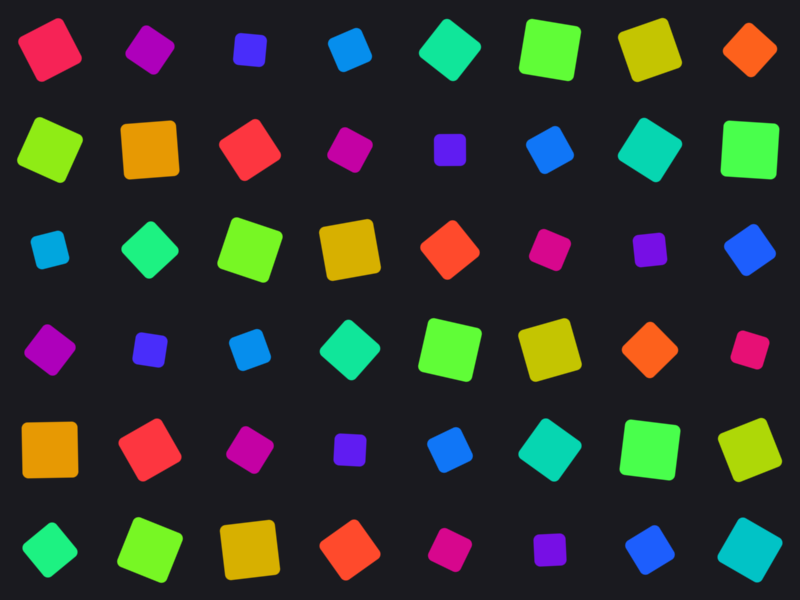
Patterns get much livelier with time.
Here each cell holds a rounded square that turns and breathes with its own phase, rot(-(uTime * 1.5 + phase)) * f, where phase = id.x * 0.5 + id.y * 0.9:
7.6 mod and the checkerboard
mod(x, y) is the remainder of divided by , defined as:
For positive numbers it is the remainder you know: mod(7.0, 3.0) = .
For negative numbers it differs from C's fmod.
GLSL's mod(-1.0, 2.0) is , always between 0 and , while C's fmod(-1.0, 2.0) is −1.
For patterns, GLSL's behaviour is exactly what we want: the pattern continues seamlessly into negative coordinates.
A checkerboard is the cell number's parity: if id.x + id.y is even the cell is dark, if it is odd the cell is light.
void main() {
  vec2 p = (2.0 * gl_FragCoord.xy - uResolution) / uResolution.y;

  vec2 id = floor(p * 4.0);
  float checker = mod(id.x + id.y, 2.0);   // 0, 1, 0, 1, ...
  vec3 color = mix(vec3(0.15, 0.15, 0.18), vec3(0.85, 0.80, 0.70), checker);
  out_color = vec4(color, 1.0);
}
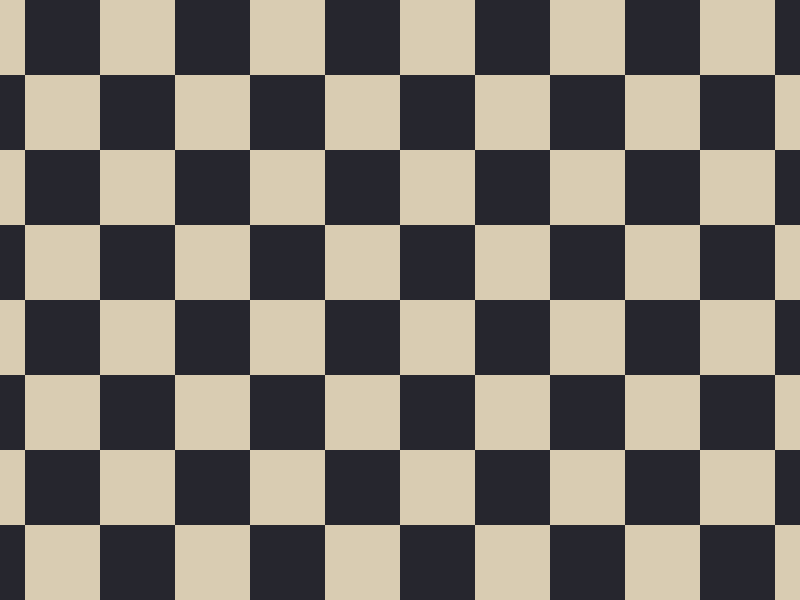
Notice that the pattern runs smoothly across the centre of the window, where the coordinates change sign.
With C's fmod the cells left of and below the centre would get the wrong colour.
7.7 Bricks
A brick wall is a grid where every other row is shifted by half a brick.
We find the row first, shift x for odd rows, and only then split into cells:
void main() {
  vec2 p = (2.0 * gl_FragCoord.xy - uResolution) / uResolution.y;

  vec2 size = vec2(0.4, 0.2);          // size of one brick
  vec2 q = p / size;                   // one brick = one unit
  float row = floor(q.y);
  q.x += 0.5 * mod(row, 2.0);          // shift every other row by half a brick
  vec2 id = floor(q);
  vec2 f = (fract(q) - 0.5) * size;    // position inside the brick (in p units)

  float d = sdRoundBox(f, size * 0.5 - 0.012, 0.02);         // a bit smaller for the mortar
  float shade = 0.85 + 0.15 * cos(id.x * 2.7 + id.y * 5.1);  // brightness per brick
  vec3 brick = vec3(0.70, 0.32, 0.22) * shade;
  vec3 mortar = vec3(0.55, 0.53, 0.50);
  vec3 color = mix(mortar, brick, fill(d));
  out_color = vec4(color, 1.0);
}
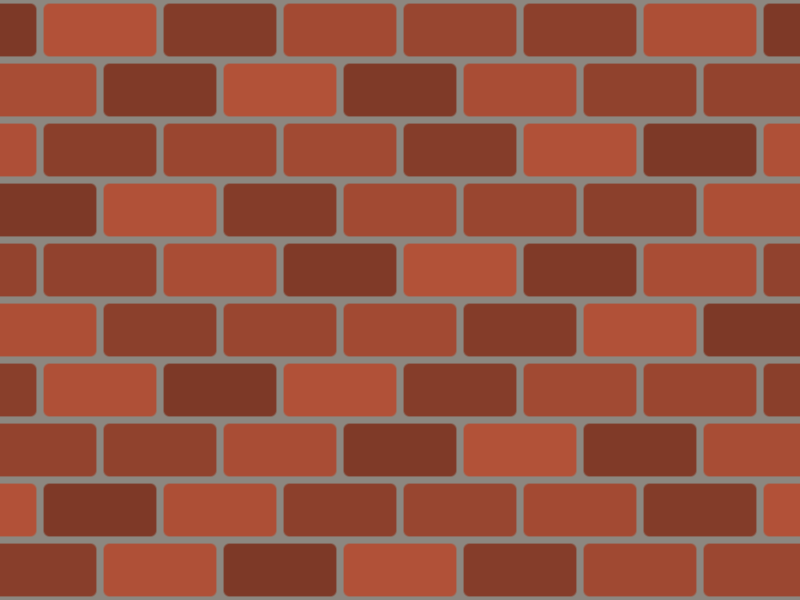
Here the cells are not square, so instead of dividing the distance afterwards, I multiply the position inside the cell back by size and draw the brick in p units directly.
Each brick is a rounded box slightly smaller than its cell, and the gap is the mortar.
Because every brick has the same size, the distance is continuous across the seams, so plain fill works here.
7.8 Mirror symmetry with abs
abs folds space.
vec2(abs(p.x), p.y) maps the left half of the screen onto the right half, so whatever we draw on the right appears mirrored on the left.
abs(p) folds both axes, giving four copies.
We already used this inside sdBox, where folding into one quarter meant we only had to handle one corner.
float sdPetal(vec2 p) {
  float d = sdSegment(p, vec2(0.15, 0.1), vec2(0.6, 0.5)) - 0.07;
  return min(d, sdCircle(p - vec2(0.75, 0.2), 0.12));
}

void main() {
  vec2 p = (2.0 * gl_FragCoord.xy - uResolution) / uResolution.y;
  vec3 color = vec3(0.10, 0.10, 0.12);
  float d0 = sdPetal(p);                       // the original shape
  float d = sdPetal(vec2(abs(p.x), p.y));      // mirror x
  color = mix(color, vec3(1.00, 0.75, 0.20), fill(d));
  color = mix(color, vec3(0.95, 0.35, 0.35), fill(abs(d0) - 0.006));
  out_color = vec4(color, 1.0);
}
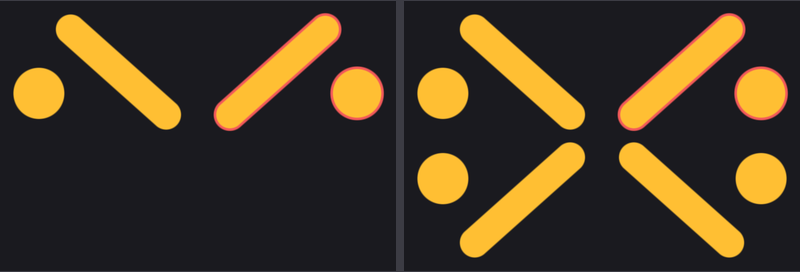
The left picture uses vec2(abs(p.x), p.y), the right one abs(p).
Faces, logos, snowflakes and ornaments are full of symmetry, and every fold halves the work.
7.9 Polar coordinates
Grids repeat along x and y.
For things that repeat around a centre (flowers, wheels, clock faces, radar screens) we describe a point by its distance from the centre and its angle instead:
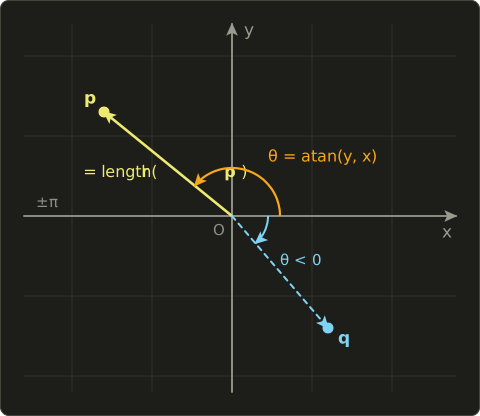
GLSL's atan has two forms.
atan(y, x) with two arguments (C calls it atan2) returns the full angle from −π to π, measured counter-clockwise from the positive x axis; it is undefined only when both arguments are 0.
atan(t) with one argument returns an angle between and and cannot tell opposite directions apart, so for polar coordinates always use the two-argument form.
Showing the angle as a colour and the radius as stripes:
void main() {
  vec2 p = (2.0 * gl_FragCoord.xy - uResolution) / uResolution.y;

  float r = length(p);            // distance from the centre
  float a = atan(p.y, p.x);       // angle (-pi to pi)

  vec3 color = 0.5 + 0.5 * cos(a + vec3(0.0, 2.0, 4.0));   // hue from the angle
  color *= 0.75 + 0.25 * cos(62.83 * r);                  // a stripe every 0.1 of radius
  out_color = vec4(color, 1.0);
}
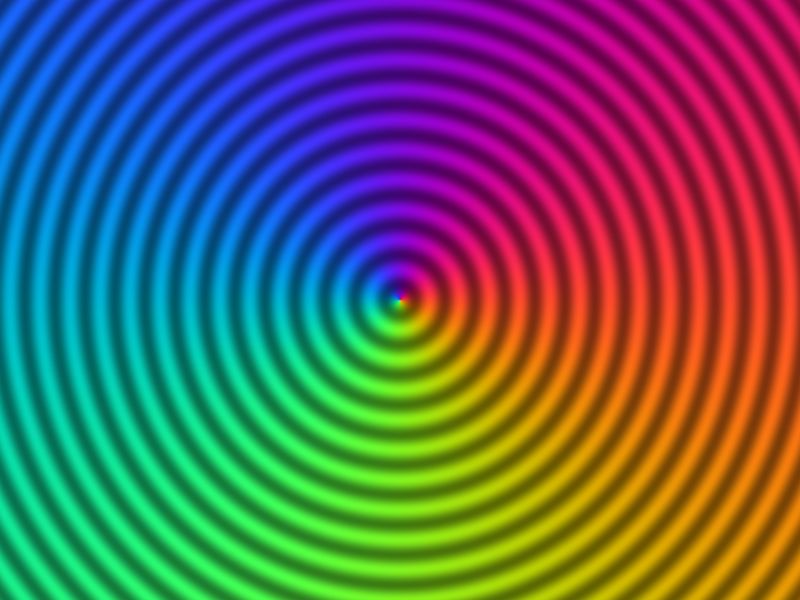
The angle jumps from π to −π on the left side of the centre, but the colour has no seam there, because the cosine has a period of .
Keep this in mind: anything you compute from should be periodic with , or it will show a seam along the negative x axis.
7.9.1 Flowers
A circle has a constant radius.
Make the radius depend on the angle and the circle grows petals:
With the radius goes up and down five times around the circle.
is periodic with for whole numbers , so there is no seam.
// flower: a circle whose radius changes with the angle (not an exact distance, so scale it down)
float sdFlower(vec2 p, float petals, float r, float amp) {
  float a = atan(p.y, p.x);
  return (length(p) - (r + amp * cos(petals * a))) * 0.5;
}
This is not an exact distance: between the petals the value changes faster than the real distance, about twice as fast for these sizes.
Multiplying by 0.5 brings it back to roughly the right scale, so outlines and glows get about the right width (and in raymarching, chapter 14, an overestimated distance would make rays overshoot).
fill does not care, because fwidth measures whatever slope the function has.
7.9.2 Angular repetition
fract repeats along a line; for repetition around a circle we split the full turn into equal sectors, find which sector the point is in, and rotate it back into the first sector:
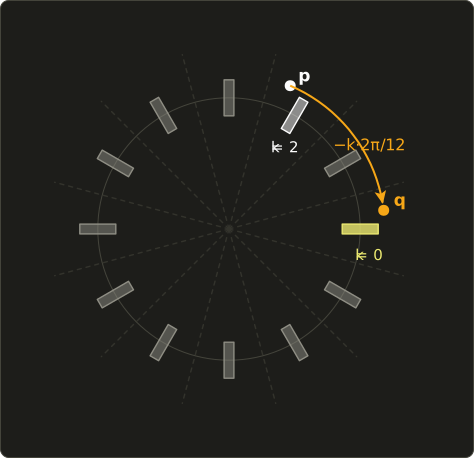
Adding before floor rounds to the nearest sector, so sector 0 is centred on the x axis instead of starting there.
A worked example with (sectors of 30°) and a point at 67°: , so , and rotating by brings the point to 7°, right next to the first tick.
Every pixel ends up near sector 0, so one sdBox on the x axis draws all 12 ticks:
  // right: 12 ticks by angular repetition
  vec2 q = p - vec2(0.65, 0.0);
  float sector = 6.2832 / 12.0;                       // angle of one sector (30 degrees)
  float a = atan(q.y, q.x);
  float k = floor(a / sector + 0.5);                  // number of the nearest sector
  vec2 r = rot(-k * sector) * q;                      // rotate the sector's centre onto the x axis
  float tick = sdBox(r - vec2(0.45, 0.0), vec2(0.07, 0.02));
  color = mix(color, vec3(1.00, 0.75, 0.20), fill(tick));
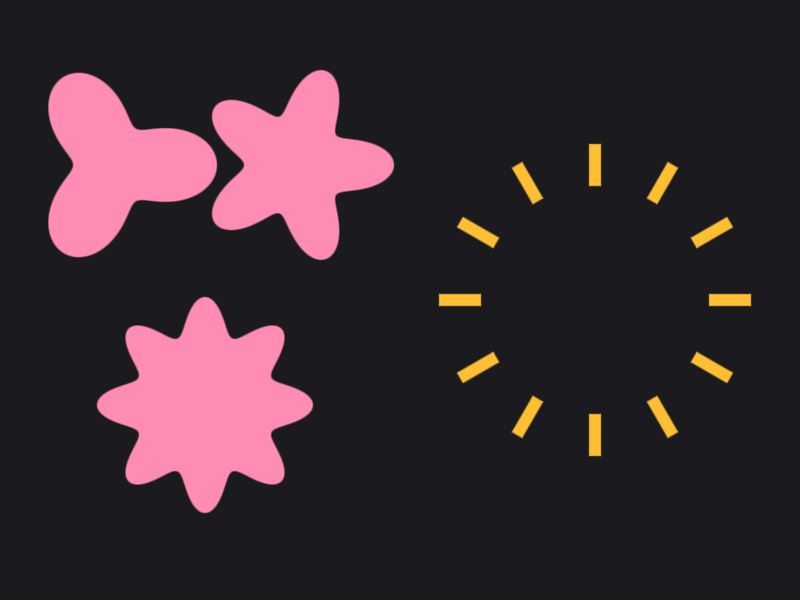
The left side draws the flowers with sdFlower(p - centre, 3.0, 0.24, 0.1), (5.0, 0.25, 0.08) and (8.0, 0.3, 0.06).
7.10 Putting it together: a wall clock
Our final playground for this chapter is a clock that shows real seconds since you started the tester, starting at 10:10 (the time watch adverts always show).
It uses nearly everything from this chapter: bricks for the wall, angular repetition for the 60 + 12 ticks, rotation for the hands, and fract to keep the angles small.
Here is the new part of playground.glsl; the chapter 6 functions above it stay as they were, only sdHead from the character is removed.
// ---- chapter 7: transforming and repeating coordinates ----

// rotation matrix (angle a in radians, counter-clockwise); mat2 takes its values column by column
mat2 rot(float a) {
  float c = cos(a), s = sin(a);
  return mat2(c, s, -s, c);  // first column (c, s), second column (-s, c)
}

// fill without fwidth (at the seams of fract the difference to the neighbour pixel is meaningless)
float fillPx(float d) {
  float px = 2.0 / uResolution.y;
  return 1.0 - smoothstep(-px, px, d);
}

// a brick wall (the tiling from this chapter)
vec3 bricks(vec2 p) {
  vec2 size = vec2(0.4, 0.2);
  vec2 q = p / size;
  q.x += 0.5 * mod(floor(q.y), 2.0);   // shift every other row by half a brick
  vec2 id = floor(q);
  vec2 f = (fract(q) - 0.5) * size;
  float d = sdRoundBox(f, size * 0.5 - 0.012, 0.02);
  float shade = 0.85 + 0.15 * cos(id.x * 2.7 + id.y * 5.1);
  return mix(vec3(0.55, 0.53, 0.50), vec3(0.70, 0.32, 0.22) * shade, fillPx(d));
}

// angular repetition: rotate p to the centre of the nearest sector (on the x axis)
vec2 repeatAngle(vec2 p, float count) {
  float sector = 6.2832 / count;
  float k = floor(atan(p.y, p.x) / sector + 0.5);
  return rot(-k * sector) * p;
}

// a hand: a capsule pointing to 12 o'clock, turned clockwise
// rotating the coordinates by rot(+a) turns the shape by -a, which is clockwise
float sdHand(vec2 p, float turn, float back, float len, float width) {
  vec2 q = rot(turn * 6.2832) * p;
  return sdSegment(q, vec2(0.0, -back), vec2(0.0, len)) - width;
}

// hour and minute hands as one distance (also used for the shadow)
float sdHands(vec2 p, float t) {
  float h = sdHand(p, fract(t / 43200.0), 0.08, 0.36, 0.028);   // hour hand: one turn in 12 hours
  float m = sdHand(p, fract(t / 3600.0), 0.10, 0.54, 0.018);    // minute hand: one turn per hour
  return min(h, m);
}

void main() {
  // origin in the centre, y from -1 to 1 (chapter 5)
  vec2 p = (2.0 * gl_FragCoord.xy - uResolution) / uResolution.y;

  // the time in seconds, starting at 10:10:00
  float t = uTime + 10.0 * 3600.0 + 10.0 * 60.0;

  // background: a darkened brick wall
  vec3 color = bricks(p) * 0.55;

  // the clock's shadow
  float shadow = sdCircle(p - vec2(0.04, -0.06), 0.8);
  color *= 1.0 - 0.6 * (1.0 - smoothstep(-0.05, 0.1, shadow));

  // rim and dial
  float rim = sdCircle(p, 0.8);
  float face = sdCircle(p, 0.72);
  color = paint(color, vec3(0.20, 0.18, 0.22), rim);
  color = paint(color, vec3(0.96, 0.93, 0.85), face);

  // ticks: 60 small ones and 12 large ones
  float minuteTick = sdBox(repeatAngle(p, 60.0) - vec2(0.65, 0.0), vec2(0.025, 0.004));
  float hourTick = sdBox(repeatAngle(p, 12.0) - vec2(0.62, 0.0), vec2(0.06, 0.014));
  color = paint(color, vec3(0.25), minuteTick);
  color = paint(color, vec3(0.12), hourTick);

  // shadow of the hands, then the hour and minute hands
  color *= 1.0 - 0.3 * (1.0 - smoothstep(-0.02, 0.03, sdHands(p - vec2(0.015, -0.025), t)));
  color = paint(color, vec3(0.12, 0.12, 0.15), sdHands(p, t));

  // second hand: jumps once per second
  float second = sdHand(p, fract(floor(t) / 60.0), 0.15, 0.6, 0.006);
  second = min(second, sdCircle(p, 0.035));
  color = paint(color, vec3(0.85, 0.15, 0.15), second);

  out_color = vec4(color, 1.0);
}
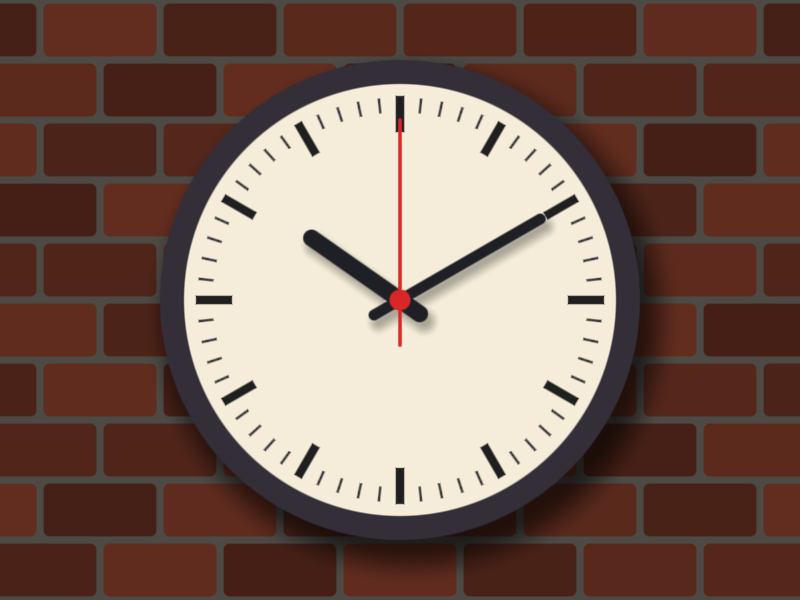
The interesting details:
- Clockwise hands. Our rotation is counter-clockwise, but clocks turn the other way. The inverse rule solves this for free:
rot(+a)on the coordinates turns the shape by , which is clockwise. Each hand is a capsule pointing up (12 o'clock), andturnis the fraction of a full turn: 0.25 is 3 o'clock, 0.5 is 6 o'clock. - The fractions. The hour hand turns once in 12 hours = 43200 seconds, so its fraction is ; the minute hand turns once per 3600 seconds. At the start, : of a turn is 10.17 hours on the dial, and , whose fractional part of a turn is 10 minutes. 10:10.
- Why fract. A
floathas about 7 significant digits.cosandsinof a huge angle lose precision, and after the tester has run for a while the hands would start to jitter.fractkeeps the turn between 0 and 1, so the angle never exceeds . Precision is a recurring theme in shaders; in chapter 8 it will bite us again. - The ticking second hand.
floor(t)only changes once per second, so the hand jumps like a real quartz clock. Remove thefloorfor a sweeping hand. - Shadows. Just like the character in chapter 6: the same distance, shifted and blurred with a wide
smoothstep. - Ticks.
repeatAngle(p, 60.0)andrepeatAngle(p, 12.0)each turn 60 or 12 boxes into a singlesdBoxcall. The tick at every sector boundary is the same distance from both sides, so the distance is continuous andfillworks.
7.11 New GLSL features in this chapter
| Feature | What it does |
|---|---|
mat2(a, b, c, d) |
a 2×2 matrix with first column (a, b) and second column (c, d) |
M * v |
matrix times column vector |
v * M |
row vector times matrix, the same as transpose(M) * v |
floor(x) |
the largest whole number not larger than x |
fract(x) |
, always in [0, 1) |
mod(x, y) |
, between 0 and y also for negative x |
atan(y, x) |
angle of the point (x, y) from −π to π |
atan(t) |
arctangent of t, from −π/2 to π/2 |
float(i) |
converts an int to a float |
7.12 How this is used in real games and engines
- Texture tiling and scrolling. The
fracttrick is exactly what the texture hardware does with theGL_REPEATwrap mode (chapter 11): a floor tile, a grass texture or a brick material is repeated by multiplying the texture coordinates. AddinguTimeto them scrolls the texture, which is how many games animate conveyor belts, waterfalls and lava. - Procedural materials. Bricks, tiles, planks and checkerboards in material editors (Unreal's material graph, Blender's shader nodes, Substance Designer) are built from these same nodes: floor, fract, mod, a shape per cell, and the cell id for variation.
- Radial UI. Cooldown timers on ability icons (the sweeping shadow in MMOs and MOBAs), circular health and stamina gauges, radial menus and loading spinners compare
atan(y, x)with a fill fraction. Minimaps rotate their coordinates with exactly ourrot. - Sprites and particles. 2D engines rotate and scale sprites with the same 2×2 matrix, usually in the vertex shader (chapter 13), and particle systems spin each particle with a per-particle angle.
- Kaleidoscopes and symmetry. Mirror and angular repetition are used for kaleidoscope post-effects, magic circles and spell effects in RPGs.
- 3D. In raymarching (chapter 14),
modon 3D coordinates repeats an object infinitely in every direction for the cost of one, the classic demo-scene trick for endless corridors and forests of pillars.
7.13 Summary
- A shader moves the coordinates, not the shape. To transform a shape by , evaluate its distance at .
- Translation:
p - c. Rotation:rot(-a) * p, withmat2(c, s, -s, c)(columns!). Scaling:f(p / s) * s. - Combined transformations apply the inverse steps in reverse order:
rot(-a) * (p - c)spins in place,rot(-a) * p - corbits. floorgives the cell id,fractthe position inside the cell. Use the id for per-cell variation. Divide distances by the scale factor.fwidthfails at seams where values jump; use the pixel size2.0 / uResolution.ythere.modgives checkerboards and alternating rows; unlike C'sfmodit is never negative for a positive divisor.absmirrors,atan(y, x)andlengthgive polar coordinates, and rotating by the nearest sector repeats a shape around a circle.- Keep angles small with
fractto avoid precision loss.
7.14 Challenges
- ★ Compute
floor,fractandmod(x, 3.0)for , and . Then compute the cell id and the centred positionfract(q) - 0.5for with . - ★ Write out the matrix
mat2(0.0, -1.0, 1.0, 0.0)as rows and columns and multiply it by and . Which rotation is it, and does it turn a shape clockwise or counter-clockwise when applied to the coordinates? - ★★ Animate the L shape so that it orbits the centre once every 4 seconds while also spinning around its own corner twice as fast. You should need two
rotcalls and one subtraction, in the right order; check that after 2 seconds the L is on the opposite side of the centre and has made one full spin. - ★★ Draw a hexagonal-looking honeycomb: a grid of circles where every other row is shifted by half a cell (like the bricks) and the rows are cells apart. The circles should touch their six neighbours.
- ★★ Make a loading spinner: 8 dots on a circle using angular repetition, where the brightness of each dot depends on its sector number
kanduTime, so that a bright dot runs around the circle once per second with a fading tail. - ★★ Make the ticks at 12, 3, 6 and 9 o'clock twice as long and red. Change
repeatAngleso that it also returns the sector numberkthrough anout floatparameter (chapter 2), and usemod(k, 3.0)to pick those four sectors. Watch out: withatan, sector 0 is at 3 o'clock, not at 12. - ★★★ Make the clock's second hand sweep smoothly but still "bounce" a little at each second, like some station clocks: use
fract(t)with asmoothstepor a small overshoot curve to move it from one second to the next during the first 0.2 seconds of every second. Explain why the hand must still usefract(... / 60.0)for its turn.
ファイル: a/shader/playground.glsl | b/shader/playground.glsl
| 前 | 新 | ||
|---|---|---|---|
| @@ -45,59 +45,92 @@ float smin(float a, float b, float k) { | |||
| 45 | return mix(b, a, h) - k * h * (1.0 - h); | 45 | return mix(b, a, h) - k * h * (1.0 - h); |
| 46 | } | 46 | } |
| 47 | 47 | ||
| 48 | // 頭:円に2つの耳を滑らかにくっつける | ||
| 49 | float sdHead(vec2 p) { | ||
| 50 | float head = sdCircle(p, 0.6); | ||
| 51 | float earL = sdCircle(p - vec2(-0.45, 0.5), 0.17); | ||
| 52 | float earR = sdCircle(p - vec2(0.45, 0.5), 0.17); | ||
| 53 | return smin(head, min(earL, earR), 0.12); | ||
| 54 | } | ||
| 55 | |||
| 56 | // 図形を色で塗り重ねる | 48 | // 図形を色で塗り重ねる |
| 57 | vec3 paint(vec3 base, vec3 ink, float d) { | 49 | vec3 paint(vec3 base, vec3 ink, float d) { |
| 58 | return mix(base, ink, fill(d)); | 50 | return mix(base, ink, fill(d)); |
| 59 | } | 51 | } |
| 60 | 52 | ||
| 53 | // ---- 第7章:座標の変換と繰り返し ---- | ||
| 54 | |||
| 55 | // 回転行列(角度aはラジアン、反時計回り)。mat2は列毎に値を並べる | ||
| 56 | mat2 rot(float a) { | ||
| 57 | float c = cos(a), s = sin(a); | ||
| 58 | return mat2(c, s, -s, c); // 1列目 (c, s)、2列目 (-s, c) | ||
| 59 | } | ||
| 60 | |||
| 61 | // fwidthを使わない塗り(fractの継ぎ目では隣のピクセルとの差が意味を持たない為) | ||
| 62 | float fillPx(float d) { | ||
| 63 | float px = 2.0 / uResolution.y; | ||
| 64 | return 1.0 - smoothstep(-px, px, d); | ||
| 65 | } | ||
| 66 | |||
| 67 | // レンガの壁(第7章のタイル) | ||
| 68 | vec3 bricks(vec2 p) { | ||
| 69 | vec2 size = vec2(0.4, 0.2); | ||
| 70 | vec2 q = p / size; | ||
| 71 | q.x += 0.5 * mod(floor(q.y), 2.0); // 1段おきに半分ずらす | ||
| 72 | vec2 id = floor(q); | ||
| 73 | vec2 f = (fract(q) - 0.5) * size; | ||
| 74 | float d = sdRoundBox(f, size * 0.5 - 0.012, 0.02); | ||
| 75 | float shade = 0.85 + 0.15 * cos(id.x * 2.7 + id.y * 5.1); | ||
| 76 | return mix(vec3(0.55, 0.53, 0.50), vec3(0.70, 0.32, 0.22) * shade, fillPx(d)); | ||
| 77 | } | ||
| 78 | |||
| 79 | // 角度の繰り返し:pを一番近い区画の中心(x軸上)に回す | ||
| 80 | vec2 repeatAngle(vec2 p, float count) { | ||
| 81 | float sector = 6.2832 / count; | ||
| 82 | float k = floor(atan(p.y, p.x) / sector + 0.5); | ||
| 83 | return rot(-k * sector) * p; | ||
| 84 | } | ||
| 85 | |||
| 86 | // 針:12時の方向を向いたカプセルを、時計回りに回す | ||
| 87 | // 座標をrot(+a)で回すと、図形は-a、つまり時計回りに回る | ||
| 88 | float sdHand(vec2 p, float turn, float back, float len, float width) { | ||
| 89 | vec2 q = rot(turn * 6.2832) * p; | ||
| 90 | return sdSegment(q, vec2(0.0, -back), vec2(0.0, len)) - width; | ||
| 91 | } | ||
| 92 | |||
| 93 | // 時針と分針を1つの距離に(影にも使う) | ||
| 94 | float sdHands(vec2 p, float t) { | ||
| 95 | float h = sdHand(p, fract(t / 43200.0), 0.08, 0.36, 0.028); // 時針:12時間で1周 | ||
| 96 | float m = sdHand(p, fract(t / 3600.0), 0.10, 0.54, 0.018); // 分針:1時間で1周 | ||
| 97 | return min(h, m); | ||
| 98 | } | ||
| 99 | |||
| 61 | void main() { | 100 | void main() { |
| 62 | // 中心が原点、縦が-1〜1になる座標(第5章) | 101 | // 中心が原点、縦が-1〜1になる座標(第5章) |
| 63 | vec2 p = (2.0 * gl_FragCoord.xy - uResolution) / uResolution.y; | 102 | vec2 p = (2.0 * gl_FragCoord.xy - uResolution) / uResolution.y; |
| 64 | vec2 m = (2.0 * uMouse - uResolution) / uResolution.y; // マウスも同じ座標に | 103 | |
| 65 | 104 | // 10時10分0秒から始まる時刻(秒) | |
| 66 | // 背景:縦のグラデーション | 105 | float t = uTime + 10.0 * 3600.0 + 10.0 * 60.0; |
| 67 | vec3 color = mix(vec3(0.16, 0.12, 0.22), vec3(0.08, 0.06, 0.10), p.y * 0.5 + 0.5); | 106 | |
| 68 | 107 | // 背景:少し暗くしたレンガの壁 | |
| 69 | // 影:同じ距離関数をずらして、ぼかして使う | 108 | vec3 color = bricks(p) * 0.55; |
| 70 | float shadow = sdHead(p - vec2(0.05, -0.06)); | 109 | |
| 71 | color *= 1.0 - 0.5 * (1.0 - smoothstep(-0.05, 0.12, shadow)); | 110 | // 時計の影 |
| 72 | 111 | float shadow = sdCircle(p - vec2(0.04, -0.06), 0.8); | |
| 73 | // 頭の塗りと輪郭 | 112 | color *= 1.0 - 0.6 * (1.0 - smoothstep(-0.05, 0.1, shadow)); |
| 74 | float head = sdHead(p); | 113 | |
| 75 | color = paint(color, vec3(1.00, 0.80, 0.30), head); | 114 | // 枠と文字盤 |
| 76 | color = paint(color, vec3(0.35, 0.18, 0.10), abs(head) - 0.012); | 115 | float rim = sdCircle(p, 0.8); |
| 77 | 116 | float face = sdCircle(p, 0.72); | |
| 78 | // ほっぺ:境界を広くぼかした円 | 117 | color = paint(color, vec3(0.20, 0.18, 0.22), rim); |
| 79 | float cheek = min(sdCircle(p - vec2(-0.36, -0.12), 0.09), | 118 | color = paint(color, vec3(0.96, 0.93, 0.85), face); |
| 80 | sdCircle(p - vec2(0.36, -0.12), 0.09)); | 119 | |
| 81 | color = mix(color, vec3(1.0, 0.50, 0.50), 0.6 * (1.0 - smoothstep(-0.04, 0.04, cheek))); | 120 | // 目盛り:60個の小さい物と12個の大きい物 |
| 82 | 121 | float minuteTick = sdBox(repeatAngle(p, 60.0) - vec2(0.65, 0.0), vec2(0.025, 0.004)); | |
| 83 | // 目:縦のカプセル | 122 | float hourTick = sdBox(repeatAngle(p, 12.0) - vec2(0.62, 0.0), vec2(0.06, 0.014)); |
| 84 | vec2 eyeL = vec2(-0.2, 0.12); | 123 | color = paint(color, vec3(0.25), minuteTick); |
| 85 | vec2 eyeR = vec2(0.2, 0.12); | 124 | color = paint(color, vec3(0.12), hourTick); |
| 86 | float eyes = min(sdSegment(p, eyeL - vec2(0.0, 0.06), eyeL + vec2(0.0, 0.06)), | 125 | |
| 87 | sdSegment(p, eyeR - vec2(0.0, 0.06), eyeR + vec2(0.0, 0.06))) - 0.075; | 126 | // 針の影、時針と分針 |
| 88 | color = paint(color, vec3(1.0), eyes); | 127 | color *= 1.0 - 0.3 * (1.0 - smoothstep(-0.02, 0.03, sdHands(p - vec2(0.015, -0.025), t))); |
| 89 | color = paint(color, vec3(0.35, 0.18, 0.10), abs(eyes) - 0.01); | 128 | color = paint(color, vec3(0.12, 0.12, 0.15), sdHands(p, t)); |
| 90 | 129 | ||
| 91 | // 瞳:マウスの方を見る(目の中から出ない様に長さを制限) | 130 | // 秒針:1秒毎にカチッと動く |
| 92 | vec2 look = m - (eyeL + eyeR) * 0.5; | 131 | float second = sdHand(p, fract(floor(t) / 60.0), 0.15, 0.6, 0.006); |
| 93 | look = look / max(length(look), 1.0) * 0.05; | 132 | second = min(second, sdCircle(p, 0.035)); |
| 94 | float pupils = min(sdCircle(p - eyeL - look, 0.04), sdCircle(p - eyeR - look, 0.04)); | 133 | color = paint(color, vec3(0.85, 0.15, 0.15), second); |
| 95 | color = paint(color, vec3(0.12, 0.08, 0.06), pupils); | ||
| 96 | |||
| 97 | // 口:リングの下半分(リングと半平面の積集合) | ||
| 98 | float ring = abs(sdCircle(p - vec2(0.0, 0.02), 0.3)) - 0.022; | ||
| 99 | float below = p.y + 0.12; // y < -0.12 の部分が負 | ||
| 100 | color = paint(color, vec3(0.35, 0.18, 0.10), max(ring, below)); | ||
| 101 | 134 | ||
| 102 | out_color = vec4(color, 1.0); | 135 | out_color = vec4(color, 1.0); |
| 103 | } | 136 | } |
コメント(0)
まだコメントはありません。
ログインするとコメント出来ます。