8. Linear Transformations: Scale, Rotation, Shear and Reflection
We now know what a matrix is (chapter 6) and how to chain matrices together (chapter 7).
But so far our matrices were just random grids of numbers.
In this chapter we build the useful ones: matrices that scale, rotate, shear and mirror things.
These are the building blocks of every model matrix, every spinning coin, every sprite that turns towards the mouse.
The tool we'll use again and again is the key insight from chapter 6: the columns of a matrix are where the basis vectors land.
To build a transformation, we just ask "where should i, j and k go?" and write the answers down as columns.
8.1 What "linear" means
All the transformations in this chapter are linear transformations.
Before any formula, here's the picture.
Draw a square grid on a sheet of rubber, then pull, turn or slant the sheet.
A transformation is linear when, after you're done:
- the origin is still at the origin,
- straight lines are still straight,
- grid lines that were parallel are still parallel, and still evenly spaced.
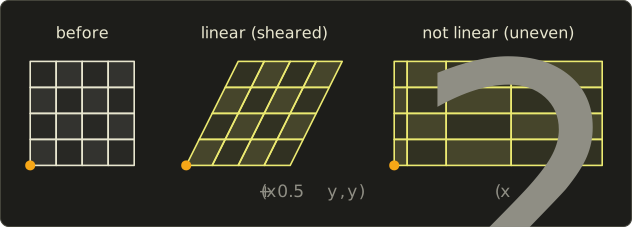
The middle grid was slanted: the squares became parallelograms, but every cell still has the same shape and size as its neighbors.
The grid on the right has straight lines, but the columns get wider to the right.
That kind of uneven stretching can't be done by a matrix.
The formal rules
In math, a transformation is linear when it satisfies two rules for all vectors and all numbers :
In words: it doesn't matter if you add first and transform afterwards, or transform first and add afterwards.
And it doesn't matter if you scale first or transform first.
A side effect of the second rule with : , the origin never moves.
Let's test a few transformations of 2D points .
- is linear. Adding first: . Transforming first: . Same.
- is not linear. The origin moves: . That's a translation, and it gets its own chapter.
- is not linear. , but . That's exactly the uneven grid on the right of the picture.
Every linear transformation is a matrix
Here's why linear transformations and matrices are really the same thing.
Every 3D vector can be written as (chapter 2).
If is linear, the two rules let us pull it apart:
That's a linear combination of three fixed vectors, which is exactly what a matrix times a vector is (view 2 in chapter 6).
So any linear transformation is the matrix whose columns are , and .
And going the other way, every matrix is a linear transformation, because matrix multiplication obeys both rules.
That gives us the recipe for this whole chapter:
To build a linear transformation, decide where i, j and k should go, and write those three vectors as the columns.
8.2 What the formulas are
Here are all the matrices of this chapter in one place.
Don't memorize them; the next section builds each one from scratch.
| Transformation | 2D matrix | What happens to i and j |
|---|---|---|
| Scale | stretched along their own axis | |
| Rotation by | turned counter-clockwise by | |
| Shear in x | i stays, j leans over by k | |
| Mirror across the y axis | i flips, j stays | |
| Flatten onto the x axis | i stays, j collapses to zero |
In 3D, scaling and the three rotations about the coordinate axes are:
All angles are in radians, and positive angles turn counter-clockwise when you look from the positive end of the axis towards the origin (the right-hand rule).
Look closely at : its minus sign is in the bottom row, not the top.
That's not a typo, and section 8.3 explains why.
8.3 How it works
Scale
To make something twice as wide, we want to become and to stay .
In general, a scale by along x and along y sends to and to .
Those are the columns, so the numbers end up on the diagonal:
Each component is simply multiplied by its own factor.
With and , the point goes to .
- When all factors are the same, it's a uniform scale: the object gets bigger or smaller but keeps its shape. It's the same as multiplying the vector by a single number (chapter 2).
- When the factors differ, it's a non-uniform scale: the object gets squashed or stretched.
- A factor of 1 leaves that axis alone, so the identity matrix is a scale by .
- A factor between 0 and 1 shrinks, a factor above 1 grows. Factors of 0 and negative factors are special; we'll meet them in a moment.
Rotation in 2D
Now let's rotate by an angle , counter-clockwise.
Again we only need to answer: where do and go?
sits on the unit circle at angle 0.
Turning it by moves it to the point on the unit circle at angle , and from chapter 1 we know that point is .
sits on the unit circle at 90°.
Turning it by moves it to angle .
There's a neat shortcut for that point: in chapter 7 we saw that a quarter turn sends to .
always stays a quarter turn ahead of , so its new position is the quarter turn of , which is .
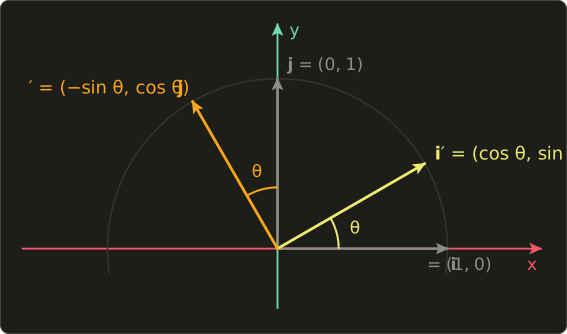
Write those as columns and we have the 2D rotation matrix:
Let's check it with , which is radians.
and , so the matrix is : exactly the quarter turn we built by hand in chapter 7.
The point goes to .
Now a less friendly angle, ( radians), applied to .
From the table in chapter 1, and .
So becomes about .
A rotation should never change the length of a vector, so let's check that with chapter 3:
Same length, just pointing somewhere else.
(The tiny difference in the last digit is only from rounding 0.866.)
Rotation in 3D: about X, Y and Z
In 3D we can rotate around any line through the origin, called the axis of rotation.
The three easiest axes are the coordinate axes themselves, and each of those rotations is just the 2D rotation applied to the other two coordinates.
Rotation about Z.
Turning around the z axis moves points within the xy plane and leaves z alone.
and turn exactly like in 2D, and (the axis itself) stays put.
That's the 2D matrix with an extra row and column for z:
Rotation about X.
Now x stays put, and y and z turn.
The rule is the same as before, with y playing the role of x and z playing the role of y: a positive turn takes towards .
So goes to and goes to :
Rotation about Y.
Here y stays put, and z and x turn.
And here's the catch.
The axes follow a cycle, x then y then z then back to x:
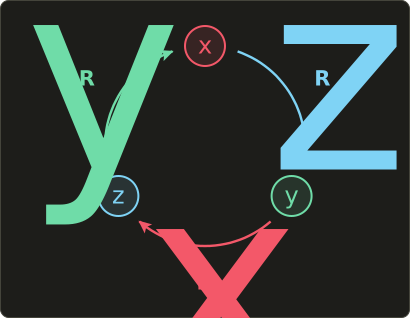
For the Z rotation, x turns toward y.
For the X rotation, y turns toward z.
Following the cycle, for the Y rotation it's z that turns toward x, not the other way around.
So a positive Y rotation sends to , and to .
Write those as columns 3 and 1:
The minus sign landed in the bottom-left corner instead of the top-right, simply because we write the matrix in x, y, z order but the turn goes from z to x.
This trips up everyone at some point, and a wrong sign here makes objects spin the wrong way around Y.
The functions rotateX, rotateY and rotateZ in our header use exactly these three matrices.
Let's check with the right-hand rule.
Point your right thumb along +y (up) and curl your fingers: they go from +z towards +x.
Equivalently, look down from above, from +y towards the origin:
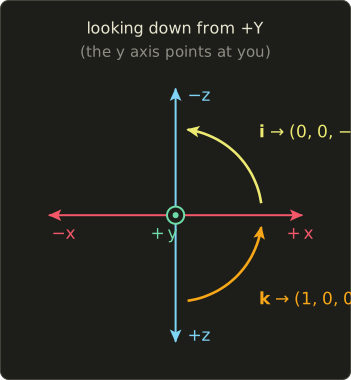
A positive rotation is counter-clockwise in this picture.
+x (right) turns towards -z (up), and +z (down) turns towards +x (right).
With (, ), is:
Its first column says , and its third column says , matching the picture.
A full example, rotating by 90° about Y:
The height (y = 2) didn't change, as it shouldn't for a turn around the vertical axis.
Rotations about other, slanted axes are possible too; we'll build the general formula in chapter 13.
Shear
A shear slides layers over each other, like pushing the top of a deck of cards sideways.
We keep where it is, and make lean over by some amount :
The higher a point is, the further it slides: x moves by times the height.
With , the point goes to , and the top corners of the unit square and go to and .
The bottom edge stays where it was.
This is the slanted grid from section 8.1, and it's the same kind of matrix as the one we drew in chapter 6 (that one also stretched x by 2).
In 3D there are six possible shears (each axis can lean in the direction of each other axis), but they all look like this: an identity matrix with one extra number off the diagonal.
Reflection
A reflection (or mirror) flips space over, like looking in a mirror.
The easiest way to get one is a scale with a negative factor.
A factor of on x sends to and keeps :
That's a mirror across the y axis: left and right swap.
In 3D, mirrors across the plane formed by the y and z axes.
Other mirrors are just as easy to build from columns.
Mirroring across the diagonal line swaps the two axes: and :
Remember the reflection formula from chapter 4, ?
It mirrors a vector across the line (or plane) that is perpendicular to the unit normal , and it's linear too.
So it has a matrix, and we can find it the usual way: reflect and .
Take , so the mirror line is .
Check: goes to , which is exactly its mirror image across the line .
A mirror does something no rotation can: it turns a left hand into a right hand.
Counter-clockwise becomes clockwise.
Keep that in mind; it matters a lot for triangles in section 8.4.
Flattening (projection onto an axis)
What if a scale factor is 0?
Then that axis collapses completely.
The matrix below keeps x and z but throws away y:
Every point is pressed flat onto the ground plane, straight down.
That's a projection: a 3D object becomes a flat shape.
It's still linear (the grid stays even, it just has zero height now), but something new has happened: information is lost.
After flattening, and both end up at , and there's no way to know which one it was.
Such a matrix can't be undone; chapter 10 shows how to detect that with a single number.
The projections that make 3D look 3D on a screen are more clever than this, and they're chapter 12.
Combining transformations
Because every one of these is a matrix, we can chain them with the matrix product from chapter 7, read right to left.
Take a scale by 2 along x, , and a 90° turn about Z, , and apply them to :
- : scale first, , then rotate, .
- : rotate first, , then scale, , because y isn't scaled.
Different results, exactly like the rectangles in chapter 7.
When you scale a model, you almost always want the scale to happen in the model's own axes, so the scale goes first (rightmost): .
Combining is also how to build new transformations from old ones.
Rotating twice by is .
Mirroring twice in the same mirror gives back the identity.
And a mirror followed by a rotation is still a mirror (it still swaps left and right).
What is NOT linear: translation
There's one transformation every game needs that we haven't built: moving things, .
It's not linear, because it moves the origin: .
And since any matrix times the zero vector is the zero vector, no 3 × 3 matrix can ever do it.
That's a real problem, because we want a single matrix to do everything.
Chapter 9 solves it with a beautiful trick: adding a fourth coordinate.
That's also why our C++ functions return a Mat4 even though everything in this chapter only needs 3 × 3.
8.4 Use in graphics programming
Scaling, rotating and spinning objects
The model matrix of an object (chapter 9) is mostly built from the matrices in this chapter.
A crate that should be twice as tall: scale({1, 2, 1}).
A door that's open 90°: rotateY(radians(90.0f)).
A tree that has been randomly turned so the forest doesn't look copy-pasted: rotateY(randomAngle).
A spinning coin or a rotating pickup item just uses an angle that grows with time.
On the CPU, the angle is time * speed with speed in radians per second, and you rebuild rotateY(angle) every frame.
For simple effects you can also rotate directly in the vertex shader.
Here's a rotation about Y as a shader function; watch the constructors again: GLSL writes them in a different order from Slang and HLSL, but all three build the same matrix :
float3 rotateAroundY(float3 p, float angle) {
  float c = cos(angle);
  float s = sin(angle);
  // float3x3(...) fills row by row
  float3x3 r = float3x3(
       c, 0.0,   s,
     0.0, 1.0, 0.0,
      -s, 0.0,   c);
  return mul(r, p);
}
vec3 rotateAroundY(vec3 p, float angle) {
float c = cos(angle);
float s = sin(angle);
// mat3(...) fills column by column
mat3 r = mat3(
c, 0.0, -s,
0.0, 1.0, 0.0,
s, 0.0, c);
return r * p;
}float3 rotateAroundY(float3 p, float angle) {
float c = cos(angle);
float s = sin(angle);
// float3x3(...) fills row by row
float3x3 r = float3x3(
c, 0.0, s,
0.0, 1.0, 0.0,
-s, 0.0, c);
return mul(r, p);
}
2D games use the 2 × 2 rotation all the time: a sprite turning towards the mouse, a car in a top-down racer, the hands of a clock, a spinning loading icon.
Usually you rotate the four corners of the sprite's quad on the CPU or in the vertex shader.
Mirroring a character, and the winding problem
Many games save memory by modeling only one version of a character, weapon or building, and mirroring it with scale({-1, 1, 1}) when they need the other side.
It works, but there's a trap.
In chapter 5 we saw that GPUs decide which side of a triangle is the front by its winding order: counter-clockwise corners mean "facing you" by default in OpenGL.
A mirror turns counter-clockwise into clockwise.
So after mirroring, every triangle suddenly looks like it's facing away, backface culling throws away the wrong side, and you see the inside of your model.
The fix is to flip the front-face setting (glFrontFace in OpenGL, frontFace in the Vulkan rasterization state) while drawing mirrored objects, or to reverse the triangle order.
But how does the engine know that a matrix mirrors?
For a single scale({-1, 1, 1}) it's obvious, but after combining rotations, scales and parents it isn't.
Chapter 10 gives a single number, the determinant, that tells you: if it's negative, the matrix contains a mirror.
Shear: italic text and slanted shapes
When a font doesn't have a real italic version, text renderers often fake one ("oblique") by shearing the glyphs: with around 0.2, which slants the letters by roughly 11°.
Shear also shows up in wind effects on grass (the top of each blade slides more than the bottom), in isometric 2D art, and in classic "skew" tools.
Squash and stretch
Animators make bouncing things feel alive by squashing them when they hit the ground and stretching them while they fly.
That's a non-uniform scale.
To keep the object from looking like it gains or loses mass, keep the volume the same: if you stretch y by , scale x and z by .
For : , and the volume factor is .
(Why multiplying the factors gives the volume change will become clear with determinants in chapter 10.)
Rotating texture coordinates
Fragment shaders often rotate UV coordinates: spinning a radar sweep, swirling a portal, rotating a decal.
UVs go from 0 to 1, so to spin around the center we first shift the center to the origin (subtract 0.5), rotate, and shift back:
float2 rotateUV(float2 uv, float angle) {
  float c = cos(angle);
  float s = sin(angle);
  float2x2 r = float2x2(
    c, -s,
    s,  c);
  return mul(r, uv - 0.5) + 0.5;
}
vec2 rotateUV(vec2 uv, float angle) {
float c = cos(angle);
float s = sin(angle);
mat2 r = mat2(
c, s,
-s, c);
return r * (uv - 0.5) + 0.5;
}float2 rotateUV(float2 uv, float angle) {
float c = cos(angle);
float s = sin(angle);
float2x2 r = float2x2(
c, -s,
s, c);
return mul(r, uv - 0.5) + 0.5;
}
One thing that surprises people: when you rotate the coordinates you look up with, the picture appears to rotate the opposite way.
If the texture should turn counter-clockwise by angle, pass -angle.
(The subtract-and-add-back step is a translation, which is why it can't be inside the matrix yet; chapter 9 fixes that too.)
8.5 Other uses
- Image editing: the rotate, flip and skew tools in GIMP, Krita or Photoshop apply exactly these 2D matrices to the pixel coordinates.
- CAD and 3D printing: "mirror part" and "scale to fit" are reflection and scale matrices; the mirror also has to flip the triangle winding in the exported STL, exactly like in games.
- Robotics: each rotating joint of a robot arm is a rotation about its axis, and the arm is a chain of them (chapter 7).
- Materials science: engineers describe how a material deforms under load with a 3 × 3 matrix: stretching on the diagonal, shear off the diagonal.
- Crystallography: the symmetries of a crystal (turns and mirrors that leave it looking the same) are a small set of rotation and reflection matrices.
- Statistics: principal component analysis (PCA) finds the rotation that lines up the axes with the directions in which a cloud of data points is most spread out.
8.6 Code
Here are the new functions in linalg.hh.
Each one starts from the identity and only sets the elements that differ, using at(row, col) so the code reads like the math:
// 拡大縮小 / scale (chapter 8)
inline Mat4 scale(Vec3 s) {
  Mat4 m = Mat4::identity();
  m.at(0, 0) = s.x;
  m.at(1, 1) = s.y;
  m.at(2, 2) = s.z;
  return m;
}

// 軸周りの回転 / rotation around the axes (chapter 8)
inline Mat4 rotateX(float angle) {
  float c = std::cos(angle), s = std::sin(angle);
  Mat4 m = Mat4::identity();
  m.at(1, 1) = c; m.at(1, 2) = -s;
  m.at(2, 1) = s; m.at(2, 2) = c;
  return m;
}

inline Mat4 rotateY(float angle) {
  float c = std::cos(angle), s = std::sin(angle);
  Mat4 m = Mat4::identity();
  m.at(0, 0) = c;  m.at(0, 2) = s;
  m.at(2, 0) = -s; m.at(2, 2) = c;
  return m;
}

inline Mat4 rotateZ(float angle) {
  float c = std::cos(angle), s = std::sin(angle);
  Mat4 m = Mat4::identity();
  m.at(0, 0) = c; m.at(0, 1) = -s;
  m.at(1, 0) = s; m.at(1, 1) = c;
  return m;
}
Compare rotateY with : at(0, 2) (row 1, column 3 in math) is , and at(2, 0) (row 3, column 1) is .
The angle is in radians; use the radians() helper from chapter 1 if you think in degrees.
The 4th row and column stay as in the identity, which will matter in chapter 9.
There's no shear or reflect function in the header: a shear is one at() on an identity matrix, and a mirror is a scale with a negative factor.
A test program
We check the three quarter turns from the cycle in section 8.3 (x to y, y to z, z to x), the extra Y example, a scale, the two orders from "Combining transformations", and a mirror.
The vectors have w = 0 here; that 4th component won't matter until chapter 9.
#include "linalg.hh"
#include <cstdio>

void printVec4(const char *name, Vec4 v) {
  printf("%-24s = (%.3f, %.3f, %.3f)\n", name, v.x, v.y, v.z);
}

int main() {
  Vec4 x = {1, 0, 0, 0};
  Vec4 y = {0, 1, 0, 0};
  Vec4 z = {0, 0, 1, 0};

  printVec4("rotateZ(90) * x", rotateZ(radians(90.0f)) * x);
  printVec4("rotateX(90) * y", rotateX(radians(90.0f)) * y);
  printVec4("rotateY(90) * z", rotateY(radians(90.0f)) * z);
  printVec4("rotateY(90) * x", rotateY(radians(90.0f)) * x);

  Vec4 p = {1, 1, 1, 0};
  printVec4("scale(2,3,4) * p", scale({2, 3, 4}) * p);

  // Scale first, then rotate: read right to left.
  Mat4 rs = rotateZ(radians(90.0f)) * scale({2, 1, 1});
  Mat4 sr = scale({2, 1, 1}) * rotateZ(radians(90.0f));
  printVec4("(R * S) * x", rs * x);
  printVec4("(S * R) * x", sr * x);

  // A mirror: negative scale on x.
  printVec4("scale(-1,1,1) * (3,2,0)", scale({-1, 1, 1}) * Vec4{3, 2, 0, 0});
  return 0;
}
Expected output:
rotateZ(90) * x          = (-0.000, 1.000, 0.000)
rotateX(90) * y          = (0.000, -0.000, 1.000)
rotateY(90) * z          = (1.000, 0.000, -0.000)
rotateY(90) * x          = (-0.000, 0.000, -1.000)
scale(2,3,4) * p         = (2.000, 3.000, 4.000)
(R * S) * x              = (-0.000, 2.000, 0.000)
(S * R) * x              = (-0.000, 1.000, 0.000)
scale(-1,1,1) * (3,2,0)  = (-3.000, 2.000, 0.000)
The first line is the classic sanity check: (1, 0, 0) turned 90° about Z gives (0, 1, 0).
What about those -0.000?
A float can't store exactly, so std::cos(radians(90.0f)) isn't exactly 0 but about .
Printed with three decimals, that tiny negative number shows up as -0.000.
It's harmless, but it's a good reminder: never compare floating-point results with ==, compare with a small tolerance instead.
8.7 Summary
- A linear transformation keeps the origin fixed and keeps grid lines straight, parallel and evenly spaced. Formally and .
- Every linear transformation is a matrix whose columns are , , , and every matrix is a linear transformation.
- Scale: the factors go on the diagonal. Uniform keeps the shape, non-uniform stretches or squashes.
- 2D rotation: , . Rotations don't change lengths.
- 3D rotations about X, Y, Z follow the cycle x to y to z to x, which is why has its minus sign in the bottom-left. These match
rotateX,rotateY,rotateZ. - Shear: identity plus one number off the diagonal. Reflection: a negative scale (or any matrix built from mirrored columns); it flips the winding of triangles.
- A zero scale factor flattens space: a projection, which loses information.
- Combine with the matrix product, right to left. Translation is not linear and needs chapter 9.
8.8 Challenges
- ★ Is linear? If yes, write its matrix by finding and . Is linear?
- ★ Rotate by 90° and by 180°, using the rotation matrix (not a drawing). Then rotate by 45°, using . You should get a point on the y axis; how far up is it?
- ★ Write with numbers and use it to rotate . Check your answer with the right-hand rule: thumb along +x, which way do your fingers push +z?
- ★ Write the 2D shear matrix with and apply it to . Then write the matrix that mirrors across the x axis, and the one that mirrors across the y axis. What do you get if you multiply those two mirrors together, and which rotation is that?
- ★★ In C++, print
rotateX(radians(90.0f)) * Vec4{0, 0, 1, 0}(expect about(0, -1, 0)) androtateZ(radians(45.0f)) * Vec4{2, 2, 0, 0}(expect about(0, 2.828, 0)). Then multiplyrotateZ(radians(30.0f))with itself 12 times, starting from the identity, and print the result: it should be the identity again, up to tiny floating-point errors. - ★★ Write a fragment shader in Slang, GLSL or HLSL that draws a checkerboard from the UV coordinates, then use
rotateUVwith a time uniform to make the checkerboard spin around the center of the screen. (Hint:floorrounds a number down to a whole number; if the sum offloor(uv.x * 8.0)andfloor(uv.y * 8.0)is even, use one color, otherwise the other. Which way it spins on screen depends on whether your UV y axis points up or down, so check it and flip the angle if needed.) - ★★★ Prove that a 2D rotation never changes the length of a vector: expand and use . Then explain why a shear does change lengths, using the vector and .
コメント(0)
まだコメントはありません。
ログインするとコメント出来ます。