12. Normal Mapping
A brick wall in a game is usually two triangles.
Yet when a light moves past it, every brick casts a little shade along its edges and the mortar looks deeper than the bricks.
That detail doesn't exist as geometry: it comes from a texture that stores normals instead of colours.
In this chapter I'll generate such a normal map in C from a height map, light a flat wall with it, compute normals from heights directly in the shader, and then put the bricks on a sphere, which needs tangent space and the TBN matrix.
We build on chapter 11's textures and on the lighting of chapters 9 and 10.
12.1 The idea: detail without geometry
All the lighting we've done so far depends on one thing about the surface: its normal .
Lambert's diffuse term is (linear algebra chapter 4), and the specular term of Blinn-Phong is .
The lighting never asks where the surface actually is, only which way it faces.
So here's the trick: keep the surface flat, but hand the lighting a different normal for every pixel, the normal the surface would have if it were bumpy.
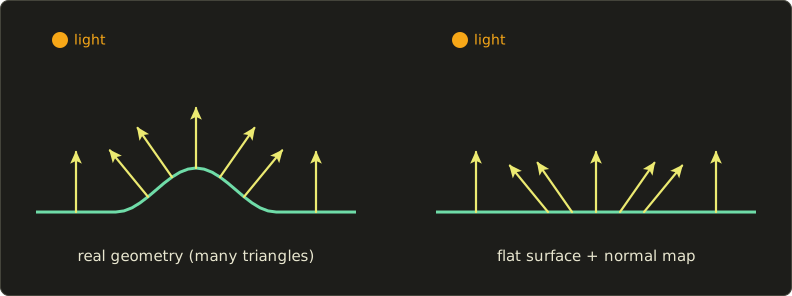
Both surfaces send the same normals into the lighting formula, so they're lit the same way.
The flat one costs two triangles instead of thousands.
What normal mapping can't do: change the outline of an object (a normal-mapped sphere is still perfectly round at its edge), or make bumps cast real shadows onto each other.
For the light and shade inside a surface, though, it's extremely convincing, and nearly every 3D game since the mid 2000s uses it on almost every surface.
12.2 From a height map to normals
The easiest way to describe bumps is a height map: a grey texture where black is low (0) and white is high (1).
From it we can compute the normal at every texel.
What the formula is
Treat the texture as a landscape.
At texel the surface point is , where is the height map and is the strength: how many texels deep a height of 1 is.
The normal is
and the slopes are measured with central differences, the height of the right neighbour minus the left neighbour, divided by the 2 texels between them:
is read "the partial derivative of along " and simply means "how fast changes when only moves".
How it works
Walk one texel to the right on the landscape: grows by 1, and the height grows by .
So the surface goes in the direction .
Walking one texel up gives .
Both arrows lie in the surface, and the cross product (linear algebra chapter 5) gives a vector perpendicular to both. Writing and :
That's the formula, before normalizing.
In a side view it's easy to check: where the ground climbs to the right, the normal leans to the left.
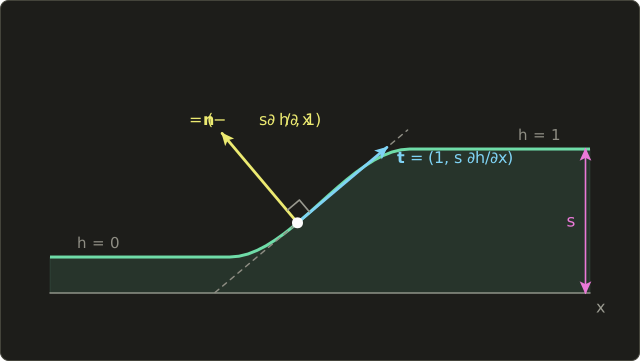
A flat area has both slopes 0, so : straight out of the surface.
A worked example
Take a texel on the left edge of a brick, where the height rises to the right: left neighbour , right neighbour , and the neighbours above and below are equal.
With strength :
The normal leans to the left, away from the rising slope, as in the picture.
Storing normals in a texture
A unit normal's components are between −1 and 1, but a GL_RGBA8 texture stores 0 to 1.
So we squeeze them in when writing and stretch them out when reading:
Our example normal becomes , which is the bytes (multiply by 255 and round).
A flat normal becomes , the bytes : a light violet-blue.
Most of a normal map points roughly straight out, which is why normal maps always look bluish.
Decoding gives back instead of exactly 0 (8 bits can't store 127.5), one reason why we always normalize after reading.
12.3 Making the maps in C
Let's add the brick textures to main.c, on top of chapter 11.
First a helper that does what chapter 11's createTestTexture did after the loop, so we don't repeat it for every texture:
// make a texture from pixel data (TEX_SIZE x TEX_SIZE, mipmapped, GL_REPEAT)
GLuint uploadTexture(GLint internalFormat, GLenum format, const unsigned char *pixels) {
  GLuint texture;
  glGenTextures(1, &texture);
  glBindTexture(GL_TEXTURE_2D, texture);
  glTexImage2D(GL_TEXTURE_2D, 0, internalFormat, TEX_SIZE, TEX_SIZE, 0,
               format, GL_UNSIGNED_BYTE, pixels);
  glGenerateMipmap(GL_TEXTURE_2D);
  glTexParameteri(GL_TEXTURE_2D, GL_TEXTURE_MIN_FILTER, GL_LINEAR_MIPMAP_LINEAR);
  glTexParameteri(GL_TEXTURE_2D, GL_TEXTURE_MAG_FILTER, GL_LINEAR);
  glTexParameteri(GL_TEXTURE_2D, GL_TEXTURE_WRAP_S, GL_REPEAT);
  glTexParameteri(GL_TEXTURE_2D, GL_TEXTURE_WRAP_T, GL_REPEAT);
  return texture;
}
The height map
The bricks are 64 × 32 texels, every second row shifted by half a brick.
For each texel we find the distance to the nearest brick edge: within 2 texels it's mortar (height 0), then the height rises smoothly over 4 texels to the top of the brick (height 1).
A little value noise (the same idea as chapter 8, written in C) makes the brick surface slightly rough:
// the same as GLSL's smoothstep (a smooth step from 0 to 1)
float smoothstepf(float edge0, float edge1, float x) {
  float t = (x - edge0) / (edge1 - edge0);
  if (t < 0.0f) t = 0.0f;
  if (t > 1.0f) t = 1.0f;
  return t * t * (3.0f - 2.0f * t);
}

// hash: integer coordinates to a pseudo-random 0..1 (the same idea as chapter 8)
float hash2(int x, int y) {
  unsigned int h = (unsigned int)x * 374761393u + (unsigned int)y * 668265263u;
  h = (h ^ (h >> 13)) * 1274126177u;
  return (float)((h ^ (h >> 16)) & 0xffffu) / 65535.0f;
}

// value noise with one value every `cell` texels (repeats every TEX_SIZE, so no seams)
float valueNoise(int x, int y, int cell) {
  int n = TEX_SIZE / cell;
  int cx = x / cell, cy = y / cell;
  float fx = smoothstepf(0.0f, 1.0f, (float)(x % cell) / cell);
  float fy = smoothstepf(0.0f, 1.0f, (float)(y % cell) / cell);
  float a = hash2(cx % n, cy % n);
  float b = hash2((cx + 1) % n, cy % n);
  float c = hash2(cx % n, (cy + 1) % n);
  float d = hash2((cx + 1) % n, (cy + 1) % n);
  return (a + (b - a) * fx) * (1.0f - fy) + (c + (d - c) * fx) * fy;
}

// make the brick height map (0..1): bricks high, mortar low, brick edges sloped
float *createBrickHeights(void) {
  float *heights = (float *)malloc(TEX_SIZE * TEX_SIZE * sizeof(float));
  if (!heights) {
    puts("Failed to allocate the height map");
    return NULL;
  }

  for (int y = 0; y < TEX_SIZE; y++) {
    for (int x = 0; x < TEX_SIZE; x++) {
      // bricks are 64x32 texels, every second row shifted by half a brick
      int row = y / 32;
      int bx = (x + (row % 2) * 32) % 64;
      int by = y % 32;

      // distance to the nearest edge of the brick (in texels)
      float ex = fminf(bx + 0.5f, 64.0f - (bx + 0.5f));
      float ey = fminf(by + 0.5f, 32.0f - (by + 0.5f));
      float e = fminf(ex, ey);

      // 2 texels of mortar (height 0) at the edge, then a 4 texel slope up
      float h = smoothstepf(2.0f, 6.0f, e);

      // small bumps on the brick surface
      float rough = 0.6f * valueNoise(x, y, 8) + 0.4f * valueNoise(x, y, 4);
      h *= 0.8f + 0.2f * rough;

      heights[y * TEX_SIZE + x] = h;
    }
  }
  return heights;
}
The % n in valueNoise makes the noise wrap around after 256 texels, and 256 is a multiple of the brick size, so the textures tile without a visible seam, which matters because we'll use GL_REPEAT.
Two textures from one height map
We upload the heights themselves as a one-channel texture, and the normals computed from them (12.2) as an RGBA texture:
// upload the height map as a one-channel texture (GL_R8)
GLuint createHeightTexture(const float *heights) {
  if (!heights) return 0;
  unsigned char *pixels = (unsigned char *)malloc(TEX_SIZE * TEX_SIZE);
  if (!pixels) return 0;
  for (int i = 0; i < TEX_SIZE * TEX_SIZE; i++) {
    pixels[i] = (unsigned char)(heights[i] * 255.0f + 0.5f);
  }
  GLuint texture = uploadTexture(GL_R8, GL_RED, pixels);
  free(pixels);
  return texture;
}

// make a normal map from the height map (central differences, OpenGL's "green is up")
GLuint createNormalTexture(const float *heights, float strength) {
  if (!heights) return 0;
  unsigned char *pixels = (unsigned char *)malloc(TEX_SIZE * TEX_SIZE * 4);
  if (!pixels) return 0;

  for (int y = 0; y < TEX_SIZE; y++) {
    for (int x = 0; x < TEX_SIZE; x++) {
      // the neighbours (wrapping around at the edges, like GL_REPEAT)
      int xl = (x + TEX_SIZE - 1) % TEX_SIZE, xr = (x + 1) % TEX_SIZE;
      int yd = (y + TEX_SIZE - 1) % TEX_SIZE, yu = (y + 1) % TEX_SIZE;

      // change of height per texel
      float dhdx = (heights[y * TEX_SIZE + xr] - heights[y * TEX_SIZE + xl]) * 0.5f;
      float dhdy = (heights[yu * TEX_SIZE + x] - heights[yd * TEX_SIZE + x]) * 0.5f;

      // normal = normalize(-s dh/dx, -s dh/dy, 1)
      float nx = -strength * dhdx;
      float ny = -strength * dhdy;
      float nz = 1.0f;
      float len = sqrtf(nx * nx + ny * ny + nz * nz);
      nx /= len;
      ny /= len;
      nz /= len;

      // pack -1..1 into 0..255
      unsigned char *p = &pixels[(y * TEX_SIZE + x) * 4];
      p[0] = (unsigned char)((nx * 0.5f + 0.5f) * 255.0f + 0.5f);
      p[1] = (unsigned char)((ny * 0.5f + 0.5f) * 255.0f + 0.5f);
      p[2] = (unsigned char)((nz * 0.5f + 0.5f) * 255.0f + 0.5f);
      p[3] = 255;
    }
  }

  GLuint texture = uploadTexture(GL_RGBA8, GL_RGBA, pixels);
  free(pixels);
  return texture;
}
GL_R8 with GL_RED stores one byte per texel.
In the shader, sampling it returns , so we read the height with .r.
Each row is 256 bytes, a multiple of 4, so the unpack alignment from chapter 11 is fine here too.
Binding three textures
In main(), after the test texture:
  // make the brick normal map and height map (chapter 12)
  float *heights = createBrickHeights();
  GLuint normalMap = createNormalTexture(heights, 3.0f);
  GLuint heightMap = createHeightTexture(heights);
  free(heights);
Strength 3 means a height difference of 1 is 3 texels deep, so the 4 texel bevel is quite steep.
In the render loop, after the test texture on unit 0, the two new textures go into units 1 and 2:
    // normal map on unit 1, height map on unit 2
    glActiveTexture(GL_TEXTURE1);
    glBindTexture(GL_TEXTURE_2D, normalMap);
    glUniform1i(glGetUniformLocation(shaderProgram, "uNormalMap"), 1);
    glActiveTexture(GL_TEXTURE2);
    glBindTexture(GL_TEXTURE_2D, heightMap);
    glUniform1i(glGetUniformLocation(shaderProgram, "uHeightMap"), 2);
There's one trap here.
The active texture unit is global state, and after this code it stays at unit 2 until someone changes it.
At the top of the next frame, chapter 11's code calls glBindTexture(GL_TEXTURE_2D, texture) for the F and W keys, which would now put the test texture into unit 2 and make setFilter change it there.
So we switch back to unit 0 first:
    // F switches the filtering, W the wrap mode
    // (the active unit is still the last one from the previous frame, so go back to unit 0)
    glActiveTexture(GL_TEXTURE0);
    glBindTexture(GL_TEXTURE_2D, texture);
And at the end, glDeleteTextures(1, &normalMap); and glDeleteTextures(1, &heightMap); next to the other cleanup.
To check the maps, this shader shows the height map on the left and the raw normal map colours on the right:
#version 450 core

in vec2 vUv;
out vec4 out_color;

uniform vec2 uResolution;
uniform sampler2D uNormalMap; // unit 1
uniform sampler2D uHeightMap; // unit 2

void main() {
  // aspect-correct UVs for the left half and for the right half
  float halfWidth = uResolution.x * 0.5;
  vec2 local = vec2(mod(gl_FragCoord.x, halfWidth), gl_FragCoord.y);
  vec2 uv = (local - vec2(halfWidth, uResolution.y) * 0.5) / uResolution.y + 0.5;

  float height = texture(uHeightMap, uv).r; // GL_R8 only has a red channel
  vec3 normalColor = texture(uNormalMap, uv).rgb;

  // left half: height map, right half: normal map
  vec3 color = gl_FragCoord.x < halfWidth ? vec3(height) : normalColor;

  out_color = vec4(color, 1.0);
}
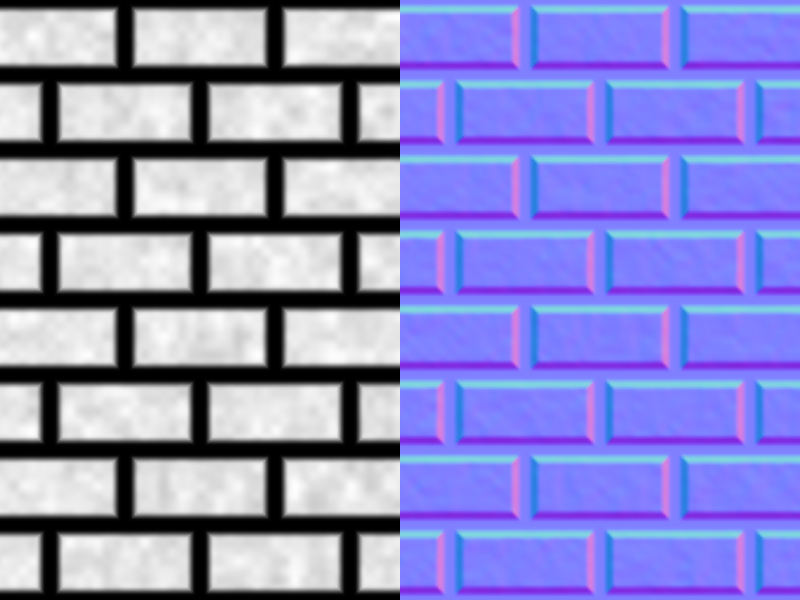
(I named the variable halfWidth because half is a reserved word in GLSL.)
Read the normal map like this: flat areas are blue, the right edges of bricks are pinker (more red, the normal leans to ), the left edges are darker blue (less red, it leans to ), the top edges are cyan (more green, leaning up) and the bottom edges violet (less green, leaning down).
12.4 A lit wall
Now let's light the wall.
The light sits at the mouse position, 0.5 units in front of the wall, and the eye looks straight at it from :
#version 450 core

in vec2 vUv;
out vec4 out_color;

uniform vec2 uResolution;
uniform vec2 uMouse;
uniform sampler2D uNormalMap;
uniform sampler2D uHeightMap;

void main() {
  vec2 p = (2.0 * gl_FragCoord.xy - uResolution) / uResolution.y;
  vec2 uv = p * 0.5 + 0.5;

  // a point on the wall, and a light at the mouse position 0.5 in front of the wall
  vec3 pos = vec3(p, 0.0);
  vec2 mouse = (2.0 * uMouse - uResolution) / uResolution.y;
  vec3 lightPos = vec3(mouse, 0.5);
  vec3 L = normalize(lightPos - pos);  // direction to the light
  vec3 V = vec3(0.0, 0.0, 1.0);        // direction to the eye

  // the normal: just a flat wall for now
  vec3 N = vec3(0.0, 0.0, 1.0);

  // colour: low parts (mortar) grey, high parts (bricks) reddish brown
  float h = texture(uHeightMap, uv).r;
  vec3 albedo = mix(vec3(0.3, 0.28, 0.25), vec3(0.5, 0.2, 0.12), smoothstep(0.05, 0.4, h));

  // Blinn-Phong (chapter 9)
  float diffuse = max(dot(N, L), 0.0);
  vec3 H = normalize(L + V);
  float specular = pow(max(dot(N, H), 0.0), 32.0) * 0.25;
  vec3 color = albedo * (0.05 + diffuse) + vec3(specular);

  // gamma correction (chapter 10)
  color = pow(color, vec3(1.0 / 2.2));
  out_color = vec4(color, 1.0);
}
The lighting is the Blinn-Phong model from chapter 9: ambient 0.05, diffuse , and a specular highlight with the half vector and shininess 32.
The colours are linear values and get gamma-corrected at the end, as chapter 10 explained.
The height map only decides the colour here.
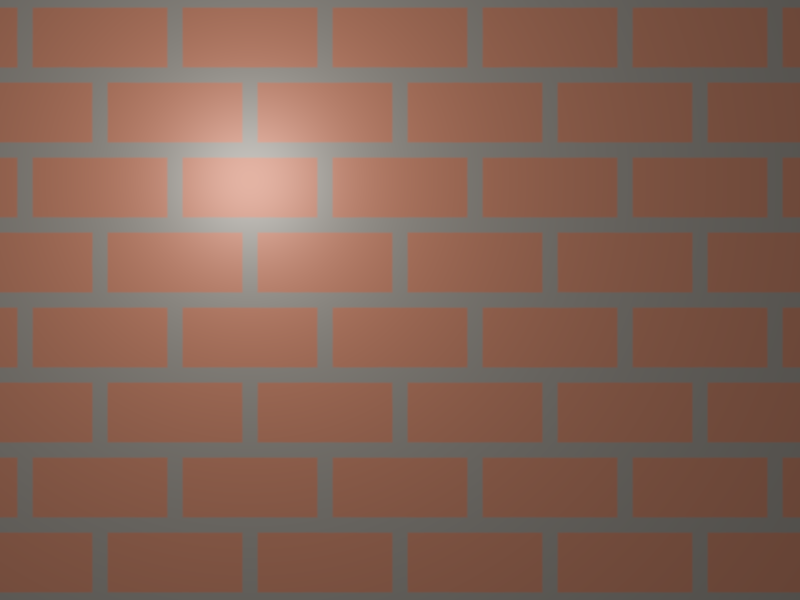
It's lit correctly, but it's obviously a painting of bricks: the light makes a smooth spot and nothing else.
Now replace the flat normal with one line:
  // the normal: read it from the normal map and turn 0..1 back into -1..1
  vec3 N = normalize(texture(uNormalMap, uv).rgb * 2.0 - 1.0);
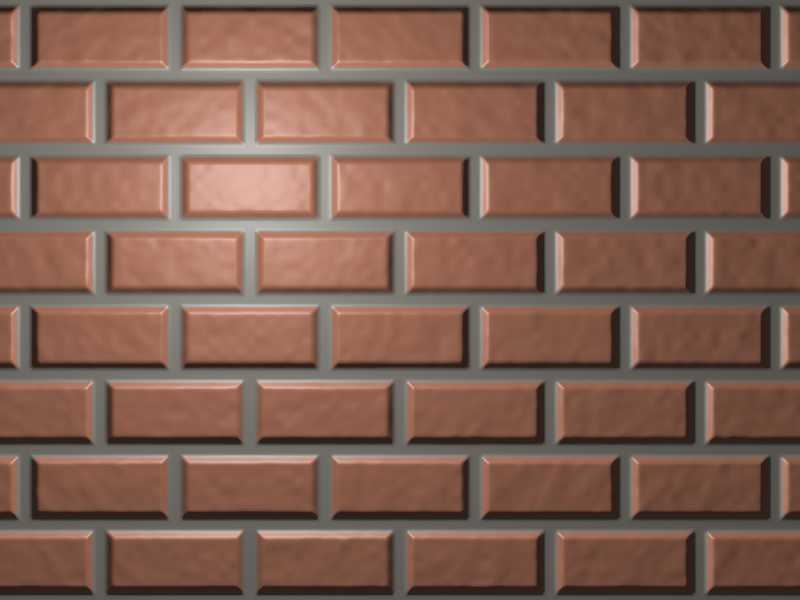
The bricks pop out of the wall.
The bevels that face the light (upper left) are bright, the ones facing away are dark, the surface of each brick is a little rough, and the highlight breaks up on the bumps.
Move the mouse and the light and shade move with it, which is something no painted texture can do.
Why could we use the normal map's vector directly?
Because the normal map stores normals in the texture's own coordinate system, where is the direction of growing , is growing , and points out of the surface.
On this wall those happen to be exactly the screen's , and , so no conversion is needed.
On a sphere that won't be true any more, and 12.6 deals with it.
12.5 Normals from the height map in the shader
We baked the normals in C, but the shader can compute them too.
Here are two ways, next to the normal map from C:
#version 450 core

in vec2 vUv;
out vec4 out_color;

uniform vec2 uResolution;
uniform vec2 uMouse;
uniform sampler2D uNormalMap;
uniform sampler2D uHeightMap;

// compute the normal from the height map (the same central differences as the C code)
vec3 normalFromHeight(sampler2D heightMap, vec2 uv, float strength) {
  vec2 texel = 1.0 / vec2(textureSize(heightMap, 0)); // size of one texel in UV
  float hL = texture(heightMap, uv - vec2(texel.x, 0.0)).r; // left
  float hR = texture(heightMap, uv + vec2(texel.x, 0.0)).r; // right
  float hD = texture(heightMap, uv - vec2(0.0, texel.y)).r; // down
  float hU = texture(heightMap, uv + vec2(0.0, texel.y)).r; // up
  vec2 slope = vec2(hR - hL, hU - hD) * 0.5; // change of height per texel
  return normalize(vec3(-strength * slope, 1.0));
}

// compute the normal with screen-space derivatives (dFdx and dFdy)
vec3 normalFromDerivatives(float h, vec2 uv, float strength) {
  vec2 texelsPerPixel = vec2(dFdx(uv.x), dFdy(uv.y)) * vec2(textureSize(uHeightMap, 0));
  vec2 slope = vec2(dFdx(h), dFdy(h)) / texelsPerPixel; // change of height per texel
  return normalize(vec3(-strength * slope, 1.0));
}

void main() {
  vec2 p = (2.0 * gl_FragCoord.xy - uResolution) / uResolution.y;
  vec2 uv = p * 0.5 + 0.5;

  vec3 pos = vec3(p, 0.0);
  vec2 mouse = (2.0 * uMouse - uResolution) / uResolution.y;
  vec3 L = normalize(vec3(mouse, 0.5) - pos);
  vec3 V = vec3(0.0, 0.0, 1.0);

  float h = texture(uHeightMap, uv).r;

  // compare three ways: left = normal map from C, middle = central differences, right = dFdx/dFdy
  vec3 fromMap = normalize(texture(uNormalMap, uv).rgb * 2.0 - 1.0);
  vec3 fromHeight = normalFromHeight(uHeightMap, uv, 3.0);
  vec3 fromDerivatives = normalFromDerivatives(h, uv, 3.0);
  float third = gl_FragCoord.x / uResolution.x * 3.0;
  vec3 N = third < 1.0 ? fromMap : (third < 2.0 ? fromHeight : fromDerivatives);

  vec3 albedo = mix(vec3(0.3, 0.28, 0.25), vec3(0.5, 0.2, 0.12), smoothstep(0.05, 0.4, h));
  float diffuse = max(dot(N, L), 0.0);
  vec3 H = normalize(L + V);
  float specular = pow(max(dot(N, H), 0.0), 32.0) * 0.25;
  vec3 color = albedo * (0.05 + diffuse) + vec3(specular);
  color = pow(color, vec3(1.0 / 2.2));

  if (abs(fract(third + 0.5) - 0.5) * uResolution.x / 3.0 < 1.0 && third > 0.5) color = vec3(0.0);
  out_color = vec4(color, 1.0);
}
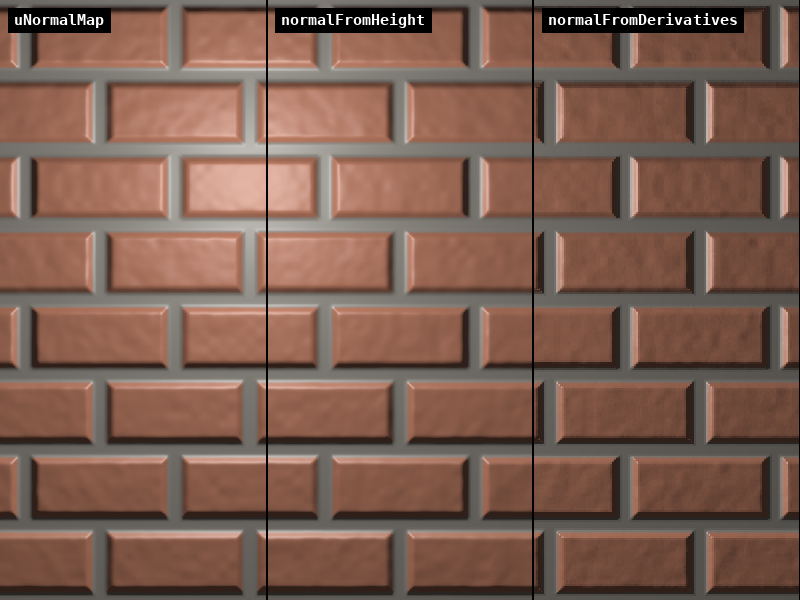
Central differences (normalFromHeight, middle) is the C code moved into the shader: four extra samples at one texel to the left, right, below and above.
It looks the same as the baked normal map on the left.
It costs four samples instead of one, but the strength can change at runtime and you only need to store a one-channel height map.
Screen-space derivatives (normalFromDerivatives, right) uses dFdx and dFdy from chapter 11.
dFdx(h) is how much the height changes from this pixel to the next one on the right.
Dividing by how many texels one pixel step covers (dFdx(uv.x) times the texture size) turns it into "height change per texel", and from there it's the formula from 12.2.
It needs no extra samples at all, but look closely:
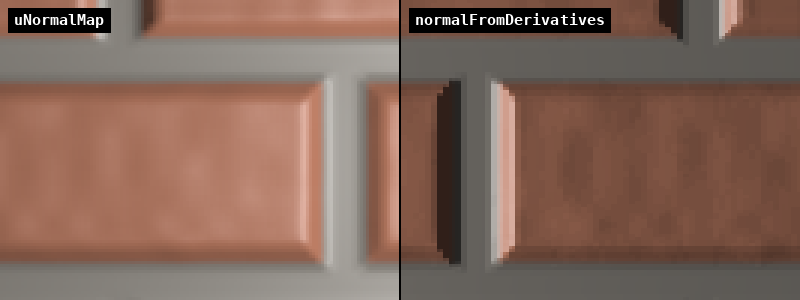
The derivative version has staircase steps and a grainier surface.
GPUs compute derivatives once per 2 × 2 block of pixels (chapter 11), so all four pixels of a block share one slope.
It's good enough for small, cheap details (decals, procedural bumps) and it's popular in shader art for exactly that reason.
This simple version also only works because our wall is lined up with the screen, so that follows and follows .
On a general surface you need the "bump mapping with derivatives" method by Morten Mikkelsen, which also uses dFdx(position).
12.6 Tangent space and the TBN matrix
A normal map stores normals in tangent space, a little coordinate system glued to each point of the surface:
- , the tangent: the direction in which grows across the surface,
- , the bitangent: the direction in which grows,
- , the normal of the surface itself (the geometry's normal, without the map).
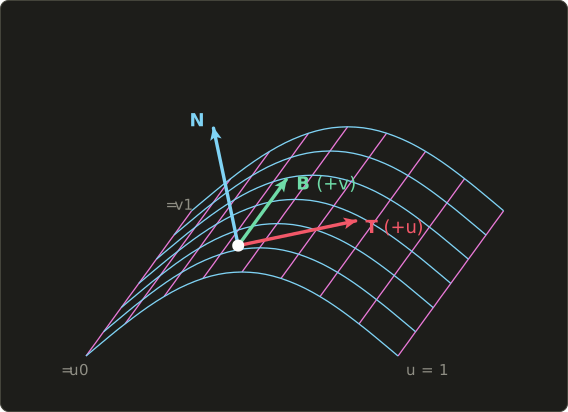
A normal-map value of means "exactly the surface normal ", would mean "lying flat, pointing along ", and so on.
That's what makes a normal map reusable: the same brick texture works on a wall, a floor, a barrel or a sphere, because it only says how much the normal leans relative to the surface.
What the formula is
To use a tangent-space normal in our lighting, we change it into the space where and live (here: the view space of the playground).
That's exactly the change of basis from linear algebra chapter 11: put the new axes, written in the old coordinates, into a matrix as columns:
In GLSL that's mat3(T, B, N) (the mat3 constructor with three vec3 arguments uses them as columns) and TBN * nTangent.
How it works
"Walk along , then along , then along ": a matrix times a vector is that linear combination of its columns.
On the flat wall , and , the TBN matrix is the identity, and that's why 12.4 worked without it.
A worked example: a point on a sphere whose surface normal is , with tangent and bitangent .
They are orthonormal: each has length 1 (), and .
The normal map says , leaning towards :
, so it's still a unit vector, now leaning further to the right than the surface itself.
Because , , are orthonormal, the inverse is the transpose (linear algebra chapter 10): .
Many engines use that to go the other way: they move and into tangent space in the vertex shader (once per vertex, cheap) and then light with the normal map's values directly in the fragment shader.
Both give the same result.
12.7 A normal-mapped sphere
Now the bricks go onto a sphere, using the same "sphere impostor" idea as chapter 9: we draw a circle, and inside it we compute the point of a sphere.
For a sphere of radius 1 at the origin, a pixel at inside the unit circle sees the point with (from ), and on a unit sphere the position is the normal.
UVs on a sphere
We need a and a for every point, like longitude and latitude on a globe:
atan(y, x)with two arguments returns the angle of the point , from to , in the correct quadrant. Here we pass and , so the angle goes around the vertical axis: 0 at the front (), growing towards . Dividing by and adding 0.5 gives 0 to 1 around the sphere.asin(x)is the inverse sine, , from to . It gives the latitude: 0 at the equator, at the poles, and runs from 0 at the bottom to 1 at the top.
Around the sphere is , top to bottom only , so to keep the bricks undistorted at the equator we repeat the texture 4 times around and 2 times from pole to pole.
Adding a little uTime to turns the sphere slowly.
The tangent on a sphere
With longitude and latitude , the point is .
The tangent is the direction of growing , that is, growing :
Since and , that's simply : horizontal, around the sphere.
The bitangent then is .
I checked it: this cross product equals , the direction of growing , so the frame is right-handed and points up the sphere as it should.
At the exact poles and the tangent has no direction (every direction is "around" at a pole), so the code falls back to there.
The shader
#version 450 core

in vec2 vUv;
out vec4 out_color;

uniform float uTime;
uniform vec2 uResolution;
uniform vec2 uMouse;
uniform sampler2D uNormalMap;
uniform sampler2D uHeightMap;

const float PI = 3.14159265;

void main() {
  vec2 p = (2.0 * gl_FragCoord.xy - uResolution) / uResolution.y;

  // a sphere of radius 0.85 (the same idea as chapter 9: z from x^2 + y^2 + z^2 = 1)
  vec2 q = p / 0.85;
  float r2 = dot(q, q);
  vec3 N = vec3(q, sqrt(max(1.0 - r2, 0.0))); // on a unit sphere, position = normal
  vec3 pos = vec3(p, N.z * 0.85);

  // UVs on the sphere: longitude is u, latitude is v (u moves with time: the sphere turns)
  vec2 uv;
  uv.x = atan(N.x, N.z) / (2.0 * PI) + 0.5 + uTime * 0.03;
  uv.y = asin(clamp(N.y, -1.0, 1.0)) / PI + 0.5;
  uv *= vec2(4.0, 2.0); // 4 times around, 2 times top to bottom: the bricks keep their shape

  // the tangent-space basis: T is the direction of growing u, B of growing v
  vec3 T = vec3(N.z, 0.0, -N.x);
  T = length(T) > 1e-4 ? normalize(T) : vec3(1.0, 0.0, 0.0); // T is undefined at the poles
  vec3 B = cross(N, T);
  mat3 TBN = mat3(T, B, N); // columns T, B, N

  // turn the normal map's normal (tangent space) into view space
  vec3 nTangent = texture(uNormalMap, uv).rgb * 2.0 - 1.0;
  vec3 n = normalize(TBN * nTangent);

  // the light is at the mouse position, 1.5 in front of the sphere
  vec2 mouse = (2.0 * uMouse - uResolution) / uResolution.y;
  vec3 L = normalize(vec3(mouse, 1.5) - pos);
  vec3 V = vec3(0.0, 0.0, 1.0);

  float h = texture(uHeightMap, uv).r;
  vec3 albedo = mix(vec3(0.3, 0.28, 0.25), vec3(0.5, 0.2, 0.12), smoothstep(0.05, 0.4, h));

  // Blinn-Phong
  float diffuse = max(dot(n, L), 0.0);
  vec3 H = normalize(L + V);
  float specular = pow(max(dot(n, H), 0.0), 32.0) * 0.25;
  vec3 color = albedo * (0.05 + diffuse) + vec3(specular);

  // background outside the sphere
  if (r2 > 1.0) color = vec3(0.02, 0.025, 0.04);

  color = pow(color, vec3(1.0 / 2.2));
  out_color = vec4(color, 1.0);
}
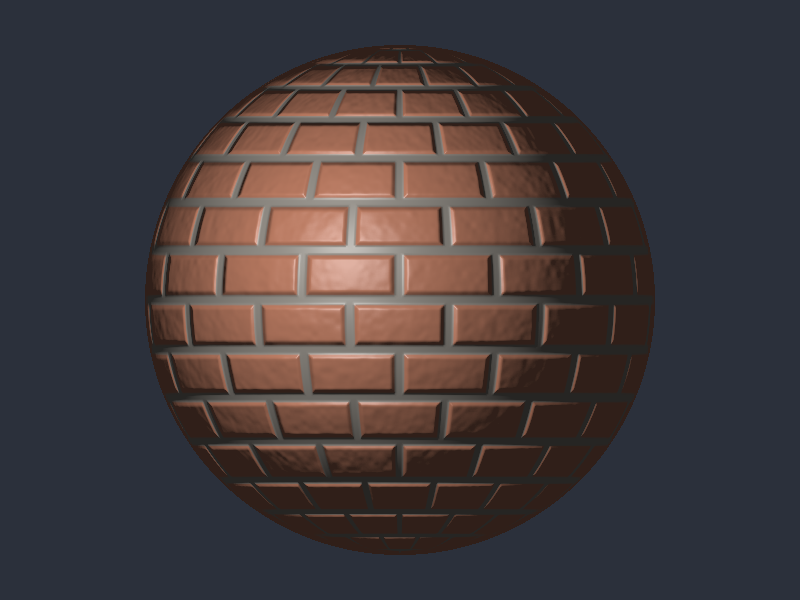
cross(a, b) is the cross product from linear algebra chapter 5.
clamp(N.y, -1.0, 1.0) protects asin from values a tiny bit outside −1 to 1 due to rounding, where it would return NaN.
Notice that texture() is called for every pixel, also outside the sphere, and only afterwards do we choose the background: the uniform control flow rule from chapter 11.
Near the edge of the sphere the UVs change very fast from pixel to pixel, so mipmapping picks small levels there and the bricks get softer, which is correct.
To see what the normal map adds, here's the same sphere with the left half using only the sphere's own normal (if (p.x < 0.0) n = N;), with the light at the top:
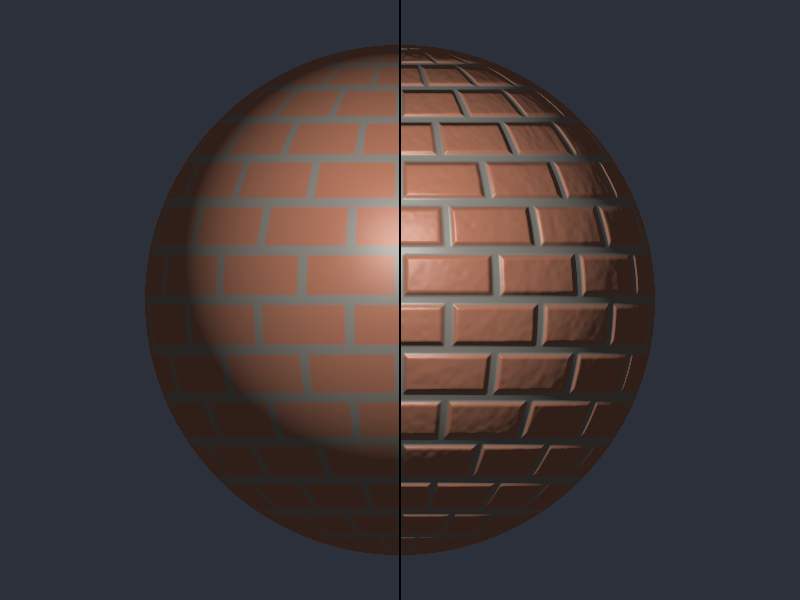
The left half is a painted ball, the right half looks like it's built from bricks.
Both have exactly the same outline, the one thing normal mapping can't change.
And with a moving light:
12.8 Common mistakes
Normal mapping has a handful of classic bugs.
Most of them produce lighting that looks "a bit off" rather than obviously broken, which makes them hard to spot.
The green channel.
There are two conventions for the of a normal map.
OpenGL style (also Blender, Unity, glTF) says green means "leaning towards ", and our C code produces that.
DirectX style (also Unreal, 3ds Max) stores flipped.
Use a DirectX normal map in an OpenGL-style shader and every bump looks lit from the wrong side vertically.
Here the right half flips N.y, and the light is at the top:
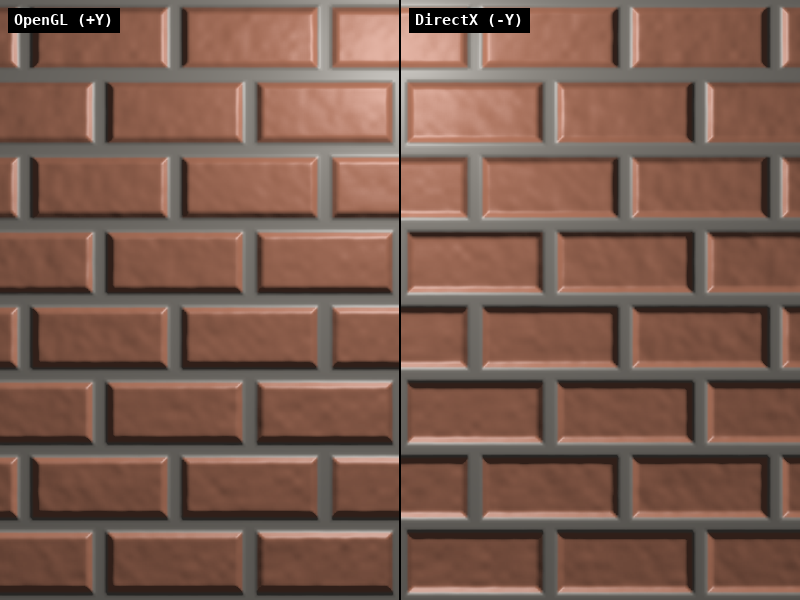
On the left the top bevels catch the light.
On the right the bottom bevels do, so the bricks seem to be lit from below while the side bevels still look right, a confusing mix.
The fix is n.y = -n.y after decoding, or flipping the green channel of the image once.
Forgetting to decode.
Using the colour directly as a normal (without * 2.0 - 1.0) gives a normal that always leans towards , and the whole surface looks lit from the upper right.
Not normalizing.
Bilinear filtering and mipmaps average neighbouring normals, and an average of unit vectors is shorter than 1 (two opposite bevels average to almost nothing).
Always normalize after decoding, and normalize again after multiplying by the TBN matrix.
A crooked TBN.
On a real mesh, and come from the vertices and are interpolated across the triangle, so in the fragment shader they're no longer unit length or exactly perpendicular.
Normalize , then remove the part of that points along (projection with the dot product, linear algebra chapter 4), then build :
This is called Gram-Schmidt orthogonalization, and it's the first line of almost every normal-mapping fragment shader.
sRGB.
Normal maps and height maps are data, not colours.
If they're loaded as GL_SRGB8_ALPHA8, the sampler "decodes" gamma that was never there and every normal bends.
Colour textures sRGB, data textures linear (chapter 11's list).
Mixed spaces.
, and must be in the same space before you take dot products.
A tangent-space normal dotted with a world-space light direction gives lighting that changes when the object turns.
12.9 How normal mapping is used in real games and engines
- Baking. Artists sculpt a very detailed model (millions of triangles), build a simple game model, and let a tool (Blender, Substance, Marmoset, xNormal) bake the difference into a normal map. That's how a character's wrinkles, seams and buttons exist without geometry.
- MikkTSpace. The tangents on a mesh must be computed exactly the same way by the baking tool and the engine, or the bake shows seams and wrong shading. The standard is Morten Mikkelsen's MikkTSpace, used by Blender, Unity, Unreal and glTF.
- Tangents in the vertex data. Meshes store a tangent per vertex as a
vec4:xyzis andwis or , the handedness, for mirrored UVs. The shader computes . Loading such meshes comes in the OpenGL series. - Two-channel compression. Since a unit normal pointing out of the surface has , engines often store only and (formats BC5 on PC, EAC RG11 on mobile) and reconstruct in the shader.
- Detail normal maps. A big normal map for the shape of the bricks plus a small, much repeated one for the grain. They're combined with a blending formula (for example "whiteout":
normalize(vec3(a.xy + b.xy, a.z * b.z))) rather than simply averaged. - Parallax mapping. Normal mapping fixes the lighting, but the texture still slides flat over the surface when you look at it from the side. Parallax and parallax occlusion mapping use the height map to shift the UVs along the view direction, so the bricks also appear to stick out.
- Triplanar mapping. Terrain and rocks often have no good UVs. Triplanar mapping samples the texture three times, projected along , and , and blends by the normal. The normal maps need their own little TBN for each projection.
- Without precomputed tangents. For procedural surfaces, a fragment shader can build the TBN from
dFdxanddFdyof the position and the UV, a technique popularized by Christian Schüler. It's the general version of 12.5's derivative trick.
12.10 Summary
- Lighting only looks at the normal, so a texture of normals adds detail without adding geometry. It can't change outlines or cast real shadows.
- A height map gives normals with , the cross product of the two slope directions. Central differences measure the slopes.
- Normals are stored as and read back with . Flat is , which is why normal maps are blue.
- Several textures use several units:
glActiveTexture(GL_TEXTURE1), bind,glUniform1i(…, 1). The active unit is global state, so set it back before changing unit 0's texture. - Normals can also be computed in the shader: central differences (4 samples, smooth) or
dFdx/dFdy(free, blocky, screen-aligned only in its simple form). - Normal maps live in tangent space. (
mat3(T, B, N)) changes them into the lighting space, and its transpose goes back. - On the sphere: UVs from
atanandasin, , . - Watch out for the green-channel convention, decoding, normalizing, Gram-Schmidt on interpolated tangents, sRGB, and mixed spaces.
12.11 Challenges
- ★ The neighbours of a texel have heights left 0.75, right 0.25, down 0.5 and up 0.5. With strength , compute the normal (normalized) and the RGB bytes it's stored as (multiply by 255, add 0.5 and cut off, like the C code). Which way does it lean?
- ★ A point on the sphere has . Compute and , check that points "up the sphere", then transform the tangent-space normal with the TBN matrix.
- ★★ Animate the strength: make the bumps grow and shrink over time by scaling the decoded normal's and by
0.5 + 0.5 * sin(uTime)before normalizing. At 0 the wall should look completely flat, at 1 like the normal-mapped wall of 12.4. - ★★ Show the normals as colours for debugging: on the sphere, output
n * 0.5 + 0.5instead of the lit colour. The right side of the sphere should be pinkish, the top greenish, and the bricks should be visible as small colour changes. Then outputT * 0.5 + 0.5and explain the colours you see. - ★★ Reconstruct : decode only
.rgfrom the normal map and computen.z = sqrt(max(1.0 - dot(n.xy, n.xy), 0.0)). The wall must look identical to 12.4. Why is this the reason BC5 compression only stores two channels? - ★★ Combine chapters 11 and 12: on the normal-mapped sphere, use the chapter 11 test texture
uTexture(unit 0) as the albedo instead of the brick colours, with the same UVs. The checkerboard and the F should now look as if they were painted on bricks. Then flip the normal map's green channel and describe which bevels change. - ★★★ Simple parallax mapping on the wall: before sampling, shift the UV by
uv += viewTangent.xy / viewTangent.z * h * 0.03, where is the height andviewTangentthe direction to the eye in tangent space. With our straight-on view this does nothing, so make the eye position depend on the mouse (for exampleV = normalize(vec3(mouse, 1.0) - pos)). The bricks should seem to slide over the mortar as the eye moves. Why is the effect wrong at very flat angles?
ファイル: a/main.c | b/main.c
| 前 | 新 | ||
|---|---|---|---|
| @@ -288,6 +288,134 @@ int keyPressed(GLFWwindow *window, int key, int *wasDown) { | |||
| 288 | return pressed; | 288 | return pressed; |
| 289 | } | 289 | } |
| 290 | 290 | ||
| 291 | // ピクセルデータからテクスチャを作る(TEX_SIZE×TEX_SIZE、ミップマップ付き、GL_REPEAT) | ||
| 292 | GLuint uploadTexture(GLint internalFormat, GLenum format, const unsigned char *pixels) { | ||
| 293 | GLuint texture; | ||
| 294 | glGenTextures(1, &texture); | ||
| 295 | glBindTexture(GL_TEXTURE_2D, texture); | ||
| 296 | glTexImage2D(GL_TEXTURE_2D, 0, internalFormat, TEX_SIZE, TEX_SIZE, 0, | ||
| 297 | format, GL_UNSIGNED_BYTE, pixels); | ||
| 298 | glGenerateMipmap(GL_TEXTURE_2D); | ||
| 299 | glTexParameteri(GL_TEXTURE_2D, GL_TEXTURE_MIN_FILTER, GL_LINEAR_MIPMAP_LINEAR); | ||
| 300 | glTexParameteri(GL_TEXTURE_2D, GL_TEXTURE_MAG_FILTER, GL_LINEAR); | ||
| 301 | glTexParameteri(GL_TEXTURE_2D, GL_TEXTURE_WRAP_S, GL_REPEAT); | ||
| 302 | glTexParameteri(GL_TEXTURE_2D, GL_TEXTURE_WRAP_T, GL_REPEAT); | ||
| 303 | return texture; | ||
| 304 | } | ||
| 305 | |||
| 306 | // GLSLのsmoothstepと同じ(0〜1の滑らかな段差) | ||
| 307 | float smoothstepf(float edge0, float edge1, float x) { | ||
| 308 | float t = (x - edge0) / (edge1 - edge0); | ||
| 309 | if (t < 0.0f) t = 0.0f; | ||
| 310 | if (t > 1.0f) t = 1.0f; | ||
| 311 | return t * t * (3.0f - 2.0f * t); | ||
| 312 | } | ||
| 313 | |||
| 314 | // 整数の座標から0〜1の疑似乱数を作るハッシュ(第8章と同じ考え方) | ||
| 315 | float hash2(int x, int y) { | ||
| 316 | unsigned int h = (unsigned int)x * 374761393u + (unsigned int)y * 668265263u; | ||
| 317 | h = (h ^ (h >> 13)) * 1274126177u; | ||
| 318 | return (float)((h ^ (h >> 16)) & 0xffffu) / 65535.0f; | ||
| 319 | } | ||
| 320 | |||
| 321 | // cellテクセル毎の値ノイズ(TEX_SIZEで繰り返すので、テクスチャの継ぎ目が見えない) | ||
| 322 | float valueNoise(int x, int y, int cell) { | ||
| 323 | int n = TEX_SIZE / cell; | ||
| 324 | int cx = x / cell, cy = y / cell; | ||
| 325 | float fx = smoothstepf(0.0f, 1.0f, (float)(x % cell) / cell); | ||
| 326 | float fy = smoothstepf(0.0f, 1.0f, (float)(y % cell) / cell); | ||
| 327 | float a = hash2(cx % n, cy % n); | ||
| 328 | float b = hash2((cx + 1) % n, cy % n); | ||
| 329 | float c = hash2(cx % n, (cy + 1) % n); | ||
| 330 | float d = hash2((cx + 1) % n, (cy + 1) % n); | ||
| 331 | return (a + (b - a) * fx) * (1.0f - fy) + (c + (d - c) * fx) * fy; | ||
| 332 | } | ||
| 333 | |||
| 334 | // レンガの高さマップ(0〜1)を作る:レンガは高く、目地は低く、レンガの縁は斜め | ||
| 335 | float *createBrickHeights(void) { | ||
| 336 | float *heights = (float *)malloc(TEX_SIZE * TEX_SIZE * sizeof(float)); | ||
| 337 | if (!heights) { | ||
| 338 | puts("高さマップのメモリ確保に失敗しました"); | ||
| 339 | return NULL; | ||
| 340 | } | ||
| 341 | |||
| 342 | for (int y = 0; y < TEX_SIZE; y++) { | ||
| 343 | for (int x = 0; x < TEX_SIZE; x++) { | ||
| 344 | // レンガは64×32テクセル、1段毎に半分ずらす | ||
| 345 | int row = y / 32; | ||
| 346 | int bx = (x + (row % 2) * 32) % 64; | ||
| 347 | int by = y % 32; | ||
| 348 | |||
| 349 | // レンガの一番近い縁までの距離(テクセル) | ||
| 350 | float ex = fminf(bx + 0.5f, 64.0f - (bx + 0.5f)); | ||
| 351 | float ey = fminf(by + 0.5f, 32.0f - (by + 0.5f)); | ||
| 352 | float e = fminf(ex, ey); | ||
| 353 | |||
| 354 | // 縁から2テクセルは目地(高さ0)、其処から4テクセルかけて斜めに上がる | ||
| 355 | float h = smoothstepf(2.0f, 6.0f, e); | ||
| 356 | |||
| 357 | // レンガの表面の細かい凸凹 | ||
| 358 | float rough = 0.6f * valueNoise(x, y, 8) + 0.4f * valueNoise(x, y, 4); | ||
| 359 | h *= 0.8f + 0.2f * rough; | ||
| 360 | |||
| 361 | heights[y * TEX_SIZE + x] = h; | ||
| 362 | } | ||
| 363 | } | ||
| 364 | return heights; | ||
| 365 | } | ||
| 366 | |||
| 367 | // 高さマップをそのまま1チャンネルのテクスチャにする(GL_R8) | ||
| 368 | GLuint createHeightTexture(const float *heights) { | ||
| 369 | if (!heights) return 0; | ||
| 370 | unsigned char *pixels = (unsigned char *)malloc(TEX_SIZE * TEX_SIZE); | ||
| 371 | if (!pixels) return 0; | ||
| 372 | for (int i = 0; i < TEX_SIZE * TEX_SIZE; i++) { | ||
| 373 | pixels[i] = (unsigned char)(heights[i] * 255.0f + 0.5f); | ||
| 374 | } | ||
| 375 | GLuint texture = uploadTexture(GL_R8, GL_RED, pixels); | ||
| 376 | free(pixels); | ||
| 377 | return texture; | ||
| 378 | } | ||
| 379 | |||
| 380 | // 高さマップから法線マップを作る(中心差分、OpenGLの「緑が上」の向き) | ||
| 381 | GLuint createNormalTexture(const float *heights, float strength) { | ||
| 382 | if (!heights) return 0; | ||
| 383 | unsigned char *pixels = (unsigned char *)malloc(TEX_SIZE * TEX_SIZE * 4); | ||
| 384 | if (!pixels) return 0; | ||
| 385 | |||
| 386 | for (int y = 0; y < TEX_SIZE; y++) { | ||
| 387 | for (int x = 0; x < TEX_SIZE; x++) { | ||
| 388 | // 隣のテクセル(端では反対側に回り込む、GL_REPEATと同じ) | ||
| 389 | int xl = (x + TEX_SIZE - 1) % TEX_SIZE, xr = (x + 1) % TEX_SIZE; | ||
| 390 | int yd = (y + TEX_SIZE - 1) % TEX_SIZE, yu = (y + 1) % TEX_SIZE; | ||
| 391 | |||
| 392 | // 1テクセル進んだ時の高さの変化 | ||
| 393 | float dhdx = (heights[y * TEX_SIZE + xr] - heights[y * TEX_SIZE + xl]) * 0.5f; | ||
| 394 | float dhdy = (heights[yu * TEX_SIZE + x] - heights[yd * TEX_SIZE + x]) * 0.5f; | ||
| 395 | |||
| 396 | // 法線 = (-s・dh/dx, -s・dh/dy, 1) を正規化 | ||
| 397 | float nx = -strength * dhdx; | ||
| 398 | float ny = -strength * dhdy; | ||
| 399 | float nz = 1.0f; | ||
| 400 | float len = sqrtf(nx * nx + ny * ny + nz * nz); | ||
| 401 | nx /= len; | ||
| 402 | ny /= len; | ||
| 403 | nz /= len; | ||
| 404 | |||
| 405 | // -1〜1を0〜255に詰める | ||
| 406 | unsigned char *p = &pixels[(y * TEX_SIZE + x) * 4]; | ||
| 407 | p[0] = (unsigned char)((nx * 0.5f + 0.5f) * 255.0f + 0.5f); | ||
| 408 | p[1] = (unsigned char)((ny * 0.5f + 0.5f) * 255.0f + 0.5f); | ||
| 409 | p[2] = (unsigned char)((nz * 0.5f + 0.5f) * 255.0f + 0.5f); | ||
| 410 | p[3] = 255; | ||
| 411 | } | ||
| 412 | } | ||
| 413 | |||
| 414 | GLuint texture = uploadTexture(GL_RGBA8, GL_RGBA, pixels); | ||
| 415 | free(pixels); | ||
| 416 | return texture; | ||
| 417 | } | ||
| 418 | |||
| 291 | int main(int argc, char **argv) { | 419 | int main(int argc, char **argv) { |
| 292 | (void)argc; | 420 | (void)argc; |
| 293 | (void)argv; | 421 | (void)argv; |
| @@ -380,6 +508,12 @@ int main(int argc, char **argv) { | |||
| 380 | setFilter(filterMode); | 508 | setFilter(filterMode); |
| 381 | setWrap(wrapMode); | 509 | setWrap(wrapMode); |
| 382 | 510 | ||
| 511 | // レンガの法線マップと高さマップを作る(第12章) | ||
| 512 | float *heights = createBrickHeights(); | ||
| 513 | GLuint normalMap = createNormalTexture(heights, 3.0f); | ||
| 514 | GLuint heightMap = createHeightTexture(heights); | ||
| 515 | free(heights); | ||
| 516 | |||
| 383 | int reloadWasDown = 0; | 517 | int reloadWasDown = 0; |
| 384 | int filterWasDown = 0; | 518 | int filterWasDown = 0; |
| 385 | int wrapWasDown = 0; | 519 | int wrapWasDown = 0; |
| @@ -390,6 +524,8 @@ int main(int argc, char **argv) { | |||
| 390 | if (glfwGetKey(window, GLFW_KEY_ESCAPE) == GLFW_PRESS) glfwSetWindowShouldClose(window, 1); | 524 | if (glfwGetKey(window, GLFW_KEY_ESCAPE) == GLFW_PRESS) glfwSetWindowShouldClose(window, 1); |
| 391 | 525 | ||
| 392 | // Fキーでフィルタリング、Wキーでラップモードを切り替える | 526 | // Fキーでフィルタリング、Wキーでラップモードを切り替える |
| 527 | // (アクティブなユニットは前のフレームの最後のままなので、ユニット0に戻す) | ||
| 528 | glActiveTexture(GL_TEXTURE0); | ||
| 393 | glBindTexture(GL_TEXTURE_2D, texture); | 529 | glBindTexture(GL_TEXTURE_2D, texture); |
| 394 | if (keyPressed(window, GLFW_KEY_F, &filterWasDown)) { | 530 | if (keyPressed(window, GLFW_KEY_F, &filterWasDown)) { |
| 395 | filterMode = (filterMode + 1) % 3; | 531 | filterMode = (filterMode + 1) % 3; |
| @@ -437,6 +573,14 @@ int main(int argc, char **argv) { | |||
| 437 | glBindTexture(GL_TEXTURE_2D, texture); | 573 | glBindTexture(GL_TEXTURE_2D, texture); |
| 438 | glUniform1i(glGetUniformLocation(shaderProgram, "uTexture"), 0); | 574 | glUniform1i(glGetUniformLocation(shaderProgram, "uTexture"), 0); |
| 439 | 575 | ||
| 576 | // 法線マップはユニット1、高さマップはユニット2 | ||
| 577 | glActiveTexture(GL_TEXTURE1); | ||
| 578 | glBindTexture(GL_TEXTURE_2D, normalMap); | ||
| 579 | glUniform1i(glGetUniformLocation(shaderProgram, "uNormalMap"), 1); | ||
| 580 | glActiveTexture(GL_TEXTURE2); | ||
| 581 | glBindTexture(GL_TEXTURE_2D, heightMap); | ||
| 582 | glUniform1i(glGetUniformLocation(shaderProgram, "uHeightMap"), 2); | ||
| 583 | |||
| 440 | // クアッドを描画 | 584 | // クアッドを描画 |
| 441 | glBindVertexArray(VAO); | 585 | glBindVertexArray(VAO); |
| 442 | glDrawElements(GL_TRIANGLES, 6, GL_UNSIGNED_INT, 0); | 586 | glDrawElements(GL_TRIANGLES, 6, GL_UNSIGNED_INT, 0); |
| @@ -451,6 +595,8 @@ int main(int argc, char **argv) { | |||
| 451 | glDeleteBuffers(1, &VBO); | 595 | glDeleteBuffers(1, &VBO); |
| 452 | glDeleteBuffers(1, &EBO); | 596 | glDeleteBuffers(1, &EBO); |
| 453 | glDeleteTextures(1, &texture); | 597 | glDeleteTextures(1, &texture); |
| 598 | glDeleteTextures(1, &normalMap); | ||
| 599 | glDeleteTextures(1, &heightMap); | ||
| 454 | glDeleteProgram(shaderProgram); | 600 | glDeleteProgram(shaderProgram); |
| 455 | glfwDestroyWindow(window); | 601 | glfwDestroyWindow(window); |
| 456 | glfwTerminate(); | 602 | glfwTerminate(); |
ファイル: a/shader/playground.glsl | b/shader/playground.glsl
| 前 | 新 | ||
|---|---|---|---|
| @@ -5,20 +5,54 @@ out vec4 out_color; | |||
| 5 | 5 | ||
| 6 | uniform float uTime; | 6 | uniform float uTime; |
| 7 | uniform vec2 uResolution; | 7 | uniform vec2 uResolution; |
| 8 | uniform sampler2D uTexture; | 8 | uniform vec2 uMouse; |
| 9 | uniform sampler2D uNormalMap; | ||
| 10 | uniform sampler2D uHeightMap; | ||
| 11 | |||
| 12 | const float PI = 3.14159265; | ||
| 9 | 13 | ||
| 10 | void main() { | 14 | void main() { |
| 11 | vec2 p = (2.0 * gl_FragCoord.xy - uResolution) / uResolution.y; | 15 | vec2 p = (2.0 * gl_FragCoord.xy - uResolution) / uResolution.y; |
| 12 | 16 | ||
| 13 | // 床の上の点:地平線(p.y = 0)に近い程遠い(距離は 1 / -p.y) | 17 | // 半径0.85の球(第9章の球と同じ考え方:zは x² + y² + z² = 1 から) |
| 14 | float depth = 1.0 / max(-p.y, 0.001); | 18 | vec2 q = p / 0.85; |
| 15 | vec2 uv = vec2(p.x * depth, depth) * 0.5; | 19 | float r2 = dot(q, q); |
| 16 | uv.y += uTime * 0.25; // 前に進む | 20 | vec3 N = vec3(q, sqrt(max(1.0 - r2, 0.0))); // 半径1の球では位置 = 法線 |
| 21 | vec3 pos = vec3(p, N.z * 0.85); | ||
| 22 | |||
| 23 | // 球面のUV:経度がu、緯度がv(uを時間でずらして自転させる) | ||
| 24 | vec2 uv; | ||
| 25 | uv.x = atan(N.x, N.z) / (2.0 * PI) + 0.5 + uTime * 0.03; | ||
| 26 | uv.y = asin(clamp(N.y, -1.0, 1.0)) / PI + 0.5; | ||
| 27 | uv *= vec2(4.0, 2.0); // 横に4回、縦に2回繰り返すとレンガが歪まない | ||
| 28 | |||
| 29 | // 接線空間の基底:Tはuが増える方向、Bはvが増える方向 | ||
| 30 | vec3 T = vec3(N.z, 0.0, -N.x); | ||
| 31 | T = length(T) > 1e-4 ? normalize(T) : vec3(1.0, 0.0, 0.0); // 極ではTが決まらない | ||
| 32 | vec3 B = cross(N, T); | ||
| 33 | mat3 TBN = mat3(T, B, N); // 列がT、B、N | ||
| 34 | |||
| 35 | // 法線マップの法線(接線空間)をビュー空間に変換する | ||
| 36 | vec3 nTangent = texture(uNormalMap, uv).rgb * 2.0 - 1.0; | ||
| 37 | vec3 n = normalize(TBN * nTangent); | ||
| 38 | |||
| 39 | // 光はマウスの位置、球の手前1.5 | ||
| 40 | vec2 mouse = (2.0 * uMouse - uResolution) / uResolution.y; | ||
| 41 | vec3 L = normalize(vec3(mouse, 1.5) - pos); | ||
| 42 | vec3 V = vec3(0.0, 0.0, 1.0); | ||
| 43 | |||
| 44 | float h = texture(uHeightMap, uv).r; | ||
| 45 | vec3 albedo = mix(vec3(0.3, 0.28, 0.25), vec3(0.5, 0.2, 0.12), smoothstep(0.05, 0.4, h)); | ||
| 46 | |||
| 47 | // Blinn-Phong | ||
| 48 | float diffuse = max(dot(n, L), 0.0); | ||
| 49 | vec3 H = normalize(L + V); | ||
| 50 | float specular = pow(max(dot(n, H), 0.0), 32.0) * 0.25; | ||
| 51 | vec3 color = albedo * (0.05 + diffuse) + vec3(specular); | ||
| 17 | 52 | ||
| 18 | // texture()はifの外で呼ぶ(理由は本文で) | 53 | // 球の外は背景 |
| 19 | vec3 floorColor = texture(uTexture, uv).rgb; | 54 | if (r2 > 1.0) color = vec3(0.02, 0.025, 0.04); |
| 20 | vec3 skyColor = vec3(0.45, 0.6, 0.85); | ||
| 21 | vec3 color = p.y < 0.0 ? floorColor : skyColor; | ||
| 22 | 55 | ||
| 56 | color = pow(color, vec3(1.0 / 2.2)); | ||
| 23 | out_color = vec4(color, 1.0); | 57 | out_color = vec4(color, 1.0); |
| 24 | } | 58 | } |
コメント(0)
まだコメントはありません。
ログインするとコメント出来ます。