6. Shapes and Distance Functions
In the previous chapter we built the playground: one fullscreen quad, and a fragment shader that runs once for every pixel and knows its own position, the time and the mouse.
That is enough to draw anything, but "anything" is not a plan.
In this chapter we learn the most useful way to describe a shape in a fragment shader: as a distance function.
A distance function answers one question for every pixel: "how far am I from the edge of the shape, and am I inside or outside?"
With that one number we can fill shapes, give them perfectly smooth edges, draw outlines, glows and shadows, and glue shapes together like clay.
At the end of the chapter we draw a small character entirely out of circles, boxes and lines, and its eyes follow the mouse.
We only change shader/playground.glsl in this chapter.
No C code changes, so you can keep the tester running and press R after every edit.
6.1 Drawing with distances
Every example starts from the coordinate we made in chapter 5:
vec2 p = (2.0 * gl_FragCoord.xy - uResolution) / uResolution.y;
The origin is in the middle of the window, y goes from −1 at the bottom to 1 at the top, and x goes from about −1.33 to 1.33 in an 800×600 window.
One unit is the same length in x and y, so a circle stays round.
Now think about a circle with radius around the origin.
A pixel at position is at distance from the centre (the length of a vector, from linear algebra chapter 3).
If we subtract the radius we get the distance to the edge:
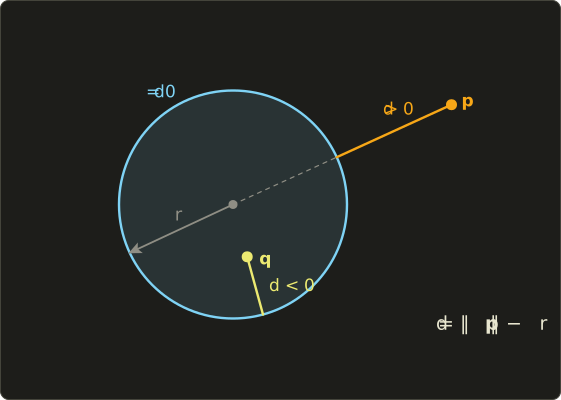
The sign tells us which side we are on:
- : outside, and is how far we have to walk to reach the shape.
- : exactly on the edge.
- : inside, and is how far it is to the edge.
A function like this is called a signed distance function, or SDF.
Let me check it with numbers, with :
- : , so . Outside, half a unit away.
- : , so . On the edge.
- : , so . Inside, 0.3 from the edge.
In GLSL this is one line:
float sdCircle(vec2 p, float r) {
  return length(p) - r;
}
length(v) returns (for a vec3, also ).
It is the same as sqrt(dot(v, v)).
The sd in the name means "signed distance"; it is a naming habit used by almost everyone who writes these functions, and I'll use it too.
Why go through the trouble of a distance, instead of just asking "inside or not"?
Because a distance carries much more information.
"Inside or not" gives one bit per pixel.
A distance tells us how close we are to the edge, which is exactly what we need for smooth edges, outlines, glows and soft shadows, and it lets us combine shapes with plain min and max.
We will use all of that in this chapter.
6.2 The first circle: step
To turn the distance into a picture, we need "1 inside, 0 outside".
That is what step does:
step(0.0, d) is 1 outside the circle () and 0 inside, so we use 1.0 - step(0.0, d) and then mix between a background colour and a foreground colour (mix(a, b, t) = , from chapter 3).
Like most GLSL functions, step also works on vectors, one component at a time.
#version 450 core

in vec2 vUv;
out vec4 out_color;

uniform float uTime;
uniform vec2 uResolution;
uniform vec2 uMouse;

void main() {
  vec2 p = (2.0 * gl_FragCoord.xy - uResolution) / uResolution.y;

  float d = length(p) - 0.5;          // signed distance to the circle
  float inside = 1.0 - step(0.0, d);  // 1 if d < 0, otherwise 0

  vec3 bg = vec3(0.10, 0.10, 0.12);
  vec3 fg = vec3(1.00, 0.75, 0.20);
  vec3 color = mix(bg, fg, inside);
  out_color = vec4(color, 1.0);
}
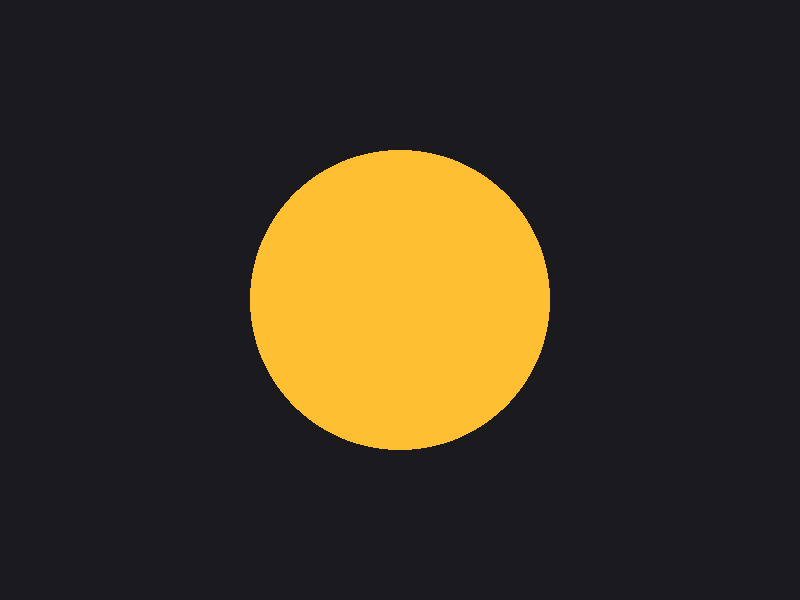
Save, press R, and you get a circle:
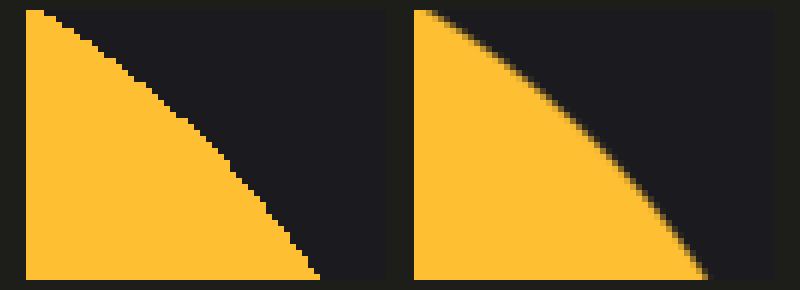
It looks fine from a distance, but look closely at the edge (the left half of the picture below is the edge of this circle, enlarged 6 times).
Every pixel is either fully yellow or fully dark, so the edge is a staircase.
This is aliasing, and on a moving shape it flickers and crawls.
6.3 Soft edges: smoothstep
The fix is to let the pixels right at the edge be partly covered.
A pixel that is half inside the circle should get a colour half way between the two.
We already used smoothstep for the mouse circle in chapter 5; now let's see what it actually computes.
6.3.1 The formula
smoothstep(e0, e1, x) goes from 0 to 1 while x goes from e0 to e1.
First it turns x into a value between 0 and 1 (a straight ramp), then it bends the ramp into an S-curve:
clamp(x, lo, hi) cuts a value to a range: it is min(max(x, lo), hi).
min and max return the smaller and the larger of two values (component-wise for vectors).
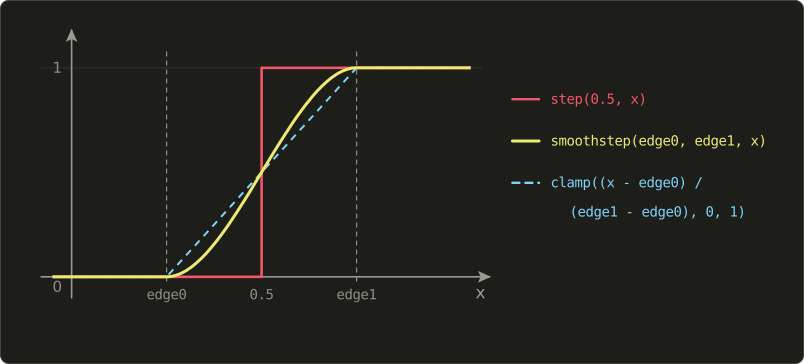
Why and not the straight ramp ?
The polynomial is 0 at and 1 at , like the ramp, but its slope () is also 0 at both ends.
So the curve leaves 0 and arrives at 1 gently, without a visible kink.
For edges you can hardly see the difference, but for animation and noise (chapter 8) it matters a lot.
A worked example: smoothstep(0.25, 0.75, 0.6).
The GLSL specification says the result ofsmoothstepis undefined whene0 >= e1. You will often seesmoothstep(0.01, 0.0, d)written to get a reversed curve. It happens to work on most drivers, but it is not guaranteed. Write1.0 - smoothstep(0.0, 0.01, d)instead.
6.3.2 One pixel of blur
How wide should the soft edge be?
About one pixel.
In our coordinate the window height (uResolution.y pixels) covers 2 units, so one pixel is
units in an 800×600 window.
We blend from one pixel inside the edge to one pixel outside:
void main() {
  vec2 p = (2.0 * gl_FragCoord.xy - uResolution) / uResolution.y;

  float d = length(p) - 0.5;
  float px = 2.0 / uResolution.y;                // size of one pixel in p units
  float inside = 1.0 - smoothstep(-px, px, d);  // soft over one pixel on each side

  vec3 bg = vec3(0.10, 0.10, 0.12);
  vec3 fg = vec3(1.00, 0.75, 0.20);
  vec3 color = mix(bg, fg, inside);
  out_color = vec4(color, 1.0);
}
The right half of the enlarged picture above is the result.
The staircase is gone; the pixels on the edge take in-between colours, and at normal size the circle looks perfectly round.
6.4 Anti-aliasing that always fits: fwidth
2.0 / uResolution.y is correct only as long as d is measured in our p units.
In the next chapter we will scale and distort coordinates, and then one pixel no longer equals 0.0033 units of d.
It would be better to ask the GPU directly: "how much does d change from this pixel to the next?"
The GPU can answer that, because it never runs one fragment shader alone.
Fragments are always processed in little 2×2 blocks of pixels, and the shaders in a block run in lockstep.
So a shader can look at the value of an expression in its neighbour:
dFdx(v): how muchvchanges from this pixel to the next one to the right (roughlyv(x + 1, y) - v(x, y)).dFdy(v): the same, upwards.fwidth(v):abs(dFdx(v)) + abs(dFdy(v)), the total change ofvacross one pixel.
abs(x) is the absolute value (component-wise for vectors).
For our circle fwidth(d) is about 0.0033 to 0.0047 (the distance changes by one pixel's worth in the direction across the edge, a bit more diagonally), whatever the window size and whatever we did to the coordinates before.
That gives a helper we will use for the rest of the series:
// coverage (0 to 1) of a shape with signed distance d, with an anti-aliased edge
float fill(float d) {
  float w = fwidth(d);
  return 1.0 - smoothstep(-w, w, d);
}
dFdx,dFdyandfwidthonly exist in fragment shaders, because only fragments come in 2×2 blocks. They are available in every desktop GLSL version we use, including macOS's 4.1. Inside anifwhose condition differs between the pixels of a block, their results are undefined, so call them outside of such branches (asfilldoes).
6.5 Seeing the distance field
A shape only uses the place where , but the function gives a number for every pixel.
All those numbers together are called a distance field.
When something goes wrong with an SDF, the best debugging tool is to look at the whole field, not just the shape.
Here is a function that turns a distance into a colour (an idea popularised by Inigo Quilez, who has written more about SDFs than anyone else):
// show a distance field as colours (outside orange, inside blue, with contour lines)
vec3 showField(float d) {
  vec3 color = d > 0.0 ? vec3(0.90, 0.60, 0.30) : vec3(0.40, 0.70, 0.90);
  color *= 1.0 - exp(-6.0 * abs(d));             // darker near the edge
  color *= 0.8 + 0.2 * cos(62.83 * d);            // stripes, one every 0.1 units
  float w = fwidth(d);
  color = mix(color, vec3(1.0), 1.0 - smoothstep(0.0, 2.0 * w, abs(d)));  // the d = 0 line
  return color;
}

void main() {
  vec2 p = (2.0 * gl_FragCoord.xy - uResolution) / uResolution.y;
  float d = sdCircle(p, 0.5);
  out_color = vec4(showField(d), 1.0);
}
(Put sdCircle from 6.1 above showField. In GLSL, like in C, a function must be declared before it is used.)
Line by line:
d > 0.0 ? a : bpicks orange outside and blue inside. The?:operator works like in C.exp(x)is . At the edge , so the colour goes black; at it is and at about 0.95. This shows how close to the edge a pixel is.cos(62.83 * d)repeats every units of distance, so each stripe is one tenth of a unit. Multiplying by0.8 + 0.2 * cos(...)makes the colour wave between 60% and 100% brightness.- The last line draws a white line where is less than two pixels: the actual shape.
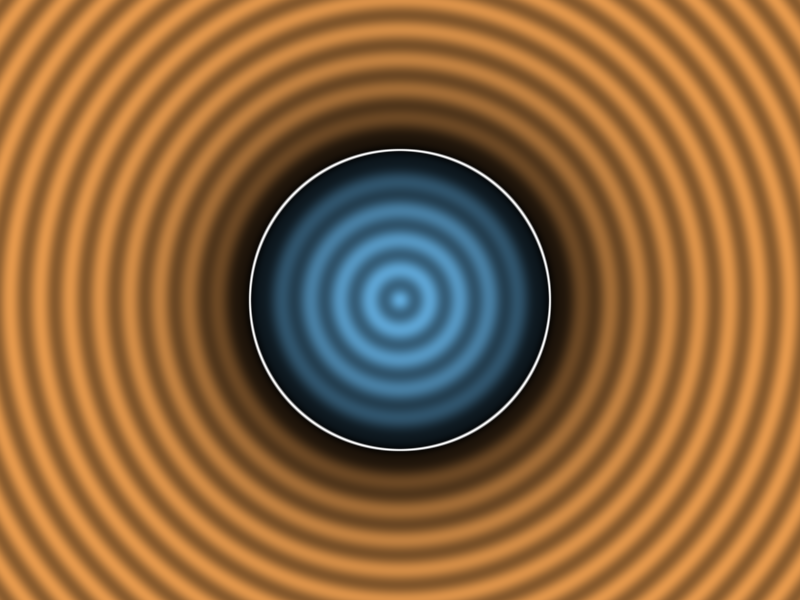
The rings are perfect circles at equal spacing.
That is what an exact distance field looks like: the contour lines are evenly spaced everywhere, because the distance grows by exactly 0.1 for every 0.1 units you walk away from the edge.
6.6 The box
A circle was easy, because every point of the edge is the same distance from the centre.
A rectangle (I'll call it a box, as most shader code does) needs more thought, but the result is short and it is worth deriving once.
6.6.1 Deriving the box SDF
The box is centred at the origin.
Its half size is : it reaches from to horizontally and from to vertically.
Step 1: fold everything into one quarter.
The box is symmetric, so a point is exactly as far from the box as .
Taking abs(p) mirrors every point into the top-right quarter, and from now on we only need to handle that quarter.
Step 2: measure how far past each edge we are.
is how far we are to the right of the right edge (negative if we are left of it), and the same for the top edge.
The two dashed lines through the box's edges split the quarter into three regions:
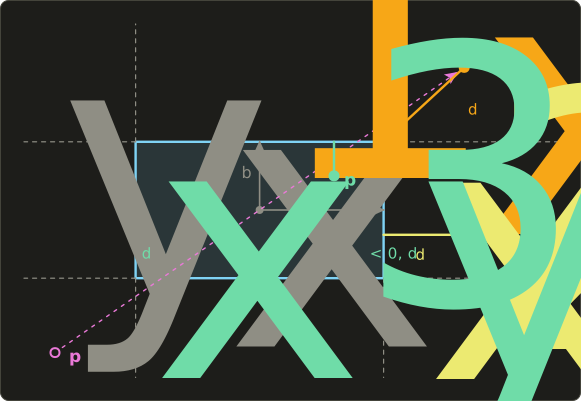
- Corner region ( and , like ): the nearest point of the box is the corner, and the distance is the length of .
- Side region ( but , like ): the nearest point is straight to the left on the right edge, and the distance is just . (Above the box it is .)
- Inside (both negative, like ): we are inside, and the nearest edge is the one we are closer to. Both numbers are negative, and the closer edge is the one whose number is nearer to zero, which is the larger one: .
Step 3: write all three cases as one formula.
max(d, 0.0) sets the negative components to zero.
In the corner region nothing changes, so its length is .
In the side region it becomes , with length .
Inside it becomes , with length 0.
So length(max(d, 0.0)) handles both outside cases and is 0 inside.
For the inside we add min(max(d.x, d.y), 0.0), which is inside and 0 everywhere outside (where at least one component is positive).
// box centred at the origin with half size b
float sdBox(vec2 p, vec2 b) {
  vec2 d = abs(p) - b;
  return length(max(d, 0.0)) + min(max(d.x, d.y), 0.0);
}
Note max(d, 0.0): when one argument is a vector and the other a float, GLSL compares every component with the same float.
6.6.2 Checking with numbers
Take a box with .
Corner region, :
Side region, :
Inside, :
The point is 0.2 below the top edge and 0.4 left of the right edge, so the nearest edge is the top one, 0.2 away. Correct.
And becomes after abs, so it also gets 0.5.
Swap the sdCircle call for sdBox(p, vec2(0.6, 0.3)) and look at the field:
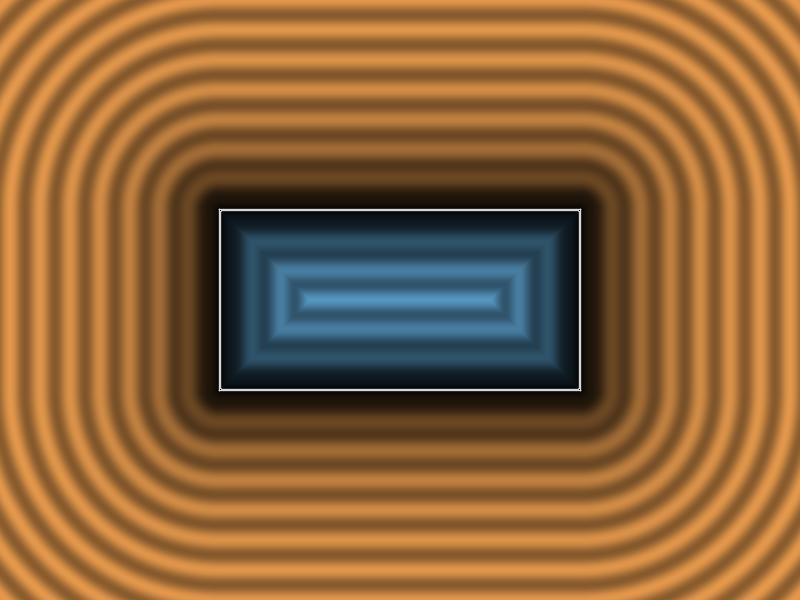
Outside, the contour lines get round corners, because in the corner regions the distance is measured to a single point.
Inside they stay sharp rectangles.
This picture is a good sanity check: if your contour lines are not evenly spaced, your function is not a true distance.
6.7 The line segment
Lines are everywhere in 2D drawing: strokes, arrows, clock hands (next chapter), graphs.
The distance to a line segment from to is a direct use of the projection from linear algebra chapter 4.
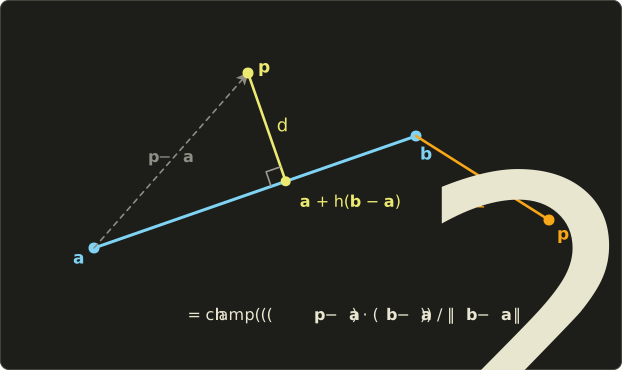
- Measure everything from : and .
- Project onto the segment direction. The dot product divided by the squared length gives how far along the segment the closest point is, as a fraction : 0 at , 1 at .
- Clamp to , because the segment ends. A point beyond (like ) is closest to itself.
- The distance is the length from to that closest point.
A worked example with , and :
And gives before clamping, so and : the distance to the end point .
dot(a, b) is the dot product (linear algebra chapter 4).
// distance to the segment from a to b
float sdSegment(vec2 p, vec2 a, vec2 b) {
  vec2 pa = p - a;
  vec2 ba = b - a;
  float h = clamp(dot(pa, ba) / dot(ba, ba), 0.0, 1.0);
  return length(pa - ba * h);
}
This is an unsigned distance: it is never negative, because a segment has no inside.
To give it thickness, subtract a radius: sdSegment(p, a, b) - 0.1 is a capsule, a thick line with round ends.
Let's make one end follow the mouse.
uMouse is in pixels, so we convert it exactly like gl_FragCoord:
void main() {
  vec2 p = (2.0 * gl_FragCoord.xy - uResolution) / uResolution.y;
  vec2 m = (2.0 * uMouse - uResolution) / uResolution.y;  // the mouse in the same coordinates

  float d = sdSegment(p, vec2(-0.5, -0.2), m) - 0.1;  // a line 0.1 thick (a capsule)
  out_color = vec4(showField(d), 1.0);
}
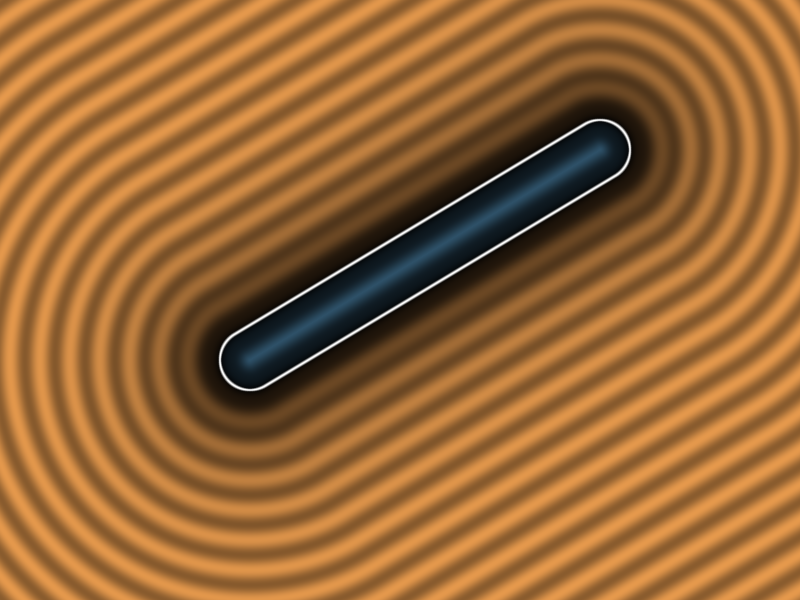
Move the mouse around.
The capsule stretches to follow it, and the field stays evenly spaced.
6.8 Modifying shapes: rounding and outlines
Because the SDF tells us the distance to the edge, we can move the edge by changing the distance.
Two tiny tricks give us a lot of new shapes.
Rounding: subtracting a number from any distance makes the shape grow by in every direction, and all its corners become round with radius (look again at the outside contour lines of the box: each one is the box grown by some amount, with round corners).
To get a rounded box of the original size, shrink the box first and then grow it:
// rounded box: make a smaller box, then subtract r from the distance
float sdRoundBox(vec2 p, vec2 b, float r) {
  return sdBox(p, b - r) - r;
}
Outlines: abs(d) is the distance to the edge without the sign, so it is small on both sides of the edge.
abs(d) - w is negative only in a band of width around the edge: an outline, or a ring when we use it on a circle.
This works on any SDF, and even on the result of another abs: abs(abs(d) - 0.1) - 0.02 gives two thin rings.
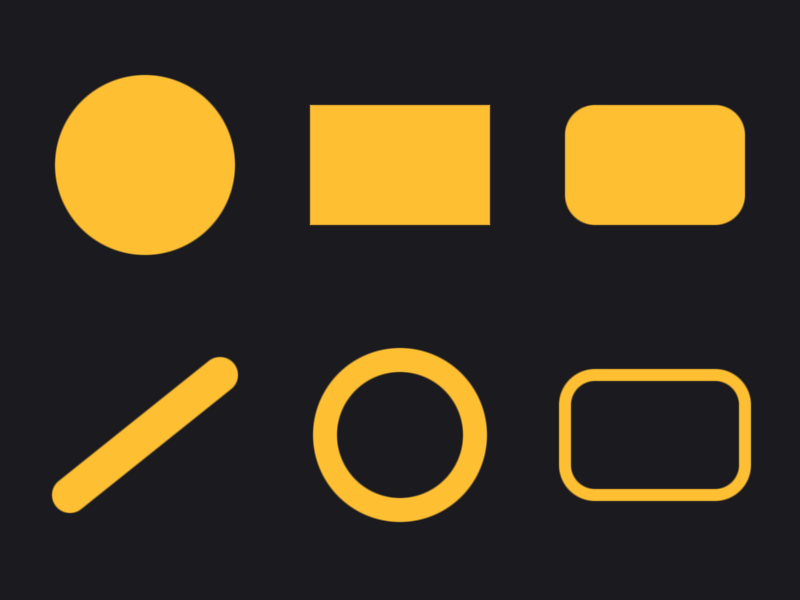
Here are all our shapes together, each moved to its own place by subtracting a position from p (the next chapter explains why subtracting moves the shape forward).
Combining them with min puts them all in the same picture; we will see why in the next section.
void main() {
  vec2 p = (2.0 * gl_FragCoord.xy - uResolution) / uResolution.y;

  vec3 color = vec3(0.10, 0.10, 0.12);
  vec3 ink = vec3(1.00, 0.75, 0.20);

  // top row
  float d1 = sdCircle(p - vec2(-0.85, 0.45), 0.3);
  float d2 = sdBox(p - vec2(0.0, 0.45), vec2(0.3, 0.2));
  float d3 = sdRoundBox(p - vec2(0.85, 0.45), vec2(0.3, 0.2), 0.1);
  // bottom row
  float d4 = sdSegment(p, vec2(-1.1, -0.65), vec2(-0.6, -0.25)) - 0.06;  // capsule
  float d5 = abs(sdCircle(p - vec2(0.0, -0.45), 0.25)) - 0.04;          // ring
  float d6 = abs(sdRoundBox(p - vec2(0.85, -0.45), vec2(0.3, 0.2), 0.1)) - 0.02;  // outline

  float d = min(min(min(d1, d2), min(d3, d4)), min(d5, d6));
  color = mix(color, ink, fill(d));
  out_color = vec4(color, 1.0);
}
6.9 Combining shapes
Two SDFs and can be combined like sets:
| Operation | Formula | Meaning |
|---|---|---|
| Union | min(a, b) |
inside either shape |
| Intersection | max(a, b) |
inside both shapes |
| Subtraction | max(a, -b) |
inside a but not inside b |
Why does this work?
A point is inside the union if it is inside at least one shape, that is, if at least one of , is negative, and that is exactly when the smaller one is negative.
A point is inside the intersection only if both are negative, which is when the larger one is negative.
For subtraction we flip the sign of : is the SDF of "everything outside b", and we intersect with that.
  // three circle and box pairs: left = union, middle = intersection, right = subtraction
  vec2 c0 = vec2(-0.85, 0.0), c1 = vec2(0.0, 0.0), c2 = vec2(0.85, 0.0);
  vec2 ca = vec2(-0.1, 0.06), cb = vec2(0.1, -0.06);
  float a0 = sdCircle(p - c0 - ca, 0.26), b0 = sdBox(p - c0 - cb, vec2(0.2));
  float a1 = sdCircle(p - c1 - ca, 0.26), b1 = sdBox(p - c1 - cb, vec2(0.2));
  float a2 = sdCircle(p - c2 - ca, 0.26), b2 = sdBox(p - c2 - cb, vec2(0.2));

  float d = min(min(
    min(a0, b0),     // union
    max(a1, b1)),    // intersection
    max(a2, -b2));   // subtraction (a minus b)
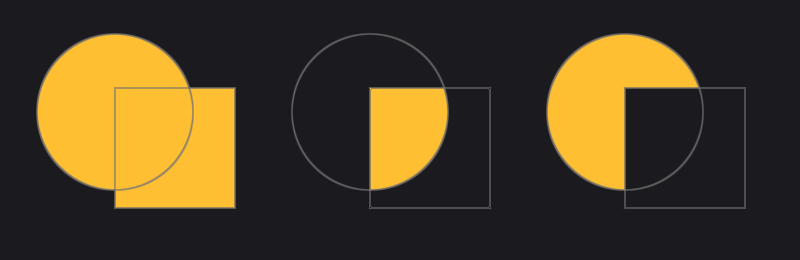
(The grey lines are the two original shapes, drawn with an outline helper: 1.0 - smoothstep(0.0, 1.5 * fwidth(d), abs(d)).)
One honest warning.
The union is an exact distance outside the shapes, but the intersection and subtraction are not always exact: they can report a distance that is too small (never too large).
For drawing in 2D this does not matter at all, since the edge is in the right place.
In chapter 14 (raymarching) we will rely on distances being "never too large", and these operations keep that promise.
6.10 Smooth union
min glues shapes together with a sharp crease where they meet.
Organic shapes (blobs, clay, metaballs, a character's ears joining its head) need a soft join instead.
The trick is a smooth minimum: a function that behaves like min when the two values are far apart, but rounds off the corner when they are close.
6.10.1 The formula
The popular polynomial version:
// smooth union (k is the size of the blended region)
float smin(float a, float b, float k) {
  float h = clamp(0.5 + 0.5 * (b - a) / k, 0.0, 1.0);
  return mix(b, a, h) - k * h * (1.0 - h);
}
How it works:
- If is smaller than by or more, then , so .
mix(b, a, 1)is , and . Result: exactly , the same asmin. - If is smaller by or more, and the result is exactly .
- In between, slides from 0 to 1,
mixblends the two distances, and the extra term pulls the result down a little. It is largest when (), where it subtracts .
Pulling the distance down means the surface moves outwards there, so the gap between the shapes fills in.
Because is a parabola that is 0 at both ends, the blend joins min without a kink.
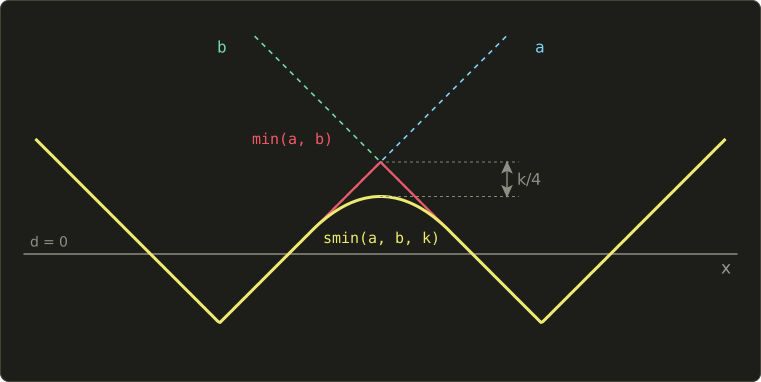
A worked example with , , :
min(0.1, 0.2) would be 0.1; the smooth version is 0.067, a bit further "inside".
With and the difference 0.4 is more than , so and the result is exactly 0.1.
6.10.2 Trying it out
Two circles of radius 0.15 with a small gap between them, joined with min, with smin and , and with smin and :
  // three pairs of circles: left = min, middle = smin (k = 0.1), right = smin (k = 0.3)
  vec2 c0 = vec2(-0.85, 0.0), c1 = vec2(0.0, 0.0), c2 = vec2(0.85, 0.0);
  vec2 o = vec2(0.17, 0.0);
  float d0 = min(sdCircle(p - c0 + o, 0.15), sdCircle(p - c0 - o, 0.15));
  float d1 = smin(sdCircle(p - c1 + o, 0.15), sdCircle(p - c1 - o, 0.15), 0.1);
  float d2 = smin(sdCircle(p - c2 + o, 0.15), sdCircle(p - c2 - o, 0.15), 0.3);
  float d = min(min(d0, d1), d2);
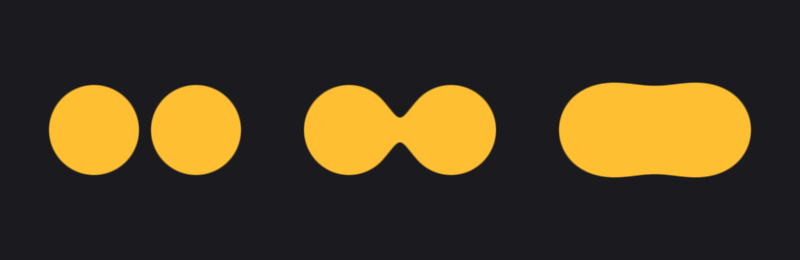
The gap between the circles is 0.04, so with min they stay apart.
With they reach towards each other and form a neck; with they melt into one shape.
It looks best in motion.
Here two circles move apart and together with uTime; the grey lines are the circles themselves:
  float x = 0.38 + 0.22 * cos(uTime * 2.0944);  // one cycle every 3 seconds
  float a = sdCircle(p - vec2(-x, 0.0), 0.3);
  float b = sdCircle(p - vec2(x, 0.0), 0.3);
  float d = smin(a, b, 0.3);
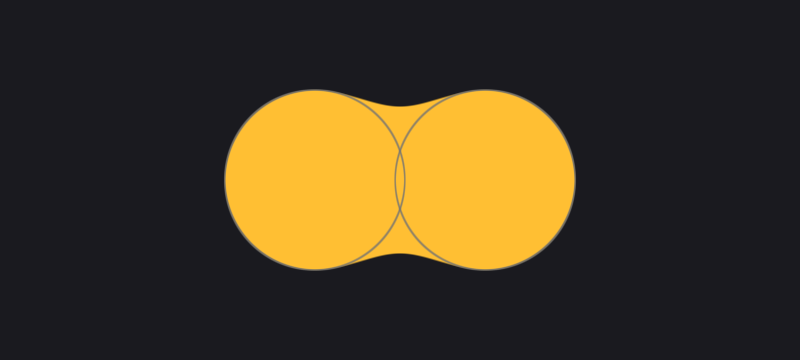
, so the cosine completes one cycle every 3 seconds.
6.11 Putting it together: a small character
Now we have enough pieces to draw something real.
This is the final playground.glsl of this chapter.
Every part is a shape from this chapter, and the colours are painted one layer over the other, from back to front, like a painter would.
#version 450 core

in vec2 vUv;
out vec4 out_color;

uniform float uTime;       // seconds since start
uniform vec2 uResolution;  // window size in pixels
uniform vec2 uMouse;       // mouse position in pixels, origin at the bottom left

// ---- chapter 6: signed distance functions (negative inside, 0 on the edge, positive outside) ----

// circle centred at the origin with radius r
float sdCircle(vec2 p, float r) {
  return length(p) - r;
}

// box centred at the origin with half size b
float sdBox(vec2 p, vec2 b) {
  vec2 d = abs(p) - b;
  return length(max(d, 0.0)) + min(max(d.x, d.y), 0.0);
}

// distance to the segment from a to b
float sdSegment(vec2 p, vec2 a, vec2 b) {
  vec2 pa = p - a;
  vec2 ba = b - a;
  float h = clamp(dot(pa, ba) / dot(ba, ba), 0.0, 1.0);
  return length(pa - ba * h);
}

// rounded box: make a smaller box, then subtract r from the distance
float sdRoundBox(vec2 p, vec2 b, float r) {
  return sdBox(p, b - r) - r;
}

// coverage (0 to 1) of a shape with signed distance d, with an anti-aliased edge
float fill(float d) {
  float w = fwidth(d);
  return 1.0 - smoothstep(-w, w, d);
}

// smooth union (k is the size of the blended region)
float smin(float a, float b, float k) {
  float h = clamp(0.5 + 0.5 * (b - a) / k, 0.0, 1.0);
  return mix(b, a, h) - k * h * (1.0 - h);
}

// head: a circle with two ears smoothly attached
float sdHead(vec2 p) {
  float head = sdCircle(p, 0.6);
  float earL = sdCircle(p - vec2(-0.45, 0.5), 0.17);
  float earR = sdCircle(p - vec2(0.45, 0.5), 0.17);
  return smin(head, min(earL, earR), 0.12);
}

// paint a shape over the current colour
vec3 paint(vec3 base, vec3 ink, float d) {
  return mix(base, ink, fill(d));
}

void main() {
  // origin in the centre, y from -1 to 1 (chapter 5)
  vec2 p = (2.0 * gl_FragCoord.xy - uResolution) / uResolution.y;
  vec2 m = (2.0 * uMouse - uResolution) / uResolution.y;  // the mouse in the same coordinates

  // background: vertical gradient
  vec3 color = mix(vec3(0.16, 0.12, 0.22), vec3(0.08, 0.06, 0.10), p.y * 0.5 + 0.5);

  // shadow: the same distance function, shifted and blurred
  float shadow = sdHead(p - vec2(0.05, -0.06));
  color *= 1.0 - 0.5 * (1.0 - smoothstep(-0.05, 0.12, shadow));

  // head fill and outline
  float head = sdHead(p);
  color = paint(color, vec3(1.00, 0.80, 0.30), head);
  color = paint(color, vec3(0.35, 0.18, 0.10), abs(head) - 0.012);

  // cheeks: circles with a very wide soft edge
  float cheek = min(sdCircle(p - vec2(-0.36, -0.12), 0.09),
                    sdCircle(p - vec2(0.36, -0.12), 0.09));
  color = mix(color, vec3(1.0, 0.50, 0.50), 0.6 * (1.0 - smoothstep(-0.04, 0.04, cheek)));

  // eyes: vertical capsules
  vec2 eyeL = vec2(-0.2, 0.12);
  vec2 eyeR = vec2(0.2, 0.12);
  float eyes = min(sdSegment(p, eyeL - vec2(0.0, 0.06), eyeL + vec2(0.0, 0.06)),
                   sdSegment(p, eyeR - vec2(0.0, 0.06), eyeR + vec2(0.0, 0.06))) - 0.075;
  color = paint(color, vec3(1.0), eyes);
  color = paint(color, vec3(0.35, 0.18, 0.10), abs(eyes) - 0.01);

  // pupils: look towards the mouse (limit the length so they stay inside the eyes)
  vec2 look = m - (eyeL + eyeR) * 0.5;
  look = look / max(length(look), 1.0) * 0.05;
  float pupils = min(sdCircle(p - eyeL - look, 0.04), sdCircle(p - eyeR - look, 0.04));
  color = paint(color, vec3(0.12, 0.08, 0.06), pupils);

  // mouth: the lower half of a ring (a ring intersected with a half-plane)
  float ring = abs(sdCircle(p - vec2(0.0, 0.02), 0.3)) - 0.022;
  float below = p.y + 0.12;  // negative where y < -0.12
  color = paint(color, vec3(0.35, 0.18, 0.10), max(ring, below));

  out_color = vec4(color, 1.0);
}

What each part teaches:
- Head: one circle plus two ear circles, joined with
smin, so the ears grow out of the head instead of being stuck on. Putting the shape in its own functionsdHeadlets us use it twice. - Shadow: the same
sdHead, moved a little to the lower right, with a very widesmoothstep(from −0.05 to 0.12 instead of one pixel). A wide edge is a blur, and a blurred dark copy of a shape is a soft shadow. With bitmaps this needs a blur pass; with an SDF it is one line. - Outline:
abs(head) - 0.012is the outline trick from 6.8, painted after the fill. - Cheeks: again a wide
smoothstep, mixed only 60% so the yellow shows through. - Eyes: capsules (6.7) standing upright.
- Pupils: the direction from between the eyes to the mouse.
look / max(length(look), 1.0)keeps short vectors as they are and shortens long ones to length 1, so the pupils move at most 0.05 and never leave the eyes. (Why notnormalize(look)?normalizedivides by the length, and when the mouse is exactly between the eyes the length is 0.maxavoids the division by zero.) - Mouth: a ring intersected (
max) with the half-planep.y + 0.12. A half-plane is the simplest SDF of all: the signed distance to the horizontal line , negative below it. The intersection keeps the part of the ring below that line.
Move the mouse and the eyes follow it.
To see what the shader "sees", replace the body of main with out_color = vec4(showField(sdHead(p)), 1.0); (with showField from 6.5 added to the file):
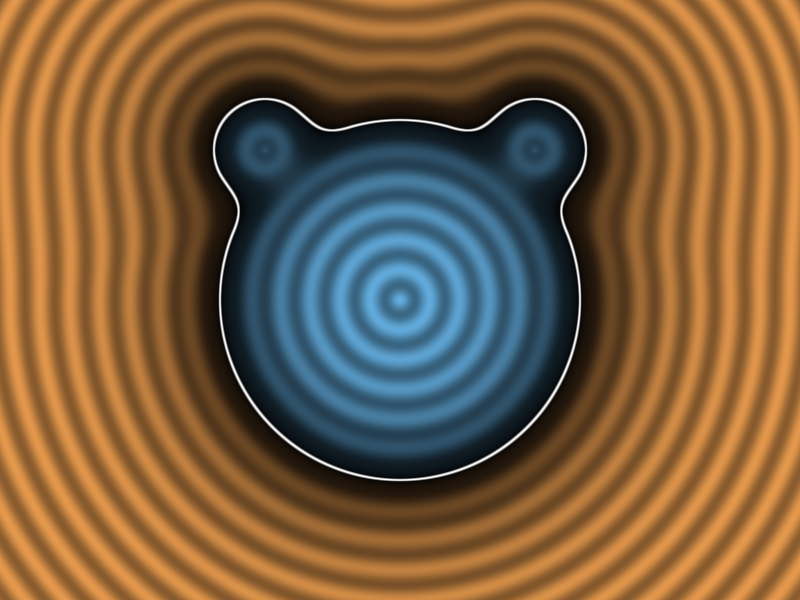
Notice how the contours near the ears are smooth: no creases, thanks to smin.
6.12 New GLSL functions in this chapter
| Function | What it computes |
|---|---|
length(v) |
|
dot(a, b) |
|
abs(x) |
if , otherwise (per component) |
min(a, b), max(a, b) |
the smaller, the larger value (per component; b may be a float) |
clamp(x, lo, hi) |
min(max(x, lo), hi) |
step(e, x) |
0 if , otherwise 1 |
smoothstep(e0, e1, x) |
with |
exp(x) |
|
dFdx(v), dFdy(v) |
change of v to the neighbouring pixel in x or y (fragment shaders only) |
fwidth(v) |
abs(dFdx(v)) + abs(dFdy(v)) |
6.13 SDFs in real games and engines
Distance functions are not just a demo-scene trick; they are all over real software.
- Text: in 2007 Valve published a short paper by Chris Green on rendering text and decals from a small texture that stores a distance field instead of colours. The shader does exactly what our
filldoes:smoothsteparound the 0.5 level. Text stays sharp at any size, and outlines, glows and drop shadows come almost free. Unity's TextMesh Pro and many other UI systems use this. A refinement called multi-channel SDF (MSDF) keeps sharp corners. - UI: rounded buttons, progress rings, health bars, icons and selection outlines are often drawn with exactly the
sdRoundBox,abs(d) - wandfillyou wrote here, because they scale to any resolution and need no textures. - Decals and effects: shockwave rings, target markers on the ground, area-of-effect circles in strategy games and MOBAs are usually a quad with a circle or ring SDF in its fragment shader.
- 3D: Unreal Engine stores a 3D distance field for each mesh and uses it for soft shadows and ambient occlusion. Media Molecule's Dreams on PS4 builds its whole sculpting system on SDFs combined with smooth unions. And raymarching (chapter 14) draws complete 3D scenes from 3D versions of the functions in this chapter.
6.14 Summary
- A signed distance function returns the distance to a shape's edge: negative inside, 0 on the edge, positive outside.
- Circle:
length(p) - r. Box: fold withabs, thenlength(max(d, 0.0)) + min(max(d.x, d.y), 0.0). Segment: projection withdot,clamped to the segment. stepgives hard, aliased edges;smoothstepwith a width of about one pixel gives smooth ones.fwidthmeasures that width for you, whatever you did to the coordinates.d - rrounds and grows a shape;abs(d) - wturns it into an outline.- Union
min, intersectionmax, subtractionmax(a, -b);sminjoins shapes smoothly, subtracting at most . - Visualise the whole field (
showField) when debugging: evenly spaced contour lines mean a correct distance. - A wide
smoothstepon a shifted SDF gives soft shadows and glows for free.
6.15 Challenges
- ★ Compute the signed distance of the points , and to a box with half size . (You should get one positive value from a side region, one negative value and one value from a corner region.)
- ★ Compute
smoothstep(0.0, 2.0, 0.5)andsmin(0.3, 0.3, 0.4)by hand. Check your answers by drawing them as colours in the playground. - ★★ Draw a target: five concentric rings in alternating red and white, using only one
sdCircleandfracton the distance. The rings should stay perfectly smooth when you resize the window. - ★★ Draw an equilateral triangle by intersecting three half-planes (a half-plane is
dot(p, n) - cfor a unit normaln). Then try to round its corners with- r. The triangle grows by r, but unlike the rounded box of 6.8 its corners stay sharp. Explain why, using the warning aboutmaxat the end of 6.9. - ★★ Give the character from 6.11 a blink: every 3 seconds, squash the eye capsules to a line for 0.15 seconds (hint: make the capsule's half height depend on
fract(uTime / 3.0)). The pupils should disappear while the eyes are closed. - ★★ Make the mouse cursor a soft light: draw a glow around the head whose strength is
exp(-8.0 * max(head, 0.0))and whose brightness depends on how close the mouse is to the head. Outside the head the glow should fade smoothly to the background. - ★★★ The intersection
max(a, b)of two circles is not an exact distance field outside the shape. DrawshowField(max(a, b))for two overlapping circles and find where the contour lines stop being evenly spaced. Explain whymaxreports a distance that is too small there.
ファイル: a/shader/playground.glsl | b/shader/playground.glsl
| 前 | 新 | ||
|---|---|---|---|
| @@ -7,16 +7,97 @@ uniform float uTime; // 起動してからの秒数 | |||
| 7 | uniform vec2 uResolution; // 画面の大きさ(ピクセル) | 7 | uniform vec2 uResolution; // 画面の大きさ(ピクセル) |
| 8 | uniform vec2 uMouse; // マウスの位置(ピクセル、左下が原点) | 8 | uniform vec2 uMouse; // マウスの位置(ピクセル、左下が原点) |
| 9 | 9 | ||
| 10 | // ---- 第6章:符号付き距離関数(負=内側、0=境界、正=外側) ---- | ||
| 11 | |||
| 12 | // 円(中心が原点、半径r) | ||
| 13 | float sdCircle(vec2 p, float r) { | ||
| 14 | return length(p) - r; | ||
| 15 | } | ||
| 16 | |||
| 17 | // 箱(中心が原点、半分の大きさがb) | ||
| 18 | float sdBox(vec2 p, vec2 b) { | ||
| 19 | vec2 d = abs(p) - b; | ||
| 20 | return length(max(d, 0.0)) + min(max(d.x, d.y), 0.0); | ||
| 21 | } | ||
| 22 | |||
| 23 | // 線分abまでの距離 | ||
| 24 | float sdSegment(vec2 p, vec2 a, vec2 b) { | ||
| 25 | vec2 pa = p - a; | ||
| 26 | vec2 ba = b - a; | ||
| 27 | float h = clamp(dot(pa, ba) / dot(ba, ba), 0.0, 1.0); | ||
| 28 | return length(pa - ba * h); | ||
| 29 | } | ||
| 30 | |||
| 31 | // 角の丸い箱:小さい箱を作ってから、距離からrを引く | ||
| 32 | float sdRoundBox(vec2 p, vec2 b, float r) { | ||
| 33 | return sdBox(p, b - r) - r; | ||
| 34 | } | ||
| 35 | |||
| 36 | // 符号付き距離から、アンチエイリアス付きの塗り(0〜1)を作る | ||
| 37 | float fill(float d) { | ||
| 38 | float w = fwidth(d); | ||
| 39 | return 1.0 - smoothstep(-w, w, d); | ||
| 40 | } | ||
| 41 | |||
| 42 | // 滑らかな和集合(kは繋がる部分の大きさ) | ||
| 43 | float smin(float a, float b, float k) { | ||
| 44 | float h = clamp(0.5 + 0.5 * (b - a) / k, 0.0, 1.0); | ||
| 45 | return mix(b, a, h) - k * h * (1.0 - h); | ||
| 46 | } | ||
| 47 | |||
| 48 | // 頭:円に2つの耳を滑らかにくっつける | ||
| 49 | float sdHead(vec2 p) { | ||
| 50 | float head = sdCircle(p, 0.6); | ||
| 51 | float earL = sdCircle(p - vec2(-0.45, 0.5), 0.17); | ||
| 52 | float earR = sdCircle(p - vec2(0.45, 0.5), 0.17); | ||
| 53 | return smin(head, min(earL, earR), 0.12); | ||
| 54 | } | ||
| 55 | |||
| 56 | // 図形を色で塗り重ねる | ||
| 57 | vec3 paint(vec3 base, vec3 ink, float d) { | ||
| 58 | return mix(base, ink, fill(d)); | ||
| 59 | } | ||
| 60 | |||
| 10 | void main() { | 61 | void main() { |
| 11 | // ピクセル座標を0〜1に正規化 | 62 | // 中心が原点、縦が-1〜1になる座標(第5章) |
| 12 | vec2 uv = gl_FragCoord.xy / uResolution; | 63 | vec2 p = (2.0 * gl_FragCoord.xy - uResolution) / uResolution.y; |
| 64 | vec2 m = (2.0 * uMouse - uResolution) / uResolution.y; // マウスも同じ座標に | ||
| 65 | |||
| 66 | // 背景:縦のグラデーション | ||
| 67 | vec3 color = mix(vec3(0.16, 0.12, 0.22), vec3(0.08, 0.06, 0.10), p.y * 0.5 + 0.5); | ||
| 68 | |||
| 69 | // 影:同じ距離関数をずらして、ぼかして使う | ||
| 70 | float shadow = sdHead(p - vec2(0.05, -0.06)); | ||
| 71 | color *= 1.0 - 0.5 * (1.0 - smoothstep(-0.05, 0.12, shadow)); | ||
| 72 | |||
| 73 | // 頭の塗りと輪郭 | ||
| 74 | float head = sdHead(p); | ||
| 75 | color = paint(color, vec3(1.00, 0.80, 0.30), head); | ||
| 76 | color = paint(color, vec3(0.35, 0.18, 0.10), abs(head) - 0.012); | ||
| 77 | |||
| 78 | // ほっぺ:境界を広くぼかした円 | ||
| 79 | float cheek = min(sdCircle(p - vec2(-0.36, -0.12), 0.09), | ||
| 80 | sdCircle(p - vec2(0.36, -0.12), 0.09)); | ||
| 81 | color = mix(color, vec3(1.0, 0.50, 0.50), 0.6 * (1.0 - smoothstep(-0.04, 0.04, cheek))); | ||
| 82 | |||
| 83 | // 目:縦のカプセル | ||
| 84 | vec2 eyeL = vec2(-0.2, 0.12); | ||
| 85 | vec2 eyeR = vec2(0.2, 0.12); | ||
| 86 | float eyes = min(sdSegment(p, eyeL - vec2(0.0, 0.06), eyeL + vec2(0.0, 0.06)), | ||
| 87 | sdSegment(p, eyeR - vec2(0.0, 0.06), eyeR + vec2(0.0, 0.06))) - 0.075; | ||
| 88 | color = paint(color, vec3(1.0), eyes); | ||
| 89 | color = paint(color, vec3(0.35, 0.18, 0.10), abs(eyes) - 0.01); | ||
| 13 | 90 | ||
| 14 | // 時間で動くグラデーション | 91 | // 瞳:マウスの方を見る(目の中から出ない様に長さを制限) |
| 15 | vec3 color = 0.5 + 0.5 * cos(uTime + uv.xyx + vec3(0.0, 2.0, 4.0)); | 92 | vec2 look = m - (eyeL + eyeR) * 0.5; |
| 93 | look = look / max(length(look), 1.0) * 0.05; | ||
| 94 | float pupils = min(sdCircle(p - eyeL - look, 0.04), sdCircle(p - eyeR - look, 0.04)); | ||
| 95 | color = paint(color, vec3(0.12, 0.08, 0.06), pupils); | ||
| 16 | 96 | ||
| 17 | // マウスの周りに白い円 | 97 | // 口:リングの下半分(リングと半平面の積集合) |
| 18 | float d = length(gl_FragCoord.xy - uMouse); | 98 | float ring = abs(sdCircle(p - vec2(0.0, 0.02), 0.3)) - 0.022; |
| 19 | color = mix(color, vec3(1.0), 1.0 - smoothstep(18.0, 20.0, d)); | 99 | float below = p.y + 0.12; // y < -0.12 の部分が負 |
| 100 | color = paint(color, vec3(0.35, 0.18, 0.10), max(ring, below)); | ||
| 20 | 101 | ||
| 21 | out_color = vec4(color, 1.0); | 102 | out_color = vec4(color, 1.0); |
| 22 | } | 103 | } |
コメント(0)
まだコメントはありません。
ログインするとコメント出来ます。