5. The Shader Playground
Up to now, we changed the C code every time we wanted to try something new.
Changing a color or adding a uniform meant rewriting C, and fixing a shader meant restarting the program.
In this chapter we turn the tester into a shader playground.
It draws one fragment shader over the whole window, passes the time, the window size and the mouse position automatically, and reloads the shader without restarting when you press R.
Chapters 6 to 10 and chapter 14 all work by editing nothing but this playground's shader/playground.glsl.
It's the same idea as web shader editors like Shadertoy: the goal is to loop "write GLSL → save → R → look at the result" in a few seconds.
5.1 The playground at a glance
The playground is built on the main.c you downloaded in chapter 1 (which chapter 4 didn't change either).
Here is what changes:
- Compiling and linking shaders moves into two functions,
compileShader()andbuildProgram(), which return 0 on failure. - The R key reloads the shaders. If that fails, the previous shader keeps running.
- The ESC key quits.
- Every frame,
uTime(seconds since start),uResolution(window size in pixels) anduMouse(mouse position) are passed as uniforms. - On macOS,
#version 450in the shaders is automatically rewritten to#version 410. So the.mac.glslfiles aren't needed anymore. - The fragment shader is
shader/playground.glsl; the vertex shader is stillshader/vertex.glsl. - The C code that animated the colors is gone. The time reaches the shader as
uTime, so animation can be written inside the shader.
You can see the full change in the diff at the end of the chapter.
Here I go through the new parts in order.
5.2 Building and running
If you switched to main-ambient.c or main-directional.c in chapter 4, switch back to main.c.
- Windows: set "Excluded From Build" back to "No" for
main.c, and to "Yes" formain-ambient.candmain-directional.c. Start with F5. - macOS: tick "Target Membership" for
main.cagain and untick the other two. Addshader/vertex.glslandshader/playground.glslto the project and to "Build Phases" → "Copy Files" (the playground reads these two, not the.mac.glslfiles). Also open "Product" → "Scheme" → "Edit Scheme" → "Run" → "Options", choose "Use custom working directory" under "Working Directory" and pick the project folder. Otherwise the R key reloads the old copy made at build time, not theplayground.glslyou edited. - Unix: run
./build-unix.shwithout an argument; it buildsmain.cand starts it.
When it starts, the window title says "GLSLシェーダープレイグラウンド" ("GLSL shader playground"), and you see a slowly changing background with a white circle that follows the mouse.

5.3 Changes on the C side
Remembering the window size
To pass the window size to the shader, the C program has to know it.
Two global variables go near the top of the file, and the resize callback updates them:
// window size and mouse position (passed to the shader)
static int gWidth = 800;
static int gHeight = 600;

// viewport resize callback
void framebuffer_size_callback(GLFWwindow *window, int width, int height) {
  (void)window;
  gWidth = width;
  gHeight = height;
  glViewport(0, 0, width, height);
}
At startup, the viewport is also set from the real framebuffer size instead of a hard-coded 800×600:
  // set the viewport (on Retina and similar screens the pixel count differs from the window size)
  glfwGetFramebufferSize(window, &gWidth, &gHeight);
  glViewport(0, 0, gWidth, gHeight);
  glfwSetFramebufferSizeCallback(window, framebuffer_size_callback);
GLFW has two kinds of "size".
- Window size (
glfwGetWindowSize): in the OS's screen coordinate units. This is what we passed toglfwCreateWindow(800, 600, ...). - Framebuffer size (
glfwGetFramebufferSize): the real number of pixels. This is what OpenGL draws into.
On an ordinary monitor the two are the same, but on high-DPI screens like a Mac's Retina display, an 800×600 window has a framebuffer of 1600×1200 pixels.
If the viewport stayed at 800×600, you would only draw into the bottom left quarter of the window.
gl_FragCoord (explained later) is in framebuffer pixels, so the size we pass to the shader is the framebuffer size too.
compileShader and buildProgram
Until now, main compiled the shaders inline, but to reload them with the R key we need the same work as a function we can call any number of times:
// compile a shader and report whether it worked
GLuint compileShader(GLenum type, const char *source) {
  GLuint shader = glCreateShader(type);
  glShaderSource(shader, 1, &source, NULL);
  glCompileShader(shader);

  GLint success;
  glGetShaderiv(shader, GL_COMPILE_STATUS, &success);
  if (!success) {
    checkShaderCompile(shader);
    glDeleteShader(shader);
    return 0;
  }
  return shader;
}
compileShader returns the shader object on success; on failure it prints the error log and returns 0.
OpenGL never uses 0 as an object name, so 0 works as the "failed" marker.
If we didn't delete the failed shader with glDeleteShader, every press of R would leak one.
// build a program from vertex and fragment shader files (0 on failure)
GLuint buildProgram(const char *vertexPath, const char *fragmentPath) {
  char *vertexSource = readShaderFile(vertexPath);
  char *fragmentSource = readShaderFile(fragmentPath);
  if (!vertexSource || !fragmentSource) {
    free(vertexSource);
    free(fragmentSource);
    return 0;
  }

#ifdef __APPLE__
  // macOS only has OpenGL 4.1, so rewrite "#version 450" to "#version 410"
  char *v;
  if ((v = strstr(vertexSource, "#version 450"))) v[10] = '1';
  if ((v = strstr(fragmentSource, "#version 450"))) v[10] = '1';
#endif

  GLuint vertexShader = compileShader(GL_VERTEX_SHADER, vertexSource);
  GLuint fragmentShader = compileShader(GL_FRAGMENT_SHADER, fragmentSource);
  free(vertexSource);
  free(fragmentSource);
  if (!vertexShader || !fragmentShader) {
    if (vertexShader) glDeleteShader(vertexShader);
    if (fragmentShader) glDeleteShader(fragmentShader);
    return 0;
  }

  GLuint program = glCreateProgram();
  glAttachShader(program, vertexShader);
  glAttachShader(program, fragmentShader);
  glLinkProgram(program);
  glDeleteShader(vertexShader);
  glDeleteShader(fragmentShader);

  GLint success;
  glGetProgramiv(program, GL_LINK_STATUS, &success);
  if (!success) {
    checkProgramLink(program);
    glDeleteProgram(program);
    return 0;
  }
  return program;
}
Wherever buildProgram fails (reading, compiling or linking), it frees everything it allocated and returns 0.
C guarantees that free(NULL) does nothing, so calling free on both is safe even if only one file could be read.
To use strstr, #include <string.h> is added at the top of the file.
Rewriting #version on macOS
OpenGL on macOS stops at 4.1, so a #version 450 shader won't compile there.
Chapters 1 to 4 kept separate .mac.glsl files for that reason; the playground instead rewrites the loaded string, so the same file works on every OS.
strstr(s, "#version 450") returns a pointer to the first place where "#version 450" appears in the string s (or NULL if it doesn't).
Counting from there:
| index | 0 | 1 to 7 | 8 | 9 | 10 | 11 |
|---|---|---|---|---|---|---|
| char | # | version | space | 4 | 5 | 0 |
Changing the '5' at index 10 into '1' gives #version 410.
Only the copy in memory changes, not the file, so Windows and Unix still use the original #version 450.
This only changes the version number, though.
If you use features that only exist in GLSL 4.50 (compute shaders or some built-in functions, for example), you get a compile error on a Mac.
The playground chapters of this series only use features that also work in 4.10.
Also, a different version such as #version 460 won't be rewritten, so always start playground shaders with #version 450 core.
Loading the shaders
In main, all that's left is one call to buildProgram:
  // load the shaders
  const char *vertexPath = "shader/vertex.glsl";
  const char *fragmentPath = "shader/playground.glsl";
  GLuint shaderProgram = buildProgram(vertexPath, fragmentPath);
  if (!shaderProgram) {
    puts("シェーダーの読み込みに失敗しました"); // failed to load the shaders
    glfwDestroyWindow(window);
    glfwTerminate();
    return -1;
  }
If it fails at startup, there's no usable shader at all, so the program quits.
The vertex data (the fullscreen quad) and the VAO setup are the same as in chapter 1's main.c.
The ESC and R keys
The main loop checks the keyboard first:
  int reloadWasDown = 0;

  // main render loop
  while (!glfwWindowShouldClose(window)) {
    // quit with ESC
    if (glfwGetKey(window, GLFW_KEY_ESCAPE) == GLFW_PRESS) glfwSetWindowShouldClose(window, 1);

    // reload the shaders with R (keep the old shader if that fails)
    int reloadDown = glfwGetKey(window, GLFW_KEY_R) == GLFW_PRESS;
    if (reloadDown && !reloadWasDown) {
      GLuint newProgram = buildProgram(vertexPath, fragmentPath);
      if (newProgram) {
        glDeleteProgram(shaderProgram);
        shaderProgram = newProgram;
        puts("シェーダーを再読み込みしました"); // shaders reloaded
      } else {
        puts("再読み込みに失敗しました。前のシェーダーを使い続けます"); // reload failed, keeping the previous one
      }
    }
    reloadWasDown = reloadDown;
glfwGetKey returns "is the key held down right now".
Between pressing and releasing R, a human takes anywhere from a few to a dozen or more frames at 60 fps.
With a plain if (reloadDown), we would reload the shader every single frame during that time.
So we remember the previous frame's state, reloadWasDown, and only reload at the moment "it wasn't down last frame, and it is down now" (the moment it was pressed).
This is called edge detection.
When building the new program fails, we don't delete the old shaderProgram.
Why?
If we deleted the old program first, there would be no program to draw with, and the window would go black or we'd get errors.
When you're writing shaders, mistakes like forgetting a semicolon happen all the time.
If the old shader keeps running, you just read the error in the terminal, fix it and press R again.
Only when a new program is ready do we delete the old one and swap them.
For example, delete the semicolon in out_color = vec4(color, 1.0); and press R. The terminal shows this, and the window keeps running the previous shader (the program prints its messages in Japanese):
シェーダーファイルを読み込み中: shader/vertex.glsl
シェーダーファイルを読み込み中: shader/playground.glsl
シェーダーのコンパイルに失敗しました:
0:22(1): error: syntax error, unexpected '}', expecting ',' or ';'

再読み込みに失敗しました。前のシェーダーを使い続けます
The lines say "loading shader file", "shader compilation failed" and "reload failed, keeping the previous shader".
0:22(1) means "source string 0, line 22, character 1".
The compiler only notices the missing semicolon when it reads the } on the next line, so the line number is one after the actual mistake.
The format of the error message depends on the GPU driver (this is Mesa's format; NVIDIA prints something like 0(22) : error C0000: ...).
Passing the uniforms
Every frame, before drawing, we set three uniforms:
    // mouse position (in pixels, y flipped so the origin is at the bottom left)
    double mouseX, mouseY;
    glfwGetCursorPos(window, &mouseX, &mouseY);
    int windowW, windowH;
    glfwGetWindowSize(window, &windowW, &windowH);
    float scale = windowW > 0 ? (float)gWidth / (float)windowW : 1.0f;

    // set the uniforms
    glUniform1f(glGetUniformLocation(shaderProgram, "uTime"), (float)glfwGetTime());
    glUniform2f(glGetUniformLocation(shaderProgram, "uResolution"), (float)gWidth, (float)gHeight);
    glUniform2f(glGetUniformLocation(shaderProgram, "uMouse"),
                (float)mouseX * scale, (float)(windowH - mouseY) * scale);
uTime:glfwGetTime(), the number of seconds since GLFW was initialized.uResolution: the width and height of the framebuffer (in pixels).uMouse: the mouse position converted to framebuffer pixels.
glfwGetCursorPos returns coordinates in window units, with the origin at the top left of the window and y pointing down.
OpenGL's gl_FragCoord, however, is in framebuffer pixels, with the origin at the bottom left and y pointing up.
So we do two conversions.
- Flip y: .
- Convert from window units to pixels: multiply by .
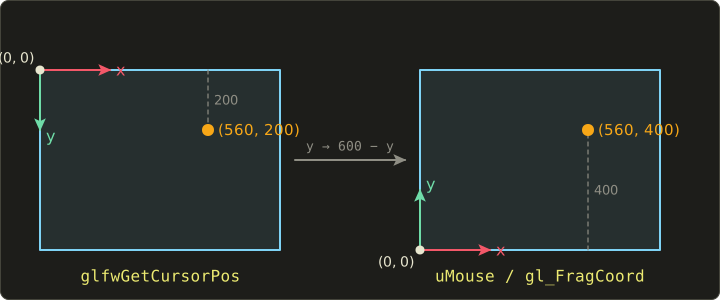
Let's check with numbers.
In an ordinary 800×600 window with the cursor at , , so:
If the same window is on a Retina display with a 1600×1200 framebuffer, , so:
In both cases, the shader sees the same place: "30% from the right, a third from the top".
The windowW > 0 check prevents a division by zero when the window is minimized and its size becomes 0.
If a shader doesn't use a uniform, the GLSL compiler removes it, glGetUniformLocation returns −1, and that glUniform* call is ignored (chapter 3).
So a playground shader only needs to declare the ones it needs out of uTime, uResolution and uMouse.
Calling glGetUniformLocation every frame is a little wasteful, but reloading with R creates a new program whose locations may differ, so here I prefer simplicity. Real engines look up the locations once when they create the program and store them.
5.4 The GLSL side: playground.glsl
Here is the playground's first shader:
#version 450 core

in vec2 vUv;
out vec4 out_color;

uniform float uTime;       // seconds since start
uniform vec2 uResolution;  // window size (pixels)
uniform vec2 uMouse;       // mouse position (pixels, origin at the bottom left)

void main() {
  // normalize the pixel coordinates to 0..1
  vec2 uv = gl_FragCoord.xy / uResolution;

  // a gradient that moves with time
  vec3 color = 0.5 + 0.5 * cos(uTime + uv.xyx + vec3(0.0, 2.0, 4.0));

  // a white circle around the mouse
  float d = length(gl_FragCoord.xy - uMouse);
  color = mix(color, vec3(1.0), 1.0 - smoothstep(18.0, 20.0, d));

  out_color = vec4(color, 1.0);
}
gl_FragCoord
gl_FragCoord is a built-in input variable (vec4) of the fragment shader, and its xy is the fragment's pixel position in the framebuffer.
The center of the bottom left pixel is , and the center of the top right pixel is .
(z is the depth and w is , but the 2D playground doesn't use them.)
In chapter 3 we learned "where on the screen" from vUv, which came from the vertex shader; gl_FragCoord tells us without passing any data.
On the fullscreen quad, gl_FragCoord.xy / uResolution has the same value as vUv.
The time-based gradient
0.5 + 0.5 * cos(...) is the same "map −1..1 onto 0..1" shape as the C animation in chapter 3:
uv.xyx is a swizzle (chapter 2) that builds the vec3 .
Passing a vec3 to cos computes the cosine of each of the three components.
R, G and B are offset by 0, 2 and 4 radians, so, just like the 120° (about 2.09 radians) offset in chapter 3, the three channel waves are shifted and the hue rotates.
At in the bottom left ():
That's an orange-ish red.
In chapter 3 we computed nine sines in C; here it's one line of shader code, and every pixel gets a different color.
The mouse circle
length(gl_FragCoord.xy - uMouse) is the distance (in pixels) from this pixel to the mouse.
smoothstep(18.0, 20.0, d) is 0 up to distance 18, 1 from distance 20, and changes smoothly in between.
Flipping it with 1.0 - gives "1 inside the circle, 0 outside", which we use as the mix factor to blend in white.
Because it changes smoothly over 2 pixels (18 to 20), the circle's edge isn't jagged (anti-aliasing, covered in detail in chapter 6).
5.5 Normalizing coordinates and the aspect ratio
When drawing shapes in the playground, you almost always start by turning pixel coordinates into coordinates that are easier to work with.
Let's go through three stages.
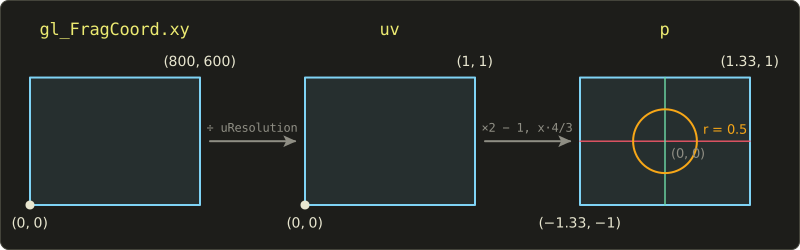
uv from 0 to 1
gl_FragCoord.xy / uResolution divides a vec2 by a vec2, so it divides component-wise.
x is divided by the width and y by the height, so both go from 0 to 1.
If you show the coordinates as a color, you can tell at a glance whether you computed them right:
#version 450 core

in vec2 vUv;
out vec4 out_color;

uniform vec2 uResolution;

void main() {
  vec2 uv = gl_FragCoord.xy / uResolution;
  out_color = vec4(uv, 0.0, 1.0); // x → red, y → green
}
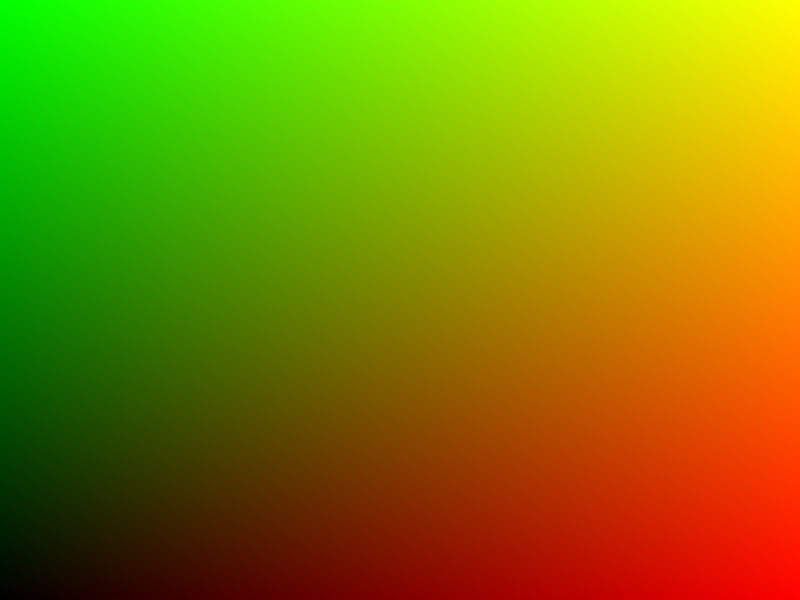
The bottom left is black , the bottom right red , the top left green and the top right yellow .
If it's upside down, you flipped y one time too many somewhere.
Centering the origin and fixing the aspect ratio
uv is handy, but it has two problems for drawing shapes.
- The origin is in the bottom left corner. Circles and the like are easier to write with the origin in the center of the screen.
- x and y have different units. On an 800×600 window, 0.1 in uv is 80 pixels horizontally and 60 pixels vertically.
As a test, let's map uv to −1..1 and draw a circle of radius 0.5:
#version 450 core

in vec2 vUv;
out vec4 out_color;

uniform vec2 uResolution;

void main() {
  vec2 uv = gl_FragCoord.xy / uResolution;
  vec2 p = uv * 2.0 - 1.0;            // −1..1 (but different units horizontally and vertically)

  float d = length(p);
  vec3 color = vec3(0.1, 0.1, 0.15);
  if (d < 0.5) color = vec3(1.0, 0.7, 0.2);
  out_color = vec4(color, 1.0);
}
The result is an ellipse stretched sideways (left in the picture below).
The fix is the line you'll use more than any other in the playground:
#version 450 core

in vec2 vUv;
out vec4 out_color;

uniform vec2 uResolution;

void main() {
  // origin in the center, −1..1 vertically, horizontal range follows the window's shape
  vec2 p = (2.0 * gl_FragCoord.xy - uResolution) / uResolution.y;

  float d = length(p);
  vec3 color = vec3(0.1, 0.1, 0.15);
  if (d < 0.5) color = vec3(1.0, 0.7, 0.2);
  out_color = vec4(color, 1.0);
}
Broken down:
2.0 * gl_FragCoord.xy - uResolution: x goes from to , and y from to . The center of the screen is ./ uResolution.y: divide both x and y by the same number (the height). y becomes , and x becomes , about .
Because x and y are divided by the same number, one unit is the same 300 pixels both vertically and horizontally, and a circle stays a circle.
Let's check with numbers.
At the center of the bottom left pixel, :
At the pixel :
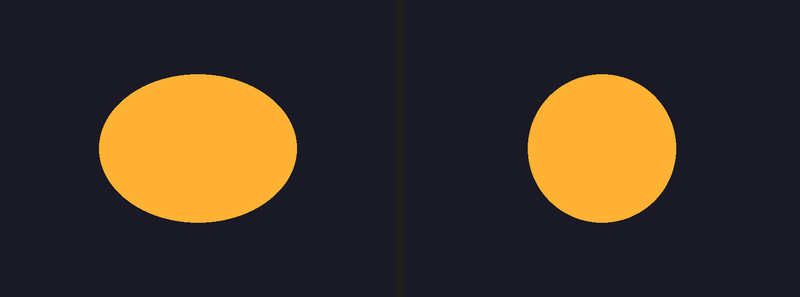
In these coordinates, even if you resize the window, the circle always keeps a radius of a quarter of the window height (its diameter is half the height).
The problem from chapter 3, where we wrote 800.0 / 600.0 directly, is solved thanks to uResolution.
5.6 Using time
With uTime, animation happens entirely inside the shader.
These are the three functions you'll use most:
sin(x),cos(x): swing smoothly between −1 and 1 with a period of . The period ofsin(uTime * k)is seconds.fract(x): the fractional part, . It repeats 0..1 as a "sawtooth wave". For example, and .step(edge, x): 0 if , otherwise 1.
With these, let's draw flowing stripes and a pulsing circle:
#version 450 core

in vec2 vUv;
out vec4 out_color;

uniform float uTime;
uniform vec2 uResolution;

void main() {
  vec2 p = (2.0 * gl_FragCoord.xy - uResolution) / uResolution.y;

  // background: stripes flowing from right to left
  float stripe = step(0.5, fract(p.x * 4.0 + uTime));
  vec3 color = mix(vec3(0.10, 0.10, 0.15), vec3(0.15, 0.15, 0.25), stripe);

  // a pulsing circle: the radius swings ±0.1 around 0.3
  float radius = 0.3 + 0.1 * sin(uTime * 3.0);
  float d = length(p);
  float circle = 1.0 - smoothstep(radius - 0.01, radius + 0.01, d);
  color = mix(color, vec3(1.0, 0.4, 0.3), circle);

  out_color = vec4(color, 1.0);
}
fract(p.x * 4.0 + uTime)repeats 0..1 once every 0.25 of x.step(0.5, ...)turns the first half into 0 and the second half into 1, giving alternating stripes 0.125 wide.- Because we add the time, a place with a given value sits at , so it moves left by 0.25 units per second.
- The radius is , swinging between 0.2 and 0.4 with a period of seconds.
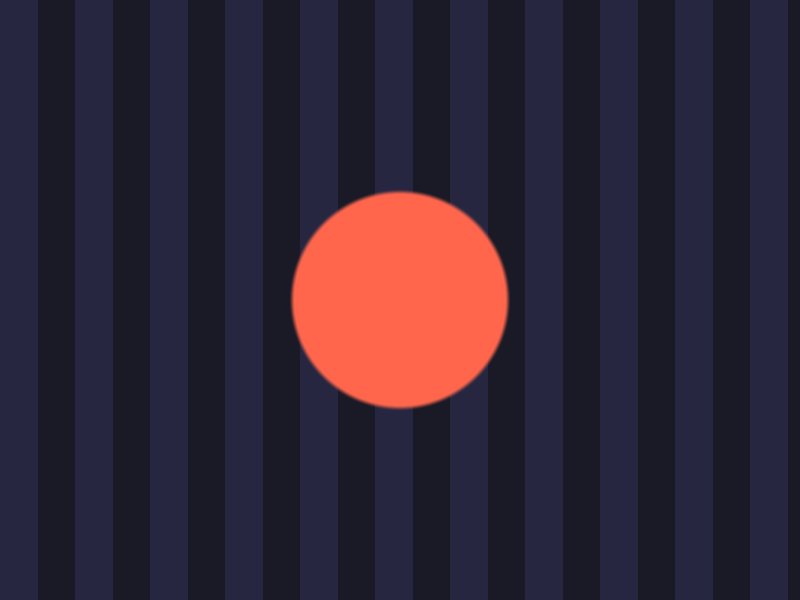
uTimeis afloat, so it loses precision if you leave the program running for hours. A 32-bitfloathas about 7 significant digits, so after about 8,200 seconds (a bit over 2 hours) it can no longer represent differences finer than 1 millisecond, and at 100,000 seconds (about 28 hours) it moves in steps of about 8 milliseconds (around half a frame at 60 fps) and animation starts to stutter. Games wrap the time around at a fixed period, or compute things likefractin C withdoublebefore passing them in.
5.7 Following the mouse
uMouse is in pixels, so if we apply the same conversion as for p, we can compare them in the same coordinate system.
Let's draw a "flashlight" centered on the mouse:
#version 450 core

in vec2 vUv;
out vec4 out_color;

uniform vec2 uResolution;
uniform vec2 uMouse;

void main() {
  vec2 p = (2.0 * gl_FragCoord.xy - uResolution) / uResolution.y;
  vec2 m = (2.0 * uMouse - uResolution) / uResolution.y; // the mouse in the same coordinates

  // a "flashlight": brighter closer to the mouse
  float d = length(p - m);
  float light = 1.0 - smoothstep(0.0, 0.8, d);
  vec3 color = vec3(0.9, 0.8, 0.6) * light + vec3(0.03, 0.03, 0.06);

  // a small dot at the mouse position
  color = mix(color, vec3(1.0, 0.2, 0.2), 1.0 - smoothstep(0.02, 0.025, d));
  out_color = vec4(color, 1.0);
}
p - m is the vector from this pixel to the mouse, and its length is the distance (the distance between two points from chapter 3 of the linear algebra series).
At distance 0, light = 1; from 0.8 on it's 0, and in between smoothstep darkens it smoothly.
Finally, a red dot at distance 0.02 to 0.025 marks the mouse position.
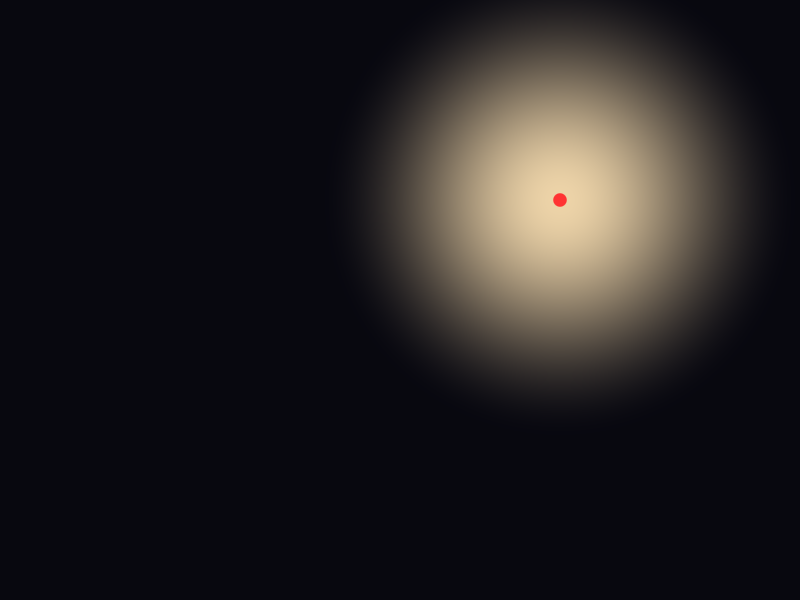
The screenshot was taken with the cursor at in window coordinates.
uMouse is , so , up and to the right of the center.
5.8 Debugging with colors
Shaders have no printf.
They run on 480,000 pixels at once, so there's no way to print one value.
Instead, output the value you want to inspect as a color.
This is the most important debugging technique shader programmers use every day.
Here are the tricks:
- Show values in 0..1 directly as
vec3(v)(gray) or in one channel. - Split values that can be negative, for example positive in green and negative in red.
- Map values in −1..1 (like normals) to 0..1 with
v * 0.5 + 0.5before showing them. - Highlight out-of-range values with a loud color (blue or magenta).
- Draw tick lines so you can read off the size of a value.
#version 450 core

in vec2 vUv;
out vec4 out_color;

uniform vec2 uResolution;

void main() {
  vec2 p = (2.0 * gl_FragCoord.xy - uResolution) / uResolution.y;

  // turn the value to inspect (here p.x) into a color: negative red, positive green
  float v = p.x;
  vec3 color = vec3(max(-v, 0.0), max(v, 0.0), 0.0);

  // thin lines every 0.25 as a scale
  vec2 g = abs(fract(p * 4.0 + 0.5) - 0.5);
  if (min(g.x, g.y) < 0.02) color += vec3(0.25);

  // highlight values above 1 in blue (find out-of-range values)
  if (abs(v) > 1.0) color.b = 1.0;
  out_color = vec4(color, 1.0);
}
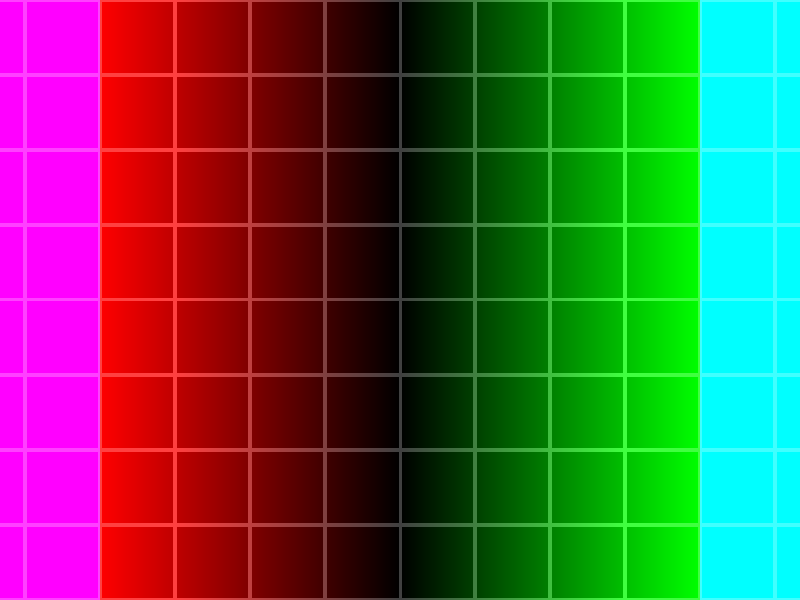
The middle of the screen is black (), it gets redder to the left and greener to the right, and at both ends, where , blue is added, giving magenta and cyan.
The grid lines are every 0.25, so counting from the middle to the edge you can read that the left and right edges are about 1.33.
The tick line formula abs(fract(p * 4.0 + 0.5) - 0.5) is "the distance to the nearest multiple of 0.25 (in units where 0.25 is 1)".
fract(x + 0.5) - 0.5 goes from −0.5 to 0.5 and is 0 at whole numbers, so where its absolute value is small, we draw a line.
Color debugging also helps in situations like these:
- Are the normals right?
out_color = vec4(normal * 0.5 + 0.5, 1.0);. Faces pointing up look light green, faces pointing right look pink. - Has a value become NaN (not a number)?
if (isnan(v)) color = vec3(1.0, 0.0, 1.0);. NaNs come from things likenormalize(vec3(0.0))orsqrt(-1.0), spread through the math and show up as black or strangely colored dots. - Which branch did the code take? Output a different color in each branch.
5.9 GLSL features used in this chapter
gl_FragCoord: the fragment's pixel position in the framebuffer (vec4). The center of the bottom left pixel is .fract(x): . Repeats 0..1.floor(x): the largest whole number not greater than .step(edge, x): 0 if , otherwise 1.sin(x),cos(x): trigonometric functions in radians. Component-wise on vectors.smoothstep(e0, e1, x): the smooth 0..1 transition from chapter 3.length(v): the length of a vector.length(a - b)is the distance between two points.min(a, b),max(a, b),abs(x): minimum, maximum, absolute value.isnan(x): true if the value is NaN.- The swizzle
uv.xyx: a new vector with components reordered or repeated. vec2 / vec2andvec2 / float: component-wise division, and dividing every component by the same number.
5.10 How games and engines use this
- Shadertoy: the best-known shader playground on the web has uniforms called
iTime,iResolutionandiMouse. It's exactly the same idea as this chapter's playground, so Shadertoy shaders mostly run here after renaming (though Shadertoy'siMouseis avec4that also carries the click position). - Post-processing: screen effects in games like bloom, color grading, depth of field and vignettes are all fragment shaders drawn on a fullscreen quad (or triangle). This playground is practice for exactly that.
- Hot reloading: Unity, Unreal Engine and Godot reload a shader as soon as you save it, and keep using the previous one if there's an error. That's the same mechanism as our R key. In your own engine, watching the file's modification time and reloading automatically is extremely useful.
- Debug views: almost every engine has "view modes" that show normals, UVs, depth, lighting only and so on as colors. GPU debuggers like RenderDoc also let you inspect values as colors, just like in this chapter.
- High DPI: the difference between window size and framebuffer size is behind common game bugs like blurry UI and clicks landing in the wrong place. Always convert mouse coordinates into framebuffer units.
5.11 Summary
- The playground draws
shader/playground.glslover the whole window and passesuTime,uResolutionanduMouseevery frame. buildProgram()returns 0 on failure. The R key reloads, and on failure the previous program keeps running.- To react only at the moment a key is pressed, remember the previous frame's state (edge detection).
- On high-DPI screens the framebuffer size (pixels) differs from the window size. The shader gets the framebuffer size.
- Mouse coordinates are flipped in y and converted to framebuffer pixels.
- On macOS,
#version 450is rewritten to410, so the same shader file works on every OS. gl_FragCoord.xy / uResolutiongives 0..1, and(2.0 * gl_FragCoord.xy - uResolution) / uResolution.ygives centered coordinates with the correct aspect ratio.sin,cos,fractanduTimegive you animation.- The basic way to debug a shader is to output values as colors.
5.12 Challenges
- ★ In a 1280×720 window, compute
uvandpfor the pixel . What is the range of x inp(left and right edge)? - ★ Compute
fract(3.2),fract(-1.75),step(0.5, 0.3)andstep(0.5, 0.5). - ★★ In the playground, draw a white circle of radius 0.25 and use
uTimeto move its center around a circle of radius 0.5 once every 5 seconds (hint: put the center atvec2(cos(a), sin(a)) * 0.5with ). The circle should go round without turning into an ellipse. - ★★ Split the window into four parts at the mouse position and paint the bottom left red, the bottom right green, the top left blue and the top right white (hint:
step(uMouse, gl_FragCoord.xy)returns avec2). When you move the mouse, the dividing cross should follow it. - ★★ Deliberately write a mistake (for example
vec3 color = 1.0;), press R and read the error message in the terminal. Check that the window keeps running the previous shader, then fix it and press R again. - ★★ Show
length(p)with color debugging: 0..1 as a shade of gray, and red where it exceeds 1. You should get a screen that is black in the center and red outside the circle of radius 1. - ★★★ Change
main.cso thatplayground.glslreloads automatically when it's saved, without pressing R (hint: check the file's modification time withstat()andst_mtimeon POSIX or_stat()on Windows, every 0.5 seconds rather than every frame). Also think about how to avoid reading a half-written file at the moment the editor saves.
ファイル: a/main.c | b/main.c
| 前 | 新 | ||
|---|---|---|---|
| @@ -9,6 +9,7 @@ | |||
| 9 | #include <GLFW/glfw3.h> | 9 | #include <GLFW/glfw3.h> |
| 10 | #include <stdio.h> | 10 | #include <stdio.h> |
| 11 | #include <stdlib.h> | 11 | #include <stdlib.h> |
| 12 | #include <string.h> | ||
| 12 | #include <vector.h> | 13 | #include <vector.h> |
| 13 | #include <math.h> | 14 | #include <math.h> |
| 14 | 15 | ||
| @@ -103,12 +104,78 @@ void checkProgramLink(GLuint program) { | |||
| 103 | } | 104 | } |
| 104 | } | 105 | } |
| 105 | 106 | ||
| 107 | // ウィンドウの大きさとマウスの位置(シェーダーに渡す) | ||
| 108 | static int gWidth = 800; | ||
| 109 | static int gHeight = 600; | ||
| 110 | |||
| 106 | // ビューポートのリサイズコールバック | 111 | // ビューポートのリサイズコールバック |
| 107 | void framebuffer_size_callback(GLFWwindow *window, int width, int height) { | 112 | void framebuffer_size_callback(GLFWwindow *window, int width, int height) { |
| 108 | (void)window; | 113 | (void)window; |
| 114 | gWidth = width; | ||
| 115 | gHeight = height; | ||
| 109 | glViewport(0, 0, width, height); | 116 | glViewport(0, 0, width, height); |
| 110 | } | 117 | } |
| 111 | 118 | ||
| 119 | // シェーダーをコンパイルし、成功したかどうかを返す | ||
| 120 | GLuint compileShader(GLenum type, const char *source) { | ||
| 121 | GLuint shader = glCreateShader(type); | ||
| 122 | glShaderSource(shader, 1, &source, NULL); | ||
| 123 | glCompileShader(shader); | ||
| 124 | |||
| 125 | GLint success; | ||
| 126 | glGetShaderiv(shader, GL_COMPILE_STATUS, &success); | ||
| 127 | if (!success) { | ||
| 128 | checkShaderCompile(shader); | ||
| 129 | glDeleteShader(shader); | ||
| 130 | return 0; | ||
| 131 | } | ||
| 132 | return shader; | ||
| 133 | } | ||
| 134 | |||
| 135 | // 頂点シェーダーとフラグメントシェーダーのファイルからプログラムを作る(失敗したら0) | ||
| 136 | GLuint buildProgram(const char *vertexPath, const char *fragmentPath) { | ||
| 137 | char *vertexSource = readShaderFile(vertexPath); | ||
| 138 | char *fragmentSource = readShaderFile(fragmentPath); | ||
| 139 | if (!vertexSource || !fragmentSource) { | ||
| 140 | free(vertexSource); | ||
| 141 | free(fragmentSource); | ||
| 142 | return 0; | ||
| 143 | } | ||
| 144 | |||
| 145 | #ifdef __APPLE__ | ||
| 146 | // macOSはOpenGL 4.1までなので、「#version 450」を「#version 410」に書き換える | ||
| 147 | char *v; | ||
| 148 | if ((v = strstr(vertexSource, "#version 450"))) v[10] = '1'; | ||
| 149 | if ((v = strstr(fragmentSource, "#version 450"))) v[10] = '1'; | ||
| 150 | #endif | ||
| 151 | |||
| 152 | GLuint vertexShader = compileShader(GL_VERTEX_SHADER, vertexSource); | ||
| 153 | GLuint fragmentShader = compileShader(GL_FRAGMENT_SHADER, fragmentSource); | ||
| 154 | free(vertexSource); | ||
| 155 | free(fragmentSource); | ||
| 156 | if (!vertexShader || !fragmentShader) { | ||
| 157 | if (vertexShader) glDeleteShader(vertexShader); | ||
| 158 | if (fragmentShader) glDeleteShader(fragmentShader); | ||
| 159 | return 0; | ||
| 160 | } | ||
| 161 | |||
| 162 | GLuint program = glCreateProgram(); | ||
| 163 | glAttachShader(program, vertexShader); | ||
| 164 | glAttachShader(program, fragmentShader); | ||
| 165 | glLinkProgram(program); | ||
| 166 | glDeleteShader(vertexShader); | ||
| 167 | glDeleteShader(fragmentShader); | ||
| 168 | |||
| 169 | GLint success; | ||
| 170 | glGetProgramiv(program, GL_LINK_STATUS, &success); | ||
| 171 | if (!success) { | ||
| 172 | checkProgramLink(program); | ||
| 173 | glDeleteProgram(program); | ||
| 174 | return 0; | ||
| 175 | } | ||
| 176 | return program; | ||
| 177 | } | ||
| 178 | |||
| 112 | int main(int argc, char **argv) { | 179 | int main(int argc, char **argv) { |
| 113 | (void)argc; | 180 | (void)argc; |
| 114 | (void)argv; | 181 | (void)argv; |
| @@ -135,7 +202,7 @@ int main(int argc, char **argv) { | |||
| 135 | #endif | 202 | #endif |
| 136 | 203 | ||
| 137 | // ウィンドウを作成 | 204 | // ウィンドウを作成 |
| 138 | GLFWwindow *window = glfwCreateWindow(800, 600, "OpenGLシェーダーテスト", NULL, NULL); | 205 | GLFWwindow *window = glfwCreateWindow(800, 600, "GLSLシェーダープレイグラウンド", NULL, NULL); |
| 139 | if (!window) { | 206 | if (!window) { |
| 140 | puts("GLFWウィンドウの作成に失敗しました"); | 207 | puts("GLFWウィンドウの作成に失敗しました"); |
| 141 | glfwTerminate(); | 208 | glfwTerminate(); |
| @@ -151,50 +218,22 @@ int main(int argc, char **argv) { | |||
| 151 | return -1; | 218 | return -1; |
| 152 | } | 219 | } |
| 153 | 220 | ||
| 154 | // ビューポートを設定 | 221 | // ビューポートを設定(Retina等では実際のピクセル数がウィンドウの大きさと違う) |
| 155 | glViewport(0, 0, 800, 600); | 222 | glfwGetFramebufferSize(window, &gWidth, &gHeight); |
| 223 | glViewport(0, 0, gWidth, gHeight); | ||
| 156 | glfwSetFramebufferSizeCallback(window, framebuffer_size_callback); | 224 | glfwSetFramebufferSizeCallback(window, framebuffer_size_callback); |
| 157 | 225 | ||
| 158 | // シェーダーファイルを読み込む | 226 | // シェーダーを読み込む |
| 159 | #ifdef __APPLE__ | 227 | const char *vertexPath = "shader/vertex.glsl"; |
| 160 | char *vertexShaderSource = readShaderFile("shader/vertex.mac.glsl"); | 228 | const char *fragmentPath = "shader/playground.glsl"; |
| 161 | char *fragmentShaderSource = readShaderFile("shader/fragment.mac.glsl"); | 229 | GLuint shaderProgram = buildProgram(vertexPath, fragmentPath); |
| 162 | #else | 230 | if (!shaderProgram) { |
| 163 | char *vertexShaderSource = readShaderFile("shader/vertex.glsl"); | 231 | puts("シェーダーの読み込みに失敗しました"); |
| 164 | char *fragmentShaderSource = readShaderFile("shader/fragment.glsl"); | ||
| 165 | #endif | ||
| 166 | if (!vertexShaderSource || !fragmentShaderSource) { | ||
| 167 | puts("シェーダーファイルの読み込みに失敗しました"); | ||
| 168 | if (vertexShaderSource) free(vertexShaderSource); | ||
| 169 | if (fragmentShaderSource) free(fragmentShaderSource); | ||
| 170 | glfwDestroyWindow(window); | 232 | glfwDestroyWindow(window); |
| 171 | glfwTerminate(); | 233 | glfwTerminate(); |
| 172 | return -1; | 234 | return -1; |
| 173 | } | 235 | } |
| 174 | 236 | ||
| 175 | // シェーダーをコンパイル | ||
| 176 | GLuint vertexShader = glCreateShader(GL_VERTEX_SHADER); | ||
| 177 | glShaderSource(vertexShader, 1, (const char **)&vertexShaderSource, NULL); | ||
| 178 | glCompileShader(vertexShader); | ||
| 179 | checkShaderCompile(vertexShader); | ||
| 180 | |||
| 181 | GLuint fragmentShader = glCreateShader(GL_FRAGMENT_SHADER); | ||
| 182 | glShaderSource(fragmentShader, 1, (const char **)&fragmentShaderSource, NULL); | ||
| 183 | glCompileShader(fragmentShader); | ||
| 184 | checkShaderCompile(fragmentShader); | ||
| 185 | |||
| 186 | // シェーダープログラムをリンク | ||
| 187 | GLuint shaderProgram = glCreateProgram(); | ||
| 188 | glAttachShader(shaderProgram, vertexShader); | ||
| 189 | glAttachShader(shaderProgram, fragmentShader); | ||
| 190 | glLinkProgram(shaderProgram); | ||
| 191 | checkProgramLink(shaderProgram); | ||
| 192 | |||
| 193 | glDeleteShader(vertexShader); | ||
| 194 | glDeleteShader(fragmentShader); | ||
| 195 | free(vertexShaderSource); | ||
| 196 | free(fragmentShaderSource); | ||
| 197 | |||
| 198 | // 頂点データ(フルスクリーンクアッド)を設定 | 237 | // 頂点データ(フルスクリーンクアッド)を設定 |
| 199 | float vertices[] = { | 238 | float vertices[] = { |
| 200 | -1.0f, -1.0f, 0.0f, 0.0f, // 左下(位置、UV) | 239 | -1.0f, -1.0f, 0.0f, 0.0f, // 左下(位置、UV) |
| @@ -222,8 +261,27 @@ int main(int argc, char **argv) { | |||
| 222 | glVertexAttribPointer(1, 2, GL_FLOAT, GL_FALSE, 4 * sizeof(float), (void *)offset); | 261 | glVertexAttribPointer(1, 2, GL_FLOAT, GL_FALSE, 4 * sizeof(float), (void *)offset); |
| 223 | glEnableVertexAttribArray(1); | 262 | glEnableVertexAttribArray(1); |
| 224 | 263 | ||
| 264 | int reloadWasDown = 0; | ||
| 265 | |||
| 225 | // メインレンダリングループ | 266 | // メインレンダリングループ |
| 226 | while (!glfwWindowShouldClose(window)) { | 267 | while (!glfwWindowShouldClose(window)) { |
| 268 | // ESCキーで終了 | ||
| 269 | if (glfwGetKey(window, GLFW_KEY_ESCAPE) == GLFW_PRESS) glfwSetWindowShouldClose(window, 1); | ||
| 270 | |||
| 271 | // Rキーでシェーダーを再読み込み(失敗したら古いシェーダーのまま) | ||
| 272 | int reloadDown = glfwGetKey(window, GLFW_KEY_R) == GLFW_PRESS; | ||
| 273 | if (reloadDown && !reloadWasDown) { | ||
| 274 | GLuint newProgram = buildProgram(vertexPath, fragmentPath); | ||
| 275 | if (newProgram) { | ||
| 276 | glDeleteProgram(shaderProgram); | ||
| 277 | shaderProgram = newProgram; | ||
| 278 | puts("シェーダーを再読み込みしました"); | ||
| 279 | } else { | ||
| 280 | puts("再読み込みに失敗しました。前のシェーダーを使い続けます"); | ||
| 281 | } | ||
| 282 | } | ||
| 283 | reloadWasDown = reloadDown; | ||
| 284 | |||
| 227 | // 画面をクリア | 285 | // 画面をクリア |
| 228 | glClearColor(0.0f, 0.0f, 0.0f, 1.0f); | 286 | glClearColor(0.0f, 0.0f, 0.0f, 1.0f); |
| 229 | glClear(GL_COLOR_BUFFER_BIT); | 287 | glClear(GL_COLOR_BUFFER_BIT); |
| @@ -231,33 +289,18 @@ int main(int argc, char **argv) { | |||
| 231 | // シェーダープログラムを使用 | 289 | // シェーダープログラムを使用 |
| 232 | glUseProgram(shaderProgram); | 290 | glUseProgram(shaderProgram); |
| 233 | 291 | ||
| 234 | // 時間に基づいて色をアニメーション | 292 | // マウスの位置(ピクセル、左下が原点になる様にyを反転) |
| 235 | float time = (float)glfwGetTime(); | 293 | double mouseX, mouseY; |
| 236 | float speed = 1.0f; // アニメーションの速度 | 294 | glfwGetCursorPos(window, &mouseX, &mouseY); |
| 237 | float phase = 2.0f * 3.14159f / 3.0f; // // 120度の位相差(3色用) | 295 | int windowW, windowH; |
| 238 | 296 | glfwGetWindowSize(window, &windowW, &windowH); | |
| 239 | // uColorA: 赤 -> 緑 -> 青 | 297 | float scale = windowW > 0 ? (float)gWidth / (float)windowW : 1.0f; |
| 240 | Vector3 colorA; | ||
| 241 | colorA.r = sin(time * speed + 0.0f) * 0.5f + 0.5f; // 0.0 to 1.0 | ||
| 242 | colorA.g = sin(time * speed + phase) * 0.5f + 0.5f; | ||
| 243 | colorA.b = sin(time * speed + 2.0f * phase) * 0.5f + 0.5f; | ||
| 244 | |||
| 245 | // uColorB: 緑 -> 青 -> 赤 | ||
| 246 | Vector3 colorB; | ||
| 247 | colorB.r = sin(time * speed + 2.0f * phase) * 0.5f + 0.5f; | ||
| 248 | colorB.g = sin(time * speed + 0.0f) * 0.5f + 0.5f; | ||
| 249 | colorB.b = sin(time * speed + phase) * 0.5f + 0.5f; | ||
| 250 | |||
| 251 | // uColorC: 青 -> 赤 -> 緑 | ||
| 252 | Vector3 colorC; | ||
| 253 | colorC.r = sin(time * speed + phase) * 0.5f + 0.5f; | ||
| 254 | colorC.g = sin(time * speed + 2.0f * phase) * 0.5f + 0.5f; | ||
| 255 | colorC.b = sin(time * speed + 0.0f) * 0.5f + 0.5f; | ||
| 256 | 298 | ||
| 257 | // ユニフォームを設定 | 299 | // ユニフォームを設定 |
| 258 | glUniform3f(glGetUniformLocation(shaderProgram, "uColorA"), colorA.r, colorA.g, colorA.b); // 赤 | 300 | glUniform1f(glGetUniformLocation(shaderProgram, "uTime"), (float)glfwGetTime()); |
| 259 | glUniform3f(glGetUniformLocation(shaderProgram, "uColorB"), colorB.r, colorB.g, colorB.b); // 緑 | 301 | glUniform2f(glGetUniformLocation(shaderProgram, "uResolution"), (float)gWidth, (float)gHeight); |
| 260 | glUniform3f(glGetUniformLocation(shaderProgram, "uColorC"), colorC.r, colorC.g, colorC.b); // 青 | 302 | glUniform2f(glGetUniformLocation(shaderProgram, "uMouse"), |
| 303 | (float)mouseX * scale, (float)(windowH - mouseY) * scale); | ||
| 261 | 304 | ||
| 262 | // クアッドを描画 | 305 | // クアッドを描画 |
| 263 | glBindVertexArray(VAO); | 306 | glBindVertexArray(VAO); |
ファイル: /dev/null | b/shader/playground.glsl
| 前 | 新 | ||
|---|---|---|---|
| @@ -0,0 +1,22 @@ | |||
| 1 | #version 450 core | ||
| 2 | |||
| 3 | in vec2 vUv; | ||
| 4 | out vec4 out_color; | ||
| 5 | |||
| 6 | uniform float uTime; // 起動してからの秒数 | ||
| 7 | uniform vec2 uResolution; // 画面の大きさ(ピクセル) | ||
| 8 | uniform vec2 uMouse; // マウスの位置(ピクセル、左下が原点) | ||
| 9 | |||
| 10 | void main() { | ||
| 11 | // ピクセル座標を0〜1に正規化 | ||
| 12 | vec2 uv = gl_FragCoord.xy / uResolution; | ||
| 13 | |||
| 14 | // 時間で動くグラデーション | ||
| 15 | vec3 color = 0.5 + 0.5 * cos(uTime + uv.xyx + vec3(0.0, 2.0, 4.0)); | ||
| 16 | |||
| 17 | // マウスの周りに白い円 | ||
| 18 | float d = length(gl_FragCoord.xy - uMouse); | ||
| 19 | color = mix(color, vec3(1.0), 1.0 - smoothstep(18.0, 20.0, d)); | ||
| 20 | |||
| 21 | out_color = vec4(color, 1.0); | ||
| 22 | } | ||
コメント(0)
まだコメントはありません。
ログインするとコメント出来ます。