4. Rendering to a Triangle and Lighting Part 1
So far, we've rendered our shader to the whole window.
In this chapter we first draw the shader onto a single triangle, then draw two triangles in one window, each with its own shader.
After that we step into the world of lighting (computing how light hits a surface).
I introduce the six common kinds of light and implement the first two: ambient light and directional light.
Directional light is a very clear example of the dot product from chapter 4 of the linear algebra series turning directly into brightness.
The look you know from 3D games, "faces that the light hits are bright, the other side is dark", almost always starts with the formula from this chapter.
4.1 Rendering to a triangle
Right now we render the shader to the whole window.
That looks nice, but it severely limits what else we can render on the screen.
Let's solve that first and render the shader onto a triangle.
Change the vertex data in main.c like this, and change the number of indices to draw from 6 to 3:
  // set up the vertex data (triangle)
  float vertices[] = {
    -0.5f, -0.5f, 0.0f, 0.0f, // bottom left (position, UV)
     0.5f, -0.5f, 1.0f, 0.0f, // bottom right
     0.0f,  0.5f, 0.5f, 1.0f  // top
  };
  GLuint indices[] = { 0, 1, 2 };
  ...
    glDrawElements(GL_TRIANGLES, 3, GL_UNSIGNED_INT, 0);
The second argument of glDrawElements is "how many indices to use".
With GL_TRIANGLES, every 3 indices make one triangle, so the quad needed 6 (two triangles) and now we need 3 (one triangle).
glBufferData uses sizeof(vertices) and sizeof(indices), so the buffer sizes follow automatically when the arrays get smaller.
The positions are normalized device coordinates (NDC), explained in chapter 3: the bottom left of the window is and the top right is .
So the bottom edge from to is half the width of the window.
The top vertex has the UV , so the tip of the triangle gets the color from the middle of the gradient's top edge (halfway between red and green, mixed with blue).
The result:
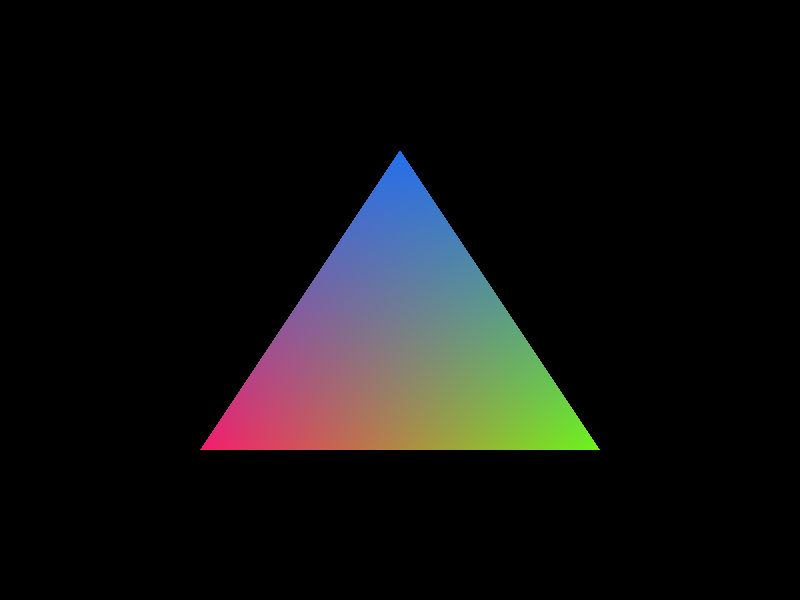
The fragment shader doesn't run for pixels outside the triangle, so the black from glClearColor stays there.
That's the result of the rasterizer's job of "finding only the pixels the triangle covers".
When you're done trying this, put main.c back the way it was.
For the rest of this chapter we leave main.c alone and work in new files (because chapter 5 changes main.c).
4.2 Explaining lighting
Next, let's talk about lighting.
It may not seem important, but once you use complex models, lighting is a very important concept.
A cube in a single color looks like a flat hexagon on screen unless each face has a different brightness.
There are six common kinds of light, and in this chapter I explain the first two, going from easy to hard.
We implement the rest in chapters 9 and 10.
This series uses these symbols for lighting:
- : the surface color (material color, diffuse color). Three values, RGB.
- : the surface normal. A vector of length 1 pointing out of the surface (a unit vector from chapter 3 of the linear algebra series).
- : a vector of length 1 pointing from the surface towards the light.
- : the intensity (brightness) of the light.
Ambient light
Ambient light is the easiest to understand and implement.
It is uniform light without a direction, and it needs no complicated calculations of direction or distance.
Put simply, "ambient light" is also called "background light".
In reality, light bounces off walls and floors many times, so even places that aren't lit directly get a little brighter.
Computing that exactly is hard, so ambient light approximates it as "the same amount of light reaches every place".
Directional light
Directional light introduces the basic concepts of 3D lighting: the direction of the light and the normal of the surface.
It is also fairly simple.
You can think of it as sunlight.
The sun is so far away that its light comes from the same direction everywhere on the ground, and it doesn't fade with distance.
The brightness depends on the cosine of the angle between the normal and the direction towards the light (Lambert's cosine law):
Point light
A point light adds a position and attenuation to directional light, introducing the idea that light fades with distance.
You can think of it as a light bulb.
The light direction is computed per fragment from the light position and the fragment position :
To apply attenuation, multiply the directional result by this factor.
is the constant term, the linear term and the quadratic term:
Real light gets weaker with the square of the distance (the term), so twice as far away means a quarter of the brightness.
Spotlight
A spotlight is a point light with a direction and a cone angle.
You can think of it as a flashlight.
The dot product of the spotlight's direction and "the direction from the light to the fragment" should change smoothly between the cosines of the inner cone angle and the outer cone angle :
Hemisphere light
A hemisphere light is a special form of ambient light that adds a change by direction (sky and ground).
It's less complex than an area light, but it introduces the idea of lighting based on the environment.
You can use it to simulate outdoor lighting.
Faces pointing up get the sky color, faces pointing down get the ground color, mixed by the y component of the normal:
Area light
Area lights are the most complex and need an integral over the whole surface, or an approximation (such as several point lights).
They simulate real-world surfaces like windows or light panels.
A large light source gives soft shadows and wide highlights.
| Light | Direction | Position and falloff | Example | Chapter |
|---|---|---|---|---|
| Ambient | none | none | indirect light in a room | 4 |
| Directional | constant | none | the sun | 4 |
| Point | per fragment | yes | a light bulb | 9 |
| Spot | per fragment plus cone | yes | a flashlight | 10 |
| Hemisphere | normal mixes sky and ground | none | the outdoor sky | 10 |
| Area | over a surface | yes | a window, a panel | 10 |
The light direction convention
There are two conventions for a light's "direction", and mixing them up swaps the lit and the dark faces.
- The direction the light travels, : from the light to the surface. If the sun is at the top right, points to the bottom left. This one feels natural to humans, so light settings in engines and editors usually use it.
- The direction towards the light, : from the surface to the light. This is the one Lambert's formula uses.
The two are exact opposites, so .
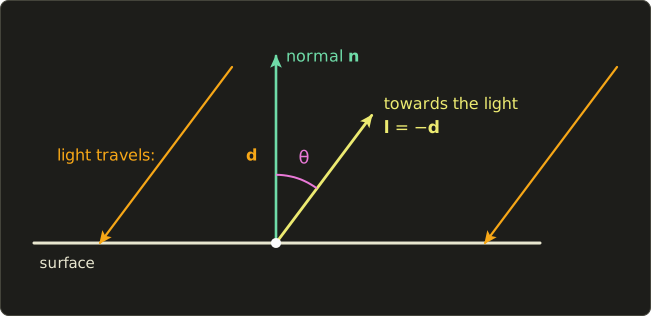
Why use ?
When light hits a surface head-on, the normal points towards the light.
The dot product of two unit vectors is 1 when they point the same way, 0 at a right angle and −1 when they're opposite (chapter 4 of the linear algebra series), so is "1 when hit head-on".
, on the other hand, would be −1 when hit head-on.
In this chapter's C code, the light is passed as "the direction the light travels", lightDirection, and the shader adds the minus sign to turn it into .
4.3 Preparing the new files
Ambient light and directional light each get their own C file:
main-ambient.c: a gradient triangle on the left, an ambient-lit triangle on the right.main-directional.c: a gradient triangle on the left, a directionally lit triangle on the right.
Both start as copies of main.c, and the following sections change them.
The shaders go into the shader folder, and for macOS we also make .mac.glsl versions with #version 410 core as the first line.
Here is how to choose which file to build.
- Unix: I changed
build-unix.shso that it takes the file to build as an argument../build-unix.sh main-ambient.cor./build-unix.sh main-directional.cbuildsglsltesterfrom that file and starts it. Without an argument it usesmain.cas before. - Windows: in the Solution Explorer, right-click "Source Files", choose "Add" → "Existing Item" and add
main-ambient.c. Then right-clickmain.c, open "Properties" → "General" and set "Excluded From Build" to "Yes". Twomainfunctions in one project give a link error, so always exclude every file except the one you use. - macOS: drag
main-ambient.cinto the Xcode project, tickglsltesterunder "Target Membership" in the File Inspector and untick it formain.c. Add the new.mac.glslfiles to the project too, and add them to the target's "Build Phases" → "Copy Files" (the one that already containsvertex.mac.glslandfragment.mac.glsl). If you forget this, you'll see "resource file not found".
4.4 Ambient light
Create a new file frag_ambient.glsl in the shader directory.
#version 450 core

in vec2 vUv;
out vec4 out_color;

uniform vec3 materialColor;
uniform float ambientIntensity;

void main() {
  vec3 ambient = materialColor * ambientIntensity;
  out_color = vec4(ambient, 1.0);
}
materialColor * ambientIntensity multiplies a vec3 by a float, so R, G and B all get multiplied by the same number.
This shader doesn't use in vec2 vUv;, but I declare it so that it pairs up with out vec2 vUv; in the vertex shader (vertex.glsl).
In the original version this line was mistyped asin vec2 uVu;. An unusedinvariable often doesn't cause a link error even without a matchingout, so the mistake is easy to miss. But as soon as you try to useuVu, you get a link error ("not written by the vertex shader") or an undefined value. Always keep the names and types ofinandoutidentical.
Looks easy, right?
The C code needs a lot more work.
In main-ambient.c, first load and compile one more shader:
  // load the shader files
#ifdef __APPLE__
  char *vertexShaderSource = readShaderFile("shader/vertex.mac.glsl");
  char *fragmentShaderSource = readShaderFile("shader/fragment.mac.glsl");
  char *fragmentAmbientSource = readShaderFile("shader/frag_ambient.mac.glsl");
#else
  char *vertexShaderSource = readShaderFile("shader/vertex.glsl");
  char *fragmentShaderSource = readShaderFile("shader/fragment.glsl");
  char *fragmentAmbientSource = readShaderFile("shader/frag_ambient.glsl");
#endif
  if (!vertexShaderSource || !fragmentShaderSource || !fragmentAmbientSource) {
    puts("シェーダーファイルの読み込みに失敗しました"); // failed to load the shader files
    if (vertexShaderSource) free(vertexShaderSource);
    if (fragmentShaderSource) free(fragmentShaderSource);
    if (fragmentAmbientSource) free(fragmentAmbientSource);
    glfwDestroyWindow(window);
    glfwTerminate();
    return -1;
  }

  // compile the shaders
  GLuint vertexShader = glCreateShader(GL_VERTEX_SHADER);
  glShaderSource(vertexShader, 1, (const char **)&vertexShaderSource, NULL);
  glCompileShader(vertexShader);
  checkShaderCompile(vertexShader);

  GLuint fragmentShader = glCreateShader(GL_FRAGMENT_SHADER);
  glShaderSource(fragmentShader, 1, (const char **)&fragmentShaderSource, NULL);
  glCompileShader(fragmentShader);
  checkShaderCompile(fragmentShader);

  GLuint fragmentAmbientShader = glCreateShader(GL_FRAGMENT_SHADER);
  glShaderSource(fragmentAmbientShader, 1, (const char **)&fragmentAmbientSource, NULL);
  glCompileShader(fragmentAmbientShader);
  checkShaderCompile(fragmentAmbientShader);
Next, link two programs.
One shader object can be attached to several programs, so we use vertexShader twice:
  // link the triangle's shader program
  GLuint shaderProgram = glCreateProgram();
  glAttachShader(shaderProgram, vertexShader);
  glAttachShader(shaderProgram, fragmentShader);
  glLinkProgram(shaderProgram);
  checkProgramLink(shaderProgram);

  // link the ambient shader program (same vertex shader)
  GLuint ambientShaderProgram = glCreateProgram();
  glAttachShader(ambientShaderProgram, vertexShader);
  glAttachShader(ambientShaderProgram, fragmentAmbientShader);
  glLinkProgram(ambientShaderProgram);
  checkProgramLink(ambientShaderProgram);

  glDeleteShader(vertexShader);
  glDeleteShader(fragmentShader);
  glDeleteShader(fragmentAmbientShader);
  free(vertexShaderSource);
  free(fragmentShaderSource);
  free(fragmentAmbientSource);
Once linking is done, you can delete the shader objects.
The program holds the compiled result (glDeleteShader only marks a shader as "no longer needed", and it isn't actually freed while it is attached to a program).
The vertex data puts two triangles side by side:
  // set up the vertex data (triangle): for the gradient (offset to the left)
  float vertices[] = {
    -0.8f,  -0.5f, 0.0f, 0.0f, // bottom left (position, UV)
    -0.3f,  -0.5f, 1.0f, 0.0f, // bottom right
    -0.55f,  0.5f, 0.5f, 1.0f  // top
  };
  GLuint indices[] = { 0, 1, 2 };

  // set up the vertex data (triangle): for ambient (offset to the right)
  float verticesAmbient[] = {
    0.3f,  -0.5f, 0.0f, 0.0f, // bottom left (position, UV)
    0.8f,  -0.5f, 1.0f, 0.0f, // bottom right
    0.55f,  0.5f, 0.5f, 1.0f  // top
  };
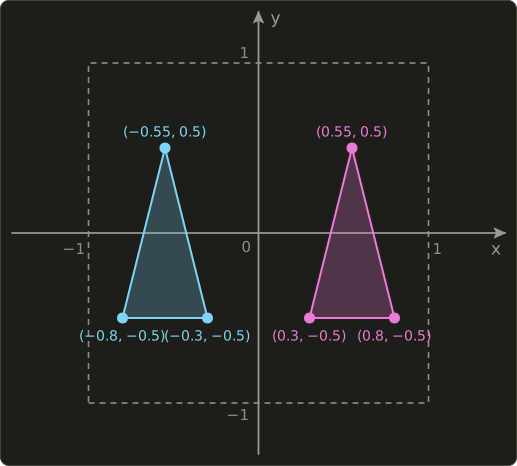
The indices { 0, 1, 2 } are the same for both triangles, so one array is enough.
Each triangle gets its own VAO (vertex array object), VBO (vertex buffer) and EBO (index buffer):
  // set up the VAO, VBO and EBO for ambient
  GLuint VAOAmbient, VBOAmbient, EBOAmbient;
  glGenVertexArrays(1, &VAOAmbient);
  glGenBuffers(1, &VBOAmbient);
  glGenBuffers(1, &EBOAmbient);

  glBindVertexArray(VAOAmbient);
  glBindBuffer(GL_ARRAY_BUFFER, VBOAmbient);
  glBufferData(GL_ARRAY_BUFFER, sizeof(verticesAmbient), verticesAmbient, GL_STATIC_DRAW);
  glBindBuffer(GL_ELEMENT_ARRAY_BUFFER, EBOAmbient);
  glBufferData(GL_ELEMENT_ARRAY_BUFFER, sizeof(indices), indices, GL_STATIC_DRAW);

  // vertex attributes are stored per VAO, so set them up here too
  glVertexAttribPointer(0, 2, GL_FLOAT, GL_FALSE, 4 * sizeof(float), (void *)0);
  glEnableVertexAttribArray(0);
  glVertexAttribPointer(1, 2, GL_FLOAT, GL_FALSE, 4 * sizeof(float), (void *)offset);
  glEnableVertexAttribArray(1);
A VAO is a container that remembers "which attribute lives where in which buffer".
glVertexAttribPointer records the currently bound GL_ARRAY_BUFFER into the currently bound VAO.
So after binding a new VAO, you must set up the attributes again.
The original diff file was missing the attribute setup for the second VAO. Without it, the right triangle isn't drawn (attribute 0 is disabled, so every vertex ends up in the same place and the triangle has zero area).
The EBO is recorded in the VAO too, so at draw time glBindVertexArray alone switches all the buffers.
In the main loop, we switch programs for each triangle and draw:
    // draw the left triangle (gradient shader)
    glBindVertexArray(VAO);
    glDrawElements(GL_TRIANGLES, 3, GL_UNSIGNED_INT, 0);

    // use the ambient shader program (right triangle)
    glUseProgram(ambientShaderProgram);

    // set the uniforms (ambient shader)
    Vector3 materialColor = { 0.8f, 0.2f, 0.3f }; // a reddish color
    float ambientIntensity = 0.6f; // ambient light intensity (0.0 to 1.0)

    glUniform3f(glGetUniformLocation(ambientShaderProgram, "materialColor"),
                materialColor.r, materialColor.g, materialColor.b);
    glUniform1f(glGetUniformLocation(ambientShaderProgram, "ambientIntensity"), ambientIntensity);

    // draw the right triangle (ambient shader)
    glBindVertexArray(VAOAmbient);
    glDrawElements(GL_TRIANGLES, 3, GL_UNSIGNED_INT, 0);
Every program has its own uniform values, so we set materialColor while ambientShaderProgram is in use, at ambientShaderProgram's location.
Finally, add the new VAO, VBO, EBO and program to the cleanup:
  glDeleteVertexArrays(1, &VAOAmbient);
  glDeleteBuffers(1, &VBOAmbient);
  glDeleteBuffers(1, &EBOAmbient);
  glDeleteProgram(ambientShaderProgram);
The result looks like this:
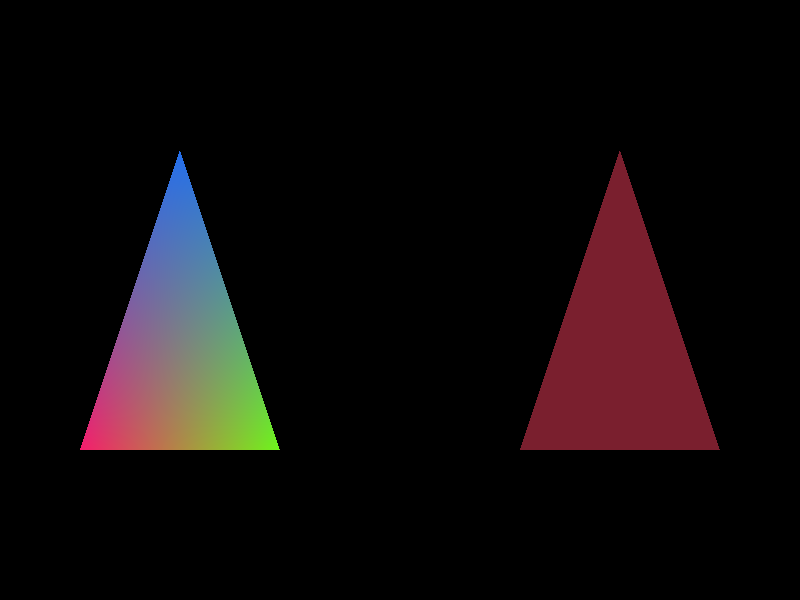
Let's compute it:
In 8 bits that's , the same as the pixels of the right triangle in the screenshot.
With ambient light alone, every pixel of the triangle has the same color, and you can't see any shape at all.
The next section changes that.
4.5 Directional light
Ambient light had the same brightness no matter which way the surface faced.
With directional light, each vertex gets a normal, and the brightness changes with its direction.
This triangle is flat, but if we give each vertex a different normal, it gets shaded like a piece of a curved surface.
The axes follow the same right-handed convention as the linear algebra series: x to the right, y up, and z coming out of the screen towards the viewer.
So a normal with a positive z component faces the viewer.
The vertex shader
Create a new file vertex_directional.glsl and insert this:
#version 450 core

layout(location = 0) in vec2 aPosition;
layout(location = 1) in vec2 aUv;
layout(location = 2) in vec3 aNormal;

out vec2 vUv;
out vec3 vNormal;

void main() {
  vUv = aUv;
  vNormal = aNormal;
  gl_Position = vec4(aPosition, 0.0, 1.0);
}
layout(location = 2) in vec3 aNormal; defines a 3D vector input for the vertex normal and assigns it to attribute 2.
The normal shows the direction a vertex "faces" and decides how the light hits each vertex.
vNormal = aNormal; passes it unchanged to the fragment shader.
Just like vUv, vNormal is interpolated by the rasterizer.
The fragment shader
Create a new file frag_directional.glsl and insert this:
#version 450 core

in vec2 vUv;
in vec3 vNormal;
out vec4 out_color;

uniform vec3 materialColor;
uniform vec3 lightDirection; // direction the light travels (from the light to the surface)
uniform float lightIntensity;

void main() {
  // interpolated normals get shorter, so normalize again
  vec3 normal = normalize(vNormal);
  // direction from the surface towards the light (opposite of the travel direction)
  vec3 toLight = -normalize(lightDirection);

  float diffuseFactor = max(dot(normal, toLight), 0.0);
  vec3 diffuse = materialColor * diffuseFactor * lightIntensity;
  out_color = vec4(diffuse, 1.0);
}
Let's go through it line by line.
in vec3 vNormal;is the (interpolated) normal vector received from the vertex shader.uniform vec3 materialColor;holds the base color (RGB) of the triangle. It's auniform, set from the C program, and stays the same for every pixel.uniform vec3 lightDirection;holds the direction (XYZ) the light travels. Like the sun, it's the same direction for every pixel.uniform float lightIntensity;holds the brightness of the light: 0.0 is darkest (no light), 1.0 is brightest.vec3 normal = normalize(vNormal);takes the interpolated normal (vNormal) and scales it to length 1 (normalize). Section 4.6 explains this in detail.-normalize(lightDirection)scales the light direction to length 1 and flips it with the minus sign, turning it into "the direction from the surface towards the light", .dot(normal, toLight)computes the cosine of the angle between the normal and the direction towards the light.max(..., 0.0)keeps the result from going negative. A negative value means the light comes from behind the surface, so it becomes 0 (no light).
Here are the formulas of the built-in functions we used:
The originalfrag_directional.glslhad noin vec3 vNormal;declaration and used a constant normal,vec3 normal = vec3(0.0, 0.0, 1.0);. That ignores the normals the vertex shader passes in, and the whole triangle gets the same brightness. We compare the two in section 4.6.
The C code
In main-directional.c, we add normals to the vertex data.
Each vertex becomes 7 floats (2 for position, 2 for UV, 3 for the normal):
  // set up the vertex data (triangle): for directional (offset to the right)
  float verticesDirectional[] = {
    // position       UV            normal
    0.3f,  -0.5f,   0.0f, 0.0f,   -0.5f, -0.5f, 0.707f, // bottom left
    0.8f,  -0.5f,   1.0f, 0.0f,    0.5f, -0.5f, 0.707f, // bottom right
    0.55f,  0.5f,   0.5f, 1.0f,    0.0f,  0.5f, 0.707f  // top
  };
| Attribute | location | floats | offset from the start of the vertex |
|---|---|---|---|
| position aPosition | 0 | 2 | 0 |
| UV aUv | 1 | 2 | 2 × sizeof(float) = 8 |
| normal aNormal | 2 | 3 | 4 × sizeof(float) = 16 |
The size of one vertex (the stride) is bytes.
We tell glVertexAttribPointer about it:
  // set up the VAO, VBO and EBO for directional
  GLuint VAODirectional, VBODirectional, EBODirectional;
  glGenVertexArrays(1, &VAODirectional);
  glGenBuffers(1, &VBODirectional);
  glGenBuffers(1, &EBODirectional);

  glBindVertexArray(VAODirectional);
  glBindBuffer(GL_ARRAY_BUFFER, VBODirectional);
  glBufferData(GL_ARRAY_BUFFER, sizeof(verticesDirectional), verticesDirectional, GL_STATIC_DRAW);
  glBindBuffer(GL_ELEMENT_ARRAY_BUFFER, EBODirectional);
  glBufferData(GL_ELEMENT_ARRAY_BUFFER, sizeof(indices), indices, GL_STATIC_DRAW);

  // vertex attributes: position (location 0), UV (location 1), normal (location 2), 7 floats per vertex
  glVertexAttribPointer(0, 2, GL_FLOAT, GL_FALSE, 7 * sizeof(float), (void *)0);
  glEnableVertexAttribArray(0);
  glVertexAttribPointer(1, 2, GL_FLOAT, GL_FALSE, 7 * sizeof(float), (void *)(2 * sizeof(float)));
  glEnableVertexAttribArray(1);
  glVertexAttribPointer(2, 3, GL_FLOAT, GL_FALSE, 7 * sizeof(float), (void *)(4 * sizeof(float)));
  glEnableVertexAttribArray(2);
The gradient triangle on the left keeps its stride of 4 floats; only the right triangle uses 7.
The attribute layout is recorded per VAO, so it's fine for the two triangles to have different vertex layouts.
Loading, compiling and linking the shaders works just like for ambient, except that this time the vertex shader is also a new one (vertex_directional.glsl):
  // link the directional shader program
  GLuint directionalShaderProgram = glCreateProgram();
  glAttachShader(directionalShaderProgram, vertexDirectionalShader);
  glAttachShader(directionalShaderProgram, fragmentDirectionalShader);
  glLinkProgram(directionalShaderProgram);
  checkProgramLink(directionalShaderProgram);
In the main loop, set the uniforms and draw:
    // use the directional shader program (right triangle)
    glUseProgram(directionalShaderProgram);

    // set the uniforms (directional shader)
    Vector3 materialColor = { 0.8f, 0.2f, 0.3f }; // a reddish color
    Vector3 lightDirection = { -0.5f, -0.5f, -0.707f }; // light travels from top right front to bottom left back
    float lightIntensity = 1.0f; // light intensity (0.0 to 1.0)

    glUniform3f(glGetUniformLocation(directionalShaderProgram, "materialColor"),
                materialColor.r, materialColor.g, materialColor.b);
    glUniform3f(glGetUniformLocation(directionalShaderProgram, "lightDirection"),
                lightDirection.x, lightDirection.y, lightDirection.z);
    glUniform1f(glGetUniformLocation(directionalShaderProgram, "lightIntensity"), lightIntensity);

    // draw the right triangle (directional shader)
    glBindVertexArray(VAODirectional);
    glDrawElements(GL_TRIANGLES, 3, GL_UNSIGNED_INT, 0);
You can see the whole thing in the diff at the end of the chapter.
The result looks like this:
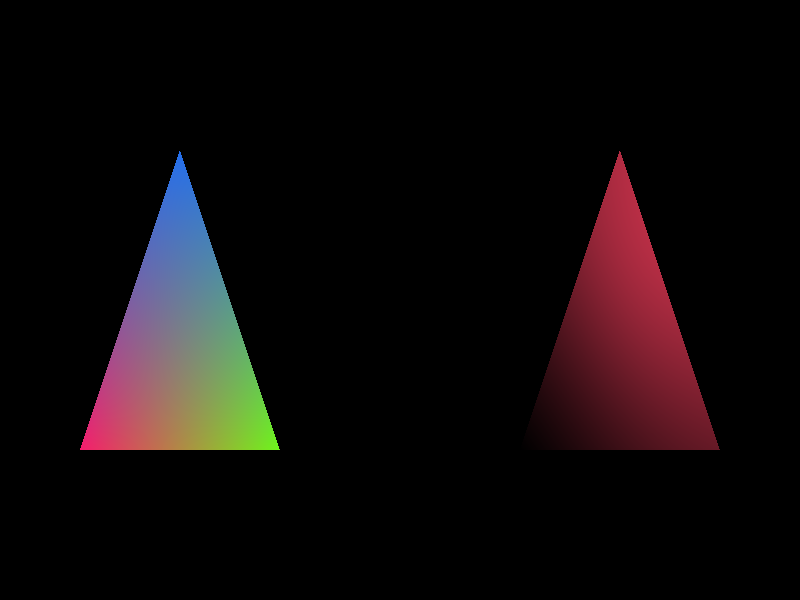
Checking with numbers
The light travels in the direction , whose length is .
So the direction towards the light is , to the top right and towards the viewer.
Let's compute the brightness at each vertex.
- Bottom left, : length 1. . It faces exactly sideways to the light, so it's pitch black.
- Bottom right, : length 1. . Half brightness, so the color is , or in 8 bits.
- Top, : the length is , not 1. Normalized, it's , giving . This is the brightest, in 8 bits.
The pixels near the vertices in the screenshot have exactly these values.
The top vertex's normal isn't of length 1, but the shader normalizes it, so the brightness comes out right.
"Don't rely on the normals in the data being unit vectors" is a good habit when writing shaders.
4.6 Common mistakes
Lighting bugs usually don't cause compile errors; things just look "somehow wrong".
Let's look at three typical mistakes.
Not using the normal
If you write vec3 normal = vec3(0.0, 0.0, 1.0); like the original version, every pixel of the triangle gets the same normal.
, so the triangle is uniformly , or in 8 bits.
Just like ambient light, there is no shading at all.
That's physically correct for a flat triangle facing the viewer, but then there's no point in passing per-vertex normals.
Not normalizing the interpolated normal
The rasterizer interpolates normals component by component, linearly, just like any other value.
The average of two vectors of length 1 is generally shorter than 1.
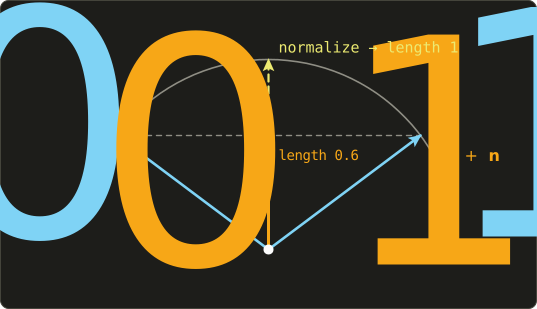
In the picture, and both have length 1, but their average has length 0.6.
The dot product scales with the length, so without normalizing, the inside of the triangle gets darker.
At the centroid of this chapter's triangle, the average of the three normals is , with length 0.727.
Without normalizing, the brightness is (85 in the red channel in 8 bits); with normalizing it's (117).
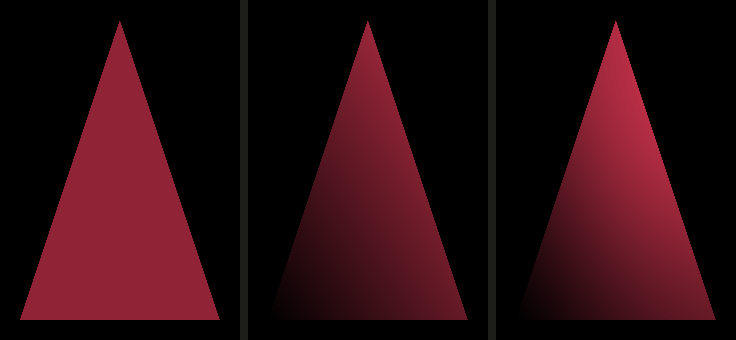
The sign of the light direction
If you forget the minus in -normalize(lightDirection), the lit and dark faces swap completely.
For this triangle, the dot product is 0 or less at all three vertices, so max turns everything into 0 and the whole triangle goes black (try it: the right triangle melts into the background).
Always write in a comment which convention your C code uses for the light direction.
4.7 GLSL and OpenGL features used in this chapter
normalize(v): . Normalizing a vector of length 0 gives an undefined result (NaN or similar), so be careful.dot(a, b): the dot product. For two unit vectors, the cosine of the angle between them.max(a, b): the larger value.max(x, 0.0)is the standard way to turn negative values into 0.vec3 * float: multiplies every component by the same number.vec3 * vec3multiplies component-wise (used to multiply a color by a light color).layout(location = 2) in vec3: a third vertex attribute, matchingglVertexAttribPointer(2, 3, ...)in C.- One shader object can be attached to several programs.
- A VAO records the vertex attribute setup and the EBO. Set up the attributes again for every VAO you create.
- Uniform values belong to each program separately.
4.8 How games and engines use this
- Sunlight: outdoor scenes almost always have one directional light as the sun. That's the "Directional Light" in Unity and Unreal Engine, whose rotation you set in the editor as "the direction the light travels". The engine flips the sign before passing it to the shader.
- Ambient: older games used a constant ambient color, just like this chapter, so that shadows weren't pitch black. Modern engines compute ambient light that changes with direction from how the sky's color is distributed (environment maps, spherical harmonics), but the starting idea is the same.
- Half Lambert: a technique Valve used in games like Half-Life 2, , which softens the dark side. Characters' shadow sides don't go pitch black, and it's popular in anime-style and stylized games too.
- Toon shading: cut into 2 or 3 bands with
step, and you get shading that looks like cel animation. - Normalizing normals: engine shaders always normalize interpolated normals again. The same goes for normal maps (chapter 12).
4.9 Summary
- Changing the number of indices in
glDrawElementschanges how many triangles are drawn. The fragment shader doesn't run for pixels outside the triangles. - You can draw several things in one window with separate programs and VAOs. Set up the vertex attributes again for each VAO.
- Ambient light: . Every pixel gets the same color.
- Directional light: . The dot product of the normal and the direction towards the light decides the brightness.
- The direction the light travels, , and the direction towards the light, , are opposites: .
- Interpolated normals get shorter, so normalize them again in the fragment shader.
- The other lights (point, spot, hemisphere, area) are implemented in chapters 9 and 10.
4.10 Challenges
- ★ With
ambientIntensity = 0.25andmaterialColor = (0.8, 0.4, 1.0), compute the color of the ambient triangle both in 0 to 1 and in 8 bits. - ★ With the light traveling in the direction (straight into the screen), compute the brightness of this chapter's three vertices. Normalize the top vertex's normal first.
- ★★ Change
lightDirectioninmain-directional.cto{ 0.5f, -0.5f, -0.707f }(coming from the top left front). Now the bottom left vertex should get and the bottom right vertex , so the left and right brightness swap. - ★★ Combine ambient and directional light in one shader: . With
ambientIntensity = 0.2, the bottom left vertex should no longer be pitch black but , about in 8 bits. - ★★ In
main-directional.c, rotate the light usingglfwGetTime()(for examplelightDirection = { -cos(time), -sin(time), -0.707f }). The bright area should circle around the triangle. - ★★ In
frag_directional.glsl, replace the brightness withstep(0.5, diffuseFactor)to get toon shading. The triangle should split sharply into a bright part and a pitch-black part. - ★★★ Implement Half Lambert, , and compare it with plain Lambert. Compute its values for and think about why it is squared. Is this formula physically correct?
ファイル: a/build-unix.sh | b/build-unix.sh
| 前 | 新 | ||
|---|---|---|---|
| @@ -1,6 +1,9 @@ | |||
| 1 | #!/bin/sh | 1 | #!/bin/sh |
| 2 | 2 | ||
| 3 | cc main.c src/glad.c -o glsltester\ | 3 | # 使い方:./build-unix.sh [ソースファイル](省略するとmain.c) |
| 4 | SRC=${1:-main.c} | ||
| 5 | |||
| 6 | cc "$SRC" src/glad.c -o glsltester\ | ||
| 4 | -I./include -I/usr/include -I/usr/X11R6/include -I/usr/X11R7/include\ | 7 | -I./include -I/usr/include -I/usr/X11R6/include -I/usr/X11R7/include\ |
| 5 | -I/usr/local/include\ | 8 | -I/usr/local/include\ |
| 6 | -L/usr/lib -L/usr/X11R6/lib -L/usr/X11R7/lib -L/usr/local/lib\ | 9 | -L/usr/lib -L/usr/X11R6/lib -L/usr/X11R7/lib -L/usr/local/lib\ |
ファイル: a/main.c | b/main-ambient.c
| 前 | 新 | ||
|---|---|---|---|
| @@ -159,14 +159,17 @@ int main(int argc, char **argv) { | |||
| 159 | #ifdef __APPLE__ | 159 | #ifdef __APPLE__ |
| 160 | char *vertexShaderSource = readShaderFile("shader/vertex.mac.glsl"); | 160 | char *vertexShaderSource = readShaderFile("shader/vertex.mac.glsl"); |
| 161 | char *fragmentShaderSource = readShaderFile("shader/fragment.mac.glsl"); | 161 | char *fragmentShaderSource = readShaderFile("shader/fragment.mac.glsl"); |
| 162 | char *fragmentAmbientSource = readShaderFile("shader/frag_ambient.mac.glsl"); | ||
| 162 | #else | 163 | #else |
| 163 | char *vertexShaderSource = readShaderFile("shader/vertex.glsl"); | 164 | char *vertexShaderSource = readShaderFile("shader/vertex.glsl"); |
| 164 | char *fragmentShaderSource = readShaderFile("shader/fragment.glsl"); | 165 | char *fragmentShaderSource = readShaderFile("shader/fragment.glsl"); |
| 166 | char *fragmentAmbientSource = readShaderFile("shader/frag_ambient.glsl"); | ||
| 165 | #endif | 167 | #endif |
| 166 | if (!vertexShaderSource || !fragmentShaderSource) { | 168 | if (!vertexShaderSource || !fragmentShaderSource || !fragmentAmbientSource) { |
| 167 | puts("シェーダーファイルの読み込みに失敗しました"); | 169 | puts("シェーダーファイルの読み込みに失敗しました"); |
| 168 | if (vertexShaderSource) free(vertexShaderSource); | 170 | if (vertexShaderSource) free(vertexShaderSource); |
| 169 | if (fragmentShaderSource) free(fragmentShaderSource); | 171 | if (fragmentShaderSource) free(fragmentShaderSource); |
| 172 | if (fragmentAmbientSource) free(fragmentAmbientSource); | ||
| 170 | glfwDestroyWindow(window); | 173 | glfwDestroyWindow(window); |
| 171 | glfwTerminate(); | 174 | glfwTerminate(); |
| 172 | return -1; | 175 | return -1; |
| @@ -183,27 +186,48 @@ int main(int argc, char **argv) { | |||
| 183 | glCompileShader(fragmentShader); | 186 | glCompileShader(fragmentShader); |
| 184 | checkShaderCompile(fragmentShader); | 187 | checkShaderCompile(fragmentShader); |
| 185 | 188 | ||
| 186 | // シェーダープログラムをリンク | 189 | GLuint fragmentAmbientShader = glCreateShader(GL_FRAGMENT_SHADER); |
| 190 | glShaderSource(fragmentAmbientShader, 1, (const char **)&fragmentAmbientSource, NULL); | ||
| 191 | glCompileShader(fragmentAmbientShader); | ||
| 192 | checkShaderCompile(fragmentAmbientShader); | ||
| 193 | |||
| 194 | // 三角形のシェーダープログラムをリンク | ||
| 187 | GLuint shaderProgram = glCreateProgram(); | 195 | GLuint shaderProgram = glCreateProgram(); |
| 188 | glAttachShader(shaderProgram, vertexShader); | 196 | glAttachShader(shaderProgram, vertexShader); |
| 189 | glAttachShader(shaderProgram, fragmentShader); | 197 | glAttachShader(shaderProgram, fragmentShader); |
| 190 | glLinkProgram(shaderProgram); | 198 | glLinkProgram(shaderProgram); |
| 191 | checkProgramLink(shaderProgram); | 199 | checkProgramLink(shaderProgram); |
| 192 | 200 | ||
| 201 | // アンビエントシェーダープログラムをリンク(頂点シェーダーは同じ物を使う) | ||
| 202 | GLuint ambientShaderProgram = glCreateProgram(); | ||
| 203 | glAttachShader(ambientShaderProgram, vertexShader); | ||
| 204 | glAttachShader(ambientShaderProgram, fragmentAmbientShader); | ||
| 205 | glLinkProgram(ambientShaderProgram); | ||
| 206 | checkProgramLink(ambientShaderProgram); | ||
| 207 | |||
| 193 | glDeleteShader(vertexShader); | 208 | glDeleteShader(vertexShader); |
| 194 | glDeleteShader(fragmentShader); | 209 | glDeleteShader(fragmentShader); |
| 210 | glDeleteShader(fragmentAmbientShader); | ||
| 195 | free(vertexShaderSource); | 211 | free(vertexShaderSource); |
| 196 | free(fragmentShaderSource); | 212 | free(fragmentShaderSource); |
| 213 | free(fragmentAmbientSource); | ||
| 197 | 214 | ||
| 198 | // 頂点データ(フルスクリーンクアッド)を設定 | 215 | // 頂点データ(三角形)を設定:グラデーション用(左にオフセット) |
| 199 | float vertices[] = { | 216 | float vertices[] = { |
| 200 | -1.0f, -1.0f, 0.0f, 0.0f, // 左下(位置、UV) | 217 | -0.8f, -0.5f, 0.0f, 0.0f, // 左下(位置、UV) |
| 201 | 1.0f, -1.0f, 1.0f, 0.0f, // 右下 | 218 | -0.3f, -0.5f, 1.0f, 0.0f, // 右下 |
| 202 | 1.0f, 1.0f, 1.0f, 1.0f, // 右上 | 219 | -0.55f, 0.5f, 0.5f, 1.0f // 上 |
| 203 | -1.0f, 1.0f, 0.0f, 1.0f // 左上 | 220 | }; |
| 221 | GLuint indices[] = { 0, 1, 2 }; | ||
| 222 | |||
| 223 | // 頂点データ(三角形)を設定:アンビエント用(右にオフセット) | ||
| 224 | float verticesAmbient[] = { | ||
| 225 | 0.3f, -0.5f, 0.0f, 0.0f, // 左下(位置、UV) | ||
| 226 | 0.8f, -0.5f, 1.0f, 0.0f, // 右下 | ||
| 227 | 0.55f, 0.5f, 0.5f, 1.0f // 上 | ||
| 204 | }; | 228 | }; |
| 205 | GLuint indices[] = { 0, 1, 2, 2, 3, 0 }; | ||
| 206 | 229 | ||
| 230 | // VAO、VBO、EBOをグラデーション用に設定 | ||
| 207 | GLuint VAO, VBO, EBO; | 231 | GLuint VAO, VBO, EBO; |
| 208 | glGenVertexArrays(1, &VAO); | 232 | glGenVertexArrays(1, &VAO); |
| 209 | glGenBuffers(1, &VBO); | 233 | glGenBuffers(1, &VBO); |
| @@ -222,6 +246,24 @@ int main(int argc, char **argv) { | |||
| 222 | glVertexAttribPointer(1, 2, GL_FLOAT, GL_FALSE, 4 * sizeof(float), (void *)offset); | 246 | glVertexAttribPointer(1, 2, GL_FLOAT, GL_FALSE, 4 * sizeof(float), (void *)offset); |
| 223 | glEnableVertexAttribArray(1); | 247 | glEnableVertexAttribArray(1); |
| 224 | 248 | ||
| 249 | // VAO、VBO、EBOをアンビエント用に設定 | ||
| 250 | GLuint VAOAmbient, VBOAmbient, EBOAmbient; | ||
| 251 | glGenVertexArrays(1, &VAOAmbient); | ||
| 252 | glGenBuffers(1, &VBOAmbient); | ||
| 253 | glGenBuffers(1, &EBOAmbient); | ||
| 254 | |||
| 255 | glBindVertexArray(VAOAmbient); | ||
| 256 | glBindBuffer(GL_ARRAY_BUFFER, VBOAmbient); | ||
| 257 | glBufferData(GL_ARRAY_BUFFER, sizeof(verticesAmbient), verticesAmbient, GL_STATIC_DRAW); | ||
| 258 | glBindBuffer(GL_ELEMENT_ARRAY_BUFFER, EBOAmbient); | ||
| 259 | glBufferData(GL_ELEMENT_ARRAY_BUFFER, sizeof(indices), indices, GL_STATIC_DRAW); | ||
| 260 | |||
| 261 | // 頂点属性はVAO毎に保存されるので、此方でも設定する | ||
| 262 | glVertexAttribPointer(0, 2, GL_FLOAT, GL_FALSE, 4 * sizeof(float), (void *)0); | ||
| 263 | glEnableVertexAttribArray(0); | ||
| 264 | glVertexAttribPointer(1, 2, GL_FLOAT, GL_FALSE, 4 * sizeof(float), (void *)offset); | ||
| 265 | glEnableVertexAttribArray(1); | ||
| 266 | |||
| 225 | // メインレンダリングループ | 267 | // メインレンダリングループ |
| 226 | while (!glfwWindowShouldClose(window)) { | 268 | while (!glfwWindowShouldClose(window)) { |
| 227 | // 画面をクリア | 269 | // 画面をクリア |
| @@ -259,9 +301,24 @@ int main(int argc, char **argv) { | |||
| 259 | glUniform3f(glGetUniformLocation(shaderProgram, "uColorB"), colorB.r, colorB.g, colorB.b); // 緑 | 301 | glUniform3f(glGetUniformLocation(shaderProgram, "uColorB"), colorB.r, colorB.g, colorB.b); // 緑 |
| 260 | glUniform3f(glGetUniformLocation(shaderProgram, "uColorC"), colorC.r, colorC.g, colorC.b); // 青 | 302 | glUniform3f(glGetUniformLocation(shaderProgram, "uColorC"), colorC.r, colorC.g, colorC.b); // 青 |
| 261 | 303 | ||
| 262 | // クアッドを描画 | 304 | // 左の三角形を描画(グラデーションシェーダー) |
| 263 | glBindVertexArray(VAO); | 305 | glBindVertexArray(VAO); |
| 264 | glDrawElements(GL_TRIANGLES, 6, GL_UNSIGNED_INT, 0); | 306 | glDrawElements(GL_TRIANGLES, 3, GL_UNSIGNED_INT, 0); |
| 307 | |||
| 308 | // アンビエントシェーダープログラムを使用(右の三角形) | ||
| 309 | glUseProgram(ambientShaderProgram); | ||
| 310 | |||
| 311 | // ユニフォームを設定(アンビエントシェーダー) | ||
| 312 | Vector3 materialColor = { 0.8f, 0.2f, 0.3f }; // 赤みがかった色 | ||
| 313 | float ambientIntensity = 0.6f; // アンビエント光の強さ(0.0~1.0) | ||
| 314 | |||
| 315 | glUniform3f(glGetUniformLocation(ambientShaderProgram, "materialColor"), | ||
| 316 | materialColor.r, materialColor.g, materialColor.b); | ||
| 317 | glUniform1f(glGetUniformLocation(ambientShaderProgram, "ambientIntensity"), ambientIntensity); | ||
| 318 | |||
| 319 | // 右の三角形を描画(アンビエントシェーダー) | ||
| 320 | glBindVertexArray(VAOAmbient); | ||
| 321 | glDrawElements(GL_TRIANGLES, 3, GL_UNSIGNED_INT, 0); | ||
| 265 | 322 | ||
| 266 | // バッファをスワップし、イベントを処理 | 323 | // バッファをスワップし、イベントを処理 |
| 267 | glfwSwapBuffers(window); | 324 | glfwSwapBuffers(window); |
| @@ -272,7 +329,11 @@ int main(int argc, char **argv) { | |||
| 272 | glDeleteVertexArrays(1, &VAO); | 329 | glDeleteVertexArrays(1, &VAO); |
| 273 | glDeleteBuffers(1, &VBO); | 330 | glDeleteBuffers(1, &VBO); |
| 274 | glDeleteBuffers(1, &EBO); | 331 | glDeleteBuffers(1, &EBO); |
| 332 | glDeleteVertexArrays(1, &VAOAmbient); | ||
| 333 | glDeleteBuffers(1, &VBOAmbient); | ||
| 334 | glDeleteBuffers(1, &EBOAmbient); | ||
| 275 | glDeleteProgram(shaderProgram); | 335 | glDeleteProgram(shaderProgram); |
| 336 | glDeleteProgram(ambientShaderProgram); | ||
| 276 | glfwDestroyWindow(window); | 337 | glfwDestroyWindow(window); |
| 277 | glfwTerminate(); | 338 | glfwTerminate(); |
| 278 | 339 | ||
ファイル: a/main.c | b/main-directional.c
| 前 | 新 | ||
|---|---|---|---|
| @@ -158,15 +158,21 @@ int main(int argc, char **argv) { | |||
| 158 | // シェーダーファイルを読み込む | 158 | // シェーダーファイルを読み込む |
| 159 | #ifdef __APPLE__ | 159 | #ifdef __APPLE__ |
| 160 | char *vertexShaderSource = readShaderFile("shader/vertex.mac.glsl"); | 160 | char *vertexShaderSource = readShaderFile("shader/vertex.mac.glsl"); |
| 161 | char *vertexDirectionalSource = readShaderFile("shader/vertex_directional.mac.glsl"); | ||
| 161 | char *fragmentShaderSource = readShaderFile("shader/fragment.mac.glsl"); | 162 | char *fragmentShaderSource = readShaderFile("shader/fragment.mac.glsl"); |
| 163 | char *fragmentDirectionalSource = readShaderFile("shader/frag_directional.mac.glsl"); | ||
| 162 | #else | 164 | #else |
| 163 | char *vertexShaderSource = readShaderFile("shader/vertex.glsl"); | 165 | char *vertexShaderSource = readShaderFile("shader/vertex.glsl"); |
| 166 | char *vertexDirectionalSource = readShaderFile("shader/vertex_directional.glsl"); | ||
| 164 | char *fragmentShaderSource = readShaderFile("shader/fragment.glsl"); | 167 | char *fragmentShaderSource = readShaderFile("shader/fragment.glsl"); |
| 168 | char *fragmentDirectionalSource = readShaderFile("shader/frag_directional.glsl"); | ||
| 165 | #endif | 169 | #endif |
| 166 | if (!vertexShaderSource || !fragmentShaderSource) { | 170 | if (!vertexShaderSource || !vertexDirectionalSource || !fragmentShaderSource || !fragmentDirectionalSource) { |
| 167 | puts("シェーダーファイルの読み込みに失敗しました"); | 171 | puts("シェーダーファイルの読み込みに失敗しました"); |
| 168 | if (vertexShaderSource) free(vertexShaderSource); | 172 | if (vertexShaderSource) free(vertexShaderSource); |
| 173 | if (vertexDirectionalSource) free(vertexDirectionalSource); | ||
| 169 | if (fragmentShaderSource) free(fragmentShaderSource); | 174 | if (fragmentShaderSource) free(fragmentShaderSource); |
| 175 | if (fragmentDirectionalSource) free(fragmentDirectionalSource); | ||
| 170 | glfwDestroyWindow(window); | 176 | glfwDestroyWindow(window); |
| 171 | glfwTerminate(); | 177 | glfwTerminate(); |
| 172 | return -1; | 178 | return -1; |
| @@ -178,32 +184,61 @@ int main(int argc, char **argv) { | |||
| 178 | glCompileShader(vertexShader); | 184 | glCompileShader(vertexShader); |
| 179 | checkShaderCompile(vertexShader); | 185 | checkShaderCompile(vertexShader); |
| 180 | 186 | ||
| 187 | GLuint vertexDirectionalShader = glCreateShader(GL_VERTEX_SHADER); | ||
| 188 | glShaderSource(vertexDirectionalShader, 1, (const char **)&vertexDirectionalSource, NULL); | ||
| 189 | glCompileShader(vertexDirectionalShader); | ||
| 190 | checkShaderCompile(vertexDirectionalShader); | ||
| 191 | |||
| 181 | GLuint fragmentShader = glCreateShader(GL_FRAGMENT_SHADER); | 192 | GLuint fragmentShader = glCreateShader(GL_FRAGMENT_SHADER); |
| 182 | glShaderSource(fragmentShader, 1, (const char **)&fragmentShaderSource, NULL); | 193 | glShaderSource(fragmentShader, 1, (const char **)&fragmentShaderSource, NULL); |
| 183 | glCompileShader(fragmentShader); | 194 | glCompileShader(fragmentShader); |
| 184 | checkShaderCompile(fragmentShader); | 195 | checkShaderCompile(fragmentShader); |
| 185 | 196 | ||
| 186 | // シェーダープログラムをリンク | 197 | GLuint fragmentDirectionalShader = glCreateShader(GL_FRAGMENT_SHADER); |
| 198 | glShaderSource(fragmentDirectionalShader, 1, (const char **)&fragmentDirectionalSource, NULL); | ||
| 199 | glCompileShader(fragmentDirectionalShader); | ||
| 200 | checkShaderCompile(fragmentDirectionalShader); | ||
| 201 | |||
| 202 | // 三角形のシェーダープログラムをリンク | ||
| 187 | GLuint shaderProgram = glCreateProgram(); | 203 | GLuint shaderProgram = glCreateProgram(); |
| 188 | glAttachShader(shaderProgram, vertexShader); | 204 | glAttachShader(shaderProgram, vertexShader); |
| 189 | glAttachShader(shaderProgram, fragmentShader); | 205 | glAttachShader(shaderProgram, fragmentShader); |
| 190 | glLinkProgram(shaderProgram); | 206 | glLinkProgram(shaderProgram); |
| 191 | checkProgramLink(shaderProgram); | 207 | checkProgramLink(shaderProgram); |
| 192 | 208 | ||
| 209 | // ディレクショナルシェーダープログラムをリンク | ||
| 210 | GLuint directionalShaderProgram = glCreateProgram(); | ||
| 211 | glAttachShader(directionalShaderProgram, vertexDirectionalShader); | ||
| 212 | glAttachShader(directionalShaderProgram, fragmentDirectionalShader); | ||
| 213 | glLinkProgram(directionalShaderProgram); | ||
| 214 | checkProgramLink(directionalShaderProgram); | ||
| 215 | |||
| 193 | glDeleteShader(vertexShader); | 216 | glDeleteShader(vertexShader); |
| 217 | glDeleteShader(vertexDirectionalShader); | ||
| 194 | glDeleteShader(fragmentShader); | 218 | glDeleteShader(fragmentShader); |
| 219 | glDeleteShader(fragmentDirectionalShader); | ||
| 195 | free(vertexShaderSource); | 220 | free(vertexShaderSource); |
| 221 | free(vertexDirectionalSource); | ||
| 196 | free(fragmentShaderSource); | 222 | free(fragmentShaderSource); |
| 223 | free(fragmentDirectionalSource); | ||
| 197 | 224 | ||
| 198 | // 頂点データ(フルスクリーンクアッド)を設定 | 225 | // 頂点データ(三角形)を設定:グラデーション用(左にオフセット) |
| 199 | float vertices[] = { | 226 | float vertices[] = { |
| 200 | -1.0f, -1.0f, 0.0f, 0.0f, // 左下(位置、UV) | 227 | -0.8f, -0.5f, 0.0f, 0.0f, // 左下(位置、UV) |
| 201 | 1.0f, -1.0f, 1.0f, 0.0f, // 右下 | 228 | -0.3f, -0.5f, 1.0f, 0.0f, // 右下 |
| 202 | 1.0f, 1.0f, 1.0f, 1.0f, // 右上 | 229 | -0.55f, 0.5f, 0.5f, 1.0f // 上 |
| 203 | -1.0f, 1.0f, 0.0f, 1.0f // 左上 | 230 | }; |
| 231 | GLuint indices[] = { 0, 1, 2 }; | ||
| 232 | |||
| 233 | // 頂点データ(三角形)を設定:ディレクショナル用(右にオフセット) | ||
| 234 | float verticesDirectional[] = { | ||
| 235 | // 位置 UV 法線 | ||
| 236 | 0.3f, -0.5f, 0.0f, 0.0f, -0.5f, -0.5f, 0.707f, // 左下 | ||
| 237 | 0.8f, -0.5f, 1.0f, 0.0f, 0.5f, -0.5f, 0.707f, // 右下 | ||
| 238 | 0.55f, 0.5f, 0.5f, 1.0f, 0.0f, 0.5f, 0.707f // 上 | ||
| 204 | }; | 239 | }; |
| 205 | GLuint indices[] = { 0, 1, 2, 2, 3, 0 }; | ||
| 206 | 240 | ||
| 241 | // VAO、VBO、EBOをグラデーション用に設定 | ||
| 207 | GLuint VAO, VBO, EBO; | 242 | GLuint VAO, VBO, EBO; |
| 208 | glGenVertexArrays(1, &VAO); | 243 | glGenVertexArrays(1, &VAO); |
| 209 | glGenBuffers(1, &VBO); | 244 | glGenBuffers(1, &VBO); |
| @@ -222,6 +257,26 @@ int main(int argc, char **argv) { | |||
| 222 | glVertexAttribPointer(1, 2, GL_FLOAT, GL_FALSE, 4 * sizeof(float), (void *)offset); | 257 | glVertexAttribPointer(1, 2, GL_FLOAT, GL_FALSE, 4 * sizeof(float), (void *)offset); |
| 223 | glEnableVertexAttribArray(1); | 258 | glEnableVertexAttribArray(1); |
| 224 | 259 | ||
| 260 | // VAO、VBO、EBOをディレクショナル用に設定 | ||
| 261 | GLuint VAODirectional, VBODirectional, EBODirectional; | ||
| 262 | glGenVertexArrays(1, &VAODirectional); | ||
| 263 | glGenBuffers(1, &VBODirectional); | ||
| 264 | glGenBuffers(1, &EBODirectional); | ||
| 265 | |||
| 266 | glBindVertexArray(VAODirectional); | ||
| 267 | glBindBuffer(GL_ARRAY_BUFFER, VBODirectional); | ||
| 268 | glBufferData(GL_ARRAY_BUFFER, sizeof(verticesDirectional), verticesDirectional, GL_STATIC_DRAW); | ||
| 269 | glBindBuffer(GL_ELEMENT_ARRAY_BUFFER, EBODirectional); | ||
| 270 | glBufferData(GL_ELEMENT_ARRAY_BUFFER, sizeof(indices), indices, GL_STATIC_DRAW); | ||
| 271 | |||
| 272 | // 頂点属性:位置(location 0)、UV(location 1)、法線(location 2)、1頂点 = 7個のfloat | ||
| 273 | glVertexAttribPointer(0, 2, GL_FLOAT, GL_FALSE, 7 * sizeof(float), (void *)0); | ||
| 274 | glEnableVertexAttribArray(0); | ||
| 275 | glVertexAttribPointer(1, 2, GL_FLOAT, GL_FALSE, 7 * sizeof(float), (void *)(2 * sizeof(float))); | ||
| 276 | glEnableVertexAttribArray(1); | ||
| 277 | glVertexAttribPointer(2, 3, GL_FLOAT, GL_FALSE, 7 * sizeof(float), (void *)(4 * sizeof(float))); | ||
| 278 | glEnableVertexAttribArray(2); | ||
| 279 | |||
| 225 | // メインレンダリングループ | 280 | // メインレンダリングループ |
| 226 | while (!glfwWindowShouldClose(window)) { | 281 | while (!glfwWindowShouldClose(window)) { |
| 227 | // 画面をクリア | 282 | // 画面をクリア |
| @@ -259,9 +314,27 @@ int main(int argc, char **argv) { | |||
| 259 | glUniform3f(glGetUniformLocation(shaderProgram, "uColorB"), colorB.r, colorB.g, colorB.b); // 緑 | 314 | glUniform3f(glGetUniformLocation(shaderProgram, "uColorB"), colorB.r, colorB.g, colorB.b); // 緑 |
| 260 | glUniform3f(glGetUniformLocation(shaderProgram, "uColorC"), colorC.r, colorC.g, colorC.b); // 青 | 315 | glUniform3f(glGetUniformLocation(shaderProgram, "uColorC"), colorC.r, colorC.g, colorC.b); // 青 |
| 261 | 316 | ||
| 262 | // クアッドを描画 | 317 | // 左の三角形を描画(グラデーションシェーダー) |
| 263 | glBindVertexArray(VAO); | 318 | glBindVertexArray(VAO); |
| 264 | glDrawElements(GL_TRIANGLES, 6, GL_UNSIGNED_INT, 0); | 319 | glDrawElements(GL_TRIANGLES, 3, GL_UNSIGNED_INT, 0); |
| 320 | |||
| 321 | // ディレクショナルシェーダープログラムを使用(右の三角形) | ||
| 322 | glUseProgram(directionalShaderProgram); | ||
| 323 | |||
| 324 | // ユニフォームを設定(ディレクショナルシェーダー) | ||
| 325 | Vector3 materialColor = { 0.8f, 0.2f, 0.3f }; // 赤みがかった色 | ||
| 326 | Vector3 lightDirection = { -0.5f, -0.5f, -0.707f }; // 光が進む向き(右上手前から左下奥へ) | ||
| 327 | float lightIntensity = 1.0f; // ライトの強さ(0.0~1.0) | ||
| 328 | |||
| 329 | glUniform3f(glGetUniformLocation(directionalShaderProgram, "materialColor"), | ||
| 330 | materialColor.r, materialColor.g, materialColor.b); | ||
| 331 | glUniform3f(glGetUniformLocation(directionalShaderProgram, "lightDirection"), | ||
| 332 | lightDirection.x, lightDirection.y, lightDirection.z); | ||
| 333 | glUniform1f(glGetUniformLocation(directionalShaderProgram, "lightIntensity"), lightIntensity); | ||
| 334 | |||
| 335 | // 右の三角形を描画(ディレクショナルシェーダー) | ||
| 336 | glBindVertexArray(VAODirectional); | ||
| 337 | glDrawElements(GL_TRIANGLES, 3, GL_UNSIGNED_INT, 0); | ||
| 265 | 338 | ||
| 266 | // バッファをスワップし、イベントを処理 | 339 | // バッファをスワップし、イベントを処理 |
| 267 | glfwSwapBuffers(window); | 340 | glfwSwapBuffers(window); |
| @@ -272,7 +345,11 @@ int main(int argc, char **argv) { | |||
| 272 | glDeleteVertexArrays(1, &VAO); | 345 | glDeleteVertexArrays(1, &VAO); |
| 273 | glDeleteBuffers(1, &VBO); | 346 | glDeleteBuffers(1, &VBO); |
| 274 | glDeleteBuffers(1, &EBO); | 347 | glDeleteBuffers(1, &EBO); |
| 348 | glDeleteVertexArrays(1, &VAODirectional); | ||
| 349 | glDeleteBuffers(1, &VBODirectional); | ||
| 350 | glDeleteBuffers(1, &EBODirectional); | ||
| 275 | glDeleteProgram(shaderProgram); | 351 | glDeleteProgram(shaderProgram); |
| 352 | glDeleteProgram(directionalShaderProgram); | ||
| 276 | glfwDestroyWindow(window); | 353 | glfwDestroyWindow(window); |
| 277 | glfwTerminate(); | 354 | glfwTerminate(); |
| 278 | 355 | ||
ファイル: /dev/null | b/shader/frag_ambient.glsl
| 前 | 新 | ||
|---|---|---|---|
| @@ -0,0 +1,12 @@ | |||
| 1 | #version 450 core | ||
| 2 | |||
| 3 | in vec2 vUv; | ||
| 4 | out vec4 out_color; | ||
| 5 | |||
| 6 | uniform vec3 materialColor; | ||
| 7 | uniform float ambientIntensity; | ||
| 8 | |||
| 9 | void main() { | ||
| 10 | vec3 ambient = materialColor * ambientIntensity; | ||
| 11 | out_color = vec4(ambient, 1.0); | ||
| 12 | } | ||
ファイル: /dev/null | b/shader/frag_ambient.mac.glsl
| 前 | 新 | ||
|---|---|---|---|
| @@ -0,0 +1,12 @@ | |||
| 1 | #version 410 core | ||
| 2 | |||
| 3 | in vec2 vUv; | ||
| 4 | out vec4 out_color; | ||
| 5 | |||
| 6 | uniform vec3 materialColor; | ||
| 7 | uniform float ambientIntensity; | ||
| 8 | |||
| 9 | void main() { | ||
| 10 | vec3 ambient = materialColor * ambientIntensity; | ||
| 11 | out_color = vec4(ambient, 1.0); | ||
| 12 | } | ||
ファイル: /dev/null | b/shader/frag_directional.glsl
| 前 | 新 | ||
|---|---|---|---|
| @@ -0,0 +1,20 @@ | |||
| 1 | #version 450 core | ||
| 2 | |||
| 3 | in vec2 vUv; | ||
| 4 | in vec3 vNormal; | ||
| 5 | out vec4 out_color; | ||
| 6 | |||
| 7 | uniform vec3 materialColor; | ||
| 8 | uniform vec3 lightDirection; // 光が進む向き(光源から表面へ) | ||
| 9 | uniform float lightIntensity; | ||
| 10 | |||
| 11 | void main() { | ||
| 12 | // 補間された法線は短くなるので、正規化し直す | ||
| 13 | vec3 normal = normalize(vNormal); | ||
| 14 | // 表面から光源への向き(光が進む向きの逆) | ||
| 15 | vec3 toLight = -normalize(lightDirection); | ||
| 16 | |||
| 17 | float diffuseFactor = max(dot(normal, toLight), 0.0); | ||
| 18 | vec3 diffuse = materialColor * diffuseFactor * lightIntensity; | ||
| 19 | out_color = vec4(diffuse, 1.0); | ||
| 20 | } | ||
ファイル: /dev/null | b/shader/frag_directional.mac.glsl
| 前 | 新 | ||
|---|---|---|---|
| @@ -0,0 +1,20 @@ | |||
| 1 | #version 410 core | ||
| 2 | |||
| 3 | in vec2 vUv; | ||
| 4 | in vec3 vNormal; | ||
| 5 | out vec4 out_color; | ||
| 6 | |||
| 7 | uniform vec3 materialColor; | ||
| 8 | uniform vec3 lightDirection; // 光が進む向き(光源から表面へ) | ||
| 9 | uniform float lightIntensity; | ||
| 10 | |||
| 11 | void main() { | ||
| 12 | // 補間された法線は短くなるので、正規化し直す | ||
| 13 | vec3 normal = normalize(vNormal); | ||
| 14 | // 表面から光源への向き(光が進む向きの逆) | ||
| 15 | vec3 toLight = -normalize(lightDirection); | ||
| 16 | |||
| 17 | float diffuseFactor = max(dot(normal, toLight), 0.0); | ||
| 18 | vec3 diffuse = materialColor * diffuseFactor * lightIntensity; | ||
| 19 | out_color = vec4(diffuse, 1.0); | ||
| 20 | } | ||
ファイル: a/shader/vertex.glsl | b/shader/vertex_directional.glsl
| 前 | 新 | ||
|---|---|---|---|
| @@ -2,9 +2,13 @@ | |||
| 2 | 2 | ||
| 3 | layout(location = 0) in vec2 aPosition; | 3 | layout(location = 0) in vec2 aPosition; |
| 4 | layout(location = 1) in vec2 aUv; | 4 | layout(location = 1) in vec2 aUv; |
| 5 | layout(location = 2) in vec3 aNormal; | ||
| 6 | |||
| 5 | out vec2 vUv; | 7 | out vec2 vUv; |
| 8 | out vec3 vNormal; | ||
| 6 | 9 | ||
| 7 | void main() { | 10 | void main() { |
| 8 | vUv = aUv; | 11 | vUv = aUv; |
| 12 | vNormal = aNormal; | ||
| 9 | gl_Position = vec4(aPosition, 0.0, 1.0); | 13 | gl_Position = vec4(aPosition, 0.0, 1.0); |
| 10 | } | 14 | } |
ファイル: a/shader/vertex.mac.glsl | b/shader/vertex_directional.mac.glsl
| 前 | 新 | ||
|---|---|---|---|
| @@ -2,9 +2,13 @@ | |||
| 2 | 2 | ||
| 3 | layout(location = 0) in vec2 aPosition; | 3 | layout(location = 0) in vec2 aPosition; |
| 4 | layout(location = 1) in vec2 aUv; | 4 | layout(location = 1) in vec2 aUv; |
| 5 | layout(location = 2) in vec3 aNormal; | ||
| 6 | |||
| 5 | out vec2 vUv; | 7 | out vec2 vUv; |
| 8 | out vec3 vNormal; | ||
| 6 | 9 | ||
| 7 | void main() { | 10 | void main() { |
| 8 | vUv = aUv; | 11 | vUv = aUv; |
| 12 | vNormal = aNormal; | ||
| 9 | gl_Position = vec4(aPosition, 0.0, 1.0); | 13 | gl_Position = vec4(aPosition, 0.0, 1.0); |
| 10 | } | 14 | } |
コメント(0)
まだコメントはありません。
ログインするとコメント出来ます。