33. トップダウンRPG パート1:タイルマップと移動
格闘ゲームが終わり、パート6は3つ目のゲームに進みます。
16ビット時代風の小さなトップダウン(見下ろし型)RPGで、3章かけて作ります。
此の最初のパートは世界其の物の話です。
村をテキストファイルから読み込み、一度だけ中身を入れて二度と触らない頂点バッファから描き、固いタイルに当たりながら主人公を歩かせ、マップの端で止まるカメラで追いかけます。
此の章のOpenGLの話題は静的なジオメトリです。
第25章のSpriteBatchは、全ての頂点をCPUで作って毎フレームGPUへ送ります。
動く物には其れで正しいのですが、変わらないマップには無駄です。
タイルは代わりに1つの不変のバッファに入れ、毎フレーム、カメラに見える行だけを層ごとに1回のglDrawElementsBaseVertexで描きます。
33.1 此の章で作る物
プログラムrpgは40 × 28マスの村を開きます。
道沿いの小さな家2軒と村長の家、橋の架かった川、井戸のある広場、柵で囲んだ畑、そして端を囲む森です。
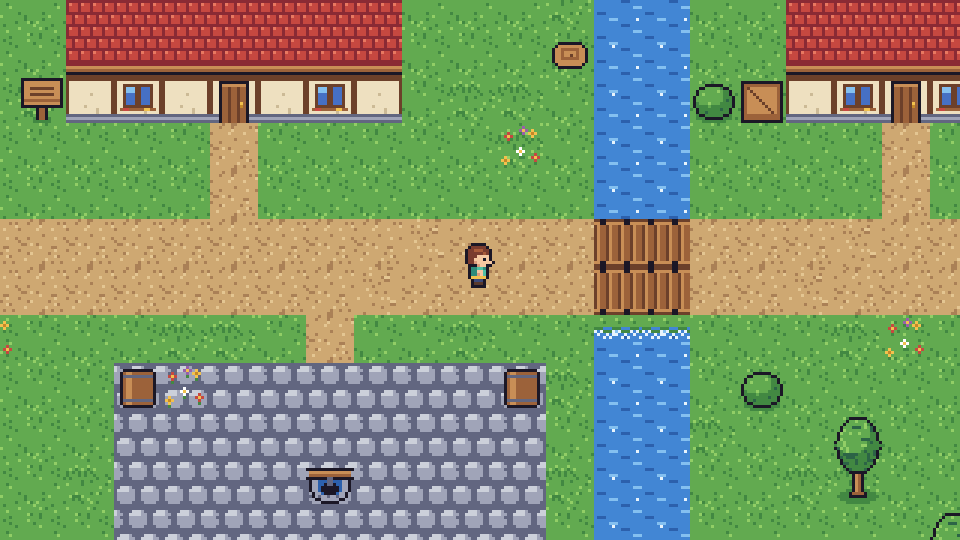
動画では、道まで下り、歩いてから走って橋を東へ渡り、カメラがマップの右端で止まるまで進みます。
其れから南の森へ行き、木の上の部分が主人公を隠し、西へ歩いて北に上り、木を回り込みます:
操作:
- 矢印キー又はW、A、S、D:歩く(斜めも可)。Shiftを押しながらで走る
- 1、2、3:地面・飾り・上の層の表示と非表示
- B:当たり判定の箱を表示(固いマスは赤、主人公の足元の箱は緑)
- Z:引いて見てカリングを確かめる。H:HUDを隠す
- R:マップをファイルから読み直す。Esc:終了
全部新しく、games/rpg/に入っています。
其のフォルダの外は何も変わりません:
CMakeLists.txt:実行ファイルrpgsrc/main.cc、src/game.hh:ウィンドウ、共有のGameデータ、フレームsrc/tilemap.hh、src/tilemap.cc:TilesetとTilemap。2つのテキスト形式の読み込みsrc/tile_renderer.hh、src/tile_renderer.cc:TileRenderer。行のカリング付きの静的なバッファsrc/character.hh、src/character.cc:キャラクターシート、Character、moveOnMapsrc/map_scene.cc:MapScene。マップを更新して描くシーンassets/:tiles.pngとtiles.atlas、characters.png、手書きのtiles.tileset、maps/village.map、LICENSE.txt(完成したファイルは章のZIPとアセットのZIPのch33/に入っています)README.md:操作
33.2 ゲームのフォルダ
ゲームがビルドにどう加わるかは第27章で説明したので、此処では短く纏めます。
一番上のCMakeLists.txtは、games/rpg/CMakeLists.txtが存在すれば直ぐにgames/rpgを加えます。
ゲーム自身のファイルは、どのゲームも使う同じ雛形です:
# 見下ろし型RPG(第33〜35章) / the top-down RPG (chapters 33-35)
add_executable(rpg
  src/main.cc
  src/tilemap.cc
  src/tile_renderer.cc
  src/character.cc
  src/map_scene.cc)
target_include_directories(rpg PRIVATE src)
target_link_libraries(rpg PRIVATE engine)
enable_warnings(rpg)
set_working_directory(rpg)
engineをリンクすると、GLAD、GLFW、エンジンとlinalg.hhのインクルードパスが付いて来ます。
set_working_directoryはVisual Studioでゲームをプロジェクトのルートで起動させます。
全てのパスは其処からです。
エンジンのシェーダーはengine/shaders/…、共有のフォントはassets/fonts/…、ゲーム自身のデータはgames/rpg/assets/…です。
解像度はピクセルアートのゲームの決まりに従います。
320 × 180のPixelCanvasを、1280 × 720のウィンドウに4倍で映します。
16 × 16のタイルなら、横に320 / 16 = 20マス、縦に180 / 16 = 11.25マスです。
フレームは第26章のデモと同じで、世界をキャンバスに描き、キャンバスを画面に映し、其の後UIを画面の解像度で描きます:
      [&](float alpha) {
        // 1. 世界:320 × 180のキャンバスに描き、整数倍で画面へ / 1. the world: into the 320 × 180 canvas, then scaled
        //    by a whole number onto the screen
        canvas.begin(hexColor(0x1b1726ff));
        scenes.draw(alpha);
        canvas.present(window.width(), window.height());
        // 2. UI:1280 × 720の文字 / 2. the UI: text at 1280 × 720
        game.uiViewport = letterbox(window.width(), window.height(), game.screen.viewSize, false);
        game.uiViewport.apply();
        scenes.drawUi(alpha);
        scenes.drawFade(*batch, game.screen.matrix(), game.screen.viewSize);
      });
此の章のシーンはMapSceneの1つだけです。
mainはSpriteBatch、TileRenderer、フォント、キャラクターシート、村を作り、長く生きる物への参照をGame構造体に入れ、自分のTilemapを持つMapSceneをプッシュします。
第34章ではマップが増え、シーンマネージャーで切り替えます。
其の為、マップはシーンが持ち、GPUの物はGameが持ちます。
33.3 タイルセット
全てのタイルは1枚のアトラスから来ます。
他のゲームの絵と同じく、あたしのPythonのスクリプト(ダウンロードには含まれません)で生成した物です:
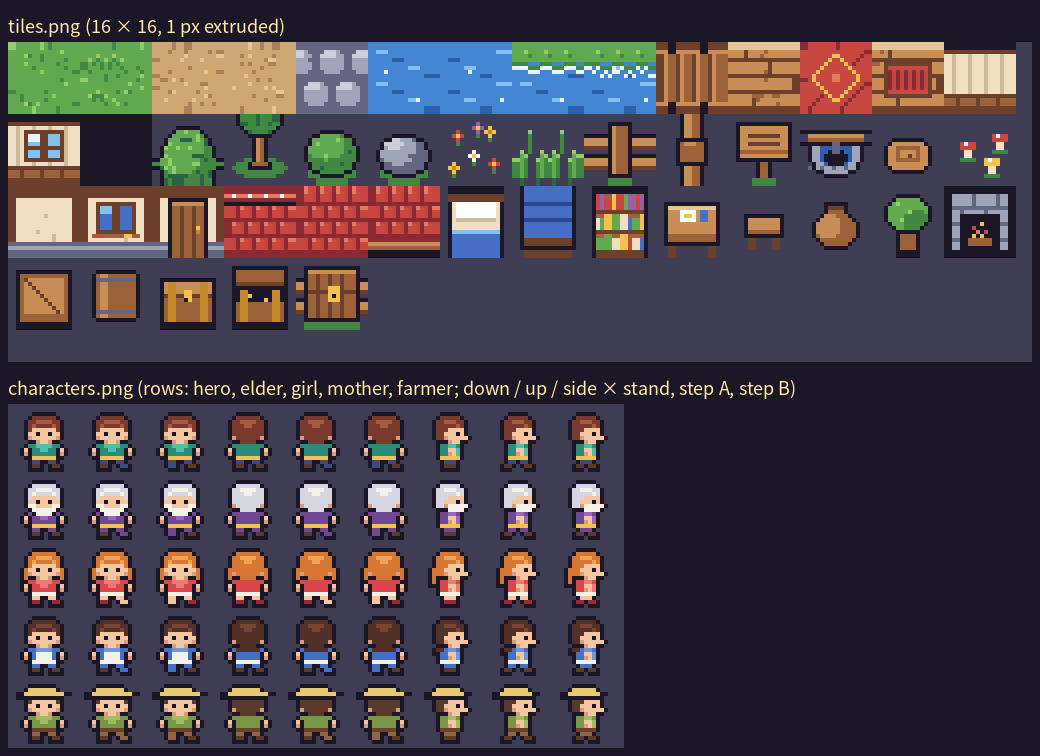
位置はtiles.atlasに書いてあり、第25章のエンジンのアトラス形式を其のままSpriteSheet::loadAtlasで読みます。
sprite grass 1 1 16 16の様な行と、動く水の為の2つのクリップ、clip water 2 loop water0 water1と岸の同じ物です。
第25章でタイルに勧めた通り、どのタイルにも自分の端をコピーした1ピクセルの縁(押し出し)があります。
アトラスに書けないのは、タイルが「何であるか」です。
通れるかどうか、動くかどうか。
其れは手書きの2つ目のファイルtiles.tilesetに書きます。
此のファイルは、マップの中でタイルを表す1文字も決めます:
# タイルの種類:マップの格子の1文字 → アトラスのスプライト、固いか、動くか
# Tile kinds: one character of a map grid → a sprite in the atlas, solid or not, animated or not
#   tile <文字 / char> <スプライト / sprite> [solid] [anim <clip>]
# '.' はどの層でも「空」 / '.' means "empty" in every layer
atlas tiles.atlas

# 地面 / ground
tile , grass
tile ; grass2
tile = path
tile : path2
tile o cobble
tile ~ water0 solid anim water
tile ^ shore0 solid anim shore
tile H bridge
ファイルは同じ様に続きます。
室内の床と壁、飾り(Tは木の幹、bは茂み、-と|は柵、M W dは家の壁・窓・扉、AとLは屋根と軒、家具、木箱、樽)、そして人物の上に描く2つのタイル、t(木の上の部分)とa(屋根の棟)です。
固さと動きはタイルの種類の性質で、マップの場所の性質ではありません。
此のタイルセットを使う全てのマップでTは固い木の幹で、茂みを全部通れる様にするのは1つのファイルの1語です(課題2)。
tileの各行はTileKindになります:
// タイルの種類(.tilesetの「tile」の1行) / a tile kind (one "tile" line of the .tileset)
struct TileKind {
  char symbol = '.';                   // マップの格子で使う文字 / the character used in map grids
  std::string name;                    // アトラスのスプライト名 / the sprite's name in the atlas
  int sprite = -1;                     // SpriteSheetの番号 / SpriteSheet index
  bool solid = false;                  // 通れない / blocks movement
  const AnimationClip *anim = nullptr; // 動くタイル(水)。nullptr = 動かない / animated tile (water); nullptr = still
};
Tilesetは種類をvectorに入れ、ASCIIの文字から種類の番号への128個の表(無ければ−1)を持つので、マップの文字を引くのは配列への1回のアクセスです。
スプライトとクリップの名前は読み込みの時に一度だけ解決します。
知らないスプライトは、後で抜けたタイルになるのではなく、ファイルと行付きのエラーになります。
animのポインターはアトラス自身のクリップの一覧を指します。
SpriteSheetはクリップをstd::dequeに入れていて、シートを移動しても要素の場所は変わらないので、安全です。
33.4 マップのファイル
見える形式
village.mapの始めは此うです:
map village
tileset ../tiles.tileset
size 40 28

layer ground
,,,,,,,,,,,,,,,,,,,;,,,,,,,;;,,,,,,,,,;,
,,,;;,,,,,;,;,,,,,,,,,,;,,,;,;,,,,,,,,;;
,,,,,,,,,;,,,;,,,,,,,,,,,^^,,,,,,,,;,,,,
マップは1行に1つの命令が少しと、文字の格子の層から出来ています。
sizeの高さの数の行に幅の数の文字、1文字が1マスで、.はどの層でも「空」です。
tilesetはマップのファイルからの相対パスなので、assets/maps/のマップはassets/tiles.tilesetを共有します。
どのテキストエディターで開いても村が見えます。
此処は地面の層の上の方で、殆ど草(,と濃い;)、右に川の上端(^、岸)があります。
飾りの層の方が分かり易いです:
layer decor
........................................
TTTTTTTTTTTTTTTTTTTTTTTTTTTTTTTTTTTTTTTT
b......................................b
T...........s.........b............b...T
b......................................b
T.............AAAAAAA..................T
b.b..LLLLL....LLLLLLL...s....LLLLLX....b
T...UMWdWMX..SMWMdMWM......bXMWdWMU..%.T
Tの行は上に並ぶ森の木の幹です。
3軒の家はLの軒と其の下の壁で、Mが壁、Wが窓、dが入れない扉です(入れる扉Dはもうタイルセットにあり、第34章で使います)。
真ん中の幅の広い家は屋根の行が1つ多く、Aです。
物は最後に、平らなkey=valueの組で書きます。
object spawn start 7 9 face=downはstartという名前の出発点を7列目・9行目に下向きで置きます。
第34章は扉にも同じ種類の行を使い、行き先のマップと其の先の出発点をkey=valueの組で書きます。
何故JSONではないのか
第13章でglTFの為にJSONパーサーを書きました(作者のブログ記事にも書き方があります)。
では何故別の形式なのでしょう。
マップは手で編集する物で、JSONは格子が苦手だからです。
一番よく使われるマップエディターTiledのJSONのマップ(.tmjファイル)は、各層を[17, 17, 17, 23, …]の様な平らな数の配列で持ちます。
道具が書くには良いですが、絵として読む事は出来ず、手で直すのは辛いです。
あたし達の物は入れ子の無いkey=valueの組の一覧なので、JSONの唯一の強み、構造が何の役にも立ちません。
行ごとの形式ならstd::getlineとstd::istringstreamで約150行、ライブラリ無しで読めます。
本物のプロジェクトでは大抵Tiledでマップを描いてTMXかTMJで書き出します。
Tiledは層をCSVでも保存出来るので、あたし達の格子のループで少しの変更で読めます。
読み込み
Tilemap::loadはファイルを1行ずつ読み、最初の単語を見ます。
コメント(#)と空行は飛ばし、行末の\rを取り除くので、Windowsの改行で保存したマップも同じに読めます。
layerの行の後には丁度高さの数の格子の行が続き、其の場で読みます:
    } else if (command == "layer") {
      if (!map.tiles || map.cols == 0) return fail("layerの前にtilesetとsizeが要る / tileset and size must come first");
      TileLayer layer;
      in >> layer.name;
      std::string flag;
      while (in >> flag) {
        if (flag == "above") layer.above = true;
        else return fail("知らない印 / unknown flag: " + flag);
      }
      layer.cells.assign(static_cast<size_t>(map.cols * map.rows), -1);
      // 続くrows行が格子。1文字が1マス / the next `rows` lines are the grid, one character per cell
      for (int row = 0; row < map.rows; ++row) {
        if (!std::getline(lines, line)) return fail("格子の行が足りない / the grid has too few rows");
        ++number;
        if (!line.empty() && line.back() == '\r') line.pop_back();
        if (static_cast<int>(line.size()) != map.cols)
          return fail("格子の行の長さが" + std::to_string(line.size()) + "(" + std::to_string(map.cols) +
                      "のはず) / grid row has " + std::to_string(line.size()) + " characters (expected " +
                      std::to_string(map.cols) + ")");
        for (int col = 0; col < map.cols; ++col) {
          char c = line[static_cast<size_t>(col)];
          if (c == '.') continue;
          int kind = map.tiles->kindIndex(c);
          if (kind < 0) return fail(std::string("タイルセットにない文字 / character not in the tileset: '") + c + "'");
          layer.cells[static_cast<size_t>(row * map.cols + col)] = kind;
        }
      }
      map.tileLayers.push_back(std::move(layer));
層は種類の番号を行ごとに(row * width + col)持ち、空のマスは−1です。
読み込みの後、文字は残りません。
全てのエラーはfailを通り、ファイル:行: 説明を出して、読み込みはstd::nulloptを返します。
此の形はコンパイラーが出す物と同じなので、殆どのエディターやIDEでクリックして其の行へ飛べます。
1文字足りない行や、タイルセットが知らない文字は、変なマップになるのではなく、行番号付きで報告されます。
行の順番が大事な所が1つあります。
層は其のlayerの行の時点のsizeとtilesetで読まれます:マスの配列はwidth × height個で、番号は其のタイルセットの種類の番号です。
最初の層の後にsizeやtilesetの行があると、もう読んだ層は大きさが違ったり、別のタイルセットの番号を持ったりしたままになり、次の固さの格子をまとめる処理や頂点のバッファを作る処理が配列の外を読み書きします。
其の為、層が1つでもあれば読み込みは其の両方を断ります。tilesetとsizeの枝の前の検査です:
    } else if ((command == "tileset" || command == "size") && !map.tileLayers.empty()) {
      // 読んだ層は今の大きさとタイルセットの番号で出来ている:後から変えると層が合わなくなる
      // The layers already read use the current size and the tileset's kind numbers: changing them later would not
      // match those layers
      return fail(command + "はlayerより前に書く / " + command + " must come before the first layer");
layer decorの前にsize 20 14を入れると、此うなります:
games/rpg/assets/maps/village.map:38: sizeはlayerより前に書く / size must come before the first layer固さの格子は1枚
最後の行の後、全ての層の固いタイルを1枚の格子に纏めます:
  // 固さを一枚にまとめる:どれかの層の固いタイルがあれば通れない / combine solidity into one grid: a solid tile in any
  // layer blocks the cell
  map.solid.assign(static_cast<size_t>(map.cols * map.rows), false);
  for (const TileLayer &layer : map.tileLayers)
    for (size_t i = 0; i < layer.cells.size(); ++i)
      if (layer.cells[i] >= 0 && map.tiles->kind(layer.cells[i]).solid) map.solid[i] = true;
  return map;
どれかの層のタイルが固ければ、其のマスは固いです。
地面の層の水も、飾りの幹もです。
移動は二度と層の事を聞かず、マスの事だけを聞きます:
bool Tilemap::solidAt(int col, int row) const {
  if (col < 0 || row < 0 || col >= cols || row >= rows) return true;
  return solid[static_cast<size_t>(row * cols + col)];
}
マップの外は固いと数えるので、主人公をマップの中に留める別のコードは要りません。
端はただの壁の1つです。
村では1120マスのうち308マスが固いです。
33.5 3枚の層
形式では層は幾つでも良く、村は決まりとして3枚を使います:
- ground(地面):草、道、石畳、水、橋。全てのマスが埋まっています
- decor(飾り):地面の上に立ち、人物の下に描く物。幹、茂み、岩、柵、家の壁、家具、樽
- overlay(上の層、
above付き):人物の後に描く物。木の上の部分と屋根の棟
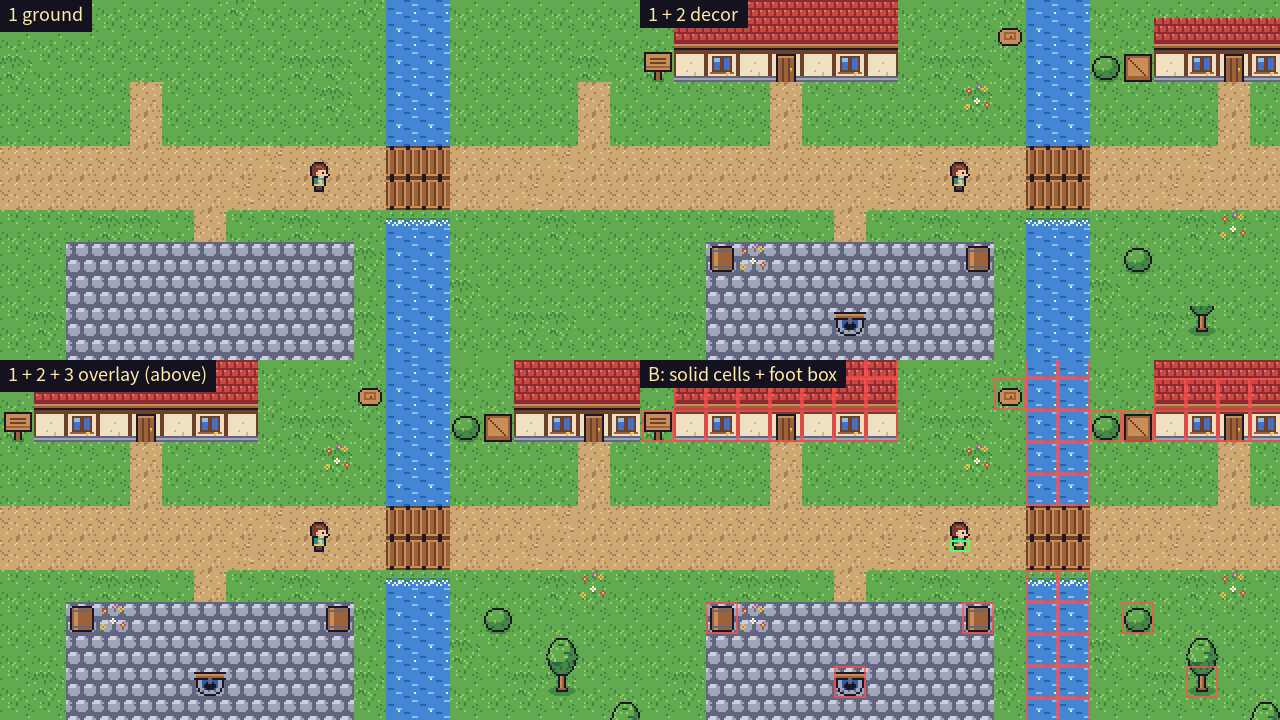
木は2枚のタイルです。
飾りの層の幹Tは固く、其の真上の上の層のt(木の上の部分)は固くありません。
上の層の最初の行は此うで、木の上の部分は先ほどの飾りの抜粋の幹の行の真上に、aの棟は屋根の真上にあります:
layer overlay above
tttttttttttttttttttttttttttttttttttttttt
........................................
t......................................t
........................................
t.............aaaaaaa..................t
.....aaaaa...................aaaaa......
なので主人公は木の上の部分のマスに入って木の後ろに隠れ、幹で止まります:
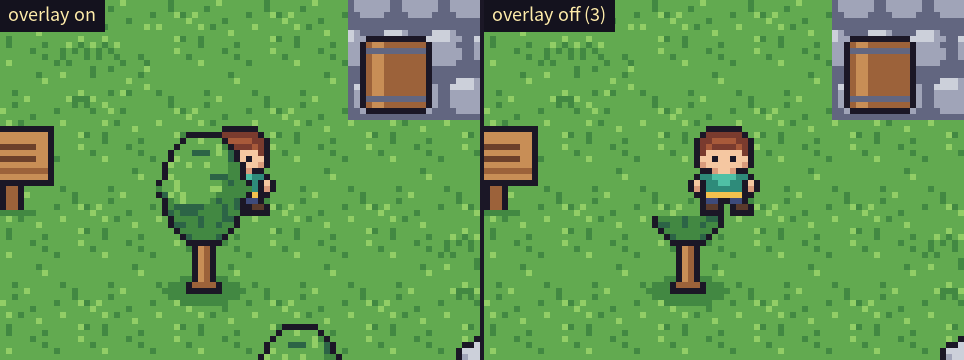
(画像では主人公が木の上の部分から6ピクセル横にいます。16ピクセルの木は16ピクセルの主人公を完全に隠し、其れは正しいのですが、スクリーンショットとしては良くありません。)
家も同じで、棟の行は上の層、軒と壁は固い飾りです。
何故「飾り、人物、上の層」の順がいつも正しいのでしょう。
飾りの物は全て高さ1マス以下で、人物は固いタイルの中には立てません。
樽の下に立つ主人公は、頭で樽のマスに重なり、樽の手前に見えるべきです。
飾りの後に描かれるので、其の通りになります。
樽の上に立つ主人公は、足が樽のマスより上にあり、絵は上に伸びるので、2つは重なりません。
背の高い物は、飾りの固い下の部分と、上の層の通れる上の部分に分けるので、上の層は丁度後ろに立つ人物だけを覆います。
人物同士の順は古典的なYソートです。
足が画面の下にある方が手前で、バッチのSpriteSort::Layerとlayer = 足のyで行います(今は主人公だけですが、第35章の村人に要ります)。
33.6 タイルを静的なバッファから描く
何故スプライトバッチではないのか
マップを描く一番簡単な方法は、全てのタイルをスプライトとしてSpriteBatchに渡す事です。
其れでも動きますし、バッチは其の為の物ですが、毎フレーム何が起きるかを見て下さい。
CPUが1449枚のタイルの其々の4つの角を計算し、1449 × 4 = 5796個の20バイトの頂点、115 920バイトをバッチの動的なバッファに書き、ドライバーが其れをGPUへコピーします。
毎秒60フレームなら、毎フレーム同じデータが毎秒約7 MBです。
タイルは動きません。
動くのはカメラだけで、カメラは1つの行列のユニフォームです。
なので、マップの頂点はマップを読み込む時に一度だけ作り、二度と書かないバッファに入れます。
第14章からの3Dモデルが静的なバッファに入ったまま、周りをカメラが飛び回っていたのと同じく、カメラの行列がGPUの上で頂点を動かします。
バッファを作る
TileRenderer::buildは層をファイルの順に、各層の中では行を上から下へ、列を左から右へ回ります:
void TileRenderer::build(const Tilemap &m) {
  map = &m;
  const SpriteSheet &sheet = m.tileset().sheet();
  std::vector<SpriteVertex> data;
  layers.clear();
  int maxLayerQuads = 0;
  for (const TileLayer &tl : m.layers()) {
    Layer layer;
    layer.firstQuad = static_cast<int>(data.size() / 4);
    layer.rowStart.reserve(static_cast<size_t>(m.height() + 1));
    for (int row = 0; row < m.height(); ++row) {
      layer.rowStart.push_back(static_cast<int>(data.size() / 4) - layer.firstQuad);
      for (int col = 0; col < m.width(); ++col) {
        int k = tl.cells[static_cast<size_t>(row * m.width() + col)];
        if (k < 0) continue; // 空のマスは四角形を作らない / empty cells make no quad
        const TileKind &kind = m.tileset().kind(k);
        Vec2 p = {kTile * static_cast<float>(col), kTile * static_cast<float>(row)};
        if (kind.anim) {
          // 動くタイルはバッファに入れず、毎フレームバッチで描く / animated tiles stay out of the buffer and are drawn
          // through the batch every frame
          layer.animated.push_back({p, &kind, row});
          continue;
        }
        Rect uv = sheet.uv(kind.sprite);
        // 左上・右上・右下・左下(SpriteBatchと同じ順:添字 0-1-2 2-3-0) / top left, top right, bottom right,
        // bottom left (the SpriteBatch's order: indices 0-1-2 2-3-0)
        data.push_back({p, {uv.left(), uv.top()}, 0xFFFFFFFFu});
        data.push_back({{p.x + kTile, p.y}, {uv.right(), uv.top()}, 0xFFFFFFFFu});
        data.push_back({{p.x + kTile, p.y + kTile}, {uv.right(), uv.bottom()}, 0xFFFFFFFFu});
        data.push_back({{p.x, p.y + kTile}, {uv.left(), uv.bottom()}, 0xFFFFFFFFu});
      }
    }
    layer.rowStart.push_back(static_cast<int>(data.size() / 4) - layer.firstQuad);
    maxLayerQuads = std::max(maxLayerQuads, layer.rowStart.back());
    layers.push_back(std::move(layer));
  }
  // 添字は一番大きい層の分だけ:どの範囲もbaseVertexで頂点をずらして同じ添字0, 1, 2, 2, 3, 0, 4…を使う
  // Indices only for the largest layer: every range reuses the same indices 0, 1, 2, 2, 3, 0, 4... with baseVertex
  // shifting the vertices
  std::vector<std::uint32_t> quadIndices;
  quadIndices.reserve(static_cast<size_t>(std::max(1, maxLayerQuads)) * 6);
  for (std::uint32_t q = 0; q < static_cast<std::uint32_t>(std::max(1, maxLayerQuads)); ++q)
    for (std::uint32_t i : {0u, 1u, 2u, 2u, 3u, 0u}) quadIndices.push_back(4 * q + i);
  if (data.empty()) data.resize(4); // 空のバッファは作れない / zero-size storage is not allowed

  // 不変のストレージ(フラグ0):作るときに中身を渡し、あとは書き換えない。ドライバーはGPUの速いメモリに置ける
  // Immutable storage (flags 0): the contents are given at creation and never change. The driver may keep it in fast
  // GPU memory
  vertices = Buffer(data.data(), static_cast<GLsizeiptr>(data.size() * sizeof(SpriteVertex)), 0);
  indices = Buffer(quadIndices.data(), static_cast<GLsizeiptr>(quadIndices.size() * sizeof(std::uint32_t)), 0);
  glVertexArrayVertexBuffer(vao, 0, vertices.id(), 0, sizeof(SpriteVertex));
  glVertexArrayElementBuffer(vao, indices.id());
  frameStats.totalQuads = static_cast<int>(data.size() / 4);
}
大事な所が3つあります。
- 空のマスは四角形を作りません。 飾りの層は1120マスのうち848マス、上の層は989マスが空なので、3枚の層は3 × 1120 = 3360枚ではなく、1046 + 272 + 131 = 1449枚の四角形を持ちます。
- 動くタイルは入れず、別に一覧にします(33.7節)。地面の層の1120マスのうち74マスが水か岸なので、地面は1046枚です。
rowStart[r]は層ごとに、行rの最初の四角形の番号(層の中で数えた物)を記録し、最後の行の次にもう1つ入れます。層の行rは、四角形rowStart[r]からrowStart[r + 1]の手前までです。
頂点はバッチのSpriteVertexの形(位置、UV、RGBA8の色、20バイト)を使います。
TileRenderer::createはエンジン自身のsprite.vertとsprite.fragを読み込み、同じ属性の形のVAOを作るので、静的なバッファから描いたタイルはバッチで描いた時と全く同じピクセルになります。
1つのプログラムが2つのVAOに使われます。
不変のストレージ、もう一度
Bufferは第4章のクラスで、3つ目の引数は其のまま第3章のglNamedBufferStorage(buffer, size, data, flags)に渡ります。
flags = 0なら、ストレージは中身と一緒に作られ、二度と変えられません。
glNamedBufferSubDataは出来ず(其れにはバッチが使うGL_DYNAMIC_STORAGE_BITが要ります)、マップも出来ません(バッチの永続マップにはGL_MAP_WRITE_BITなどが要ります)。
代わりに、ドライバーはCPUが此のデータを決して書かない事を知り、GPUが一番速く読める場所に置けます。
同じ事を言う古いやり方はglBufferData(…, GL_STATIC_DRAW)ですが、其れはただのヒントです。
フラグ無しの不変のストレージは約束です。
コードには2つの結果が表れています。
ストレージは0バイトに出来ない(大きさ0のglNamedBufferStorageはGL_INVALID_VALUE)ので、動かないタイルが1枚も無いマップには、描かれる事の無いダミーの四角形を1枚入れます。
又、ストレージは大きさを変える事も作り直す事も出来ない(同じバッファへの2回目のglNamedBufferStorageはGL_INVALID_OPERATION)ので、マップが変わった時(Rで読み直した時や、第34章で扉を通った時)、buildは新しいBufferを作ります。
古い物はムーブ代入が消します。
VAOは残りますが、古いバッファの名前を指したままなので、glVertexArrayVertexBufferとglVertexArrayElementBufferで新しい物を繋ぎます。
此の2行を忘れるのが典型的な間違いで、VAOが消えたバッファから描こうとします。
頂点バッファは115 920バイトです。
添字バッファはいつもの0 1 2 2 3 0の並びですが、一番大きい層、1046枚の分だけで、6276個、25 104バイトです。
其れで足りる理由が次の話です。
行のカリングとglDrawElementsBaseVertex
カメラに見えるのはマップの横の帯で、高さ180ピクセルは12行に触れます。
画面の上端が行の中に13〜15ピクセル入っている時は13行です(上端が13なら)。
どの層も行の順に並んでいるので、層の見える行は一続きの四角形の範囲、rowStart[r0]からrowStart[r1]までです。
下のカリングのスクリーンショットのフレームでは5〜16行が見え、3つの範囲は此うなります:
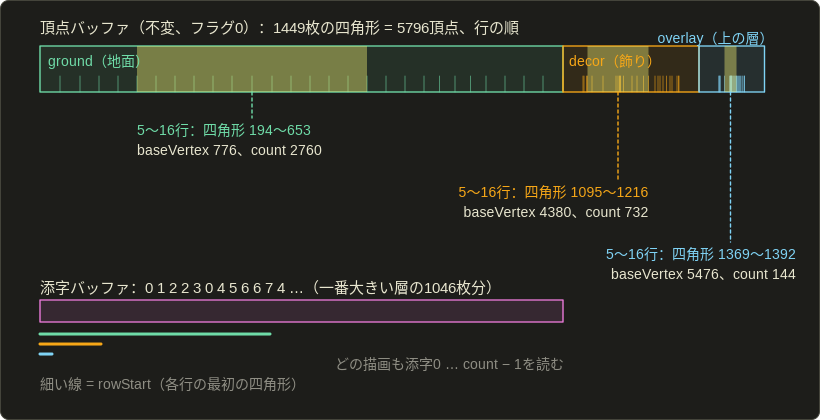
範囲1つが描画コール1回です:
// visibleが触れる行の範囲 [r0, r1) / the range of rows [r0, r1) that `visible` touches
static std::pair<int, int> visibleRows(const Rect &visible, int rows) {
  int r0 = static_cast<int>(std::floor(visible.top() / kTile));
  int r1 = static_cast<int>(std::ceil(visible.bottom() / kTile));
  return {std::clamp(r0, 0, rows), std::clamp(r1, 0, rows)};
}

void TileRenderer::drawLayer(int index, const Mat4 &viewProjection, const Rect &visible) {
  if (!map || index < 0 || index >= static_cast<int>(layers.size())) return;
  const Layer &layer = layers[static_cast<size_t>(index)];
  auto [r0, r1] = visibleRows(visible, map->height());
  int first = layer.rowStart[static_cast<size_t>(r0)], count = layer.rowStart[static_cast<size_t>(r1)] - first;
  if (count <= 0) return;
  shader->use();
  shader->set("uViewProjection", viewProjection);
  map->tileset().sheet().texture().bind(0);
  glDisable(GL_DEPTH_TEST);
  glDisable(GL_CULL_FACE);
  glEnable(GL_BLEND);
  glBlendFunc(GL_ONE, GL_ONE_MINUS_SRC_ALPHA); // 乗算済みアルファ(loadSpriteTexture) / premultiplied alpha
  glBindVertexArray(vao);
  // 行は続けて並んでいるので、見える行は一続きの範囲:添字は0から、頂点はbaseVertexだけずらす
  // Rows are stored one after another, so the visible rows are one contiguous range: indices start at 0, vertices are
  // shifted by baseVertex
  glDrawElementsBaseVertex(GL_TRIANGLES, count * 6, GL_UNSIGNED_INT, nullptr, (layer.firstQuad + first) * 4);
  glBindVertexArray(0);
  frameStats.quads += count;
  ++frameStats.drawCalls;
}
glDrawElementsBaseVertex(mode, count, type, indices, basevertex)は第25章で、バッチがリングバッファの途中から描くのに使いました。
此処では静的なバッファで同じ仕事をします:
mode:GL_TRIANGLES。四角形1枚に三角形2つ。count:添字の数なので、四角形の数 × 6。上のフレームの地面なら、460枚で2760です。type:GL_UNSIGNED_INT。std::uint32_tの添字に合わせます。indices:要素バッファの中のバイト単位のオフセットで、此処ではnullptr= 0。どの描画も最初の添字から始めます。basevertex:頂点を取り出す前に全ての添字に足す数。範囲は四角形firstQuad + firstから始まるので、頂点では(firstQuad + first) × 4です。地面は776、飾りは(1046 + 49) × 4 = 4380、上の層は(1318 + 51) × 4 = 5476です。
なので、どの描画でも添字0は其の範囲の最初の頂点に、添字6は5つ目の頂点に当たり、以下同じです。
同じ小さな添字バッファが、全ての層の全ての範囲に使えます。
長さは今まで描く一番長い範囲の分が要り、どの範囲も其の層全体より長くはならないので、「一番大きい層」の分です。
よくある間違いは単位です。
countを添字ではなく四角形の数にするとタイルの6分の1しか描かれず、basevertexを頂点ではなく四角形の数にすると違うタイルが描かれ、添字の数のつもりでindicesにバイトのオフセットを渡すとゴミを読みます。
添字とbasevertexの和がバッファの終わりを越えるとバッファの外を読み、其れは未定義動作なので、rowStartの計算は正しくなければなりません。
3枚の層、3回の描画コールで、画面の全ての動かないタイルです。
カリングを見える様にした物が此れです。
Zで表示を半分の大きさに引きますが、カリングは本物のカメラ(黄色の長方形)のままです:
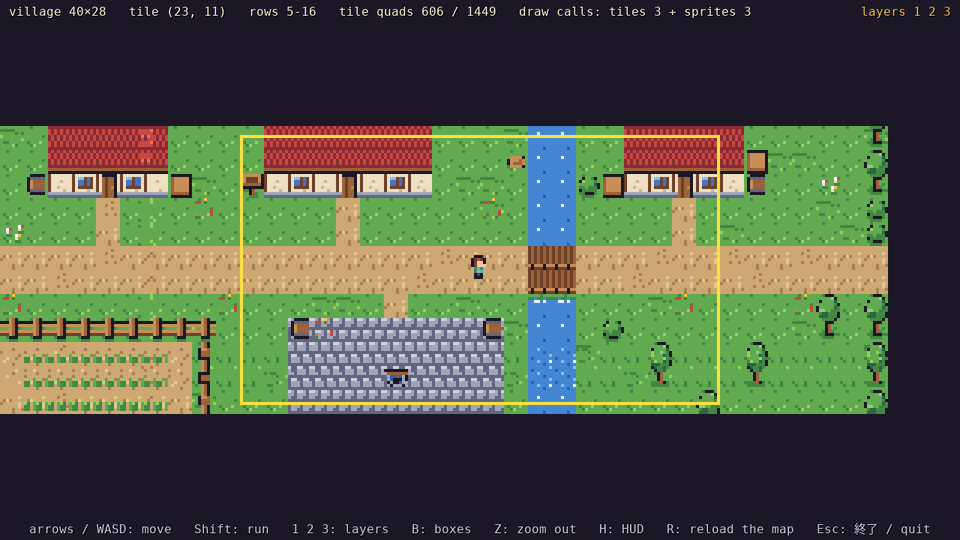
5〜16行しかありませんが、其の行はマップの全幅にあります。
画面の外の列もGPUに送られ、GPUが其れを切り取ります。
其れが行のカリングの妥協です。
行の帯の中の列の範囲はバッファの中で一続きではない(各行が自分の切れ端を出す)ので、列も間引くには行ごとに1回描くか、別の並べ方(チャンク、課題4)が要ります。
幅40マスのマップと幅20マスの画面なら、描く四角形の半分は画面の外で、頂点の処理が少し掛かりますが、フラグメントの処理は掛かりません。
スクリーンショットでは1449枚のうち460 + 122 + 24 = 606枚を描いています。
村の中の全てのカメラの位置で、此の数は544から691の間(691は一番上だけで、13行に森の行が丸ごと入る時)、平均で約590です。
動くタイル(水)は長方形に対してタイルごとに、行だけでなく列でも間引きます。
其れがレンダラーのもう半分です(此処では川が丁度長方形の列の中を流れているので、他のタイルと同じ行で終わっています)。
(引いた表示は絵の1ピクセルをキャンバスの半ピクセルで描くので、絵のピクセルの行と列が1つおきに消えます。デバッグの表示で、プレイヤー向けのズームではありません。)
33.7 動くタイルはバッチで
水と岸のタイルにはタイルセットでanim water又はanim shoreが付いていて、2コマを毎秒2コマで切り替えます。
静的なバッファはUVを変えられないので、buildは其のマスを入れず、位置、種類、行をlayer.animatedに記録します。
毎フレーム、層の動かないタイルを描いた直後に、シーンは其の層の動くタイルをSpriteBatchで描きます:
void TileRenderer::drawAnimated(SpriteBatch &batch, int index, const Rect &visible, float time, float spriteLayer) const {
  if (!map || index < 0 || index >= static_cast<int>(layers.size())) return;
  const SpriteSheet &sheet = map->tileset().sheet();
  for (const Animated &a : layers[static_cast<size_t>(index)].animated) {
    if (a.position.y + kTile <= visible.top() || a.position.y >= visible.bottom() || a.position.x + kTile <= visible.left() ||
        a.position.x >= visible.right())
      continue;
    const AnimationClip &clip = *a.kind->anim;
    size_t frame = static_cast<size_t>(time * clip.fps) % clip.frames.size();
    Sprite s = sheet.sprite(clip.frames[frame], a.position);
    s.layer = spriteLayer;
    batch.draw(s);
  }
}
コマはシーンの時間から直接決まるので、全ての水のタイルが一緒に変わり、タイルごとの状態は要りません。
何故此の分け方で上手く行くのでしょう。
- 2つの部分は決して重なりません。 マスは静的なバッファか動くタイルの一覧のどちらか一方にだけあり、同じ層のタイル同士は重なりません(其々が自分の16 × 16の正方形を埋めます)。なので層を「動かないタイル、其れから動くタイル」の順に描いても、全てのタイルをどんな順で描いても、同じ絵になります。
- 層の間の順は保たれます。 シーンは層の動くタイルの
batch.end()を、層の動かないタイルを描く前に呼ぶので、水はいつも飾りと人物の下です。 - ピクセルは同じです。 どちらの道も同じプログラム、同じ頂点の形、同じアトラスのテクスチャ、同じ乗算済みのブレンドを使うので、水のタイルはバッファに入っていた時と全く同じに見えます。
- 費用は僅かです。 村の動くタイルは全部で74枚で、送るのは見えている物だけです。1449枚ではなく、フレームごとに多くても数十のスプライトとバッチの描画コール1回です。
一般的な決まりは、変わらない物は静的なバッファに入れ、変わる物だけを流す事です。
大きいマップならどちらも妥当な、タイルを動かす他の方法が2つあります。
動くタイルの四角形にGL_DYNAMIC_STORAGE_BIT付きの小さな自分のバッファを持たせ、コマが変わった時(此処なら1秒に2回)だけUVをglNamedBufferSubDataで書き換える方法と、頂点ごとのコマ数と時間のユニフォームでUVをずらし、頂点シェーダーの中で動かす方法です。
33.8 歩き回る
自由な移動、足元の箱
トップダウンRPGの移動には古典的な2つのやり方があります。
マス目の移動(ポケモン、ドラゴンクエスト)は主人公を1歩でマス丸ごと1つ動かし、行き先のマスについてsolidAtに聞くだけです。
自由な移動(ゼルダの伝説 神々のトライフォース、Stardew Valley)は、更新ごとに数ピクセルずつどの方向にも動かし、箱で当たり判定をします。
あたし達は自由な移動を使います。
第26章のエンジンのmoveAndSlideがもう壁に沿って滑らせてくれ、次の2章では同じ箱が村人や扉にも当たり、今風の手触りになるからです。
マス目の移動は課題5です。
当たり判定の箱は絵ではありません。
足元の10 × 6の箱で、16 × 16の絵は原点を(0.5, 1)、つまり下の辺の真ん中にして、箱の下の真ん中に描きます:
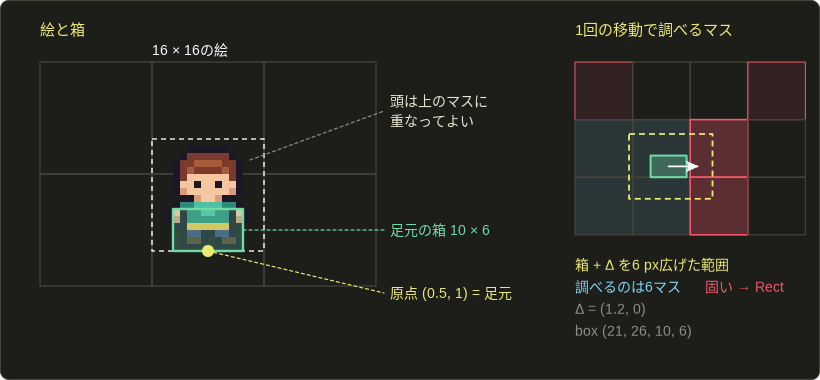
当たるのは足だけなので、頭は上のマスに重なって構いません。
主人公は壁や樽のすぐ下に立てて、其の手前に立っている様に見えます。
トップダウンの古典的な見た目です。
箱はマスより狭く、16ピクセルのうち10ピクセルなので、1マスの隙間には6ピクセルの余裕があります。
placeAtは人物をマスの中に、箱を真ん中に、足をマスの下の辺に置きます。
出発点のマス(7, 9)なら箱は(115, 154, 10, 6)、足は(120, 160)です。
moveOnMap
シーンは更新ごとに2つの軸を読み、斜めが速くならない様に方向を正規化し(単位ベクトル、線型代数の第3章)、箱を動かします:
  // 主人公:自由に動く(マス目に縛られない)。斜めは正規化して同じ速さ / the hero moves freely (not locked to the
  // grid); diagonals are normalized to the same speed
  hero.beginStep();
  Vec2 move = {in.axis("left", "right"), in.axis("up", "down")};
  hero.moving = move.x != 0.0f || move.y != 0.0f;
  if (hero.moving) {
    hero.facing = facingFor(move, hero.facing);
    float speed = in.actionHeld("run") ? kRunSpeed : kWalkSpeed;
    moveOnMap(hero.box, normalize(move) * (speed * dt), map, {}, scratch);
  }
  hero.anim.speed = in.actionHeld("run") ? 1.5f : 1.0f;
  hero.animate(g.characters, dt);
歩きは毎秒72 px、毎秒4.5マス、1/60秒の更新ごとに1.2ピクセルです。
Shiftで走ると毎秒120 px、更新ごとに2ピクセルです。
斜めなら各軸は px/sです。
どちらも更新ごとの箱の高さ6ピクセルよりずっと小さいので、箱がタイルをすり抜ける事はありません(さもないと何が起きるかは第26章の課題6で見ました)。
facingForは今の向きのキーが押されている間は其の向きを保つので、斜めに歩いても絵が2つの向きの間でちらつきません。
走っている間は歩きのアニメーションが1.5倍速く進みます。
beginStepは第26章と同じく、補間の為に箱の位置を取っておきます。
moveOnMapはマップとエンジンの当たり判定が出会う所です:
MoveResult moveOnMap(Rect &box, Vec2 delta, const Tilemap &map, std::span<const Rect> extra, std::vector<Rect> &scratch) {
  constexpr float kAssist = 6.0f; // 何ピクセルまでの引っかかりを回り込むか / how many pixels of overlap to slide round
  // 動く範囲(+回り込みの分)に触れる固いマスだけを集める / collect only the solid cells near the move (+ the assist)
  Rect area = {std::min(box.x, box.x + delta.x) - kAssist, std::min(box.y, box.y + delta.y) - kAssist,
               box.w + std::abs(delta.x) + 2.0f * kAssist, box.h + std::abs(delta.y) + 2.0f * kAssist};
  scratch.clear();
  map.solidRects(area, scratch);
  scratch.insert(scratch.end(), extra.begin(), extra.end());
  MoveResult result = moveAndSlide(box, delta, scratch);

  // 角の回り込み:一方向だけに歩いて止まったとき、横にdずらせば進めるなら、少しずつずらす(Zelda風)
  // Corner assist: when walking in one direction only and stopped, if shifting sideways by d would free the way, shift
  // a little each step (Zelda-style)
  bool alongX = delta.x != 0.0f && delta.y == 0.0f && result.hitX;
  bool alongY = delta.y != 0.0f && delta.x == 0.0f && result.hitY;
  if (!alongX && !alongY) return result;
  float speed = std::abs(alongX ? delta.x : delta.y);
  Vec2 forward = alongX ? Vec2{delta.x > 0.0f ? 1.0f : -1.0f, 0.0f} : Vec2{0.0f, delta.y > 0.0f ? 1.0f : -1.0f};
  Vec2 side = alongX ? Vec2{0.0f, 1.0f} : Vec2{1.0f, 0.0f};
  for (float d = 1.0f; d <= kAssist; d += 1.0f)
    for (float sign : {-1.0f, 1.0f}) {
      Rect shifted = box.translated(side * (sign * d));
      if (blocked(shifted, scratch) || blocked(shifted.translated(forward), scratch)) continue;
      moveAndSlide(box, side * (sign * std::min(d, speed)), scratch);
      return result;
    }
  return result;
}
moveAndSlideは固い箱の一覧を欲しがり、マップには固いマスが308あります。
更新ごとに其の全部のRectを作っても動きますが、馬鹿げています。
当たり得るのは移動の近くのマスだけです。
solidRects(area, out)はareaに触れる固いマスだけを箱にします。
areaは箱を移動の分だけ伸ばし、角の回り込みの為に四方へ6ピクセル広げた物です。
(21, 26)の箱が右へ1.2ピクセル動くなら、xは15から38.2、yは20から38で、0〜2列と1〜2行、絵の右半分の通り6マスを調べます。
scratchは更新でメモリを確保しない様にシーンが持っているvectorで、extraは他の箱(第35章の村人)を受け取ります。
今は空です。
角の回り込み
タイルの世界の自由な移動には、困った性質が1つあります。
通り道は丁度1マスの幅で、通るには箱を6ピクセル以内に揃えなければなりません。
柵の切れ目に向かって4ピクセル左にずれたまま上へ歩くと、柵の角でぴたりと止まります。
角の回り込み(corner assist)は正に其処を助けます。
移動が1つの軸だけで、其の軸が塞がれた時、箱を横に1、2、…6ピクセル、両方向にずらしてみて、ずらした箱が空いているか、且つ1ピクセル前でも空いているかを調べます。
最初に上手く行くずらしを使いますが、動かすのはmin(d, speed)、1回の更新の歩く距離だけなので、主人公は飛ばずに角を滑る様に回ります:
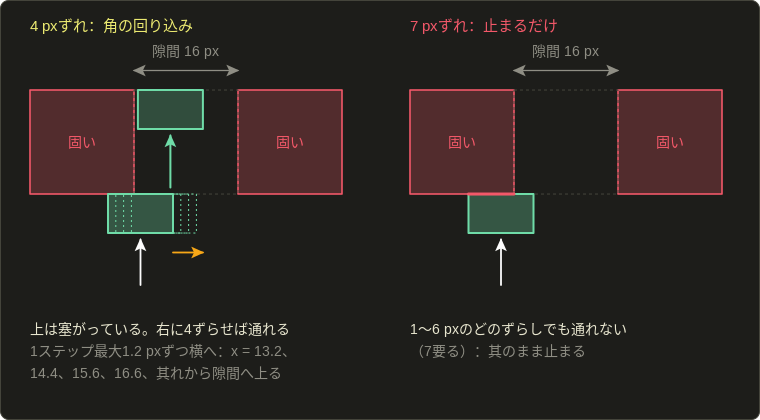
左の場合は4のずらしが見つかり、箱は1.2ピクセル動きます。
次の更新では重なりが2.8、其の次は1.6ピクセルで、通れる一番小さいずらしは3と2なので、毎回また1.2動きます。
重なりが0.4になると1のずらしで足り、1動きます。
4回の更新、67 msでx = 13.2、14.4、15.6、16.6となり、其の後箱は隙間へ上って行きます。
プレイヤーは上を押しているだけです。
7ピクセルのずれは回り込みの6より大きいので、何も起きません。
本当に柵に向かって歩いているのです。
回り込みは真っ直ぐの移動の時だけです。
斜めなら其れだけで壁に沿って滑ります。
ゼルダの伝説 神々のトライフォースも同じ事をしていて、プレイヤーは気付きません。
気付くのは、其れが無いゲームの時だけです。
人物を描く
CharacterSheetはcharacters.pngを16 × 16の格子(余白と間隔は1ピクセル)として読み、1人に9列あります。
下向き・上向き・横向きの、立ち、歩きA、歩きBです。
人と方向ごとに立ちのクリップと歩きのクリップをaddClipで足します。
歩きは歩きA、立ち、歩きB、立ちを毎秒8コマ、0.5秒で2歩です。
横向きのコマは右向きで、flipXで左向きにします。
スプライト其の物は此うです:
Sprite Character::sprite(const CharacterSheet &sheet, float alpha) const {
  Vec2 f = feet(alpha);
  // まだクリップがない(最初のanimateの前)とframe()は-1:そのままではシートの外を読むので、立ちのコマを使う
  // Without a clip yet (before the first animate) frame() is -1, which would read outside the sheet: use the standing
  // frame instead
  int frame = anim.frame();
  if (frame < 0) frame = sheet.idle(look, facing)->frames.front();
  // 整数のピクセルに丸める(カメラも同じ丸め方:人物とタイルの相対位置が揺れない) / round to whole pixels (the camera
  // rounds the same way: characters and tiles never wobble against each other)
  Sprite s = sheet.sheet().sprite(frame, {std::round(f.x), std::round(f.y)}, {0.5f, 1.0f});
  s.flipX = facing == Facing::Left;
  s.layer = f.y; // 下にいる人ほど手前(Y順) / the lower on screen, the nearer (Y-sorting)
  return s;
}
feet(alpha)は第26章で学んだ通り、前の更新の箱の位置と今の位置の間を補間し、(5, 6)を足して箱の下の真ん中にします。
何故丸めるのか、何故カメラと合わせなければならないのかは、次の節です。
frameの2行は、本当に起きる瞬間の為の守りです。
シーンは最初のupdateの前に一度描かれます:シーンマネージャーは更新のステップの終わりにpushを実行してenter()を呼び、其のすぐ後にフレームが描かれるからです。
其の時、Animatorはまだ一度もクリップを貰っていないので、frame()は「コマ無し」の−1を返します。
エンジンのSpriteSheet::spriteは番号を確かめないので、−1ではシートの配列の先頭の手前の長方形、つまり自分の物ではないメモリを読みます(AddressSanitizerはSpriteSheet::pixelsのheap-buffer-overflowとして報告します)。
其の為、spawn()の最後でhero.animate(g.characters, 0.0f)を呼び、時間を進めずに出発点の向きの立ちのクリップを選びます。
そして守りの2行は、最初のanimateの前に描かれるどの人物にも立ちのコマを使います。
33.9 カメラ
カメラは足元の6ピクセル上、体の真ん中を追い、マップの端で止まります:
Camera2D MapScene::followCamera(Vec2 target) const {
  Vec2 size = map.pixelSize(), half = 0.5f * kView;
  Vec2 c;
  c.x = size.x <= kView.x ? 0.5f * size.x : std::clamp(target.x, half.x, size.x - half.x);
  c.y = size.y <= kView.y ? 0.5f * size.y : std::clamp(target.y, half.y, size.y - half.y);
  // 中心を整数に丸める:タイルがいつもピクセルの格子に乗る(主人公の絵も同じ丸め方) / round the center to whole pixels:
  // tiles always sit on the pixel grid (the hero's picture is rounded the same way)
  return {.viewSize = kView, .centre = {std::round(c.x), std::round(c.y)}};
}

void MapScene::draw(float alpha) {
  // 足元の少し上(体の真ん中)を追う / follow a point a little above the feet (the middle of the body)
  Vec2 feet = hero.feet(alpha);
  Camera2D camera = followCamera({feet.x, feet.y - 6.0f});
  Rect visible = camera.visibleRect();
端から画面の半分より近い中心は、マップの外の何も無い所を映してしまうので、各軸をに収めます。
640 × 448の村と320 × 180の画面なら、xは[160, 480]、yは[90, 358]です。
或る軸でマップが画面より小さい時(第34章の家の中)は、其の軸では真ん中に置きます。
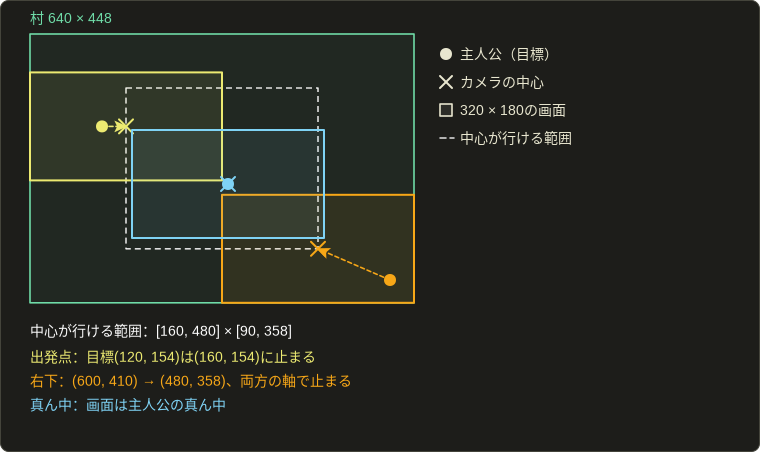
カメラが止まっている間、主人公は真ん中から外れて端の方へ歩きます。
2Dのゲームは皆そうしています。
此のカメラのcamera.visibleRect()がカリングに使う長方形です。
描くのと同じカメラから計算するので、カリングと描画が食い違う事はありません(Zの表示はわざと其れを崩しています)。
中心は整数のピクセルに丸め、主人公のスプライトも同じ様に丸めます。
あたし達のキャンバスの整数倍の拡大では、カメラの位置が小数でも何かがぼやけたりちらついたりはしません。
最近傍のサンプリングは絵をずらすだけで、何ピクセルずらすかを誰かが決める事になります。
大事なのは、其の決定を全ての物に対して一度、同じやり方でする事です。
カメラが小数を持ったまま、スプライトだけをあたし達のコードで丸めると、主人公は二度丸められます。
一度はあたし達が、もう一度はラスタライザーがカメラの小数に対して丸めるので、フレームによって地面に対して1ピクセルずれる事があります。
世界がスクロールする間、ぴくぴく震える主人公です。
此処ではどちらも同じ小数部を持つ数から始めます。
カメラの中心はx = box.x + 5、y = 足 − 6 = box.y、スプライトはbox.x + 5、box.y + 6にあります。
同じ様に丸めれば、主人公と地面は同じ整数のピクセルだけ動き、全てのタイルの縁が丁度ピクセルの縁に乗り、半ピクセルの所に頂点が来て同点の規則が決める、という事もありません。
第25章のpixelSnapはCamera2D::matrixの中で丸めますが、此処ではカリングの長方形とHUDの為に丸めた中心が自分で要るので、カメラを作る前に丸めます。
33.10 フレーム
シーンのdrawが部品を組み合わせます。
層ごとに動かないタイルと動くタイルをファイルの順に描き、最初のaboveの層の直前に人物を描きます:
  // 層はファイルの順に描く。「above」の層(木の上・屋根の棟)は人物の後 / layers are drawn in file order; "above"
  // layers (tree tops, roof ridges) come after the characters
  bool charactersDrawn = false;
  const std::vector<TileLayer> &layers = map.layers();
  for (int i = 0; i < static_cast<int>(layers.size()); ++i) {
    if (layers[static_cast<size_t>(i)].above && !charactersDrawn) {
      drawCharacters();
      charactersDrawn = true;
    }
    if (i < static_cast<int>(layerOn.size()) && !layerOn[static_cast<size_t>(i)]) continue;
    g.tiles.drawLayer(i, vp, visible);
    if (g.tiles.hasAnimated(i)) {
      b.begin(vp);
      g.tiles.drawAnimated(b, i, visible, time);
      b.end();
      spriteCalls += b.stats().drawCalls;
    }
  }
  if (!charactersDrawn) drawCharacters();
drawCharactersは主人公を入れたSpriteSort::Layerのバッチです。
人物は隠した層を飛ばす判定の前に描くので、3で上の層を隠しても主人公は描かれます。
普通のフレームではタイルの描画コール3回と、バッチの描画コール2回(見えている水に1回、主人公に1回)で、HUDはdraw calls: tiles 3 + sprites 2と表示します(水が画面に無ければsprites 1)。
Bでは3つ目のバッチが輪郭を描きます。
画面の近くの固いマスを同じsolidRectsから赤で、補間した足元の箱を緑で描きます。
33.11 デバッグのキーと読み直し
1、2、3、B、Z、Hのキーはどれもupdateの中の1行の切り替えで、何を見せるかはもう見ました。
Rは作業のやり方を変えるキーです:
  if (in.pressed(GLFW_KEY_R)) {
    // ファイルから読み直す(テキストエディターで直してすぐ確かめる)。失敗したら今のマップのまま
    // Reload from the file (edit in a text editor, check at once). On failure the current map stays
    if (std::optional<Tilemap> fresh = Tilemap::load(map.path())) {
      map = std::move(*fresh);
      g.tiles.build(map);
      printf("%s: 読み直した / reloaded\n", map.path().c_str());
    }
  }
ゲームを動かしたまま、エディターでvillage.mapを直し、保存してRを押すと、ビルドし直さずに村が変わります。
タイルセットもマップと一緒に読み直すので、tiles.tilesetでも同じ事が出来ます。
loadはどんなエラーでもstd::nulloptを返すので、壊れたファイルなら今のマップが其のまま残り、問題の場所が出ます。
タイルセットが知らない文字&を飾りの層の9行目に入れると、此うなります:
games/rpg/assets/maps/village.map:48: タイルセットにない文字 / character not in the tileset: '&'
48行目が其の格子の行です。
直してもう一度Rを押すと、games/rpg/assets/maps/village.map: 読み直した / reloadedで読み直しが通ります。
手で編集する時に気を付ける事が2つあります。
格子の行は丁度幅の数の文字でなければならないので、タブや行末の空白は長過ぎる行として報告されます。
又、マップの層同士は揃っている必要があります(上の層の木の上の部分は、飾りの層の幹の真上)。
村自体は、層を跨いで木と屋根を揃える為だけにあたしのスクリプトで書きました。
此処からは、ファイルが元です。
33.12 動かす
プロジェクトのルートから:
cmake -S . -B build
cmake --build build -j8
./build/games/rpg/rpg
Visual Studioではrpgをスタートアッププロジェクトにして(build\games\rpg\Debug\rpg.exeです)F5を押します。
作業ディレクトリはもうプロジェクトのルートです。
HUDの上の帯には、マップと其の大きさ、主人公のマス、見える行、描いた動かないタイルの四角形と全体の数、描画コールが出ます。
村の上から下まで歩くと、見える行は0〜11から16〜27に変わり、四角形の数は544と691の間を動き、タイルの描画コールは3のままです。
stderrに「character not in the font」やGLのデバッグメッセージが出てはいけません。
33.13 プラットフォームごとの注意
- Windows(Visual Studio): ソースには日本語の文字列(エラーメッセージ、HUDの終了)があります。MSVCが其れをUTF-8のまま扱うには
/utf-8が要りますが、プロジェクトのCMakeがMSVCに設定するので、する事はありません。 - Windows: メモ帳やVisual Studioで編集したマップは行が
\r\nで終わります。読み込みは\rを取り除きます。さもないと格子の全ての行が1文字長くなります。Gitのcore.autocrlfがチェックアウトの時にファイルを変換する事もありますが、どちらの改行でも動きます。 - 全て: 最後の改行を足したり消したり、行末の空白を削ったりするエディターがありますが、どれも此処では無害です。空白をタブに変えるエディターも、格子に空白は無いので関係ありません。但し長い行を折り返すエディターは格子を壊すので、折り返しを切るか、ウィンドウを40桁より広くして下さい。
- Linux、FreeBSD: プロジェクトのルートから実行して下さい(
./build/games/rpg/rpg)。他の場所から起動すると全ての読み込みが失敗し、マップのメッセージが「running from the project root?」と尋ねます。
33.14 本物のエンジンではどうしているか
- マップエディター: Tiled(TMXはXML、TMJはJSON、層はCSVでも可)とLDtkがよく使われる無料のエディターです。エンジンは其のファイルを取り込むか、自分のエディターを持っています(GodotのTileMapの層、UnityのTilemapとTile Palette)。「固い」の様なタイルの性質は其処でもタイルセットにあり、カスタムプロパティやタイルごとの物理の形として持ちます。
- チャンク: 大きいマップは行丸ごとではなく、チャンク(例えば16 × 16マス)に分けます。其々が自分の静的なメッシュか、1つのバッファの中の自分の範囲を持ち、画面に触れるチャンクだけを描きます。描画コールが少し増える代わりに、両方向に間引けます(課題4)。UnityのTilemap Rendererにはチャンクのモードがあり、GodotもTileMapLayerのマスを同じ理由で描画用の区画に纏めます。
- タイルマップのシェーダー: 層全体を画面の大きさの四角形1枚で描く事も出来ます。層のタイルの番号を小さな整数のテクスチャ(1マスに1テクセル、
R16UI)に入れ、フラグメントシェーダーが各ピクセルの下のマスを求め、texelFetchで番号を読み、アトラス(又はタイルのGL_TEXTURE_2D_ARRAY)を其のタイルのUVでサンプリングします。タイルを変えるのは1テクセルの送信です(課題7)。サンプリングはGLSLの第11章で扱いました。 - インスタンシング: 1枚の四角形を、インスタンスごとのタイルの番号付きでタイルごとに1回描く、第19章の技です。メモリが節約出来(タイル1枚に80バイトではなく数バイト)、インスタンスの範囲はあたし達と同じく行で間引けます。
- 移動: 自由に動くトップダウンのゲームは殆ど全て、何らかの角の回り込みと、スプライトより小さい当たり判定の箱を持っています。マス目のゲームは「マスへ移動中」の状態を持ち、マスの間を補間します。
33.15 まとめ
- マップの形式: 自前の行ごとのテキスト。
map、tileset、size、layer <名前> [above]と其れに続く1マス1文字の格子(.= 空)、object <種類> <名前> <列> <行> [key=value …]。絵として読めて編集出来、getlineとistringstreamで読め、エラーはファイル:行: 説明で出ます。格子と平らなkey=valueの物には、JSONは何も与えません。 - タイルセット:
tiles.atlas(エンジンの形式)が絵の場所を示し、tiles.tilesetが文字をスプライトに対応させ、solidとanim <clip>を足します。固さはタイルの種類の性質です。纏めた1枚の格子が「此のマスはどれかの層で固いか」に答え、マップの外は固いです。 - 層: 地面、人物の下の飾り、人物の上の
aboveの層。背の高い物は飾りの固い下の部分と上の層の通れる上の部分で、主人公は木や屋根の後ろを歩けます。人物同士はYソートです。 - 静的なバッファ: 全ての層の全ての動かないタイルを行の順に、フラグ0の
glNamedBufferStorageの1つのバッファに入れます(不変、二度と書かない、マップが変われば新しいバッファとして作り直し、VAOを繋ぎ直す)。村では1449枚、115 920バイトと、一番大きい層の分の6276個の添字です。 - 行のカリング: 層の見える行は一続きの範囲で、1回の
glDrawElementsBaseVertexで描きます(count = 四角形 × 6、basevertex = 最初の四角形 × 4、添字は0から)。動かないタイル全部で描画コール3回、フレームごとに1449枚のうち544〜691枚。画面の外の列はGPUが切り取ります。 - 動くタイル: バッファに入れず、見えている物だけを其の層の動かないタイルの後に
SpriteBatchで描きます。2つの集まりが重ならず、層の順が保たれ、どちらの道も同じピクセルを出すので上手く行きます。 - 移動: 自由な移動。10 × 6の足元の箱、移動の近くの固いマスだけに対する
moveAndSlide、正規化した斜め、歩きは毎秒72 px、走りは毎秒120 px、1マスの隙間の為の最大6ピクセルの角の回り込み。 - カメラ: 体の真ん中を追い、[画面の半分, マップ − 画面の半分]に収め、主人公のスプライトと同じ様に整数のピクセルに丸めるので、2つが互いにずれる事はありません。
- 道具: 1 2 3で層、Bで箱、Zでカリング、HでHUD、Rでゲームを動かしたままマップを読み直し、エラーなら古いマップを残します。
33.16 課題
- ★
tiles.tilesetにtile & stumpの行(今あるstumpのスプライトを使う、2つ目の固くない種類)を足し、village.mapの飾りの層に&を幾つか入れて、動いているゲームでRを押して下さい。切り株がコンパイルし直さずに現れ、主人公は其れを通り抜けるはずです。逆の順(タイルセットより先にマップ)でやるとvillage.map:N: … character not in the tileset: '&'が出て、古いマップが残るはずです。 - ★ タイルセットの
bushの行からsolidを消して読み直して下さい。主人公は茂みを通り抜け、其の上に描かれ(飾りは人物の下です)、Bでもう輪郭が出ないはずです。 - ★ 村の上から下まで歩いて戻る間、1秒に1回
g.tiles.stats().quadsを出して下さい。544と691の間に収まり(一番大きい値は13行が見える一番上だけ)、タイルの描画コールは3のままのはずです。 - ★★ 列も間引いて下さい。全ての層を8 × 8マスのチャンクに分け、各チャンクを自分の
rowStartの表付きで行の順に入れ、画面に触れる全てのチャンクの見える行を描きます。村の全てのカメラの位置で、描く動かない四角形は544〜691から301〜546に減り、タイルの描画コールは3から14〜34(空でないチャンクの範囲1つに1回)に増えるはずです。llvmpipeでは違いは見えませんが、1000 × 1000マスのマップなら見えるでしょう。 - ★★ マス目の移動:キーを押したら主人公を0.2秒で丁度1マス動かし(2つのマスの間を補間、毎秒80 px)、行き先のマスの
solidAtがfalseの時だけにし、1歩が終わるまで新しい入力は無視して下さい。ポケモン風の歩きになり、角の回り込みは要らず、斜めは無く、当たり判定は全て1回の参照で、主人公はいつも丁度マスの上に立つはずです。 - ★★ 滑らかなカメラ:主人公に固定する代わりに、
updateでカメラの中心をc += (target − c) · (1 − exp(−8 dt))で動かし、補間の為に前の値を取っておき、描く時は今まで通り収めて丸めて下さい。主人公が歩き出すとカメラは少し遅れ、止まると追い付くはずです(0.5秒後には距離のを進んでいます)。結果をスプライトと同じ様に丸めているので、震えは無いはずです。 - ★★★ 層全体を四角形1枚で描いて下さい。層のマスを40 × 28テクセルの
R16UIテクスチャ(種類の番号 + 1、0 = 空)として送り、マップを覆う四角形を1枚描き、新しいフラグメントシェーダーで各フラグメントの下のマスを求め、texelFetchで種類を読み、空のマスはdiscardし、其のタイルのUVの長方形(ユニフォームの配列で渡します)でアトラスをサンプリングします。画像は静的なバッファの物と同じになり、層ごとに四角形は1枚、タイルを1枚変えるのは1テクセルのglTextureSubImage2D1回のはずです。
ファイル: /dev/null | b/games/rpg/CMakeLists.txt
| 前 | 新 | ||
|---|---|---|---|
| @@ -0,0 +1,11 @@ | |||
| 1 | # 見下ろし型RPG(第33〜35章) / the top-down RPG (chapters 33-35) | ||
| 2 | add_executable(rpg | ||
| 3 | src/main.cc | ||
| 4 | src/tilemap.cc | ||
| 5 | src/tile_renderer.cc | ||
| 6 | src/character.cc | ||
| 7 | src/map_scene.cc) | ||
| 8 | target_include_directories(rpg PRIVATE src) | ||
| 9 | target_link_libraries(rpg PRIVATE engine) | ||
| 10 | enable_warnings(rpg) | ||
| 11 | set_working_directory(rpg) | ||
ファイル: /dev/null | b/games/rpg/README.md
| 前 | 新 | ||
|---|---|---|---|
| @@ -0,0 +1,22 @@ | |||
| 1 | # RPG(第33〜35章) / RPG (chapters 33-35) | ||
| 2 | |||
| 3 | 見下ろし型のRPG。プロジェクトのルートから実行する / A top-down RPG. Run it from the project root: | ||
| 4 | |||
| 5 | ```sh | ||
| 6 | ./build/games/rpg/rpg # Visual Studio: build\games\rpg\Debug\rpg.exe (working directory = the root) | ||
| 7 | ``` | ||
| 8 | |||
| 9 | | キー / Key | | | ||
| 10 | |---|---| | ||
| 11 | | 矢印 / WASD | 移動 / move | | ||
| 12 | | Shift | 走る / run | | ||
| 13 | | 1 2 3 | 層の表示(地面・飾り・上の層) / toggle the layers (ground, decor, overlay) | | ||
| 14 | | B | 当たり判定の箱 / collision boxes | | ||
| 15 | | Z | 引いて見る(行のカリングが見える) / zoom out (shows the row culling) | | ||
| 16 | | H | HUD | | ||
| 17 | | R | マップをファイルから読み直す / reload the map from its file | | ||
| 18 | | Esc | 終了 / quit | | ||
| 19 | |||
| 20 | マップは `assets/maps/*.map`(テキスト)。書式は `src/tilemap.hh`、タイルの文字は `assets/tiles.tileset`。 | ||
| 21 | Maps are `assets/maps/*.map` (text). The format is described in `src/tilemap.hh`, the tile characters in | ||
| 22 | `assets/tiles.tileset`. | ||
ファイル: /dev/null | b/games/rpg/assets/LICENSE.txt
| 前 | 新 | ||
|---|---|---|---|
| @@ -0,0 +1,9 @@ | |||
| 1 | games/rpg/assets/ のファイルはこのチュートリアルのために作者が自作したもの(作者のPythonのスクリプトで生成。スクリプトはこのプロジェクトには含まれない)。自由に使ってよい。 | ||
| 2 | The files in games/rpg/assets/ were made for this tutorial by the author (generated with the author's own Python scripts, which are not part of this project). Free to use for any purpose. | ||
| 3 | |||
| 4 | tiles.png/.atlas 16×16のタイル(草・道・水・木・家・家具…、1ピクセルの押し出し付き) / 16×16 tiles (grass, path, | ||
| 5 | water, trees, houses, furniture..., 1 px extruded) (chapter 33) | ||
| 6 | characters.png 人物5人 × 4方向の歩き(16×16、9コマずつ) / five characters × 4-direction walk (16×16, 9 frames | ||
| 7 | each) (chapter 33) | ||
| 8 | tiles.tileset タイルの文字・固さ・動き(手書き) / tile characters, solidity, animation (hand-written, chapter 33) | ||
| 9 | maps/village.map 村のマップ / the village map (chapter 33; edit by hand freely) | ||
ファイル: /dev/null | b/games/rpg/assets/characters.png
新しいファイル:100644 / バイナリファイル
ファイル: /dev/null | b/games/rpg/assets/maps/village.map
| 前 | 新 | ||
|---|---|---|---|
| @@ -0,0 +1,99 @@ | |||
| 1 | # 村 / Village | ||
| 2 | # 書式は games/rpg/src/tilemap.hh、文字の意味は ../tiles.tileset / format: games/rpg/src/tilemap.hh, | ||
| 3 | # characters: ../tiles.tileset ('.' = 空 / empty) | ||
| 4 | map village | ||
| 5 | tileset ../tiles.tileset | ||
| 6 | size 40 28 | ||
| 7 | |||
| 8 | layer ground | ||
| 9 | ,,,,,,,,,,,,,,,,,,,;,,,,,,,;;,,,,,,,,,;, | ||
| 10 | ,,,;;,,,,,;,;,,,,,,,,,,;,,,;,;,,,,,,,,;; | ||
| 11 | ,,,,,,,,,;,,,;,,,,,,,,,,,^^,,,,,,,,;,,,, | ||
| 12 | ,,;,,,,,;,,,,,;;,,,;,,,,,~~,,;;,,,,,,,,, | ||
| 13 | ;,,;,,,,,,,;;,,,,,;,,,,,;~~,,,;,,,,,;,,, | ||
| 14 | ,,,;,,,,,,,,,,,,,,,,;,,,;~~,,,,,,;,,,,,; | ||
| 15 | ,,,,,,,,,,,,,,,,,,,,,,,,,~~,,,,,,,,;;,,, | ||
| 16 | ,,,,,,,,;,,;,;,,,,,,,,;;,~~,,,,;,,,,,,,, | ||
| 17 | ,,,,,,,:,,,,,,,,,=,,,,,;,~~,,,,=,,,,,;,, | ||
| 18 | ,,,,,,,=,,,,,,,,,=,,,,,,,~~,,,,=,;,,,,;, | ||
| 19 | ,======:=============:===HH===:==:==:=== | ||
| 20 | ,====:==============:====HH==:====:===== | ||
| 21 | ,,,,,,,,,,,,,,,,;;,=,,;,,^^,,,;,,,,,,,,, | ||
| 22 | ,,,,,,,,,,,;,,,ooooooooo;~~,,,,,,,,,;,,, | ||
| 23 | ,,,==:=====,,,,ooooooooo,~~;,,,,,,,,,,,; | ||
| 24 | ,,;:=======,,,;ooooooooo;~~,,;;,,,,,,,,, | ||
| 25 | ,,,==:=====;,,,ooooooooo,~~,,,,,,,,,,,,, | ||
| 26 | ,,,,,,,,,,,,,,,ooooooooo,~~,,,,,,,,,,,,, | ||
| 27 | ,,;;;,,,,,,,;,,ooooooooo;~~,,,;,,,,,,,,, | ||
| 28 | ,,,,;,;,,,,,,,,,,,,,,,,;,~~,,,,,,,,,,,,; | ||
| 29 | ,,,^^^^^^^;,,,,,;,,,,,,,,~~;,,,,,;,,,,,; | ||
| 30 | ,,,~~~~~~~,,,,,,,,;,,,,,,~~,,;,,,,,,,,,; | ||
| 31 | ,,,~~~~~~~,,,,,,,,,;,,,,,~~,,,,,,,,;;,,, | ||
| 32 | ,,,~~~~~~~,,,,,,,,,,,,,,,~~,,;,,,,,;,,,, | ||
| 33 | ,,,,,,,,,,,;,,;,,,,,,,,,,~~;,,,,,,,,,,,, | ||
| 34 | ,,,,,,,,,,,,,,,,,,,,,,,,,~~,,;,,,,;,,,,, | ||
| 35 | ,,,;;,,,;,,,;,,,,,,,,,,,;~~,,,,,,,,,,,,, | ||
| 36 | ,;,,,,,,,,,,,;,,,,,,;,;,,,,,,,;,,,,,,,,; | ||
| 37 | |||
| 38 | layer decor | ||
| 39 | ........................................ | ||
| 40 | TTTTTTTTTTTTTTTTTTTTTTTTTTTTTTTTTTTTTTTT | ||
| 41 | b......................................b | ||
| 42 | T...........s.........b............b...T | ||
| 43 | b......................................b | ||
| 44 | T.............AAAAAAA..................T | ||
| 45 | b.b..LLLLL....LLLLLLL...s....LLLLLX....b | ||
| 46 | T...UMWdWMX..SMWMdMWM......bXMWdWMU..%.T | ||
| 47 | b..........*...........*...............b | ||
| 48 | T..%...................................b | ||
| 49 | b....................................... | ||
| 50 | T....................................... | ||
| 51 | b..*........*..................*....*..b | ||
| 52 | T.----------...U*......U....b........T.T | ||
| 53 | b.|."""""".|...........................b | ||
| 54 | T.|."""""".|.......O..........T...T....T | ||
| 55 | b.|."""""".|...........................b | ||
| 56 | T.-----.----....................T...b..T | ||
| 57 | b..............U......*U.....*.........b | ||
| 58 | T.*........S...........................T | ||
| 59 | b............T....*............b....T..b | ||
| 60 | T.........*.....R....*..b........R.....T | ||
| 61 | b.*...........T....b.........T.....*...b | ||
| 62 | T..........*...........T...............T | ||
| 63 | b.R.*...*.R.T....b.........R.....T.....b | ||
| 64 | T....................T.................T | ||
| 65 | .......................................b | ||
| 66 | TTTTTTTTTTTTTTTTTTTTTTTTTTTTTTTTTTTTTTTT | ||
| 67 | |||
| 68 | layer overlay above | ||
| 69 | tttttttttttttttttttttttttttttttttttttttt | ||
| 70 | ........................................ | ||
| 71 | t......................................t | ||
| 72 | ........................................ | ||
| 73 | t.............aaaaaaa..................t | ||
| 74 | .....aaaaa...................aaaaa...... | ||
| 75 | t......................................t | ||
| 76 | ........................................ | ||
| 77 | t....................................... | ||
| 78 | ........................................ | ||
| 79 | t....................................... | ||
| 80 | ........................................ | ||
| 81 | t....................................t.t | ||
| 82 | ........................................ | ||
| 83 | t.............................t...t....t | ||
| 84 | ........................................ | ||
| 85 | t...............................t......t | ||
| 86 | ........................................ | ||
| 87 | t......................................t | ||
| 88 | .............t......................t... | ||
| 89 | t......................................t | ||
| 90 | ..............t..............t.......... | ||
| 91 | t......................t...............t | ||
| 92 | ............t....................t...... | ||
| 93 | t....................t.................t | ||
| 94 | ........................................ | ||
| 95 | tttttttttttttttttttttttttttttttttttttttt | ||
| 96 | ........................................ | ||
| 97 | |||
| 98 | # 物:object <種類> <名前> <列> <行> [key=value …] / objects: kind name col row [key=value ...] | ||
| 99 | object spawn start 7 9 face=down | ||
ファイル: /dev/null | b/games/rpg/assets/tiles.atlas
| 前 | 新 | ||
|---|---|---|---|
| @@ -0,0 +1,51 @@ | |||
| 1 | # rpg tiles (generated by the author's own script): 16x16, extruded 1 px | ||
| 2 | image tiles.png | ||
| 3 | sprite grass 1 1 16 16 | ||
| 4 | sprite grass2 19 1 16 16 | ||
| 5 | sprite path 37 1 16 16 | ||
| 6 | sprite path2 55 1 16 16 | ||
| 7 | sprite cobble 73 1 16 16 | ||
| 8 | sprite water0 91 1 16 16 | ||
| 9 | sprite water1 109 1 16 16 | ||
| 10 | sprite shore0 127 1 16 16 | ||
| 11 | sprite shore1 145 1 16 16 | ||
| 12 | sprite bridge 163 1 16 16 | ||
| 13 | sprite floor 181 1 16 16 | ||
| 14 | sprite rug 199 1 16 16 | ||
| 15 | sprite doormat 217 1 16 16 | ||
| 16 | sprite wall_in 235 1 16 16 | ||
| 17 | sprite wall_in_window 1 19 16 16 | ||
| 18 | sprite void 19 19 16 16 | ||
| 19 | sprite tree_top 37 19 16 16 | ||
| 20 | sprite tree_bottom 55 19 16 16 | ||
| 21 | sprite bush 73 19 16 16 | ||
| 22 | sprite rock 91 19 16 16 | ||
| 23 | sprite flowers 109 19 16 16 | ||
| 24 | sprite tall_grass 127 19 16 16 | ||
| 25 | sprite fence 145 19 16 16 | ||
| 26 | sprite fence_v 163 19 16 16 | ||
| 27 | sprite sign 181 19 16 16 | ||
| 28 | sprite well 199 19 16 16 | ||
| 29 | sprite stump 217 19 16 16 | ||
| 30 | sprite mushrooms 235 19 16 16 | ||
| 31 | sprite house_wall 1 37 16 16 | ||
| 32 | sprite house_window 19 37 16 16 | ||
| 33 | sprite house_door 37 37 16 16 | ||
| 34 | sprite roof_ridge 55 37 16 16 | ||
| 35 | sprite roof 73 37 16 16 | ||
| 36 | sprite roof_eave 91 37 16 16 | ||
| 37 | sprite bed_top 109 37 16 16 | ||
| 38 | sprite bed_bottom 127 37 16 16 | ||
| 39 | sprite bookshelf 145 37 16 16 | ||
| 40 | sprite table 163 37 16 16 | ||
| 41 | sprite stool 181 37 16 16 | ||
| 42 | sprite pot 199 37 16 16 | ||
| 43 | sprite plant 217 37 16 16 | ||
| 44 | sprite hearth 235 37 16 16 | ||
| 45 | sprite crate 1 55 16 16 | ||
| 46 | sprite barrel 19 55 16 16 | ||
| 47 | sprite chest_closed 37 55 16 16 | ||
| 48 | sprite chest_open 55 55 16 16 | ||
| 49 | sprite gate 73 55 16 16 | ||
| 50 | clip water 2 loop water0 water1 | ||
| 51 | clip shore 2 loop shore0 shore1 | ||
ファイル: /dev/null | b/games/rpg/assets/tiles.png
新しいファイル:100644 / バイナリファイル
ファイル: /dev/null | b/games/rpg/assets/tiles.tileset
| 前 | 新 | ||
|---|---|---|---|
| @@ -0,0 +1,54 @@ | |||
| 1 | # タイルの種類:マップの格子の1文字 → アトラスのスプライト、固いか、動くか | ||
| 2 | # Tile kinds: one character of a map grid → a sprite in the atlas, solid or not, animated or not | ||
| 3 | # tile <文字 / char> <スプライト / sprite> [solid] [anim <clip>] | ||
| 4 | # '.' はどの層でも「空」 / '.' means "empty" in every layer | ||
| 5 | atlas tiles.atlas | ||
| 6 | |||
| 7 | # 地面 / ground | ||
| 8 | tile , grass | ||
| 9 | tile ; grass2 | ||
| 10 | tile = path | ||
| 11 | tile : path2 | ||
| 12 | tile o cobble | ||
| 13 | tile ~ water0 solid anim water | ||
| 14 | tile ^ shore0 solid anim shore | ||
| 15 | tile H bridge | ||
| 16 | tile _ floor | ||
| 17 | tile r rug | ||
| 18 | tile m doormat | ||
| 19 | tile w wall_in solid | ||
| 20 | tile n wall_in_window solid | ||
| 21 | tile x void solid | ||
| 22 | |||
| 23 | # 飾り(人物の下に描く) / decoration (drawn below the characters) | ||
| 24 | tile T tree_bottom solid | ||
| 25 | tile b bush solid | ||
| 26 | tile R rock solid | ||
| 27 | tile * flowers | ||
| 28 | tile " tall_grass | ||
| 29 | tile - fence solid | ||
| 30 | tile | fence_v solid | ||
| 31 | tile S sign solid | ||
| 32 | tile O well solid | ||
| 33 | tile s stump solid | ||
| 34 | tile % mushrooms | ||
| 35 | tile M house_wall solid | ||
| 36 | tile W house_window solid | ||
| 37 | tile d house_door solid | ||
| 38 | tile D house_door | ||
| 39 | tile A roof solid | ||
| 40 | tile L roof_eave solid | ||
| 41 | tile B bed_top solid | ||
| 42 | tile E bed_bottom solid | ||
| 43 | tile K bookshelf solid | ||
| 44 | tile Q table solid | ||
| 45 | tile c stool | ||
| 46 | tile p pot solid | ||
| 47 | tile P plant solid | ||
| 48 | tile F hearth solid | ||
| 49 | tile X crate solid | ||
| 50 | tile U barrel solid | ||
| 51 | |||
| 52 | # 人物の上に重ねる(layer … above) / drawn above the characters (layer ... above) | ||
| 53 | tile t tree_top | ||
| 54 | tile a roof_ridge | ||
ファイル: /dev/null | b/games/rpg/src/character.cc
| 前 | 新 | ||
|---|---|---|---|
| @@ -0,0 +1,115 @@ | |||
| 1 | #include "character.hh" | ||
| 2 | |||
| 3 | #include <algorithm> | ||
| 4 | #include <cmath> | ||
| 5 | #include <cstdio> | ||
| 6 | |||
| 7 | std::optional<CharacterSheet> CharacterSheet::load(const std::string &path) { | ||
| 8 | std::optional<SpriteSheet> grid = SpriteSheet::loadGrid(path, 16, 16, 1, 1); | ||
| 9 | if (!grid) return std::nullopt; | ||
| 10 | if (grid->count() % kColumns != 0) { | ||
| 11 | fprintf(stderr, "%s: 列が%dでない / not %d columns\n", path.c_str(), kColumns, kColumns); | ||
| 12 | return std::nullopt; | ||
| 13 | } | ||
| 14 | CharacterSheet cs; | ||
| 15 | cs.grid = std::move(grid); | ||
| 16 | // クリップは人ごと・方向ごとに作る(SpriteSheetのdequeに入るのでポインターは変わらない) | ||
| 17 | // Clips per character and direction (they live in the SpriteSheet's deque, so the pointers stay valid) | ||
| 18 | static const char *const kDir[] = {"down", "up", "side"}; | ||
| 19 | for (int look = 0; look < cs.looks(); ++look) | ||
| 20 | for (int d = 0; d < 3; ++d) { | ||
| 21 | int first = look * kColumns + d * 3; | ||
| 22 | std::string base = std::to_string(look) + "." + kDir[d]; | ||
| 23 | cs.grid->addClip({.name = base + ".idle", .frames = {first}, .fps = 1.0f}); | ||
| 24 | // 歩き:A・立ち・B・立ち(8コマ/秒 = 0.5秒で一歩ずつ二歩) / walking: A, stand, B, stand (8 frames/s = two steps | ||
| 25 | // in 0.5 s) | ||
| 26 | cs.grid->addClip({.name = base + ".walk", .frames = {first + 1, first, first + 2, first}, .fps = 8.0f}); | ||
| 27 | cs.clips.push_back(cs.grid->clip(base + ".idle")); | ||
| 28 | cs.clips.push_back(cs.grid->clip(base + ".walk")); | ||
| 29 | } | ||
| 30 | return cs; | ||
| 31 | } | ||
| 32 | |||
| 33 | const AnimationClip *CharacterSheet::clip(int look, Facing facing, bool walking) const { | ||
| 34 | int d = facing == Facing::Down ? 0 : facing == Facing::Up ? 1 : 2; // 左右は同じ絵(左はflipX) / left and right | ||
| 35 | // share pictures (left = flipX) | ||
| 36 | look = std::clamp(look, 0, looks() - 1); | ||
| 37 | return clips[static_cast<size_t>(look * 6 + d * 2 + (walking ? 1 : 0))]; | ||
| 38 | } | ||
| 39 | |||
| 40 | void Character::placeAt(Vec2 tileTopLeft) { | ||
| 41 | box = {tileTopLeft.x + 0.5f * (kTile - kFootBox.x), tileTopLeft.y + kTile - kFootBox.y, kFootBox.x, kFootBox.y}; | ||
| 42 | previous = box.position(); | ||
| 43 | } | ||
| 44 | |||
| 45 | void Character::animate(const CharacterSheet &sheet, float dt) { | ||
| 46 | anim.play(moving ? sheet.walk(look, facing) : sheet.idle(look, facing)); | ||
| 47 | anim.update(dt); | ||
| 48 | } | ||
| 49 | |||
| 50 | Vec2 Character::feet(float alpha) const { | ||
| 51 | Vec2 p = lerp(previous, box.position(), alpha); | ||
| 52 | return {p.x + 0.5f * box.w, p.y + box.h}; | ||
| 53 | } | ||
| 54 | |||
| 55 | Sprite Character::sprite(const CharacterSheet &sheet, float alpha) const { | ||
| 56 | Vec2 f = feet(alpha); | ||
| 57 | // まだクリップがない(最初のanimateの前)とframe()は-1:そのままではシートの外を読むので、立ちのコマを使う | ||
| 58 | // Without a clip yet (before the first animate) frame() is -1, which would read outside the sheet: use the standing | ||
| 59 | // frame instead | ||
| 60 | int frame = anim.frame(); | ||
| 61 | if (frame < 0) frame = sheet.idle(look, facing)->frames.front(); | ||
| 62 | // 整数のピクセルに丸める(カメラも同じ丸め方:人物とタイルの相対位置が揺れない) / round to whole pixels (the camera | ||
| 63 | // rounds the same way: characters and tiles never wobble against each other) | ||
| 64 | Sprite s = sheet.sheet().sprite(frame, {std::round(f.x), std::round(f.y)}, {0.5f, 1.0f}); | ||
| 65 | s.flipX = facing == Facing::Left; | ||
| 66 | s.layer = f.y; // 下にいる人ほど手前(Y順) / the lower on screen, the nearer (Y-sorting) | ||
| 67 | return s; | ||
| 68 | } | ||
| 69 | |||
| 70 | Facing facingFor(Vec2 move, Facing current) { | ||
| 71 | bool left = move.x < 0.0f, right = move.x > 0.0f, up = move.y < 0.0f, down = move.y > 0.0f; | ||
| 72 | if ((current == Facing::Left && left) || (current == Facing::Right && right) || (current == Facing::Up && up) || | ||
| 73 | (current == Facing::Down && down)) | ||
| 74 | return current; | ||
| 75 | if (left) return Facing::Left; | ||
| 76 | if (right) return Facing::Right; | ||
| 77 | if (up) return Facing::Up; | ||
| 78 | if (down) return Facing::Down; | ||
| 79 | return current; | ||
| 80 | } | ||
| 81 | |||
| 82 | static bool blocked(const Rect &r, std::span<const Rect> solids) { | ||
| 83 | for (const Rect &s : solids) | ||
| 84 | if (overlaps(r, s)) return true; | ||
| 85 | return false; | ||
| 86 | } | ||
| 87 | |||
| 88 | MoveResult moveOnMap(Rect &box, Vec2 delta, const Tilemap &map, std::span<const Rect> extra, std::vector<Rect> &scratch) { | ||
| 89 | constexpr float kAssist = 6.0f; // 何ピクセルまでの引っかかりを回り込むか / how many pixels of overlap to slide round | ||
| 90 | // 動く範囲(+回り込みの分)に触れる固いマスだけを集める / collect only the solid cells near the move (+ the assist) | ||
| 91 | Rect area = {std::min(box.x, box.x + delta.x) - kAssist, std::min(box.y, box.y + delta.y) - kAssist, | ||
| 92 | box.w + std::abs(delta.x) + 2.0f * kAssist, box.h + std::abs(delta.y) + 2.0f * kAssist}; | ||
| 93 | scratch.clear(); | ||
| 94 | map.solidRects(area, scratch); | ||
| 95 | scratch.insert(scratch.end(), extra.begin(), extra.end()); | ||
| 96 | MoveResult result = moveAndSlide(box, delta, scratch); | ||
| 97 | |||
| 98 | // 角の回り込み:一方向だけに歩いて止まったとき、横にdずらせば進めるなら、少しずつずらす(Zelda風) | ||
| 99 | // Corner assist: when walking in one direction only and stopped, if shifting sideways by d would free the way, shift | ||
| 100 | // a little each step (Zelda-style) | ||
| 101 | bool alongX = delta.x != 0.0f && delta.y == 0.0f && result.hitX; | ||
| 102 | bool alongY = delta.y != 0.0f && delta.x == 0.0f && result.hitY; | ||
| 103 | if (!alongX && !alongY) return result; | ||
| 104 | float speed = std::abs(alongX ? delta.x : delta.y); | ||
| 105 | Vec2 forward = alongX ? Vec2{delta.x > 0.0f ? 1.0f : -1.0f, 0.0f} : Vec2{0.0f, delta.y > 0.0f ? 1.0f : -1.0f}; | ||
| 106 | Vec2 side = alongX ? Vec2{0.0f, 1.0f} : Vec2{1.0f, 0.0f}; | ||
| 107 | for (float d = 1.0f; d <= kAssist; d += 1.0f) | ||
| 108 | for (float sign : {-1.0f, 1.0f}) { | ||
| 109 | Rect shifted = box.translated(side * (sign * d)); | ||
| 110 | if (blocked(shifted, scratch) || blocked(shifted.translated(forward), scratch)) continue; | ||
| 111 | moveAndSlide(box, side * (sign * std::min(d, speed)), scratch); | ||
| 112 | return result; | ||
| 113 | } | ||
| 114 | return result; | ||
| 115 | } | ||
ファイル: /dev/null | b/games/rpg/src/character.hh
| 前 | 新 | ||
|---|---|---|---|
| @@ -0,0 +1,72 @@ | |||
| 1 | // 人物(第33章):4方向の歩きの絵と、タイルにぶつかりながら動く足元の箱 | ||
| 2 | // Characters (chapter 33): 4-direction walk pictures, and a foot box that moves while colliding with tiles | ||
| 3 | #pragma once | ||
| 4 | |||
| 5 | #include "tilemap.hh" | ||
| 6 | |||
| 7 | #include "engine/animation.hh" | ||
| 8 | #include "engine/collision.hh" | ||
| 9 | #include "engine/sprite_sheet.hh" | ||
| 10 | |||
| 11 | #include <optional> | ||
| 12 | #include <span> | ||
| 13 | #include <string> | ||
| 14 | #include <vector> | ||
| 15 | |||
| 16 | enum class Facing { Down, Up, Left, Right }; | ||
| 17 | |||
| 18 | // characters.png:1行が1人、9列 = 下向き(立ち・歩きA・歩きB)、上向き(同じ)、横向き(同じ、右向き) | ||
| 19 | // characters.png: one row per character, 9 columns = facing down (stand, step A, step B), up (the same), side (the | ||
| 20 | // same, facing right) | ||
| 21 | class CharacterSheet { | ||
| 22 | public: | ||
| 23 | static std::optional<CharacterSheet> load(const std::string &path); | ||
| 24 | const SpriteSheet &sheet() const { return *grid; } | ||
| 25 | int looks() const { return grid->count() / kColumns; } // 何人分あるか / how many characters there are | ||
| 26 | const AnimationClip *idle(int look, Facing facing) const { return clip(look, facing, false); } | ||
| 27 | const AnimationClip *walk(int look, Facing facing) const { return clip(look, facing, true); } | ||
| 28 | |||
| 29 | static constexpr int kColumns = 9; | ||
| 30 | |||
| 31 | private: | ||
| 32 | CharacterSheet() = default; | ||
| 33 | const AnimationClip *clip(int look, Facing facing, bool walking) const; | ||
| 34 | std::optional<SpriteSheet> grid; | ||
| 35 | std::vector<const AnimationClip *> clips; // look * 6 + 方向 * 2 + 歩き / look * 6 + direction * 2 + walking | ||
| 36 | }; | ||
| 37 | |||
| 38 | // 当たり判定は足元の小さな箱。絵(16 × 16)はその下の真ん中に合わせて描く:頭は上のマスに重なってよい | ||
| 39 | // The collision box is a small box at the feet. The 16 × 16 picture is drawn aligned to its bottom center: the head | ||
| 40 | // may overlap the tile above | ||
| 41 | constexpr Vec2 kFootBox = {10.0f, 6.0f}; | ||
| 42 | |||
| 43 | struct Character { | ||
| 44 | int look = 0; // characters.pngの行 / the row in characters.png | ||
| 45 | Rect box; // 足元の箱(ピクセル) / the foot box (pixels) | ||
| 46 | Vec2 previous; // 前のステップのbox.position()(描くときの補間) / box.position() of the last step (for | ||
| 47 | // interpolation when drawing) | ||
| 48 | Facing facing = Facing::Down; | ||
| 49 | bool moving = false; | ||
| 50 | Animator anim; | ||
| 51 | |||
| 52 | // マス(col, row)の真ん中、足がマスの下の辺に来るように置く / puts the character in cell (col, row), feet on the | ||
| 53 | // cell's bottom edge | ||
| 54 | void placeAt(Vec2 tileTopLeft); | ||
| 55 | void beginStep() { previous = box.position(); } | ||
| 56 | void animate(const CharacterSheet &sheet, float dt); | ||
| 57 | Vec2 feet(float alpha) const; // 補間した足元(箱の下の真ん中) / the interpolated feet (bottom center of the box) | ||
| 58 | Sprite sprite(const CharacterSheet &sheet, float alpha) const; | ||
| 59 | }; | ||
| 60 | |||
| 61 | // 動きの向きから顔の向き:今の向きが押されている方向の一つなら変えない(斜めに歩いても向きが震えない) | ||
| 62 | // Facing from a movement: keep the current facing if it is one of the pressed directions (walking diagonally does not | ||
| 63 | // make the facing flicker) | ||
| 64 | Facing facingFor(Vec2 move, Facing current); | ||
| 65 | |||
| 66 | // 箱をdeltaだけ動かす:マップの固いマス+extra(人物などの箱)に当たれば止まり、壁に沿って滑る。 | ||
| 67 | // 真横・真上下に歩いていて角に数ピクセルだけ引っかかったら、その分だけ横にずらして角を回り込む(corner assist) | ||
| 68 | // Moves the box by delta: it stops at the map's solid cells + `extra` (other characters' boxes...) and slides along | ||
| 69 | // walls. When walking straight and only a few pixels catch on a corner, it is nudged sideways around the corner | ||
| 70 | // (corner assist) | ||
| 71 | MoveResult moveOnMap(Rect &box, Vec2 delta, const Tilemap &map, std::span<const Rect> extra, | ||
| 72 | std::vector<Rect> &scratch); | ||
ファイル: /dev/null | b/games/rpg/src/game.hh
| 前 | 新 | ||
|---|---|---|---|
| @@ -0,0 +1,65 @@ | |||
| 1 | // RPG:どのシーンからも使う共有データと、シーンのクラス | ||
| 2 | // The RPG: the shared data every scene uses, and the scene classes | ||
| 3 | #pragma once | ||
| 4 | |||
| 5 | #include "character.hh" | ||
| 6 | #include "tile_renderer.hh" | ||
| 7 | #include "tilemap.hh" | ||
| 8 | |||
| 9 | #include "engine/camera2d.hh" | ||
| 10 | #include "engine/font.hh" | ||
| 11 | #include "engine/game_loop.hh" | ||
| 12 | #include "engine/input.hh" | ||
| 13 | #include "engine/scene.hh" | ||
| 14 | #include "engine/sprite_batch.hh" | ||
| 15 | |||
| 16 | #include <array> | ||
| 17 | #include <optional> | ||
| 18 | #include <vector> | ||
| 19 | |||
| 20 | // 仮想解像度:320 × 180(1280 × 720の4倍)、タイル16 × 16で20 × 11.25マスが見える | ||
| 21 | // The virtual resolution: 320 × 180 (× 4 = 1280 × 720); with 16 × 16 tiles, 20 × 11.25 tiles are visible | ||
| 22 | constexpr Vec2 kView = {320.0f, 180.0f}; | ||
| 23 | |||
| 24 | // ゲーム全体で一つ。mainが作り、シーンは参照で持つ / one per game: main creates it, the scenes keep a reference | ||
| 25 | struct Game { | ||
| 26 | Window &window; | ||
| 27 | Input &input; | ||
| 28 | GameLoop &loop; | ||
| 29 | SpriteBatch &batch; | ||
| 30 | TileRenderer &tiles; // GPUの物は一つを使い回す(マップが変わったらbuildし直す) / one set of GPU objects, rebuilt | ||
| 31 | // when the map changes | ||
| 32 | const Font &ui; // mono16:画面の解像度 / screen resolution | ||
| 33 | const Font &pixel; // pixel12:キャンバスの中 / inside the canvas | ||
| 34 | const CharacterSheet &characters; | ||
| 35 | Camera2D screen; // 1280 × 720のUI / the 1280 × 720 UI | ||
| 36 | Viewport uiViewport; | ||
| 37 | }; | ||
| 38 | |||
| 39 | // マップの上を歩くシーン / the scene where you walk around a map | ||
| 40 | class MapScene : public Scene { | ||
| 41 | public: | ||
| 42 | MapScene(Game &game, Tilemap map); | ||
| 43 | void enter() override; | ||
| 44 | void pause() override; | ||
| 45 | void update(float dt) override; | ||
| 46 | void draw(float alpha) override; | ||
| 47 | void drawUi(float alpha) override; | ||
| 48 | |||
| 49 | private: | ||
| 50 | void spawn(); | ||
| 51 | // カメラ:主人公の足元を追い、マップの端で止める(マップが画面より小さければ真ん中に) | ||
| 52 | // The camera: follows the hero's feet and stops at the map's edges (centered when the map is smaller than the view) | ||
| 53 | Camera2D followCamera(Vec2 target) const; | ||
| 54 | |||
| 55 | Game &g; | ||
| 56 | Tilemap map; | ||
| 57 | Character hero; | ||
| 58 | std::vector<Rect> scratch; // 当たり判定の箱の作業用(毎ステップ作り直さない) / scratch boxes for collision (kept | ||
| 59 | // between steps to avoid allocations) | ||
| 60 | float time = 0.0f; | ||
| 61 | bool showBoxes = false, zoomOut = false, showHud = true; | ||
| 62 | std::array<bool, 8> layerOn; | ||
| 63 | // HUD用:前のフレームの描画の数 / for the HUD: last frame's drawing counts | ||
| 64 | int rowFirst = 0, rowLast = 0, spriteCalls = 0; | ||
| 65 | }; | ||
ファイル: /dev/null | b/games/rpg/src/main.cc
| 前 | 新 | ||
|---|---|---|---|
| @@ -0,0 +1,69 @@ | |||
| 1 | // 第33章:見下ろし型RPG(1)タイルマップ、当たり判定のある移動、追いかけるカメラ | ||
| 2 | // Chapter 33: a top-down RPG (1) tile maps, movement with collision, a following camera | ||
| 3 | // | ||
| 4 | // 操作 / Controls: | ||
| 5 | // 矢印 / WASD 移動 / move Shift 走る / run | ||
| 6 | // 1 2 3 層の表示 / toggle layers (ground, decor, overlay) | ||
| 7 | // B 当たり判定の箱 / collision boxes Z 引いて見る(カリングの確認) / zoom out (shows culling) | ||
| 8 | // H HUDの表示 / toggle the HUD | ||
| 9 | // R マップをファイルから読み直す / reload the map from its file Esc 終了 / quit | ||
| 10 | // | ||
| 11 | // 実行はプロジェクトのルートから / run from the project root: ./build/games/rpg/rpg | ||
| 12 | #include "game.hh" | ||
| 13 | |||
| 14 | #include "engine/pixel_canvas.hh" | ||
| 15 | #include "engine/window.hh" | ||
| 16 | |||
| 17 | #include <cstdio> | ||
| 18 | #include <memory> | ||
| 19 | #include <optional> | ||
| 20 | |||
| 21 | int main() { | ||
| 22 | Window window; | ||
| 23 | if (!window.create(1280, 720, "OpenGL Tutorial - RPG")) return 1; | ||
| 24 | |||
| 25 | std::optional<SpriteBatch> batch = SpriteBatch::create(); | ||
| 26 | std::optional<TileRenderer> tiles = TileRenderer::create(); | ||
| 27 | std::optional<Font> ui = Font::load("assets/fonts/mono16.fnt"); | ||
| 28 | std::optional<Font> pixel = Font::load("assets/fonts/pixel12.fnt", TextureFilter::Nearest); | ||
| 29 | std::optional<CharacterSheet> characters = CharacterSheet::load("games/rpg/assets/characters.png"); | ||
| 30 | std::optional<Tilemap> village = Tilemap::load("games/rpg/assets/maps/village.map"); | ||
| 31 | if (!batch || !tiles || !ui || !pixel || !characters || !village) return 1; | ||
| 32 | |||
| 33 | Input input; | ||
| 34 | input.attach(window); | ||
| 35 | input.bind("left", {InputBinding::key(GLFW_KEY_LEFT), InputBinding::key(GLFW_KEY_A)}); | ||
| 36 | input.bind("right", {InputBinding::key(GLFW_KEY_RIGHT), InputBinding::key(GLFW_KEY_D)}); | ||
| 37 | input.bind("up", {InputBinding::key(GLFW_KEY_UP), InputBinding::key(GLFW_KEY_W)}); | ||
| 38 | input.bind("down", {InputBinding::key(GLFW_KEY_DOWN), InputBinding::key(GLFW_KEY_S)}); | ||
| 39 | input.bind("run", {InputBinding::key(GLFW_KEY_LEFT_SHIFT), InputBinding::key(GLFW_KEY_RIGHT_SHIFT)}); | ||
| 40 | |||
| 41 | GameLoop loop({.step = 1.0 / 60.0, .maxSteps = 5}); | ||
| 42 | PixelCanvas canvas(static_cast<int>(kView.x), static_cast<int>(kView.y)); | ||
| 43 | Game game{.window = window, .input = input, .loop = loop, .batch = *batch, .tiles = *tiles, .ui = *ui, | ||
| 44 | .pixel = *pixel, .characters = *characters, .screen = Camera2D::screen({1280.0f, 720.0f}), | ||
| 45 | .uiViewport = {}}; | ||
| 46 | |||
| 47 | SceneManager scenes; | ||
| 48 | scenes.push(std::make_unique<MapScene>(game, std::move(*village))); | ||
| 49 | |||
| 50 | loop.run( | ||
| 51 | window, input, | ||
| 52 | [&](float dt) { | ||
| 53 | scenes.update(dt); | ||
| 54 | if (scenes.empty()) window.close(); | ||
| 55 | }, | ||
| 56 | [&](float alpha) { | ||
| 57 | // 1. 世界:320 × 180のキャンバスに描き、整数倍で画面へ / 1. the world: into the 320 × 180 canvas, then scaled | ||
| 58 | // by a whole number onto the screen | ||
| 59 | canvas.begin(hexColor(0x1b1726ff)); | ||
| 60 | scenes.draw(alpha); | ||
| 61 | canvas.present(window.width(), window.height()); | ||
| 62 | // 2. UI:1280 × 720の文字 / 2. the UI: text at 1280 × 720 | ||
| 63 | game.uiViewport = letterbox(window.width(), window.height(), game.screen.viewSize, false); | ||
| 64 | game.uiViewport.apply(); | ||
| 65 | scenes.drawUi(alpha); | ||
| 66 | scenes.drawFade(*batch, game.screen.matrix(), game.screen.viewSize); | ||
| 67 | }); | ||
| 68 | return 0; | ||
| 69 | } | ||
ファイル: /dev/null | b/games/rpg/src/map_scene.cc
| 前 | 新 | ||
|---|---|---|---|
| @@ -0,0 +1,166 @@ | |||
| 1 | // マップのシーン:主人公を歩かせ、カメラで追い、層の順にタイルと人物を描く | ||
| 2 | // The map scene: walks the hero around, follows it with the camera, draws tiles and characters in layer order | ||
| 3 | #include "game.hh" | ||
| 4 | |||
| 5 | #include "engine/collision.hh" | ||
| 6 | |||
| 7 | #include <algorithm> | ||
| 8 | #include <cmath> | ||
| 9 | #include <cstdio> | ||
| 10 | |||
| 11 | constexpr float kWalkSpeed = 72.0f; // ピクセル毎秒(4.5マス/秒) / pixels per second (4.5 tiles/s) | ||
| 12 | constexpr float kRunSpeed = 120.0f; | ||
| 13 | |||
| 14 | MapScene::MapScene(Game &game, Tilemap tilemap) : g(game), map(std::move(tilemap)) { layerOn.fill(true); } | ||
| 15 | |||
| 16 | void MapScene::enter() { | ||
| 17 | g.tiles.build(map); // 静的な頂点バッファを作る(マップごとに一度) / build the static vertex buffer (once per map) | ||
| 18 | spawn(); | ||
| 19 | } | ||
| 20 | |||
| 21 | void MapScene::spawn() { | ||
| 22 | hero.look = 0; | ||
| 23 | const MapObject *start = map.findObject("spawn", "start"); | ||
| 24 | hero.placeAt(start ? start->rect.position() : Vec2{kTile, kTile}); | ||
| 25 | std::string_view face = start ? start->get("face", "down") : "down"; | ||
| 26 | hero.facing = face == "up" ? Facing::Up : face == "left" ? Facing::Left : face == "right" ? Facing::Right : Facing::Down; | ||
| 27 | // 最初のフレームは更新なしで描かれる:今のうちに立ちのクリップを選んでおく / the first frame is drawn before any | ||
| 28 | // update: pick the standing clip now | ||
| 29 | hero.animate(g.characters, 0.0f); | ||
| 30 | } | ||
| 31 | |||
| 32 | void MapScene::pause() { hero.previous = hero.box.position(); } | ||
| 33 | |||
| 34 | void MapScene::update(float dt) { | ||
| 35 | time += dt; | ||
| 36 | Input &in = g.input; | ||
| 37 | if (in.pressed(GLFW_KEY_ESCAPE)) { | ||
| 38 | scenes().pop(); // 最後のシーン:mainが終わる / the last scene: main quits | ||
| 39 | return; | ||
| 40 | } | ||
| 41 | if (in.pressed(GLFW_KEY_B)) showBoxes = !showBoxes; | ||
| 42 | if (in.pressed(GLFW_KEY_Z)) zoomOut = !zoomOut; | ||
| 43 | if (in.pressed(GLFW_KEY_H)) showHud = !showHud; | ||
| 44 | for (int i = 0; i < 3; ++i) | ||
| 45 | if (in.pressed(GLFW_KEY_1 + i)) layerOn[static_cast<size_t>(i)] = !layerOn[static_cast<size_t>(i)]; | ||
| 46 | if (in.pressed(GLFW_KEY_R)) { | ||
| 47 | // ファイルから読み直す(テキストエディターで直してすぐ確かめる)。失敗したら今のマップのまま | ||
| 48 | // Reload from the file (edit in a text editor, check at once). On failure the current map stays | ||
| 49 | if (std::optional<Tilemap> fresh = Tilemap::load(map.path())) { | ||
| 50 | map = std::move(*fresh); | ||
| 51 | g.tiles.build(map); | ||
| 52 | printf("%s: 読み直した / reloaded\n", map.path().c_str()); | ||
| 53 | } | ||
| 54 | } | ||
| 55 | |||
| 56 | // 主人公:自由に動く(マス目に縛られない)。斜めは正規化して同じ速さ / the hero moves freely (not locked to the | ||
| 57 | // grid); diagonals are normalized to the same speed | ||
| 58 | hero.beginStep(); | ||
| 59 | Vec2 move = {in.axis("left", "right"), in.axis("up", "down")}; | ||
| 60 | hero.moving = move.x != 0.0f || move.y != 0.0f; | ||
| 61 | if (hero.moving) { | ||
| 62 | hero.facing = facingFor(move, hero.facing); | ||
| 63 | float speed = in.actionHeld("run") ? kRunSpeed : kWalkSpeed; | ||
| 64 | moveOnMap(hero.box, normalize(move) * (speed * dt), map, {}, scratch); | ||
| 65 | } | ||
| 66 | hero.anim.speed = in.actionHeld("run") ? 1.5f : 1.0f; | ||
| 67 | hero.animate(g.characters, dt); | ||
| 68 | } | ||
| 69 | |||
| 70 | Camera2D MapScene::followCamera(Vec2 target) const { | ||
| 71 | Vec2 size = map.pixelSize(), half = 0.5f * kView; | ||
| 72 | Vec2 c; | ||
| 73 | c.x = size.x <= kView.x ? 0.5f * size.x : std::clamp(target.x, half.x, size.x - half.x); | ||
| 74 | c.y = size.y <= kView.y ? 0.5f * size.y : std::clamp(target.y, half.y, size.y - half.y); | ||
| 75 | // 中心を整数に丸める:タイルがいつもピクセルの格子に乗る(主人公の絵も同じ丸め方) / round the center to whole pixels: | ||
| 76 | // tiles always sit on the pixel grid (the hero's picture is rounded the same way) | ||
| 77 | return {.viewSize = kView, .centre = {std::round(c.x), std::round(c.y)}}; | ||
| 78 | } | ||
| 79 | |||
| 80 | void MapScene::draw(float alpha) { | ||
| 81 | // 足元の少し上(体の真ん中)を追う / follow a point a little above the feet (the middle of the body) | ||
| 82 | Vec2 feet = hero.feet(alpha); | ||
| 83 | Camera2D camera = followCamera({feet.x, feet.y - 6.0f}); | ||
| 84 | Rect visible = camera.visibleRect(); | ||
| 85 | // Z:引いて見る。カリングは本物のカメラのままなので、見えない行が描かれていないのが分かる | ||
| 86 | // Z: zoom out. Culling still uses the real camera, so you can see that rows outside it are not drawn | ||
| 87 | Camera2D view = camera; | ||
| 88 | if (zoomOut) { | ||
| 89 | view.zoom = 0.5f; | ||
| 90 | view.centre = {std::round(camera.centre.x), std::round(camera.centre.y)}; | ||
| 91 | } | ||
| 92 | Mat4 vp = view.matrix(); | ||
| 93 | SpriteBatch &b = g.batch; | ||
| 94 | g.tiles.resetStats(); | ||
| 95 | spriteCalls = 0; | ||
| 96 | rowFirst = std::clamp(static_cast<int>(std::floor(visible.top() / kTile)), 0, map.height()); | ||
| 97 | rowLast = std::clamp(static_cast<int>(std::ceil(visible.bottom() / kTile)), 0, map.height()) - 1; | ||
| 98 | |||
| 99 | auto drawCharacters = [&] { | ||
| 100 | b.begin(vp, SpriteSort::Layer); | ||
| 101 | b.draw(hero.sprite(g.characters, alpha)); | ||
| 102 | b.end(); | ||
| 103 | spriteCalls += b.stats().drawCalls; | ||
| 104 | }; | ||
| 105 | |||
| 106 | // 層はファイルの順に描く。「above」の層(木の上・屋根の棟)は人物の後 / layers are drawn in file order; "above" | ||
| 107 | // layers (tree tops, roof ridges) come after the characters | ||
| 108 | bool charactersDrawn = false; | ||
| 109 | const std::vector<TileLayer> &layers = map.layers(); | ||
| 110 | for (int i = 0; i < static_cast<int>(layers.size()); ++i) { | ||
| 111 | if (layers[static_cast<size_t>(i)].above && !charactersDrawn) { | ||
| 112 | drawCharacters(); | ||
| 113 | charactersDrawn = true; | ||
| 114 | } | ||
| 115 | if (i < static_cast<int>(layerOn.size()) && !layerOn[static_cast<size_t>(i)]) continue; | ||
| 116 | g.tiles.drawLayer(i, vp, visible); | ||
| 117 | if (g.tiles.hasAnimated(i)) { | ||
| 118 | b.begin(vp); | ||
| 119 | g.tiles.drawAnimated(b, i, visible, time); | ||
| 120 | b.end(); | ||
| 121 | spriteCalls += b.stats().drawCalls; | ||
| 122 | } | ||
| 123 | } | ||
| 124 | if (!charactersDrawn) drawCharacters(); | ||
| 125 | |||
| 126 | if (showBoxes || zoomOut) { | ||
| 127 | b.begin(vp); | ||
| 128 | if (showBoxes) { | ||
| 129 | // 固いマス(赤)と主人公の足元の箱(緑) / solid cells (red) and the hero's foot box (green) | ||
| 130 | scratch.clear(); | ||
| 131 | map.solidRects(visible, scratch); | ||
| 132 | for (const Rect &r : scratch) b.drawRectOutline(r, hexColor(0xff5050c0)); | ||
| 133 | Vec2 p = lerp(hero.previous, hero.box.position(), alpha); | ||
| 134 | b.drawRectOutline({p.x, p.y, hero.box.w, hero.box.h}, hexColor(0x50ff60ff)); | ||
| 135 | } | ||
| 136 | if (zoomOut) b.drawRectOutline(visible, hexColor(0xffe040ff), 2.0f); // 本物のカメラ / the real camera | ||
| 137 | b.end(); | ||
| 138 | spriteCalls += b.stats().drawCalls; | ||
| 139 | } | ||
| 140 | } | ||
| 141 | |||
| 142 | void MapScene::drawUi(float /*alpha*/) { | ||
| 143 | if (!showHud) return; | ||
| 144 | SpriteBatch &b = g.batch; | ||
| 145 | const TileRenderer::Stats &ts = g.tiles.stats(); | ||
| 146 | char line[256]; | ||
| 147 | int col = static_cast<int>(std::floor(hero.box.centre().x / kTile)), row = static_cast<int>(std::floor(hero.box.centre().y / kTile)); | ||
| 148 | snprintf(line, sizeof line, "%s %d×%d tile (%d, %d) rows %d-%d tile quads %d / %d draw calls: tiles %d + sprites %d", | ||
| 149 | map.name().c_str(), map.width(), map.height(), col, row, rowFirst, rowLast, ts.quads, ts.totalQuads, | ||
| 150 | ts.drawCalls, spriteCalls); | ||
| 151 | b.begin(g.screen.matrix()); | ||
| 152 | TextStyle hud = {.color = hexColor(0xfff4d6ff), .shadow = hexColor(0x000000ff)}; | ||
| 153 | b.drawRect({0.0f, 0.0f, 1280.0f, 30.0f}, hexColor(0x1b1726c0)); | ||
| 154 | g.ui.draw(b, line, {12.0f, 6.0f}, hud); | ||
| 155 | char layers[64]; | ||
| 156 | snprintf(layers, sizeof layers, "layers %s %s %s", layerOn[0] ? "1" : "-", layerOn[1] ? "2" : "-", layerOn[2] ? "3" : "-"); | ||
| 157 | hud.align = TextAlign::Right; | ||
| 158 | hud.color = hexColor(0xf2c14eff); | ||
| 159 | g.ui.draw(b, layers, {1268.0f, 6.0f}, hud); | ||
| 160 | b.drawRect({0.0f, 690.0f, 1280.0f, 30.0f}, hexColor(0x1b1726c0)); | ||
| 161 | hud.align = TextAlign::Centre; | ||
| 162 | hud.color = hexColor(0xc8cce0ff); | ||
| 163 | g.ui.draw(b, "arrows / WASD: move Shift: run 1 2 3: layers B: boxes Z: zoom out H: HUD R: reload the map Esc: 終了 / quit", | ||
| 164 | {640.0f, 696.0f}, hud); | ||
| 165 | b.end(); | ||
| 166 | } | ||
ファイル: /dev/null | b/games/rpg/src/tile_renderer.cc
| 前 | 新 | ||
|---|---|---|---|
| @@ -0,0 +1,150 @@ | |||
| 1 | #include "tile_renderer.hh" | ||
| 2 | |||
| 3 | #include <algorithm> | ||
| 4 | #include <cmath> | ||
| 5 | #include <cstdint> | ||
| 6 | #include <utility> | ||
| 7 | |||
| 8 | std::optional<TileRenderer> TileRenderer::create() { | ||
| 9 | TileRenderer r; | ||
| 10 | r.shader = Shader::load("engine/shaders/sprite.vert", "engine/shaders/sprite.frag"); | ||
| 11 | if (!r.shader) return std::nullopt; | ||
| 12 | // VAOの形はSpriteBatchと同じ:位置(0)、UV(1)、色(2、RGBA8を0〜1に) / the same VAO format as the SpriteBatch: | ||
| 13 | // position (0), UV (1), color (2, RGBA8 normalized to 0..1) | ||
| 14 | glCreateVertexArrays(1, &r.vao); | ||
| 15 | glEnableVertexArrayAttrib(r.vao, 0); | ||
| 16 | glVertexArrayAttribFormat(r.vao, 0, 2, GL_FLOAT, GL_FALSE, offsetof(SpriteVertex, position)); | ||
| 17 | glVertexArrayAttribBinding(r.vao, 0, 0); | ||
| 18 | glEnableVertexArrayAttrib(r.vao, 1); | ||
| 19 | glVertexArrayAttribFormat(r.vao, 1, 2, GL_FLOAT, GL_FALSE, offsetof(SpriteVertex, uv)); | ||
| 20 | glVertexArrayAttribBinding(r.vao, 1, 0); | ||
| 21 | glEnableVertexArrayAttrib(r.vao, 2); | ||
| 22 | glVertexArrayAttribFormat(r.vao, 2, 4, GL_UNSIGNED_BYTE, GL_TRUE, offsetof(SpriteVertex, color)); | ||
| 23 | glVertexArrayAttribBinding(r.vao, 2, 0); | ||
| 24 | return r; | ||
| 25 | } | ||
| 26 | |||
| 27 | TileRenderer::~TileRenderer() { release(); } | ||
| 28 | |||
| 29 | void TileRenderer::release() { | ||
| 30 | if (vao) glDeleteVertexArrays(1, &vao); | ||
| 31 | vao = 0; | ||
| 32 | } | ||
| 33 | |||
| 34 | TileRenderer::TileRenderer(TileRenderer &&o) noexcept | ||
| 35 | : shader(std::move(o.shader)), vertices(std::move(o.vertices)), indices(std::move(o.indices)), | ||
| 36 | vao(std::exchange(o.vao, 0)), map(o.map), layers(std::move(o.layers)), frameStats(o.frameStats) {} | ||
| 37 | |||
| 38 | TileRenderer &TileRenderer::operator=(TileRenderer &&o) noexcept { | ||
| 39 | if (this != &o) { | ||
| 40 | release(); | ||
| 41 | shader = std::move(o.shader); | ||
| 42 | vertices = std::move(o.vertices); | ||
| 43 | indices = std::move(o.indices); | ||
| 44 | vao = std::exchange(o.vao, 0); | ||
| 45 | map = o.map; | ||
| 46 | layers = std::move(o.layers); | ||
| 47 | frameStats = o.frameStats; | ||
| 48 | } | ||
| 49 | return *this; | ||
| 50 | } | ||
| 51 | |||
| 52 | void TileRenderer::build(const Tilemap &m) { | ||
| 53 | map = &m; | ||
| 54 | const SpriteSheet &sheet = m.tileset().sheet(); | ||
| 55 | std::vector<SpriteVertex> data; | ||
| 56 | layers.clear(); | ||
| 57 | int maxLayerQuads = 0; | ||
| 58 | for (const TileLayer &tl : m.layers()) { | ||
| 59 | Layer layer; | ||
| 60 | layer.firstQuad = static_cast<int>(data.size() / 4); | ||
| 61 | layer.rowStart.reserve(static_cast<size_t>(m.height() + 1)); | ||
| 62 | for (int row = 0; row < m.height(); ++row) { | ||
| 63 | layer.rowStart.push_back(static_cast<int>(data.size() / 4) - layer.firstQuad); | ||
| 64 | for (int col = 0; col < m.width(); ++col) { | ||
| 65 | int k = tl.cells[static_cast<size_t>(row * m.width() + col)]; | ||
| 66 | if (k < 0) continue; // 空のマスは四角形を作らない / empty cells make no quad | ||
| 67 | const TileKind &kind = m.tileset().kind(k); | ||
| 68 | Vec2 p = {kTile * static_cast<float>(col), kTile * static_cast<float>(row)}; | ||
| 69 | if (kind.anim) { | ||
| 70 | // 動くタイルはバッファに入れず、毎フレームバッチで描く / animated tiles stay out of the buffer and are drawn | ||
| 71 | // through the batch every frame | ||
| 72 | layer.animated.push_back({p, &kind, row}); | ||
| 73 | continue; | ||
| 74 | } | ||
| 75 | Rect uv = sheet.uv(kind.sprite); | ||
| 76 | // 左上・右上・右下・左下(SpriteBatchと同じ順:添字 0-1-2 2-3-0) / top left, top right, bottom right, | ||
| 77 | // bottom left (the SpriteBatch's order: indices 0-1-2 2-3-0) | ||
| 78 | data.push_back({p, {uv.left(), uv.top()}, 0xFFFFFFFFu}); | ||
| 79 | data.push_back({{p.x + kTile, p.y}, {uv.right(), uv.top()}, 0xFFFFFFFFu}); | ||
| 80 | data.push_back({{p.x + kTile, p.y + kTile}, {uv.right(), uv.bottom()}, 0xFFFFFFFFu}); | ||
| 81 | data.push_back({{p.x, p.y + kTile}, {uv.left(), uv.bottom()}, 0xFFFFFFFFu}); | ||
| 82 | } | ||
| 83 | } | ||
| 84 | layer.rowStart.push_back(static_cast<int>(data.size() / 4) - layer.firstQuad); | ||
| 85 | maxLayerQuads = std::max(maxLayerQuads, layer.rowStart.back()); | ||
| 86 | layers.push_back(std::move(layer)); | ||
| 87 | } | ||
| 88 | // 添字は一番大きい層の分だけ:どの範囲もbaseVertexで頂点をずらして同じ添字0, 1, 2, 2, 3, 0, 4…を使う | ||
| 89 | // Indices only for the largest layer: every range reuses the same indices 0, 1, 2, 2, 3, 0, 4... with baseVertex | ||
| 90 | // shifting the vertices | ||
| 91 | std::vector<std::uint32_t> quadIndices; | ||
| 92 | quadIndices.reserve(static_cast<size_t>(std::max(1, maxLayerQuads)) * 6); | ||
| 93 | for (std::uint32_t q = 0; q < static_cast<std::uint32_t>(std::max(1, maxLayerQuads)); ++q) | ||
| 94 | for (std::uint32_t i : {0u, 1u, 2u, 2u, 3u, 0u}) quadIndices.push_back(4 * q + i); | ||
| 95 | if (data.empty()) data.resize(4); // 空のバッファは作れない / zero-size storage is not allowed | ||
| 96 | |||
| 97 | // 不変のストレージ(フラグ0):作るときに中身を渡し、あとは書き換えない。ドライバーはGPUの速いメモリに置ける | ||
| 98 | // Immutable storage (flags 0): the contents are given at creation and never change. The driver may keep it in fast | ||
| 99 | // GPU memory | ||
| 100 | vertices = Buffer(data.data(), static_cast<GLsizeiptr>(data.size() * sizeof(SpriteVertex)), 0); | ||
| 101 | indices = Buffer(quadIndices.data(), static_cast<GLsizeiptr>(quadIndices.size() * sizeof(std::uint32_t)), 0); | ||
| 102 | glVertexArrayVertexBuffer(vao, 0, vertices.id(), 0, sizeof(SpriteVertex)); | ||
| 103 | glVertexArrayElementBuffer(vao, indices.id()); | ||
| 104 | frameStats.totalQuads = static_cast<int>(data.size() / 4); | ||
| 105 | } | ||
| 106 | |||
| 107 | // visibleが触れる行の範囲 [r0, r1) / the range of rows [r0, r1) that `visible` touches | ||
| 108 | static std::pair<int, int> visibleRows(const Rect &visible, int rows) { | ||
| 109 | int r0 = static_cast<int>(std::floor(visible.top() / kTile)); | ||
| 110 | int r1 = static_cast<int>(std::ceil(visible.bottom() / kTile)); | ||
| 111 | return {std::clamp(r0, 0, rows), std::clamp(r1, 0, rows)}; | ||
| 112 | } | ||
| 113 | |||
| 114 | void TileRenderer::drawLayer(int index, const Mat4 &viewProjection, const Rect &visible) { | ||
| 115 | if (!map || index < 0 || index >= static_cast<int>(layers.size())) return; | ||
| 116 | const Layer &layer = layers[static_cast<size_t>(index)]; | ||
| 117 | auto [r0, r1] = visibleRows(visible, map->height()); | ||
| 118 | int first = layer.rowStart[static_cast<size_t>(r0)], count = layer.rowStart[static_cast<size_t>(r1)] - first; | ||
| 119 | if (count <= 0) return; | ||
| 120 | shader->use(); | ||
| 121 | shader->set("uViewProjection", viewProjection); | ||
| 122 | map->tileset().sheet().texture().bind(0); | ||
| 123 | glDisable(GL_DEPTH_TEST); | ||
| 124 | glDisable(GL_CULL_FACE); | ||
| 125 | glEnable(GL_BLEND); | ||
| 126 | glBlendFunc(GL_ONE, GL_ONE_MINUS_SRC_ALPHA); // 乗算済みアルファ(loadSpriteTexture) / premultiplied alpha | ||
| 127 | glBindVertexArray(vao); | ||
| 128 | // 行は続けて並んでいるので、見える行は一続きの範囲:添字は0から、頂点はbaseVertexだけずらす | ||
| 129 | // Rows are stored one after another, so the visible rows are one contiguous range: indices start at 0, vertices are | ||
| 130 | // shifted by baseVertex | ||
| 131 | glDrawElementsBaseVertex(GL_TRIANGLES, count * 6, GL_UNSIGNED_INT, nullptr, (layer.firstQuad + first) * 4); | ||
| 132 | glBindVertexArray(0); | ||
| 133 | frameStats.quads += count; | ||
| 134 | ++frameStats.drawCalls; | ||
| 135 | } | ||
| 136 | |||
| 137 | void TileRenderer::drawAnimated(SpriteBatch &batch, int index, const Rect &visible, float time, float spriteLayer) const { | ||
| 138 | if (!map || index < 0 || index >= static_cast<int>(layers.size())) return; | ||
| 139 | const SpriteSheet &sheet = map->tileset().sheet(); | ||
| 140 | for (const Animated &a : layers[static_cast<size_t>(index)].animated) { | ||
| 141 | if (a.position.y + kTile <= visible.top() || a.position.y >= visible.bottom() || a.position.x + kTile <= visible.left() || | ||
| 142 | a.position.x >= visible.right()) | ||
| 143 | continue; | ||
| 144 | const AnimationClip &clip = *a.kind->anim; | ||
| 145 | size_t frame = static_cast<size_t>(time * clip.fps) % clip.frames.size(); | ||
| 146 | Sprite s = sheet.sprite(clip.frames[frame], a.position); | ||
| 147 | s.layer = spriteLayer; | ||
| 148 | batch.draw(s); | ||
| 149 | } | ||
| 150 | } | ||
ファイル: /dev/null | b/games/rpg/src/tile_renderer.hh
| 前 | 新 | ||
|---|---|---|---|
| @@ -0,0 +1,75 @@ | |||
| 1 | // タイルマップの描画(第33章):動かないタイルは読み込み時に一度だけ作る静的な頂点バッファに入れる | ||
| 2 | // Drawing tile maps (chapter 33): tiles that never change go into a static vertex buffer built once at load time | ||
| 3 | // | ||
| 4 | // SpriteBatchは毎フレーム頂点を作ってGPUへ送る(動的なバッファ)。タイルは変わらないので、送るのは一度だけでいい: | ||
| 5 | // 不変のストレージ(glNamedBufferStorage、フラグ0)に全部の層の四角形を行の順に並べ、見えている行の範囲だけを | ||
| 6 | // glDrawElementsBaseVertexの1回で描く。動くタイル(水)は数が少ないので、毎フレームSpriteBatchで描く | ||
| 7 | // The SpriteBatch builds vertices every frame and sends them to the GPU (a dynamic buffer). Tiles never change, so | ||
| 8 | // they only need to be sent once: the quads of all layers go row by row into immutable storage (glNamedBufferStorage, | ||
| 9 | // flags 0), and only the range of visible rows is drawn, with one glDrawElementsBaseVertex per layer. Animated tiles | ||
| 10 | // (water) are few, so they go through the SpriteBatch every frame | ||
| 11 | #pragma once | ||
| 12 | |||
| 13 | #include "tilemap.hh" | ||
| 14 | |||
| 15 | #include "engine/buffer.hh" | ||
| 16 | #include "engine/shader.hh" | ||
| 17 | #include "engine/sprite_batch.hh" | ||
| 18 | |||
| 19 | #include <optional> | ||
| 20 | #include <vector> | ||
| 21 | |||
| 22 | class TileRenderer { | ||
| 23 | public: | ||
| 24 | // シェーダーはエンジンのsprite.vert/.frag(頂点の形もSpriteBatchと同じ) / the shader is the engine's | ||
| 25 | // sprite.vert/.frag (the vertex format is the same as the SpriteBatch's) | ||
| 26 | static std::optional<TileRenderer> create(); | ||
| 27 | ~TileRenderer(); | ||
| 28 | TileRenderer(const TileRenderer &) = delete; | ||
| 29 | TileRenderer &operator=(const TileRenderer &) = delete; | ||
| 30 | TileRenderer(TileRenderer &&other) noexcept; | ||
| 31 | TileRenderer &operator=(TileRenderer &&other) noexcept; | ||
| 32 | |||
| 33 | // マップの全部の層の頂点を作り、新しいバッファに入れる(不変のストレージは大きさを変えられない:作り直す) | ||
| 34 | // Builds the vertices of every layer of the map into new buffers (immutable storage cannot change size: rebuild) | ||
| 35 | void build(const Tilemap &map); | ||
| 36 | // 層の動かないタイルのうち、visibleに入る行だけを描く(描画コール1回) / draws the still tiles of a layer, only the | ||
| 37 | // rows inside `visible` (one draw call) | ||
| 38 | void drawLayer(int layer, const Mat4 &viewProjection, const Rect &visible); | ||
| 39 | // 層の動くタイルをバッチに足す(呼ぶ側がbegin/endする) / adds the layer's animated tiles to the batch (the caller | ||
| 40 | // does begin/end) | ||
| 41 | void drawAnimated(SpriteBatch &batch, int layer, const Rect &visible, float time, float spriteLayer = 0.0f) const; | ||
| 42 | bool hasAnimated(int layer) const { return !layers[static_cast<size_t>(layer)].animated.empty(); } | ||
| 43 | |||
| 44 | // 前のフレームの数(HUD用) / counts of the last frame (for the HUD) | ||
| 45 | struct Stats { | ||
| 46 | int quads = 0; // 描いた四角形 / quads drawn | ||
| 47 | int drawCalls = 0; | ||
| 48 | int totalQuads = 0; // バッファの中の全部 / everything in the buffer | ||
| 49 | }; | ||
| 50 | const Stats &stats() const { return frameStats; } | ||
| 51 | void resetStats() { frameStats = {0, 0, frameStats.totalQuads}; } | ||
| 52 | |||
| 53 | private: | ||
| 54 | TileRenderer() = default; | ||
| 55 | void release(); | ||
| 56 | |||
| 57 | struct Animated { | ||
| 58 | Vec2 position; | ||
| 59 | const TileKind *kind; | ||
| 60 | int row; | ||
| 61 | }; | ||
| 62 | struct Layer { | ||
| 63 | int firstQuad = 0; // バッファの中の最初の四角形 / the layer's first quad in the buffer | ||
| 64 | std::vector<int> rowStart; // rows + 1個:行rの最初の四角形(層の中の番号) / rows + 1 entries: the first quad | ||
| 65 | // of row r (counted inside the layer) | ||
| 66 | std::vector<Animated> animated; | ||
| 67 | }; | ||
| 68 | |||
| 69 | std::optional<Shader> shader; | ||
| 70 | Buffer vertices, indices; | ||
| 71 | GLuint vao = 0; | ||
| 72 | const Tilemap *map = nullptr; | ||
| 73 | std::vector<Layer> layers; | ||
| 74 | Stats frameStats; | ||
| 75 | }; | ||
ファイル: /dev/null | b/games/rpg/src/tilemap.cc
| 前 | 新 | ||
|---|---|---|---|
| @@ -0,0 +1,246 @@ | |||
| 1 | // タイルセットとマップの読み込み:1行ずつ、最初の単語で命令を見分ける | ||
| 2 | // Loading tilesets and maps: line by line, the first word says what the line is | ||
| 3 | #include "tilemap.hh" | ||
| 4 | |||
| 5 | #include "engine/file_util.hh" | ||
| 6 | |||
| 7 | #include <charconv> | ||
| 8 | #include <cmath> | ||
| 9 | #include <cstdio> | ||
| 10 | #include <sstream> | ||
| 11 | |||
| 12 | std::string folderOf(const std::string &path) { | ||
| 13 | size_t slash = path.find_last_of("/\\"); | ||
| 14 | return slash == std::string::npos ? std::string() : path.substr(0, slash + 1); | ||
| 15 | } | ||
| 16 | |||
| 17 | // 「ファイル:行: 説明」の形で出す(エディターやIDEがそこへ飛べる) / prints "file:line: message" (editors and IDEs can | ||
| 18 | // jump there) | ||
| 19 | static void parseError(const std::string &path, int line, const std::string &what) { | ||
| 20 | fprintf(stderr, "%s:%d: %s\n", path.c_str(), line, what.c_str()); | ||
| 21 | } | ||
| 22 | |||
| 23 | static bool toInt(std::string_view s, int &out) { | ||
| 24 | auto [end, ec] = std::from_chars(s.data(), s.data() + s.size(), out); | ||
| 25 | return ec == std::errc() && end == s.data() + s.size(); | ||
| 26 | } | ||
| 27 | |||
| 28 | // ---------------------------------------------------------------------------------------------------- Tileset | ||
| 29 | |||
| 30 | std::optional<Tileset> Tileset::load(const std::string &path) { | ||
| 31 | std::optional<std::string> text = readTextFile(path); | ||
| 32 | if (!text) { | ||
| 33 | fprintf(stderr, "%s: 読めない / cannot read\n", path.c_str()); | ||
| 34 | return std::nullopt; | ||
| 35 | } | ||
| 36 | Tileset set; | ||
| 37 | set.bySymbol.fill(-1); | ||
| 38 | bool haveAtlas = false; | ||
| 39 | std::istringstream lines(*text); | ||
| 40 | std::string line; | ||
| 41 | int number = 0; | ||
| 42 | while (std::getline(lines, line)) { | ||
| 43 | ++number; | ||
| 44 | std::istringstream in(line); | ||
| 45 | std::string command; | ||
| 46 | if (!(in >> command) || command[0] == '#') continue; | ||
| 47 | if (command == "atlas") { | ||
| 48 | std::string file; | ||
| 49 | in >> file; | ||
| 50 | std::optional<SpriteSheet> sheet = SpriteSheet::loadAtlas(folderOf(path) + file); | ||
| 51 | if (!sheet) return std::nullopt; // loadAtlasが理由を出した / loadAtlas printed why | ||
| 52 | set.atlas = std::move(sheet); | ||
| 53 | haveAtlas = true; | ||
| 54 | } else if (command == "tile") { | ||
| 55 | std::string symbol, sprite; | ||
| 56 | if (!(in >> symbol >> sprite) || symbol.size() != 1 || static_cast<unsigned char>(symbol[0]) >= 128 || | ||
| 57 | symbol[0] == '.') { | ||
| 58 | parseError(path, number, "tile <1文字(.以外のASCII) / one ASCII character other than .> <sprite> ..."); | ||
| 59 | return std::nullopt; | ||
| 60 | } | ||
| 61 | if (!haveAtlas) { | ||
| 62 | parseError(path, number, "atlasの行が先に要る / the atlas line must come first"); | ||
| 63 | return std::nullopt; | ||
| 64 | } | ||
| 65 | TileKind kind{.symbol = symbol[0], .name = sprite, .sprite = set.atlas->find(sprite)}; | ||
| 66 | if (kind.sprite < 0) { | ||
| 67 | parseError(path, number, "アトラスにないスプライト / sprite not in the atlas: " + sprite); | ||
| 68 | return std::nullopt; | ||
| 69 | } | ||
| 70 | std::string flag; | ||
| 71 | while (in >> flag) { | ||
| 72 | if (flag == "solid") kind.solid = true; | ||
| 73 | else if (flag == "anim") { | ||
| 74 | std::string clip; | ||
| 75 | in >> clip; | ||
| 76 | kind.anim = set.atlas->clip(clip); | ||
| 77 | if (!kind.anim) { | ||
| 78 | parseError(path, number, "アトラスにないクリップ / clip not in the atlas: " + clip); | ||
| 79 | return std::nullopt; | ||
| 80 | } | ||
| 81 | } else { | ||
| 82 | parseError(path, number, "知らない印 / unknown flag: " + flag); | ||
| 83 | return std::nullopt; | ||
| 84 | } | ||
| 85 | } | ||
| 86 | if (set.bySymbol[static_cast<size_t>(kind.symbol)] >= 0) { | ||
| 87 | parseError(path, number, std::string("同じ文字が二度 / the same character twice: ") + kind.symbol); | ||
| 88 | return std::nullopt; | ||
| 89 | } | ||
| 90 | set.bySymbol[static_cast<size_t>(kind.symbol)] = static_cast<int>(set.kinds.size()); | ||
| 91 | set.kinds.push_back(std::move(kind)); | ||
| 92 | } else { | ||
| 93 | parseError(path, number, "知らない命令 / unknown command: " + command); | ||
| 94 | return std::nullopt; | ||
| 95 | } | ||
| 96 | } | ||
| 97 | if (!haveAtlas) { | ||
| 98 | parseError(path, number, "atlasの行がない / no atlas line"); | ||
| 99 | return std::nullopt; | ||
| 100 | } | ||
| 101 | return set; | ||
| 102 | } | ||
| 103 | |||
| 104 | int Tileset::kindIndex(char symbol) const { | ||
| 105 | unsigned char c = static_cast<unsigned char>(symbol); | ||
| 106 | return c < 128 ? bySymbol[c] : -1; | ||
| 107 | } | ||
| 108 | |||
| 109 | const TileKind *Tileset::find(char symbol) const { | ||
| 110 | int i = kindIndex(symbol); | ||
| 111 | return i < 0 ? nullptr : &kinds[static_cast<size_t>(i)]; | ||
| 112 | } | ||
| 113 | |||
| 114 | // ---------------------------------------------------------------------------------------------------- MapObject | ||
| 115 | |||
| 116 | std::string_view MapObject::get(std::string_view key, std::string_view fallback) const { | ||
| 117 | for (const auto &[k, v] : properties) | ||
| 118 | if (k == key) return v; | ||
| 119 | return fallback; | ||
| 120 | } | ||
| 121 | |||
| 122 | int MapObject::getInt(std::string_view key, int fallback) const { | ||
| 123 | int value = 0; | ||
| 124 | return toInt(get(key), value) ? value : fallback; | ||
| 125 | } | ||
| 126 | |||
| 127 | // ---------------------------------------------------------------------------------------------------- Tilemap | ||
| 128 | |||
| 129 | std::optional<Tilemap> Tilemap::load(const std::string &path) { | ||
| 130 | std::optional<std::string> text = readTextFile(path); | ||
| 131 | if (!text) { | ||
| 132 | fprintf(stderr, "%s: 読めない / cannot read (プロジェクトのルートから実行した? / running from the project root?)\n", | ||
| 133 | path.c_str()); | ||
| 134 | return std::nullopt; | ||
| 135 | } | ||
| 136 | Tilemap map; | ||
| 137 | map.filePath = path; | ||
| 138 | std::istringstream lines(*text); | ||
| 139 | std::string line; | ||
| 140 | int number = 0; | ||
| 141 | auto fail = [&](const std::string &what) { | ||
| 142 | parseError(path, number, what); | ||
| 143 | return std::nullopt; | ||
| 144 | }; | ||
| 145 | while (std::getline(lines, line)) { | ||
| 146 | ++number; | ||
| 147 | if (!line.empty() && line.back() == '\r') line.pop_back(); // Windowsの改行 / Windows line endings | ||
| 148 | std::istringstream in(line); | ||
| 149 | std::string command; | ||
| 150 | if (!(in >> command) || command[0] == '#') continue; | ||
| 151 | if (command == "map") { | ||
| 152 | in >> map.mapName; | ||
| 153 | } else if ((command == "tileset" || command == "size") && !map.tileLayers.empty()) { | ||
| 154 | // 読んだ層は今の大きさとタイルセットの番号で出来ている:後から変えると層が合わなくなる | ||
| 155 | // The layers already read use the current size and the tileset's kind numbers: changing them later would not | ||
| 156 | // match those layers | ||
| 157 | return fail(command + "はlayerより前に書く / " + command + " must come before the first layer"); | ||
| 158 | } else if (command == "tileset") { | ||
| 159 | std::string file; | ||
| 160 | in >> file; | ||
| 161 | std::optional<Tileset> set = Tileset::load(folderOf(path) + file); | ||
| 162 | if (!set) return fail("タイルセットを読めない / cannot load the tileset " + file); | ||
| 163 | map.tiles = std::make_shared<const Tileset>(std::move(*set)); | ||
| 164 | } else if (command == "size") { | ||
| 165 | if (!(in >> map.cols >> map.rows) || map.cols <= 0 || map.rows <= 0 || map.cols > 1024 || map.rows > 1024) | ||
| 166 | return fail("size <幅> <高さ>(1〜1024) / size <width> <height> (1..1024)"); | ||
| 167 | } else if (command == "layer") { | ||
| 168 | if (!map.tiles || map.cols == 0) return fail("layerの前にtilesetとsizeが要る / tileset and size must come first"); | ||
| 169 | TileLayer layer; | ||
| 170 | in >> layer.name; | ||
| 171 | std::string flag; | ||
| 172 | while (in >> flag) { | ||
| 173 | if (flag == "above") layer.above = true; | ||
| 174 | else return fail("知らない印 / unknown flag: " + flag); | ||
| 175 | } | ||
| 176 | layer.cells.assign(static_cast<size_t>(map.cols * map.rows), -1); | ||
| 177 | // 続くrows行が格子。1文字が1マス / the next `rows` lines are the grid, one character per cell | ||
| 178 | for (int row = 0; row < map.rows; ++row) { | ||
| 179 | if (!std::getline(lines, line)) return fail("格子の行が足りない / the grid has too few rows"); | ||
| 180 | ++number; | ||
| 181 | if (!line.empty() && line.back() == '\r') line.pop_back(); | ||
| 182 | if (static_cast<int>(line.size()) != map.cols) | ||
| 183 | return fail("格子の行の長さが" + std::to_string(line.size()) + "(" + std::to_string(map.cols) + | ||
| 184 | "のはず) / grid row has " + std::to_string(line.size()) + " characters (expected " + | ||
| 185 | std::to_string(map.cols) + ")"); | ||
| 186 | for (int col = 0; col < map.cols; ++col) { | ||
| 187 | char c = line[static_cast<size_t>(col)]; | ||
| 188 | if (c == '.') continue; | ||
| 189 | int kind = map.tiles->kindIndex(c); | ||
| 190 | if (kind < 0) return fail(std::string("タイルセットにない文字 / character not in the tileset: '") + c + "'"); | ||
| 191 | layer.cells[static_cast<size_t>(row * map.cols + col)] = kind; | ||
| 192 | } | ||
| 193 | } | ||
| 194 | map.tileLayers.push_back(std::move(layer)); | ||
| 195 | } else if (command == "object") { | ||
| 196 | MapObject object; | ||
| 197 | int col = 0, row = 0; | ||
| 198 | std::string x, y; | ||
| 199 | if (!(in >> object.kind >> object.name >> x >> y) || !toInt(x, col) || !toInt(y, row)) | ||
| 200 | return fail("object <種類> <名前> <列> <行> [key=value …] / object <kind> <name> <col> <row> [key=value ...]"); | ||
| 201 | std::string pair; | ||
| 202 | while (in >> pair) { | ||
| 203 | size_t eq = pair.find('='); | ||
| 204 | if (eq == std::string::npos || eq == 0) return fail("key=valueのはず / expected key=value: " + pair); | ||
| 205 | object.properties.emplace_back(pair.substr(0, eq), pair.substr(eq + 1)); | ||
| 206 | } | ||
| 207 | int w = object.getInt("w", 1), h = object.getInt("h", 1); | ||
| 208 | object.rect = {kTile * static_cast<float>(col), kTile * static_cast<float>(row), kTile * static_cast<float>(w), | ||
| 209 | kTile * static_cast<float>(h)}; | ||
| 210 | map.mapObjects.push_back(std::move(object)); | ||
| 211 | } else { | ||
| 212 | return fail("知らない命令 / unknown command: " + command); | ||
| 213 | } | ||
| 214 | } | ||
| 215 | if (!map.tiles || map.tileLayers.empty()) return fail("tilesetとlayerが要る / a tileset and layers are required"); | ||
| 216 | |||
| 217 | // 固さを一枚にまとめる:どれかの層の固いタイルがあれば通れない / combine solidity into one grid: a solid tile in any | ||
| 218 | // layer blocks the cell | ||
| 219 | map.solid.assign(static_cast<size_t>(map.cols * map.rows), false); | ||
| 220 | for (const TileLayer &layer : map.tileLayers) | ||
| 221 | for (size_t i = 0; i < layer.cells.size(); ++i) | ||
| 222 | if (layer.cells[i] >= 0 && map.tiles->kind(layer.cells[i]).solid) map.solid[i] = true; | ||
| 223 | return map; | ||
| 224 | } | ||
| 225 | |||
| 226 | const MapObject *Tilemap::findObject(std::string_view kind, std::string_view name) const { | ||
| 227 | for (const MapObject &o : mapObjects) | ||
| 228 | if (o.kind == kind && o.name == name) return &o; | ||
| 229 | return nullptr; | ||
| 230 | } | ||
| 231 | |||
| 232 | bool Tilemap::solidAt(int col, int row) const { | ||
| 233 | if (col < 0 || row < 0 || col >= cols || row >= rows) return true; | ||
| 234 | return solid[static_cast<size_t>(row * cols + col)]; | ||
| 235 | } | ||
| 236 | |||
| 237 | void Tilemap::solidRects(const Rect &area, std::vector<Rect> &out) const { | ||
| 238 | // areaに触れるマスだけを調べる(マップ全部の箱を作らない) / only the cells touching `area` are checked (no boxes | ||
| 239 | // for the whole map) | ||
| 240 | int c0 = static_cast<int>(std::floor(area.left() / kTile)), c1 = static_cast<int>(std::floor(area.right() / kTile)); | ||
| 241 | int r0 = static_cast<int>(std::floor(area.top() / kTile)), r1 = static_cast<int>(std::floor(area.bottom() / kTile)); | ||
| 242 | for (int row = r0; row <= r1; ++row) | ||
| 243 | for (int col = c0; col <= c1; ++col) | ||
| 244 | if (solidAt(col, row)) | ||
| 245 | out.push_back({kTile * static_cast<float>(col), kTile * static_cast<float>(row), kTile, kTile}); | ||
| 246 | } | ||
ファイル: /dev/null | b/games/rpg/src/tilemap.hh
| 前 | 新 | ||
|---|---|---|---|
| @@ -0,0 +1,117 @@ | |||
| 1 | // タイルマップ(第33章):タイルの種類の一覧(.tileset)と、文字の格子で書いたマップ(.map)を読む | ||
| 2 | // Tile maps (chapter 33): reads the list of tile kinds (.tileset) and maps written as character grids (.map) | ||
| 3 | // | ||
| 4 | // どちらも1行に1つの命令のテキスト。ライブラリなしで読めて、テキストエディターで地図が「見える」 | ||
| 5 | // Both are text files with one command per line: they parse without a library, and in a text editor you *see* the map | ||
| 6 | #pragma once | ||
| 7 | |||
| 8 | #include "engine/animation.hh" | ||
| 9 | #include "engine/rect.hh" | ||
| 10 | #include "engine/sprite_sheet.hh" | ||
| 11 | |||
| 12 | #include <array> | ||
| 13 | #include <memory> | ||
| 14 | #include <optional> | ||
| 15 | #include <string> | ||
| 16 | #include <string_view> | ||
| 17 | #include <vector> | ||
| 18 | |||
| 19 | constexpr int kTileSize = 16; | ||
| 20 | constexpr float kTile = 16.0f; | ||
| 21 | |||
| 22 | // タイルの種類(.tilesetの「tile」の1行) / a tile kind (one "tile" line of the .tileset) | ||
| 23 | struct TileKind { | ||
| 24 | char symbol = '.'; // マップの格子で使う文字 / the character used in map grids | ||
| 25 | std::string name; // アトラスのスプライト名 / the sprite's name in the atlas | ||
| 26 | int sprite = -1; // SpriteSheetの番号 / SpriteSheet index | ||
| 27 | bool solid = false; // 通れない / blocks movement | ||
| 28 | const AnimationClip *anim = nullptr; // 動くタイル(水)。nullptr = 動かない / animated tile (water); nullptr = still | ||
| 29 | }; | ||
| 30 | |||
| 31 | // タイルセット:アトラス(画像)+文字 → 種類の表。全部のマップで同じ文字は同じタイル | ||
| 32 | // A tileset: the atlas (image) + the character → kind table. A character means the same tile in every map | ||
| 33 | class Tileset { | ||
| 34 | public: | ||
| 35 | // 書式 / format: | ||
| 36 | // atlas <file.atlas> (.tilesetからの相対パス / relative to the .tileset) | ||
| 37 | // tile <char> <sprite> [solid] [anim <clip>] | ||
| 38 | // # コメント / comment | ||
| 39 | static std::optional<Tileset> load(const std::string &path); | ||
| 40 | |||
| 41 | const SpriteSheet &sheet() const { return *atlas; } | ||
| 42 | // 文字の種類。'.'や知らない文字はnullptr / the kind of a character; nullptr for '.' and unknown characters | ||
| 43 | const TileKind *find(char symbol) const; | ||
| 44 | int kindIndex(char symbol) const; | ||
| 45 | const TileKind &kind(int index) const { return kinds[static_cast<size_t>(index)]; } | ||
| 46 | int kindCount() const { return static_cast<int>(kinds.size()); } | ||
| 47 | |||
| 48 | private: | ||
| 49 | Tileset() = default; | ||
| 50 | std::optional<SpriteSheet> atlas; // SpriteSheetは読み込みでしか作れない / a SpriteSheet only comes from loading | ||
| 51 | std::vector<TileKind> kinds; | ||
| 52 | std::array<int, 128> bySymbol{}; // ASCIIの文字 → kindsの番号(-1 = なし) / ASCII character → kinds index (-1 = none) | ||
| 53 | }; | ||
| 54 | |||
| 55 | // マップの物(扉・出発点・宝箱・人…)。位置と大きさはピクセル、性質は key=value の文字列 | ||
| 56 | // An object on a map (door, spawn point, chest, person...). Position and size in pixels, properties as key=value | ||
| 57 | struct MapObject { | ||
| 58 | std::string kind; // spawn, door, … | ||
| 59 | std::string name; | ||
| 60 | Rect rect; // ピクセル / pixels | ||
| 61 | std::vector<std::pair<std::string, std::string>> properties; | ||
| 62 | |||
| 63 | std::string_view get(std::string_view key, std::string_view fallback = "") const; | ||
| 64 | int getInt(std::string_view key, int fallback) const; | ||
| 65 | }; | ||
| 66 | |||
| 67 | // 1枚の層:width × heightのマス、各マスはタイルの種類の番号(-1 = 空) / one layer: width × height cells, each the | ||
| 68 | // index of a tile kind (-1 = empty) | ||
| 69 | struct TileLayer { | ||
| 70 | std::string name; | ||
| 71 | bool above = false; // trueなら人物の上に描く(木の上半分・屋根の棟) / drawn above the characters (tree tops, | ||
| 72 | // roof ridges) | ||
| 73 | std::vector<int> cells; // 行ごと(row * width + col) / row by row (row * width + col) | ||
| 74 | }; | ||
| 75 | |||
| 76 | class Tilemap { | ||
| 77 | public: | ||
| 78 | // 書式 / format (see games/rpg/assets/maps/*.map): | ||
| 79 | // map <name> 名前 / the name | ||
| 80 | // tileset <file.tileset> .mapからの相対パス / relative to the .map | ||
| 81 | // size <width> <height> マスの数 / in tiles | ||
| 82 | // layer <name> [above] 続くheight行が格子(1文字 = 1マス、'.' = 空) / the next `height` lines are the grid | ||
| 83 | // (1 character = 1 tile, '.' = empty) | ||
| 84 | // object <kind> <name> <col> <row> [key=value …] w= h= でマスの大きさ(既定1×1) / w= h= set the size in tiles | ||
| 85 | // (default 1 × 1) | ||
| 86 | // エラーは「ファイル:行: 説明」でstderrに出してnullopt / errors go to stderr as "file:line: message", then nullopt | ||
| 87 | static std::optional<Tilemap> load(const std::string &path); | ||
| 88 | |||
| 89 | const std::string &name() const { return mapName; } | ||
| 90 | const std::string &path() const { return filePath; } | ||
| 91 | const Tileset &tileset() const { return *tiles; } | ||
| 92 | int width() const { return cols; } | ||
| 93 | int height() const { return rows; } | ||
| 94 | Vec2 pixelSize() const { return {kTile * static_cast<float>(cols), kTile * static_cast<float>(rows)}; } | ||
| 95 | const std::vector<TileLayer> &layers() const { return tileLayers; } | ||
| 96 | const std::vector<MapObject> &objects() const { return mapObjects; } | ||
| 97 | const MapObject *findObject(std::string_view kind, std::string_view name) const; | ||
| 98 | |||
| 99 | // そのマスに固いタイルがあるか(どれかの層で)。マップの外も固い(端から出られない) | ||
| 100 | // Is there a solid tile in the cell (in any layer)? Outside the map counts as solid (you cannot walk off the edge) | ||
| 101 | bool solidAt(int col, int row) const; | ||
| 102 | // areaに触れる固いマスの箱をoutに足す(moveAndSlideに渡す) / appends the boxes of the solid cells touching `area` | ||
| 103 | // to out (to pass to moveAndSlide) | ||
| 104 | void solidRects(const Rect &area, std::vector<Rect> &out) const; | ||
| 105 | |||
| 106 | private: | ||
| 107 | Tilemap() = default; | ||
| 108 | std::string mapName, filePath; | ||
| 109 | std::shared_ptr<const Tileset> tiles; // 同じタイルセットを何枚ものマップで共有できる / several maps can share one | ||
| 110 | int cols = 0, rows = 0; | ||
| 111 | std::vector<TileLayer> tileLayers; | ||
| 112 | std::vector<MapObject> mapObjects; | ||
| 113 | std::vector<bool> solid; // 全部の層をまとめた固さ / the solidity of all layers combined | ||
| 114 | }; | ||
| 115 | |||
| 116 | // パスのフォルダ部分("a/b/c.map" → "a/b/") / the folder part of a path ("a/b/c.map" → "a/b/") | ||
| 117 | std::string folderOf(const std::string &path); | ||
コメント(0)
まだコメントはありません。
ログインするとコメント出来ます。