27. スペースインベーダー パート1:プレイヤー・エイリアン・インスタンシング
此処からパート6、つまりゲームの部です。
第25章と第26章で小さなエンジンを作りました。
スプライト、ピクセルキャンバス、文字、固定ステップのループ、入力、シーン、当たり判定、乱数です。
今度は其れを本物のゲームに使います。
最初のゲームは1978年の名作、スペースインベーダーです。
此のゲームは3章かけて作ります。
此の章では、ゲームを独立したプログラムとして用意し、動く部分を作ります。
プレイヤーの自機、55匹のエイリアンの隊列、そして一度に一匹ずつ動くあの有名な行進です。
隊列は第19章のインスタンシングでも描きます。
其の隣に第25章のSpriteBatchで描いた同じ隊列を置き、2つを正直に比べます。
まだ誰も撃ちません。
弾、当たり判定、防壁は第28章、得点、シーン、仕上げは第29章です。
ゲームは殆どがコードなので、此の章にもコードが沢山あります。
全ての行を説明する事はしません。
其の裏にある判断を説明します。
ダウンロードのファイルは完全で、コメントも付いています。
27.1 此の章で作る物
プログラムの名前はinvadersです。
1280 × 720の「OpenGL Tutorial - Invaders」というウィンドウを開きます:
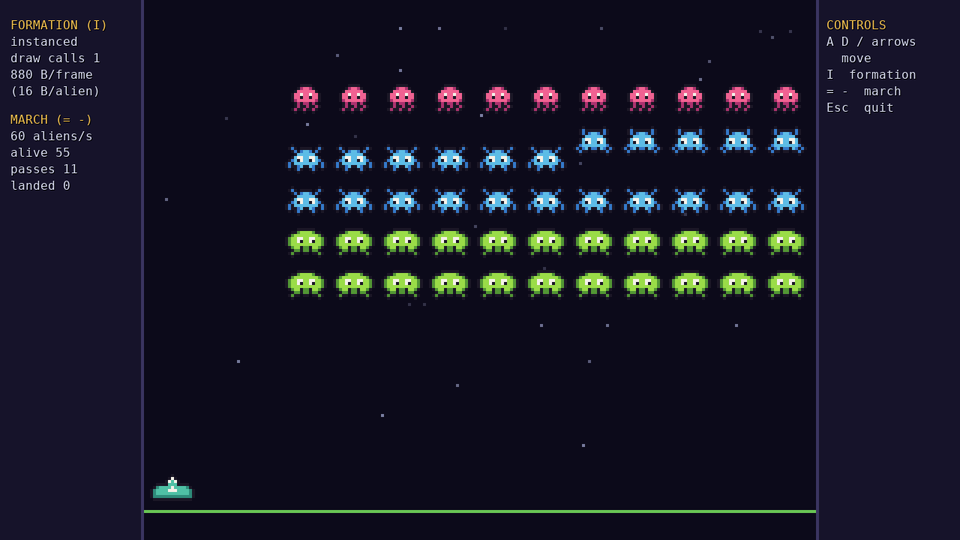
動画では自機を左右に動かし、行進を2回速くして、隊列が端に着き、1段下がり、向きを変えるところを見せます。
途中で隊列の描き方を2回切り替えます(変わるのは左の板の数字だけです):
操作:
- ← →又はA、D:自機を動かす
- I:隊列をインスタンシングで描くか、
SpriteBatchで描くか - =と−:行進を速く・遅く(1秒に動くエイリアンの数を2倍・半分、15〜960)
- Esc:終了
此の章の物は全て新しく、全部が新しいフォルダgames/invaders/一つの中にあります:
CMakeLists.txt:実行ファイルinvaderssrc/main.cc:ウィンドウ、読み込み、入力の行動、ゲームループ、フレームsrc/game.hh:画面の寸法の定数、共有データGame、PlaySceneクラスsrc/play_scene.cc:遊ぶ場面(自機、行進、描画、脇の板の文字)src/formation.hh、src/formation.cc:エイリアンと行進(OpenGLは使わない)src/formation_renderer.hh、src/formation_renderer.cc:インスタンシングで隊列を描くクラスshaders/formation.vert:其の頂点シェーダーassets/sprites.png、assets/sprites.atlas:3部全部の絵。assets/LICENSE.txt(完成したファイルは章のZIPとアセットのZIPのch27/に入っています)README.md:操作と動かし方
games/invaders/の外は何も変わりません。
エンジンも、トップのCMakeLists.txtも、共有のassets/もです。
此れが全てのゲームの章の決まりで、此の章のdiffは新しいファイルだけです。
27.2 自分のプログラムを持つゲーム
フォルダ
第25章で「各ゲームは自分のフォルダにある自分の実行ファイル」と決めました。
そして第26章の最後に、其れらを探すループをトップのCMakeLists.txtに入れました:
foreach(name invaders fighter rpg tps)
  if(EXISTS "${CMAKE_CURRENT_SOURCE_DIR}/games/${name}/CMakeLists.txt")
    add_subdirectory(games/${name})
  endif()
endforeach()
なので、games/invaders/CMakeLists.txtを作るだけで、プログラムがビルドに加わります。
何故gameのモードの一つではなく、別のプログラムにするのでしょうか?
ゲームは大きくなるからです。
invadersは自分のシーン、シェーダー、絵を持ち、格闘ゲームもRPGもシューターも同じです。
フォルダを分ければ、各ゲームは読める大きさに収まり、第25・26章のデモは其の儘残り、一つのゲームの失敗が別のゲームを壊す事もありません。
共有するのはengineライブラリと共有のassets/(殆どはフォント)で、ゲームは其れを読むだけです。
games/invaders/CMakeLists.txt
ファイル全体です:
# Invaders(第27〜29章):エンジンだけを使う一つの実行ファイル。プロジェクトのルートから ./build/games/invaders/invaders
# Invaders (chapters 27-29): one executable that only uses the engine. Run ./build/games/invaders/invaders from the
# project root
add_executable(invaders
  src/main.cc
  src/play_scene.cc
  src/formation.cc
  src/formation_renderer.cc)
target_include_directories(invaders PRIVATE src)
target_link_libraries(invaders PRIVATE engine)
enable_warnings(invaders)
set_working_directory(invaders)
コマンドは5つで、其々の仕事は一つです:
add_executable(invaders …)はターゲットを作り、ソースを並べます。パスは此のファイルのフォルダからの相対パスなので、src/main.ccはgames/invaders/src/main.ccです。ヘッダーは並べなくて構いません。target_include_directories(invaders PRIVATE src)で、ソース同士を名前だけでインクルード出来ます(#include "game.hh")。invadersをリンクする物は無いのでPRIVATEです。target_link_libraries(invaders PRIVATE engine)は、残りの全てを持って来る1行です。第25章で説明した様に、エンジンのPUBLICの要件が付いて来ます。engine/include、GLAD、GLFW、linalg.hhのインクルードパスと、ライブラリ其の物です。ゲームはGLFWもGLADも一度も名前を書きません。enable_warnings(invaders)とset_working_directory(invaders)は、トップのファイルにある2つの関数です(第25章)。/W4又は-Wall -Wextraと、Visual Studioのデバッガーの作業ディレクトリをプロジェクトのルートにする設定です。
此処で2つの関数を呼べるのは、トップのファイルが其れらを定義した後で、add_subdirectoryが此のファイルを読むからです。
そしてset_working_directoryは一番近いproject()のフォルダ${PROJECT_SOURCE_DIR}を使うので、games/invaders/から呼んでもプロジェクトのルートになります。
ビルド
今までと同じく、プロジェクトのルートで構成してビルドします:
cmake -S . -B build
cmake --build build -j8
第26章で構成したbuildフォルダにフォルダを足した場合は、最初のコマンドをもう一度実行して下さい。
ビルドがCMakeを実行し直すのは、既に読んだCMakeLists.txtが変わった時だけで、新しいフォルダを見つけるif(EXISTS …)はCMakeが動く時にしか評価されないからです。
ゲームだけをビルドするなら、ターゲットの名前を指定します:cmake --build build --target invaders。
2Dのゲームを作っている間、第25章の3Dの確認用プログラムが要らなければ、最初のコマンドに-DBUILD_SCENE3D=OFFを付けると其のビルドの時間が省けます。
何処に出来て、どう動かすか
実行ファイルは、其のCMakeLists.txtに対応するビルドフォルダに出来ます:
| プラットフォーム | 実行ファイル |
|---|---|
| Linux、FreeBSD | build/games/invaders/invaders |
| Visual Studioのソリューション | build\games\invaders\Debug\invaders.exe(又はRelease\) |
| Visual Studioの「フォルダーを開く」 | out\build\x64-Debug\games\invaders\invaders.exe |
第1章からの全てのプログラムと同じく、作業ディレクトリはプロジェクトのルートでなければなりません。
engine/shaders/…、assets/fonts/…、games/invaders/…を相対パスで読むからです(第25章の25.6節)。
LinuxとFreeBSDでは:
./build/games/invaders/invaders
cd build/games/invaders && ./invadersではありません。
他の場所から始めると、ファイルを一つも見つけられず、直ぐに止まります:
engine/shaders/sprite.vert: 開けない / cannot open (プロジェクトのルートから実行した? / running from the project root?)
engine/shaders/sprite.frag: 開けない / cannot open (プロジェクトのルートから実行した? / running from the project root?)
assets/fonts/mono16.fnt: 読めない / cannot read (プロジェクトのルートから実行した? / running from the project root?)
games/invaders/assets/sprites.atlas: 読めない / cannot read (プロジェクトのルートから実行した? / running from the project root?)
Visual Studioのソリューションでは、invadersはgame、scene3d、gltf_dumpやライブラリと並ぶ新しいプロジェクトです。
トップのファイルがVS_STARTUP_PROJECTをgameにしているので、F5は相変わらずgameを始めます。
ソリューションエクスプローラーでinvadersを右クリックして「スタートアップ プロジェクトに設定」を選べば、F5でゲームが始まります。
作業ディレクトリは既にプロジェクトのルートです。
「フォルダーを開く」のモードでは、スタートアップ項目の一覧でinvaders.exeを選び、デバッグ → invadersのデバッグと起動の設定を開き、第1章でgameにした様に、新しい構成に"currentDir": "${workspaceRoot}"を足して下さい。
フォルダには操作と此れらのコマンドを書いた短いREADME.mdもあります。
チュートリアル無しでゲームを見つけた人の為です。
27.3 画面
320 × 180、そして戦場が224ピクセル幅の理由
あたし達のピクセルアートのゲームは全て、第25章のPixelCanvasを使います。
小さなフレームバッファに描いて、ウィンドウに整数倍で拡大する物です。
invadersでは320 × 180で、1280 × 720の縦横4分の1です。
元のアーケードの筐体は、モニターを横倒しにしていました。
幅224ピクセル、高さ256ピクセルの縦長の画面です。
あたし達のキャンバスは横長なので、遊ぶ場所には元の幅を残し、真ん中の224ピクセル(xが48から272)を戦場にします。
両側の48ピクセルは脇の板です。
ゲームの感触を決めるのは幅です。
隊列が下がるまでにどれだけ動けるか、従ってどれだけ速く降りて来るかを決めるからです。
元の幅を使えば、元のペースも付いて来ます。
320ピクセルの戦場だと、隊列は3倍も長くうろうろします(課題2)。
脇の板には、此の章と次の章では開発用の文字を、第29章では得点と残機を出します。
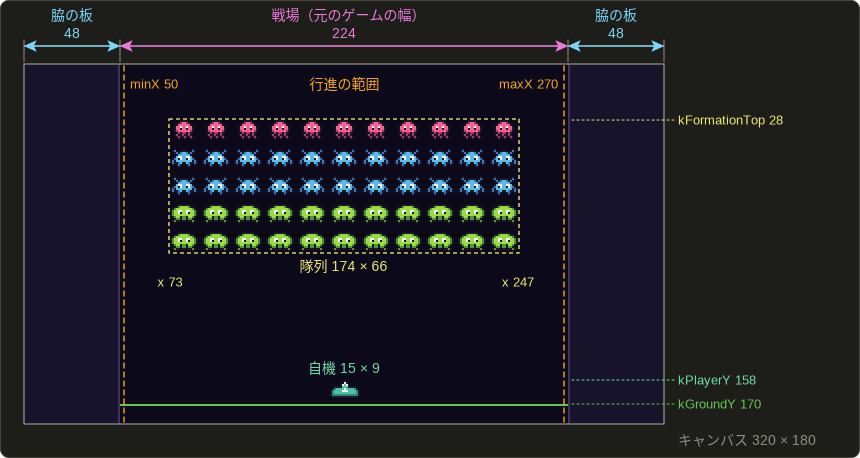
定数はgame.hhの最初にあります:
// 仮想解像度320 × 180(ウィンドウ1280 × 720で4倍)。真ん中の224ピクセル幅が戦場、左右48ピクセルは脇の板
// Virtual resolution 320 × 180 (× 4 in the 1280 × 720 window). The middle 224 pixels are the arena, 48 pixels on
// each side are side panels
constexpr Vec2 kView = {320.0f, 180.0f};
constexpr float kArenaLeft = 48.0f, kArenaRight = 272.0f;
constexpr float kFormationTop = 28.0f;  // 最初の隊列の一番上 / the first formation's top row
constexpr float kPlayerY = 158.0f;      // 自機の上端 / the ship's top
constexpr float kGroundY = 170.0f;      // 地面の線 / the ground line
constexpr float kPlayerSpeed = 60.0f;   // ピクセル毎秒(1ステップ1ピクセル) / pixels per second (1 px per step)
エイリアン自身の大きさはformation.hhにあります。
エイリアンのスプライトは14 × 10の枠(12 × 8の絵と1ピクセルの縁取り)で、列は16ピクセル、行は14ピクセル間隔です。
なので隊列は幅ピクセル、高さピクセルになります。
180ピクセルのキャンバスでは縦の余裕がありません。
隊列の下端はyが94から始まり、自機の上端158より下に来たら行進は終わりです(第28章では其れがゲームの終わりになります)。
其の為、1段下がるのは8ピクセルではなく6ピクセルです。
8ピクセルだと9回目で既に自機に届き、6ピクセルなら11回目です。
色
色は第25章の2Dの決まりに従います。
スプライトと色はGL_RGBA8に入ったsRGBの値で、ブレンドはsRGBの空間で行い、GL_FRAMEBUFFER_SRGBはオフの儘です。
なので全てが描いた通りの色に見えます。
キャンバスのクリアの色は0x0c0a1a、脇の板は0x16132aで、1ピクセルの枠が0x3a3460、地面は緑の線0x68c454です。
戦場では40個の薄い星が、其々自分の位相で瞬きます。
27.4 絵
スプライトはオリジナルです。
アーケードのビットマップではなく、同じ雰囲気の新しい3種類のエイリアンで、あたしの生成スクリプトがコードで描いています。
第25章のスプライトと同じピクセルアートの道具を使い、共通の暗い縁取りを付けています。
スクリプトはダウンロードに含まれませんが、生成したシートは含まれます:

此のシートには3部全部の絵が入っています。
爆発、弾、トーチカ、円盤、ロゴがもう入っているので、第28章と第29章でPNGは変わりません。
128 × 48ピクセルに24枚のスプライトがあり、其々の周りには少なくとも1ピクセルの透明な隙間があります(第25章のにじみ対策の決まり)。
読み込みは第25章のSpriteSheet::loadAtlasです。
アトラスのファイルはこう始まります:
# Invaders sprites (chapters 27-29), generated by the author's own script
image sprites.png
sprite jelly_0 1 1 14 10
sprite jelly_1 17 1 14 10
sprite beetle_0 33 1 14 10
sprite beetle_1 49 1 14 10
sprite blob_0 65 1 14 10
sprite blob_1 81 1 14 10
どのエイリアンにも_0と_1の2つのポーズがあり、其の切り替えが「足踏み」です。
元のゲームの3種類と同じく、クラゲが一番上の行、甲虫が2・3行目、丸い奴が4・5行目です。
自機は15 × 9です。
assets/LICENSE.txtには、ファイルが共有のassets/LICENSE.txtと同じ言葉で書いてあります。
27.5 main.ccとゲームの共有データ
Game構造体
第26章のデモは、各シーンのコンストラクタに文脈の構造体を渡しました。
グローバル変数無しで、シーン同士がウィンドウ、入力、バッチ、フォントを共有出来る様にする為です。
invadersもGameで同じ事をします:
// ゲーム全体で一つ。mainが作り、シーンは参照で持つ / one per game: main creates it, the scenes keep a reference
struct Game {
  Window &window;
  Input &input;
  GameLoop &loop;
  SpriteBatch &batch;
  FormationRenderer &formationRenderer;
  const Font &ui;               // mono16:画面の解像度の文字 / text at screen resolution
  const SpriteSheet &sprites;   // games/invaders/assets/sprites.atlas
  Camera2D world;               // 320 × 180のキャンバス / the 320 × 180 canvas
  Camera2D screen;              // 1280 × 720のUI / the 1280 × 720 UI
  Viewport uiViewport;
  Rng rng{27};
  bool instanced = true;        // 隊列をインスタンシングで(I) / draw the formation instanced (I)
};
mainが持つ物は参照で、ゲームの物(2つのカメラ、UIのビューポート、ゲーム用のRng、設定一つ)は値で持ちます。
rngは第26章の言う通り定数の種で作ります。
此の部のロジックではまだ使わず、後の部の為にあります。
main
mainは先ず全てを読み込み、何かが足りなければ終了コード1で諦めます:
int main() {
  Window window;
  if (!window.create(1280, 720, "OpenGL Tutorial - Invaders")) return 1;

  std::optional<SpriteBatch> batch = SpriteBatch::create();
  std::optional<Font> ui = Font::load("assets/fonts/mono16.fnt");
  std::optional<SpriteSheet> sprites = SpriteSheet::loadAtlas("games/invaders/assets/sprites.atlas");
  if (!batch || !ui || !sprites) return 1;
  std::optional<FormationRenderer> formationRenderer = FormationRenderer::create(*sprites);
  if (!formationRenderer) return 1;
何時も通りWindowが最初です。
全てのGLのオブジェクトがコンテキストより先に消える様にする為です。
フォントmono16はassets/fonts/の共有の物で、スプライトシートと隊列のレンダラー(27.9節)はゲーム自身の物です。
次に入力の行動です。
名前を付けるのは移動だけです。
デモ用のキー(I、=、−)は使う所で直接読みます。
割り当てを変えたい人は居ないでしょうから:
  // 行動に名前を付ける(キーを変えるならここだけ) / name the actions (to change keys, edit only this)
  Input input;
  input.attach(window);
  input.bind("left", {InputBinding::key(GLFW_KEY_LEFT), InputBinding::key(GLFW_KEY_A)});
  input.bind("right", {InputBinding::key(GLFW_KEY_RIGHT), InputBinding::key(GLFW_KEY_D)});
ループ、キャンバス、Game:
  // 固定ステップ:ゲームの動きは1/60秒ごとの更新の中だけ / fixed step: the game only changes in the 1/60 s updates
  GameLoop loop({.step = 1.0 / 60.0, .maxSteps = 5});
  PixelCanvas canvas(static_cast<int>(kView.x), static_cast<int>(kView.y));
  Game game{.window = window, .input = input, .loop = loop, .batch = *batch, .formationRenderer = *formationRenderer,
            .ui = *ui, .sprites = *sprites, .world = Camera2D::screen(kView),
            .screen = Camera2D::screen({1280.0f, 720.0f}), .uiViewport = {}};
Camera2D::screen(kView)は、世界がキャンバスのピクセル(yは下向き、原点は左上)になるカメラを作り、Camera2D::screen({1280, 720})はUIに同じ事をします。
ステップは1/60秒です。
行進の速さは1秒あたりで決めるので(27.8節)、ステップが決めるのはゲームを更新する頻度だけで、遊ぶ速さではありません。
最後に、シーン一つを持つシーンマネージャーと、第26章のフレームです:
  SceneManager scenes;
  scenes.push(std::make_unique<PlayScene>(game));

  loop.run(
      window, input,
      [&](float dt) {
        scenes.update(dt);
        if (scenes.empty()) window.close();
      },
      [&](float alpha) {
        // 1. 世界:320 × 180のキャンバスに描いて4倍で画面へ / 1. the world: into the 320 × 180 canvas, shown × 4
        canvas.begin(hexColor(0x0c0a1aff));
        scenes.draw(alpha);
        canvas.present(window.width(), window.height());
        // 2. UI:1280 × 720の文字 / 2. the UI: text at 1280 × 720
        game.uiViewport = letterbox(window.width(), window.height(), game.screen.viewSize, false);
        game.uiViewport.apply();
        scenes.drawUi(alpha);
        scenes.drawFade(*batch, game.screen.matrix(), game.screen.viewSize);
      });
  return 0;
更新のラムダは、シーンのスタックが空になったら終了します。
Escは此れで動きます:遊ぶ場面が自分をpopするのです。
描画のラムダは第26章のフレームの構造其の儘です。
世界をキャンバスに描き、整数倍(1280 × 720のウィンドウでは4倍)でpresentし、次にレターボックスしたUIのビューポートに実際の解像度で文字を描き、最後にシーンマネージャーのフェードです(此の章では使いません)。
27.6 自機
自機のコードはPlaySceneにあります。
其のコンストラクタは隊列と星も置きます:
PlayScene::PlayScene(Game &game) : g(game) {
  const char *names[3][2] = {{"jelly_0", "jelly_1"}, {"beetle_0", "beetle_1"}, {"blob_0", "blob_1"}};
  for (int k = 0; k < 3; ++k)
    for (int p = 0; p < 2; ++p) frames[k][p] = g.sprites.find(names[k][p]);
  shipFrame = g.sprites.find("ship");

  // 隊列:幅 = 10 × 16 + 14 = 174ピクセル、戦場の真ん中 / the formation: 10 × 16 + 14 = 174 px wide, centered in the arena
  formation.minX = kArenaLeft + 2.0f;
  formation.maxX = kArenaRight - 2.0f;
  formation.reset(std::round(0.5f * (kArenaLeft + kArenaRight - 174.0f)), kFormationTop);

  playerX = playerPrevX = std::round(0.5f * (kArenaLeft + kArenaRight) - 7.0f);
  // 星:自分の種で作るので、場面を作り直しても同じ空 / stars: made with their own seed, so the sky stays the same when
  // the scene is created again
  Rng sky(1978);
  for (int i = 0; i < 40; ++i)
    stars.push_back({{std::round(sky.range(kArenaLeft + 2.0f, kArenaRight - 2.0f)), std::round(sky.range(4.0f, 150.0f))},
                     sky.unit()});
}
自機は真ん中、xが153(左端。戦場の中心160から、15ピクセルの約半分の7を引いた所)から始まります。
更新ごとに第26章の左右の行動の軸で毎秒60ピクセル、丁度1ステップ1ピクセル動き、戦場の中に収めます:
  // 自機:左右の行動の軸で動き、戦場からは出ない / the ship: moves along the left/right action axis, stays inside the
  // arena
  playerPrevX = playerX;
  playerX += in.axis("left", "right") * kPlayerSpeed * dt;
  playerX = std::clamp(playerX, kArenaLeft + 2.0f, kArenaRight - 2.0f - 15.0f);
両側に2ピクセルの余白があるので、自機の左端はxが50から255の間に留まります。
キーを押し続けると、壁から壁までの205ピクセルを約3.4秒で動きます。
自機は滑らかに動くので、第26章で習った通り補間して描きます。
前の位置を覚えておき、各ステップの最初に更新し、prev + (current − prev) · alphaで描きます。
ピクセルアートは整数のピクセルに描くので(第25章)、結果はキャンバスのピクセルに丸めます。
そして一時停止したシーンが震えない様に、pause()で前 = 今にします:
// 一時停止の間は補間しない(第26章) / no interpolation while paused (chapter 26)
void PlayScene::pause() { playerPrevX = playerX; }
一方、エイリアンは補間しません。
わざと2ピクセルずつ飛び飛びに動くのであって、飛ぶ間を滑らかに繋いだら別のゲームになってしまいます。
27.7 隊列
OpenGLの無いデータ
formation.hhとformation.ccはエイリアンと行進を持ち、GLのヘッダーを一つもインクルードしません。
ゲームのロジックは、エイリアンがどう描かれるかを知る必要がありません。
此の後、同じデータから2つの違う方法で描きますし、第28章の当たり判定も同じ箱を読みます。
// 宇宙人の種類(上の行から):クラゲ、甲虫、丸い奴 / alien kinds (from the top row): jelly, beetle, blob
enum class AlienKind { Jelly = 0, Beetle = 1, Blob = 2 };

struct Alien {
  AlienKind kind = AlienKind::Blob;
  int column = 0, row = 0; // row 0 = 一番上 / the top row
  Vec2 position;           // 左上、整数のピクセル / top left, whole pixels
  int pose = 0;            // 0か1:動くたびに入れ替わる(足踏み) / 0 or 1: flips every time it moves (the walk)
  bool alive = true;
  Rect box() const;        // 当たり判定 = 絵の枠 / the collision box = the sprite cell
};

constexpr int kColumns = 11, kRows = 5;
constexpr Vec2 kAlienSize = {14.0f, 10.0f}; // スプライトの枠 / the sprite cell
constexpr float kColumnSpacing = 16.0f, kRowSpacing = 14.0f;
Alienは自分の種類、格子の中の場所、整数のピクセルでの左上の位置、ポーズ、生きているかを知っています。
当たり判定の箱はスプライトの枠其の物で、第28章で使います。
class Formation {
public:
  // 全員を生き返らせ、左上の宇宙人の位置を(left, top)にして、右向きに歩き始める
  // Brings everyone back, puts the top-left alien at (left, top) and starts marching right
  void reset(float left, float top);
  // 行進:1秒にrate匹ずつ、次の一匹を動かす。全員が一回ずつ動いたら(一巡)、端に着いていれば次の一巡で下がり、
  // 向きを変える。生き残りが少ないほど一人あたりの順番が早く回ってくる = 自然に速くなる
  // The march: moves the next alien, `rate` aliens per second. When everyone has moved once (a pass) and the
  // formation touches an edge, the next pass moves everyone down, then the direction flips. The fewer aliens are left,
  // the sooner each one's turn comes around = the formation speeds up by itself
  void update(float dt);

  int alive() const;
  Rect bounds() const; // 生きている宇宙人を囲む箱(全滅なら大きさ0) / box around the living aliens (empty if none)

  std::vector<Alien> aliens; // 行進の順番:下の行の左から右へ、それから上の行 / march order: bottom row left to right,
                             // then the row above
  float rate = 60.0f;        // 1秒に動く宇宙人の数 / aliens moved per second
  float stepX = 2.0f, stepY = 6.0f;
  float minX = 0.0f, maxX = 320.0f; // 行進できる範囲 / where the formation may go
  int direction = 1;                // +1 = 右 / right, -1 = 左 / left
  bool dropping = false;            // この一巡は下へ / this pass moves down
  int passes = 0;                   // 終わった一巡の数 / completed passes

private:
  void moveOne();
  void advanceCursor();
  void endPass();
  size_t cursor = 0;   // 次に動く宇宙人 / the alien that moves next
  float budget = 0.0f; // 動かしてよい数(端数を持ち越す) / moves owed (fractions carry over)
};
行進の順番
resetは55匹を行進の順番に作ります。
一番下の行を左から右へ、次に其の上の行、と一番上の行までです:
void Formation::reset(float left, float top) {
  aliens.clear();
  // 下の行から:行進は一番下の左端から始まる / bottom row first: the march starts at the bottom left
  for (int row = kRows - 1; row >= 0; --row)
    for (int col = 0; col < kColumns; ++col) {
      AlienKind kind = row == 0 ? AlienKind::Jelly : row <= 2 ? AlienKind::Beetle : AlienKind::Blob;
      aliens.push_back({.kind = kind, .column = col, .row = row,
                        .position = {left + kColumnSpacing * static_cast<float>(col),
                                     top + kRowSpacing * static_cast<float>(row)}});
    }
  direction = 1;
  dropping = false;
  passes = 0;
  cursor = 0;
  budget = 0.0f;
}
ベクターの順番がエイリアンの動く順番で、其れが次の節の話です。
隊列は戦場の真ん中、から始まり、一番上の行はyが28です。
27.8 行進
更新ごとに一匹
元のゲームのエイリアンは一緒には動きません。
1978年のゲームは画面の1フレームにエイリアンを一匹動かしていました。
隊列全体が一歩進むのは、全員が自分の一歩を終えた後です。
此の一つの決まりが行進の見た目とゲームの緊張感を生むので、あたし達も其の儘真似します。
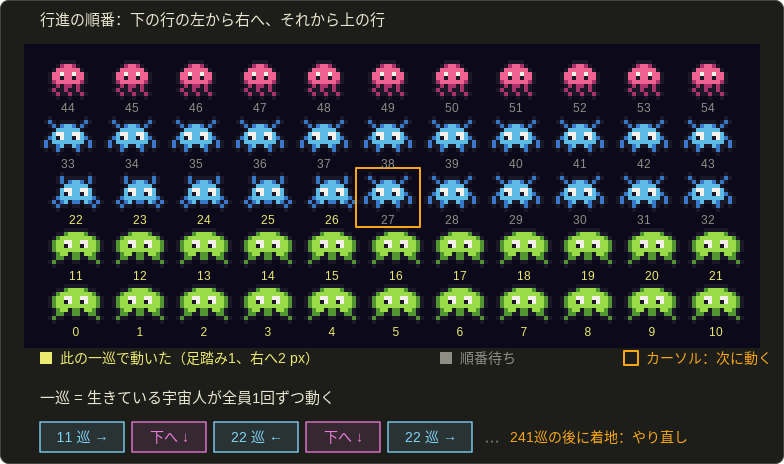
カーソルが行進の順番にエイリアンを辿ります。
1回の移動では、カーソルの下のエイリアンだけが横に2ピクセル(又は下に6ピクセル、後述)動き、ポーズを入れ替えます。
其れからカーソルは次のエイリアンに進みます:
void Formation::moveOne() {
  // 死んだ宇宙人は飛ばす(順番を待たない) / skip dead aliens (they do not take a turn)
  while (!aliens[cursor].alive) advanceCursor();
  Alien &a = aliens[cursor];
  if (dropping) a.position.y += stepY;
  else a.position.x += stepX * static_cast<float>(direction);
  a.pose ^= 1;
  advanceCursor();
}

void Formation::advanceCursor() {
  if (++cursor < aliens.size()) return;
  cursor = 0;
  endPass();
}
カーソルが一周すると、生きているエイリアンが全員1回ずつ動いた事になります。
此れが一巡(パス)です。
死んだエイリアンは順番を使わずに飛ばします(第28章までは死にませんが、コードは準備出来ています)。
端、下がる、向きを変える
隊列が端を見るのは一巡の終わり、全員が再び一列に揃った時だけです:
// 一巡が終わった:下がり終えたなら向きを変え、端に届きそうなら次の一巡は下へ
// A pass is complete: after a drop, turn around; if the next step would cross an edge, the next pass drops
void Formation::endPass() {
  ++passes;
  if (dropping) {
    dropping = false;
    direction = -direction;
    return;
  }
  Rect b = bounds();
  if ((direction > 0 && b.right() + stepX > maxX) || (direction < 0 && b.left() - stepX < minX)) dropping = true;
}
次の横の一歩でminXかmaxXを越えるなら、次の一巡は下がる一巡です。
全員が横ではなく6ピクセル下に動きます。
他の移動と同じく、一匹ずつです。
下がる一巡の後で向きが変わります。
端の判定にはbounds()、つまり生きているエイリアンを囲む箱を使います。
外側の列が撃たれた隊列が、早めに向きを変えずに壁まで行進し続ける為です(第28章):
Rect Formation::bounds() const {
  bool any = false;
  float l = 0, t = 0, r = 0, b = 0;
  for (const Alien &a : aliens) {
    if (!a.alive) continue;
    Rect box = a.box();
    if (!any) {
      l = box.left(), t = box.top(), r = box.right(), b = box.bottom();
      any = true;
    }
    l = std::min(l, box.left()), t = std::min(t, box.top());
    r = std::max(r, box.right()), b = std::max(b, box.bottom());
  }
  return {l, t, r - l, b - t};
}
コードから計算した(そして動かして確かめた)数です:
- 隊列はxが73から247で始まります。右へ動くと、で止まるので、巡の後、95から269です。
- 其れから下がり、になるまで左へ歩きます。巡で、51から225です。其の後の横断も全て22巡(44ピクセル)です。奇数のxから始まったので、50や270には丁度は着かず、各範囲の1ピクセル手前で向きを変えます。
- 下端は94から始まり、1回下がるごとに6増えます。10回下がると154で、11回目の下がる一巡の最初のエイリアンが下端を160にし、自機の上端158より下になります。其れは巡の後です。
まだ誰も撃てないので、そうなったらPlaySceneは隊列を上からやり直し、1行出力します:
  formation.update(dt);
  // 第27章では撃てないので、地面まで下りてきたら上からやり直す(第28章で「侵略された」になる)
  // There is no shooting in chapter 27 yet, so when the formation reaches the ship's row it starts again at the top
  // (chapter 28 turns this into "invaded")
  if (formation.bounds().bottom() > kPlayerY) {
    ++landings;
    printf("formation landed after %d passes: reset\n", formation.passes);
    formation.reset(std::round(0.5f * (kArenaLeft + kArenaRight - 174.0f)), kFormationTop);
  }
既定の毎秒60匹では、55匹の一巡は秒、22巡の横断は約20秒かかり、着地は13 256回の更新の後、220.9秒、約3分41秒です。
毎秒960匹(=を4回)なら13.8秒です。
さざ波
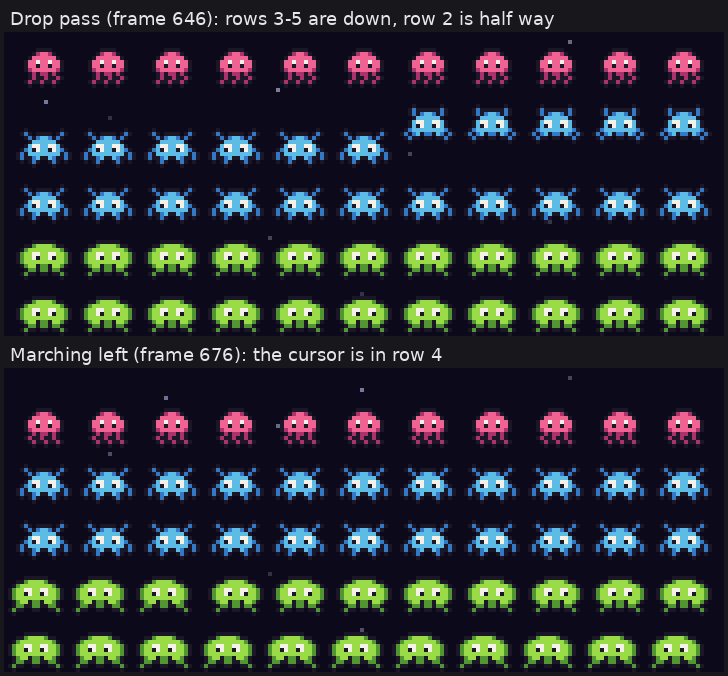
一度に一匹しか動かないので、一巡の間、隊列は決して一列に揃いません。
もう動いたエイリアンは、まだ動いていないエイリアンより2ピクセル先に居ます。
其の境目は左下から右上へ、何度も何度も進みます。
此れがさざ波です。
下がる一巡では、同じ境目のせいで、隊列が1行ずつ折れ曲がって下りて来る様に見えます。
本物の2つのフレームを4倍にした物です(キャンバスの1ピクセルが4 × 4):
只で手に入る加速
元のゲームで一番有名な特徴、隊列が小さくなる程速くなる事も、同じ決まりから出て来ます。
一巡は「生きているエイリアンが全員1回ずつ動く」事なので、生きているのが匹なら秒かかります。
一巡ごとに隊列は2ピクセル動くので、横の速さは毎秒ピクセルです:
| 生きているエイリアン | 毎秒60匹での一巡 | 隊列の速さ |
|---|---|---|
| 55 | 0.92秒 | 2.2 px/s |
| 30 | 0.50秒 | 4 px/s |
| 10 | 0.17秒 | 12 px/s |
| 1 | 1/60秒 | 120 px/s |
最後の一匹は毎回の更新で動き、毎秒120ピクセルで戦場を駆け抜けます。
此の為のコードは1行も書いていません。
エイリアンが死ねる様になる第28章で直ぐに見え始め、第29章では其の上に波ごとの加速を足します。
フレームの数ではなく速さ
元のゲームの速さは画面のフレームに縛られていました。
あたし達の速さは1秒あたりで決めます。
rateは1秒に動かすエイリアンの数で既定は60、更新ごとに予算(budget)を使います:
void Formation::update(float dt) {
  if (alive() == 0) return;
  // 1ステップ(1/60秒)にrate/60匹。予算は浮動小数点数の和なので少し許す(60 × (1/60)は丁度1.0fだが、
  // 1/50秒のステップでは5回目の更新の予算が2ではなく1.99999964になる)
  // rate/60 aliens per 1/60 s step. The budget is a float sum, so allow a little (60 × (1/60) is exactly 1.0f,
  // but with a 1/50 s step the fifth update's budget is 1.99999964, not 2)
  budget += rate * dt;
  while (budget > 0.999f) {
    budget -= 1.0f;
    moveOne();
  }
}
既定の1/60秒のステップではrate * dtは丁度1で、更新ごとに一匹動きます。
120なら更新ごとに2匹、15なら4回の更新ごとに1匹です。
誰かがループのステップを1/30秒に変えても、更新ごとに2匹が前と同じペースで動きます。
ゲームの速さはステップの長さに依存しません。
元のゲームは依存していました。
何故1.0fではなく0.999fなのでしょうか?
予算は浮動小数点数の和で、浮動小数点数の和は滅多に正確にならないからです。
既定の数では偶々正確です。
static_cast<float>(1.0 / 60.0)は0.016666668で、其の60倍は丸めると丁度1.0fになります。
でも1/50秒のステップを考えて下さい。
更新ごとに1.2足すので、5回に1回は2匹動くはずで、5回目の更新で予算は丁度2になるはずです。
実際は1.99999964です。
budget >= 1.0fだと一匹目が動いて0.99999964が残り、二匹目は次の更新まで待たされます。
許容誤差は、比べる時に此の最後の数ビットに負けない様にする物です。
第26章のGameLoopがsnapToleranceで解いたのと同じ問題です。
ループの上のコメントには両方の事実を書いてあります。
1/60秒では丁度、1/50秒では1.99999964です。
27.9 隊列をインスタンシングで描く
何故此処でインスタンシングなのか
此の講座の概要は「インスタンシングで描くエイリアンの隊列」を約束していました。
でも一つ落とし穴があるので、先に正直に言っておきます。
第19章では描画呼び出しを減らす為にインスタンシングを紹介しました。
何千回の呼び出しの代わりに、1回で何千個の岩を描く、という話です。
ところが第25章のSpriteBatchは、1枚のテクスチャを使う55匹を、既に1回の描画呼び出しで描いています。
此処ではインスタンシングで減らせる物が何もありません。
其処で隊列には、比べて学ぶ為の本物のインスタンシングの描画を用意します。
同じエイリアンを同じ絵で、もう一つの方法で描き、Iで実行中に切り替えられます。
2Dでのインスタンシング、整数の属性、ユニフォームの表を見せ、其々の値段を推測ではなく測れる様にします。
結論は27.10節にあります。
インスタンシングの考え方は第19章(19.9節と19.10節)にあります。
メッシュが一つ、インスタンスの数、そしてバインディングのdivisorのお陰でインスタンスごとに1つ進む属性です。
此処では「メッシュ」は単位正方形の四隅で、インスタンス一つがエイリアン一匹です。
インスタンスのデータ:一匹16バイト
// 一匹分のインスタンスデータ(16バイト)。attribute location 9・10・8に繋ぐ
// One alien's instance data (16 bytes), connected to attribute locations 9, 10 and 8
struct AlienInstance {
  Vec2 position;       // 左上(ワールド座標) / top left (world space)     → location 9, vec2
  std::uint32_t frame; // スプライトシートのコマ番号 / sprite sheet frame → location 10, uint (整数のまま / stays an integer)
  std::uint32_t color; // RGBA8(Rが下位バイト) / RGBA8 (R lowest byte)  → location 8, vec4 (0..1に正規化 / normalized)
};
static_assert(sizeof(AlienInstance) == 16);

// 色(0〜1、sRGBの値)→ RGBA8。SpriteBatchと同じ丸め方(同じ絵になるように) / a 0..1 color → RGBA8, rounded like
// SpriteBatch does (so both paths give the same image)
std::uint32_t packRgba8(Vec4 color);
何処に描くか(左上の角)、シートのどのコマか、色。
16バイトで、static_assertが確かめます。
色は赤を一番下のバイトにしてuint32_t一つに詰め、GPUは正規化された4バイトとして読みます。
SpriteBatchが頂点の色を詰めるのと同じ丸め方で詰めるので、2つの方法は全く同じバイトになります:
std::uint32_t packRgba8(Vec4 c) {
  auto byte = [](float v) { return static_cast<std::uint32_t>(std::lround(std::clamp(v, 0.0f, 1.0f) * 255.0f)); };
  return byte(c.x) | (byte(c.y) << 8) | (byte(c.z) << 16) | (byte(c.w) << 24);
}
バッチと比べてみましょう。
バッチのSpriteVertexは位置、UV、色の20バイトで、1枚に4つ、つまり一匹80バイトです。
其の上バッチは、原点、回転、反転を考えて四隅を全てCPUで計算し、並べ替えてから送ります。
インスタンシングの方は、エイリアンごとに違う物だけを送り、四隅は頂点シェーダーに作らせます。
頂点シェーダー
games/invaders/shaders/formation.vertの全体です:
#version 460 core
// 隊列のインスタンシング(第27章):頂点は四隅(0〜1)だけ。どこに・どのコマで・何色で描くかはインスタンスごとの属性
// Formation instancing (chapter 27): the vertices are only the corners (0..1). Where, which frame and which color
// come from per-instance attributes
// フラグメントシェーダーはSpriteBatchと同じ engine/shaders/sprite.frag(vUv・vColorを受け取る)
// The fragment shader is SpriteBatch's engine/shaders/sprite.frag (it takes vUv and vColor)

layout(location = 0) in vec2 aCorner;         // 頂点ごと:(0,0) (1,0) (0,1) (1,1) / per vertex
layout(location = 8) in vec4 aInstanceColor;  // インスタンスごと:RGBA8 → 0〜1(sRGB、乗算前) / per instance
layout(location = 9) in vec2 aInstanceOffset; // インスタンスごと:左上(ワールド座標) / per instance: top left
layout(location = 10) in uint aInstanceFrame; // インスタンスごと:コマ番号(整数の属性) / per instance: frame (integer)

uniform mat4 uViewProjection;
// スプライトシートの各コマ:UVの四角 (x, y, w, h) と大きさ(ピクセル) / every sheet frame: UV rect and size in pixels
uniform vec4 uFrameUv[32];
uniform vec2 uFrameSize[32];

out vec2 vUv;
out vec4 vColor;

void main() {
  vec4 uv = uFrameUv[aInstanceFrame];
  vUv = uv.xy + aCorner * uv.zw;
  vColor = vec4(aInstanceColor.rgb * aInstanceColor.a, aInstanceColor.a); // 乗算済みに / premultiplied
  vec2 world = aInstanceOffset + aCorner * uFrameSize[aInstanceFrame];
  gl_Position = uViewProjection * vec4(world, 0.0, 1.0);
}
aCornerは(0, 0)、(1, 0)、(0, 1)、(1, 1)のどれかで、どのエイリアンでも同じです。
コマの番号が、シートの中の其のコマの四角(uFrameUv:UVの単位でのx、y、幅、高さ)と、ピクセルでの大きさ(uFrameSize)を選びます。
そして角が其の両方の中を補間します。
世界の位置はオフセット + 角 × 大きさ、UVは四角の角 + 角 × 四角の大きさです。
yが下向きの世界では(0, 0)はスプライトの左上で、あたし達のスプライトのテクスチャは決して反転しないので、画像の0行目がv = 0、つまり画像の左上でもあります。
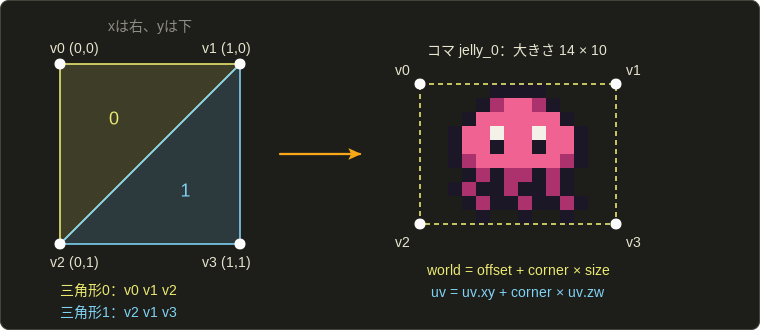
四隅はGL_TRIANGLE_STRIPで四角形になります(第4章のプリミティブの種類)。
新しい頂点が其の前の2つと三角形を作るので、v0 v1 v2、次にv1 v2 v3です。
OpenGLは巻き方を揃える為に、2つ目をv2 v1 v3にします。
インデックスバッファは要りません。
どの道2Dではカリングはオフなので、此処では巻き方は関係ありません。
mainの最後の行と乗算済みアルファの計算は、エンジンのsprite.vertと同じです。
偶然ではありません。
フラグメントシェーダーはエンジンのengine/shaders/sprite.fragを其の儘使います。
プログラムは、フラグメントシェーダーが読む入力を出してくれる頂点シェーダーなら、どれとでもリンク出来ます。
sprite.fragが読むのはvUvとvColorだけです。
同じテクスチャの読み方、同じ乗算済みの色、同じブレンド。
だから2つの方法が同じピクセルを出せるのです。
ユニフォームの配列に入れたコマの表
シェーダーには、全てのコマのUVの四角と大きさが要ります。
此れらは変わらないので、createがシートの24コマ全部を一度だけ書きます:
std::optional<FormationRenderer> FormationRenderer::create(const SpriteSheet &sheet, int capacity) {
  if (sheet.count() > kMaxFrames) {
    fprintf(stderr, "FormationRenderer: コマが多すぎる / too many frames (%d > %d)\n", sheet.count(), kMaxFrames);
    return std::nullopt;
  }
  FormationRenderer r;
  r.shader = Shader::load("games/invaders/shaders/formation.vert", "engine/shaders/sprite.frag");
  if (!r.shader) return std::nullopt;
  r.texture = &sheet.texture();
  r.capacity = capacity;

  // コマの表:配列のユニフォームは要素0の場所に、まとめて何個でも送れる(glProgramUniform4fvのcount)
  // The frame table: a uniform array is set in one call at the location of element 0 (the count of
  // glProgramUniform4fv)
  std::vector<Vec4> uvs;
  std::vector<Vec2> sizes;
  for (int i = 0; i < sheet.count(); ++i) {
    Rect uv = sheet.uv(i);
    uvs.push_back({uv.x, uv.y, uv.w, uv.h});
    sizes.push_back(sheet.size(i));
  }
  GLuint program = r.shader->id();
  glProgramUniform4fv(program, glGetUniformLocation(program, "uFrameUv"), sheet.count(), &uvs[0].x);
  glProgramUniform2fv(program, glGetUniformLocation(program, "uFrameSize"), sheet.count(), &sizes[0].x);
第5章のShader::setは値を一つ設定する物です。
配列にはDSAの関数を直接呼びます。
glProgramUniform4fv(program, location, count, value)は、locationからcount個のvec4を書きます:
program:プログラムオブジェクト(Shader::id())。location:配列の最初の要素の場所。glGetUniformLocation(program, "uFrameUv")は丁度其れを返し、"uFrameUv[0]"を訊くのと同じです。其の後の要素は連続した場所に続きます。count:書く要素の数、此処では24。配列の終わり(32)を越えて書いてもエラーではなく、余った値は無視されます。value:count× 4個のfloatへのポインタ。std::vector<Vec4>は其れを隙間無く並べるので、&uvs[0].xが先頭です。
glProgramUniform2fvは、vec2の大きさに同じ事をします。
配列はkMaxFrames = 32コマ分の大きさで、createは其れより多いシートを断ります。
使うのはvec4が32個とvec2が32個で、OpenGL 4.6のドライバーが頂点シェーダーに必ず用意する1024個のユニフォームの成分の一部に過ぎません。
代わりにUVと大きさを全てのインスタンスに入れる事も出来ますが、一匹24バイト増えます。
4バイトのコマの番号とGPUに置いた表の方が安上がりです。
VAO:2つのバインディング
次に2つのバッファと頂点配列です:
  // 頂点(バインディング0):四角形の四隅。GL_TRIANGLE_STRIPなので4つで三角形2枚
  // The vertices (binding 0): the quad's corners. With GL_TRIANGLE_STRIP four of them make two triangles
  const Vec2 corners[4] = {{0, 0}, {1, 0}, {0, 1}, {1, 1}};
  r.corners = Buffer(corners, sizeof corners);
  // インスタンス(バインディング1):毎フレーム書き換える / the instances (binding 1): rewritten every frame
  r.instances = Buffer(nullptr, static_cast<GLsizeiptr>(capacity) * static_cast<GLsizeiptr>(sizeof(AlienInstance)),
                       GL_DYNAMIC_STORAGE_BIT);

  glCreateVertexArrays(1, &r.vao);
  glVertexArrayVertexBuffer(r.vao, 0, r.corners.id(), 0, sizeof(Vec2));
  glEnableVertexArrayAttrib(r.vao, 0);
  glVertexArrayAttribFormat(r.vao, 0, 2, GL_FLOAT, GL_FALSE, 0);
  glVertexArrayAttribBinding(r.vao, 0, 0);

  glVertexArrayVertexBuffer(r.vao, 1, r.instances.id(), 0, sizeof(AlienInstance));
  // divisor 1:バインディング1は頂点ごとではなく、インスタンスごとに一つ進む(第19章と同じ)
  // divisor 1: binding 1 advances once per instance instead of once per vertex (as in chapter 19)
  glVertexArrayBindingDivisor(r.vao, 1, 1);
  glEnableVertexArrayAttrib(r.vao, 9);
  glVertexArrayAttribFormat(r.vao, 9, 2, GL_FLOAT, GL_FALSE, offsetof(AlienInstance, position));
  glVertexArrayAttribBinding(r.vao, 9, 1);
  // 整数の属性はglVertexArrayAttribIFormat(Iが付く)。Formatのほうだとfloatに変換されてしまい、`in uint`では読めない
  // Integer attributes need glVertexArrayAttribIFormat (with the I). The plain Format converts to float, which an
  // `in uint` cannot read
  glEnableVertexArrayAttrib(r.vao, 10);
  glVertexArrayAttribIFormat(r.vao, 10, 1, GL_UNSIGNED_INT, offsetof(AlienInstance, frame));
  glVertexArrayAttribBinding(r.vao, 10, 1);
  glEnableVertexArrayAttrib(r.vao, 8);
  glVertexArrayAttribFormat(r.vao, 8, 4, GL_UNSIGNED_BYTE, GL_TRUE, offsetof(AlienInstance, color));
  glVertexArrayAttribBinding(r.vao, 8, 1);
  return r;
バインディング0は四隅を持ち、strideは8バイト、divisorは既定の0、つまり頂点ごとに進みます。
バインディング1はインスタンスを持ち、strideは16で、glVertexArrayBindingDivisor(r.vao, 1, 1)がインスタンスごとに1つ進む様にします。
第19章と全く同じです。
インスタンスの3つの属性は全てバインディング1に繋がっているので、全部一緒に進みます。
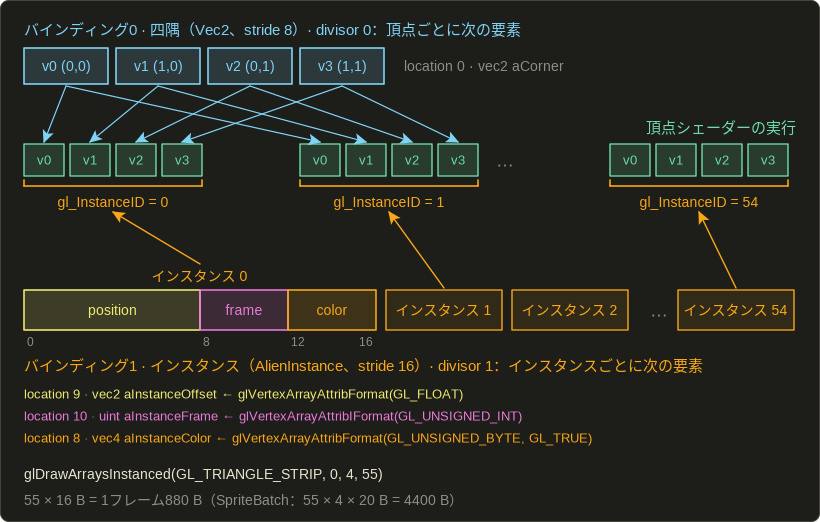
locationは第19章の計画通りです。
0〜3は頂点のデータ、4〜7はインスタンスの行列(此処では使いません)、8はインスタンスの色、9以降は其の他何でもです。
AlienInstanceは位置を9に、コマを10に置きます。
四隅のバッファはフラグ0、つまり変更出来ない形で作ります。
決して変わらないからです。
インスタンスのバッファはGL_DYNAMIC_STORAGE_BIT付きで、capacity = 64匹分、1024バイトあります。
毎フレームglNamedBufferSubDataで(第19章のBuffer::updateを通して)書き直すからです。
整数の属性にはIが要る
コマの番号は整数で、シェーダーは其れをin uintと宣言しています。
頂点属性には3つの種類があり、其々に自分の形式の関数があります:
glVertexArrayAttribFormat(vaobj, attribindex, size, type, normalized, relativeoffset):値はシェーダーにfloat(float、vec2〜vec4)として届きます。整数の型は変換されます。normalizedがGL_FALSEなら其の値に(7は7.0に)、GL_TRUEなら0〜1に(255は1.0に)。色は此れを使い、正規化したGL_UNSIGNED_BYTEが4つです。glVertexArrayAttribIFormat(vaobj, attribindex, size, type, relativeoffset):値は整数の儘です(int、uint、ivec、uvec)。normalizedの引数は無く、typeは整数の型(GL_BYTE、GL_UNSIGNED_BYTE、GL_SHORT、GL_UNSIGNED_SHORT、GL_INT、GL_UNSIGNED_INT)でなければなりません。glVertexArrayAttribLFormat:64ビットのdoubleの属性(double、dvec)で、typeはGL_DOUBLE。滅多に使いませんが、在る事だけ知っておいて下さい。
引数は第3章で知った物です。
VAO、属性のlocation、成分の数(1〜4)、バッファの中のデータの型、要素一つの中でのバイトのオフセットです。
落とし穴: 整数の属性を普通のglVertexArrayAttribFormatで設定すると、バッファの0、1、2…は0.0、1.0、2.0…に変換され、整数を期待するシェーダーの変数に渡されます。結果は未定義で、あたしが試した環境(Mesa)ではシェーダーがコマの表をでたらめな番号で引き、隊列が丸ごと黙って消えました。GLのエラーも、デバッグメッセージも、シェーダーのエラーも出ません。形式の種類とシェーダーの入力の型の食い違いは、描画の時には調べられないのです。整数がおかしかったら、先ずIが抜けていないか見て下さい。
描く
描画の関数は、生きているエイリアンを送り、1回の呼び出しで描きます:
void FormationRenderer::draw(const Mat4 &viewProjection, std::span<const AlienInstance> list) {
  const GLsizei count = static_cast<GLsizei>(std::min(list.size(), static_cast<size_t>(capacity)));
  bytes = count * static_cast<int>(sizeof(AlienInstance));
  drawCalls = count > 0 ? 1 : 0;
  if (count == 0) return;
  instances.update(list.data(), bytes);

  // SpriteBatchと同じ2Dの状態:深度なし、カリングなし、乗算済みアルファ / the same 2D state as SpriteBatch: no depth,
  // no culling, premultiplied alpha
  glDisable(GL_DEPTH_TEST);
  glDisable(GL_CULL_FACE);
  glEnable(GL_BLEND);
  glBlendFunc(GL_ONE, GL_ONE_MINUS_SRC_ALPHA);
  shader->set("uViewProjection", viewProjection);
  shader->use();
  texture->bind(0);
  glBindVertexArray(vao);
  // 4頂点 × count個のインスタンス。gl_InstanceIDが0〜count-1、属性9・10・8はその番号の要素
  // 4 vertices × count instances. gl_InstanceID runs 0..count-1 and attributes 9, 10, 8 read that element
  glDrawArraysInstanced(GL_TRIANGLE_STRIP, 0, 4, count);
  glBindVertexArray(0);
}
SpriteBatch::end()が残すのと同じ状態にします(第25章)。
深度テスト無し、カリング無し、乗算済みアルファのブレンドです。
スプライトシートは、sprite.fragがuTextureを待つユニット0に置きます。
glDrawArraysInstanced(mode, first, count, instancecount)は、第19章の呼び出しのインデックス無し版です:
mode:GL_TRIANGLE_STRIP、4つの頂点から三角形2つ。first:使う最初の頂点、0。count:インスタンス一つあたりの頂点の数、4。instancecount:エイリアンの数、此処では55。頂点シェーダーはインスタンス0の頂点0〜3、次にインスタンス1の頂点0〜3、と続けて、全部で回動きます。
シーンは毎フレーム、隊列から一覧を作ります:
void PlayScene::drawFormation() {
  if (g.instanced) {
    // インスタンシング:生きている宇宙人を16バイトずつ並べて、一回で描く / instancing: 16 bytes per living alien, one
    // draw call
    std::vector<AlienInstance> list;
    for (const Alien &a : formation.aliens)
      if (a.alive)
        list.push_back({a.position, static_cast<std::uint32_t>(alienFrame(a)), packRgba8(kWhite)});
    g.formationRenderer.draw(g.world.matrix(), list);
    formationDrawCalls = g.formationRenderer.lastDrawCalls();
    formationBytes = g.formationRenderer.lastBytes();
  } else {
    // 比べるため:同じ宇宙人をSpriteBatchで(一枚4頂点 × 20バイト) / for comparison: the same aliens through
    // SpriteBatch (4 vertices × 20 bytes per sprite)
    g.batch.begin(g.world.matrix());
    for (const Alien &a : formation.aliens)
      if (a.alive) g.batch.draw(g.sprites.sprite(alienFrame(a), a.position));
    g.batch.end();
    formationDrawCalls = g.batch.stats().drawCalls;
    formationBytes = g.batch.stats().sprites * 4 * static_cast<int>(sizeof(SpriteVertex));
  }
}
elseの方が比べる相手です。
同じエイリアンをSpriteBatchで、SpriteSheet::spriteから作ったSpriteを一匹1枚ずつ描きます。
どちらの方も、描画呼び出しの数とバイト数をHUDに報告します。
27.10 インスタンシングかSpriteBatchか
Iを押すと、左の板の数字が片方からもう片方に変わります。
戦場は全く変わりません:
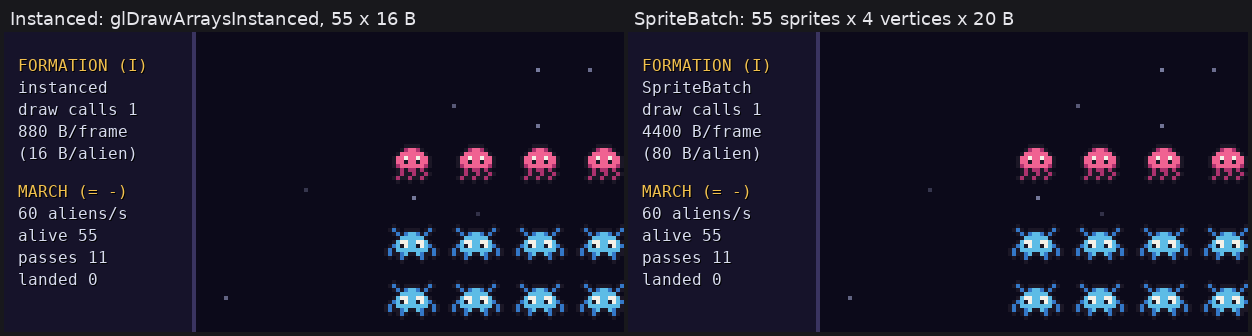
| インスタンシング | SpriteBatch | |
|---|---|---|
| 隊列の描画呼び出し | 1 | 1 |
| 1フレームに送るバイト数 | ||
| 四隅を計算するのは | 頂点シェーダー | CPU |
| 絵 | 同じ | 同じ |
絵はピクセル単位で同じです。
同じフレームの戦場を両方のモードでスクリプトで比べると、違うピクセルは一つもありません。
そして55匹では、どちらの値段も測れない程小さいです。
1フレーム4400バイトは、どのGPUにもバスにも何でもありません。
では、インスタンシングが得になるのは何時でしょうか?
- 何千個もある時。 第19章の小惑星の環には162頂点の岩が4000個ありました。バッチのやり方だと、其の頂点を全部、毎フレーム計算して送る事になります。エイリアンが10 000匹なら、バッチはCPUで40 000個の角を計算し、毎フレーム800 000バイトを送り(既定の容量は8192枚なので、描画呼び出しも2回要ります)、インスタンシングは1回の呼び出しで160 000バイトを送り、残りはGPUに任せます。
- データをGPUに置いた儘に出来る時。 あたし達のインスタンスのバッファは毎フレーム書き直していますが、其の必要はありません。更新ごとに動くのは一匹だけなので、其の16バイトだけを更新すれば十分です(課題5)。
SpriteBatchは全ての四角形を一から作り直すので、其れが出来ません。コンピュートシェーダーで動かすパーティクルが極端な例で、CPUはインスタンスに一切触れません。
では値段は?
柔軟さです。
インスタンシングの隊列はテクスチャを1枚しか使えず、回転も原点も反転も無く、バッチのレイヤーに混ぜて並べ替える事も出来ません。
背景と自機の間に描く物は、フレームの決まった場所で、自分のパスで描かなければなりません。
バッチはどのスプライトとどのスプライトでも混ぜられるので、ゲームの其れ以外は全てバッチを通ります。
本物のエンジンでも此れが普通の取り引きです。
色々違う物が沢山なら一般的なバッチング、同じ物が沢山ならインスタンシングです。
27.11 遊ぶ場面の1フレーム
更新
更新の全体を順番に:終了、デモのキー(I、=、−)、自機、行進、着地の確認です。
void PlayScene::update(float dt) {
  time += dt;
  Input &in = g.input;
  if (in.pressed(GLFW_KEY_ESCAPE)) {
    scenes().pop(); // スタックが空になる → main が終わらせる / the stack becomes empty → main quits
    return;
  }
  if (in.pressed(GLFW_KEY_I)) {
    g.instanced = !g.instanced;
    printf("formation: %s\n", g.instanced ? "instanced" : "SpriteBatch");
  }
  // 行進の速さを変える(説明用):1秒に動く宇宙人の数を2倍・半分 / change the march speed (for the demo): double or
  // halve the number of aliens moved per second
  if (in.pressed(GLFW_KEY_EQUAL)) formation.rate = std::min(formation.rate * 2.0f, 960.0f);
  if (in.pressed(GLFW_KEY_MINUS)) formation.rate = std::max(formation.rate * 0.5f, 15.0f);
速さは毎秒15〜960匹に収めます。
=を4回押すと60から960に、−を2回押すと15になります。
自機と隊列が続きます(上で見せた物です)。
全てupdateの中だけで、固定のdtで動くので、同じ入力なら毎回全く同じ結果になります。
第26章のスクリプトで撮るスクリーンショットや動画は其れを頼りにしています。
3つのパス
描画は奥から手前へ、3つの別々のパスで行います。
インスタンシングの隊列はバッチの中で並べ替えられないからです:
void PlayScene::draw(float alpha) {
  // 奥から:背景(バッチ)→ 隊列(インスタンシングかバッチ)→ 自機(バッチ) / back to front: background (batch) →
  // formation (instanced or batch) → ship (batch)
  g.batch.begin(g.world.matrix());
  drawBackground();
  g.batch.end();

  drawFormation();

  // 宇宙人は飛び飛びに動くので補間しない。自機は滑らかに動くので補間する(第26章)
  // Aliens move in jumps, so they are not interpolated. The ship moves smoothly, so it is (chapter 26)
  float x = std::round(playerPrevX + (playerX - playerPrevX) * alpha);
  g.batch.begin(g.world.matrix());
  g.batch.draw(g.sprites.sprite(shipFrame, {x, kPlayerY}));
  g.batch.end();
}
背景のパスは脇の板、其の枠、星、地面を、全てバッチの白いテクスチャのdrawRectで描きます:
void PlayScene::drawBackground() {
  SpriteBatch &b = g.batch;
  // 脇の板と枠 / the side panels and their borders
  b.drawRect({0.0f, 0.0f, kArenaLeft, kView.y}, hexColor(0x16132aff));
  b.drawRect({kArenaRight, 0.0f, kView.x - kArenaRight, kView.y}, hexColor(0x16132aff));
  b.drawRect({kArenaLeft - 1.0f, 0.0f, 1.0f, kView.y}, hexColor(0x3a3460ff));
  b.drawRect({kArenaRight, 0.0f, 1.0f, kView.y}, hexColor(0x3a3460ff));
  // 瞬く星 / twinkling stars
  for (const Star &s : stars) {
    float t = 0.5f + 0.5f * std::sin(2.0f * time + 6.283f * s.phase);
    b.drawRect({s.position.x, s.position.y, 1.0f, 1.0f}, {0.62f, 0.64f, 0.8f, 0.25f + 0.5f * t});
  }
  // 地面 / the ground
  b.drawRect({kArenaLeft, kGroundY, kArenaRight - kArenaLeft, 1.0f}, hexColor(0x68c454ff));
}
SpriteBatchのモードでもフレームは同じ3つのパスで、真ん中のパスが隊列のレンダラーの代わりにバッチを使うだけです。
自機はスプライト1枚で、自分のバッチで描きます。
脇の板
drawUiは、左の板のHUDと右の板の操作の説明を、mono16で画面の解像度で書きます。
キャンバスではなくUIのパスです。
320 × 180には読める文字の場所がありません。
板一つはキャンバスで48ピクセル、ウィンドウで192ピクセル幅で、mono16で約17文字入ります。
第29章では開発用の文字を得点と残機に置き換えます。
27.12 動かす
プロジェクトのルートからゲームを始めます:
./build/games/invaders/invaders
デスクトップのGPUなら、最初の行にドライバーの名前が出ます。
其の後は、何かが起こるまで何も出ません。
Iを2回、=を4回押して待つとこうなります:
formation: SpriteBatch
formation: instanced
formation landed after 241 passes: reset
毎秒960匹なら、着地は始めてから13.8秒後です。
既定の60なら3分41秒かかります。
撃たずに隊列を眺めるには長い時間です。
Escで終了コード0で終わります。
27.2節の「cannot open」の4行が出たら、違うフォルダから始めています。
27.13 プラットフォームごとの注意
- Windows(Visual Studio):
invadersは別のプロジェクトで、F5はスタートアッププロジェクトを始めます。invadersを右クリック →「スタートアップ プロジェクトに設定」です。エクスプローラーでinvaders.exeをダブルクリックしても動きません。作業ディレクトリがbuild\games\invaders\Debugになるからです。あたし達のソースはBOM無しのUTF-8で、日本語のコメントがあります。プロジェクトのCMakeがMSVCに/utf-8を渡しているので(第1章)、MSVCは其れを正しく読みます(此のゲームの画面の文字はASCIIなので、何れにしても画面には影響しません)。 - Windows、「フォルダーを開く」: 実行ファイルは
out\build\x64-Debug\games\invaders\の下にあり、作業ディレクトリはlaunch.vs.jsonで決まります。プログラムごとに自分のcurrentDirの項目が要ります(27.2節)。 - Linux、FreeBSD: プロジェクトのルートから、端末か、先にルートに移動するスクリプトで動かして下さい。デスクトップのランチャー(
.desktopファイル)ならPath=キーで作業ディレクトリを決められます。其れが無いと、ゲームはホームフォルダで始まり、何も見つけられません。 - FreeBSD: 其れ以外はLinuxと何も変わりません。
cmake --buildはCMakeが生成したビルドツールを呼ぶので、コマンドは同じです。cmake --build build --target invadersでゲームだけをビルド出来ます。 - 全て: GLFWはUSキーボードでの位置でキーに名前を付けます(第26章)。
GLFW_KEY_EQUALはUSキーボードでBackspaceの左のキーで、日本語のJISキーボードでは其の位置のキーには^と書いてあります。GLFW_KEY_MINUSは−と書かれたキーです。移動のキーは名前を付けた行動なので、変えるのはmain.ccの1行です。
27.14 本物のゲームではどうしているか
- 元のゲーム: 1978年のアーケードのゲームはIntel 8080で動き、横倒しのモニターの1ビットのフレームバッファに描いていました。1フレームにエイリアン一匹、というのが其のハードウェアで出来る事でした。さざ波と加速は其の結果で、両方ともゲームの個性になりました。あたし達の版は決まりを残し、1秒あたりのエイリアンの数で測ります。
- エンジンのインスタンシング: Unityは
Graphics.RenderMeshInstancedや、マテリアルの「Enable GPU Instancing」でインスタンシングします。GodotにはMultiMesh(2DにはMultiMeshInstance2D)があり、UnrealにはInstanced Static Meshのコンポーネントと、草木向けの階層版があります。草、木、群衆、破片、パーティクル、つまり同じ物の沢山のコピーに使います。 - エンジンの2D: スプライトは自動でバッチされます(Unityの2DレンダラーとSRP Batcher、Godotのキャンバスのレンダラーは、テクスチャとマテリアルが同じ物をまとめます)。普通の2Dのゲームでインスタンシングが要る事は滅多にありません。出て来るのは、同じ弾が何千発も飛ぶ弾幕ゲームや、インスタンスのデータがGPUから出ないGPUのパーティクルです。
- ロジックと描画を分ける:
FormationにGLを入れず、レンダラーが其のデータを読む形は、よくある構造です。シミュレーションはウィンドウ無しでテスト出来、描き方は(あたし達がした様に)決まりに触れずに変えられます。エンティティのシステムを持つエンジンは更に進んで、ゲームのロジックが書いたコンポーネントを描画のシステムが読みます。
27.15 まとめ
- ゲームは自分のプログラム:
games/invaders/に5つのコマンドのCMakeLists.txt(add_executable、srcのインクルードディレクトリ、target_link_libraries(invaders PRIVATE engine)、enable_warnings、set_working_directory)を置けば、トップのforeachが拾います。出来るのはbuild/games/invaders/invaders(VSではbuild\games\invaders\Debug\invaders.exe)で、プロジェクトのルートから動かします。 - 画面: 4倍の320 × 180のキャンバス、224ピクセルの戦場(元のゲームの幅で、元のペースを保ちます)、UIのパスで文字を書く48ピクセルの脇の板が2つ。
- GLの無いロジック:
Formationは55匹のAlienを行進の順番(左下から右上)に持ち、位置は整数のピクセル、当たり判定の箱付き。 - 行進: 1回に一匹動き、一巡は生きている全員が1回ずつ、端は一巡の終わりに調べ、下がる一巡で全員が6ピクセル下がり、其の後向きが変わります。横断は22巡で、隊列は241巡の後に着地します。さざ波と加速(毎秒ピクセル)は只で手に入ります。
- 速さの予算: 1秒に
rate匹を、更新ごとに浮動小数点数の和に対する0.999の許容誤差付きで使います。ステップの長さに依存しません。 - 2Dのインスタンシング: バインディング0に四隅4つの
GL_TRIANGLE_STRIP、バインディング1にdivisor 1で16バイトのAlienInstance、glDrawArraysInstanced(GL_TRIANGLE_STRIP, 0, 4, 55)、glProgramUniform4fvと数で一度だけ設定するユニフォームの配列のコマの表、そしてエンジンのsprite.fragを其の儘。 - 整数の属性には
glVertexArrayAttribIFormatが要ります。普通のFormatはfloatに変換し、in uintは黙ってでたらめな値を読みます。 - インスタンシング対SpriteBatch: 此処では両方とも描画呼び出し1回、1フレーム880対4400バイト、絵は同じ。インスタンシングが得になるのは、同じ物が何千個もある時か、データがGPUに置いた儘に出来る時です。値段は柔軟さです(テクスチャ1枚、回転無し、レイヤーに混ぜられない)。
27.16 課題
- ★ 隊列を速く下ろして下さい。
formation.hhでstepYを8に、game.hhでkFormationTopを40にします。毎秒960匹(=を4回)で、標準出力は241巡・13.8秒ではなく、約8.6秒後にformation landed after 149 passes: resetと出るはずです。stepY = 4で上端を元の28にすると379巡、既定の約1.6倍かかるはずです。 - ★ キャンバス全体を戦場にして下さい。
kArenaLeftを0に、kArenaRightを320にします。最初の横断は35巡、其の後は22ではなく70巡になり、隊列は745巡の後にやっと着地するはずです。毎秒60匹で約11分23秒、960匹で約43秒です。脇の板の文字は戦場の上に浮かびます。224ピクセルの戦場が守っているのは此のペースです。 - ★ 行に色を付けて下さい。
packRgba8(kWhite)の代わりに行ごとの色(例えば0行目は白、丸い奴は薄い黄色)を渡し、SpriteBatchの方にもSprite::colorで同じ色を付けます。Iを押しても戦場は何も変わらず、1フレームのバイト数は880と4400の儘のはずです。 - ★★ 一歩を半分に、速さを2倍にして下さい。
PlaySceneのコンストラクタでformation.stepX = 1とformation.rate = 120にします。隊列は同じ平均の速さで、より細かく速いさざ波で動き、ポーズは2倍の頻度で入れ替わるはずです。最初に下がり始めるのは10.1秒ではなく約10.5秒後(横断は23巡と46巡になり、隊列はmaxXに1ピクセル近付きます)で、標準出力はlanded after 493 passesになるはずです。 - ★★ インスタンスをGPUに置いた儘にして下さい。
FormationRendererに、一匹のAlienInstanceを其の番号の場所に書く関数(instances.update(&inst, 16, index * 16))を足し、resetの後に55匹全部を一度書き、其の後は移動ごとに動いたエイリアンだけを書きます(行進の順番はベクターの順番なので、番号は分かります)。絵は両方のモードで同じで、送るバイト数は1フレーム880から、既定の速さで1回の更新あたり16(更新ごとに一匹動きます)に減るはずです。SpriteBatchは全ての四角形を作り直すので、此処には付いて来られません。 - ★★ インスタンスの属性を頂点プル(vertex pulling)に置き換えて下さい。
formation.vertにstruct AlienGpu { vec2 position; uint frame; uint color; };とlayout(std430, binding = 0) readonly buffer Aliens { AlienGpu aliens[]; };を宣言し、aliens[gl_InstanceID]を読み、色はunpackUnorm4x8で戻し、インスタンスのバッファはバインディング1に付ける代わりにbindBase(GL_SHADER_STORAGE_BUFFER, 0)で結び付けます。絵は同じで、VAOにはdivisorも属性8〜10も要らなくなるはずです。AlienGpuのstd430のレイアウトがAlienInstanceと同じ16バイトになる事を確かめて下さい。 - ★★★ 頂点シェーダーでエイリアンに「息」をさせて下さい。
formation.vertにuniform float uTime;を足して毎フレーム設定し、世界の位置のyにsin(uTime * 3.0 + float(gl_InstanceID))ピクセルを足します。エイリアンはCPUの負担無しに一匹ずつ上下に揺れるはずですが、インスタンシングのモードだけで、Alien::box()はもう見えている物と合いません。第28章の弾は違うピクセルに当たり、外れます。此の様な効果は何処に置くべきか、ゲームのロジックは其れをどう知れば良いかを考えて下さい。
ファイル: /dev/null | b/games/invaders/CMakeLists.txt
| 前 | 新 | ||
|---|---|---|---|
| @@ -0,0 +1,12 @@ | |||
| 1 | # Invaders(第27〜29章):エンジンだけを使う一つの実行ファイル。プロジェクトのルートから ./build/games/invaders/invaders | ||
| 2 | # Invaders (chapters 27-29): one executable that only uses the engine. Run ./build/games/invaders/invaders from the | ||
| 3 | # project root | ||
| 4 | add_executable(invaders | ||
| 5 | src/main.cc | ||
| 6 | src/play_scene.cc | ||
| 7 | src/formation.cc | ||
| 8 | src/formation_renderer.cc) | ||
| 9 | target_include_directories(invaders PRIVATE src) | ||
| 10 | target_link_libraries(invaders PRIVATE engine) | ||
| 11 | enable_warnings(invaders) | ||
| 12 | set_working_directory(invaders) | ||
ファイル: /dev/null | b/games/invaders/README.md
| 前 | 新 | ||
|---|---|---|---|
| @@ -0,0 +1,26 @@ | |||
| 1 | # Invaders(第27〜29章 / chapters 27-29) | ||
| 2 | |||
| 3 | エンジン(`engine`)だけを使うスペースインベーダー風のゲーム。 / A Space Invaders style game that uses only the engine. | ||
| 4 | |||
| 5 | ```sh | ||
| 6 | cmake --build build -j8 | ||
| 7 | ./build/games/invaders/invaders # プロジェクトのルートから / from the project root | ||
| 8 | ``` | ||
| 9 | Visual Studio: `build\games\invaders\Debug\invaders.exe`(作業ディレクトリはルートに設定済み / the working directory | ||
| 10 | is already the project root)。 | ||
| 11 | |||
| 12 | ## 操作 / Controls | ||
| 13 | | キー / Key | | | ||
| 14 | |---|---| | ||
| 15 | | ← → / A D | 移動 / move | | ||
| 16 | | I | 隊列の描き方:インスタンシング ⇔ SpriteBatch / formation: instancing ⇔ SpriteBatch | | ||
| 17 | | = / - | 行進を速く・遅く / march faster / slower | | ||
| 18 | | Esc | 終了 / quit | | ||
| 19 | |||
| 20 | ## ファイル / Files | ||
| 21 | * `src/main.cc` ウィンドウ、読み込み、行動、ゲームループ / window, loading, actions, game loop | ||
| 22 | * `src/game.hh` 共有データ・画面の寸法・シーン / shared data, layout, scenes | ||
| 23 | * `src/play_scene.cc` 遊ぶ場面 / the play scene | ||
| 24 | * `src/formation.hh/.cc` 隊列と行進(GLなし) / the formation and its march (no GL) | ||
| 25 | * `src/formation_renderer.hh/.cc`, `shaders/formation.vert` インスタンシングで隊列を描く / instanced formation drawing | ||
| 26 | * `assets/` 絵(作者の自作スクリプトで生成。スクリプトはダウンロードに含まれない) / art (generated by the author's own script, not part of the download) | ||
ファイル: /dev/null | b/games/invaders/assets/LICENSE.txt
| 前 | 新 | ||
|---|---|---|---|
| @@ -0,0 +1,6 @@ | |||
| 1 | games/invaders/assets/ のファイルはこのチュートリアルのために作者が自作したもの(作者のPythonのスクリプトで生成。スクリプトはこのプロジェクトには含まれない)。自由に使ってよい。 | ||
| 2 | The files in games/invaders/assets/ were made for this tutorial by the author (generated with the author's own Python scripts, which are not part of this project). Free to use for any purpose. | ||
| 3 | |||
| 4 | sprites.png/.atlas 宇宙人3種(各2コマ)・爆発・自機・円盤・弾・着弾・防壁・ロゴ / three aliens (2 poses each), | ||
| 5 | explosions, the ship, the saucer, bullets, an impact, a shield, the logo | ||
| 6 | (chapter 27) | ||
ファイル: /dev/null | b/games/invaders/assets/sprites.atlas
| 前 | 新 | ||
|---|---|---|---|
| @@ -0,0 +1,30 @@ | |||
| 1 | # Invaders sprites (chapters 27-29), generated by the author's own script | ||
| 2 | image sprites.png | ||
| 3 | sprite jelly_0 1 1 14 10 | ||
| 4 | sprite jelly_1 17 1 14 10 | ||
| 5 | sprite beetle_0 33 1 14 10 | ||
| 6 | sprite beetle_1 49 1 14 10 | ||
| 7 | sprite blob_0 65 1 14 10 | ||
| 8 | sprite blob_1 81 1 14 10 | ||
| 9 | sprite alien_boom_0 97 1 14 10 | ||
| 10 | sprite alien_boom_1 113 1 14 10 | ||
| 11 | sprite ship 1 13 15 9 | ||
| 12 | sprite ship_boom_0 18 13 15 9 | ||
| 13 | sprite ship_boom_1 35 13 15 9 | ||
| 14 | sprite ufo 52 13 18 8 | ||
| 15 | sprite shot 72 13 1 5 | ||
| 16 | sprite zig_0 75 13 3 7 | ||
| 17 | sprite zig_1 80 13 3 7 | ||
| 18 | sprite zig_2 85 13 3 7 | ||
| 19 | sprite zig_3 90 13 3 7 | ||
| 20 | sprite bolt_0 95 13 3 7 | ||
| 21 | sprite bolt_1 100 13 3 7 | ||
| 22 | sprite bolt_2 105 13 3 7 | ||
| 23 | sprite bolt_3 110 13 3 7 | ||
| 24 | sprite splat 115 13 6 8 | ||
| 25 | sprite shield 1 24 22 16 | ||
| 26 | sprite logo 25 24 64 11 | ||
| 27 | clip alien_boom 8 once alien_boom_0 alien_boom_1 | ||
| 28 | clip ship_boom 8 loop ship_boom_0 ship_boom_1 | ||
| 29 | clip zig 12 loop zig_0 zig_1 zig_2 zig_3 | ||
| 30 | clip bolt 12 loop bolt_0 bolt_1 bolt_2 bolt_3 | ||
ファイル: /dev/null | b/games/invaders/assets/sprites.png
新しいファイル:100644 / バイナリファイル
ファイル: /dev/null | b/games/invaders/shaders/formation.vert
| 前 | 新 | ||
|---|---|---|---|
| @@ -0,0 +1,27 @@ | |||
| 1 | #version 460 core | ||
| 2 | // 隊列のインスタンシング(第27章):頂点は四隅(0〜1)だけ。どこに・どのコマで・何色で描くかはインスタンスごとの属性 | ||
| 3 | // Formation instancing (chapter 27): the vertices are only the corners (0..1). Where, which frame and which color | ||
| 4 | // come from per-instance attributes | ||
| 5 | // フラグメントシェーダーはSpriteBatchと同じ engine/shaders/sprite.frag(vUv・vColorを受け取る) | ||
| 6 | // The fragment shader is SpriteBatch's engine/shaders/sprite.frag (it takes vUv and vColor) | ||
| 7 | |||
| 8 | layout(location = 0) in vec2 aCorner; // 頂点ごと:(0,0) (1,0) (0,1) (1,1) / per vertex | ||
| 9 | layout(location = 8) in vec4 aInstanceColor; // インスタンスごと:RGBA8 → 0〜1(sRGB、乗算前) / per instance | ||
| 10 | layout(location = 9) in vec2 aInstanceOffset; // インスタンスごと:左上(ワールド座標) / per instance: top left | ||
| 11 | layout(location = 10) in uint aInstanceFrame; // インスタンスごと:コマ番号(整数の属性) / per instance: frame (integer) | ||
| 12 | |||
| 13 | uniform mat4 uViewProjection; | ||
| 14 | // スプライトシートの各コマ:UVの四角 (x, y, w, h) と大きさ(ピクセル) / every sheet frame: UV rect and size in pixels | ||
| 15 | uniform vec4 uFrameUv[32]; | ||
| 16 | uniform vec2 uFrameSize[32]; | ||
| 17 | |||
| 18 | out vec2 vUv; | ||
| 19 | out vec4 vColor; | ||
| 20 | |||
| 21 | void main() { | ||
| 22 | vec4 uv = uFrameUv[aInstanceFrame]; | ||
| 23 | vUv = uv.xy + aCorner * uv.zw; | ||
| 24 | vColor = vec4(aInstanceColor.rgb * aInstanceColor.a, aInstanceColor.a); // 乗算済みに / premultiplied | ||
| 25 | vec2 world = aInstanceOffset + aCorner * uFrameSize[aInstanceFrame]; | ||
| 26 | gl_Position = uViewProjection * vec4(world, 0.0, 1.0); | ||
| 27 | } | ||
ファイル: /dev/null | b/games/invaders/src/formation.cc
| 前 | 新 | ||
|---|---|---|---|
| @@ -0,0 +1,84 @@ | |||
| 1 | #include "formation.hh" | ||
| 2 | |||
| 3 | #include <algorithm> | ||
| 4 | |||
| 5 | Rect Alien::box() const { return {position.x, position.y, kAlienSize.x, kAlienSize.y}; } | ||
| 6 | |||
| 7 | void Formation::reset(float left, float top) { | ||
| 8 | aliens.clear(); | ||
| 9 | // 下の行から:行進は一番下の左端から始まる / bottom row first: the march starts at the bottom left | ||
| 10 | for (int row = kRows - 1; row >= 0; --row) | ||
| 11 | for (int col = 0; col < kColumns; ++col) { | ||
| 12 | AlienKind kind = row == 0 ? AlienKind::Jelly : row <= 2 ? AlienKind::Beetle : AlienKind::Blob; | ||
| 13 | aliens.push_back({.kind = kind, .column = col, .row = row, | ||
| 14 | .position = {left + kColumnSpacing * static_cast<float>(col), | ||
| 15 | top + kRowSpacing * static_cast<float>(row)}}); | ||
| 16 | } | ||
| 17 | direction = 1; | ||
| 18 | dropping = false; | ||
| 19 | passes = 0; | ||
| 20 | cursor = 0; | ||
| 21 | budget = 0.0f; | ||
| 22 | } | ||
| 23 | |||
| 24 | int Formation::alive() const { | ||
| 25 | return static_cast<int>(std::count_if(aliens.begin(), aliens.end(), [](const Alien &a) { return a.alive; })); | ||
| 26 | } | ||
| 27 | |||
| 28 | Rect Formation::bounds() const { | ||
| 29 | bool any = false; | ||
| 30 | float l = 0, t = 0, r = 0, b = 0; | ||
| 31 | for (const Alien &a : aliens) { | ||
| 32 | if (!a.alive) continue; | ||
| 33 | Rect box = a.box(); | ||
| 34 | if (!any) { | ||
| 35 | l = box.left(), t = box.top(), r = box.right(), b = box.bottom(); | ||
| 36 | any = true; | ||
| 37 | } | ||
| 38 | l = std::min(l, box.left()), t = std::min(t, box.top()); | ||
| 39 | r = std::max(r, box.right()), b = std::max(b, box.bottom()); | ||
| 40 | } | ||
| 41 | return {l, t, r - l, b - t}; | ||
| 42 | } | ||
| 43 | |||
| 44 | void Formation::update(float dt) { | ||
| 45 | if (alive() == 0) return; | ||
| 46 | // 1ステップ(1/60秒)にrate/60匹。予算は浮動小数点数の和なので少し許す(60 × (1/60)は丁度1.0fだが、 | ||
| 47 | // 1/50秒のステップでは5回目の更新の予算が2ではなく1.99999964になる) | ||
| 48 | // rate/60 aliens per 1/60 s step. The budget is a float sum, so allow a little (60 × (1/60) is exactly 1.0f, | ||
| 49 | // but with a 1/50 s step the fifth update's budget is 1.99999964, not 2) | ||
| 50 | budget += rate * dt; | ||
| 51 | while (budget > 0.999f) { | ||
| 52 | budget -= 1.0f; | ||
| 53 | moveOne(); | ||
| 54 | } | ||
| 55 | } | ||
| 56 | |||
| 57 | void Formation::moveOne() { | ||
| 58 | // 死んだ宇宙人は飛ばす(順番を待たない) / skip dead aliens (they do not take a turn) | ||
| 59 | while (!aliens[cursor].alive) advanceCursor(); | ||
| 60 | Alien &a = aliens[cursor]; | ||
| 61 | if (dropping) a.position.y += stepY; | ||
| 62 | else a.position.x += stepX * static_cast<float>(direction); | ||
| 63 | a.pose ^= 1; | ||
| 64 | advanceCursor(); | ||
| 65 | } | ||
| 66 | |||
| 67 | void Formation::advanceCursor() { | ||
| 68 | if (++cursor < aliens.size()) return; | ||
| 69 | cursor = 0; | ||
| 70 | endPass(); | ||
| 71 | } | ||
| 72 | |||
| 73 | // 一巡が終わった:下がり終えたなら向きを変え、端に届きそうなら次の一巡は下へ | ||
| 74 | // A pass is complete: after a drop, turn around; if the next step would cross an edge, the next pass drops | ||
| 75 | void Formation::endPass() { | ||
| 76 | ++passes; | ||
| 77 | if (dropping) { | ||
| 78 | dropping = false; | ||
| 79 | direction = -direction; | ||
| 80 | return; | ||
| 81 | } | ||
| 82 | Rect b = bounds(); | ||
| 83 | if ((direction > 0 && b.right() + stepX > maxX) || (direction < 0 && b.left() - stepX < minX)) dropping = true; | ||
| 84 | } | ||
ファイル: /dev/null | b/games/invaders/src/formation.hh
| 前 | 新 | ||
|---|---|---|---|
| @@ -0,0 +1,56 @@ | |||
| 1 | // 宇宙人の隊列(第27章):11列 × 5行。行進は「一度に一匹」:更新ごとに次の一匹だけが動く(GLは使わない) | ||
| 2 | // The alien formation (chapter 27): 11 columns × 5 rows. The march moves "one alien at a time": each move shifts only | ||
| 3 | // the next alien (no GL in here) | ||
| 4 | #pragma once | ||
| 5 | |||
| 6 | #include "engine/rect.hh" | ||
| 7 | |||
| 8 | #include <vector> | ||
| 9 | |||
| 10 | // 宇宙人の種類(上の行から):クラゲ、甲虫、丸い奴 / alien kinds (from the top row): jelly, beetle, blob | ||
| 11 | enum class AlienKind { Jelly = 0, Beetle = 1, Blob = 2 }; | ||
| 12 | |||
| 13 | struct Alien { | ||
| 14 | AlienKind kind = AlienKind::Blob; | ||
| 15 | int column = 0, row = 0; // row 0 = 一番上 / the top row | ||
| 16 | Vec2 position; // 左上、整数のピクセル / top left, whole pixels | ||
| 17 | int pose = 0; // 0か1:動くたびに入れ替わる(足踏み) / 0 or 1: flips every time it moves (the walk) | ||
| 18 | bool alive = true; | ||
| 19 | Rect box() const; // 当たり判定 = 絵の枠 / the collision box = the sprite cell | ||
| 20 | }; | ||
| 21 | |||
| 22 | constexpr int kColumns = 11, kRows = 5; | ||
| 23 | constexpr Vec2 kAlienSize = {14.0f, 10.0f}; // スプライトの枠 / the sprite cell | ||
| 24 | constexpr float kColumnSpacing = 16.0f, kRowSpacing = 14.0f; | ||
| 25 | |||
| 26 | class Formation { | ||
| 27 | public: | ||
| 28 | // 全員を生き返らせ、左上の宇宙人の位置を(left, top)にして、右向きに歩き始める | ||
| 29 | // Brings everyone back, puts the top-left alien at (left, top) and starts marching right | ||
| 30 | void reset(float left, float top); | ||
| 31 | // 行進:1秒にrate匹ずつ、次の一匹を動かす。全員が一回ずつ動いたら(一巡)、端に着いていれば次の一巡で下がり、 | ||
| 32 | // 向きを変える。生き残りが少ないほど一人あたりの順番が早く回ってくる = 自然に速くなる | ||
| 33 | // The march: moves the next alien, `rate` aliens per second. When everyone has moved once (a pass) and the | ||
| 34 | // formation touches an edge, the next pass moves everyone down, then the direction flips. The fewer aliens are left, | ||
| 35 | // the sooner each one's turn comes around = the formation speeds up by itself | ||
| 36 | void update(float dt); | ||
| 37 | |||
| 38 | int alive() const; | ||
| 39 | Rect bounds() const; // 生きている宇宙人を囲む箱(全滅なら大きさ0) / box around the living aliens (empty if none) | ||
| 40 | |||
| 41 | std::vector<Alien> aliens; // 行進の順番:下の行の左から右へ、それから上の行 / march order: bottom row left to right, | ||
| 42 | // then the row above | ||
| 43 | float rate = 60.0f; // 1秒に動く宇宙人の数 / aliens moved per second | ||
| 44 | float stepX = 2.0f, stepY = 6.0f; | ||
| 45 | float minX = 0.0f, maxX = 320.0f; // 行進できる範囲 / where the formation may go | ||
| 46 | int direction = 1; // +1 = 右 / right, -1 = 左 / left | ||
| 47 | bool dropping = false; // この一巡は下へ / this pass moves down | ||
| 48 | int passes = 0; // 終わった一巡の数 / completed passes | ||
| 49 | |||
| 50 | private: | ||
| 51 | void moveOne(); | ||
| 52 | void advanceCursor(); | ||
| 53 | void endPass(); | ||
| 54 | size_t cursor = 0; // 次に動く宇宙人 / the alien that moves next | ||
| 55 | float budget = 0.0f; // 動かしてよい数(端数を持ち越す) / moves owed (fractions carry over) | ||
| 56 | }; | ||
ファイル: /dev/null | b/games/invaders/src/formation_renderer.cc
| 前 | 新 | ||
|---|---|---|---|
| @@ -0,0 +1,118 @@ | |||
| 1 | #include "formation_renderer.hh" | ||
| 2 | |||
| 3 | #include <algorithm> | ||
| 4 | #include <cmath> | ||
| 5 | #include <cstddef> | ||
| 6 | #include <cstdio> | ||
| 7 | #include <utility> | ||
| 8 | #include <vector> | ||
| 9 | |||
| 10 | std::uint32_t packRgba8(Vec4 c) { | ||
| 11 | auto byte = [](float v) { return static_cast<std::uint32_t>(std::lround(std::clamp(v, 0.0f, 1.0f) * 255.0f)); }; | ||
| 12 | return byte(c.x) | (byte(c.y) << 8) | (byte(c.z) << 16) | (byte(c.w) << 24); | ||
| 13 | } | ||
| 14 | |||
| 15 | std::optional<FormationRenderer> FormationRenderer::create(const SpriteSheet &sheet, int capacity) { | ||
| 16 | if (sheet.count() > kMaxFrames) { | ||
| 17 | fprintf(stderr, "FormationRenderer: コマが多すぎる / too many frames (%d > %d)\n", sheet.count(), kMaxFrames); | ||
| 18 | return std::nullopt; | ||
| 19 | } | ||
| 20 | FormationRenderer r; | ||
| 21 | r.shader = Shader::load("games/invaders/shaders/formation.vert", "engine/shaders/sprite.frag"); | ||
| 22 | if (!r.shader) return std::nullopt; | ||
| 23 | r.texture = &sheet.texture(); | ||
| 24 | r.capacity = capacity; | ||
| 25 | |||
| 26 | // コマの表:配列のユニフォームは要素0の場所に、まとめて何個でも送れる(glProgramUniform4fvのcount) | ||
| 27 | // The frame table: a uniform array is set in one call at the location of element 0 (the count of | ||
| 28 | // glProgramUniform4fv) | ||
| 29 | std::vector<Vec4> uvs; | ||
| 30 | std::vector<Vec2> sizes; | ||
| 31 | for (int i = 0; i < sheet.count(); ++i) { | ||
| 32 | Rect uv = sheet.uv(i); | ||
| 33 | uvs.push_back({uv.x, uv.y, uv.w, uv.h}); | ||
| 34 | sizes.push_back(sheet.size(i)); | ||
| 35 | } | ||
| 36 | GLuint program = r.shader->id(); | ||
| 37 | glProgramUniform4fv(program, glGetUniformLocation(program, "uFrameUv"), sheet.count(), &uvs[0].x); | ||
| 38 | glProgramUniform2fv(program, glGetUniformLocation(program, "uFrameSize"), sheet.count(), &sizes[0].x); | ||
| 39 | |||
| 40 | // 頂点(バインディング0):四角形の四隅。GL_TRIANGLE_STRIPなので4つで三角形2枚 | ||
| 41 | // The vertices (binding 0): the quad's corners. With GL_TRIANGLE_STRIP four of them make two triangles | ||
| 42 | const Vec2 corners[4] = {{0, 0}, {1, 0}, {0, 1}, {1, 1}}; | ||
| 43 | r.corners = Buffer(corners, sizeof corners); | ||
| 44 | // インスタンス(バインディング1):毎フレーム書き換える / the instances (binding 1): rewritten every frame | ||
| 45 | r.instances = Buffer(nullptr, static_cast<GLsizeiptr>(capacity) * static_cast<GLsizeiptr>(sizeof(AlienInstance)), | ||
| 46 | GL_DYNAMIC_STORAGE_BIT); | ||
| 47 | |||
| 48 | glCreateVertexArrays(1, &r.vao); | ||
| 49 | glVertexArrayVertexBuffer(r.vao, 0, r.corners.id(), 0, sizeof(Vec2)); | ||
| 50 | glEnableVertexArrayAttrib(r.vao, 0); | ||
| 51 | glVertexArrayAttribFormat(r.vao, 0, 2, GL_FLOAT, GL_FALSE, 0); | ||
| 52 | glVertexArrayAttribBinding(r.vao, 0, 0); | ||
| 53 | |||
| 54 | glVertexArrayVertexBuffer(r.vao, 1, r.instances.id(), 0, sizeof(AlienInstance)); | ||
| 55 | // divisor 1:バインディング1は頂点ごとではなく、インスタンスごとに一つ進む(第19章と同じ) | ||
| 56 | // divisor 1: binding 1 advances once per instance instead of once per vertex (as in chapter 19) | ||
| 57 | glVertexArrayBindingDivisor(r.vao, 1, 1); | ||
| 58 | glEnableVertexArrayAttrib(r.vao, 9); | ||
| 59 | glVertexArrayAttribFormat(r.vao, 9, 2, GL_FLOAT, GL_FALSE, offsetof(AlienInstance, position)); | ||
| 60 | glVertexArrayAttribBinding(r.vao, 9, 1); | ||
| 61 | // 整数の属性はglVertexArrayAttribIFormat(Iが付く)。Formatのほうだとfloatに変換されてしまい、`in uint`では読めない | ||
| 62 | // Integer attributes need glVertexArrayAttribIFormat (with the I). The plain Format converts to float, which an | ||
| 63 | // `in uint` cannot read | ||
| 64 | glEnableVertexArrayAttrib(r.vao, 10); | ||
| 65 | glVertexArrayAttribIFormat(r.vao, 10, 1, GL_UNSIGNED_INT, offsetof(AlienInstance, frame)); | ||
| 66 | glVertexArrayAttribBinding(r.vao, 10, 1); | ||
| 67 | glEnableVertexArrayAttrib(r.vao, 8); | ||
| 68 | glVertexArrayAttribFormat(r.vao, 8, 4, GL_UNSIGNED_BYTE, GL_TRUE, offsetof(AlienInstance, color)); | ||
| 69 | glVertexArrayAttribBinding(r.vao, 8, 1); | ||
| 70 | return r; | ||
| 71 | } | ||
| 72 | |||
| 73 | void FormationRenderer::release() { | ||
| 74 | if (vao) glDeleteVertexArrays(1, &vao); | ||
| 75 | vao = 0; | ||
| 76 | } | ||
| 77 | |||
| 78 | FormationRenderer::~FormationRenderer() { release(); } | ||
| 79 | |||
| 80 | FormationRenderer::FormationRenderer(FormationRenderer &&other) noexcept { *this = std::move(other); } | ||
| 81 | |||
| 82 | FormationRenderer &FormationRenderer::operator=(FormationRenderer &&other) noexcept { | ||
| 83 | if (this != &other) { | ||
| 84 | release(); | ||
| 85 | shader = std::move(other.shader); | ||
| 86 | corners = std::move(other.corners); | ||
| 87 | instances = std::move(other.instances); | ||
| 88 | vao = std::exchange(other.vao, 0); | ||
| 89 | texture = other.texture; | ||
| 90 | capacity = other.capacity; | ||
| 91 | bytes = other.bytes; | ||
| 92 | drawCalls = other.drawCalls; | ||
| 93 | } | ||
| 94 | return *this; | ||
| 95 | } | ||
| 96 | |||
| 97 | void FormationRenderer::draw(const Mat4 &viewProjection, std::span<const AlienInstance> list) { | ||
| 98 | const GLsizei count = static_cast<GLsizei>(std::min(list.size(), static_cast<size_t>(capacity))); | ||
| 99 | bytes = count * static_cast<int>(sizeof(AlienInstance)); | ||
| 100 | drawCalls = count > 0 ? 1 : 0; | ||
| 101 | if (count == 0) return; | ||
| 102 | instances.update(list.data(), bytes); | ||
| 103 | |||
| 104 | // SpriteBatchと同じ2Dの状態:深度なし、カリングなし、乗算済みアルファ / the same 2D state as SpriteBatch: no depth, | ||
| 105 | // no culling, premultiplied alpha | ||
| 106 | glDisable(GL_DEPTH_TEST); | ||
| 107 | glDisable(GL_CULL_FACE); | ||
| 108 | glEnable(GL_BLEND); | ||
| 109 | glBlendFunc(GL_ONE, GL_ONE_MINUS_SRC_ALPHA); | ||
| 110 | shader->set("uViewProjection", viewProjection); | ||
| 111 | shader->use(); | ||
| 112 | texture->bind(0); | ||
| 113 | glBindVertexArray(vao); | ||
| 114 | // 4頂点 × count個のインスタンス。gl_InstanceIDが0〜count-1、属性9・10・8はその番号の要素 | ||
| 115 | // 4 vertices × count instances. gl_InstanceID runs 0..count-1 and attributes 9, 10, 8 read that element | ||
| 116 | glDrawArraysInstanced(GL_TRIANGLE_STRIP, 0, 4, count); | ||
| 117 | glBindVertexArray(0); | ||
| 118 | } | ||
ファイル: /dev/null | b/games/invaders/src/formation_renderer.hh
| 前 | 新 | ||
|---|---|---|---|
| @@ -0,0 +1,65 @@ | |||
| 1 | // 隊列をインスタンシングで描く(第27章):四隅4つの頂点を全員で共有し、宇宙人ごとのデータ(位置・コマ・色)を | ||
| 2 | // インスタンスのバッファから読む。一回のglDrawArraysInstancedで全員 | ||
| 3 | // Drawing the formation with instancing (chapter 27): every alien shares the same 4 corner vertices and reads its own | ||
| 4 | // data (position, frame, color) from an instance buffer. One glDrawArraysInstanced for all of them | ||
| 5 | // | ||
| 6 | // SpriteBatchとの違い:バッチは一枚ごとに4頂点(80バイト)をCPUで計算して送る。ここでは一匹16バイトだけ送り、 | ||
| 7 | // 四隅はGPUが作る。代わりにできることは少ない(回転なし、一枚のテクスチャ、layerでバッチと混ぜられない) | ||
| 8 | // Compared with SpriteBatch: the batch computes 4 vertices (80 bytes) per sprite on the CPU and uploads them. Here | ||
| 9 | // only 16 bytes per alien are sent and the GPU builds the corners. In exchange it can do less (no rotation, one | ||
| 10 | // texture, cannot be interleaved with batch sprites by layer) | ||
| 11 | #pragma once | ||
| 12 | |||
| 13 | #include "engine/buffer.hh" | ||
| 14 | #include "engine/mathx.hh" | ||
| 15 | #include "engine/shader.hh" | ||
| 16 | #include "engine/sprite_sheet.hh" | ||
| 17 | |||
| 18 | #include <cstdint> | ||
| 19 | #include <optional> | ||
| 20 | #include <span> | ||
| 21 | |||
| 22 | // 一匹分のインスタンスデータ(16バイト)。attribute location 9・10・8に繋ぐ | ||
| 23 | // One alien's instance data (16 bytes), connected to attribute locations 9, 10 and 8 | ||
| 24 | struct AlienInstance { | ||
| 25 | Vec2 position; // 左上(ワールド座標) / top left (world space) → location 9, vec2 | ||
| 26 | std::uint32_t frame; // スプライトシートのコマ番号 / sprite sheet frame → location 10, uint (整数のまま / stays an integer) | ||
| 27 | std::uint32_t color; // RGBA8(Rが下位バイト) / RGBA8 (R lowest byte) → location 8, vec4 (0..1に正規化 / normalized) | ||
| 28 | }; | ||
| 29 | static_assert(sizeof(AlienInstance) == 16); | ||
| 30 | |||
| 31 | // 色(0〜1、sRGBの値)→ RGBA8。SpriteBatchと同じ丸め方(同じ絵になるように) / a 0..1 color → RGBA8, rounded like | ||
| 32 | // SpriteBatch does (so both paths give the same image) | ||
| 33 | std::uint32_t packRgba8(Vec4 color); | ||
| 34 | |||
| 35 | class FormationRenderer { | ||
| 36 | public: | ||
| 37 | // games/invaders/shaders/formation.vert + engine/shaders/sprite.frag(フラグメント側はバッチと同じ)。 | ||
| 38 | // シートの全コマのUVと大きさをユニフォームの配列に入れる(最大kMaxFrames) | ||
| 39 | // games/invaders/shaders/formation.vert + engine/shaders/sprite.frag (the fragment stage is the batch's). The UV | ||
| 40 | // rectangle and size of every sheet frame go into uniform arrays (at most kMaxFrames) | ||
| 41 | static std::optional<FormationRenderer> create(const SpriteSheet &sheet, int capacity = 64); | ||
| 42 | ~FormationRenderer(); | ||
| 43 | FormationRenderer(const FormationRenderer &) = delete; | ||
| 44 | FormationRenderer &operator=(const FormationRenderer &) = delete; | ||
| 45 | FormationRenderer(FormationRenderer &&other) noexcept; | ||
| 46 | FormationRenderer &operator=(FormationRenderer &&other) noexcept; | ||
| 47 | |||
| 48 | // インスタンスを送って(glNamedBufferSubData)一回で描く。状態はSpriteBatch::end()の後と同じにする | ||
| 49 | // Uploads the instances (glNamedBufferSubData) and draws them in one call. Leaves the same state as SpriteBatch::end() | ||
| 50 | void draw(const Mat4 &viewProjection, std::span<const AlienInstance> instances); | ||
| 51 | int lastBytes() const { return bytes; } // 直前のdrawで送ったバイト数 / bytes uploaded by the last draw | ||
| 52 | int lastDrawCalls() const { return drawCalls; } | ||
| 53 | |||
| 54 | static constexpr int kMaxFrames = 32; // formation.vertの配列の大きさ / the array size in formation.vert | ||
| 55 | |||
| 56 | private: | ||
| 57 | FormationRenderer() = default; | ||
| 58 | void release(); | ||
| 59 | std::optional<Shader> shader; | ||
| 60 | Buffer corners; // バインディング0:四隅 (0,0) (1,0) (0,1) (1,1)、頂点ごと / binding 0: the corners, per vertex | ||
| 61 | Buffer instances; // バインディング1:AlienInstance、インスタンスごと(divisor 1) / binding 1: per instance | ||
| 62 | GLuint vao = 0; | ||
| 63 | const Texture2D *texture = nullptr; | ||
| 64 | int capacity = 0, bytes = 0, drawCalls = 0; | ||
| 65 | }; | ||
ファイル: /dev/null | b/games/invaders/src/game.hh
| 前 | 新 | ||
|---|---|---|---|
| @@ -0,0 +1,73 @@ | |||
| 1 | // Invaders:どのシーンからも使う共有データ、画面の寸法、シーン | ||
| 2 | // Invaders: the data every scene shares, the screen layout, the scenes | ||
| 3 | #pragma once | ||
| 4 | |||
| 5 | #include "formation.hh" | ||
| 6 | #include "formation_renderer.hh" | ||
| 7 | |||
| 8 | #include "engine/camera2d.hh" | ||
| 9 | #include "engine/font.hh" | ||
| 10 | #include "engine/game_loop.hh" | ||
| 11 | #include "engine/input.hh" | ||
| 12 | #include "engine/rng.hh" | ||
| 13 | #include "engine/scene.hh" | ||
| 14 | #include "engine/sprite_batch.hh" | ||
| 15 | #include "engine/sprite_sheet.hh" | ||
| 16 | |||
| 17 | #include <vector> | ||
| 18 | |||
| 19 | // 仮想解像度320 × 180(ウィンドウ1280 × 720で4倍)。真ん中の224ピクセル幅が戦場、左右48ピクセルは脇の板 | ||
| 20 | // Virtual resolution 320 × 180 (× 4 in the 1280 × 720 window). The middle 224 pixels are the arena, 48 pixels on | ||
| 21 | // each side are side panels | ||
| 22 | constexpr Vec2 kView = {320.0f, 180.0f}; | ||
| 23 | constexpr float kArenaLeft = 48.0f, kArenaRight = 272.0f; | ||
| 24 | constexpr float kFormationTop = 28.0f; // 最初の隊列の一番上 / the first formation's top row | ||
| 25 | constexpr float kPlayerY = 158.0f; // 自機の上端 / the ship's top | ||
| 26 | constexpr float kGroundY = 170.0f; // 地面の線 / the ground line | ||
| 27 | constexpr float kPlayerSpeed = 60.0f; // ピクセル毎秒(1ステップ1ピクセル) / pixels per second (1 px per step) | ||
| 28 | |||
| 29 | // ゲーム全体で一つ。mainが作り、シーンは参照で持つ / one per game: main creates it, the scenes keep a reference | ||
| 30 | struct Game { | ||
| 31 | Window &window; | ||
| 32 | Input &input; | ||
| 33 | GameLoop &loop; | ||
| 34 | SpriteBatch &batch; | ||
| 35 | FormationRenderer &formationRenderer; | ||
| 36 | const Font &ui; // mono16:画面の解像度の文字 / text at screen resolution | ||
| 37 | const SpriteSheet &sprites; // games/invaders/assets/sprites.atlas | ||
| 38 | Camera2D world; // 320 × 180のキャンバス / the 320 × 180 canvas | ||
| 39 | Camera2D screen; // 1280 × 720のUI / the 1280 × 720 UI | ||
| 40 | Viewport uiViewport; | ||
| 41 | Rng rng{27}; | ||
| 42 | bool instanced = true; // 隊列をインスタンシングで(I) / draw the formation instanced (I) | ||
| 43 | }; | ||
| 44 | |||
| 45 | // 遊ぶ場面:自機と行進する隊列 / the play scene: the ship and the marching formation | ||
| 46 | class PlayScene : public Scene { | ||
| 47 | public: | ||
| 48 | explicit PlayScene(Game &game); | ||
| 49 | void pause() override; | ||
| 50 | void update(float dt) override; | ||
| 51 | void draw(float alpha) override; | ||
| 52 | void drawUi(float alpha) override; | ||
| 53 | |||
| 54 | private: | ||
| 55 | struct Star { | ||
| 56 | Vec2 position; | ||
| 57 | float phase; | ||
| 58 | }; | ||
| 59 | int alienFrame(const Alien &a) const; | ||
| 60 | void drawBackground(); | ||
| 61 | void drawFormation(); | ||
| 62 | |||
| 63 | Game &g; | ||
| 64 | Formation formation; | ||
| 65 | float playerX = 0.0f, playerPrevX = 0.0f; // 自機の左端(補間用に前のステップも) / the ship's left edge (+ the | ||
| 66 | // previous step's, for interpolation) | ||
| 67 | std::vector<Star> stars; | ||
| 68 | float time = 0.0f; | ||
| 69 | int frames[3][2] = {}; // 種類 × 足踏み → シートのコマ / kind × pose → sheet frame | ||
| 70 | int shipFrame = 0; | ||
| 71 | int formationDrawCalls = 0, formationBytes = 0; | ||
| 72 | int landings = 0; | ||
| 73 | }; | ||
ファイル: /dev/null | b/games/invaders/src/main.cc
| 前 | 新 | ||
|---|---|---|---|
| @@ -0,0 +1,62 @@ | |||
| 1 | // Invaders 第1部(第27章):自機、インスタンシングで描く宇宙人の隊列、行進、操作 | ||
| 2 | // Invaders part 1 (chapter 27): the player's ship, the alien formation drawn with instancing, the march, the controls | ||
| 3 | // | ||
| 4 | // 操作 / Controls: | ||
| 5 | // ← → / A D 移動 / move | ||
| 6 | // I 隊列の描き方:インスタンシング ⇔ SpriteBatch / formation: instancing ⇔ SpriteBatch | ||
| 7 | // = / - 行進を速く・遅く / march faster / slower | ||
| 8 | // Esc 終了 / quit | ||
| 9 | #include "game.hh" | ||
| 10 | |||
| 11 | #include "engine/pixel_canvas.hh" | ||
| 12 | #include "engine/window.hh" | ||
| 13 | |||
| 14 | #include <memory> | ||
| 15 | #include <optional> | ||
| 16 | |||
| 17 | int main() { | ||
| 18 | Window window; | ||
| 19 | if (!window.create(1280, 720, "OpenGL Tutorial - Invaders")) return 1; | ||
| 20 | |||
| 21 | std::optional<SpriteBatch> batch = SpriteBatch::create(); | ||
| 22 | std::optional<Font> ui = Font::load("assets/fonts/mono16.fnt"); | ||
| 23 | std::optional<SpriteSheet> sprites = SpriteSheet::loadAtlas("games/invaders/assets/sprites.atlas"); | ||
| 24 | if (!batch || !ui || !sprites) return 1; | ||
| 25 | std::optional<FormationRenderer> formationRenderer = FormationRenderer::create(*sprites); | ||
| 26 | if (!formationRenderer) return 1; | ||
| 27 | |||
| 28 | // 行動に名前を付ける(キーを変えるならここだけ) / name the actions (to change keys, edit only this) | ||
| 29 | Input input; | ||
| 30 | input.attach(window); | ||
| 31 | input.bind("left", {InputBinding::key(GLFW_KEY_LEFT), InputBinding::key(GLFW_KEY_A)}); | ||
| 32 | input.bind("right", {InputBinding::key(GLFW_KEY_RIGHT), InputBinding::key(GLFW_KEY_D)}); | ||
| 33 | |||
| 34 | // 固定ステップ:ゲームの動きは1/60秒ごとの更新の中だけ / fixed step: the game only changes in the 1/60 s updates | ||
| 35 | GameLoop loop({.step = 1.0 / 60.0, .maxSteps = 5}); | ||
| 36 | PixelCanvas canvas(static_cast<int>(kView.x), static_cast<int>(kView.y)); | ||
| 37 | Game game{.window = window, .input = input, .loop = loop, .batch = *batch, .formationRenderer = *formationRenderer, | ||
| 38 | .ui = *ui, .sprites = *sprites, .world = Camera2D::screen(kView), | ||
| 39 | .screen = Camera2D::screen({1280.0f, 720.0f}), .uiViewport = {}}; | ||
| 40 | |||
| 41 | SceneManager scenes; | ||
| 42 | scenes.push(std::make_unique<PlayScene>(game)); | ||
| 43 | |||
| 44 | loop.run( | ||
| 45 | window, input, | ||
| 46 | [&](float dt) { | ||
| 47 | scenes.update(dt); | ||
| 48 | if (scenes.empty()) window.close(); | ||
| 49 | }, | ||
| 50 | [&](float alpha) { | ||
| 51 | // 1. 世界:320 × 180のキャンバスに描いて4倍で画面へ / 1. the world: into the 320 × 180 canvas, shown × 4 | ||
| 52 | canvas.begin(hexColor(0x0c0a1aff)); | ||
| 53 | scenes.draw(alpha); | ||
| 54 | canvas.present(window.width(), window.height()); | ||
| 55 | // 2. UI:1280 × 720の文字 / 2. the UI: text at 1280 × 720 | ||
| 56 | game.uiViewport = letterbox(window.width(), window.height(), game.screen.viewSize, false); | ||
| 57 | game.uiViewport.apply(); | ||
| 58 | scenes.drawUi(alpha); | ||
| 59 | scenes.drawFade(*batch, game.screen.matrix(), game.screen.viewSize); | ||
| 60 | }); | ||
| 61 | return 0; | ||
| 62 | } | ||
ファイル: /dev/null | b/games/invaders/src/play_scene.cc
| 前 | 新 | ||
|---|---|---|---|
| @@ -0,0 +1,167 @@ | |||
| 1 | // 遊ぶ場面(第27章):自機の操作、隊列の行進、隊列の描き方の比較(インスタンシング ⇔ SpriteBatch) | ||
| 2 | // The play scene (chapter 27): steering the ship, the formation's march, two ways to draw the formation (instancing | ||
| 3 | // ⇔ SpriteBatch) | ||
| 4 | #include "game.hh" | ||
| 5 | |||
| 6 | #include <algorithm> | ||
| 7 | #include <cmath> | ||
| 8 | #include <cstdio> | ||
| 9 | |||
| 10 | PlayScene::PlayScene(Game &game) : g(game) { | ||
| 11 | const char *names[3][2] = {{"jelly_0", "jelly_1"}, {"beetle_0", "beetle_1"}, {"blob_0", "blob_1"}}; | ||
| 12 | for (int k = 0; k < 3; ++k) | ||
| 13 | for (int p = 0; p < 2; ++p) frames[k][p] = g.sprites.find(names[k][p]); | ||
| 14 | shipFrame = g.sprites.find("ship"); | ||
| 15 | |||
| 16 | // 隊列:幅 = 10 × 16 + 14 = 174ピクセル、戦場の真ん中 / the formation: 10 × 16 + 14 = 174 px wide, centered in the arena | ||
| 17 | formation.minX = kArenaLeft + 2.0f; | ||
| 18 | formation.maxX = kArenaRight - 2.0f; | ||
| 19 | formation.reset(std::round(0.5f * (kArenaLeft + kArenaRight - 174.0f)), kFormationTop); | ||
| 20 | |||
| 21 | playerX = playerPrevX = std::round(0.5f * (kArenaLeft + kArenaRight) - 7.0f); | ||
| 22 | // 星:自分の種で作るので、場面を作り直しても同じ空 / stars: made with their own seed, so the sky stays the same when | ||
| 23 | // the scene is created again | ||
| 24 | Rng sky(1978); | ||
| 25 | for (int i = 0; i < 40; ++i) | ||
| 26 | stars.push_back({{std::round(sky.range(kArenaLeft + 2.0f, kArenaRight - 2.0f)), std::round(sky.range(4.0f, 150.0f))}, | ||
| 27 | sky.unit()}); | ||
| 28 | } | ||
| 29 | |||
| 30 | // 一時停止の間は補間しない(第26章) / no interpolation while paused (chapter 26) | ||
| 31 | void PlayScene::pause() { playerPrevX = playerX; } | ||
| 32 | |||
| 33 | int PlayScene::alienFrame(const Alien &a) const { return frames[static_cast<int>(a.kind)][a.pose]; } | ||
| 34 | |||
| 35 | void PlayScene::update(float dt) { | ||
| 36 | time += dt; | ||
| 37 | Input &in = g.input; | ||
| 38 | if (in.pressed(GLFW_KEY_ESCAPE)) { | ||
| 39 | scenes().pop(); // スタックが空になる → main が終わらせる / the stack becomes empty → main quits | ||
| 40 | return; | ||
| 41 | } | ||
| 42 | if (in.pressed(GLFW_KEY_I)) { | ||
| 43 | g.instanced = !g.instanced; | ||
| 44 | printf("formation: %s\n", g.instanced ? "instanced" : "SpriteBatch"); | ||
| 45 | } | ||
| 46 | // 行進の速さを変える(説明用):1秒に動く宇宙人の数を2倍・半分 / change the march speed (for the demo): double or | ||
| 47 | // halve the number of aliens moved per second | ||
| 48 | if (in.pressed(GLFW_KEY_EQUAL)) formation.rate = std::min(formation.rate * 2.0f, 960.0f); | ||
| 49 | if (in.pressed(GLFW_KEY_MINUS)) formation.rate = std::max(formation.rate * 0.5f, 15.0f); | ||
| 50 | |||
| 51 | // 自機:左右の行動の軸で動き、戦場からは出ない / the ship: moves along the left/right action axis, stays inside the | ||
| 52 | // arena | ||
| 53 | playerPrevX = playerX; | ||
| 54 | playerX += in.axis("left", "right") * kPlayerSpeed * dt; | ||
| 55 | playerX = std::clamp(playerX, kArenaLeft + 2.0f, kArenaRight - 2.0f - 15.0f); | ||
| 56 | |||
| 57 | formation.update(dt); | ||
| 58 | // 第27章では撃てないので、地面まで下りてきたら上からやり直す(第28章で「侵略された」になる) | ||
| 59 | // There is no shooting in chapter 27 yet, so when the formation reaches the ship's row it starts again at the top | ||
| 60 | // (chapter 28 turns this into "invaded") | ||
| 61 | if (formation.bounds().bottom() > kPlayerY) { | ||
| 62 | ++landings; | ||
| 63 | printf("formation landed after %d passes: reset\n", formation.passes); | ||
| 64 | formation.reset(std::round(0.5f * (kArenaLeft + kArenaRight - 174.0f)), kFormationTop); | ||
| 65 | } | ||
| 66 | } | ||
| 67 | |||
| 68 | void PlayScene::drawBackground() { | ||
| 69 | SpriteBatch &b = g.batch; | ||
| 70 | // 脇の板と枠 / the side panels and their borders | ||
| 71 | b.drawRect({0.0f, 0.0f, kArenaLeft, kView.y}, hexColor(0x16132aff)); | ||
| 72 | b.drawRect({kArenaRight, 0.0f, kView.x - kArenaRight, kView.y}, hexColor(0x16132aff)); | ||
| 73 | b.drawRect({kArenaLeft - 1.0f, 0.0f, 1.0f, kView.y}, hexColor(0x3a3460ff)); | ||
| 74 | b.drawRect({kArenaRight, 0.0f, 1.0f, kView.y}, hexColor(0x3a3460ff)); | ||
| 75 | // 瞬く星 / twinkling stars | ||
| 76 | for (const Star &s : stars) { | ||
| 77 | float t = 0.5f + 0.5f * std::sin(2.0f * time + 6.283f * s.phase); | ||
| 78 | b.drawRect({s.position.x, s.position.y, 1.0f, 1.0f}, {0.62f, 0.64f, 0.8f, 0.25f + 0.5f * t}); | ||
| 79 | } | ||
| 80 | // 地面 / the ground | ||
| 81 | b.drawRect({kArenaLeft, kGroundY, kArenaRight - kArenaLeft, 1.0f}, hexColor(0x68c454ff)); | ||
| 82 | } | ||
| 83 | |||
| 84 | void PlayScene::drawFormation() { | ||
| 85 | if (g.instanced) { | ||
| 86 | // インスタンシング:生きている宇宙人を16バイトずつ並べて、一回で描く / instancing: 16 bytes per living alien, one | ||
| 87 | // draw call | ||
| 88 | std::vector<AlienInstance> list; | ||
| 89 | for (const Alien &a : formation.aliens) | ||
| 90 | if (a.alive) | ||
| 91 | list.push_back({a.position, static_cast<std::uint32_t>(alienFrame(a)), packRgba8(kWhite)}); | ||
| 92 | g.formationRenderer.draw(g.world.matrix(), list); | ||
| 93 | formationDrawCalls = g.formationRenderer.lastDrawCalls(); | ||
| 94 | formationBytes = g.formationRenderer.lastBytes(); | ||
| 95 | } else { | ||
| 96 | // 比べるため:同じ宇宙人をSpriteBatchで(一枚4頂点 × 20バイト) / for comparison: the same aliens through | ||
| 97 | // SpriteBatch (4 vertices × 20 bytes per sprite) | ||
| 98 | g.batch.begin(g.world.matrix()); | ||
| 99 | for (const Alien &a : formation.aliens) | ||
| 100 | if (a.alive) g.batch.draw(g.sprites.sprite(alienFrame(a), a.position)); | ||
| 101 | g.batch.end(); | ||
| 102 | formationDrawCalls = g.batch.stats().drawCalls; | ||
| 103 | formationBytes = g.batch.stats().sprites * 4 * static_cast<int>(sizeof(SpriteVertex)); | ||
| 104 | } | ||
| 105 | } | ||
| 106 | |||
| 107 | void PlayScene::draw(float alpha) { | ||
| 108 | // 奥から:背景(バッチ)→ 隊列(インスタンシングかバッチ)→ 自機(バッチ) / back to front: background (batch) → | ||
| 109 | // formation (instanced or batch) → ship (batch) | ||
| 110 | g.batch.begin(g.world.matrix()); | ||
| 111 | drawBackground(); | ||
| 112 | g.batch.end(); | ||
| 113 | |||
| 114 | drawFormation(); | ||
| 115 | |||
| 116 | // 宇宙人は飛び飛びに動くので補間しない。自機は滑らかに動くので補間する(第26章) | ||
| 117 | // Aliens move in jumps, so they are not interpolated. The ship moves smoothly, so it is (chapter 26) | ||
| 118 | float x = std::round(playerPrevX + (playerX - playerPrevX) * alpha); | ||
| 119 | g.batch.begin(g.world.matrix()); | ||
| 120 | g.batch.draw(g.sprites.sprite(shipFrame, {x, kPlayerY})); | ||
| 121 | g.batch.end(); | ||
| 122 | } | ||
| 123 | |||
| 124 | void PlayScene::drawUi(float /*alpha*/) { | ||
| 125 | SpriteBatch &b = g.batch; | ||
| 126 | b.begin(g.screen.matrix()); | ||
| 127 | TextStyle head = {.color = hexColor(0xf2c14eff), .shadow = hexColor(0x000000ff)}; | ||
| 128 | TextStyle body = {.color = hexColor(0xd8dcefff), .shadow = hexColor(0x000000ff)}; | ||
| 129 | char line[64]; | ||
| 130 | // 左の板:隊列の描き方と、その値段 / the left panel: how the formation is drawn and what it costs | ||
| 131 | float y = 24.0f; | ||
| 132 | auto text = [&](const char *s, const TextStyle &st) { | ||
| 133 | g.ui.draw(b, s, {14.0f, y}, st); | ||
| 134 | y += 22.0f; | ||
| 135 | }; | ||
| 136 | text("FORMATION (I)", head); | ||
| 137 | text(g.instanced ? "instanced" : "SpriteBatch", body); | ||
| 138 | snprintf(line, sizeof line, "draw calls %d", formationDrawCalls); | ||
| 139 | text(line, body); | ||
| 140 | snprintf(line, sizeof line, "%d B/frame", formationBytes); | ||
| 141 | text(line, body); | ||
| 142 | text(g.instanced ? "(16 B/alien)" : "(80 B/alien)", body); | ||
| 143 | y += 16.0f; | ||
| 144 | text("MARCH (= -)", head); | ||
| 145 | snprintf(line, sizeof line, "%.0f aliens/s", static_cast<double>(formation.rate)); | ||
| 146 | text(line, body); | ||
| 147 | snprintf(line, sizeof line, "alive %d", formation.alive()); | ||
| 148 | text(line, body); | ||
| 149 | snprintf(line, sizeof line, "passes %d", formation.passes); | ||
| 150 | text(line, body); | ||
| 151 | snprintf(line, sizeof line, "landed %d", landings); | ||
| 152 | text(line, body); | ||
| 153 | |||
| 154 | // 右の板:操作 / the right panel: controls | ||
| 155 | y = 24.0f; | ||
| 156 | auto right = [&](const char *s, const TextStyle &st) { | ||
| 157 | g.ui.draw(b, s, {1102.0f, y}, st); | ||
| 158 | y += 22.0f; | ||
| 159 | }; | ||
| 160 | right("CONTROLS", head); | ||
| 161 | right("A D / arrows", body); | ||
| 162 | right(" move", body); | ||
| 163 | right("I formation", body); | ||
| 164 | right("= - march", body); | ||
| 165 | right("Esc quit", body); | ||
| 166 | b.end(); | ||
| 167 | } | ||
コメント(0)
まだコメントはありません。
ログインするとコメント出来ます。