3. Length, Distance and Normalization
In chapter 2 we learned that a vector is both a list of numbers and an arrow.
An arrow has two properties you can see immediately: how long it is, and which way it points.
In this chapter we learn how to measure the first one, and how to separate the two from each other.
This sounds like a small thing, but a graphics programmer does it constantly.
How far is the enemy from the player?
Which direction is the light coming from?
Why does my character run faster when I walk diagonally?
All of these questions are answered with three small functions: length, distance and normalize.
3.1 The idea: how long is an arrow?
Imagine you walk 3 meters east and then 4 meters north.
You have walked 7 meters in total, but how far are you from where you started, in a straight line?
That straight line is the arrow , and its length is what we want.
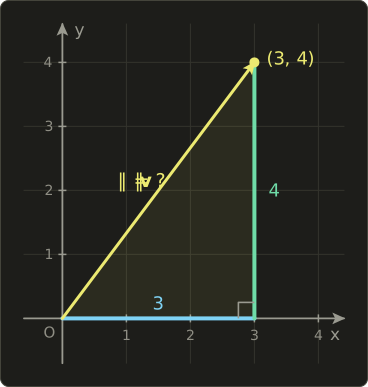
Look at the picture.
The arrow, the horizontal step and the vertical step form a right triangle.
The arrow is the long side (the hypotenuse), so we can use the Pythagorean theorem from chapter 1.
3.2 What the formula is
The length of a vector is written with double vertical bars: .
I read it as "the length of v" (other names you will see: magnitude, norm).
We use double bars so it doesn't get mixed up with the absolute value of a single number, which we will also need in this chapter.
For a 2D vector :
For a 3D vector :
And in general, for a vector with components, using the sigma notation from chapter 1:
In words: square every component, add the squares up, take the square root.
That's it.
Since squares are never negative, the length is never negative either, and it is zero only for the zero vector.
The distance between two points and is the length of the arrow from one to the other:
A unit vector is a vector of length exactly 1.
We mark unit vectors with a little hat: (read "v hat").
Turning any non-zero vector into a unit vector pointing the same way is called normalization:
Those are all the formulas of this chapter.
Now let's see why they work.
3.3 How it works
3.3.1 Length in 2D
For the right triangle in the picture has legs 3 and 4.
Pythagoras says the square of the hypotenuse equals the sum of the squares of the legs:
So you are exactly 5 meters from where you started.
Negative components work the same way, because squaring removes the sign: also has length .
That makes sense, since walking 3 meters west instead of east doesn't change how far you end up.
3.3.2 Length in 3D: Pythagoras twice
In 3D the arrow doesn't lie in a flat triangle anymore, but we can split the problem in two.
Take and picture a box that is 2 wide (x), 3 high (y) and 6 deep (z).
The arrow goes from one bottom corner to the opposite top corner .
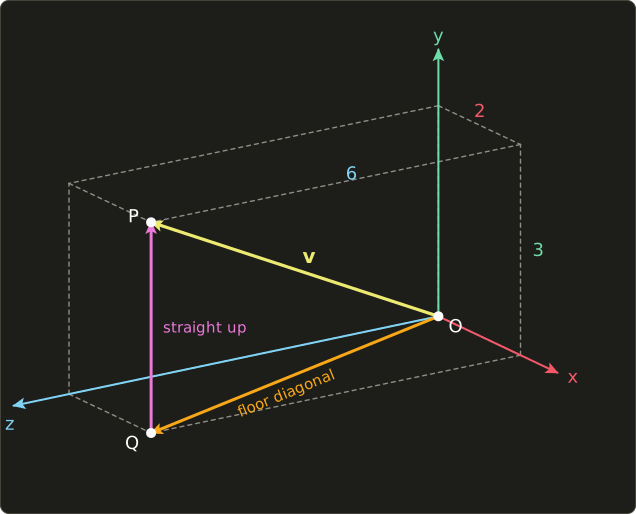
Step 1: walk across the floor from to .
The floor is a flat rectangle, 2 by 6, so Pythagoras gives the floor diagonal :
Step 2: from , go straight up 3 to reach .
The floor diagonal and the vertical edge are at a right angle, so we have another right triangle with legs and 3:
Notice that we never needed itself (it's , an ugly number).
We only needed , and then we added .
So the total is simply , which is the 3D formula.
3.3.3 More dimensions
The same trick keeps working.
Each extra component adds one more right angle and one more square under the root.
We can't draw 4D, but we can calculate it: for ,
In graphics we rarely need the length of a 4D vector (we'll meet 4D vectors properly in chapter 9), but in data science vectors with hundreds of components are normal, and the formula doesn't change.
3.3.4 Distance between two points
In chapter 2 we saw that is the arrow that starts at point and ends at point .
The distance between the points is just the length of that arrow.
Let and .
It doesn't matter which point you subtract from which.
points the other way, but the squares are the same, so the distance is still 13.
3.3.5 Squared length and squared distance
A square root is noticeably slower to compute than an addition or a multiplication.
One square root doesn't matter, but a game might compare distances millions of times per frame.
Here is the trick: if two lengths are both non-negative, then the bigger one also has the bigger square.
So if you only want to compare distances, you can compare the squares and skip the root completely.
Example: is an enemy within 10 units of the player at the origin?
Instead of checking , check .
| Enemy | Compare with 100 | Result | |
|---|---|---|---|
| inside | |||
| outside |
No square root anywhere.
Just remember to square the radius too; comparing with 10 instead of 100 is a classic bug.
3.3.6 Scaling a vector scales its length
What happens to the length if we multiply a vector by a number (scalar multiplication from chapter 2)?
Take , which has length 7, and multiply by 3:
Now take , length 5, and multiply by :
The length got multiplied by 2, not by .
The minus sign flipped the arrow around, but a flipped arrow is just as long.
This is where the absolute value comes in: means "s without its minus sign", so and .
The rule is:
Why it works: every component gets multiplied by , so every square gets multiplied by .
We can pull out of the sum, and .
3.3.7 Normalization
The rule above is the key to normalization.
If a vector has length and we multiply it by , its new length is .
And since is positive, the direction doesn't change.
Example with , length 5:
Check: .
Example with , length 7:
Check: .
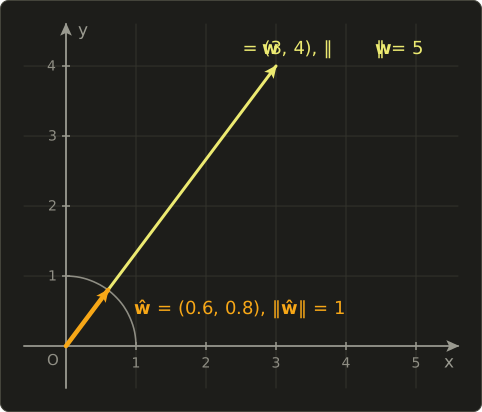
3.3.8 Length times direction
Normalization lets us split any non-zero vector into two independent pieces of information:
The length says "how much", the unit vector says "which way".
For a velocity, that's speed times direction.
Example: a ball moving with velocity meters per second.
Its speed is m/s, its direction is , and indeed .
This split is extremely useful in games, because you usually want to control the two parts separately.
The AI decides where to go (a direction), the character stats decide how fast (a speed), and you multiply them at the end.
3.3.9 The zero-vector problem
There is one vector we can't normalize: the zero vector .
Its length is 0, and the formula asks us to divide by 0.
In floating-point math, doesn't crash; it produces a special value called NaN ("not a number").
NaN is poisonous: any calculation that touches it also becomes NaN.
One NaN in a position and your model vanishes from the screen, or your physics object teleports to nowhere.
And it's not a rare case.
The player stands exactly on top of the target, the input stick is centered, two vertices of a broken mesh are in the same place.
The zero vector simply has no direction, so there is no correct answer.
Our linalg.hh handles it the simple way: normalize of the zero vector returns the zero vector.
That's safe (no NaN), but it means you should be aware that "normalized" vectors can still be zero in that case.
Shader normalize functions do NOT protect you: in GLSL, Slang and HLSL, normalizing a zero vector gives an undefined result, which usually means NaN.
3.4 Use in graphics programming
3.4.1 The diagonal-movement bug
This is the most famous bug in this chapter, and almost every beginner game has it.
The player presses D to move right and W to move forward.
In our right-handed system, right is +X and forward is −Z, so the code builds an input vector like this:
 W only: ( 0, 0, -1)   length 1
 D only: ( 1, 0,  0)   length 1
 W + D : ( 1, 0, -1)   length 1.4142  <- too long!
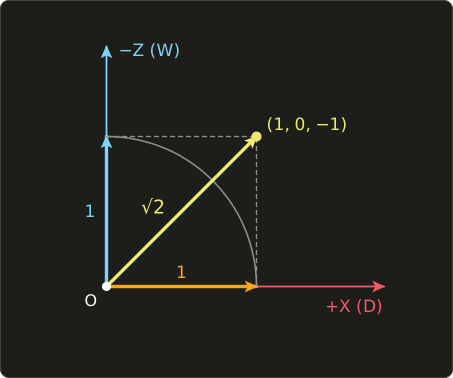
Then it does position = position + speed * input * dt.
With a speed of 5, moving straight gives 5 units per second, but diagonally:
The player is about 41% faster when moving diagonally.
Speedrunners love this bug; game designers don't.
The fix is to normalize the input direction before multiplying by the speed:
Now in every direction.
Note that the zero-vector rule matters here: if no key is pressed, the input is , and our normalize returns zero instead of NaN, so the player simply stands still.
With an analog stick, normalizing would make a slight tilt as fast as a full tilt. There you usually only normalize if the length is greater than 1, so small tilts still mean walking slowly.
3.4.2 Direction from A to B
"Make this thing move towards that thing" is the bread and butter of game code: enemies chasing the player, homing missiles, bullets fired at a target, a camera following a character.
The recipe is always the same:
- Subtract: is the arrow from A to B.
- Normalize: divide it by its length to get the direction , length 1.
- Multiply by speed and time, and add to the position.
Worked example: an enemy at chases a player at with speed 2 units per second, and this frame lasts seconds.
The enemy moved exactly 1 unit towards the player, no matter how far away the player is.
Without the normalization, it would move faster when the player is far away and crawl when the player is close, which is sometimes what you want (a smooth follow camera that slows down as it arrives), but usually not.
3.4.3 Light directions and normals
Lighting needs two directions at every point of a surface:
- the light direction : from the surface point towards the light,
normalize(lightPos - worldPos); - the normal : the direction the surface is facing (perpendicular to it).
In the next chapter we will compute brightness from these two vectors with the dot product.
That calculation only works if both vectors have length 1.
If they are longer, the surface gets brighter for no reason; if shorter, darker.
There is a trap here.
Normals are stored per vertex, and the GPU blends (interpolates) them across the triangle with exactly the lerp from chapter 2.
Halfway between two unit normals and the blended normal is:
That is no longer a unit vector.
So the very first thing almost every lighting fragment shader does is normalize the normal again.
3.4.4 Distance-based effects
Many effects fade with distance.
In shaders, length, distance and normalize are built in, in Slang, GLSL and HLSL alike:
// 1 near the light, 0 at radius and beyond
float attenuation(float3 lightPos, float3 worldPos, float radius) {
  float d = distance(lightPos, worldPos);
  float a = saturate(1.0 - d / radius);
  return a * a;
}

// 1 = no fog, 0 = completely fogged
float fogFactor(float3 cameraPos, float3 worldPos, float fogStart, float fogEnd) {
  float d = distance(cameraPos, worldPos);
  return saturate((fogEnd - d) / (fogEnd - fogStart));
}
// 1 near the light, 0 at radius and beyond
float attenuation(vec3 lightPos, vec3 worldPos, float radius) {
float d = distance(lightPos, worldPos);
float a = clamp(1.0 - d / radius, 0.0, 1.0);
return a * a;
}
// 1 = no fog, 0 = completely fogged
float fogFactor(vec3 cameraPos, vec3 worldPos, float fogStart, float fogEnd) {
float d = distance(cameraPos, worldPos);
return clamp((fogEnd - d) / (fogEnd - fogStart), 0.0, 1.0);
}// 1 near the light, 0 at radius and beyond
float attenuation(float3 lightPos, float3 worldPos, float radius) {
float d = distance(lightPos, worldPos);
float a = saturate(1.0 - d / radius);
return a * a;
}
// 1 = no fog, 0 = completely fogged
float fogFactor(float3 cameraPos, float3 worldPos, float fogStart, float fogEnd) {
float d = distance(cameraPos, worldPos);
return saturate((fogEnd - d) / (fogEnd - fogStart));
}
saturate(x) in Slang and HLSL and clamp(x, 0.0, 1.0) in GLSL both squeeze a number into the range 0 to 1.
Let's check them with numbers.
A light at with radius 10 shines on the point :
So the point gets a quarter of the light's full brightness.
Squaring makes the falloff gentle at the edge, which looks closer to real light than a straight line.
(Real light falls off with , the inverse-square law, but that never quite reaches zero, so games often use a windowed version like this one that ends at a fixed radius.)
For fog with start 10 and end 50, a point 30 units from the camera gets , so we mix half fog color and half object color with lerp/mix from chapter 2.
Level of detail (LOD) uses distance on the CPU side: close objects get the detailed mesh, far ones get a cheaper mesh.
Since we only compare against thresholds, this is a perfect place for squared distances: compare with , and so on.
3.4.5 A circle and a vignette in a fragment shader
Texture coordinates (UVs) go from 0 to 1 across the screen, so the center of the screen is .
The distance from the center is length(uv - 0.5): 0 at the center, 0.5 at the middle of each edge, and in the corners.
Every pixel with the same distance lies on a circle, so with this one number we can draw circles, rings, spotlights or a vignette (a darkening towards the edges).
struct Params {
  float2 resolution; // window size in pixels
};
ConstantBuffer<Params> params;

[shader("fragment")]
float4 fragmentMain(float2 uv : TEXCOORD0) : SV_Target {
  float2 p = uv - 0.5;
  p.x *= params.resolution.x / params.resolution.y; // keep the circle round
  float d = length(p);
  float vignette = 1.0 - smoothstep(0.3, 0.7, d);
  float3 color = float3(1.0, 0.8, 0.6) * vignette;
  return float4(color, 1.0);
}
#version 450
layout(location = 0) in vec2 uv;
layout(location = 0) out vec4 outColor;
layout(set = 0, binding = 0) uniform Params {
vec2 resolution; // window size in pixels
};
void main() {
vec2 p = uv - 0.5;
p.x *= resolution.x / resolution.y; // keep the circle round
float d = length(p);
float vignette = 1.0 - smoothstep(0.3, 0.7, d);
vec3 color = vec3(1.0, 0.8, 0.6) * vignette;
outColor = vec4(color, 1.0);
}struct Params {
float2 resolution; // window size in pixels
};
ConstantBuffer<Params> params;
float4 fragmentMain(float2 uv : TEXCOORD0) : SV_Target {
float2 p = uv - 0.5;
p.x *= params.resolution.x / params.resolution.y; // keep the circle round
float d = length(p);
float vignette = 1.0 - smoothstep(0.3, 0.7, d);
float3 color = float3(1.0, 0.8, 0.6) * vignette;
return float4(color, 1.0);
}
smoothstep(a, b, x) returns 0 when x is below a, 1 when x is above b, and a smooth S-shaped curve in between.
So pixels closer than 0.3 to the center keep their full color, pixels further than 0.7 become black, and at we get exactly half: .
The line with the resolution is important on a non-square window: UVs are 0 to 1 in both directions, so without it the "circle" would be stretched into an ellipse on a 16:9 screen.
3.5 Other uses
Length and distance are everywhere outside graphics too.
- Maps and GPS: the straight-line ("as the crow flies") distance between two places on a local, flat map is exactly our distance formula. For long distances the Earth's curvature matters and you need spherical formulas instead.
- k-nearest neighbors: a simple machine-learning method that classifies a new data point by looking at the k closest known points, where "closest" is our distance formula in many dimensions.
- Normalizing feature vectors: in data science, vectors (for example word counts of a document) are often normalized so that a long document and a short document about the same topic look similar. We will use this in chapter 4 for cosine similarity.
- Signal strength (RMS): in audio, the loudness of a block of samples is often measured as the RMS (root mean square): the length of the sample vector divided by . For the samples the length is and the RMS is .
- Physics: speed is the length of the velocity vector, and the strength of a force is the length of the force vector.
- Error measurement: "how far is my prediction from the real answer" is often the distance between two vectors.
3.6 Code
Now let's add the functions to linalg.hh.
Put them below the vector operators from chapter 2:
// 長さ・距離・正規化 / length, distance, normalization (chapter 3)
inline float length(Vec2 v) { return std::sqrt(v.x * v.x + v.y * v.y); }
inline float length(Vec3 v) { return std::sqrt(v.x * v.x + v.y * v.y + v.z * v.z); }
inline float distance(Vec3 a, Vec3 b) { return length(b - a); }

inline Vec3 normalize(Vec3 v) {
  float len = length(v);
  if (len == 0.0f) return {0.0f, 0.0f, 0.0f}; // ゼロベクトルは正規化出来ない / cannot normalize zero
  return (1.0f / len) * v;
}
A few remarks:
std::sqrtcomes from<cmath>, which the header already includes since chapter 1.distanceis literally the definition: the length ofb - a, using the subtraction operator from chapter 2.normalizechecks for the zero vector before dividing. Instead of dividing each component bylen, it computes1.0f / lenonce and multiplies, using the scalar multiplication from chapter 2.- The exact comparison
len == 0.0fonly catches the true zero vector. A vector like (1e-30, 0, 0) still gets normalized; that's fine for this tutorial.
Here is a small test program, main.cc.
It also defines a distanceSquared helper for the comparison trick (it is not part of the header):
#include "linalg.hh"
#include <cstdio>

// Squared distance: no square root needed for comparisons.
float distanceSquared(Vec3 a, Vec3 b) {
  Vec3 d = b - a;
  return d.x * d.x + d.y * d.y + d.z * d.z;
}

int main() {
  Vec2 a{3.0f, 4.0f};
  Vec3 v{2.0f, 3.0f, 6.0f};
  printf("length(a)      = %g\n", length(a));
  printf("length(v)      = %g\n", length(v));

  Vec3 p{1.0f, 2.0f, 3.0f};
  Vec3 q{4.0f, 6.0f, 15.0f};
  printf("distance(p, q) = %g\n", distance(p, q));

  Vec3 n = normalize(v);
  printf("normalize(v)   = (%.4f, %.4f, %.4f)\n", n.x, n.y, n.z);
  printf("length of that = %.4f\n", length(n));

  // W + D pressed: right (+X) and forward (-Z) at the same time
  Vec3 input{1.0f, 0.0f, -1.0f};
  float speed = 5.0f;
  printf("raw speed      = %.4f\n", length(speed * input));
  printf("fixed speed    = %.4f\n", length(speed * normalize(input)));

  // An enemy chases the player
  Vec3 enemy{2.0f, 0.0f, 1.0f};
  Vec3 player{5.0f, 0.0f, 5.0f};
  Vec3 dir = normalize(player - enemy);
  enemy = enemy + (2.0f * 0.5f) * dir; // speed 2, dt 0.5
  printf("enemy moved to = (%g, %g, %g)\n", enemy.x, enemy.y, enemy.z);

  // Is it within 10 units? Compare squares: 10 * 10 = 100
  Vec3 origin{};
  Vec3 e1{6.0f, 0.0f, 7.0f};
  Vec3 e2{9.0f, 0.0f, 5.0f};
  float d1 = distanceSquared(origin, e1);
  float d2 = distanceSquared(origin, e2);
  printf("e1: %g -> %s\n", d1, d1 < 100.0f ? "inside" : "outside");
  printf("e2: %g -> %s\n", d2, d2 < 100.0f ? "inside" : "outside");

  Vec3 zero = normalize(Vec3{});
  printf("normalize(0)   = (%g, %g, %g)\n", zero.x, zero.y, zero.z);
  return 0;
}
Expected output:
length(a)      = 5
length(v)      = 7
distance(p, q) = 13
normalize(v)   = (0.2857, 0.4286, 0.8571)
length of that = 1.0000
raw speed      = 7.0711
fixed speed    = 5.0000
enemy moved to = (2.6, 0, 1.8)
e1: 85 -> inside
e2: 106 -> outside
normalize(0)   = (0, 0, 0)
Every line matches a worked example from this chapter.
If you want to see a NaN with your own eyes, try printf("%f\n", 0.0f / 0.0f); (some systems print nan, others -nan).
3.7 Summary
- The length is the square root of the sum of the squared components. It comes straight from Pythagoras, applied once per extra dimension.
- The distance between two points is .
- To compare distances, compare squared distances and skip the square root (and square the threshold too).
- Scaling a vector by scales its length by .
- A unit vector has length 1. Normalizing means dividing by the length: .
- Every non-zero vector is length times direction: .
- The zero vector can't be normalized. Our header returns zero; shaders give garbage (usually NaN).
- Normalize movement input (diagonal bug), directions to targets, light directions and interpolated normals.
3.8 Challenges
- ★ Compute the length of , and .
- ★ Compute the distance between the points and .
- ★ Normalize and check that the result has length 1.
- ★ A vector has length 4. What is the length of times that vector? What is the length of times it?
- ★★ Add
float length(Vec4 v)and Vec2 versions ofdistanceandnormalizeto your header (the header already haslength(Vec2)andfloat * Vec2). Check thatlength(Vec4{1, 2, 2, 4})prints5and that normalizingVec2{3, 4}prints(0.6, 0.8). - ★★ Write a function
Vec3 moveTowards(Vec3 from, Vec3 to, float maxStep)that moves at mostmaxSteptowardstoand never overshoots it (if the target is closer thanmaxStep, returnto). Starting at{0, 0, 0}with target{3, 0, 4}andmaxStep = 2, calling it repeatedly should print(1.2, 0, 1.6),(2.4, 0, 3.2),(3, 0, 4),(3, 0, 4). - ★★★ An analog stick returns values from −1 to 1 on each axis, so pushing it into a corner can return . Design input handling that keeps small tilts slow, never lets the diagonal be faster than straight movement, and never produces NaN. What should happen for a stick input of ? And for ?
コメント(0)
まだコメントはありません。
ログインするとコメント出来ます。