15. Geometry, Tessellation and Compute Shaders
So far we have written two kinds of shaders: vertex shaders and fragment shaders.
Those are the two every program needs, but OpenGL has four more: the geometry shader, the two tessellation shaders (control and evaluation), and the compute shader.
In chapter 2 I only described them in a few sentences; in this last chapter we write a small, working program for each.
- A geometry shader that draws a mesh's normals as lines, and one that makes a sphere explode.
- A tessellation pipeline that turns a coarse grid of 64 squares into a detailed, noise-displaced landscape, finer near the camera.
- A compute shader that runs Conway's Game of Life on a 200×150 grid and writes the result into a texture.
We continue from the chapter 13 code (not chapter 14's playground), because we need its meshes, matrices and lighting.
All four demos live in one program; the keys 1 to 4 switch between them.
macOS: geometry shaders (OpenGL 3.2) and tessellation (OpenGL 4.0) work on macOS's OpenGL 4.1. Compute shaders need OpenGL 4.3, so demo 4 is not available on macOS; the code skips it there, and the key 4 does nothing.
15.1 Where the other stages sit
Here is the full OpenGL pipeline, with the stages we have not used yet:
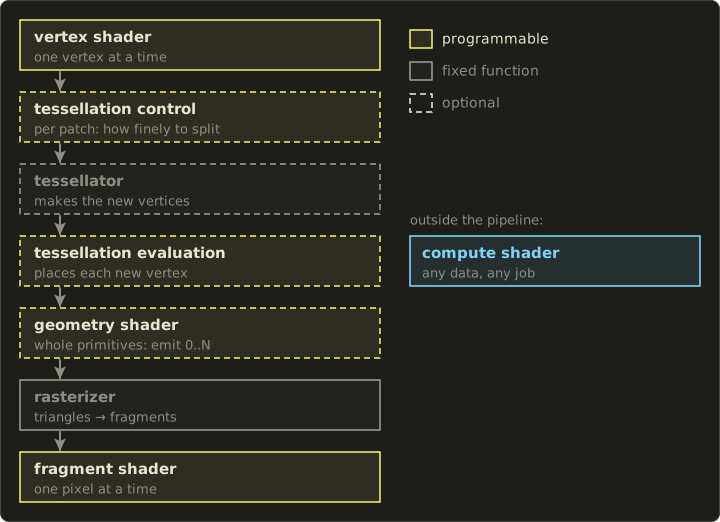
- The tessellation stages come right after the vertex shader. They take a patch (a small group of vertices) and subdivide it into many triangles. The tessellator in the middle is fixed hardware; we only tell it how finely to cut (control shader) and where to put each new vertex (evaluation shader).
- The geometry shader comes next. It sees one whole primitive at a time (a triangle, line or point) with all its vertices, and can output any number of new primitives, of a different type if it likes, or none at all.
- The compute shader is not part of the drawing pipeline at all. It is a general program that runs on the GPU in many parallel copies, reads and writes buffers and images, and draws nothing by itself.
Whichever stage comes last before the rasterizer has to write gl_Position.
With tessellation and/or a geometry shader present, the vertex shader no longer needs to do the projection; we will see that in both demos.
15.2 Preparing the C code
Programs with any combination of stages
buildProgram from chapter 5 knows exactly two files.
I generalise it: an array of six paths, one per stage, where NULL means "not used":
// compile a shader from a file (0 on failure)
GLuint compileShaderFile(GLenum type, const char *path) {
  char *source = readShaderFile(path);
  if (!source) return 0;

#ifdef __APPLE__
  // macOS only has OpenGL 4.1, so patch "#version 450" to "#version 410"
  char *v;
  if ((v = strstr(source, "#version 450"))) v[10] = '1';
#endif

  GLuint shader = compileShader(type, source);
  free(source);
  return shader;
}

// shader stages (the order of the path array)
enum { STAGE_VERTEX, STAGE_TESS_CONTROL, STAGE_TESS_EVALUATION, STAGE_GEOMETRY, STAGE_FRAGMENT,
       STAGE_COMPUTE, STAGE_COUNT };

static const GLenum gStageTypes[STAGE_COUNT] = {
  GL_VERTEX_SHADER, GL_TESS_CONTROL_SHADER, GL_TESS_EVALUATION_SHADER, GL_GEOMETRY_SHADER,
  GL_FRAGMENT_SHADER,
#ifdef __APPLE__
  0, // macOS (OpenGL 4.1) has no compute shaders
#else
  GL_COMPUTE_SHADER,
#endif
};

// build a program from any combination of stages (NULL = unused, 0 on failure)
GLuint buildProgramStages(const char *const paths[STAGE_COUNT]) {
  GLuint shaders[STAGE_COUNT] = { 0 };
  int ok = 1;
  for (int i = 0; i < STAGE_COUNT; i++) {
    if (!paths[i]) continue;
    if (!gStageTypes[i]) {
      printf("此のプラットフォームでは使えないシェーダーです: %s\n", paths[i]); // not available here
      ok = 0;
      break;
    }
    shaders[i] = compileShaderFile(gStageTypes[i], paths[i]);
    if (!shaders[i]) {
      ok = 0;
      break;
    }
  }

  GLuint program = 0;
  if (ok) {
    program = glCreateProgram();
    for (int i = 0; i < STAGE_COUNT; i++) {
      if (shaders[i]) glAttachShader(program, shaders[i]);
    }
    glLinkProgram(program);

    GLint success;
    glGetProgramiv(program, GL_LINK_STATUS, &success);
    if (!success) {
      checkProgramLink(program);
      glDeleteProgram(program);
      program = 0;
    }
  }

  for (int i = 0; i < STAGE_COUNT; i++) {
    if (shaders[i]) glDeleteShader(shaders[i]);
  }
  return program;
}

// build a program from a vertex and a fragment shader file (0 on failure)
GLuint buildProgram(const char *vertexPath, const char *fragmentPath) {
  const char *paths[STAGE_COUNT] = { NULL };
  paths[STAGE_VERTEX] = vertexPath;
  paths[STAGE_FRAGMENT] = fragmentPath;
  return buildProgramStages(paths);
}
Linking does the real checking: it complains if the outputs of one stage do not match the inputs of the next, or if a compute shader is mixed with drawing stages (a compute program contains only the compute shader).
buildProgram keeps working as before, now as a thin wrapper.
The program table
The table from chapter 13 now stores six paths per program, and gets five new entries:
// list of shader programs (R reloads all of them)
typedef struct {
  const char *paths[STAGE_COUNT]; // vertex, tess control, tess evaluation, geometry, fragment, compute
  GLuint id;
} Program;

enum {
  PROGRAM_SKY, PROGRAM_PHONG, PROGRAM_GOURAUD, PROGRAM_FLAG,
  PROGRAM_NORMALS, PROGRAM_EXPLODE, PROGRAM_TERRAIN, PROGRAM_LIFE_STEP, PROGRAM_LIFE_SHOW,
  PROGRAM_COUNT
};

static Program gPrograms[PROGRAM_COUNT] = {
  { { "shader/vertex_fullscreen.glsl", NULL, NULL, NULL, "shader/frag_sky.glsl", NULL }, 0 },
  { { "shader/vertex_mesh.glsl", NULL, NULL, NULL, "shader/frag_phong.glsl", NULL }, 0 },
  { { "shader/vertex_gouraud.glsl", NULL, NULL, NULL, "shader/frag_gouraud.glsl", NULL }, 0 },
  { { "shader/vertex_flag.glsl", NULL, NULL, NULL, "shader/frag_phong.glsl", NULL }, 0 },
  // geometry shaders: normals as lines, explosion
  { { "shader/vertex_passthrough.glsl", NULL, NULL, "shader/geom_normals.glsl", "shader/frag_line.glsl",
      NULL }, 0 },
  { { "shader/vertex_passthrough.glsl", NULL, NULL, "shader/geom_explode.glsl", "shader/frag_phong.glsl",
      NULL }, 0 },
  // tessellation: terrain
  { { "shader/vertex_terrain.glsl", "shader/tesc_terrain.glsl", "shader/tese_terrain.glsl", NULL,
      "shader/frag_terrain.glsl", NULL }, 0 },
  // compute shader: Game of Life (not available on macOS)
  { { NULL, NULL, NULL, NULL, NULL, "shader/comp_life.glsl" }, 0 },
  { { "shader/vertex_fullscreen.glsl", NULL, NULL, NULL, "shader/frag_life.glsl", NULL }, 0 },
};
loadPrograms loops over it as before and calls buildProgramStages(gPrograms[i].paths); on macOS it skips the two Game of Life programs.
The drawing code of chapter 13 moved into a function drawSceneDemo, and each new demo gets its own function.
In the main loop the number keys pick one:
    // keys 1 to 4 switch the demo
    for (int i = 0; i < 4; i++) {
      if (glfwGetKey(window, GLFW_KEY_1 + i) == GLFW_PRESS && demo != i) {
#ifdef __APPLE__
        if (i == 3) continue; // no compute shaders on macOS
#endif
        demo = i;
        glfwSetWindowTitle(window, demoNames[i]);
        puts(demoNames[i]);
      }
    }
GLFW_KEY_1 to GLFW_KEY_4 are consecutive codes (49 to 52, the ASCII digits), so GLFW_KEY_1 + i works.
glfwSetWindowTitle shows the current demo in the title bar.
The meshes are now globals (gCube, gSphere, …) so the demo functions can reach them, and drawSky() draws the background from chapter 13.
The complete main.c is in the diff at the end of the chapter.
15.3 The geometry shader
What it sees and what it does
A geometry shader runs once per primitive.
For triangles, it receives the outputs of all three vertices at once, as arrays, and it emits new vertices one by one:
layout(triangles) in;declares the input type:points,lines,triangles(or the_adjacencyvariants). It must match what the draw call produces.layout(line_strip, max_vertices = 6) out;declares the output type (points,line_striportriangle_strip) and the maximum number of vertices one invocation may emit. The GPU reserves memory for that maximum, so keep it small.- Each input variable from the vertex shader becomes an array:
in vec3 vsNormal[];with one element per vertex of the primitive (3 for triangles). The built-ingl_in[i].gl_Positionholds the vertex shader'sgl_Position, if it wrote one. - To emit a vertex you set all the output variables and
gl_Position, then callEmitVertex(). The values are copied, and afterwards all outputs are undefined, so set every output again before the nextEmitVertex(). EndPrimitive()finishes the current strip. The next emitted vertex starts a new line or triangle strip.
Demo 2a: drawing normals
This is a classic debugging tool.
The geometry shader takes each triangle and, instead of drawing it, outputs three short lines, one from each vertex along its normal.
Because the geometry shader now does the projection, the vertex shader just passes the data through untouched:
#version 450 core

layout(location = 0) in vec3 aPosition;
layout(location = 1) in vec3 aNormal;
layout(location = 2) in vec2 aUv;

// pass everything to the geometry shader unchanged
out vec3 vsPosition;
out vec3 vsNormal;
out vec2 vsUv;

void main() {
  vsPosition = aPosition;
  vsNormal = aNormal;
  vsUv = aUv;
}
It does not write gl_Position at all.
That is allowed: only the last stage before the rasterizer has to.
#version 450 core

layout(triangles) in;                         // input: triangles (3 vertices)
layout(line_strip, max_vertices = 6) out;     // output: lines (2 vertices x 3)

in vec3 vsPosition[]; // vertex shader outputs arrive as arrays
in vec3 vsNormal[];

out vec3 gColor;

uniform mat4 uModel;
uniform mat4 uView;
uniform mat4 uProj;
uniform mat3 uNormalMatrix;
uniform float uLength; // line length (world space)

void main() {
  mat4 viewProj = uProj * uView;
  for (int i = 0; i < 3; i++) {
    vec3 p = (uModel * vec4(vsPosition[i], 1.0)).xyz;
    vec3 n = normalize(uNormalMatrix * vsNormal[i]);

    gColor = vec3(1.0, 0.9, 0.2); // base: yellow
    gl_Position = viewProj * vec4(p, 1.0);
    EmitVertex();

    gColor = vec3(1.0, 0.2, 0.1); // tip: red
    gl_Position = viewProj * vec4(p + n * uLength, 1.0);
    EmitVertex();

    EndPrimitive(); // one line finished
  }
}
The line is built in world space: and , both projected with the same view-projection matrix.
That way every line has the same real length of 0.2 units, whatever the object's scale.
The fragment shader only outputs the interpolated colour:
#version 450 core

in vec3 gColor;
out vec4 out_color;

void main() {
  out_color = vec4(gColor, 1.0);
}
In C we draw the squashed sphere normally with the Phong program, then draw the same mesh again with the normals program on top:
  // right: draw normally, then draw the same mesh's normals on top as lines
  Matrix4 rightModel = mat4Multiply(mat4Translate(1.3f, 0.1f, 0.0f),
                                    mat4Multiply(mat4RotateY(time * 0.4f), mat4Scale(0.9f, 0.6f, 0.9f)));
  GLuint lit = gPrograms[PROGRAM_PHONG].id;
  setCommonUniforms(lit, view, proj, eye, time);
  Vector3 rightColor = { { 0.2f, 0.45f, 0.9f } };
  drawLit(lit, &gSphere, rightModel, rightColor, 0);

  GLuint normals = gPrograms[PROGRAM_NORMALS].id;
  setCommonUniforms(normals, view, proj, eye, time);
  glUniform1f(glGetUniformLocation(normals, "uLength"), 0.2f);
  drawLit(normals, &gSphere, rightModel, rightColor, 0);
The draw call is still glDrawElements(GL_TRIANGLES, ...); the geometry shader turns those triangles into lines on the way.
Each vertex is shared by several triangles, so most normals are drawn more than once; for a debug view that does not matter.
This is exactly the check from chapter 13: on the squashed sphere, the lines stand perpendicular to the surface because they use the normal matrix.
Demo 2b: an exploding sphere
The second geometry shader keeps the triangles but moves each one outwards along its own face normal, so the surface breaks apart into separate pieces.
The face normal comes from the cross product of two edges (linear algebra chapter 5):
With counter-clockwise winding (chapter 13), this points out of the mesh.
A quick check with the triangle , which is counter-clockwise seen from +Z: , towards the viewer.
#version 450 core

layout(triangles) in;
layout(triangle_strip, max_vertices = 3) out;

in vec3 vsPosition[];
in vec3 vsNormal[];
in vec2 vsUv[];

// the names the fragment shader (frag_phong.glsl) expects
out vec3 vWorldPos;
out vec3 vNormal;
out vec2 vUv;

uniform mat4 uModel;
uniform mat4 uView;
uniform mat4 uProj;
uniform mat3 uNormalMatrix;
uniform float uExplode; // how far to push

void main() {
  vec3 world[3];
  for (int i = 0; i < 3; i++) world[i] = (uModel * vec4(vsPosition[i], 1.0)).xyz;

  // face normal: cross product of two edges (linear algebra chapter 5)
  vec3 faceNormal = normalize(cross(world[1] - world[0], world[2] - world[0]));
  vec3 offset = faceNormal * uExplode;

  mat4 viewProj = uProj * uView;
  for (int i = 0; i < 3; i++) {
    vWorldPos = world[i] + offset;
    vNormal = uNormalMatrix * vsNormal[i];
    vUv = vsUv[i];
    gl_Position = viewProj * vec4(vWorldPos, 1.0);
    EmitVertex();
  }
  EndPrimitive();
}
The geometry shader's outputs are named vWorldPos, vNormal and vUv, exactly like the chapter 13 vertex shader's, so we can reuse frag_phong.glsl without touching it: the fragment shader only cares about the names and types of what arrives, not which stage produced them.
In C, the amount is animated between 0 and 0.5, and culling is turned off because through the gaps we now see the inside of the sphere:
  // explosion: push each triangle along its face normal (the inside shows, so no culling)
  GLuint explode = gPrograms[PROGRAM_EXPLODE].id;
  setCommonUniforms(explode, view, proj, eye, time);
  float amount = 0.5f * (0.5f - 0.5f * cosf(time * 1.2f)); // goes back and forth between 0 and 0.5
  glUniform1f(glGetUniformLocation(explode, "uExplode"), amount);
  Matrix4 leftModel = mat4Multiply(mat4Translate(-1.3f, 0.1f, 0.0f),
                                   mat4Multiply(mat4RotateY(time * 0.4f), mat4Scale(0.8f, 0.8f, 0.8f)));
  Vector3 leftColor = { { 0.9f, 0.3f, 0.35f } };
  glDisable(GL_CULL_FACE);
  drawLit(explode, &gSmoothSphere, leftModel, leftColor, 1);
  glEnable(GL_CULL_FACE);
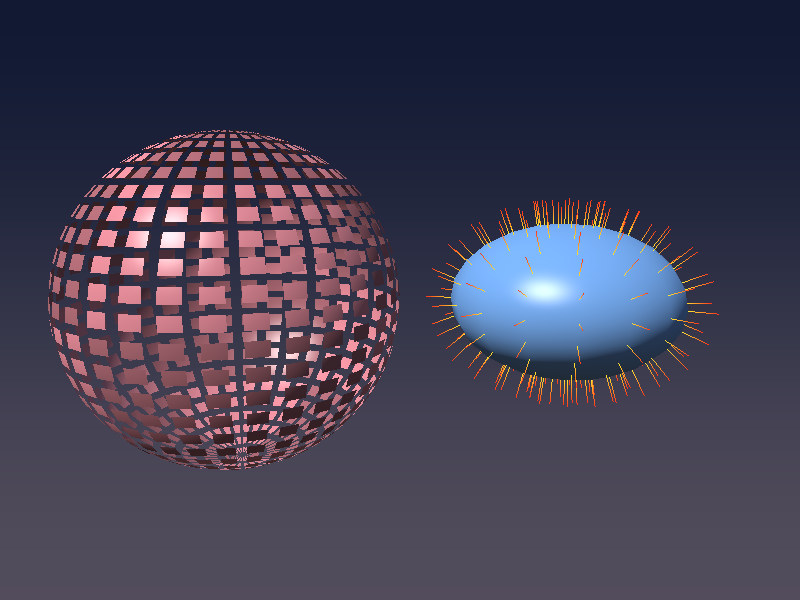
The pieces look like little squares rather than triangles: the two triangles of each quad of the UV sphere have almost the same face normal, so they fly out together.
gSmoothSphere is createSphere(32, 24), finer than the chapter 13 sphere, so there are more pieces.
Why geometry shaders are often avoided
Geometry shaders look like the perfect tool, but in practice they are used sparingly.
Their output has to come out in order and its size is only known while the shader runs, so the GPU has to buffer it, and on many GPUs a geometry shader that emits more than a few vertices is slow.
For most jobs there is a faster tool today: instancing for many copies of a mesh, a compute shader writing into a vertex buffer for generated geometry, and on newer hardware mesh shaders (in Vulkan and DirectX 12, not in core OpenGL) that replace the vertex, tessellation and geometry stages altogether.
They remain handy for debugging views like the normals above, wireframe overlays, and small effects such as extruding shadow volumes, rendering to several cube map faces in one pass (with gl_Layer), or turning points into camera-facing quads.
15.4 Tessellation
Patches and the two shaders
With tessellation the draw call no longer sends triangles but patches: groups of a fixed number of vertices that mean whatever we want.
Here a patch is one square of a terrain grid, 4 corners.
  glPatchParameteri(GL_PATCH_VERTICES, 4); // 1 patch = 4 vertices
  glBindVertexArray(gTerrain.vao);
  glDrawElements(GL_PATCHES, gTerrain.indexCount, GL_UNSIGNED_INT, 0);
The grid is made by createPatchGrid(8, 10.0f): 8 × 8 squares covering 10 × 10 units in the xz plane, centred on the origin, with 4 indices per square in the order (the function is in the diff; it works like createGrid from chapter 13, but in the xz plane and with 4 indices per cell instead of 6).
That is only 64 patches and 81 vertices; the tessellator will make the rest.
The work is split in three:
- The tessellation control shader (TCS) runs once per output control point of each patch. It can pass on or modify the control points, and decides how finely to subdivide the patch with
gl_TessLevelOuterandgl_TessLevelInner. - The fixed tessellator cuts the abstract patch domain (here a unit square) into many small triangles and produces, for each new vertex, its position in that domain,
gl_TessCoord. - The tessellation evaluation shader (TES) runs once per new vertex and turns
gl_TessCoordand the patch's control points into a real position, writinggl_Position.
The tessellation levels
For a quad patch there are four outer levels, one per edge, and two inner levels:
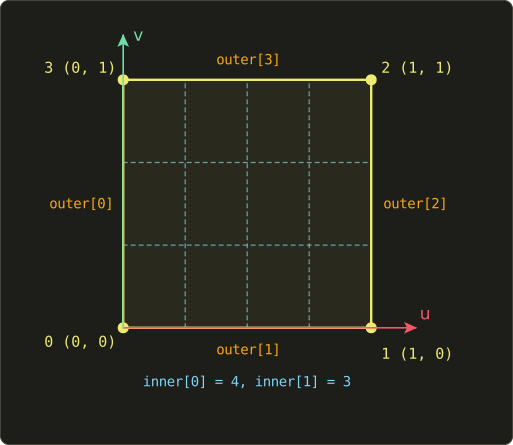
gl_TessLevelOuter[0]to[3]: into how many segments each edge is cut. Edge 0 is , edge 1 is , edge 2 is , edge 3 is .gl_TessLevelInner[0]and[1]: how finely the inside is cut along and along .
The outer levels are kept separate for a very good reason: two neighbouring patches share an edge, and if they cut it into a different number of pieces, the vertices do not line up and you get cracks in the surface.
As long as both patches compute the same outer level for the shared edge, the surface stays watertight, whatever their inner levels are.
The vertex and control shaders
The vertex shader only passes the corner on:
#version 450 core

layout(location = 0) in vec3 aPosition;

out vec3 vsPosition; // patch corner (world space)

void main() {
  vsPosition = aPosition;
}
The control shader decides the levels from the distance to the camera:
#version 450 core

layout(vertices = 4) out; // number of control points in the output patch

in vec3 vsPosition[];
out vec3 tcPosition[];

uniform vec3 uCameraPos;

// the closer the midpoint of an edge is to the camera, the finer
float edgeLevel(vec3 a, vec3 b) {
  float d = distance(0.5 * (a + b), uCameraPos);
  return clamp(96.0 / d, 1.0, 64.0);
}

void main() {
  // pass the control points on unchanged (gl_InvocationID is 0 to 3)
  tcPosition[gl_InvocationID] = vsPosition[gl_InvocationID];

  // the levels only need to be set once per patch
  if (gl_InvocationID == 0) {
    // corner order: 0 = (0, 0), 1 = (1, 0), 2 = (1, 1), 3 = (0, 1)
    gl_TessLevelOuter[0] = edgeLevel(vsPosition[3], vsPosition[0]); // the u = 0 edge
    gl_TessLevelOuter[1] = edgeLevel(vsPosition[0], vsPosition[1]); // the v = 0 edge
    gl_TessLevelOuter[2] = edgeLevel(vsPosition[1], vsPosition[2]); // the u = 1 edge
    gl_TessLevelOuter[3] = edgeLevel(vsPosition[2], vsPosition[3]); // the v = 1 edge
    gl_TessLevelInner[0] = max(gl_TessLevelOuter[1], gl_TessLevelOuter[3]); // along u
    gl_TessLevelInner[1] = max(gl_TessLevelOuter[0], gl_TessLevelOuter[2]); // along v
  }
}
layout(vertices = 4) out;says how many control points the TCS outputs per patch, and therefore how many times it runs per patch.gl_InvocationIDtells each run which one it is responsible for.- Inputs and outputs are arrays over the whole patch:
vsPosition[](all 4 input points can be read by every invocation),tcPosition[](each invocation should only write its own element). - The levels are per patch, so one invocation sets them.
The level of an edge depends only on the edge's midpoint, and both patches sharing that edge see the same midpoint, so they always agree: no cracks.
For example an edge whose midpoint is 8 units from the camera gets segments; one 16 units away gets 6; anything closer than 1.5 units hits the maximum of 64.
(64 is the minimum maximum that every OpenGL 4 GPU supports, GL_MAX_TESS_GEN_LEVEL.)
The evaluation shader
#version 450 core

layout(quads, fractional_odd_spacing, ccw) in;

in vec3 tcPosition[];

out vec3 vWorldPos;
out vec3 vNormal;

uniform mat4 uView;
uniform mat4 uProj;

// value noise and fBm as in chapter 8
float hash(vec2 p) {
  p = fract(p * vec2(123.34, 456.21));
  p += dot(p, p + 45.32);
  return fract(p.x * p.y);
}

float valueNoise(vec2 p) {
  vec2 i = floor(p);
  vec2 f = fract(p);
  vec2 u = f * f * (3.0 - 2.0 * f);
  float a = hash(i);
  float b = hash(i + vec2(1.0, 0.0));
  float c = hash(i + vec2(0.0, 1.0));
  float d = hash(i + vec2(1.0, 1.0));
  return mix(mix(a, b, u.x), mix(c, d, u.x), u.y);
}

float fbm(vec2 p) {
  float sum = 0.0;
  float amplitude = 0.5;
  for (int i = 0; i < 4; i++) {
    sum += amplitude * valueNoise(p);
    p *= 2.0;
    amplitude *= 0.5;
  }
  return sum;
}

// terrain height (below 0 is water and stays flat)
float terrainHeight(vec2 xz) {
  return max(3.0 * fbm(xz * 0.3) - 1.1, 0.0);
}

void main() {
  // gl_TessCoord: position inside the patch (u, v), 0 to 1
  vec2 uv = gl_TessCoord.xy;
  vec3 bottom = mix(tcPosition[0], tcPosition[1], uv.x);
  vec3 top = mix(tcPosition[3], tcPosition[2], uv.x);
  vec3 p = mix(bottom, top, uv.y);

  // push up by the height (displacement)
  p.y = terrainHeight(p.xz);

  // normal from height differences (gradient of y = h(x, z))
  const float e = 0.02;
  float hx = terrainHeight(p.xz + vec2(e, 0.0)) - terrainHeight(p.xz - vec2(e, 0.0));
  float hz = terrainHeight(p.xz + vec2(0.0, e)) - terrainHeight(p.xz - vec2(0.0, e));
  vNormal = normalize(vec3(-hx, 2.0 * e, -hz));

  vWorldPos = p;
  gl_Position = uProj * uView * vec4(p, 1.0);
}
The layout line configures the tessellator:
| Part | Options | Meaning |
|---|---|---|
| Domain | triangles, quads, isolines |
The shape of the patch domain and what gl_TessCoord means |
| Spacing | equal_spacing, fractional_even_spacing, fractional_odd_spacing |
How non-integer levels are handled |
| Winding | ccw, cw |
The winding of the generated triangles (for culling) |
With equal_spacing a level of 5.3 is rounded up to 6 and the segments jump suddenly as the camera moves.
The fractional modes instead grow new segments gradually from the middle of the edge, so the change of detail is smooth; that is why terrain usually uses them.
The position inside the patch is a bilinear interpolation of the four corners: first along on the bottom and top edges, then along between those two points (two mix steps, like the bilinear texture filtering of chapter 11).
For example in the patch with corners , , , : bottom , top , and the mix gives .
Then the height comes from the fBm noise of chapter 8, with 4 octaves; max(..., 0.0) flattens everything below 0 into a lake.
The normal comes from central differences, as in chapter 14.
The surface is , or , and its gradient is .
With (where is the difference hx in the code), multiplying the whole vector by gives , which has the same direction and saves two divisions.
The fragment shader colours by height and slope (water, sand, grass, rock, snow) using smoothstep from chapter 6, and adds diffuse light and fog:
#version 450 core

in vec3 vWorldPos;
in vec3 vNormal;
out vec4 out_color;

uniform vec3 uLightDir;
uniform vec3 uCameraPos;

void main() {
  vec3 n = normalize(vNormal);
  float h = vWorldPos.y;

  // colour by height and slope
  vec3 rock = vec3(0.3, 0.27, 0.25);
  vec3 color = vec3(0.05, 0.15, 0.35);                                // water
  color = mix(color, vec3(0.6, 0.55, 0.35), smoothstep(0.0, 0.05, h)); // sand
  color = mix(color, vec3(0.12, 0.35, 0.08), smoothstep(0.1, 0.3, h)); // grass
  color = mix(color, rock, smoothstep(0.55, 0.8, h));                  // rock
  color = mix(color, rock, 1.0 - smoothstep(0.6, 0.75, n.y));          // steep slopes are rock too
  color = mix(color, vec3(0.9), smoothstep(1.1, 1.3, h));              // snow

  float diffuse = max(dot(n, normalize(uLightDir)), 0.0);
  vec3 lit = color * (0.15 + diffuse);

  // the farther, the closer to the sky colour
  float d = distance(vWorldPos, uCameraPos);
  float fog = 1.0 - exp(-0.002 * d * d);
  lit = mix(lit, vec3(0.32, 0.30, 0.36), fog);

  out_color = vec4(pow(lit, vec3(1.0 / 2.2)), 1.0);
}
Note 1.0 - smoothstep(0.6, 0.75, n.y) for "the flatter, the less rock".
It is tempting to write smoothstep(0.75, 0.6, n.y) instead, and many drivers even give the expected result, but the GLSL specification says the result is undefined when the first edge is not smaller than the second.
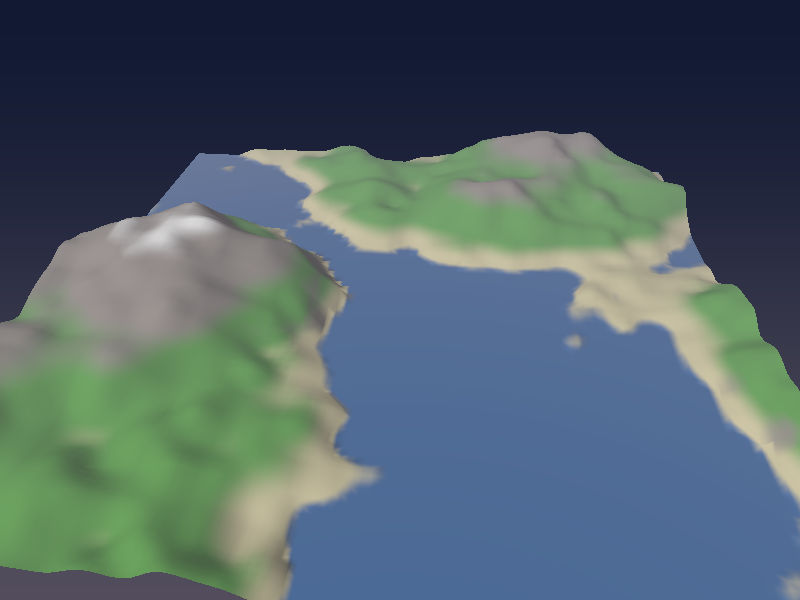
Press W to see the wireframe (it uses glPolygonMode, as in chapter 13):
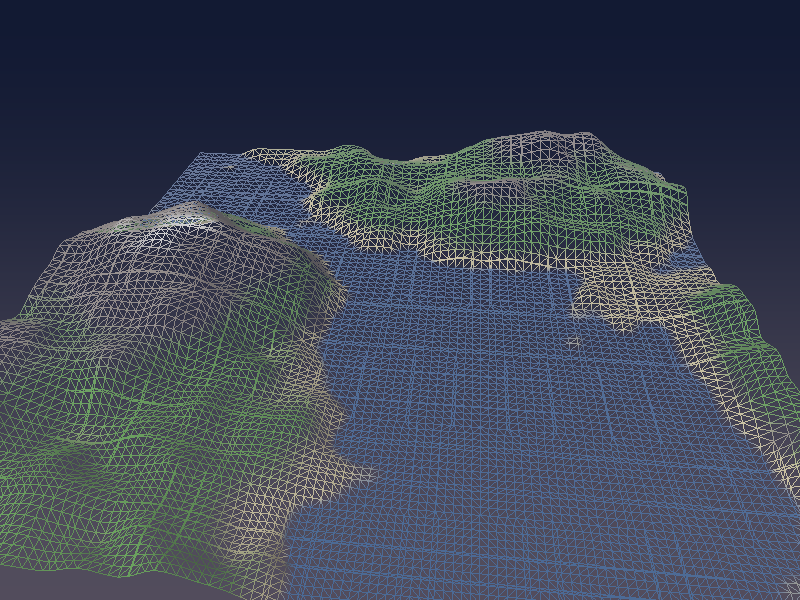
Near the camera the triangles are small; towards the back they get bigger.
The camera slowly circles the terrain, and as it moves, detail flows smoothly to wherever it is needed.
From 64 squares in memory we get thousands of triangles, and the CPU did not have to do any of it.
15.5 The compute shader
A different way to think
A compute shader is not attached to vertices or pixels.
You decide how many copies to run, and each copy finds out which one it is and does its share of the work.
Copies are organised in two levels:
- A work group is a block of invocations whose size is fixed in the shader:
layout(local_size_x = 16, local_size_y = 16, local_size_z = 1) in;means 16 × 16 = 256 invocations per group. Invocations in one group run together and can share memory (sharedvariables) and synchronise (barrier()). glDispatchCompute(x, y, z)in C starts a grid of work groups.
Each invocation gets built-in IDs:
(component-wise, as uvec3).
For a 2D image the natural choice is one invocation per pixel, so gl_GlobalInvocationID.xy is simply the pixel coordinate.
Images
Fragment shaders read textures with texture(); compute shaders usually work with images, which are textures you can read and write at exact integer coordinates, without filtering:
layout(rgba8, binding = 0) uniform readonly image2D uCurrent;declares an image on image unit 0 in thergba8format (it must match the texture's format), and promises to only read it.imageLoad(image, ivec2)reads one texel,imageStore(image, ivec2, vec4)writes one,imageSize(image)returns the size as anivec2.- For
rgba8images the values are floats between 0 and 1, as with textures.
Demo 4: Conway's Game of Life
The Game of Life is a grid of cells, each alive or dead.
Every generation, each cell counts its 8 neighbours:
- A living cell with 2 or 3 living neighbours survives; otherwise it dies.
- A dead cell with exactly 3 living neighbours becomes alive.
The well-known "blinker" shows how it works: three living cells in a row.
The middle one has 2 neighbours and survives; the two ends have only 1 and die; the cells directly above and below the middle have 3 (the whole row) and are born.
So the horizontal line becomes a vertical one, and the next generation turns it back.
Every cell can be computed independently from the previous generation, which makes this a perfect job for the GPU.
There is one trap: if we read and write the same image, a cell might read a neighbour that was already updated to the next generation.
So we use two textures and swap them every step (ping-pong): read from one, write to the other.
#version 450 core

// one work group = 16 x 16 invocations
layout(local_size_x = 16, local_size_y = 16, local_size_z = 1) in;

layout(rgba8, binding = 0) uniform readonly image2D uCurrent; // this generation
layout(rgba8, binding = 1) uniform writeonly image2D uNext;   // next generation

void main() {
  ivec2 size = imageSize(uCurrent);
  ivec2 p = ivec2(gl_GlobalInvocationID.xy); // the cell this invocation is responsible for
  if (p.x >= size.x || p.y >= size.y) return; // the part of the last work groups outside the image

  // count the 8 neighbours (the edges wrap around)
  int neighbours = 0;
  for (int dy = -1; dy <= 1; dy++) {
    for (int dx = -1; dx <= 1; dx++) {
      if (dx == 0 && dy == 0) continue;
      ivec2 q = (p + ivec2(dx, dy) + size) % size;
      if (imageLoad(uCurrent, q).r > 0.5) neighbours++;
    }
  }

  // the rules: a living cell survives with 2 or 3, a dead cell is born with 3
  vec4 cell = imageLoad(uCurrent, p);
  bool alive = cell.r > 0.5;
  bool next = alive ? (neighbours == 2 || neighbours == 3) : (neighbours == 3);

  // g: a trail that fades out slowly after a cell dies
  float trail = next ? 1.0 : cell.g * 0.92;
  imageStore(uNext, p, vec4(next ? 1.0 : 0.0, trail, 0.0, 1.0));
}
(p + ivec2(dx, dy) + size) % sizewraps around the edges, so the grid behaves like the surface of a donut. Addingsizefirst keeps the value positive:%on negative integers is undefined in GLSL.- The red channel stores alive (1) or dead (0); green stores a trail that fades by 8% per generation, just for looks.
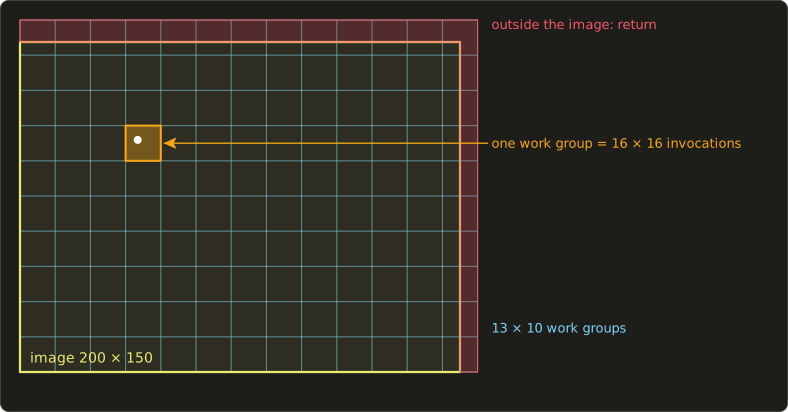
The grid is 200 × 150 and the work groups are 16 × 16, so we need groups across and down.
In integer C arithmetic, rounding up is (n + 15) / 16: and .
That launches invocations, a few more than there are cells, and the return at the top lets the extra ones do nothing:
The C side
The two textures are created with glTexStorage2D (OpenGL 4.2), which fixes the size and format once and for all (an immutable texture).
That is the recommended way to make textures for glBindImageTexture (desktop OpenGL also accepts complete glTexImage2D textures with a matching format, OpenGL ES only immutable ones):
void createLife(void) {
  glGenTextures(2, gLifeTextures);
  for (int i = 0; i < 2; i++) {
    glBindTexture(GL_TEXTURE_2D, gLifeTextures[i]);
    glTexStorage2D(GL_TEXTURE_2D, 1, GL_RGBA8, LIFE_WIDTH, LIFE_HEIGHT); // fixed size and format
    glTexParameteri(GL_TEXTURE_2D, GL_TEXTURE_MIN_FILTER, GL_NEAREST);
    glTexParameteri(GL_TEXTURE_2D, GL_TEXTURE_MAG_FILTER, GL_NEAREST);
  }
  resetLife(76);
}
resetLife fills the current texture with random cells (about 25% alive) using a small linear congruential generator and glTexSubImage2D, and is also called when you press Space.
One step of the simulation:
// one generation: read the current texture, write the other one
void stepLife(void) {
  GLuint program = gPrograms[PROGRAM_LIFE_STEP].id;
  glUseProgram(program);
  glBindImageTexture(0, gLifeTextures[gLifeCurrent], 0, GL_FALSE, 0, GL_READ_ONLY, GL_RGBA8);
  glBindImageTexture(1, gLifeTextures[1 - gLifeCurrent], 0, GL_FALSE, 0, GL_WRITE_ONLY, GL_RGBA8);

  // work groups are 16 x 16, so round up to cover the whole image
  glDispatchCompute((LIFE_WIDTH + 15) / 16, (LIFE_HEIGHT + 15) / 16, 1);

  // make the writes visible before the next reads (imageLoad and texture)
  glMemoryBarrier(GL_SHADER_IMAGE_ACCESS_BARRIER_BIT | GL_TEXTURE_FETCH_BARRIER_BIT);
  gLifeCurrent = 1 - gLifeCurrent;
}
glBindImageTexture(unit, texture, level, layered, layer, access, format) attaches mip level 0 of a texture to an image unit; the unit numbers match the binding = 0 and binding = 1 in the shader.
glMemoryBarrier is the part that is easy to forget.
Image writes do not go through the normal, automatically ordered path of the pipeline, so OpenGL does not guarantee that the next command sees them.
The barrier says "everything written before this point must be visible to the following kinds of reads": GL_SHADER_IMAGE_ACCESS_BARRIER_BIT for the next generation's imageLoad, and GL_TEXTURE_FETCH_BARRIER_BIT for the texture() call that draws it.
Without it the program may work on your GPU and show garbage on another.
Drawing the result is just the fullscreen triangle from chapter 13 with a fragment shader that samples the texture:
#version 450 core

in vec2 vUv;
out vec4 out_color;

uniform sampler2D uLife; // the texture written by the compute shader

void main() {
  vec4 cell = texture(uLife, vUv);
  vec3 trail = vec3(0.15, 0.1, 0.45) * cell.g; // trail: purple
  vec3 alive = vec3(1.0, 0.9, 0.5) * cell.r;   // living cells: bright yellow
  out_color = vec4(max(trail, alive), 1.0);
}
With GL_NEAREST filtering each cell becomes a crisp 4 × 4 pixel square on the 800 × 600 window.
The main loop advances 20 generations per second:
      if (time - lastLifeStep >= 0.05f) {
        stepLife();
        lastLifeStep = time;
      }
      drawComputeDemo();
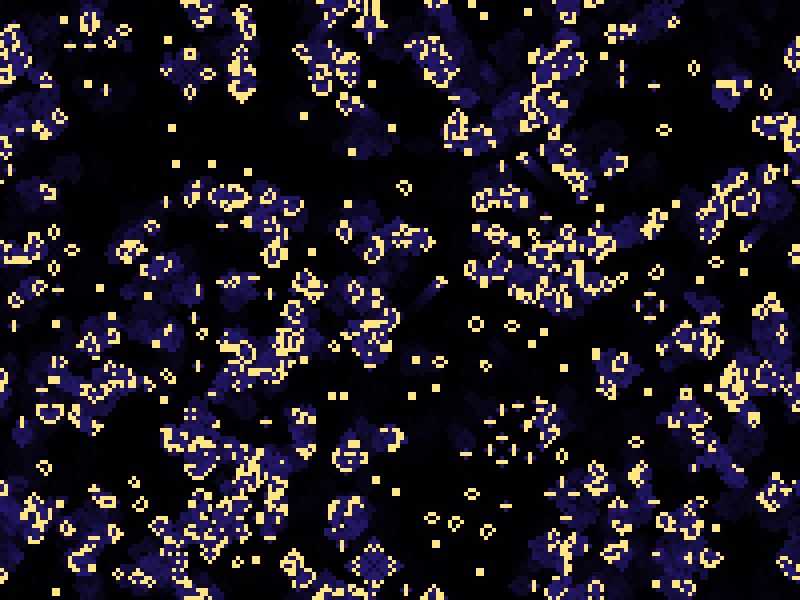
From random noise, the familiar shapes appear within a few seconds: blinkers, blocks, and gliders crawling diagonally across the screen (and wrapping around the edges).
On macOS you can get the same effect without compute shaders by rendering a fullscreen triangle into a framebuffer texture and ping-ponging between two framebuffers; that technique is part of the OpenGL series.
15.6 When to use which
| Stage | Good for | Watch out for |
|---|---|---|
| Vertex shader | Transforming, skinning, vertex animation | Can only move existing vertices |
| Tessellation | Terrain, displacement mapping, smooth curved surfaces, distance-based detail | Cracks if neighbouring edges disagree; very small triangles are inefficient |
| Geometry shader | Debug views, wireframe overlays, layered rendering, small amplification | Slow on many GPUs when emitting many vertices |
| Fragment shader | Lighting, texturing, post-processing, raymarching | Runs for every pixel, so cost scales with resolution |
| Compute shader | Particles, simulation, culling, image processing, anything not tied to drawing | Needs explicit barriers; not on macOS OpenGL |
In current engines, compute shaders do more and more of the work: they cull invisible objects and build the draw lists on the GPU (GPU-driven rendering), simulate particles and cloth, compute lighting in tiles or clusters, and run most post-processing.
Tessellation is used for terrain and close-up detail, but mesh shaders (Vulkan, DirectX 12) are gradually replacing both tessellation and geometry shaders.
15.7 New GLSL in this chapter
| Feature | Stage | What it does |
|---|---|---|
layout(triangles) in; |
geometry | Input primitive type |
layout(line_strip, max_vertices = N) out; |
geometry | Output primitive type and maximum vertex count |
EmitVertex(), EndPrimitive() |
geometry | Emit the current outputs as a vertex; end the strip |
gl_in[i].gl_Position |
geometry, tessellation | The previous stage's gl_Position for vertex i |
layout(vertices = N) out; |
tess control | Number of output control points (invocations) per patch |
gl_InvocationID |
tess control | Which output control point this invocation writes |
gl_TessLevelOuter[4], gl_TessLevelInner[2] |
tess control | How finely to subdivide the edges and the inside |
layout(quads, fractional_odd_spacing, ccw) in; |
tess evaluation | Domain, spacing and winding for the tessellator |
gl_TessCoord |
tess evaluation | Position of the new vertex inside the patch domain |
layout(local_size_x = X, ...) in; |
compute | Work group size |
gl_GlobalInvocationID, gl_LocalInvocationID, gl_WorkGroupID |
compute | Which invocation this is |
image2D, layout(rgba8, binding = N) |
compute (any) | An image on an image unit, with its format |
imageLoad, imageStore, imageSize |
compute (any) | Read, write and query an image at integer coordinates |
readonly, writeonly |
compute (any) | Memory qualifiers that promise how an image is used |
15.8 The end of the series, and what comes next
That is the last chapter of the GLSL series.
Let me look back at what we built, starting from a two-colour gradient on a rectangle:
- Chapters 1 to 4: the tester, the language and its dialects, gradients and interpolation, triangles and the first lights.
- Chapter 5: the shader playground with time, resolution, mouse and hot reload.
- Chapters 6 to 8: shapes from distance functions, transformations and patterns, randomness and noise, everything from nothing but coordinates.
- Chapters 9 and 10: specular highlights, point lights, spotlights, hemisphere and area lights, and gamma.
- Chapters 11 and 12: textures, filtering and mipmaps, then normal maps and tangent space.
- Chapter 13: real 3D meshes, the model, view and projection matrices, the normal matrix and vertex animation.
- Chapter 14: a complete 3D scene with shadows and AO inside a single fragment shader.
- Chapter 15: the other stages of the pipeline.
Along the way, nearly every idea from the Linear Algebra series has turned up in a shader: dot products for light, cross products for normals, matrices for every transform, the inverse transpose, change of basis and projection.
What we have not looked at closely is the C side.
main.c has grown chapter by chapter, and many of its calls (glBufferData, glVertexAttribPointer, glTexStorage2D, glBindImageTexture, …) were explained only as far as the shaders needed.
That is the job of the next series: OpenGL.
There we build a renderer properly from the ground up: buffers and vertex layouts, uniform buffers, loading images and models from files, framebuffers and render-to-texture, shadow maps, instancing, and the rest of the API, with the shaders from this series as building blocks.
After that come the Slang and Vulkan series, where the shaders you know from here meet a modern, explicit graphics API.
Thank you for following along this far.
15.9 Summary
- Besides vertex and fragment shaders, OpenGL has tessellation control, tessellation evaluation, geometry and compute shaders. The last stage before the rasterizer writes
gl_Position. - A program can be built from any combination of stages; linking checks that the interfaces match, and a compute program contains only a compute shader.
- A geometry shader sees whole primitives as arrays and emits new vertices with
EmitVertex()andEndPrimitive(); great for debugging views, but often slow for heavy use. - Tessellation draws
GL_PATCHES. The control shader setsgl_TessLevelOuterandgl_TessLevelInner; the evaluation shader turnsgl_TessCoordinto a position. Base each edge's level on that edge alone to avoid cracks. - A compute shader runs in work groups (
local_size_*), started withglDispatchCompute, rounded up and bounds-checked. It reads and writes images withimageLoadandimageStore, needs ping-pong buffers when cells depend on neighbours, and needsglMemoryBarrierbefore the results are used. - Compute shaders need OpenGL 4.3 and are not available on macOS; geometry and tessellation shaders are.
15.10 Challenges
- ★ The Game of Life grid is changed to 320 × 200 with 8 × 8 work groups. What do you pass to
glDispatchCompute, and how many invocations do nothing (you should get 40 × 25 groups and no idle invocations)? - ★ With
edgeLevelas in the text, how many segments does an edge get whose midpoint is 4 units from the camera, and at what distance does an edge drop to a single segment (24 segments; at 96 units or more)? - ★★ Extend the normals geometry shader to also draw the face normal of each triangle in a third colour, from the triangle's centre. Remember to raise
max_verticesto 8. - ★★ Add a wireframe overlay with a geometry shader: pass the barycentric coordinates , , to the three vertices of each triangle and, in the fragment shader, darken pixels where the smallest of them is below 0.02. The edges of every triangle should appear as dark lines on the shaded cube and sphere.
- ★★ In the terrain, replace
fractional_odd_spacingwithequal_spacingand watch the wireframe while the camera moves: the triangles should change in sudden jumps instead of smoothly. - ★★ Change the Game of Life rule to "HighLife" (a dead cell is also born with 6 neighbours). The picture should look similar, but every so often a pattern copies itself.
- ★★★ Write a compute-shader particle system: a buffer of 10 000 positions and velocities (
layout(std430, binding = 0) buffer Particles { vec4 data[]; };), a compute shader that adds gravity and bounces the particles off the floor,glMemoryBarrier(GL_VERTEX_ATTRIB_ARRAY_BARRIER_BIT), and then draw the same buffer asGL_POINTS. You should see a fountain of points that never touches the CPU.
ファイル: a/main.c | b/main.c
| 前 | 新 | ||
|---|---|---|---|
| @@ -133,50 +133,85 @@ GLuint compileShader(GLenum type, const char *source) { | |||
| 133 | return shader; | 133 | return shader; |
| 134 | } | 134 | } |
| 135 | 135 | ||
| 136 | // 頂点シェーダーとフラグメントシェーダーのファイルからプログラムを作る(失敗したら0) | 136 | // シェーダーファイルを読み込んでコンパイルする(失敗したら0) |
| 137 | GLuint buildProgram(const char *vertexPath, const char *fragmentPath) { | 137 | GLuint compileShaderFile(GLenum type, const char *path) { |
| 138 | char *vertexSource = readShaderFile(vertexPath); | 138 | char *source = readShaderFile(path); |
| 139 | char *fragmentSource = readShaderFile(fragmentPath); | 139 | if (!source) return 0; |
| 140 | if (!vertexSource || !fragmentSource) { | ||
| 141 | free(vertexSource); | ||
| 142 | free(fragmentSource); | ||
| 143 | return 0; | ||
| 144 | } | ||
| 145 | 140 | ||
| 146 | #ifdef __APPLE__ | 141 | #ifdef __APPLE__ |
| 147 | // macOSはOpenGL 4.1までなので、「#version 450」を「#version 410」に書き換える | 142 | // macOSはOpenGL 4.1までなので、「#version 450」を「#version 410」に書き換える |
| 148 | char *v; | 143 | char *v; |
| 149 | if ((v = strstr(vertexSource, "#version 450"))) v[10] = '1'; | 144 | if ((v = strstr(source, "#version 450"))) v[10] = '1'; |
| 150 | if ((v = strstr(fragmentSource, "#version 450"))) v[10] = '1'; | ||
| 151 | #endif | 145 | #endif |
| 152 | 146 | ||
| 153 | GLuint vertexShader = compileShader(GL_VERTEX_SHADER, vertexSource); | 147 | GLuint shader = compileShader(type, source); |
| 154 | GLuint fragmentShader = compileShader(GL_FRAGMENT_SHADER, fragmentSource); | 148 | free(source); |
| 155 | free(vertexSource); | 149 | return shader; |
| 156 | free(fragmentSource); | 150 | } |
| 157 | if (!vertexShader || !fragmentShader) { | 151 | |
| 158 | if (vertexShader) glDeleteShader(vertexShader); | 152 | // シェーダーステージの種類(パスの配列の順番) |
| 159 | if (fragmentShader) glDeleteShader(fragmentShader); | 153 | enum { STAGE_VERTEX, STAGE_TESS_CONTROL, STAGE_TESS_EVALUATION, STAGE_GEOMETRY, STAGE_FRAGMENT, |
| 160 | return 0; | 154 | STAGE_COMPUTE, STAGE_COUNT }; |
| 155 | |||
| 156 | static const GLenum gStageTypes[STAGE_COUNT] = { | ||
| 157 | GL_VERTEX_SHADER, GL_TESS_CONTROL_SHADER, GL_TESS_EVALUATION_SHADER, GL_GEOMETRY_SHADER, | ||
| 158 | GL_FRAGMENT_SHADER, | ||
| 159 | #ifdef __APPLE__ | ||
| 160 | 0, // macOS(OpenGL 4.1)にはコンピュートシェーダーがない | ||
| 161 | #else | ||
| 162 | GL_COMPUTE_SHADER, | ||
| 163 | #endif | ||
| 164 | }; | ||
| 165 | |||
| 166 | // 好きなステージの組み合わせからプログラムを作る(NULLのステージは使わない、失敗したら0) | ||
| 167 | GLuint buildProgramStages(const char *const paths[STAGE_COUNT]) { | ||
| 168 | GLuint shaders[STAGE_COUNT] = { 0 }; | ||
| 169 | int ok = 1; | ||
| 170 | for (int i = 0; i < STAGE_COUNT; i++) { | ||
| 171 | if (!paths[i]) continue; | ||
| 172 | if (!gStageTypes[i]) { | ||
| 173 | printf("此のプラットフォームでは使えないシェーダーです: %s\n", paths[i]); | ||
| 174 | ok = 0; | ||
| 175 | break; | ||
| 176 | } | ||
| 177 | shaders[i] = compileShaderFile(gStageTypes[i], paths[i]); | ||
| 178 | if (!shaders[i]) { | ||
| 179 | ok = 0; | ||
| 180 | break; | ||
| 181 | } | ||
| 161 | } | 182 | } |
| 162 | 183 | ||
| 163 | GLuint program = glCreateProgram(); | 184 | GLuint program = 0; |
| 164 | glAttachShader(program, vertexShader); | 185 | if (ok) { |
| 165 | glAttachShader(program, fragmentShader); | 186 | program = glCreateProgram(); |
| 166 | glLinkProgram(program); | 187 | for (int i = 0; i < STAGE_COUNT; i++) { |
| 167 | glDeleteShader(vertexShader); | 188 | if (shaders[i]) glAttachShader(program, shaders[i]); |
| 168 | glDeleteShader(fragmentShader); | 189 | } |
| 190 | glLinkProgram(program); | ||
| 191 | |||
| 192 | GLint success; | ||
| 193 | glGetProgramiv(program, GL_LINK_STATUS, &success); | ||
| 194 | if (!success) { | ||
| 195 | checkProgramLink(program); | ||
| 196 | glDeleteProgram(program); | ||
| 197 | program = 0; | ||
| 198 | } | ||
| 199 | } | ||
| 169 | 200 | ||
| 170 | GLint success; | 201 | for (int i = 0; i < STAGE_COUNT; i++) { |
| 171 | glGetProgramiv(program, GL_LINK_STATUS, &success); | 202 | if (shaders[i]) glDeleteShader(shaders[i]); |
| 172 | if (!success) { | ||
| 173 | checkProgramLink(program); | ||
| 174 | glDeleteProgram(program); | ||
| 175 | return 0; | ||
| 176 | } | 203 | } |
| 177 | return program; | 204 | return program; |
| 178 | } | 205 | } |
| 179 | 206 | ||
| 207 | // 頂点シェーダーとフラグメントシェーダーのファイルからプログラムを作る(失敗したら0) | ||
| 208 | GLuint buildProgram(const char *vertexPath, const char *fragmentPath) { | ||
| 209 | const char *paths[STAGE_COUNT] = { NULL }; | ||
| 210 | paths[STAGE_VERTEX] = vertexPath; | ||
| 211 | paths[STAGE_FRAGMENT] = fragmentPath; | ||
| 212 | return buildProgramStages(paths); | ||
| 213 | } | ||
| 214 | |||
| 180 | #define PI 3.14159265358979f | 215 | #define PI 3.14159265358979f |
| 181 | 216 | ||
| 182 | // メッシュ(頂点配列オブジェクトとインデックスの数) | 217 | // メッシュ(頂点配列オブジェクトとインデックスの数) |
| @@ -332,6 +367,40 @@ Mesh createGrid(int nx, int ny, float w, float h) { | |||
| 332 | return mesh; | 367 | return mesh; |
| 333 | } | 368 | } |
| 334 | 369 | ||
| 370 | // XZ平面上のパッチの格子(一辺size、中心が原点):n × n個のパッチ、1パッチ=4頂点 | ||
| 371 | Mesh createPatchGrid(int n, float size) { | ||
| 372 | int vertexCount = (n + 1) * (n + 1); | ||
| 373 | int indexCount = n * n * 4; | ||
| 374 | float *vertices = malloc(vertexCount * VERTEX_FLOATS * sizeof(float)); | ||
| 375 | GLuint *indices = malloc(indexCount * sizeof(GLuint)); | ||
| 376 | |||
| 377 | float *out = vertices; | ||
| 378 | for (int j = 0; j <= n; j++) { | ||
| 379 | for (int i = 0; i <= n; i++) { | ||
| 380 | float u = (float)i / (float)n, v = (float)j / (float)n; | ||
| 381 | out[0] = (u - 0.5f) * size; out[1] = 0.0f; out[2] = (v - 0.5f) * size; | ||
| 382 | out[3] = 0.0f; out[4] = 1.0f; out[5] = 0.0f; | ||
| 383 | out[6] = u; out[7] = v; | ||
| 384 | out += VERTEX_FLOATS; | ||
| 385 | } | ||
| 386 | } | ||
| 387 | |||
| 388 | // 1パッチの頂点の順番:(u, v) = (0, 0)、(1, 0)、(1, 1)、(0, 1) | ||
| 389 | GLuint *idx = indices; | ||
| 390 | for (int j = 0; j < n; j++) { | ||
| 391 | for (int i = 0; i < n; i++) { | ||
| 392 | GLuint a = j * (n + 1) + i; | ||
| 393 | GLuint b = a + n + 1; | ||
| 394 | *idx++ = a; *idx++ = a + 1; *idx++ = b + 1; *idx++ = b; | ||
| 395 | } | ||
| 396 | } | ||
| 397 | |||
| 398 | Mesh mesh = createMesh(vertices, vertexCount, indices, indexCount); | ||
| 399 | free(vertices); | ||
| 400 | free(indices); | ||
| 401 | return mesh; | ||
| 402 | } | ||
| 403 | |||
| 335 | // 行列のユニフォームを設定(列優先のままなのでtransposeはGL_FALSE) | 404 | // 行列のユニフォームを設定(列優先のままなのでtransposeはGL_FALSE) |
| 336 | void setMat4(GLuint program, const char *name, Matrix4 m) { | 405 | void setMat4(GLuint program, const char *name, Matrix4 m) { |
| 337 | glUniformMatrix4fv(glGetUniformLocation(program, name), 1, GL_FALSE, m.m); | 406 | glUniformMatrix4fv(glGetUniformLocation(program, name), 1, GL_FALSE, m.m); |
| @@ -343,25 +412,42 @@ void setMat3(GLuint program, const char *name, Matrix3 m) { | |||
| 343 | 412 | ||
| 344 | // シェーダープログラムの一覧(Rキーで全部再読み込み) | 413 | // シェーダープログラムの一覧(Rキーで全部再読み込み) |
| 345 | typedef struct { | 414 | typedef struct { |
| 346 | const char *vertexPath; | 415 | const char *paths[STAGE_COUNT]; // 頂点、テッセレーション制御、テッセレーション評価、ジオメトリ、フラグメント、コンピュート |
| 347 | const char *fragmentPath; | ||
| 348 | GLuint id; | 416 | GLuint id; |
| 349 | } Program; | 417 | } Program; |
| 350 | 418 | ||
| 351 | enum { PROGRAM_SKY, PROGRAM_PHONG, PROGRAM_GOURAUD, PROGRAM_FLAG, PROGRAM_COUNT }; | 419 | enum { |
| 420 | PROGRAM_SKY, PROGRAM_PHONG, PROGRAM_GOURAUD, PROGRAM_FLAG, | ||
| 421 | PROGRAM_NORMALS, PROGRAM_EXPLODE, PROGRAM_TERRAIN, PROGRAM_LIFE_STEP, PROGRAM_LIFE_SHOW, | ||
| 422 | PROGRAM_COUNT | ||
| 423 | }; | ||
| 352 | 424 | ||
| 353 | static Program gPrograms[PROGRAM_COUNT] = { | 425 | static Program gPrograms[PROGRAM_COUNT] = { |
| 354 | { "shader/vertex_fullscreen.glsl", "shader/frag_sky.glsl", 0 }, | 426 | { { "shader/vertex_fullscreen.glsl", NULL, NULL, NULL, "shader/frag_sky.glsl", NULL }, 0 }, |
| 355 | { "shader/vertex_mesh.glsl", "shader/frag_phong.glsl", 0 }, | 427 | { { "shader/vertex_mesh.glsl", NULL, NULL, NULL, "shader/frag_phong.glsl", NULL }, 0 }, |
| 356 | { "shader/vertex_gouraud.glsl", "shader/frag_gouraud.glsl", 0 }, | 428 | { { "shader/vertex_gouraud.glsl", NULL, NULL, NULL, "shader/frag_gouraud.glsl", NULL }, 0 }, |
| 357 | { "shader/vertex_flag.glsl", "shader/frag_phong.glsl", 0 }, | 429 | { { "shader/vertex_flag.glsl", NULL, NULL, NULL, "shader/frag_phong.glsl", NULL }, 0 }, |
| 430 | // ジオメトリシェーダー:法線を線で描く、爆発 | ||
| 431 | { { "shader/vertex_passthrough.glsl", NULL, NULL, "shader/geom_normals.glsl", "shader/frag_line.glsl", | ||
| 432 | NULL }, 0 }, | ||
| 433 | { { "shader/vertex_passthrough.glsl", NULL, NULL, "shader/geom_explode.glsl", "shader/frag_phong.glsl", | ||
| 434 | NULL }, 0 }, | ||
| 435 | // テッセレーション:地形 | ||
| 436 | { { "shader/vertex_terrain.glsl", "shader/tesc_terrain.glsl", "shader/tese_terrain.glsl", NULL, | ||
| 437 | "shader/frag_terrain.glsl", NULL }, 0 }, | ||
| 438 | // コンピュートシェーダー:ライフゲーム(macOSでは使えない) | ||
| 439 | { { NULL, NULL, NULL, NULL, NULL, "shader/comp_life.glsl" }, 0 }, | ||
| 440 | { { "shader/vertex_fullscreen.glsl", NULL, NULL, NULL, "shader/frag_life.glsl", NULL }, 0 }, | ||
| 358 | }; | 441 | }; |
| 359 | 442 | ||
| 360 | // 全てのプログラムを作り直す(失敗した物は前のままにする)、失敗の数を返す | 443 | // 全てのプログラムを作り直す(失敗した物は前のままにする)、失敗の数を返す |
| 361 | int loadPrograms(void) { | 444 | int loadPrograms(void) { |
| 362 | int failed = 0; | 445 | int failed = 0; |
| 363 | for (int i = 0; i < PROGRAM_COUNT; i++) { | 446 | for (int i = 0; i < PROGRAM_COUNT; i++) { |
| 364 | GLuint program = buildProgram(gPrograms[i].vertexPath, gPrograms[i].fragmentPath); | 447 | #ifdef __APPLE__ |
| 448 | if (gPrograms[i].paths[STAGE_COMPUTE] || i == PROGRAM_LIFE_SHOW) continue; // デモ4はmacOSでは無し | ||
| 449 | #endif | ||
| 450 | GLuint program = buildProgramStages(gPrograms[i].paths); | ||
| 365 | if (program) { | 451 | if (program) { |
| 366 | if (gPrograms[i].id) glDeleteProgram(gPrograms[i].id); | 452 | if (gPrograms[i].id) glDeleteProgram(gPrograms[i].id); |
| 367 | gPrograms[i].id = program; | 453 | gPrograms[i].id = program; |
| @@ -391,6 +477,191 @@ void setCommonUniforms(GLuint program, Matrix4 view, Matrix4 proj, Vector3 eye, | |||
| 391 | glUniform1f(glGetUniformLocation(program, "uTime"), time); | 477 | glUniform1f(glGetUniformLocation(program, "uTime"), time); |
| 392 | } | 478 | } |
| 393 | 479 | ||
| 480 | // 全てのデモで使うメッシュ | ||
| 481 | static Mesh gCube, gSphere, gSmoothSphere, gFlag, gTerrain; | ||
| 482 | static GLuint gEmptyVAO; | ||
| 483 | |||
| 484 | // 背景:頂点バッファなしのフルスクリーン三角形(深度テストなし) | ||
| 485 | void drawSky(void) { | ||
| 486 | glDisable(GL_DEPTH_TEST); | ||
| 487 | GLuint sky = gPrograms[PROGRAM_SKY].id; | ||
| 488 | glUseProgram(sky); | ||
| 489 | glUniform2f(glGetUniformLocation(sky, "uResolution"), (float)gWidth, (float)gHeight); | ||
| 490 | glBindVertexArray(gEmptyVAO); | ||
| 491 | glDrawArrays(GL_TRIANGLES, 0, 3); | ||
| 492 | glEnable(GL_DEPTH_TEST); | ||
| 493 | } | ||
| 494 | |||
| 495 | Matrix4 cameraProjection(void) { | ||
| 496 | float aspect = gHeight > 0 ? (float)gWidth / (float)gHeight : 1.0f; | ||
| 497 | return mat4Perspective(50.0f * PI / 180.0f, aspect, 0.1f, 100.0f); | ||
| 498 | } | ||
| 499 | |||
| 500 | // デモ1:第13章のシーン | ||
| 501 | void drawSceneDemo(float time, int useGouraud) { | ||
| 502 | drawSky(); | ||
| 503 | |||
| 504 | // カメラ:ビュー行列と投影行列 | ||
| 505 | Vector3 eye = { { 0.0f, 1.0f, 5.0f } }; | ||
| 506 | Vector3 target = { { 0.0f, 0.1f, 0.0f } }; | ||
| 507 | Vector3 up = { { 0.0f, 1.0f, 0.0f } }; | ||
| 508 | Matrix4 view = mat4LookAt(eye, target, up); | ||
| 509 | Matrix4 proj = cameraProjection(); | ||
| 510 | |||
| 511 | // 立方体と球(Gキーでシェーダーを切り替え) | ||
| 512 | GLuint lit = useGouraud ? gPrograms[PROGRAM_GOURAUD].id : gPrograms[PROGRAM_PHONG].id; | ||
| 513 | setCommonUniforms(lit, view, proj, eye, time); | ||
| 514 | |||
| 515 | // 立方体:回転してから左へ移動(M = T * R) | ||
| 516 | Matrix4 cubeModel = mat4Multiply(mat4Translate(-1.7f, 0.1f, 0.0f), | ||
| 517 | mat4Multiply(mat4RotateY(time * 0.7f), mat4RotateX(0.6f))); | ||
| 518 | Vector3 cubeColor = { { 0.9f, 0.45f, 0.1f } }; | ||
| 519 | drawLit(lit, &gCube, cubeModel, cubeColor, 1); | ||
| 520 | |||
| 521 | // 球:わざと潰してから回転(M = T * R * S)、法線行列が必要になる | ||
| 522 | Matrix4 sphereModel = mat4Multiply(mat4Translate(0.0f, 0.1f, 0.0f), | ||
| 523 | mat4Multiply(mat4RotateY(time * 0.5f), | ||
| 524 | mat4Scale(0.9f, 0.6f, 0.9f))); | ||
| 525 | Vector3 sphereColor = { { 0.2f, 0.45f, 0.9f } }; | ||
| 526 | drawLit(lit, &gSphere, sphereModel, sphereColor, 1); | ||
| 527 | |||
| 528 | // 旗竿:細長く伸ばした立方体 | ||
| 529 | Matrix4 poleModel = mat4Multiply(mat4Translate(1.2f, 0.0f, 0.0f), mat4Scale(0.05f, 2.2f, 0.05f)); | ||
| 530 | Vector3 poleColor = { { 0.8f, 0.8f, 0.75f } }; | ||
| 531 | drawLit(lit, &gCube, poleModel, poleColor, 0); | ||
| 532 | |||
| 533 | // 旗:頂点シェーダーで波打たせる(両面を描くのでカリングなし) | ||
| 534 | GLuint flagProgram = gPrograms[PROGRAM_FLAG].id; | ||
| 535 | setCommonUniforms(flagProgram, view, proj, eye, time); | ||
| 536 | glDisable(GL_CULL_FACE); | ||
| 537 | Vector3 flagColor = { { 0.95f, 0.95f, 0.92f } }; | ||
| 538 | Matrix4 flagModel = mat4Multiply(mat4Translate(1.2f, 0.2f, 0.0f), mat4RotateY(0.6f)); | ||
| 539 | drawLit(flagProgram, &gFlag, flagModel, flagColor, 2); | ||
| 540 | glEnable(GL_CULL_FACE); | ||
| 541 | } | ||
| 542 | |||
| 543 | // デモ2:ジオメトリシェーダー(左:爆発する球、右:法線を線で描いた球) | ||
| 544 | void drawGeometryDemo(float time) { | ||
| 545 | drawSky(); | ||
| 546 | |||
| 547 | Vector3 eye = { { 0.0f, 1.0f, 5.0f } }; | ||
| 548 | Vector3 target = { { 0.0f, 0.1f, 0.0f } }; | ||
| 549 | Vector3 up = { { 0.0f, 1.0f, 0.0f } }; | ||
| 550 | Matrix4 view = mat4LookAt(eye, target, up); | ||
| 551 | Matrix4 proj = cameraProjection(); | ||
| 552 | |||
| 553 | // 爆発:三角形を面の法線の方向へ押し出す(裏側も見えるのでカリングなし) | ||
| 554 | GLuint explode = gPrograms[PROGRAM_EXPLODE].id; | ||
| 555 | setCommonUniforms(explode, view, proj, eye, time); | ||
| 556 | float amount = 0.5f * (0.5f - 0.5f * cosf(time * 1.2f)); // 0〜0.5を行ったり来たり | ||
| 557 | glUniform1f(glGetUniformLocation(explode, "uExplode"), amount); | ||
| 558 | Matrix4 leftModel = mat4Multiply(mat4Translate(-1.3f, 0.1f, 0.0f), | ||
| 559 | mat4Multiply(mat4RotateY(time * 0.4f), mat4Scale(0.8f, 0.8f, 0.8f))); | ||
| 560 | Vector3 leftColor = { { 0.9f, 0.3f, 0.35f } }; | ||
| 561 | glDisable(GL_CULL_FACE); | ||
| 562 | drawLit(explode, &gSmoothSphere, leftModel, leftColor, 1); | ||
| 563 | glEnable(GL_CULL_FACE); | ||
| 564 | |||
| 565 | // 右:普通に描いてから、同じメッシュの法線を線で重ねる | ||
| 566 | Matrix4 rightModel = mat4Multiply(mat4Translate(1.3f, 0.1f, 0.0f), | ||
| 567 | mat4Multiply(mat4RotateY(time * 0.4f), mat4Scale(0.9f, 0.6f, 0.9f))); | ||
| 568 | GLuint lit = gPrograms[PROGRAM_PHONG].id; | ||
| 569 | setCommonUniforms(lit, view, proj, eye, time); | ||
| 570 | Vector3 rightColor = { { 0.2f, 0.45f, 0.9f } }; | ||
| 571 | drawLit(lit, &gSphere, rightModel, rightColor, 0); | ||
| 572 | |||
| 573 | GLuint normals = gPrograms[PROGRAM_NORMALS].id; | ||
| 574 | setCommonUniforms(normals, view, proj, eye, time); | ||
| 575 | glUniform1f(glGetUniformLocation(normals, "uLength"), 0.2f); | ||
| 576 | drawLit(normals, &gSphere, rightModel, rightColor, 0); | ||
| 577 | } | ||
| 578 | |||
| 579 | // デモ3:テッセレーションで地形を細かくする | ||
| 580 | void drawTessellationDemo(float time, int wireframe) { | ||
| 581 | drawSky(); | ||
| 582 | |||
| 583 | // カメラ:地形の周りをゆっくり回る | ||
| 584 | float angle = time * 0.15f; | ||
| 585 | Vector3 eye = { { 8.0f * sinf(angle), 6.0f, 8.0f * cosf(angle) } }; | ||
| 586 | Vector3 target = { { 0.0f, 0.0f, 0.0f } }; | ||
| 587 | Vector3 up = { { 0.0f, 1.0f, 0.0f } }; | ||
| 588 | Matrix4 view = mat4LookAt(eye, target, up); | ||
| 589 | Matrix4 proj = cameraProjection(); | ||
| 590 | |||
| 591 | GLuint terrain = gPrograms[PROGRAM_TERRAIN].id; | ||
| 592 | setCommonUniforms(terrain, view, proj, eye, time); | ||
| 593 | |||
| 594 | if (wireframe) glPolygonMode(GL_FRONT_AND_BACK, GL_LINE); | ||
| 595 | glDisable(GL_CULL_FACE); | ||
| 596 | glPatchParameteri(GL_PATCH_VERTICES, 4); // 1パッチ=4頂点 | ||
| 597 | glBindVertexArray(gTerrain.vao); | ||
| 598 | glDrawElements(GL_PATCHES, gTerrain.indexCount, GL_UNSIGNED_INT, 0); | ||
| 599 | glEnable(GL_CULL_FACE); | ||
| 600 | glPolygonMode(GL_FRONT_AND_BACK, GL_FILL); | ||
| 601 | } | ||
| 602 | |||
| 603 | #ifndef __APPLE__ | ||
| 604 | // デモ4:コンピュートシェーダーのライフゲーム(OpenGL 4.3以上) | ||
| 605 | #define LIFE_WIDTH 200 | ||
| 606 | #define LIFE_HEIGHT 150 | ||
| 607 | |||
| 608 | static GLuint gLifeTextures[2]; | ||
| 609 | static int gLifeCurrent = 0; | ||
| 610 | |||
| 611 | // セルをランダムに置く(r=生きているか、g=残像) | ||
| 612 | void resetLife(unsigned int seed) { | ||
| 613 | static unsigned char cells[LIFE_WIDTH * LIFE_HEIGHT * 4]; | ||
| 614 | for (int i = 0; i < LIFE_WIDTH * LIFE_HEIGHT; i++) { | ||
| 615 | seed = seed * 1664525u + 1013904223u; // 線型合同法 | ||
| 616 | unsigned char alive = (seed >> 24) < 64 ? 255 : 0; // 約25% | ||
| 617 | cells[i * 4 + 0] = alive; | ||
| 618 | cells[i * 4 + 1] = alive; | ||
| 619 | cells[i * 4 + 2] = 0; | ||
| 620 | cells[i * 4 + 3] = 255; | ||
| 621 | } | ||
| 622 | glBindTexture(GL_TEXTURE_2D, gLifeTextures[gLifeCurrent]); | ||
| 623 | glTexSubImage2D(GL_TEXTURE_2D, 0, 0, 0, LIFE_WIDTH, LIFE_HEIGHT, GL_RGBA, GL_UNSIGNED_BYTE, cells); | ||
| 624 | } | ||
| 625 | |||
| 626 | void createLife(void) { | ||
| 627 | glGenTextures(2, gLifeTextures); | ||
| 628 | for (int i = 0; i < 2; i++) { | ||
| 629 | glBindTexture(GL_TEXTURE_2D, gLifeTextures[i]); | ||
| 630 | glTexStorage2D(GL_TEXTURE_2D, 1, GL_RGBA8, LIFE_WIDTH, LIFE_HEIGHT); // 大きさと形式を固定 | ||
| 631 | glTexParameteri(GL_TEXTURE_2D, GL_TEXTURE_MIN_FILTER, GL_NEAREST); | ||
| 632 | glTexParameteri(GL_TEXTURE_2D, GL_TEXTURE_MAG_FILTER, GL_NEAREST); | ||
| 633 | } | ||
| 634 | resetLife(76); | ||
| 635 | } | ||
| 636 | |||
| 637 | // 1世代進める:今のテクスチャを読み、もう一方に書く | ||
| 638 | void stepLife(void) { | ||
| 639 | GLuint program = gPrograms[PROGRAM_LIFE_STEP].id; | ||
| 640 | glUseProgram(program); | ||
| 641 | glBindImageTexture(0, gLifeTextures[gLifeCurrent], 0, GL_FALSE, 0, GL_READ_ONLY, GL_RGBA8); | ||
| 642 | glBindImageTexture(1, gLifeTextures[1 - gLifeCurrent], 0, GL_FALSE, 0, GL_WRITE_ONLY, GL_RGBA8); | ||
| 643 | |||
| 644 | // ワークグループは16 × 16なので、切り上げて画像全体を覆う | ||
| 645 | glDispatchCompute((LIFE_WIDTH + 15) / 16, (LIFE_HEIGHT + 15) / 16, 1); | ||
| 646 | |||
| 647 | // 書き込みが終わってから次の読み込み(imageLoadとtexture)をする | ||
| 648 | glMemoryBarrier(GL_SHADER_IMAGE_ACCESS_BARRIER_BIT | GL_TEXTURE_FETCH_BARRIER_BIT); | ||
| 649 | gLifeCurrent = 1 - gLifeCurrent; | ||
| 650 | } | ||
| 651 | |||
| 652 | void drawComputeDemo(void) { | ||
| 653 | glDisable(GL_DEPTH_TEST); | ||
| 654 | GLuint show = gPrograms[PROGRAM_LIFE_SHOW].id; | ||
| 655 | glUseProgram(show); | ||
| 656 | glActiveTexture(GL_TEXTURE0); | ||
| 657 | glBindTexture(GL_TEXTURE_2D, gLifeTextures[gLifeCurrent]); | ||
| 658 | glUniform1i(glGetUniformLocation(show, "uLife"), 0); | ||
| 659 | glBindVertexArray(gEmptyVAO); | ||
| 660 | glDrawArrays(GL_TRIANGLES, 0, 3); | ||
| 661 | glEnable(GL_DEPTH_TEST); | ||
| 662 | } | ||
| 663 | #endif | ||
| 664 | |||
| 394 | int main(int argc, char **argv) { | 665 | int main(int argc, char **argv) { |
| 395 | (void)argc; | 666 | (void)argc; |
| 396 | (void)argv; | 667 | (void)argv; |
| @@ -417,7 +688,7 @@ int main(int argc, char **argv) { | |||
| 417 | #endif | 688 | #endif |
| 418 | 689 | ||
| 419 | // ウィンドウを作成 | 690 | // ウィンドウを作成 |
| 420 | GLFWwindow *window = glfwCreateWindow(800, 600, "GLSLシェーダー:頂点シェーダーと3D", NULL, NULL); | 691 | GLFWwindow *window = glfwCreateWindow(800, 600, "1:3Dシーン", NULL, NULL); |
| 421 | if (!window) { | 692 | if (!window) { |
| 422 | puts("GLFWウィンドウの作成に失敗しました"); | 693 | puts("GLFWウィンドウの作成に失敗しました"); |
| 423 | glfwTerminate(); | 694 | glfwTerminate(); |
| @@ -447,13 +718,18 @@ int main(int argc, char **argv) { | |||
| 447 | } | 718 | } |
| 448 | 719 | ||
| 449 | // メッシュを作る | 720 | // メッシュを作る |
| 450 | Mesh cube = createCube(); | 721 | gCube = createCube(); |
| 451 | Mesh sphere = createSphere(16, 12); | 722 | gSphere = createSphere(16, 12); |
| 452 | Mesh flag = createGrid(32, 20, 1.4f, 0.9f); | 723 | gSmoothSphere = createSphere(32, 24); |
| 724 | gFlag = createGrid(32, 20, 1.4f, 0.9f); | ||
| 725 | gTerrain = createPatchGrid(8, 10.0f); | ||
| 453 | 726 | ||
| 454 | // 頂点バッファなしで描く為の空のVAO(コアプロファイルではVAOが必須) | 727 | // 頂点バッファなしで描く為の空のVAO(コアプロファイルではVAOが必須) |
| 455 | GLuint emptyVAO; | 728 | glGenVertexArrays(1, &gEmptyVAO); |
| 456 | glGenVertexArrays(1, &emptyVAO); | 729 | |
| 730 | #ifndef __APPLE__ | ||
| 731 | createLife(); | ||
| 732 | #endif | ||
| 457 | 733 | ||
| 458 | // 深度テストと裏面カリング | 734 | // 深度テストと裏面カリング |
| 459 | glEnable(GL_DEPTH_TEST); | 735 | glEnable(GL_DEPTH_TEST); |
| @@ -461,15 +737,31 @@ int main(int argc, char **argv) { | |||
| 461 | glCullFace(GL_BACK); | 737 | glCullFace(GL_BACK); |
| 462 | glFrontFace(GL_CCW); | 738 | glFrontFace(GL_CCW); |
| 463 | 739 | ||
| 464 | int reloadWasDown = 0; | 740 | const char *demoNames[4] = { |
| 465 | int gouraudWasDown = 0; | 741 | "1:3Dシーン", "2:ジオメトリシェーダー", "3:テッセレーション", "4:コンピュートシェーダー" |
| 466 | int useGouraud = 0; | 742 | }; |
| 743 | int demo = 0; | ||
| 744 | int reloadWasDown = 0, gouraudWasDown = 0, wireWasDown = 0, spaceWasDown = 0; | ||
| 745 | int useGouraud = 0, wireframe = 0; | ||
| 746 | float lastLifeStep = 0.0f; | ||
| 467 | 747 | ||
| 468 | // メインレンダリングループ | 748 | // メインレンダリングループ |
| 469 | while (!glfwWindowShouldClose(window)) { | 749 | while (!glfwWindowShouldClose(window)) { |
| 470 | // ESCキーで終了 | 750 | // ESCキーで終了 |
| 471 | if (glfwGetKey(window, GLFW_KEY_ESCAPE) == GLFW_PRESS) glfwSetWindowShouldClose(window, 1); | 751 | if (glfwGetKey(window, GLFW_KEY_ESCAPE) == GLFW_PRESS) glfwSetWindowShouldClose(window, 1); |
| 472 | 752 | ||
| 753 | // 1〜4キーでデモを切り替える | ||
| 754 | for (int i = 0; i < 4; i++) { | ||
| 755 | if (glfwGetKey(window, GLFW_KEY_1 + i) == GLFW_PRESS && demo != i) { | ||
| 756 | #ifdef __APPLE__ | ||
| 757 | if (i == 3) continue; // コンピュートシェーダーはmacOSでは使えない | ||
| 758 | #endif | ||
| 759 | demo = i; | ||
| 760 | glfwSetWindowTitle(window, demoNames[i]); | ||
| 761 | puts(demoNames[i]); | ||
| 762 | } | ||
| 763 | } | ||
| 764 | |||
| 473 | // Rキーでシェーダーを再読み込み(失敗したら古いシェーダーのまま) | 765 | // Rキーでシェーダーを再読み込み(失敗したら古いシェーダーのまま) |
| 474 | int reloadDown = glfwGetKey(window, GLFW_KEY_R) == GLFW_PRESS; | 766 | int reloadDown = glfwGetKey(window, GLFW_KEY_R) == GLFW_PRESS; |
| 475 | if (reloadDown && !reloadWasDown) { | 767 | if (reloadDown && !reloadWasDown) { |
| @@ -486,59 +778,33 @@ int main(int argc, char **argv) { | |||
| 486 | } | 778 | } |
| 487 | gouraudWasDown = gouraudDown; | 779 | gouraudWasDown = gouraudDown; |
| 488 | 780 | ||
| 781 | // Wキーでワイヤーフレーム(デモ3) | ||
| 782 | int wireDown = glfwGetKey(window, GLFW_KEY_W) == GLFW_PRESS; | ||
| 783 | if (wireDown && !wireWasDown) wireframe = !wireframe; | ||
| 784 | wireWasDown = wireDown; | ||
| 785 | |||
| 489 | float time = (float)glfwGetTime(); | 786 | float time = (float)glfwGetTime(); |
| 490 | 787 | ||
| 491 | // 画面と深度バッファをクリア | 788 | // 画面と深度バッファをクリア |
| 492 | glClearColor(0.0f, 0.0f, 0.0f, 1.0f); | 789 | glClearColor(0.0f, 0.0f, 0.0f, 1.0f); |
| 493 | glClear(GL_COLOR_BUFFER_BIT | GL_DEPTH_BUFFER_BIT); | 790 | glClear(GL_COLOR_BUFFER_BIT | GL_DEPTH_BUFFER_BIT); |
| 494 | 791 | ||
| 495 | // 背景:頂点バッファなしのフルスクリーン三角形(深度テストなし) | 792 | if (demo == 0) drawSceneDemo(time, useGouraud); |
| 496 | glDisable(GL_DEPTH_TEST); | 793 | else if (demo == 1) drawGeometryDemo(time); |
| 497 | GLuint sky = gPrograms[PROGRAM_SKY].id; | 794 | else if (demo == 2) drawTessellationDemo(time, wireframe); |
| 498 | glUseProgram(sky); | 795 | #ifndef __APPLE__ |
| 499 | glUniform2f(glGetUniformLocation(sky, "uResolution"), (float)gWidth, (float)gHeight); | 796 | else { |
| 500 | glBindVertexArray(emptyVAO); | 797 | // スペースキーでやり直し、1秒に20世代進める |
| 501 | glDrawArrays(GL_TRIANGLES, 0, 3); | 798 | int spaceDown = glfwGetKey(window, GLFW_KEY_SPACE) == GLFW_PRESS; |
| 502 | glEnable(GL_DEPTH_TEST); | 799 | if (spaceDown && !spaceWasDown) resetLife((unsigned int)(time * 1000.0f)); |
| 503 | 800 | spaceWasDown = spaceDown; | |
| 504 | // カメラ:ビュー行列と投影行列 | 801 | if (time - lastLifeStep >= 0.05f) { |
| 505 | Vector3 eye = { { 0.0f, 1.0f, 5.0f } }; | 802 | stepLife(); |
| 506 | Vector3 target = { { 0.0f, 0.1f, 0.0f } }; | 803 | lastLifeStep = time; |
| 507 | Vector3 up = { { 0.0f, 1.0f, 0.0f } }; | 804 | } |
| 508 | Matrix4 view = mat4LookAt(eye, target, up); | 805 | drawComputeDemo(); |
| 509 | float aspect = gHeight > 0 ? (float)gWidth / (float)gHeight : 1.0f; | 806 | } |
| 510 | Matrix4 proj = mat4Perspective(50.0f * PI / 180.0f, aspect, 0.1f, 100.0f); | 807 | #endif |
| 511 | |||
| 512 | // 立方体と球(Gキーでシェーダーを切り替え) | ||
| 513 | GLuint lit = useGouraud ? gPrograms[PROGRAM_GOURAUD].id : gPrograms[PROGRAM_PHONG].id; | ||
| 514 | setCommonUniforms(lit, view, proj, eye, time); | ||
| 515 | |||
| 516 | // 立方体:回転してから左へ移動(M = T * R) | ||
| 517 | Matrix4 cubeModel = mat4Multiply(mat4Translate(-1.7f, 0.1f, 0.0f), | ||
| 518 | mat4Multiply(mat4RotateY(time * 0.7f), mat4RotateX(0.6f))); | ||
| 519 | Vector3 cubeColor = { { 0.9f, 0.45f, 0.1f } }; | ||
| 520 | drawLit(lit, &cube, cubeModel, cubeColor, 1); | ||
| 521 | |||
| 522 | // 球:わざと潰してから回転(M = T * R * S)、法線行列が必要になる | ||
| 523 | Matrix4 sphereModel = mat4Multiply(mat4Translate(0.0f, 0.1f, 0.0f), | ||
| 524 | mat4Multiply(mat4RotateY(time * 0.5f), | ||
| 525 | mat4Scale(0.9f, 0.6f, 0.9f))); | ||
| 526 | Vector3 sphereColor = { { 0.2f, 0.45f, 0.9f } }; | ||
| 527 | drawLit(lit, &sphere, sphereModel, sphereColor, 1); | ||
| 528 | |||
| 529 | // 旗竿:細長く伸ばした立方体 | ||
| 530 | Matrix4 poleModel = mat4Multiply(mat4Translate(1.2f, 0.0f, 0.0f), mat4Scale(0.05f, 2.2f, 0.05f)); | ||
| 531 | Vector3 poleColor = { { 0.8f, 0.8f, 0.75f } }; | ||
| 532 | drawLit(lit, &cube, poleModel, poleColor, 0); | ||
| 533 | |||
| 534 | // 旗:頂点シェーダーで波打たせる(両面を描くのでカリングなし) | ||
| 535 | GLuint flagProgram = gPrograms[PROGRAM_FLAG].id; | ||
| 536 | setCommonUniforms(flagProgram, view, proj, eye, time); | ||
| 537 | glDisable(GL_CULL_FACE); | ||
| 538 | Vector3 flagColor = { { 0.95f, 0.95f, 0.92f } }; | ||
| 539 | Matrix4 flagModel = mat4Multiply(mat4Translate(1.2f, 0.2f, 0.0f), mat4RotateY(0.6f)); | ||
| 540 | drawLit(flagProgram, &flag, flagModel, flagColor, 2); | ||
| 541 | glEnable(GL_CULL_FACE); | ||
| 542 | 808 | ||
| 543 | // バッファをスワップし、イベントを処理 | 809 | // バッファをスワップし、イベントを処理 |
| 544 | glfwSwapBuffers(window); | 810 | glfwSwapBuffers(window); |
| @@ -546,10 +812,15 @@ int main(int argc, char **argv) { | |||
| 546 | } | 812 | } |
| 547 | 813 | ||
| 548 | // クリーンアップ | 814 | // クリーンアップ |
| 549 | destroyMesh(&cube); | 815 | destroyMesh(&gCube); |
| 550 | destroyMesh(&sphere); | 816 | destroyMesh(&gSphere); |
| 551 | destroyMesh(&flag); | 817 | destroyMesh(&gSmoothSphere); |
| 552 | glDeleteVertexArrays(1, &emptyVAO); | 818 | destroyMesh(&gFlag); |
| 819 | destroyMesh(&gTerrain); | ||
| 820 | glDeleteVertexArrays(1, &gEmptyVAO); | ||
| 821 | #ifndef __APPLE__ | ||
| 822 | glDeleteTextures(2, gLifeTextures); | ||
| 823 | #endif | ||
| 553 | for (int i = 0; i < PROGRAM_COUNT; i++) glDeleteProgram(gPrograms[i].id); | 824 | for (int i = 0; i < PROGRAM_COUNT; i++) glDeleteProgram(gPrograms[i].id); |
| 554 | glfwDestroyWindow(window); | 825 | glfwDestroyWindow(window); |
| 555 | glfwTerminate(); | 826 | glfwTerminate(); |
ファイル: /dev/null | b/shader/comp_life.glsl
| 前 | 新 | ||
|---|---|---|---|
| @@ -0,0 +1,32 @@ | |||
| 1 | #version 450 core | ||
| 2 | |||
| 3 | // 1つのワークグループ=16 × 16個の呼び出し | ||
| 4 | layout(local_size_x = 16, local_size_y = 16, local_size_z = 1) in; | ||
| 5 | |||
| 6 | layout(rgba8, binding = 0) uniform readonly image2D uCurrent; // 今の世代 | ||
| 7 | layout(rgba8, binding = 1) uniform writeonly image2D uNext; // 次の世代 | ||
| 8 | |||
| 9 | void main() { | ||
| 10 | ivec2 size = imageSize(uCurrent); | ||
| 11 | ivec2 p = ivec2(gl_GlobalInvocationID.xy); // 此の呼び出しが担当するセル | ||
| 12 | if (p.x >= size.x || p.y >= size.y) return; // 端のワークグループのはみ出し | ||
| 13 | |||
| 14 | // 周りの8つのセルを数える(端は反対側に繋がる) | ||
| 15 | int neighbours = 0; | ||
| 16 | for (int dy = -1; dy <= 1; dy++) { | ||
| 17 | for (int dx = -1; dx <= 1; dx++) { | ||
| 18 | if (dx == 0 && dy == 0) continue; | ||
| 19 | ivec2 q = (p + ivec2(dx, dy) + size) % size; | ||
| 20 | if (imageLoad(uCurrent, q).r > 0.5) neighbours++; | ||
| 21 | } | ||
| 22 | } | ||
| 23 | |||
| 24 | // ライフゲームの規則:生きているセルは2か3で生き残り、死んでいるセルは3で生まれる | ||
| 25 | vec4 cell = imageLoad(uCurrent, p); | ||
| 26 | bool alive = cell.r > 0.5; | ||
| 27 | bool next = alive ? (neighbours == 2 || neighbours == 3) : (neighbours == 3); | ||
| 28 | |||
| 29 | // g:残像(死んだ後ゆっくり消える) | ||
| 30 | float trail = next ? 1.0 : cell.g * 0.92; | ||
| 31 | imageStore(uNext, p, vec4(next ? 1.0 : 0.0, trail, 0.0, 1.0)); | ||
| 32 | } | ||
ファイル: /dev/null | b/shader/frag_life.glsl
| 前 | 新 | ||
|---|---|---|---|
| @@ -0,0 +1,13 @@ | |||
| 1 | #version 450 core | ||
| 2 | |||
| 3 | in vec2 vUv; | ||
| 4 | out vec4 out_color; | ||
| 5 | |||
| 6 | uniform sampler2D uLife; // コンピュートシェーダーが書いたテクスチャ | ||
| 7 | |||
| 8 | void main() { | ||
| 9 | vec4 cell = texture(uLife, vUv); | ||
| 10 | vec3 trail = vec3(0.15, 0.1, 0.45) * cell.g; // 残像:紫 | ||
| 11 | vec3 alive = vec3(1.0, 0.9, 0.5) * cell.r; // 生きているセル:明るい黄色 | ||
| 12 | out_color = vec4(max(trail, alive), 1.0); | ||
| 13 | } | ||
ファイル: /dev/null | b/shader/frag_line.glsl
| 前 | 新 | ||
|---|---|---|---|
| @@ -0,0 +1,8 @@ | |||
| 1 | #version 450 core | ||
| 2 | |||
| 3 | in vec3 gColor; | ||
| 4 | out vec4 out_color; | ||
| 5 | |||
| 6 | void main() { | ||
| 7 | out_color = vec4(gColor, 1.0); | ||
| 8 | } | ||
ファイル: /dev/null | b/shader/frag_terrain.glsl
| 前 | 新 | ||
|---|---|---|---|
| @@ -0,0 +1,32 @@ | |||
| 1 | #version 450 core | ||
| 2 | |||
| 3 | in vec3 vWorldPos; | ||
| 4 | in vec3 vNormal; | ||
| 5 | out vec4 out_color; | ||
| 6 | |||
| 7 | uniform vec3 uLightDir; | ||
| 8 | uniform vec3 uCameraPos; | ||
| 9 | |||
| 10 | void main() { | ||
| 11 | vec3 n = normalize(vNormal); | ||
| 12 | float h = vWorldPos.y; | ||
| 13 | |||
| 14 | // 高さと傾きで色を決める | ||
| 15 | vec3 rock = vec3(0.3, 0.27, 0.25); | ||
| 16 | vec3 color = vec3(0.05, 0.15, 0.35); // 水 | ||
| 17 | color = mix(color, vec3(0.6, 0.55, 0.35), smoothstep(0.0, 0.05, h)); // 砂 | ||
| 18 | color = mix(color, vec3(0.12, 0.35, 0.08), smoothstep(0.1, 0.3, h)); // 草 | ||
| 19 | color = mix(color, rock, smoothstep(0.55, 0.8, h)); // 岩 | ||
| 20 | color = mix(color, rock, 1.0 - smoothstep(0.6, 0.75, n.y)); // 急な斜面も岩 | ||
| 21 | color = mix(color, vec3(0.9), smoothstep(1.1, 1.3, h)); // 雪 | ||
| 22 | |||
| 23 | float diffuse = max(dot(n, normalize(uLightDir)), 0.0); | ||
| 24 | vec3 lit = color * (0.15 + diffuse); | ||
| 25 | |||
| 26 | // 遠い程空の色に | ||
| 27 | float d = distance(vWorldPos, uCameraPos); | ||
| 28 | float fog = 1.0 - exp(-0.002 * d * d); | ||
| 29 | lit = mix(lit, vec3(0.32, 0.30, 0.36), fog); | ||
| 30 | |||
| 31 | out_color = vec4(pow(lit, vec3(1.0 / 2.2)), 1.0); | ||
| 32 | } | ||
ファイル: /dev/null | b/shader/geom_explode.glsl
| 前 | 新 | ||
|---|---|---|---|
| @@ -0,0 +1,38 @@ | |||
| 1 | #version 450 core | ||
| 2 | |||
| 3 | layout(triangles) in; | ||
| 4 | layout(triangle_strip, max_vertices = 3) out; | ||
| 5 | |||
| 6 | in vec3 vsPosition[]; | ||
| 7 | in vec3 vsNormal[]; | ||
| 8 | in vec2 vsUv[]; | ||
| 9 | |||
| 10 | // フラグメントシェーダー(frag_phong.glsl)が受け取る名前 | ||
| 11 | out vec3 vWorldPos; | ||
| 12 | out vec3 vNormal; | ||
| 13 | out vec2 vUv; | ||
| 14 | |||
| 15 | uniform mat4 uModel; | ||
| 16 | uniform mat4 uView; | ||
| 17 | uniform mat4 uProj; | ||
| 18 | uniform mat3 uNormalMatrix; | ||
| 19 | uniform float uExplode; // 押し出す距離 | ||
| 20 | |||
| 21 | void main() { | ||
| 22 | vec3 world[3]; | ||
| 23 | for (int i = 0; i < 3; i++) world[i] = (uModel * vec4(vsPosition[i], 1.0)).xyz; | ||
| 24 | |||
| 25 | // 面の法線:二つの辺の外積(線型代数の第5章) | ||
| 26 | vec3 faceNormal = normalize(cross(world[1] - world[0], world[2] - world[0])); | ||
| 27 | vec3 offset = faceNormal * uExplode; | ||
| 28 | |||
| 29 | mat4 viewProj = uProj * uView; | ||
| 30 | for (int i = 0; i < 3; i++) { | ||
| 31 | vWorldPos = world[i] + offset; | ||
| 32 | vNormal = uNormalMatrix * vsNormal[i]; | ||
| 33 | vUv = vsUv[i]; | ||
| 34 | gl_Position = viewProj * vec4(vWorldPos, 1.0); | ||
| 35 | EmitVertex(); | ||
| 36 | } | ||
| 37 | EndPrimitive(); | ||
| 38 | } | ||
ファイル: /dev/null | b/shader/geom_normals.glsl
| 前 | 新 | ||
|---|---|---|---|
| @@ -0,0 +1,33 @@ | |||
| 1 | #version 450 core | ||
| 2 | |||
| 3 | layout(triangles) in; // 入力:三角形(頂点3つ) | ||
| 4 | layout(line_strip, max_vertices = 6) out; // 出力:線(頂点2つ × 3本) | ||
| 5 | |||
| 6 | in vec3 vsPosition[]; // 頂点シェーダーの出力は配列になる | ||
| 7 | in vec3 vsNormal[]; | ||
| 8 | |||
| 9 | out vec3 gColor; | ||
| 10 | |||
| 11 | uniform mat4 uModel; | ||
| 12 | uniform mat4 uView; | ||
| 13 | uniform mat4 uProj; | ||
| 14 | uniform mat3 uNormalMatrix; | ||
| 15 | uniform float uLength; // 線の長さ(ワールド空間) | ||
| 16 | |||
| 17 | void main() { | ||
| 18 | mat4 viewProj = uProj * uView; | ||
| 19 | for (int i = 0; i < 3; i++) { | ||
| 20 | vec3 p = (uModel * vec4(vsPosition[i], 1.0)).xyz; | ||
| 21 | vec3 n = normalize(uNormalMatrix * vsNormal[i]); | ||
| 22 | |||
| 23 | gColor = vec3(1.0, 0.9, 0.2); // 根元:黄色 | ||
| 24 | gl_Position = viewProj * vec4(p, 1.0); | ||
| 25 | EmitVertex(); | ||
| 26 | |||
| 27 | gColor = vec3(1.0, 0.2, 0.1); // 先:赤 | ||
| 28 | gl_Position = viewProj * vec4(p + n * uLength, 1.0); | ||
| 29 | EmitVertex(); | ||
| 30 | |||
| 31 | EndPrimitive(); // 1本の線が終わり | ||
| 32 | } | ||
| 33 | } | ||
ファイル: /dev/null | b/shader/tesc_terrain.glsl
| 前 | 新 | ||
|---|---|---|---|
| @@ -0,0 +1,30 @@ | |||
| 1 | #version 450 core | ||
| 2 | |||
| 3 | layout(vertices = 4) out; // 出力パッチの制御点の数 | ||
| 4 | |||
| 5 | in vec3 vsPosition[]; | ||
| 6 | out vec3 tcPosition[]; | ||
| 7 | |||
| 8 | uniform vec3 uCameraPos; | ||
| 9 | |||
| 10 | // 辺の中点がカメラに近い程細かくする | ||
| 11 | float edgeLevel(vec3 a, vec3 b) { | ||
| 12 | float d = distance(0.5 * (a + b), uCameraPos); | ||
| 13 | return clamp(96.0 / d, 1.0, 64.0); | ||
| 14 | } | ||
| 15 | |||
| 16 | void main() { | ||
| 17 | // 制御点はそのまま渡す(gl_InvocationIDは0〜3) | ||
| 18 | tcPosition[gl_InvocationID] = vsPosition[gl_InvocationID]; | ||
| 19 | |||
| 20 | // 分割数はパッチに1回だけ決めれば良い | ||
| 21 | if (gl_InvocationID == 0) { | ||
| 22 | // 角の順番:0 = (0, 0)、1 = (1, 0)、2 = (1, 1)、3 = (0, 1) | ||
| 23 | gl_TessLevelOuter[0] = edgeLevel(vsPosition[3], vsPosition[0]); // u = 0の辺 | ||
| 24 | gl_TessLevelOuter[1] = edgeLevel(vsPosition[0], vsPosition[1]); // v = 0の辺 | ||
| 25 | gl_TessLevelOuter[2] = edgeLevel(vsPosition[1], vsPosition[2]); // u = 1の辺 | ||
| 26 | gl_TessLevelOuter[3] = edgeLevel(vsPosition[2], vsPosition[3]); // v = 1の辺 | ||
| 27 | gl_TessLevelInner[0] = max(gl_TessLevelOuter[1], gl_TessLevelOuter[3]); // u方向 | ||
| 28 | gl_TessLevelInner[1] = max(gl_TessLevelOuter[0], gl_TessLevelOuter[2]); // v方向 | ||
| 29 | } | ||
| 30 | } | ||
ファイル: /dev/null | b/shader/tese_terrain.glsl
| 前 | 新 | ||
|---|---|---|---|
| @@ -0,0 +1,65 @@ | |||
| 1 | #version 450 core | ||
| 2 | |||
| 3 | layout(quads, fractional_odd_spacing, ccw) in; | ||
| 4 | |||
| 5 | in vec3 tcPosition[]; | ||
| 6 | |||
| 7 | out vec3 vWorldPos; | ||
| 8 | out vec3 vNormal; | ||
| 9 | |||
| 10 | uniform mat4 uView; | ||
| 11 | uniform mat4 uProj; | ||
| 12 | |||
| 13 | // 第8章の様なバリューノイズとfBm | ||
| 14 | float hash(vec2 p) { | ||
| 15 | p = fract(p * vec2(123.34, 456.21)); | ||
| 16 | p += dot(p, p + 45.32); | ||
| 17 | return fract(p.x * p.y); | ||
| 18 | } | ||
| 19 | |||
| 20 | float valueNoise(vec2 p) { | ||
| 21 | vec2 i = floor(p); | ||
| 22 | vec2 f = fract(p); | ||
| 23 | vec2 u = f * f * (3.0 - 2.0 * f); | ||
| 24 | float a = hash(i); | ||
| 25 | float b = hash(i + vec2(1.0, 0.0)); | ||
| 26 | float c = hash(i + vec2(0.0, 1.0)); | ||
| 27 | float d = hash(i + vec2(1.0, 1.0)); | ||
| 28 | return mix(mix(a, b, u.x), mix(c, d, u.x), u.y); | ||
| 29 | } | ||
| 30 | |||
| 31 | float fbm(vec2 p) { | ||
| 32 | float sum = 0.0; | ||
| 33 | float amplitude = 0.5; | ||
| 34 | for (int i = 0; i < 4; i++) { | ||
| 35 | sum += amplitude * valueNoise(p); | ||
| 36 | p *= 2.0; | ||
| 37 | amplitude *= 0.5; | ||
| 38 | } | ||
| 39 | return sum; | ||
| 40 | } | ||
| 41 | |||
| 42 | // 地形の高さ(0より下は水面で平らにする) | ||
| 43 | float terrainHeight(vec2 xz) { | ||
| 44 | return max(3.0 * fbm(xz * 0.3) - 1.1, 0.0); | ||
| 45 | } | ||
| 46 | |||
| 47 | void main() { | ||
| 48 | // gl_TessCoord:パッチの中の位置(u, v)、0〜1 | ||
| 49 | vec2 uv = gl_TessCoord.xy; | ||
| 50 | vec3 bottom = mix(tcPosition[0], tcPosition[1], uv.x); | ||
| 51 | vec3 top = mix(tcPosition[3], tcPosition[2], uv.x); | ||
| 52 | vec3 p = mix(bottom, top, uv.y); | ||
| 53 | |||
| 54 | // 高さで押し上げる(ディスプレイスメント) | ||
| 55 | p.y = terrainHeight(p.xz); | ||
| 56 | |||
| 57 | // 法線:高さの差分から(y = h(x, z) の勾配) | ||
| 58 | const float e = 0.02; | ||
| 59 | float hx = terrainHeight(p.xz + vec2(e, 0.0)) - terrainHeight(p.xz - vec2(e, 0.0)); | ||
| 60 | float hz = terrainHeight(p.xz + vec2(0.0, e)) - terrainHeight(p.xz - vec2(0.0, e)); | ||
| 61 | vNormal = normalize(vec3(-hx, 2.0 * e, -hz)); | ||
| 62 | |||
| 63 | vWorldPos = p; | ||
| 64 | gl_Position = uProj * uView * vec4(p, 1.0); | ||
| 65 | } | ||
ファイル: /dev/null | b/shader/vertex_passthrough.glsl
| 前 | 新 | ||
|---|---|---|---|
| @@ -0,0 +1,16 @@ | |||
| 1 | #version 450 core | ||
| 2 | |||
| 3 | layout(location = 0) in vec3 aPosition; | ||
| 4 | layout(location = 1) in vec3 aNormal; | ||
| 5 | layout(location = 2) in vec2 aUv; | ||
| 6 | |||
| 7 | // 何も変換せず、そのままジオメトリシェーダーへ渡す | ||
| 8 | out vec3 vsPosition; | ||
| 9 | out vec3 vsNormal; | ||
| 10 | out vec2 vsUv; | ||
| 11 | |||
| 12 | void main() { | ||
| 13 | vsPosition = aPosition; | ||
| 14 | vsNormal = aNormal; | ||
| 15 | vsUv = aUv; | ||
| 16 | } | ||
ファイル: /dev/null | b/shader/vertex_terrain.glsl
| 前 | 新 | ||
|---|---|---|---|
| @@ -0,0 +1,9 @@ | |||
| 1 | #version 450 core | ||
| 2 | |||
| 3 | layout(location = 0) in vec3 aPosition; | ||
| 4 | |||
| 5 | out vec3 vsPosition; // パッチの角(ワールド空間) | ||
| 6 | |||
| 7 | void main() { | ||
| 8 | vsPosition = aPosition; | ||
| 9 | } | ||
コメント(0)
まだコメントはありません。
ログインするとコメント出来ます。