8. Randomness and Noise
Everything we have drawn so far was perfectly regular: exact circles, straight bricks, a clock with identical ticks.
Nature is not like that.
Clouds, rock, wood, fire, water, terrain and rust all have structure, but no two places look exactly the same.
In this chapter we learn how shaders produce that kind of controlled irregularity: first random numbers, then noise, which is randomness that changes smoothly.
We start with why a GPU has no rand() at all, build a proper hash function with integer bit operations, and then build value noise, gradient noise (the family of Perlin noise), fractal noise (fBm), domain warping and cellular (Voronoi) noise.
We finish with effects you see in every game, a dissolve and a flame, and a sunset landscape where the mountains, clouds and stars are all made from noise.
As before, only shader/playground.glsl changes.
The functions from chapters 6 and 7 (sdCircle, sdRoundBox, fill, paint, rot, …) are still at the top of the file.
8.1 Why there is no rand()
In C you call rand() and get a different number every time.
That works because rand() keeps a hidden state (a seed) that changes with every call.
A fragment shader cannot do that.
Hundreds of thousands of fragment shaders run at the same time, in no particular order, and they cannot share a variable that each of them changes: there is no "previous call" to continue from.
And even if there were, the picture would change every frame depending on the order the GPU happened to process the pixels in.
So a shader needs something different: a function that takes an input (a pixel position, a cell number, a time) and returns a number that looks random, but is always the same for the same input.
Such a function is called a hash function.
Same input, same output; slightly different input, completely different output.
This is not a limitation, it is a feature.
Because the "random" value of a cell only depends on the cell's number, every pixel in the cell gets the same value without talking to the others, the picture is the same in every frame, and we can ask for the random value of a neighbouring cell whenever we need it (which noise does all the time).
8.2 The classic sin hash
If you read shader code on the internet, you will find this line everywhere:
// the well-known sin hash
float hashSin(vec2 p) {
  return fract(sin(dot(p, vec2(12.9898, 78.233))) * 43758.5453);
}
How does it work?
dot(p, vec2(12.9898, 78.233)) turns the 2D input into one number, with odd-looking factors so that neighbouring inputs give quite different values.
sin of that is a number between −1 and 1.
Multiplying by 43758.5453 blows it up, and fract keeps only the digits after the decimal point.
Those digits change wildly when the input changes a little, so the result looks random.
It is short and it often works, but it has two serious problems.
- It depends on how accurately your GPU computes
sin. The digits thatfractkeeps are the 5th to 10th digit of the sine value. A 32-bitfloatonly has about 7 significant digits in total, and GPUs are allowed to computesinless accurately than that, especially for large arguments. On one GPU it looks random, on another you get stripes, and on a phone it may be terrible. - It breaks far from the origin. With an input around ,
dotgives about . At that size, afloatcan only represent multiples of 8, so the argument ofsinis rounded, and neighbouring cells give related results.
Let me show the second problem.
This shader gives every 4×4 pixel cell a random grey, using cell numbers near the origin on the left half and cell numbers shifted by 10 million on the right half:
void main() {
  vec2 cell = floor(gl_FragCoord.xy / 4.0);       // 4x4 pixel cells
  float n;
  if (gl_FragCoord.x < uResolution.x * 0.5) {
    n = hashSin(cell);                            // left: near the origin
  } else {
    n = hashSin(cell + vec2(10000000.0, 0.0));    // right: far from the origin (10 million)
  }
  out_color = vec4(vec3(n), 1.0);
}
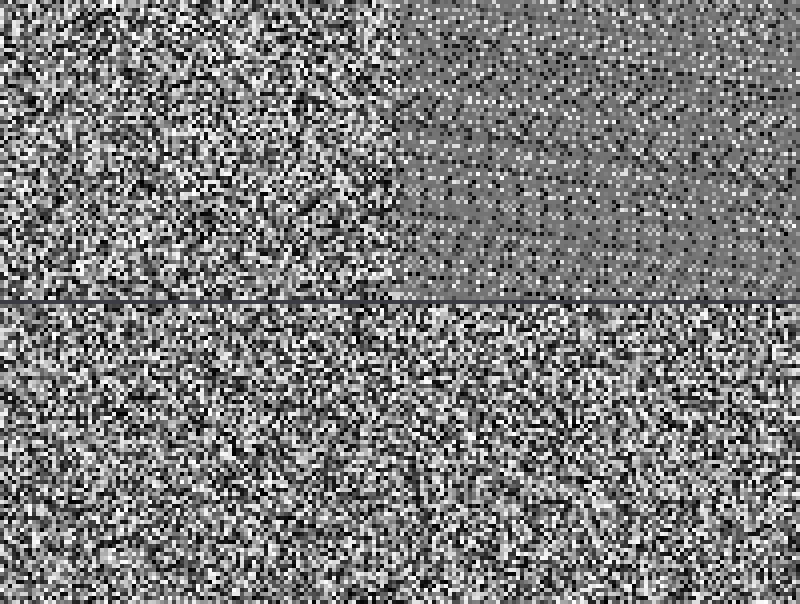
The top half of the picture is the sin hash: on the right a regular pattern of dots and stripes appears.
The bottom half is the integer hash from the next section, with exactly the same inputs: random on both sides.
(The screenshots were made with Mesa's software renderer, which runs on the CPU with an accurate sin, so it only breaks this far out. On real GPUs the sin hash can fail with much smaller numbers.)
Ten million sounds like a lot, but it is only about 2.8 hours of uTime in milliseconds, or a large open world in centimetres.
8.3 An integer hash
Since GLSL 1.30 (OpenGL 3.0) shaders have real 32-bit integers, int and uint, with the bit operations from C.
Integer arithmetic is exact and works the same on every GPU, so it is the right tool for hashing.
The idea is the same as in the random generators of C libraries: mix the bits with shifts, XORs and multiplications by large odd numbers, until every input bit affects every output bit.
This is the "lowbias32" hash by Chris Wellons, found by a computer search for the best constants:
// integer hash (lowbias32 by Chris Wellons): mixes all 32 bits well
uint hashU(uint x) {
  x ^= x >> 16u;
  x *= 0x7feb352du;
  x ^= x >> 15u;
  x *= 0x846ca68bu;
  x ^= x >> 16u;
  return x;
}
New GLSL features in these lines:
uintis an unsigned 32-bit integer. Literals need theusuffix (16u,0x7feb352du) to beuint; without it they areint. Desktop GLSL 4.00 and newer converts aninttouintautomatically (chapter 2), but GLSL 1.30 to 3.30 and GLSL ES 3.00 never mixintanduintin one operation, so theukeeps the hash portable.x >> 16ushifts the bits right by 16 places: the upper half moves into the lower half.^is bitwise XOR, sox ^= x >> 16umixes the upper bits into the lower bits.x *= 0x7feb352dumultiplies by a large odd number. The result does not fit in 32 bits, and likeunsignedin C, the extra bits are simply dropped: the result is modulo . Multiplication moves information from the lower bits into the upper bits, and the next shift brings it back down.
After five steps, changing one input bit changes about half of the output bits, which is what "looks random" means for bits.
To use it for 2D cells we need two more steps: turn the cell's float coordinates into uint, and turn the 32-bit result into a float between 0 and 1.
// a random number from 0 to 1 for a grid point (whole-number coordinates)
float hash21(vec2 cell) {
  uvec2 q = uvec2(ivec2(cell));   // negative numbers keep their bits
  return float(hashU(q.x + hashU(q.y)) >> 8u) / 16777216.0;
}

// two random numbers from 0 to 1 for a grid point
vec2 hash22(vec2 cell) {
  uvec2 q = uvec2(ivec2(cell));
  uint h = hashU(q.x + hashU(q.y));
  return vec2(float(h >> 8u), float(hashU(h) >> 8u)) / 16777216.0;
}
ivec2(cell)converts the float vector to integers (dropping the fraction, which is zero for cell numbers fromfloor).uvec2(...)reinterprets them as unsigned; for negative numbers GLSL keeps the bit pattern, so −1 becomes 4294967295 and every cell still gets a different number.hashU(q.x + hashU(q.y))hashes y first and adds x before hashing again. Simply adding x and y would give the cells (1, 2) and (2, 1) the same value.- A
floathas 24 bits of precision.>> 8ukeeps the top 24 bits of the hash, and dividing by turns them into a number from 0 to just below 1. Every possible value is exactly representable, so the result is evenly spread. hash22hashes the result once more to get a second, independent number.
Mark Jarzynski and Marc Olano compared many GPU hash functions in "Hash Functions for GPU Rendering" (2020); integer hashes like this one gave much better randomness than the sin hash at a similar cost.
uintand the bit operators need GLSL 1.30 or newer. Desktop OpenGL 3.0+ (including macOS's 4.1) and OpenGL ES 3.0 / WebGL 2 have them; OpenGL ES 2.0 and WebGL 1 do not (theirintmay not even be a real 32-bit integer), which is why the sin hash became popular there.
White noise is simply a hash per pixel (or per cell), like the bottom half of the picture above.
To make it flicker like an old TV, add the frame number to the input: hash21(cell + floor(uTime * 30.0) * vec2(37.0, 17.0)).
White noise is useful for grain and dithering, but it changes completely from one pixel to the next.
For clouds and terrain we need something smoother.
8.4 Value noise
The simplest smooth noise: put a random value on every grid point (every point with whole-number coordinates), and blend between them in between.
8.4.1 The idea in 1D
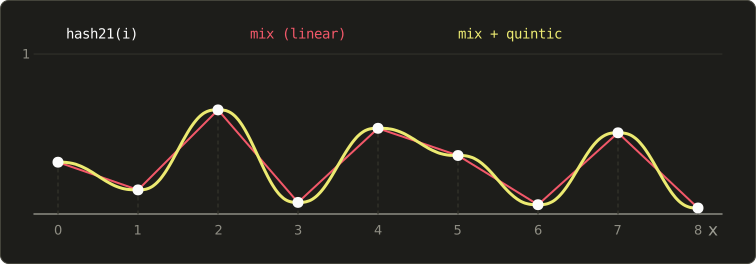
In one dimension: at every integer we take the random value , and between and we blend from to with mix, using the fractional part :
With (linear interpolation) we get straight lines with sharp corners at every integer (red in the picture).
With a smooth curve the corners disappear (yellow):
8.4.2 Choosing the curve
We know one smooth curve already: smoothstep's from chapter 6.
Its slope is 0 at both ends, so the pieces join without corners.
But its curvature (the second derivative, ) is 6 at and −6 at , so it jumps at every integer.
That is invisible in the noise itself, but it shows up as creases as soon as we use the noise as a height map and compute lighting from it (chapter 12), because lighting depends on the slope, and the slope's change jumps.
Ken Perlin's improved noise (2002) uses a fifth-degree curve whose first and second derivatives are 0 at both ends:
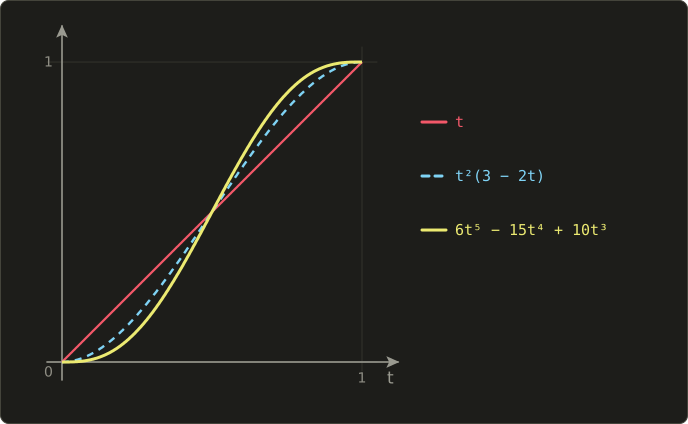
Check the ends: and .
The derivative is , which is 0 at and .
In code, written so it needs only a few multiplications (Horner's scheme):
// the quintic curve 6t^5 - 15t^4 + 10t^3 (first and second derivatives are 0 at both ends)
vec2 quintic(vec2 t) {
  return t * t * t * (t * (t * 6.0 - 15.0) + 10.0);
}
8.4.3 Value noise in 2D
In 2D a point lies inside a grid cell with four corners.
We take the random values of the bottom-left, bottom-right, top-left and top-right corners, blend along x on the bottom edge and on the top edge, and then blend those two results along y.
This is called bilinear interpolation (with a curve instead of a straight line):
// value noise: smoothly blended random values from the grid points (0 to 1)
float valueNoise(vec2 p) {
  vec2 i = floor(p);
  vec2 f = fract(p);
  float a = hash21(i);
  float b = hash21(i + vec2(1.0, 0.0));
  float c = hash21(i + vec2(0.0, 1.0));
  float d = hash21(i + vec2(1.0, 1.0));
  vec2 u = quintic(f);
  return mix(mix(a, b, u.x), mix(c, d, u.x), u.y);
}
A worked example with corner values , , , and the point at inside the cell:
Here is the same grid of random values (4 cells per unit) shown four ways, to compare the curves:
// value noise where only the interpolation curve changes
float valueNoiseWith(vec2 p, int mode) {
  vec2 i = floor(p);
  vec2 f = fract(p);
  float a = hash21(i);
  float b = hash21(i + vec2(1.0, 0.0));
  float c = hash21(i + vec2(0.0, 1.0));
  float d = hash21(i + vec2(1.0, 1.0));
  vec2 u = f;                                  // 0: linear
  if (mode == 1) u = f * f * (3.0 - 2.0 * f);  // 1: the cubic curve of smoothstep
  if (mode == 2) u = quintic(f);               // 2: the quintic curve
  return mix(mix(a, b, u.x), mix(c, d, u.x), u.y);
}

void main() {
  vec2 p = (2.0 * gl_FragCoord.xy - uResolution) / uResolution.y;
  vec2 q = p * 4.0;

  // from the left: the raw cell values, linear, cubic, quintic
  float x = gl_FragCoord.x / uResolution.x;
  float n;
  if (x < 0.25)      n = hash21(floor(q));
  else if (x < 0.5)  n = valueNoiseWith(q, 0);
  else if (x < 0.75) n = valueNoiseWith(q, 1);
  else               n = valueNoiseWith(q, 2);

  vec3 color = vec3(n);
  color *= smoothstep(0.0, 0.004, abs(fract(x * 4.0 + 0.5) - 0.5));  // dividing lines
  out_color = vec4(color, 1.0);
}
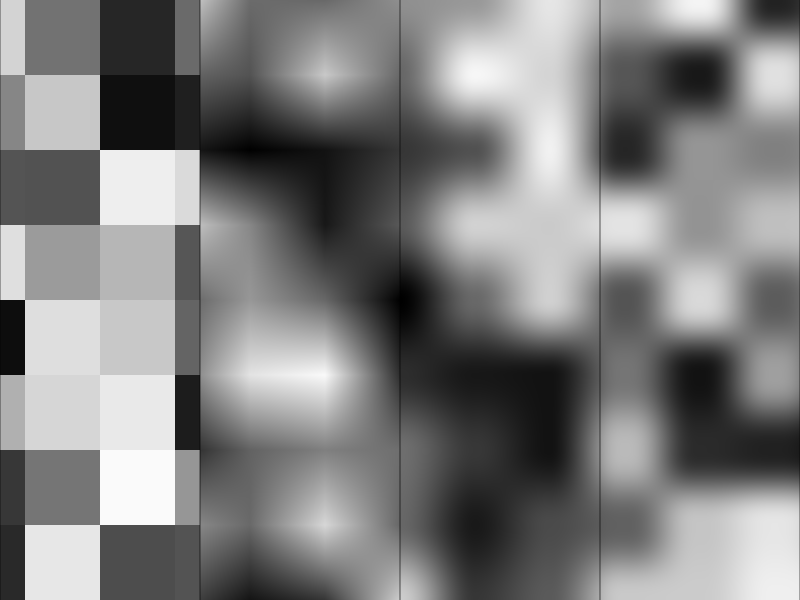
Linear interpolation shows bright and dark "stars" pointing along the grid lines.
The curves remove them, but you can still see the grid: value noise has its peaks and valleys exactly at the grid points, and the flat areas around them make the squares visible.
Gradient noise fixes that.
8.5 Gradient noise
Ken Perlin's idea (1985, the work that later won him an Academy Award for technical achievement) was to put a random slope on every grid point instead of a random value.
8.5.1 The idea in 1D
At every integer the noise is 0, and it leaves that point with a random slope .
Near the point the noise behaves like the straight line ; near like .
Between the two we blend these lines with the quintic curve:
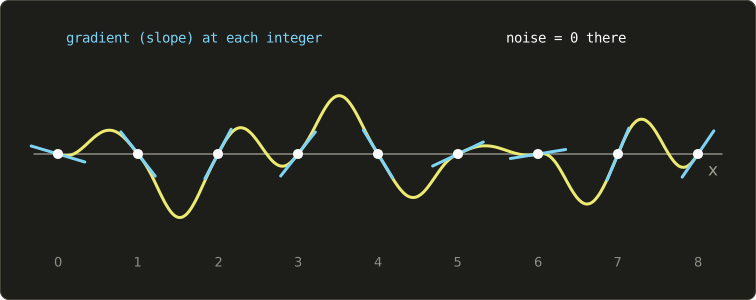
Because the highs and lows now fall between the grid points and not on them, the grid is much harder to see.
The noise values are centred on 0: about half the values are negative.
8.5.2 In 2D
In 2D each grid point gets a random unit vector (a gradient, the 2D version of a slope).
The "straight line" of a corner becomes a tilted plane: the dot product of the corner's gradient with the vector from that corner to the point (linear algebra chapter 4).
For the corner at , the vector to the point is ; for the corner at it is , and so on:
and then the same bilinear blend as value noise.
// a random unit vector for a grid point
vec2 gradient(vec2 cell) {
  float a = hash21(cell) * 6.2832;
  return vec2(cos(a), sin(a));
}

// gradient noise (a relative of Perlin noise): about -0.7 to 0.7
float gradientNoise(vec2 p) {
  vec2 i = floor(p);
  vec2 f = fract(p);
  float a = dot(gradient(i), f);
  float b = dot(gradient(i + vec2(1.0, 0.0)), f - vec2(1.0, 0.0));
  float c = dot(gradient(i + vec2(0.0, 1.0)), f - vec2(0.0, 1.0));
  float d = dot(gradient(i + vec2(1.0, 1.0)), f - vec2(1.0, 1.0));
  vec2 u = quintic(f);
  return mix(mix(a, b, u.x), mix(c, d, u.x), u.y);
}
The random unit vector is a random angle from 0 to , turned into a direction with cos and sin.
With unit gradients the result stays between about −0.71 and 0.71 ().
A worked example with the gradients , , , at the same point :
Side by side, value noise (left) and gradient noise (right, shown as 0.5 + 0.7 * n so it fits between 0 and 1):
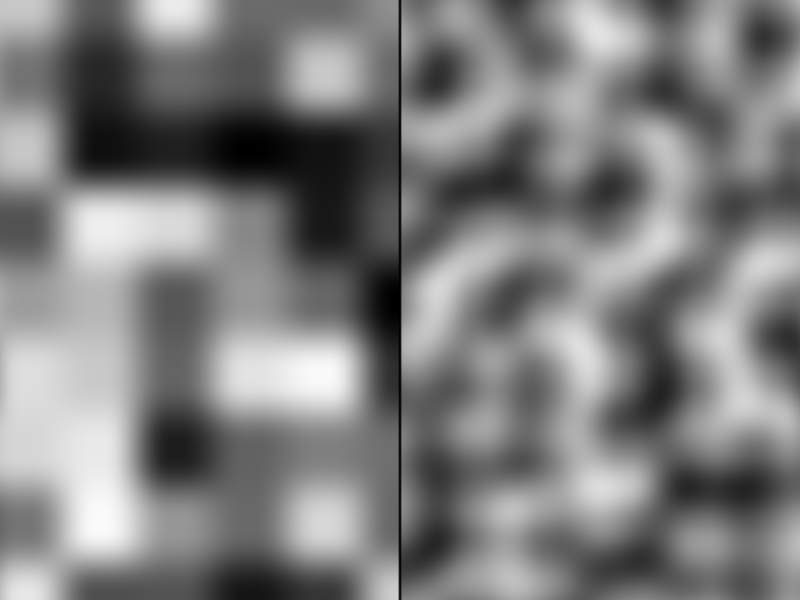
Gradient noise has no blocky structure; it looks like rounded, flowing shapes.
This is the noise most effects are built on.
Perlin's noise picks the gradients from a small fixed table using a permutation table, because in 1985 a hash per grid point was expensive (his improved noise of 2002 uses just 12 directions in 3D). Ours uses a hash and any direction; the result looks the same. Simplex noise (also by Perlin, 2001) uses triangles instead of squares, which is cheaper in higher dimensions and has even fewer directional artefacts. The 3D version of the gradient noise above looks at the 8 corners of a cube instead of 4.
8.6 Fractal noise: fBm
One layer of noise has one size of detail: at 4 cells per unit, the blobs are about a quarter unit wide.
Real surfaces have detail at every size: a mountain range has mountains, and each mountain has ridges, and each ridge has rocks.
The trick is to add several layers of noise, each with twice the frequency (smaller details) and half the amplitude (weaker):
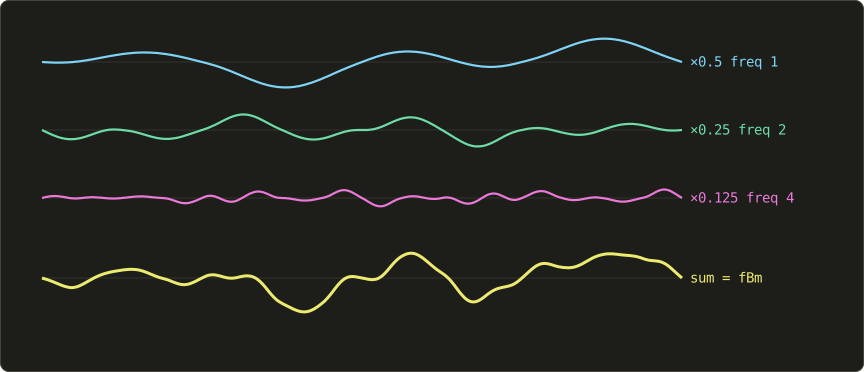
The names come from music and physics:
- Each layer is an octave, because doubling the frequency is an octave in music.
- is the lacunarity, the factor by which the frequency grows (usually 2).
- is the gain (or persistence), the factor by which the amplitude shrinks (usually 0.5).
- The sum is called fBm, fractional Brownian motion. With and it has the same statistical "roughness" as many natural surfaces.
With 6 octaves and , the amplitudes are , so fBm of gradient noise stays roughly in the same range as one octave.
// fBm (fractional Brownian motion): add up octaves
float fbm(vec2 p, int octaves) {
  float sum = 0.0;
  float amp = 0.5;
  for (int i = 0; i < octaves; i++) {
    sum += amp * gradientNoise(p);
    p = rot(0.6) * p * 2.0 + vec2(17.1, 9.3);  // double the frequency (rotate and shift to hide the grid)
    amp *= 0.5;                                // halve the amplitude
  }
  return sum;
}
Two details in the loop:
rot(0.6)(from chapter 7) turns each octave by about 34°. Without it, the grids of all octaves line up, and their grid lines add up to visible horizontal and vertical structure.+ vec2(17.1, 9.3)shifts each octave. Every octave has a zero at the grid point (0, 0); without the shift they would all be zero at the origin together.
octaves is a parameter, so the loop length is not a constant.
That is fine in desktop GLSL; in GLSL ES 1.00 (WebGL 1) loops must have a constant length.
From the left, 1, 2, 4 and 8 octaves of the same noise (shown as 0.5 + fbm):
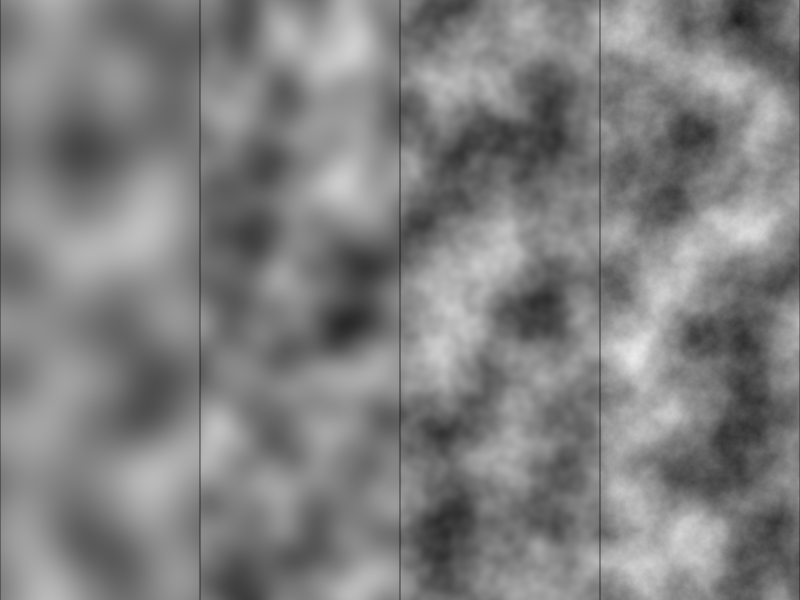
Every octave costs one more noise evaluation (four hashes and four dot products), so the octave count is a direct trade between detail and speed.
More octaves than there are pixels for the smallest detail are wasted work: at 3 cells per unit and 300 pixels per unit, the 7th octave is already at about 1.5 pixels per cell.
8.7 Domain warping
fBm looks like clouds or a rough surface, but a bit uniform.
A beautiful trick by Inigo Quilez: use noise to move the coordinates before reading the noise.
We already know from chapter 7 that changing the coordinates changes the shape; here the change is different for every pixel, so the pattern gets bent and swirled like a liquid:
The offset just makes the two components independent of each other.
And we can do it twice:
void main() {
  vec2 p = (2.0 * gl_FragCoord.xy - uResolution) / uResolution.y;
  vec2 q = p * 2.0;
  float t = uTime * 0.1;

  // step 1: fBm gives an offset
  vec2 w1 = vec2(fbm(q + vec2(0.0, 0.0) + t, 5), fbm(q + vec2(5.2, 1.3) - t, 5));
  // step 2: with the offset coordinates, make another offset
  vec2 w2 = vec2(fbm(q + 4.0 * w1 + vec2(1.7, 9.2), 5), fbm(q + 4.0 * w1 + vec2(8.3, 2.8), 5));
  // finally, read fBm at the coordinates moved twice
  float n = fbm(q + 4.0 * w2, 5);

  // colouring: the offsets are used for colour too
  vec3 color = mix(vec3(0.10, 0.20, 0.35), vec3(0.85, 0.55, 0.25), clamp(0.5 + 1.5 * n, 0.0, 1.0));
  color = mix(color, vec3(0.05, 0.05, 0.15), clamp(length(w1) * 1.2, 0.0, 1.0));
  color = mix(color, vec3(0.95, 0.90, 0.80), clamp(2.0 * w2.x * w2.x, 0.0, 1.0));
  out_color = vec4(color, 1.0);
}
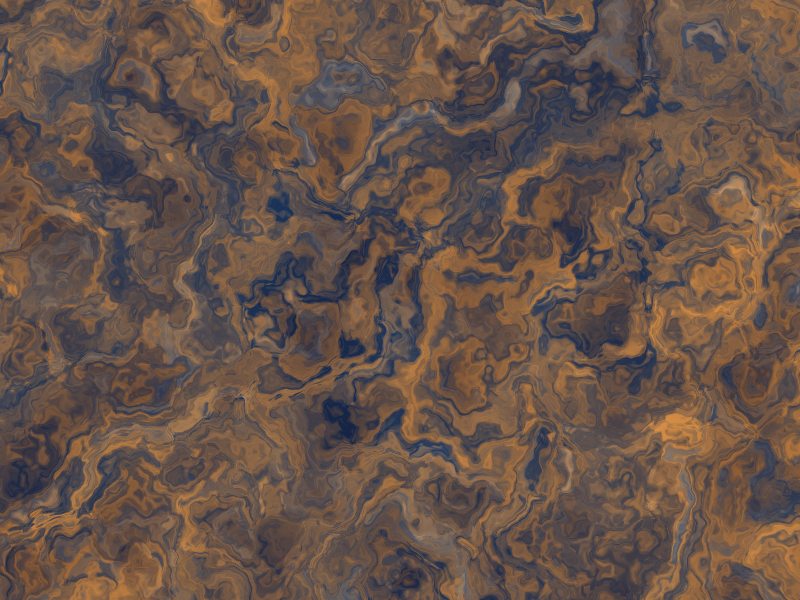
The result looks like marble, rust, smoke or the surface of Jupiter.
t slides the first layer slowly in opposite directions, so the pattern flows over time.
It is expensive: 5 fBm calls of 5 octaves each, 25 noise evaluations per pixel.
In a game you would compute something like this once into a texture rather than every frame.
8.8 Cellular noise (Voronoi)
A completely different kind of noise.
Scatter random points over the plane (one per grid cell), and for every pixel measure the distance to the nearest point.
The result looks like cells, scales, cracked mud, stone walls or the pattern on a giraffe.
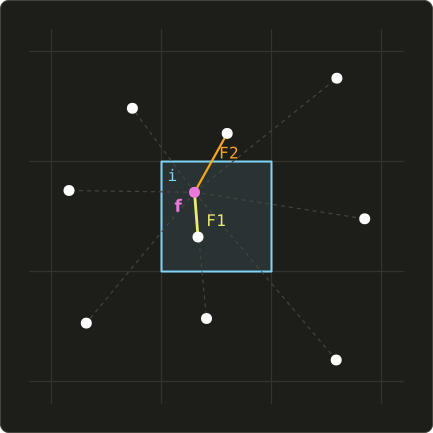
Each cell's point is at a random position inside its own cell (from hash22).
The nearest point to a pixel can be in its own cell or in one of the 8 neighbouring cells, so we check all 9.
This is the "check the neighbouring cells" idea from chapter 7.5: a pixel only knows its own cell, but it can compute the random values of the neighbours whenever it needs them.
We keep the two smallest distances: to the nearest point and to the second nearest.
// cellular (Voronoi) noise: distance to the nearest and the second nearest feature point
vec2 voronoi(vec2 p, float t) {
  vec2 i = floor(p);
  vec2 f = fract(p);
  float d1 = 8.0;
  float d2 = 8.0;
  for (int y = -1; y <= 1; y++) {
    for (int x = -1; x <= 1; x++) {
      vec2 o = vec2(float(x), float(y));
      vec2 h = hash22(i + o);
      vec2 pt = o + 0.5 + 0.4 * sin(t + 6.2832 * h);  // the neighbour cell's point (moving with time)
      float d = length(pt - f);
      if (d < d1) {
        d2 = d1;
        d1 = d;
      } else if (d < d2) {
        d2 = d;
      }
    }
  }
  return vec2(d1, d2);
}
All positions are relative to the current cell's corner i: the point of the neighbour cell o is at o + (something between 0 and 1), and the pixel is at f.
The points move on little circles with sin(t + 6.2832 * h), each with its own phase, and stay within 0.1 to 0.9 of their cell.
That keeps them far enough from the cell borders that the 3×3 search always finds the nearest one.
Different combinations of and give very different looks:
void main() {
  vec2 p = (2.0 * gl_FragCoord.xy - uResolution) / uResolution.y;
  vec2 q = p * 3.0;
  float x = gl_FragCoord.x / uResolution.x;

  vec2 v = voronoi(q, uTime);
  vec3 color;
  if (x < 1.0 / 3.0) {
    color = vec3(v.x);                                       // left: F1 (distance to the nearest point)
  } else if (x < 2.0 / 3.0) {
    color = vec3(1.0 - smoothstep(0.0, 0.06, v.y - v.x));    // middle: where F2 - F1 is small = borders
  } else {
    color = vec3(v.y - v.x);                                 // right: F2 - F1
  }
  color *= smoothstep(0.0, 0.004, abs(fract(x * 3.0 + 0.5) - 0.5));
  out_color = vec4(color, 1.0);
}
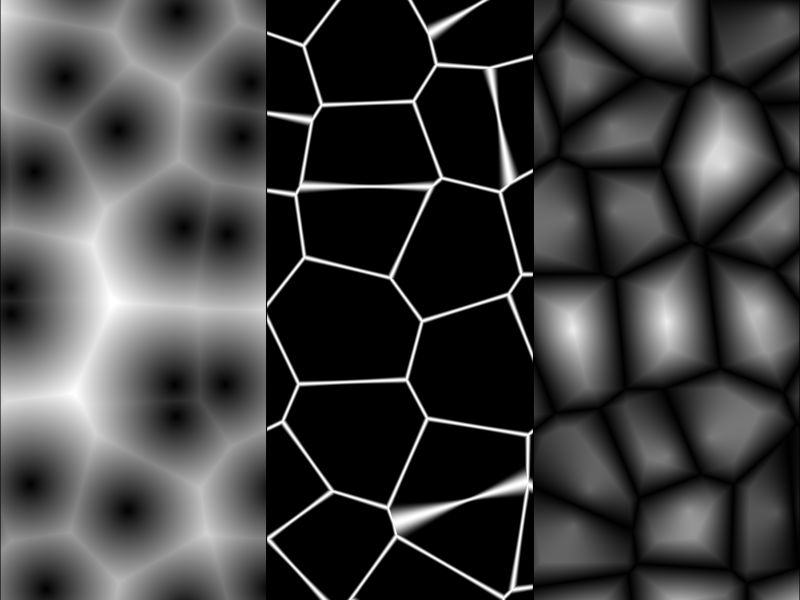
- alone: dark at every point, bright between them. Good for bubbles, spots and cells.
- is zero exactly where two points are equally near, which is the border between two cells. Thresholding it draws the borders (cracks, stone walls, a dragonfly's wing).
- itself makes every cell a little hill: stones, scales, cobblestones.
Look closely at the middle strip: the lines get wider where two feature points are close together.
is not the true distance to the border; it changes more slowly when the two points are close.
For exact border lines, a second pass measures the distance to the perpendicular bisector of the two nearest points (challenge 7).
8.9 Noise in effects
Noise on its own is just grey shapes.
The art is in what you connect it to.
8.9.1 Dissolve
A dissolve effect makes an object burn away or teleport out.
Each pixel compares the noise with a threshold: where the noise is lower, the pixel is already gone.
Moving the threshold from 0 to 1 eats the shape from its "weakest" places outwards, and the pixels whose noise is close to the threshold get a glowing edge:
void main() {
  vec2 p = (2.0 * gl_FragCoord.xy - uResolution) / uResolution.y;
  vec3 color = vec3(0.10, 0.10, 0.12);

  // a card that dissolves (the rounded box from chapter 6)
  float card = sdRoundBox(p, vec2(0.7, 0.5), 0.08);
  vec3 cardColor = mix(vec3(0.25, 0.45, 0.85), vec3(0.55, 0.80, 1.00), 0.5 + 0.5 * p.y);

  float n = 0.5 + fbm(p * 3.0, 5);                 // noise of about 0 to 1
  float threshold = 0.5 + 0.45 * sin(uTime * 0.8); // threshold moving up and down with time
  float edge = n - threshold;                      // negative where it has burnt away

  float alive = fill(card) * smoothstep(0.0, 0.01, edge);
  float burn = fill(card) * (1.0 - smoothstep(0.0, 0.06, abs(edge)));  // the burning edge
  color = mix(color, cardColor, alive);
  color += burn * vec3(1.0, 0.45, 0.1) * 1.5;
  out_color = vec4(color, 1.0);
}
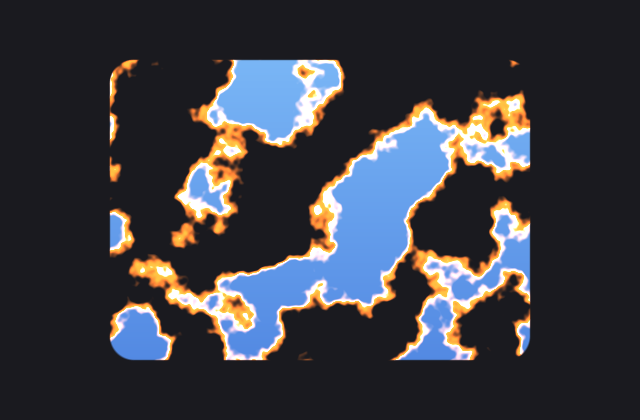
The glow is the outline trick from chapter 6 (abs(d) - w), applied to edge as if it were a distance.
Any function whose zero line is the border can be treated that way.
8.9.2 Fire
A simple flame: fBm that scrolls upwards with time (subtracting uTime from y moves the pattern up, by chapter 7's inverse rule), cut out by a shape that is wide at the bottom and narrow at the top, and coloured by "heat":
void main() {
  vec2 p = (2.0 * gl_FragCoord.xy - uResolution) / uResolution.y;

  // flame: noise flowing upwards, cut out by a shape that is wide at the bottom and thin at the top
  vec2 q = vec2(p.x * 2.5, p.y * 1.5 - uTime * 1.5);
  float n = 0.5 + fbm(q, 5);
  float shape = 1.0 - length(vec2(p.x * (1.8 + 1.2 * max(p.y, 0.0)), (p.y + 0.6) * 0.7));  // thinner upwards
  float heat = clamp(shape * 1.6 + (n - 0.5) * 1.2 - 0.2, 0.0, 1.0);

  // heat to colour: black, red, orange, yellow, white
  vec3 color = vec3(1.5 * heat, 1.5 * heat * heat, heat * heat * heat * heat);
  out_color = vec4(min(color, vec3(1.0)), 1.0);
}
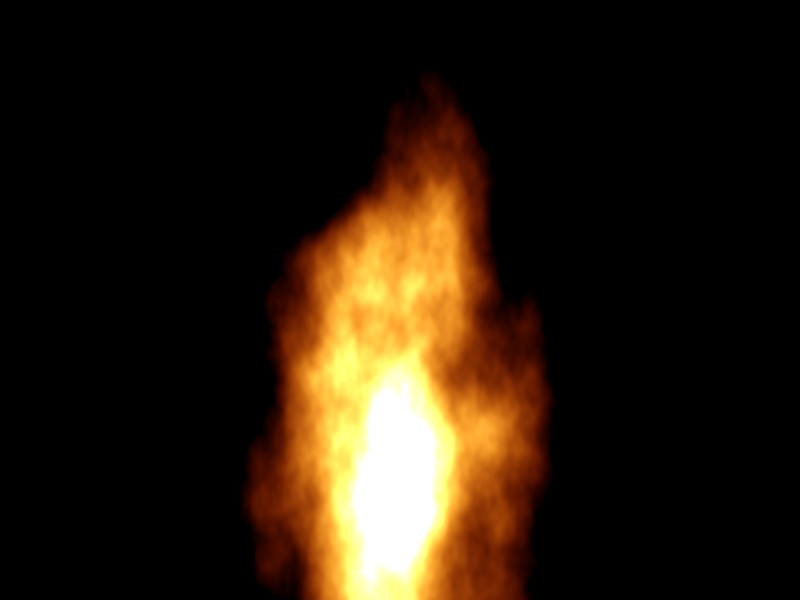
The colour ramp uses different powers of heat per channel: red rises first, green follows (squared), and blue only appears at the hottest places (fourth power), so cold is dark red and hot is white, like real fire.
8.10 Putting it together: a sunset landscape
The final playground.glsl of this chapter draws a whole landscape from noise: stars from a hash, a sun and its glow from a circle SDF, clouds from warped fBm, and three layers of mountains from 1D fBm.
The chapter 6 and 7 functions stay; the clock functions (bricks, sdHand, sdHands) are removed, and the noise functions from this chapter are added after repeatAngle.
// height of a mountain ridge: a function of x only (1D noise, with the layer number as y)
float ridge(float x, float layer) {
  return fbm(vec2(x, layer * 7.3), 5);
}

void main() {
  // origin in the centre, y from -1 to 1 (chapter 5)
  vec2 p = (2.0 * gl_FragCoord.xy - uResolution) / uResolution.y;
  float t = uTime;

  // sky: a sunset gradient
  vec3 color = mix(vec3(0.98, 0.55, 0.30), vec3(0.12, 0.10, 0.30), smoothstep(-0.3, 1.0, p.y));

  // stars: a random number per pixel cell, only a very few light up
  vec2 starCell = floor(gl_FragCoord.xy / 3.0);
  float star = step(0.996, hash21(starCell));
  float twinkle = 0.6 + 0.4 * sin(t * 3.0 + 6.2832 * hash21(starCell + 71.0));
  color += star * twinkle * smoothstep(0.3, 0.9, p.y) * vec3(0.9, 0.9, 1.0);

  // sun: a circle and a glow that fades with the distance (chapter 6)
  vec2 sunPos = vec2(0.45, -0.05);
  float sun = sdCircle(p - sunPos, 0.18);
  color += vec3(1.0, 0.6, 0.3) * 0.35 * exp(-4.0 * max(sun, 0.0));
  color = paint(color, vec3(1.0, 0.92, 0.70), sun);

  // clouds: slowly drifting, warped fBm
  vec2 cq = vec2(p.x * 1.2 + t * 0.03, p.y * 3.0);
  vec2 warp = vec2(fbm(cq + vec2(0.0, t * 0.05), 4), fbm(cq + vec2(3.7, 1.9), 4));
  float cloud = smoothstep(-0.05, 0.4, fbm(cq + 1.5 * warp, 6) + 0.25 * (p.y - 0.3));
  cloud *= smoothstep(0.0, 0.35, p.y);                              // none near the horizon
  vec3 cloudColor = mix(vec3(0.95, 0.55, 0.45), vec3(0.35, 0.25, 0.45), smoothstep(0.2, 0.9, p.y));
  color = mix(color, cloudColor, cloud * 0.85);

  // mountains: three layers from back to front, darker, bigger and more jagged towards the front
  for (int i = 0; i < 3; i++) {
    float k = float(i);
    float h = -0.15 - 0.22 * k + (0.35 - 0.05 * k) * ridge(p.x * (1.0 + 0.6 * k) + 3.1 * k, k);
    vec3 hill = mix(vec3(0.45, 0.30, 0.45), vec3(0.06, 0.05, 0.10), k / 2.0);
    hill = mix(hill, vec3(0.98, 0.55, 0.30), 0.25 * (1.0 - k / 2.0));  // far away mixes with the sky (haze)
    color = paint(color, hill, p.y - h);
  }

  out_color = vec4(color, 1.0);
}

How the parts work:
- Stars:
step(0.996, hash21(...))is 1 for about 0.4% of the 3×3 pixel cells. A second hash of the same cell (shifted by 71 so it is a different number) gives each star its own twinkle phase. White noise, used sparingly. - Mountains:
ridge(x, layer)reads 2D fBm along a horizontal line; using a different y for each layer gives three unrelated ridges. The pixel is inside the mountain if it is below the ridge, sop.y - hworks like a signed distance forpaint. It is not an exact distance, butfillonly needs its sign and its slope. - Depth: the back layers are lighter and tinted with the sky colour, the front layer is nearly black. This "aerial perspective" is how painters show distance, and fog in 3D games does the same (chapter 14).
- Clouds: domain-warped fBm, stretched horizontally (
p.y * 3.0squeezes them vertically), drifting witht * 0.03, faded out near the horizon.
Leave the tester running for a minute and the clouds slowly drift and change shape while the stars twinkle.
8.11 New GLSL features in this chapter
| Feature | What it does |
|---|---|
uint, uvec2 |
unsigned 32-bit integers (GLSL 1.30+) |
16u, 0x7feb352du |
unsigned integer literals (decimal and hexadecimal) |
^, &, >>, << |
bitwise XOR, AND, right shift and left shift, as in C |
uint overflow |
wraps around modulo 2 to the 32nd power, as in C |
ivec2(v), uvec2(v) |
convert to signed or unsigned integer vectors |
float(u) |
convert an integer to a float |
exp(x) |
(from chapter 6) |
for with a variable count |
allowed in desktop GLSL, not in GLSL ES 1.00 |
8.12 Noise in real games and engines
- Terrain. Height maps for open worlds start as fBm (often ridged noise,
1.0 - abs(noise), for sharp mountain ridges) and are then eroded and edited by hand. Minecraft's world generation is built from layers of 2D and 3D Perlin-style noise. - Clouds and fog. The volumetric clouds of Horizon Zero Dawn (Andrew Schneider's "The Real-time Volumetric Cloudscapes of Horizon Zero Dawn", SIGGRAPH 2015) combine Perlin and Worley (cellular) noise stored in 3D textures. Animated fog and smoke in many games scroll fBm through a volume.
- Water. Ripples and caustics are often scrolling noise or Voronoi patterns; foam on shores is noise thresholded with a dissolve-like edge.
- Fire, magic and dissolves. The dissolve from 8.9.1 is one of the most common shader effects in games: enemies burning away, teleport effects, a level fading in. The noise usually comes from a texture rather than being computed.
- Materials. Rust, dirt, scratches, marble and wood in procedural material tools (Substance Designer, Blender, Houdini) are noise, fBm, warping and Voronoi, mixed by masks.
- Dithering and sampling. Hashes and blue noise break up banding in gradients and spread out the samples of soft shadows and ambient occlusion (chapter 14), trading banding for fine grain that the eye accepts more easily.
- Precomputed noise. For speed, games often store noise in a tiling texture and read it with one texture fetch (chapter 11) instead of computing hashes every frame. Computing it in the shader is better when you need infinite, non-repeating detail or animation.
8.13 Summary
- A shader has no
rand(); it uses a hash, a function that turns an input into a random-looking but repeatable number. - The classic
fract(sin(dot(...)) * 43758.5453)depends onsinprecision and breaks for large inputs. Integer hashes withuint, shifts, XOR and multiplication are better and as fast. - Turn 24 bits of the hash into a float with
float(h >> 8u) / 16777216.0. - Value noise blends random values of the grid corners; gradient noise blends random slopes and hides the grid much better. Blend with the quintic .
- fBm adds octaves with doubled frequency (lacunarity) and halved amplitude (gain). Rotate and shift each octave.
- Domain warping feeds noise into the coordinates of noise; Voronoi measures distances to random points in the 3×3 neighbouring cells, giving and .
- Effects come from what you connect noise to: thresholds (dissolve), colour ramps (fire), heights (mountains), offsets (warping).
8.14 Challenges
- ★ Compute the value noise for corner values , , , at and at , using the quintic curve. (The first should come out as exactly 0.5.)
- ★ How many
hashUcalls does one pixel of 6-octave fBm ofgradientNoiseneed? And one pixel of the domain warp in 8.7? - ★★ Make the old TV effect: animated white noise in 2×2 pixel cells that changes 30 times per second, with dark horizontal scan lines and a slowly rolling brighter band. The noise must not show any pattern even after the tester has run for hours (use the integer hash, and
fractormodon the frame number if needed). - ★★ Change
fbminto ridged noise: addamp * (1.0 - abs(gradientNoise(p)))(squared for sharper ridges) instead ofamp * gradientNoise(p). Use it for the front mountain layer of the landscape. The front mountains should get sharp, rocky peaks while the back layers stay soft. - ★★ Draw a wood texture: take the distance from a point (like the rings of a tree trunk), add a little fBm to it, and use
fract(distance * 10.0)with a colour ramp from light to dark brown. The rings should be wobbly, not perfect circles. - ★★ Colour every Voronoi cell with its own random colour. Change
voronoiso that it also returns the cell id (i + o) of the nearest point, for example through anout vec2parameter, and usehash22or the cosine palette from chapter 7 on it. The cells should look like stained glass, with the borders drawn as dark lead lines. - ★★★ Fix the wide lines of the Voronoi borders: after finding the nearest point , loop over the neighbours again (5×5 to be safe) and for every other point compute the distance to the perpendicular bisector,
dot((m + r) * 0.5 - f, normalize(r - m)), keeping the smallest. Compare the result with the middle strip of 8.8; the lines should now have the same width everywhere. Explain why this is the true distance to the border, using the projection from linear algebra chapter 4.
ファイル: a/shader/playground.glsl | b/shader/playground.glsl
| 前 | 新 | ||
|---|---|---|---|
| @@ -64,18 +64,6 @@ float fillPx(float d) { | |||
| 64 | return 1.0 - smoothstep(-px, px, d); | 64 | return 1.0 - smoothstep(-px, px, d); |
| 65 | } | 65 | } |
| 66 | 66 | ||
| 67 | // レンガの壁(第7章のタイル) | ||
| 68 | vec3 bricks(vec2 p) { | ||
| 69 | vec2 size = vec2(0.4, 0.2); | ||
| 70 | vec2 q = p / size; | ||
| 71 | q.x += 0.5 * mod(floor(q.y), 2.0); // 1段おきに半分ずらす | ||
| 72 | vec2 id = floor(q); | ||
| 73 | vec2 f = (fract(q) - 0.5) * size; | ||
| 74 | float d = sdRoundBox(f, size * 0.5 - 0.012, 0.02); | ||
| 75 | float shade = 0.85 + 0.15 * cos(id.x * 2.7 + id.y * 5.1); | ||
| 76 | return mix(vec3(0.55, 0.53, 0.50), vec3(0.70, 0.32, 0.22) * shade, fillPx(d)); | ||
| 77 | } | ||
| 78 | |||
| 79 | // 角度の繰り返し:pを一番近い区画の中心(x軸上)に回す | 67 | // 角度の繰り返し:pを一番近い区画の中心(x軸上)に回す |
| 80 | vec2 repeatAngle(vec2 p, float count) { | 68 | vec2 repeatAngle(vec2 p, float count) { |
| 81 | float sector = 6.2832 / count; | 69 | float sector = 6.2832 / count; |
| @@ -83,54 +71,142 @@ vec2 repeatAngle(vec2 p, float count) { | |||
| 83 | return rot(-k * sector) * p; | 71 | return rot(-k * sector) * p; |
| 84 | } | 72 | } |
| 85 | 73 | ||
| 86 | // 針:12時の方向を向いたカプセルを、時計回りに回す | 74 | // ---- 第8章:乱数とノイズ ---- |
| 87 | // 座標をrot(+a)で回すと、図形は-a、つまり時計回りに回る | 75 | |
| 88 | float sdHand(vec2 p, float turn, float back, float len, float width) { | 76 | // 整数ハッシュ(Chris Wellonsのlowbias32):32ビットをよく掻き混ぜる |
| 89 | vec2 q = rot(turn * 6.2832) * p; | 77 | uint hashU(uint x) { |
| 90 | return sdSegment(q, vec2(0.0, -back), vec2(0.0, len)) - width; | 78 | x ^= x >> 16u; |
| 79 | x *= 0x7feb352du; | ||
| 80 | x ^= x >> 15u; | ||
| 81 | x *= 0x846ca68bu; | ||
| 82 | x ^= x >> 16u; | ||
| 83 | return x; | ||
| 91 | } | 84 | } |
| 92 | 85 | ||
| 93 | // 時針と分針を1つの距離に(影にも使う) | 86 | // 格子点(整数の座標)から0〜1の乱数を1つ |
| 94 | float sdHands(vec2 p, float t) { | 87 | float hash21(vec2 cell) { |
| 95 | float h = sdHand(p, fract(t / 43200.0), 0.08, 0.36, 0.028); // 時針:12時間で1周 | 88 | uvec2 q = uvec2(ivec2(cell)); // 負の数もビットのまま変換される |
| 96 | float m = sdHand(p, fract(t / 3600.0), 0.10, 0.54, 0.018); // 分針:1時間で1周 | 89 | return float(hashU(q.x + hashU(q.y)) >> 8u) / 16777216.0; |
| 97 | return min(h, m); | ||
| 98 | } | 90 | } |
| 99 | 91 | ||
| 100 | void main() { | 92 | // 格子点から0〜1の乱数を2つ |
| 101 | // 中心が原点、縦が-1〜1になる座標(第5章) | 93 | vec2 hash22(vec2 cell) { |
| 102 | vec2 p = (2.0 * gl_FragCoord.xy - uResolution) / uResolution.y; | 94 | uvec2 q = uvec2(ivec2(cell)); |
| 95 | uint h = hashU(q.x + hashU(q.y)); | ||
| 96 | return vec2(float(h >> 8u), float(hashU(h) >> 8u)) / 16777216.0; | ||
| 97 | } | ||
| 98 | |||
| 99 | // 5次の補間曲線 6t^5 - 15t^4 + 10t^3(両端で1階と2階の微分が0) | ||
| 100 | vec2 quintic(vec2 t) { | ||
| 101 | return t * t * t * (t * (t * 6.0 - 15.0) + 10.0); | ||
| 102 | } | ||
| 103 | 103 | ||
| 104 | // 10時10分0秒から始まる時刻(秒) | 104 | // バリューノイズ:格子点の乱数を滑らかに補間(0〜1) |
| 105 | float t = uTime + 10.0 * 3600.0 + 10.0 * 60.0; | 105 | float valueNoise(vec2 p) { |
| 106 | vec2 i = floor(p); | ||
| 107 | vec2 f = fract(p); | ||
| 108 | float a = hash21(i); | ||
| 109 | float b = hash21(i + vec2(1.0, 0.0)); | ||
| 110 | float c = hash21(i + vec2(0.0, 1.0)); | ||
| 111 | float d = hash21(i + vec2(1.0, 1.0)); | ||
| 112 | vec2 u = quintic(f); | ||
| 113 | return mix(mix(a, b, u.x), mix(c, d, u.x), u.y); | ||
| 114 | } | ||
| 106 | 115 | ||
| 107 | // 背景:少し暗くしたレンガの壁 | 116 | // 格子点のランダムな単位ベクトル |
| 108 | vec3 color = bricks(p) * 0.55; | 117 | vec2 gradient(vec2 cell) { |
| 118 | float a = hash21(cell) * 6.2832; | ||
| 119 | return vec2(cos(a), sin(a)); | ||
| 120 | } | ||
| 109 | 121 | ||
| 110 | // 時計の影 | 122 | // グラディエントノイズ(パーリンノイズの仲間):約-0.7〜0.7 |
| 111 | float shadow = sdCircle(p - vec2(0.04, -0.06), 0.8); | 123 | float gradientNoise(vec2 p) { |
| 112 | color *= 1.0 - 0.6 * (1.0 - smoothstep(-0.05, 0.1, shadow)); | 124 | vec2 i = floor(p); |
| 125 | vec2 f = fract(p); | ||
| 126 | float a = dot(gradient(i), f); | ||
| 127 | float b = dot(gradient(i + vec2(1.0, 0.0)), f - vec2(1.0, 0.0)); | ||
| 128 | float c = dot(gradient(i + vec2(0.0, 1.0)), f - vec2(0.0, 1.0)); | ||
| 129 | float d = dot(gradient(i + vec2(1.0, 1.0)), f - vec2(1.0, 1.0)); | ||
| 130 | vec2 u = quintic(f); | ||
| 131 | return mix(mix(a, b, u.x), mix(c, d, u.x), u.y); | ||
| 132 | } | ||
| 113 | 133 | ||
| 114 | // 枠と文字盤 | 134 | // fBm(非整数ブラウン運動):オクターブを重ねる |
| 115 | float rim = sdCircle(p, 0.8); | 135 | float fbm(vec2 p, int octaves) { |
| 116 | float face = sdCircle(p, 0.72); | 136 | float sum = 0.0; |
| 117 | color = paint(color, vec3(0.20, 0.18, 0.22), rim); | 137 | float amp = 0.5; |
| 118 | color = paint(color, vec3(0.96, 0.93, 0.85), face); | 138 | for (int i = 0; i < octaves; i++) { |
| 139 | sum += amp * gradientNoise(p); | ||
| 140 | p = rot(0.6) * p * 2.0 + vec2(17.1, 9.3); // 周波数を2倍に(回してずらし、格子を隠す) | ||
| 141 | amp *= 0.5; // 振幅を半分に | ||
| 142 | } | ||
| 143 | return sum; | ||
| 144 | } | ||
| 119 | 145 | ||
| 120 | // 目盛り:60個の小さい物と12個の大きい物 | 146 | // セルラー(ボロノイ)ノイズ:一番近い特徴点と2番目に近い特徴点までの距離 |
| 121 | float minuteTick = sdBox(repeatAngle(p, 60.0) - vec2(0.65, 0.0), vec2(0.025, 0.004)); | 147 | vec2 voronoi(vec2 p, float t) { |
| 122 | float hourTick = sdBox(repeatAngle(p, 12.0) - vec2(0.62, 0.0), vec2(0.06, 0.014)); | 148 | vec2 i = floor(p); |
| 123 | color = paint(color, vec3(0.25), minuteTick); | 149 | vec2 f = fract(p); |
| 124 | color = paint(color, vec3(0.12), hourTick); | 150 | float d1 = 8.0; |
| 151 | float d2 = 8.0; | ||
| 152 | for (int y = -1; y <= 1; y++) { | ||
| 153 | for (int x = -1; x <= 1; x++) { | ||
| 154 | vec2 o = vec2(float(x), float(y)); | ||
| 155 | vec2 h = hash22(i + o); | ||
| 156 | vec2 pt = o + 0.5 + 0.4 * sin(t + 6.2832 * h); // 隣のマスの特徴点(時間で揺れる) | ||
| 157 | float d = length(pt - f); | ||
| 158 | if (d < d1) { | ||
| 159 | d2 = d1; | ||
| 160 | d1 = d; | ||
| 161 | } else if (d < d2) { | ||
| 162 | d2 = d; | ||
| 163 | } | ||
| 164 | } | ||
| 165 | } | ||
| 166 | return vec2(d1, d2); | ||
| 167 | } | ||
| 125 | 168 | ||
| 126 | // 針の影、時針と分針 | 169 | // 山の稜線の高さ:xだけの関数(1Dのノイズとして、yに層毎の番号を入れる) |
| 127 | color *= 1.0 - 0.3 * (1.0 - smoothstep(-0.02, 0.03, sdHands(p - vec2(0.015, -0.025), t))); | 170 | float ridge(float x, float layer) { |
| 128 | color = paint(color, vec3(0.12, 0.12, 0.15), sdHands(p, t)); | 171 | return fbm(vec2(x, layer * 7.3), 5); |
| 172 | } | ||
| 129 | 173 | ||
| 130 | // 秒針:1秒毎にカチッと動く | 174 | void main() { |
| 131 | float second = sdHand(p, fract(floor(t) / 60.0), 0.15, 0.6, 0.006); | 175 | // 中心が原点、縦が-1〜1になる座標(第5章) |
| 132 | second = min(second, sdCircle(p, 0.035)); | 176 | vec2 p = (2.0 * gl_FragCoord.xy - uResolution) / uResolution.y; |
| 133 | color = paint(color, vec3(0.85, 0.15, 0.15), second); | 177 | float t = uTime; |
| 178 | |||
| 179 | // 空:夕焼けのグラデーション | ||
| 180 | vec3 color = mix(vec3(0.98, 0.55, 0.30), vec3(0.12, 0.10, 0.30), smoothstep(-0.3, 1.0, p.y)); | ||
| 181 | |||
| 182 | // 星:画素の格子毎の乱数で、ごく一部だけ光らせる | ||
| 183 | vec2 starCell = floor(gl_FragCoord.xy / 3.0); | ||
| 184 | float star = step(0.996, hash21(starCell)); | ||
| 185 | float twinkle = 0.6 + 0.4 * sin(t * 3.0 + 6.2832 * hash21(starCell + 71.0)); | ||
| 186 | color += star * twinkle * smoothstep(0.3, 0.9, p.y) * vec3(0.9, 0.9, 1.0); | ||
| 187 | |||
| 188 | // 太陽:円と、距離で弱くなる光彩(第6章) | ||
| 189 | vec2 sunPos = vec2(0.45, -0.05); | ||
| 190 | float sun = sdCircle(p - sunPos, 0.18); | ||
| 191 | color += vec3(1.0, 0.6, 0.3) * 0.35 * exp(-4.0 * max(sun, 0.0)); | ||
| 192 | color = paint(color, vec3(1.0, 0.92, 0.70), sun); | ||
| 193 | |||
| 194 | // 雲:ゆっくり流れる、ずらしたfBm | ||
| 195 | vec2 cq = vec2(p.x * 1.2 + t * 0.03, p.y * 3.0); | ||
| 196 | vec2 warp = vec2(fbm(cq + vec2(0.0, t * 0.05), 4), fbm(cq + vec2(3.7, 1.9), 4)); | ||
| 197 | float cloud = smoothstep(-0.05, 0.4, fbm(cq + 1.5 * warp, 6) + 0.25 * (p.y - 0.3)); | ||
| 198 | cloud *= smoothstep(0.0, 0.35, p.y); // 地平線の近くには出さない | ||
| 199 | vec3 cloudColor = mix(vec3(0.95, 0.55, 0.45), vec3(0.35, 0.25, 0.45), smoothstep(0.2, 0.9, p.y)); | ||
| 200 | color = mix(color, cloudColor, cloud * 0.85); | ||
| 201 | |||
| 202 | // 山:奥から手前へ3層。手前程暗く、大きく、ギザギザに | ||
| 203 | for (int i = 0; i < 3; i++) { | ||
| 204 | float k = float(i); | ||
| 205 | float h = -0.15 - 0.22 * k + (0.35 - 0.05 * k) * ridge(p.x * (1.0 + 0.6 * k) + 3.1 * k, k); | ||
| 206 | vec3 hill = mix(vec3(0.45, 0.30, 0.45), vec3(0.06, 0.05, 0.10), k / 2.0); | ||
| 207 | hill = mix(hill, vec3(0.98, 0.55, 0.30), 0.25 * (1.0 - k / 2.0)); // 遠くは空の色が混ざる(霞) | ||
| 208 | color = paint(color, hill, p.y - h); | ||
| 209 | } | ||
| 134 | 210 | ||
| 135 | out_color = vec4(color, 1.0); | 211 | out_color = vec4(color, 1.0); |
| 136 | } | 212 | } |
コメント(0)
まだコメントはありません。
ログインするとコメント出来ます。