14. モデルの読み込み
第13章では、glTF又はGLBのファイルを普通のC++の構造体にしました。
readFloatsとreadIndicesで読めるアクセサー、imageDataで取り出せる埋め込み画像、マテリアル、そして其々localTransform()を持つノードの木です。
まだ何も描いていません。
此の章で、やっとデータがGPUに届きます。
Modelクラスを書きます。
全てのプリミティブをMeshにアップロードし、埋め込まれたPNGのテクスチャをデコードし、glTFのPBRマテリアルを第11章のBlinn-PhongのMaterialに変換し、ノードの階層を各ノードに正しい行列で描きます。
其の後、第12章で手で置いた立方体を、風車のジオラマと幾つかの木箱に置き換えます。
全部ファイルから読み込んだ物です。
そして1つのノードの1つの数字を変えるだけで、風車を動かします。
14.1 此の章で作る物
第9章の石の床の上に、丸い芝生のジオラマがあります。
羽根が回る風車、木、岩が2つ、街灯、積まれた木箱、そして2つ目のファイルから読み込んで周りに置いた5つの木箱です。
昼は太陽がシーンを照らし、夜は月が弱く、街灯が本物の点光源になります。
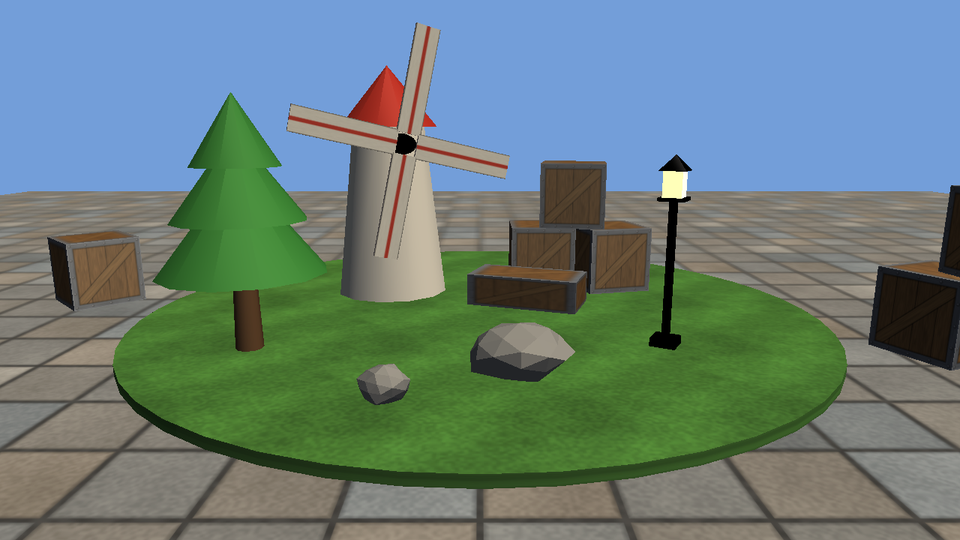
操作は第12章と同じで、4つ変わりました(ライトのグループを切り替える1、2、3のキーは無くなりました):
- W、A、S、D、スペース、左Ctrl、Shift、マウス、ホイール:今迄通り移動と見回し
- C:FPSカメラ ⇔ オービットカメラ、V:表示モード(全部、環境光、拡散、鏡面、発光、法線)
- N:昼 ⇔ 夜(新規)
- F:懐中電灯のオン・オフ(最初はオフになりました)
- P:風車を止める・回す(意味が変わりました)
- H:ノードの階層のオン・オフ。親 × 子が無いとどうなるかを見る為(新規)
- Tab:カーソルの解放、R:シェーダーを読み直す、Esc:終了
プログラムはファイル名を1つ受け取る事も出来ます。
./build/game assets/models/crate.glbとすると、ジオラマの代わりに其のモデルがシーンの真ん中に置かれます。
第13章からの変更:
src/model.hhとsrc/model.cc(新規):Modelクラスsrc/mesh.hh:接線付きのModelVertexと其のレイアウトsrc/texture.hhとsrc/texture.cc:メモリ上の画像の為のImageとdecodeImage()src/main.cc:新しいシーン、昼と夜、動く風車CMakeLists.txt:gameがjson.cc、gltf.cc、model.ccもコンパイルする様に
シェーダーは全く変わりません。
モデルは第12章のphong.vertとphong.fragで描きます。
其れが14.6節のマテリアル変換の要点です。
assets/models/のファイルは、第13章で生成し、gltf_dumpで中身を確かめた物です。
14.2 計画:何を何処に置くか
glTFのファイルとあたし達のレンダラーは、物の整理の仕方が違います。
glTFにはプリミティブ(其々が自分の属性、インデックス、マテリアルを持つ)から成るメッシュがあり、マテリアルはテクスチャを指し、テクスチャは画像とサンプラーを指し、ノードはメッシュを指します。
あたし達のレンダラーにはMesh(VAOが1つ、描画呼び出しが1回)、Texture2D、Materialがあります。
対応は素直です:
| glTF | Model | 用途 |
|---|---|---|
| プリミティブ | Meshを持つPrimitive |
描画呼び出し1回 |
| メッシュ | MeshData(プリミティブのリスト) |
ノードが描く物 |
| テクスチャ+画像+サンプラー | Texture2D |
拡散マップと発光マップ |
| マテリアル | MaterialData(PBRの元の値+Blinn-Phongの複製) |
Material::apply |
| ノード | GltfNode(其のまま) |
シーングラフ |
ヘッダーsrc/model.hhの全体です:
// 読み込んだモデル:メッシュ(VAO)、テクスチャ、マテリアル、ノードの階層(RAII、コピー不可・移動可)。
// 描くときは、ノードごとに 親のワールド行列 × 自分のローカル行列 をたどる。
// A loaded model: meshes (VAOs), textures, materials and the node hierarchy (RAII, non-copyable, movable).
// Drawing walks the nodes, each with world = parent's world × its own local matrix.
class Model {
public:
  // プリミティブ一つ=描画呼び出し一回 / one primitive = one draw call
  struct Primitive {
    Mesh mesh;
    int material = -1;   // materialsの番号、-1 = 既定 / index into materials, -1 = the default
    Vec3 boundsMin, boundsMax; // モデル座標の箱 / box in model space
  };
  struct MeshData {
    std::string name;
    std::vector<Primitive> primitives;
  };
  // glTFのPBRマテリアルと、それを近似したBlinn-Phongのマテリアル(マップは描くときに繋ぐ)
  // The glTF PBR material and the Blinn-Phong material approximating it (maps are attached at draw time)
  struct MaterialData {
    GltfMaterial pbr;
    Material phong;
  };

  Model() = default;
  Model(const Model &) = delete;
  Model &operator=(const Model &) = delete;
  Model(Model &&) noexcept = default;
  Model &operator=(Model &&) noexcept = default;

  // .glb/.gltfを読み、GPUに載せる。失敗したらエラーを表示してstd::nullopt。
  // Loads a .glb/.gltf and uploads it to the GPU. On failure prints the error and returns std::nullopt.
  static std::optional<Model> load(const std::string &path);

  // transform(モデル全体の置き場所)で描く。マップのないマテリアルにはwhiteを繋ぐ。
  // hierarchy = falseなら親の変換を無視する(なぜ親×子が必要かを見せるため)。
  // Draws with transform (where the whole model goes). Binds `white` for missing maps.
  // hierarchy = false ignores the parents' transforms (to show why parent × child is needed).
  void draw(const Shader &shader, const Mat4 &transform, const Texture2D &white, bool hierarchy = true) const;

  // 名前でノードを探す。なければ-1 / finds a node by name; -1 if none
  int findNode(std::string_view name) const;
  // ノードのモデル座標での行列(ルートからの積)。描く場所はtransform × これ
  // A node's matrix in model space (the product from the root). It is drawn at transform × this
  Mat4 nodeTransform(int node) const;

  // ノードは公開:translation・rotation・scaleを書き換えると動かせる(行列のノードは動かせない)
  // The nodes are public: change translation / rotation / scale to animate them (matrix nodes cannot be animated)
  std::vector<GltfNode> nodes;
  std::vector<int> roots;            // 描き始めるノード / the nodes drawing starts from
  Vec3 boundsMin, boundsMax;         // モデル全体の箱(読み込んだときの姿勢) / box around the whole model (as loaded)

  size_t meshCount() const { return meshes.size(); }
  size_t primitiveCount() const;
  size_t materialCount() const { return materials.size(); }
  size_t textureCount() const { return textures.size(); }

private:
  void drawNode(int node, const Mat4 &parentWorld, const Mat4 &transform, const Shader &shader,
                const Texture2D &white, bool hierarchy) const;
  const Texture2D *texture(int index) const; // なければnullptr / nullptr if missing

  std::vector<MeshData> meshes;
  std::vector<Texture2D> textures; // glTFのtexturesと同じ番号 / same indices as the glTF textures
  std::vector<MaterialData> materials;
  MaterialData defaultMaterial;
};
注目する価値のある設計上の決定が幾つかあります:
- glTFの番号は其のまま使える。
textures[i]はglTFのtextures[i]、materials[i]はmaterials[i]、meshes[i]はmeshes[i]で、nodesは単純な複製です。其の為、プリミティブのmaterialもノードのmeshも、変換表無しで其のまま使えます。 - コピー不可・移動可。 第3章以来の全てのGLのラッパーと同じです。メンバー(
Mesh、Texture2D、vector)は全て既に移動出来るので、= defaultで十分です。loadはstd::optional<Model>を返し、Shader::loadやTexture2D::loadと同じ形です。 - ノードは公開。 CPU側の
GltfNodeこそが、あたし達のシーングラフです。何かを動かすには、ノードのtranslation、rotation又はscaleを変えれば、次のdrawが其れを使います(14.9節)。 MaterialDataは元のPBRマテリアルを持っておく。 今は近似で描きますが、第24章では本当の値が必要になります。
14.3 モデルの為の頂点
glTFのプリミティブは接線(TANGENT、VEC4)を持てます。
第22章の法線マッピングで必要になる物です。
其の時に全てのモデルの頂点形式をもう一度変えるより、今のうちにmesh.hhにモデル用の頂点を作っておきます:
// モデル(glTF)の頂点:Vertex3Dに接線を足したもの。接線は第22章の法線マッピングで使う。
// wは従法線の向き(±1):従法線 = cross(normal, tangent.xyz) * tangent.w。接線がなければ (0, 0, 0, 0)。
// A model (glTF) vertex: Vertex3D plus a tangent, used for normal mapping in chapter 22.
// w is the bitangent's sign (±1): bitangent = cross(normal, tangent.xyz) * tangent.w. (0, 0, 0, 0) if there is none.
struct ModelVertex {
  Vec3 position;
  Vec3 normal;
  Vec2 uv;
  Vec4 tangent;
};

constexpr VertexAttrib kModelVertexLayout[] = {
  {0, 3, offsetof(ModelVertex, position)}, // layout(location = 0) in vec3 aPosition
  {1, 3, offsetof(ModelVertex, normal)},   // layout(location = 1) in vec3 aNormal
  {2, 2, offsetof(ModelVertex, uv)},       // layout(location = 2) in vec2 aUv
  {3, 4, offsetof(ModelVertex, tangent)},  // layout(location = 3) in vec4 aTangent(第22章 / chapter 22)
};
ロケーション0〜2はVertex3Dと全く同じなので、phong.vertは何も変えずにModelVertexを読めます。
ロケーション3はVAOで有効になっていますが、まだ其処に入力を持つシェーダーはありません。
其れで問題ありません。
頂点シェーダーが使わない属性を、OpenGLは単に読み込まないだけです。
ModelVertexは48バイト(12 + 12 + 8 + 16)で、第4章のMeshのテンプレートのコンストラクターは他の頂点構造体と同じ様に其れを受け取り、ストライドをsizeof(ModelVertex)から取ります。
14.4 プリミティブのアップロード
model.ccは、glTFのプリミティブ1つをModel::Primitiveにする関数から始まります。
staticで(Model::loadしか使わない)、描けないプリミティブにはstd::nulloptを返します。
属性を読む
static std::optional<Model::Primitive> loadPrimitive(const Gltf &g, const GltfPrimitive &p, const std::string &where) {
  // 属性を読む。型が合わないものは無視する / read the attributes; ignore those with an unexpected type
  auto read = [&](const char *name, int components) -> std::optional<std::vector<float>> {
    int accessor = p.attribute(name);
    if (accessor < 0) return std::nullopt;
    if (g.accessors[static_cast<size_t>(accessor)].components != components) {
      fprintf(stderr, "%s: %s: %s の型が違うので無視 / unexpected type, ignored\n", g.path.c_str(), where.c_str(), name);
      return std::nullopt;
    }
    return g.readFloats(accessor);
  };

  std::optional<std::vector<float>> positions = read("POSITION", 3);
  if (!positions) {
    fprintf(stderr, "%s: %s: POSITIONがないので描かない / no POSITION, skipped\n", g.path.c_str(), where.c_str());
    return std::nullopt;
  }
  std::optional<std::vector<float>> normals = read("NORMAL", 3);
  std::optional<std::vector<float>> uvs = read("TEXCOORD_0", 2);
  std::optional<std::vector<float>> tangents = read("TANGENT", 4);
大変な仕事は全て第13章で済ませました。
readFloatsはどんな成分の型(float、KHR_mesh_quantizationの正規化されたbyteやshort)も、どんなbyteStrideも、疎なアクセサーも扱い、ローダーは全てのアクセサーがバッファの中に収まっている事を既に確かめています。
此処に残っているのは型の確認だけです。
仕様ではPOSITIONとNORMALはVEC3、TEXCOORD_0はVEC2、TANGENTはVEC4で、其の規則を破るファイルはクラッシュではなく警告になります。
whereはmeshes[2].primitives[1]の様な文字列で、メッセージが問題のプリミティブを正確に示す様にします。
次に、属性を1つの交互に並んだ配列に入れます:
  // 交互に並んだ頂点の配列を作る(ファイルの並び方に関係なく同じ形になる)
  // Build an interleaved vertex array (the same layout whatever the file's layout was)
  size_t count = positions->size() / 3;
  std::vector<ModelVertex> vertices(count);
  for (size_t i = 0; i < count; ++i) {
    ModelVertex &v = vertices[i];
    const float *f = positions->data() + i * 3;
    v.position = {f[0], f[1], f[2]};
    v.normal = {0.0f, 1.0f, 0.0f};
    if (normals) v.normal = {(*normals)[i * 3], (*normals)[i * 3 + 1], (*normals)[i * 3 + 2]};
    if (uvs) v.uv = {(*uvs)[i * 2], (*uvs)[i * 2 + 1]};
    if (tangents) v.tangent = {(*tangents)[i * 4], (*tangents)[i * 4 + 1], (*tangents)[i * 4 + 2], (*tangents)[i * 4 + 3]};
  }
ジオラマでは、塔の属性はファイルの中で既に交互に並んでいます(ストライド48バイトのbufferViewが1つ)が、他のメッシュは全て属性を別々に保存しています。
此のループの後はどちらも同じ形になるので、GPU側は1つの形式しか見ません。
glTFはプリミティブの全ての属性の数が同じである事を保証している(第13章で確かめています)ので、位置の番号でnormalsやuvsを引いても安全です。
無い属性は既定値のままです。
UVは(0, 0)、接線は(0, 0, 0, 0)、法線は上向きで、法線は此の後すぐに置き換えます。
ランタンのガラスが其の例で、POSITIONとNORMALしか無く、UVがありません。
其のマテリアルにはテクスチャが無いので、UVは1×1の白いテクスチャを読み、どの座標でも同じ白になります。
インデックスを調べる
  // インデックス:u8・u16・u32はすべてu32になる / indices: u8, u16 and u32 all become u32
  std::vector<std::uint32_t> indices;
  if (p.indices >= 0) {
    std::optional<std::vector<std::uint32_t>> read32 = g.readIndices(p.indices);
    if (!read32) return std::nullopt;
    indices = std::move(*read32);
    // 範囲外のインデックスはGPUで範囲外の読み込みになる:必ず調べる
    // an out-of-range index would make the GPU read out of bounds: always check
    for (std::uint32_t i : indices) {
      if (i >= count) {
        fprintf(stderr, "%s: %s: インデックスが頂点数を超える / index exceeds the vertex count\n", g.path.c_str(),
                where.c_str());
        return std::nullopt;
      }
    }
  }
readIndicesはu8、u16、u32のインデックスをu32にします(あたし達のMeshは何時もGL_UNSIGNED_INTで描きます。第4章の決定です)。
其の後のループは、第13章では出来なかった検査です。
此のプリミティブの頂点数が必要だからです。
全てのインデックスはcountより小さくなければなりません。
此れは省略出来ません。
glDrawElementsは何も調べません。
頂点24個のバッファに70000というインデックスがあると、GPUは頂点バッファの先頭から70000 × 48バイト先を読みます。
其の後どうなるかはドライバー次第です。
ゴミの三角形、0(「robust buffer access」がある場合)、クラッシュ、又はプログラム全体を道連れにするGPUコンテキストの消失です。
WebGLは丁度此の理由でインデックスを検査しますが、デスクトップのOpenGLは其れをあなたに任せています。
モデルのファイルは外の世界からの入力なので、読み込み時に1回調べ、描画中には二度と調べません。
NORMALの無いプリミティブには平らな法線
ジオラマの岩はテスト用です。
其のメッシュにはPOSITIONしか無く、法線もインデックスも無く、240個の頂点が80個の三角形を作っています。
法線が無いとライティングは動きませんが、glTFの仕様が何をすべきかを決めています。
「法線が指定されていない場合、クライアントの実装は平らな法線を計算しなければならない」。
「平ら」とは、各三角形が自分の面に垂直な法線を1つ持つという事で、面は切り出した石の様に角張って見えます。
角がの三角形の法線は、2つの辺の外積です(線型代数シリーズの第5章):
例えば、、なら:。
+Zから見ると角は反時計回りに並び、法線は+Z、つまり此方を向きます。
glTFの表面は反時計回りなので、此の式はライティングに必要な外向きの法線をくれます。
1つ落とし穴があります。
インデックス付きのメッシュでは、幾つかの三角形が共有する角は1つの頂点で、1つの頂点は1つの法線しか持てません。
平らな陰影では、同じ位置に三角形毎に違う法線が必要なので、共有された頂点を分けなければなりません。
各三角形が自分の頂点を3つ持ち、インデックスは要らなくなります。
  // 法線がなければ、glTFの仕様どおり平らな法線を作る。三角形ごとに頂点を分ける(インデックスなしにする)
  // Without normals, make flat normals as the glTF spec requires. Each triangle gets its own vertices (no indices)
  if (!normals && p.mode == kGltfTriangles) {
    size_t corners = indices.empty() ? count : indices.size();
    std::vector<ModelVertex> flat;
    flat.reserve(corners / 3 * 3);
    for (size_t t = 0; t + 2 < corners; t += 3) {
      ModelVertex a = vertices[indices.empty() ? t : indices[t]];
      ModelVertex b = vertices[indices.empty() ? t + 1 : indices[t + 1]];
      ModelVertex c = vertices[indices.empty() ? t + 2 : indices[t + 2]];
      Vec3 n = normalize(cross(b.position - a.position, c.position - a.position)); // 反時計回りなら外向き / CCW = outwards
      a.normal = b.normal = c.normal = n;
      flat.insert(flat.end(), {a, b, c});
    }
    vertices = std::move(flat);
    indices.clear();
  }
頂点は値でコピーされる(ModelVertex a = …)ので、UVと接線も位置と一緒に付いて来ます。
インデックスの検査が先にあるのは、此の「インデックス外し」の為でもあります。
vertices[indices[t]]は絶対に配列の外を読んではいけません。
平らな法線を作るのはTRIANGLESだけです。
ストリップ、ファン、線、点の頂点は既定の法線(0, 1, 0)のままですが、其れらのモードを法線無しで使う事は殆ど無いので、問題になる事は滅多にありません。
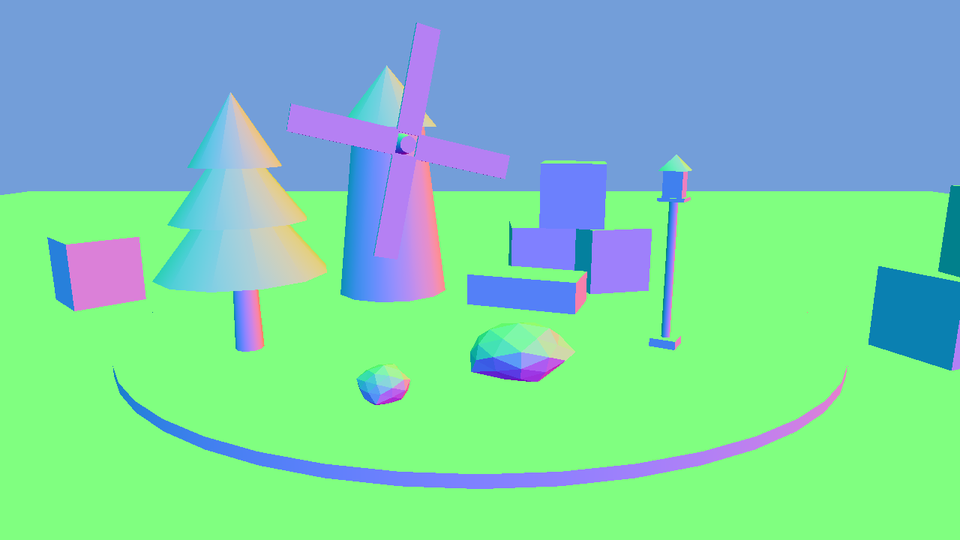
Vを5回押すと法線を色で見られます。
塔と木は滑らかで、岩は平らな面の継ぎ接ぎです。
バウンディングボックスとMesh
  Model::Primitive out;
  out.material = p.material;
  out.boundsMin = out.boundsMax = vertices.empty() ? Vec3{} : vertices[0].position;
  for (const ModelVertex &v : vertices) {
    const Vec3 &q = v.position;
    out.boundsMin = {q.x < out.boundsMin.x ? q.x : out.boundsMin.x, q.y < out.boundsMin.y ? q.y : out.boundsMin.y,
                     q.z < out.boundsMin.z ? q.z : out.boundsMin.z};
    out.boundsMax = {q.x > out.boundsMax.x ? q.x : out.boundsMax.x, q.y > out.boundsMax.y ? q.y : out.boundsMax.y,
                     q.z > out.boundsMax.z ? q.z : out.boundsMax.z};
  }
  // glTFのmode(0〜6)はGL_POINTS〜GL_TRIANGLE_FANと同じ値 / glTF modes 0..6 equal GL_POINTS..GL_TRIANGLE_FAN
  out.mesh = Mesh(vertices, indices, kModelVertexLayout, static_cast<GLenum>(p.mode));
  return out;
}
各プリミティブのバウンディングボックスは後の為に覚えておきます(14.7節のモデル全体の箱と、課題5)。
std::min/std::maxを使わずに比較を書き出しているのは、第8章のWindowsのマクロの問題の為です。
glTFのプリミティブのmodeは、OpenGLに合わせて設計されています。
0〜6はGL_POINTS、GL_LINES、GL_LINE_LOOP、GL_LINE_STRIP、GL_TRIANGLES、GL_TRIANGLE_STRIP、GL_TRIANGLE_FANで、enumの値も全く同じです。
其の為modeは其のままMeshに渡します。
MeshはインデックスがあればglDrawElements、無ければ(岩)glDrawArraysを呼びます。
此の章には新しいOpenGLの関数は1つも出て来ません。
Meshは第3章と第4章のDSAの呼び出しでVAOとバッファを作ります。
14.5 メモリからのテクスチャ
decodeImage
第6章のTexture2D::load(path)は、stbi_loadでファイルを読みます。
ところがGLBの画像はファイルではありません。
BINチャンクの中のバイトの範囲で、第13章のimageDataは其れを完全なPNG又はJPEGのファイルを持つstd::vector<std::uint8_t>として渡してくれます。
stb_imageは其れをメモリから直接デコード出来ます。
texture.hhに小さな構造体と関数が加わります:
// デコードした画像:RGBA8、上の行から順に / a decoded image: RGBA8, rows from the top
struct Image {
  int width = 0, height = 0;
  std::vector<unsigned char> rgba;
};

// メモリ上の画像ファイル(PNG、JPEG…)をデコードする。flipY = trueなら上下を反転する。失敗したらstd::nullopt。
// Decodes an image file held in memory (PNG, JPEG, ...). flipY = true flips it upside down. std::nullopt on failure.
std::optional<Image> decodeImage(const unsigned char *bytes, size_t size, bool flipY);
そしてtexture.ccに実装です:
std::optional<Image> decodeImage(const unsigned char *bytes, size_t size, bool flipY) {
  stbi_set_flip_vertically_on_load(flipY ? 1 : 0);
  int width = 0, height = 0, channels = 0;
  // ファイルからではなくメモリから(GLBに埋め込まれた画像など) / from memory instead of a file (e.g. images embedded in a GLB)
  unsigned char *pixels = stbi_load_from_memory(bytes, static_cast<int>(size), &width, &height, &channels, 4);
  if (!pixels) {
    fprintf(stderr, "画像をデコードできない / cannot decode image: %s\n", stbi_failure_reason());
    return std::nullopt;
  }
  Image image;
  image.width = width;
  image.height = height;
  image.rgba.assign(pixels, pixels + static_cast<size_t>(width) * static_cast<size_t>(height) * 4);
  stbi_image_free(pixels);
  return image;
}
stbi_load_from_memory(buffer, len, &x, &y, &channelsInFile, desiredChannels)は、パスの代わりにバイトのバッファを受け取るstbi_loadです:
buffer、len:メモリ上のエンコードされたファイル(PNG、JPEG、BMP、TGA…。glTF自体は拡張無しではPNGとJPEGしか許しません)。長さはintなので、キャストしています。x、y:ピクセル単位の大きさを受け取ります。channelsInFile:ファイルが何チャンネルだったか(グレーなら1、RGBなら3…)を受け取ります。あたし達は使いません。desiredChannels:4にすると全てRGBAに変換されるので、残りのコードは元の形式を気にする必要が無くなります。
結果はstbがmallocしたメモリなので、std::vectorにコピーして直ぐにstbi_image_freeで返します。
其れを忘れるのがstb_imageの定番のメモリリークです。
第6章で見た通りstbi_set_flip_vertically_on_loadはグローバルな状態なので、decodeImageは毎回其れを設定します。
Texture2DではなくImageを返すのは、デコードとアップロードを分ける為です。
ローダーはアップロードの前にピクセルを見る必要があります(14.6節の平均)し、後の章では別のスレッドでデコードしたくなるかも知れません。
其処にはGLのコンテキストがありません。
何故glTFのテクスチャは絶対に反転しないのか
第6章では、全ての画像を読み込む時に反転しました。
画像ファイルは一番上の行を最初に保存し、OpenGLは最初にアップロードした行をに置き、あたし達が四角形や立方体に手で書いたUVはOpenGLの決まり、つまりが絵の下端という決まりを使っていました。
絵の一番下の行をメモリの最初の行にする為に、stbが行を逆順にする必要がありました。
glTFはUVを逆に定義しています。
は画像の左上の角で、は下へ増えます。
Direct3D、Vulkan、Metalと同じ決まりです。
Blenderの様なエクスポーターは、ファイルを書く時に自分のUVを此の決まりに変換します。
従ってglTFのファイルではは「画像の最初の行」を意味し、ファイルの行を保存されている順にアップロードすれば、ファイルの最初の行は丁度OpenGLがに置く行になります。
2つの決まりは何の助けも無く噛み合います。
読み込み時の反転も、UVのも、シェーダーの中の処理も要りません。
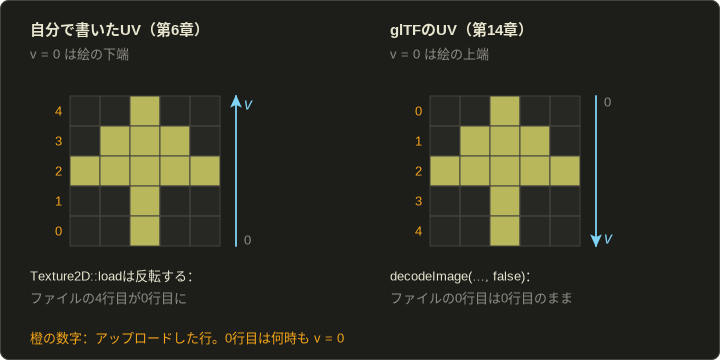
図の橙の数字はアップロードした行です。
どちらの場合もアップロードの0行目はにあり(OpenGLは何が「上」かを気にしません。0行目をに対応させるだけです)、どちらの場合も絵は正しい向きになります。
違うのはファイルのどの行が0行目にならなければならないかで、其れを決めるのはAPIではなく、UVがどの決まりで書かれたかです。
其の為ローダーはdecodeImage(…, false)を呼び、Texture2D::fromPixelsは決して反転しません(行を渡された順にアップロードする事は第6章で既に書きました)。
此れはOpenGLで初めてglTFを読む時の一番よくあるバグでもあります。
既定でflipY = trueのファイル用のローダーを使い回すと、全てのモデルの全てのテクスチャが上下逆になります。
あたし達の木箱なら直ぐに気付きます。
斜めの筋交いが逆向きになるからです。
アップロードとサンプラー
Model::loadのテクスチャの部分です:
  // テクスチャ:埋め込まれたPNG/JPEGをデコードしてアップロード。glTFのUVは画像の左上が原点なので反転しない
  // Textures: decode the embedded PNG/JPEG and upload it. glTF UVs start at the image's top-left: no flipping
  std::vector<Vec4> averages(g.textures.size(), Vec4{1.0f, 1.0f, 1.0f, 1.0f});
  model.textures.resize(g.textures.size()); // 読めなかったものは空(id 0)=白 / ones that fail stay empty (id 0) = white
  for (size_t i = 0; i < g.textures.size(); ++i) {
    const GltfTexture &t = g.textures[i];
    if (t.source < 0) continue;
    std::optional<std::vector<std::uint8_t>> bytes = g.imageData(t.source);
    if (!bytes) continue;
    std::optional<Image> image = decodeImage(bytes->data(), bytes->size(), false);
    if (!image) {
      fprintf(stderr, "%s: images[%d] をデコードできない / cannot decode images[%d]\n", path.c_str(), t.source, t.source);
      continue;
    }
    // 各チャンネルの平均(金属・粗さテクスチャの近似に使う) / average of each channel (for the metallic-roughness approximation)
    double sum[4] = {0, 0, 0, 0};
    for (size_t p = 0; p < image->rgba.size(); ++p) sum[p % 4] += image->rgba[p];
    double pixels = static_cast<double>(image->width) * image->height * 255.0;
    averages[i] = {static_cast<float>(sum[0] / pixels), static_cast<float>(sum[1] / pixels),
                   static_cast<float>(sum[2] / pixels), static_cast<float>(sum[3] / pixels)};

    // 色のテクスチャは本当はsRGB(第21章で直す) / colour textures are really sRGB (fixed in chapter 21)
    Texture2D texture = Texture2D::fromPixels(image->rgba.data(), image->width, image->height,
                                              {.flipY = false, .mipmaps = true});
    if (t.sampler >= 0) {
      // 値はGLのenumそのもの(読み込み時に検査済み)。0 = 指定なし / the values are GL enums (validated); 0 = not given
      const GltfSampler &s = g.samplers[static_cast<size_t>(t.sampler)];
      texture.setWrap(static_cast<GLenum>(s.wrapS), static_cast<GLenum>(s.wrapT));
      texture.setFilter(s.minFilter ? static_cast<GLenum>(s.minFilter) : GL_LINEAR_MIPMAP_LINEAR,
                        s.magFilter ? static_cast<GLenum>(s.magFilter) : GL_LINEAR);
    }
    model.textures[i] = std::move(texture);
  }
glTFのテクスチャは(画像、サンプラー)の組なので、glTFのテクスチャ1つにつきTexture2Dを1つ作ります。
番号がglTFと揃う様に、先にmodel.texturesの大きさを決めます。
デコードに失敗したテクスチャは空のTexture2D(id 0)のままで、後でtexture(index)が其れをnullptrにし、Material::applyが其の代わりに白いテクスチャを繋ぎます。
壊れた画像があっても、ファイル全体の読み込みを拒否するのではなく、モデルの一部分が白くなるだけです。
サンプラーもプリミティブのmodeと同じく素直です。
glTFはmagFilter、minFilter、wrapS、wrapTをOpenGLのenumの値で保存し(9729はGL_LINEAR、9987はGL_LINEAR_MIPMAP_LINEAR、10497はGL_REPEAT、33071はGL_CLAMP_TO_EDGE)、正しくない値は第13章で既に弾いています。
其の為値は其のまま第6章のsetWrapとsetFilterに入り、其れらがglTextureParameteriを呼びます。
glTFではフィルターは省略出来る(「0 = 指定なし」)ので、其の時はトライリニアフィルタリングを使います。
サンプラーの無いテクスチャはあたし達のTexture2Dの既定値(繰り返し、トライリニア)のままで、glTFが求める事(繰り返しの折り返し、フィルタリングは実装に任せる)に合っています。
ジオラマでは芝生がGL_REPEATのサンプラーを、帆の布がGL_CLAMP_TO_EDGEを使うので、帆の端の縞が反対側に滲みません。
ミップマップは何時も作ります。
glTFのminFilterがGL_LINEARやGL_NEARESTなら、追加の段が使われないだけです。
此のコードの中の2つの事は、後の章の為の物です。
カラー画像は本当はsRGBですが、テクスチャはGL_RGBA8でアップロードしています。
第21章でベースカラーと発光のテクスチャをGL_SRGB8_ALPHA8に切り替えます(ローダーはマテリアルの参照からどれがどれかを知っています)。
其れ迄、モデルはglTFビューアーより少し暗く、色が濃く見えます。
そしてチャンネル毎の平均はマテリアルの変換で必要になります。
其れが次の話です。
14.6 Blinn-Phongの世界のPBRマテリアル
表面の2つの違う表し方
第10章からのあたし達のライティングはBlinn-Phongです。
表面は拡散反射の色、鏡面反射の色、光沢度の指数を持ち、其れらは目で見て選んだ物です。
glTFは物理ベースレンダリング(PBR)の金属・粗さモデルで表面を表します:
baseColorFactor(RGBA)×baseColorTexture:素材の色metallicFactor(0 = 木、プラスチック、石の様な非金属、1 = 金属)とroughnessFactor(0 = 鏡の様に滑らか、1 = 完全に粗い)、其々にmetallicRoughnessTextureの青と緑のチャンネルを掛けるemissiveFactor(RGB)×emissiveTexture×KHR_materials_emissive_strengthのemissiveStrength- 他に法線、遮蔽、アルファモード、両面。読み込みますが、まだ使いません
此れらは芸術的な調整つまみではなく物理量で、本当の描き方は第24章のCook–TorranceのBRDFです。
其れ迄は、今あるシェーダーでglTFのモデルを大体正しく見せる何かが必要です。
関数phongFromPbrが其の何かです。
正直に言っておきます。
此れは一時的な橋渡しで、正しい翻訳ではありません。
変換
ベースカラー、金属度、粗さのマテリアルについて:
がMaterial::diffuse、がspecular、がshininessになります。
1行ずつ見ていきましょう:
- 金属は拡散反射をしない。 金属に入った光は殆ど直ぐに吸収されます。金属で見える物は全て表面での反射です。非金属は表面で少しだけ反射し、残りを散乱させて拡散反射の色として返します。其の為が1に近付くと拡散反射の色は黒になります。
- は垂直入射での反射率、正面から見た時に表面がどれだけ光を反射するかです。殆ど全ての非金属は4%前後です。金属は50〜100%を反射し、反射を自分の色で染めます(金の映り込みが金色なのは其の為です)。glTFの決まりでは、0.04とベースカラーの間を金属度で混ぜます。
linalg.hhのlerpです。 - 粗さから光沢度へ。 粗い表面はハイライトを広く広げ、滑らかな表面は集中させます。glTFの粗さは「知覚的な」値で、マイクロファセットの分布はを使います。Walter達(2007年)は、指数のBlinn-Phongのローブが、粗さのベックマン分布に良く一致する事を示しました。当てずっぽうではなく、根拠のある対応です。制限は、粗い素材を広いローブ(n ≥ 1)に、鏡を有限のローブに留めます。
- 正規化。 素のBlinn-Phongでは、指数を上げるとハイライトが小さくなり、しかも明るさの頂点は変わらないので、反射する光の総量が減ります。光沢のある表面が鈍い表面より少ない光を反射してしまう訳です。エネルギーを保存するBlinn-Phongのローブにはを掛けます。あたし達の拡散反射の項にもが無い(光の色が其れを吸収しています)ので、拡散反射に対する比はになります。鋭いハイライトは小さいが明るく、広いハイライトは大きいが暗くなります。
コードです:
static float clamp01(float v) { return v < 0.0f ? 0.0f : v > 1.0f ? 1.0f : v; }

// metallicScale・roughnessScale:金属・粗さテクスチャの平均(テクスチャがなければ1)。
// Blinn-Phongはピクセルごとの金属度を扱えないので、テクスチャの平均で係数を代表させる。
// metallicScale, roughnessScale: the averages of the metallic-roughness texture (1 without a texture).
// Our Blinn-Phong cannot vary metallic per pixel, so the texture's average stands in for it.
static Material phongFromPbr(const GltfMaterial &m, float metallicScale, float roughnessScale) {
  float metallic = clamp01(m.metallicFactor * metallicScale);
  float roughness = clamp01(m.roughnessFactor * roughnessScale);
  Vec3 base = {m.baseColorFactor.x, m.baseColorFactor.y, m.baseColorFactor.z};

  Material p;
  // 金属は拡散反射をしない / metals have no diffuse reflection
  p.diffuse = (1.0f - metallic) * base;
  // 正面から見た反射率F0:非金属は約4%、金属は自分の色 / reflectance at normal incidence F0: ~4% for non-metals,
  // the base colour for metals
  Vec3 f0 = lerp({0.04f, 0.04f, 0.04f}, base, metallic);
  // 粗さ → 光沢度:Blinn-Phongとベックマン分布の対応 n = 2/α² − 2(α = 粗さ²)
  // roughness → shininess: the Blinn-Phong / Beckmann correspondence n = 2/α² − 2 (α = roughness²)
  float alpha = roughness * roughness;
  float n = alpha > 0.0f ? 2.0f / (alpha * alpha) - 2.0f : 1024.0f;
  n = n < 1.0f ? 1.0f : n > 1024.0f ? 1024.0f : n;
  // 正規化 (n + 8) / 8:鋭いハイライトほど明るく(反射する光の総量がほぼ一定になる)
  // normalization (n + 8) / 8: sharper highlights get brighter (the total reflected light stays about the same)
  p.specular = ((n + 8.0f) / 8.0f) * f0;
  p.shininess = n;
  p.emission = m.emissiveStrength * m.emissiveFactor;
  return p;
}
ジオラマでの計算例
漆喰(塔):、、。
、。
、、。
:とても広く、とても淡い艶で、粗い漆喰は正に其の様に見えます。
真鍮(風車のハブ):、、。
、。
、、。
なので、。
鏡面反射の色が1を超えるのは驚くかも知れませんが、のハイライトはとても小さく、明るさは其処に集まります。
(第21章でHDRが来る迄、フレームバッファは結果を1に切り詰めます。)
マテリアルの無いプリミティブの為の既定のマテリアルは、、、白です。
、、で、普通のプラスチックです。
此処では敢えてglTFの既定値を使いません。
glTFの既定値は金属度1、粗さ1で、あたし達のシェーダーでは拡散反射の色が全く無く、巨大で平らなハイライト()だけになります。
光が当たる所は模様の無い白っぽい塊、其れ以外は真っ黒です。
金属・粗さテクスチャ:平均を使う
phongFromPbrは追加の引数を2つ取ります。
metallicScaleとroughnessScaleです。
金属・粗さテクスチャでは、ピクセル毎に緑のチャンネルが粗さ、青のチャンネルが金属度で、最終的な値は係数 × テクスチャです。
あたし達のBlinn-Phongのマテリアルは、描画呼び出し1回につき拡散反射の色と光沢度を1つずつしか持てません。
三角形の途中で金属から木に変わる事は出来ません。
次善の策はテクスチャの平均で、14.5節のループが全てのテクスチャについて計算していた物です:
  // マテリアル / materials
  for (const GltfMaterial &m : g.materials) {
    Vec4 mr = {1.0f, 1.0f, 1.0f, 1.0f};
    int t = m.metallicRoughnessTexture.index;
    if (t >= 0 && model.textures[static_cast<size_t>(t)].id() != 0) mr = averages[static_cast<size_t>(t)];
    model.materials.push_back({m, phongFromPbr(m, mr.z, mr.y)}); // B = 金属度 / metallic、G = 粗さ / roughness
  }
  // マテリアルのないプリミティブ用。glTFの既定(金属度1、粗さ1)だと拡散色の無い淡い塊になるので、白いプラスチックにする
  // For primitives without a material. glTF's default (metallic 1, roughness 1) would be a pale blob with no diffuse
  // colour here, so use white plastic
  model.defaultMaterial.pbr.name = "(default)";
  model.defaultMaterial.pbr.metallicFactor = 0.0f;
  model.defaultMaterial.pbr.roughnessFactor = 0.5f;
  model.defaultMaterial.phong = phongFromPbr(model.defaultMaterial.pbr, 1.0f, 1.0f);
何故単純に係数を使わないのでしょうか?
実際のファイルの作られ方の為です。
アーティストがBlenderで金属度や粗さのテクスチャを繋ぐと、エクスポーターは係数を1と1にし、情報を全てテクスチャに入れます。
あたし達の木箱も同じ作りで、係数だけだと完全に粗い白い金属になってしまいます。
で木のテクスチャが消え、模様の無い白っぽい箱が残ります。
平均を使うと、木箱は次の様になります。
其の金属・粗さテクスチャの平均は(鋼の枠は金属で、木は金属ではない)、です。
従って、、 × ベースカラーのテクスチャ、、、、、。
木箱全体が「少し金属的で、かなり粗い」物になります。
第12章の木箱より少し暗く、全体に鈍い艶があります。
第11章の鏡面反射マップでは枠だけが光っていました。
課題7で、ピクセル毎にちゃんとやります。
橋が運ばない物
描画時に、マテリアルにはマップが付きます。
diffuseMapはベースカラーのテクスチャ(なので拡散反射の色は本来通り × 係数 × テクスチャになります)、emissionMapは発光のテクスチャで、specularMapは白のままです。
其の他は全て失われるか、近似されます:
- 金属度と粗さはマテリアル毎に一定(上の平均)。
- はテクスチャではなくベースカラーの係数を使うので、金属のハイライトはテクスチャの色を無視します。
- フレネル効果がありません。本物の表面は浅い角度で遥かに多く反射し、PBRは其れを表しますが、あたし達の鏡面反射はどの角度からでも同じです。
- 遮蔽テクスチャと法線テクスチャは無視します(法線マップは第22章)。
一番目に見える結果は此れです。
金属は殆ど黒く見えます。
スクリーンショットの羽根の真ん中のハブと、街灯の柱を見て下さい。
本物の金属が明るいのは、周りの物、つまり空、芝生、太陽を映すからです。
あたし達のレンダラーには映す周りの物がありません。
金属が見せられるのは、僅かなライトのハイライトだけです。
しかもなので環境光の項も0になり、ハイライトの無い所では金属は黒になります。
此れは変換のバグではなく、映り込みの無いライティングモデルの正直な結果です。
第18章でキューブマップの映り込みを見せ、第24章でイメージベースドライティングを使ってちゃんと直します。
夜には、真鍮のハブに出来る唯一の事が見られます。
街灯の橙のハイライトを受ける事です。
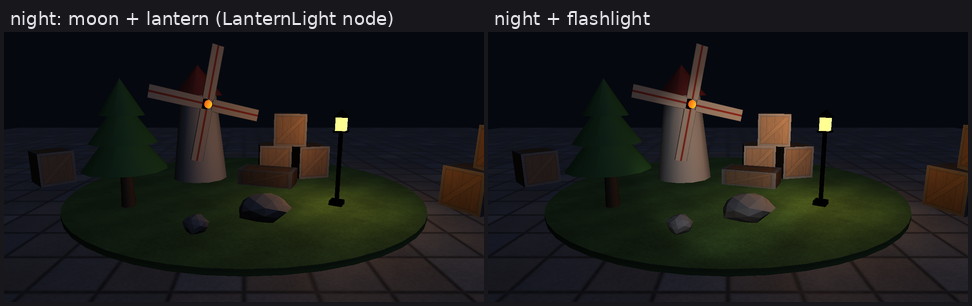
発光は今迄通りです。
ランタンのガラスは発光(1, 0.62, 0.25)、発光の強さ2なので、emissionは(2, 1.24, 0.5)になり、光が届かなくても光ります。
14.7 Model::loadを組み立てる
テクスチャとマテリアルの後は、メッシュ、ノード、バウンディングボックスです:
  // メッシュ / meshes
  for (size_t i = 0; i < g.meshes.size(); ++i) {
    MeshData mesh;
    mesh.name = g.meshes[i].name;
    for (size_t k = 0; k < g.meshes[i].primitives.size(); ++k) {
      std::string where = "meshes[" + std::to_string(i) + "].primitives[" + std::to_string(k) + "]";
      std::optional<Primitive> prim = loadPrimitive(g, g.meshes[i].primitives[k], where);
      if (prim) mesh.primitives.push_back(std::move(*prim)); // 描けないものは飛ばす / skip what cannot be drawn
    }
    model.meshes.push_back(std::move(mesh));
  }

  model.nodes = g.nodes;
  model.roots = g.rootNodes();

  // 全体の箱:メッシュのある全部のノードについて、プリミティブの箱を変換する
  // The whole box: transform each primitive's box for every node that has a mesh
  bool first = true;
  for (size_t i = 0; i < model.nodes.size(); ++i) {
    if (model.nodes[i].mesh < 0) continue;
    Mat4 m = model.nodeTransform(static_cast<int>(i));
    for (const Primitive &p : model.meshes[static_cast<size_t>(model.nodes[i].mesh)].primitives)
      growBounds(model.boundsMin, model.boundsMax, first, m, p.boundsMin, p.boundsMax);
  }
  return model;
}
プリミティブが全部飛ばされてもメッシュは追加するので、meshes[i]はglTFのmeshes[i]と揃ったままです。
空のメッシュは何も描かないだけです。
rootNodes()(第13章)は既定のシーンのノード、又は最初のシーンのノード、シーンの無いファイルでは親の無い全てのノードを返します。
Gltfのオブジェクト自体はローカル変数です。
全てがGPUに載ってノードを複製したら、其のバッファ(BINチャンク全体)はloadの終わりで解放されます。
バウンディングボックスは、各プリミティブの箱の8つの角を其のノードの行列で変換し(model.ccの短いヘルパーgrowBounds)、其れらを囲む様にモデルの箱を広げます。
最小と最大の角だけを変換すると、回転があった途端に間違いになります。
45°回した箱は、変換した2つの角より外にはみ出すからです。
mainが結果を表示します:
assets/models/diorama.glb: 20 nodes, 8 meshes, 11 primitives, 11 materials, 4 textures, bounds (-4.60, 0.00, -4.60) - (4.60, 4.05, 4.60)
assets/models/crate.glb: 1 nodes, 1 meshes, 1 primitives, 1 materials, 2 textures, bounds (-0.50, 0.00, -0.50) - (0.50, 1.00, 0.50)
芝生の直径は9.2 mで、風車の一番上の羽根は4.05 mに届きます。
どちらの箱もから始まります。
あたし達のモデルは全て原点が床の上にあるので、translate(position)でモデルが地面に立ちます(中心が原点のmakeCubeとは違います。第9章では大きさの半分だけ持ち上げる必要がありました)。
他の決まりはglTFと同じです。
1単位 = 1メートル、+Yが上、正面は+Zを向きます。
14.8 ノードの階層
親 × 子
ジオラマの20個のノードは木を作っています。
此の章で大事な部分は此処です:
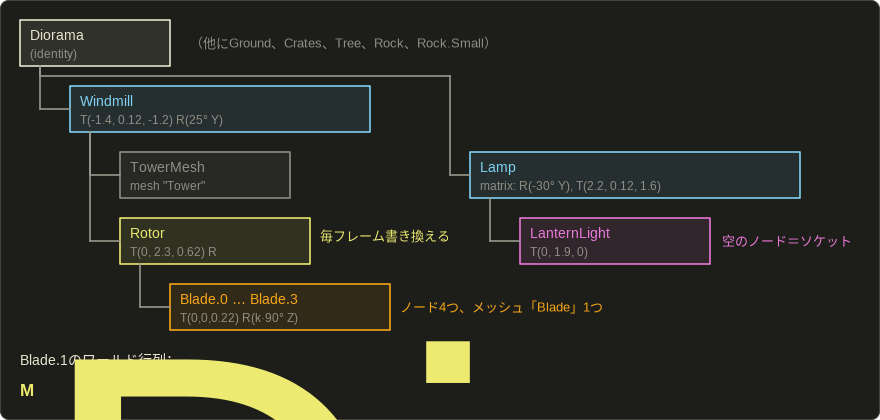
各ノードの変換(TRS又は行列、第13章のlocalTransform())は、親から見た物です。
羽根はローターから見て置かれ、ローターは風車から、風車はジオラマから見て置かれています。
羽根を描くにはワールドから見た行列が必要で、其れはルートからの道筋にある全ての行列の積です:
はノードのローカル行列で、はモデル全体を置く場所です。
此れは線型代数シリーズの第7章の通り、変換を合成する行列の積で、右から左に読みます。
羽根の点は、まず羽根自身のローカル変換でローターの空間に移り、次にローターの変換で風車の空間に、次にジオラマの空間に、最後にワールドに移ります。
順番は大事です。
だと親の変換を子の空間で掛ける事になり、部品がばらばらに散らばります。
計算例:ランタンの光は何処にある?
街灯はTRSではなくmatrixを使っています。
其の列はY周りの−30°の回転と平行移動で、子のLanternLightは平行移動だけを持ち、ジオラマのルートは単位行列です。
光の位置は、子の原点を親の行列 × 子の行列で変換した物です。
子の平行移動で原点はになり、行列とベクトルの積は其の列の線型結合です:
光は街灯の根元から1.9 m上、ランタンの中のにあります。
此処で回転が何も変えないのは、点がY軸の上にあり、Y周りの回転はY軸を動かさないからです。
計算例:羽根
3段の深さにあるBlade.0でも同じ事をします。
其のローカル変換は平行移動(ハブの前)なので、ローターの空間での原点はです。
ローターはZ周りに回転し、だけ動きます。
Z周りの回転はZ軸上の点を動かさないので、風車の空間での羽根の原点は、ローターがどの角度でもです。
羽根は此の点の周りを回ります。
風車はY周りに25°回転し、だけ動きます。
Y周りの回転は、です(線型代数シリーズの第8章):
平行移動を足すと:。
風車の正面、ハブの所、高さ2.42 mです。
木を描く
drawは全てのルートノードから再帰を始めます:
void Model::draw(const Shader &shader, const Mat4 &transform, const Texture2D &white, bool hierarchy) const {
  for (int root : roots) drawNode(root, transform, transform, shader, white, hierarchy);
}

void Model::drawNode(int node, const Mat4 &parentWorld, const Mat4 &transform, const Shader &shader,
                     const Texture2D &white, bool hierarchy) const {
  const GltfNode &n = nodes[static_cast<size_t>(node)];
  // ワールド行列 = 親のワールド行列 × 自分のローカル行列 / world = the parent's world matrix × our local matrix
  Mat4 world = (hierarchy ? parentWorld : transform) * n.localTransform();
  if (n.mesh >= 0) {
    shader.set("uModel", world);
    shader.set("uNormalMatrix", normalMatrix(world));
    for (const Primitive &p : meshes[static_cast<size_t>(n.mesh)].primitives) {
      const MaterialData &md = p.material >= 0 ? materials[static_cast<size_t>(p.material)] : defaultMaterial;
      Material m = md.phong;
      m.diffuseMap = texture(md.pbr.baseColorTexture.index);  // 色 = 係数 × テクスチャ / colour = factor × texture
      m.emissionMap = texture(md.pbr.emissiveTexture.index);
      m.apply(shader, white);
      p.mesh.draw();
    }
  }
  for (int child : n.children) drawNode(child, world, transform, shader, white, hierarchy);
}
親のワールド行列を引数で下に渡すので、各行列は1フレームにノード毎に1回だけ計算され、描画中にどのノードも自分の親が誰かを知る必要がありません。
メッシュの無いノード(風車、ローター、Crates、LanternLight)は何も描きませんが、自分のワールド行列を子に渡します。
幾つかのノードが使うメッシュ(4つの木箱が「Crate」メッシュを1つ、4枚の羽根が「Blade」メッシュを1つ共有しています)は、違う行列で何度か描かれるだけです。
頂点はGPU上に1回だけあります。
再帰が無限に続く事はありません。
親が2つあるノードや、循環のある木のファイルは第13章で弾いています。
法線行列は、第10章の通り、各ノード自身のワールド行列から計算します(線型代数シリーズの第10章)。
代わりにモデルのtransformを使うと、に拡大縮小されたCrate.Flatで間違いになります。
一様でない拡大縮小では、逆行列の転置だけが法線を面に垂直に保ちます。
texture(index)は「テクスチャ無し」(番号−1)と読み込みに失敗したテクスチャにnullptrを返し、Material::applyは其の代わりに1×1の白いテクスチャを繋ぎます。
第11章の技で、シェーダーに「テクスチャがあるか」のフラグが要りません。
Hキーが見せる物
hierarchy = falseでは、全てのノードが親を全て無視してtransform × localで描かれます:
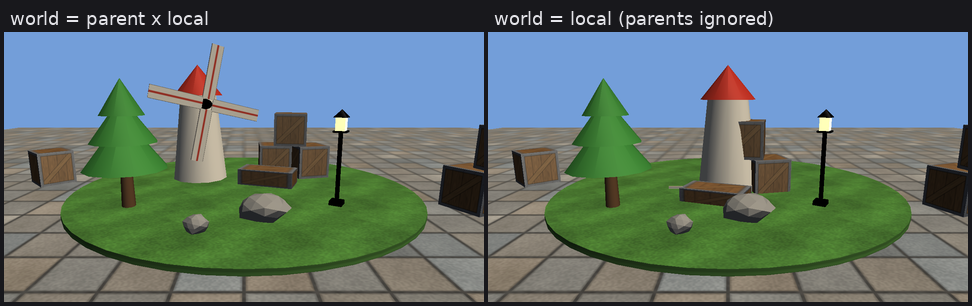
街灯、木、岩は動きません。
唯一の親がジオラマのルートで、其の行列が単位行列だからです。
塔は芝生の真ん中に飛びます。
塔自身のローカル変換は単位行列で、置き場所は全てWindmillノードから来ていたからです。
ハブと羽根は原点に落ちて殆ど地面に埋まり、木箱はCratesのグループのずれを失って塔の周りに集まります。
丁度其れが、親 × 子の積が運んでいる情報です。
14.9 mainでモデルを使う
読み込み
mainはシェーダーの後に2つのモデルを読み込みます:
  // モデル:真ん中の場面(引数で別のファイルにできる)と木箱 / models: the scene in the middle (or a file given
  // on the command line) and the crate
  const char *scenePath = argc > 1 ? argv[1] : "assets/models/diorama.glb";
  std::optional<Model> scene = Model::load(scenePath);
  std::optional<Model> crate = Model::load("assets/models/crate.glb");
  if (!scene || !crate) return 1;
  printModel(scenePath, *scene);
  printModel("assets/models/crate.glb", *crate);
モデルはmainの中のstd::optional<Model>で、Windowの後に宣言しているので、其れより先に破棄されます。
VAO、バッファ、テクスチャは、OpenGLのコンテキストがまだある間に削除しなければなりません(第2章の規則)。
他のファイルを試せる様に、mainはint main(int argc, char **argv)になりました。
第12章の木箱、球、光源の目印は無くなりました。
unlitシェーダーのファイルはshaders/に残っていますが、もう読み込みません。
床とモデルを描くのは4行で済みます:
    phong->set("uModel", Mat4::identity());
    phong->set("uNormalMatrix", normalMatrix(Mat4::identity()));
    floorMaterial.apply(*phong, white);
    floorMesh.draw();

    // モデルは自分でノードごとにuModelとマテリアルを設定する / the model sets uModel and the material per node itself
    scene->draw(*phong, Mat4::identity(), white, hierarchy);
    for (const CrateInfo &c : kCrates) crate->draw(*phong, translate(c.position) * rotateY(c.angle), white, hierarchy);
5つの追加の木箱は、1つのモデルを5つの変換で5回描いた物です(第9章の底の中心の位置で、大きさは無くなりました)。
drawの呼び出しは其々uModel、uNormalMatrix、マテリアルを自分で設定します。
カメラとライトは第12章と同じく、其の前に1フレームに1回設定します。
此の方法で沢山の複製を描くと、複製1つのプリミティブ1つにつき描画呼び出しが1回掛かります。
第19章ではインスタンシングで何千個も描きます。
名前でノードを探す、そしてソケット
  // 動かすノードと、光を置くノードを名前で探す(ないファイルでは-1) / find the node to animate and the node
  // that carries the light by name (-1 in files that do not have them)
  int rotor = scene->findNode("Rotor");
  int lanternNode = scene->findNode("LanternLight");
  Quat rotorStart = rotor >= 0 ? scene->nodes[static_cast<size_t>(rotor)].rotation : Quat{};
findNodeはノードの名前を順に探すだけで、起動時に1回だけ行います。
毎フレーム使うのは番号です。
他のファイル(game assets/models/crate.glb)では両方とも−1を返し、其れを使うコードは全て其れを確かめています。
LanternLightはメッシュを全く持たないノードです。
場所に印を付ける為だけにあります。
「此の街灯の光は此処」という印です。
此の様な空のノードはソケット(又はアタッチメントポイント、Blenderではエンプティ)と呼ばれ、ゲームがコードとアートを繋ぐ方法です。
銃口が何処にあるか、キャラクターが何処で剣を持つか、カメラが何処を軸に回るかはアーティストが決め、モデリングツールで動かします。
コードは名前でノードを尋ねるだけで、ずれの値を直書きする事はありません。
三人称シューティングで、丁度其れらの為にソケットを使います。
夜には、街灯の光をソケットに置きます:
    // 昼は太陽、夜は月と街灯 / the sun by day, the moon and the street lamp by night
    LightSet lights;
    if (!night) {
      lights.ambient = {0.28f, 0.30f, 0.34f};
      lights.directional = {.direction = {-0.5f, -1.0f, -0.35f}, .color = {0.95f, 0.9f, 0.8f}};
    } else {
      lights.ambient = {0.03f, 0.035f, 0.05f};
      lights.directional = {.direction = {-0.4f, -1.0f, -0.6f}, .color = {0.15f, 0.18f, 0.28f}};
      // 光の位置=空のノード「LanternLight」のワールド座標 / the light sits at the world position of the empty node
      if (lanternNode >= 0) {
        Vec4 p = scene->nodeTransform(lanternNode) * Vec4{0.0f, 0.0f, 0.0f, 1.0f};
        lights.points.push_back({.position = {p.x, p.y, p.z}, .color = {2.6f, 1.6f, 0.7f}, .attenuation = kMediumRange});
      }
    }
    if (flashlightOn) lights.spots.push_back({.position = viewPos, .direction = viewDir, .color = {1.0f, 0.95f, 0.85f}});
nodeTransformは描画の再帰と同じ積を1つのノードについて計算します。
第13章で求めたparentのリンクを上に辿ります:
Mat4 Model::nodeTransform(int node) const {
  if (node < 0 || static_cast<size_t>(node) >= nodes.size()) return Mat4::identity();
  // 親をたどって左から掛ける:ルート × … × 親 × 自分 / walk up the parents multiplying from the left
  Mat4 m = nodes[static_cast<size_t>(node)].localTransform();
  for (int p = nodes[static_cast<size_t>(node)].parent; p >= 0; p = nodes[static_cast<size_t>(p)].parent)
    m = nodes[static_cast<size_t>(p)].localTransform() * m;
  return m;
}
親は其々左から掛けるので、ループの後のmはルート × … × 親 × ノードになり、式と同じ順番です。
結果はモデル座標です。
原点を変換するとソケットの位置、手で計算したになります。
シーンは単位行列で描いているので、此処ではモデル座標がワールド座標です。
ジオラマを他の場所に置いたら、光はtransform * nodeTransform(lanternNode) * originに置かなければなりません。
モデル自身の変換を忘れるのが、ソケットの定番のバグです。
点光源は第12章の中距離の減衰と、1より明るい暖かい色を使うので、街灯の周りの芝生を照らします。
ノードを動かす
風車の羽根が回るのは、毎フレーム1つのノードが変わるからです:
    // 風車の羽根:Rotorノードの回転だけを変える。子ノード(ハブと羽根4枚)は一緒に回る
    // The windmill: change only the Rotor node's rotation. Its children (the hub and four blades) turn with it
    if (windmillMoving) windmillTime += dt;
    if (rotor >= 0)
      scene->nodes[static_cast<size_t>(rotor)].rotation =
          Quat::fromAxisAngle({0.0f, 0.0f, 1.0f}, -0.8f * windmillTime) * rotorStart;
Rotorノードに新しいrotationを書き込むと、次のdrawが其のの行列を組み直します。
ハブと4枚の羽根はローターの子なので、全部一緒に回ります。
コードは其れらに全く触れません。
此れが階層の本当の力です。
複雑な物を動かすのは、幾つかのノードの幾つかの数字を変える事なのです。
回転はクォータニオンです(線型代数シリーズの第13章)。
rotorStartはファイルの回転(Z周りに17.2°)で、アニメーションは其の前に掛けます。
積は、まずで回し、次にで回します。
左から掛けるとノードは親の軸の周りに回り、右から掛けると既に回った自分の軸の周りに回ります。
此処では両方ともZ周りの回転なので順番は関係ありませんが、任意の軸では関係あります。
毎秒−0.8ラジアンは約7.9秒で1回転で、正面(+Z)から見て時計回りです。
windmillTimeは風車が止まっていない(P)間だけ進みます。
毎フレーム少しずつ回転を足すのではなく時間を保存するのは、丸め誤差が溜まらない様にする為です。
此の方法で動かない物が2つあります。
matrixを使うノードは、TRSを書いても動きません。
localTransform()は行列を返し、TRSを無視するからです。
glTFの仕様が、アニメーションするノードにTRSを使う事を求めているのは此の為です(あたし達の街灯は行列を使っていて、動きません)。
そしてModel::boundsMin/boundsMaxは読み込んだ時のモデルを表していて、アニメーションには付いて来ません。
プラットフォーム毎の注意
- Windows(Visual Studio): プログラムにファイルを渡すには、
gameのプロジェクトのプロパティ → デバッグ → コマンド引数にassets\models\crate.glbと入力するか、ターミナルでプロジェクトのルートからbuild\Debug\game.exe assets\models\crate.glbを実行します。パスにはどちら向きのスラッシュも使えます。 - Linux及びFreeBSD: 何時もの章と同じく、プロジェクトのルートから
./build/game assets/models/crate.glb。 - 自分のモデル: Blenderでは、ファイル → エクスポート → glTF 2.0で、形式を「glTFバイナリ(.glb)」にします。エクスポーターはBlenderのZが上の座標をglTFのYが上の座標に変換してくれます(「+Y Up」のオプションは既定でオンです)。エクスポートの前にスケールを適用し(Ctrl+A)、結果を
gltf_dumpで確かめて下さい。自分で描いたテクスチャは、14.5節の理由で、反転無しで正しい向きに出ます。
14.10 ローダーがまだしない事
ローダーは幾つかのglTFの機能を、失敗せずに読み飛ばします(第13章が数えたり印を付けたりします):
- アルファ。
alphaModeのMASKとBLEND、及びdoubleSidedは読み込みますが無視します。第16章でdiscard、ブレンディング、フェイスカリングを扱います(帆の布は両面の印が付いていて、カリングをオンにすると其れが大事になります)。 - 法線マップと遮蔽マップ。 接線は既にロケーション3で頂点バッファに入っています。第22章で使います。
- sRGB。 ベースカラーと発光のテクスチャは
GL_SRGB8_ALPHA8、其の他はリニアにすべきです。第21章。 - 本物のPBRは第24章で、元の値は
MaterialData::pbrに取ってあります。 - スキン、アニメーションのチャンネル、モーフターゲット、カメラ、
KHR_lights_punctual、KHR_texture_transform、TEXCOORD_1及びCOLOR_0。 あたし達のゲームは、風車と同じくノードのTRSを書き換えて固い部品を動かします。スキンのあるキャラクターは、其れだけで1つの話題です。 - 共有された画像。 2つのglTFのテクスチャが同じ画像を使うと、2回デコードされ、2回アップロードされます。課題6でキャッシュを付けます。
14.11 本物のエンジンではどうしているか
- 1回インポートし、速く読み込む。 エンジンが実行時にglTFを読む事は余りありません。インポートの段階で其れをエンジン独自の形式に変換します。頂点は最終的なレイアウトに、インデックスはGPUの頂点キャッシュ向けに最適化され(meshoptimizerが定番のライブラリです)、テクスチャはGPUの形式(BC7、ASTC、又はBasis UniversalのKTX2)に圧縮され、ミップマップも前もって作られます。読み込みは殆どメモリのコピーだけになります。glTFは交換用の形式ですが、あたし達の様な小さなプロジェクトなら実行時の形式としても全く問題ありません。
- ワールド行列のキャッシュ。 あたし達は全てのノードのワールド行列を毎フレーム計算し直しています。エンジンはノード毎にキャッシュしたワールド行列と「ダーティ」フラグを持ち、変わった所だけを計算し直します。ノードが何千もあると其れが効きます。多くのエンジンは、木の静的な部分をインポート時に平らにもします。
- バッチ処理。 あたし達のジオラマは描画呼び出し18回(プリミティブは11個で、其の幾つかは複数のノードが描きます)、木箱で更に5回掛かります。エンジンはマテリアルが同じ静的なメッシュをまとめ、繰り返す物にはインスタンシングを使い(第19章)、状態の変更を減らす為に描画をシェーダーとマテリアルで並べ替えます。
- マテリアル。 本物のマテリアルシステムは、ピクセル毎のPBR、幾つかのシェーダーの変種(法線マップの有無、アルファテスト、スキニング)、必要な解像度でストリーミングされるテクスチャを持っています。
14.12 まとめ
Model::load=Gltf::load(第13章)+ GPUへのアップロード。glTFの番号を其のまま使うので、textures、materials、meshes、nodesはファイルと揃います。- 各プリミティブは交互に並んだ
ModelVertexの配列(位置、法線、UV、接線、ロケーション0〜3)になり、1つのMeshに入ります。glTFのmodeの値はOpenGLのプリミティブのenumです。 - インデックスはアップロード前に頂点数と比べて調べます。範囲外のインデックスはGPUでの範囲外の読み込みになります。
NORMALの無いプリミティブはから平らな法線を得ます。其の為には各三角形が自分の頂点を持つ必要があります。- 埋め込み画像は
stbi_load_from_memoryでデコードし、絶対に反転しません。glTFのUVの原点は画像の左上で、ファイルの最初の行を0行目としてアップロードすると、丁度glTFのになります。第6章の自分のテクスチャで反転が必要だったのは、自分のUVが逆の決まりを使っていたからです。 - glTFのサンプラーはOpenGLのenumを保存しているので、其のまま
glTextureParameteriに入ります。 - PBR → Blinn-Phongは一時的な橋渡しです。拡散 = 、 = mix(0.04, , )、で、鏡面 = 、金属度と粗さはテクスチャの平均から。映す物が何も無いので、第24章迄金属は暗く見えます。
- ワールド行列 = 親のワールド行列 × ローカル行列、ルートから下へ。法線行列は各ノードのワールド行列から作ります。
- 空のノードはソケットです。
nodeTransform(findNode("…"))で位置が分かります。ノードのTRSを書き換えて動かせば、子も付いて来ます。
14.13 課題
- ★ 木箱をシーンとして読み込んで下さい:
./build/game assets/models/crate.glb。他の5つの間の真ん中に木箱が1つ立ち、findNodeが−1を返すので、風車とランタンのコードは何もしない(回転せず、夜に街灯の光も無い)はずです。 - ★ 風車全体を回して下さい。
Windmillノードの回転もY周りに動かします(rotorStartと同じく元の回転を取っておきます)。塔が其の場で回り、孫である羽根は回り続けながら塔と一緒に向きを変えるはずです。 - ★ 全ての
Blade.nノードも、自分のY軸の周りに回して下さい(右から掛けます)。ローターが羽根を回している間、羽根はプロペラの様に捩れるはずです。各ノードが全ての親と合成される事が分かります。 - ★★
LanternLightのソケットに、unlitシェーダーで小さな目印の立方体を描いて下さい(もう一度読み込み、makeCube()とtranslate(p) * scale({0.1f, 0.1f, 0.1f})を使います)。立方体はランタンのガラスの中にあるはずです。次に実行中に街灯のノードの行列(例えば平行移動の列matrix.c[3])を変えて下さい。街灯、立方体、夜の光が全部一緒に動くはずです。 - ★★ 全てのプリミティブのバウンディングボックスを12本の線で描いて下さい(
GL_LINES、unlitシェーダー、モデル行列 =nodeTransform(node))。塔、屋根、各羽根、各木箱の周りに箱が見え、平たい木箱の箱は平たく一緒に回っていて、羽根の箱は羽根と一緒に回るはずです。 - ★★ デコードした画像を
GltfTexture::sourceでキャッシュし、幾つかのglTFのテクスチャが使う画像を1回だけデコード・アップロードする様にして下さい(画像の番号からTexture2Dの番号への対応表を持つか、texturesが画像を参照する様にします)。2つのテクスチャが画像を共有するファイル(例えば第13章の課題6の.gltfのジオラマを、2つのテクスチャが同じ画像を指す様に書き換えた物)で、前後のglTextureStorage2Dの呼び出し回数を数えて下さい。絵は同じで、呼び出しが1回減るはずです。 - ★★★ 金属・粗さテクスチャをピクセル毎に使って下さい。テクスチャユニット3に
uMetallicRoughnessMapとして繋ぎ、ベースカラーの係数とマテリアルの係数をユニフォームで渡し、phongFromPbrの式で拡散、、光沢度、鏡面をフラグメントシェーダーで計算します。木箱の鋼の枠は光り、木は鈍くなり、第11章の鏡面反射マップに近くなるはずです。平均の版では全体が均等に鈍く見えていました。第24章の小さな予告です。
ファイル: a/CMakeLists.txt | b/CMakeLists.txt
| 前 | 新 | ||
|---|---|---|---|
| @@ -37,7 +37,10 @@ add_executable(game | |||
| 37 | src/shapes.cc | 37 | src/shapes.cc |
| 38 | src/camera.cc | 38 | src/camera.cc |
| 39 | src/material.cc | 39 | src/material.cc |
| 40 | src/lights.cc) | 40 | src/lights.cc |
| 41 | src/json.cc | ||
| 42 | src/gltf.cc | ||
| 43 | src/model.cc) | ||
| 41 | target_include_directories(game PRIVATE src external/stb external/linalg) | 44 | target_include_directories(game PRIVATE src external/stb external/linalg) |
| 42 | target_link_libraries(game PRIVATE glad stb_image glfw) | 45 | target_link_libraries(game PRIVATE glad stb_image glfw) |
| 43 | 46 | ||
ファイル: a/src/main.cc | b/src/main.cc
| 前 | 新 | ||
|---|---|---|---|
| @@ -1,5 +1,5 @@ | |||
| 1 | // 第13章:glTFとGLB:ファイルの読み込み(このプログラムは第12章と同じ。新しいのは gltf_dump) | 1 | // 第14章:モデルの読み込み |
| 2 | // Chapter 13: glTF and GLB: reading the file (this program is the same as in chapter 12; the new part is gltf_dump) | 2 | // Chapter 14: loading models |
| 3 | // | 3 | // |
| 4 | // 操作 / Controls: | 4 | // 操作 / Controls: |
| 5 | // WASD 前後左右に移動 / move forward, back, left, right | 5 | // WASD 前後左右に移動 / move forward, back, left, right |
| @@ -9,19 +9,21 @@ | |||
| 9 | // ホイール / wheel ズーム / zoom | 9 | // ホイール / wheel ズーム / zoom |
| 10 | // C FPS ⇔ オービットカメラ / FPS ⇔ orbit camera | 10 | // C FPS ⇔ オービットカメラ / FPS ⇔ orbit camera |
| 11 | // V 表示:全部 → 環境光 → 拡散 → 鏡面 → 発光 → 法線 / view: all → ambient → diffuse → specular → emission → normals | 11 | // V 表示:全部 → 環境光 → 拡散 → 鏡面 → 発光 → 法線 / view: all → ambient → diffuse → specular → emission → normals |
| 12 | // P 点光源を止める・動かす / pause / resume the point lights | 12 | // N 昼 ⇔ 夜 / day ⇔ night |
| 13 | // 1 平行光源(月)のオン・オフ / directional light (the moon) on / off | ||
| 14 | // 2 点光源のオン・オフ / point lights on / off | ||
| 15 | // 3 スポットライトのオン・オフ / spotlights on / off | ||
| 16 | // F 懐中電灯のオン・オフ / flashlight on / off | 13 | // F 懐中電灯のオン・オフ / flashlight on / off |
| 14 | // P 風車を止める・回す / pause / resume the windmill | ||
| 15 | // H ノードの階層のオン・オフ(オフ=親の変換を無視) / node hierarchy on / off (off = ignore the parents) | ||
| 17 | // Tab カーソルのキャプチャ切り替え / toggle cursor capture | 16 | // Tab カーソルのキャプチャ切り替え / toggle cursor capture |
| 18 | // R シェーダーを読み直す / reload the shaders | 17 | // R シェーダーを読み直す / reload the shaders |
| 19 | // Esc 終了 / quit | 18 | // Esc 終了 / quit |
| 19 | // | ||
| 20 | // 使い方 / usage: game [model.glb] (指定すれば、そのモデルを場面の真ん中に置く / puts that model in the middle of the scene) | ||
| 20 | #include "camera.hh" | 21 | #include "camera.hh" |
| 21 | #include "lights.hh" | 22 | #include "lights.hh" |
| 22 | #include "material.hh" | 23 | #include "material.hh" |
| 23 | #include "mathx.hh" | 24 | #include "mathx.hh" |
| 24 | #include "mesh.hh" | 25 | #include "mesh.hh" |
| 26 | #include "model.hh" | ||
| 25 | #include "shader.hh" | 27 | #include "shader.hh" |
| 26 | #include "shapes.hh" | 28 | #include "shapes.hh" |
| 27 | #include "texture.hh" | 29 | #include "texture.hh" |
| @@ -29,115 +31,74 @@ | |||
| 29 | 31 | ||
| 30 | #include <cmath> | 32 | #include <cmath> |
| 31 | #include <cstdio> | 33 | #include <cstdio> |
| 32 | #include <iterator> | ||
| 33 | #include <optional> | 34 | #include <optional> |
| 34 | 35 | ||
| 35 | // 床に置いた箱:位置(底の中心)、大きさ、Y軸周りの回転 / crates on the floor: position (bottom centre), size, yaw | 36 | // 木箱のモデルを置く場所:位置(底の中心)とY軸周りの回転 / where the crate models go: position (bottom centre) and yaw |
| 36 | struct CrateInfo { | 37 | struct CrateInfo { |
| 37 | Vec3 position; | 38 | Vec3 position; |
| 38 | float size; | ||
| 39 | float angle; | 39 | float angle; |
| 40 | }; | 40 | }; |
| 41 | 41 | ||
| 42 | static const CrateInfo kCrates[] = { | 42 | static const CrateInfo kCrates[] = { |
| 43 | {{0.0f, 0.0f, 0.0f}, 1.0f, 0.0f}, {{1.1f, 0.0f, 0.2f}, 1.0f, 0.3f}, | 43 | {{5.5f, 0.0f, 1.5f}, 0.4f}, {{6.3f, 0.0f, 2.6f}, -0.3f}, {{5.9f, 1.0f, 2.0f}, 0.1f}, |
| 44 | {{0.5f, 1.0f, 0.1f}, 1.0f, -0.2f}, {{-3.0f, 0.0f, -2.0f}, 2.0f, 0.6f}, | 44 | {{-6.0f, 0.0f, -1.0f}, 0.8f}, {{-5.2f, 0.0f, 3.5f}, -0.6f}, |
| 45 | {{-3.0f, 2.0f, -2.0f}, 1.0f, 0.1f}, {{4.0f, 0.0f, -4.0f}, 1.5f, -0.5f}, | ||
| 46 | {{-6.0f, 0.0f, 3.0f}, 1.0f, 0.9f}, {{6.5f, 0.0f, 2.5f}, 1.0f, 0.2f}, | ||
| 47 | {{2.0f, 0.0f, -9.0f}, 3.0f, 0.4f}, {{-8.0f, 0.0f, -8.0f}, 2.0f, -0.3f}, | ||
| 48 | {{9.0f, 0.0f, -12.0f}, 2.5f, 0.7f}, {{-2.5f, 0.0f, 5.5f}, 0.6f, 0.5f}, | ||
| 49 | }; | ||
| 50 | |||
| 51 | // 色だけのマテリアル(古典的なOpenGLのマテリアル表から。表のambientは使わない:環境光 = uAmbient × diffuse) | ||
| 52 | // Colour-only materials (from the classic OpenGL material table; its ambient column is not used: | ||
| 53 | // our ambient light is uAmbient × diffuse) | ||
| 54 | struct NamedMaterial { | ||
| 55 | const char *name; | ||
| 56 | Material material; | ||
| 57 | }; | ||
| 58 | |||
| 59 | static const NamedMaterial kMaterialSamples[] = { | ||
| 60 | {"gold", {.diffuse = {0.75164f, 0.60648f, 0.22648f}, | ||
| 61 | .specular = {0.628281f, 0.555802f, 0.366065f}, | ||
| 62 | .shininess = 51.2f}}, | ||
| 63 | {"silver", {.diffuse = {0.50754f, 0.50754f, 0.50754f}, | ||
| 64 | .specular = {0.508273f, 0.508273f, 0.508273f}, | ||
| 65 | .shininess = 51.2f}}, | ||
| 66 | {"copper", {.diffuse = {0.7038f, 0.27048f, 0.0828f}, | ||
| 67 | .specular = {0.256777f, 0.137622f, 0.086014f}, | ||
| 68 | .shininess = 12.8f}}, | ||
| 69 | {"jade", {.diffuse = {0.54f, 0.89f, 0.63f}, | ||
| 70 | .specular = {0.316228f, 0.316228f, 0.316228f}, | ||
| 71 | .shininess = 12.8f}}, | ||
| 72 | {"ruby", {.diffuse = {0.61424f, 0.04136f, 0.04136f}, | ||
| 73 | .specular = {0.727811f, 0.626959f, 0.626959f}, | ||
| 74 | .shininess = 76.8f}}, | ||
| 75 | {"cyan plastic", {.diffuse = {0.0f, 0.50980392f, 0.50980392f}, | ||
| 76 | .specular = {0.50196078f, 0.50196078f, 0.50196078f}, | ||
| 77 | .shininess = 32.0f}}, | ||
| 78 | }; | ||
| 79 | |||
| 80 | // 点光源(提灯)の中心と色 / centres and colours of the point lights (lanterns) | ||
| 81 | struct LanternInfo { | ||
| 82 | Vec3 centre; | ||
| 83 | Vec3 color; | ||
| 84 | }; | 45 | }; |
| 85 | 46 | ||
| 86 | static const LanternInfo kLanterns[] = { | ||
| 87 | {{2.6f, 1.2f, 0.2f}, {2.4f, 1.0f, 0.35f}}, // 橙 / orange | ||
| 88 | {{-1.8f, 1.0f, 0.8f}, {0.4f, 2.0f, 0.7f}}, // 緑 / green | ||
| 89 | {{4.5f, 1.6f, -4.5f}, {0.6f, 0.9f, 2.6f}}, // 青 / blue | ||
| 90 | {{-5.5f, 1.4f, -3.5f}, {2.2f, 0.5f, 1.8f}}, // 紫 / purple | ||
| 91 | }; | ||
| 92 | |||
| 93 | // 箱の山を上から照らすスポットライト / the spotlight shining down on the pile of crates | ||
| 94 | constexpr Vec3 kStageSpotPos = {2.0f, 6.0f, 1.5f}; | ||
| 95 | constexpr Vec3 kStageSpotTarget = {0.3f, 0.5f, -0.2f}; | ||
| 96 | |||
| 97 | static const char *const kViewModeNames[] = {"all", "ambient", "diffuse", "specular", "emission", "normals"}; | 47 | static const char *const kViewModeNames[] = {"all", "ambient", "diffuse", "specular", "emission", "normals"}; |
| 98 | 48 | ||
| 99 | int main() { | 49 | static void printModel(const char *path, const Model &m) { |
| 50 | printf("%s: %zu nodes, %zu meshes, %zu primitives, %zu materials, %zu textures, bounds (%.2f, %.2f, %.2f) - (%.2f, " | ||
| 51 | "%.2f, %.2f)\n", | ||
| 52 | path, m.nodes.size(), m.meshCount(), m.primitiveCount(), m.materialCount(), m.textureCount(), m.boundsMin.x, | ||
| 53 | m.boundsMin.y, m.boundsMin.z, m.boundsMax.x, m.boundsMax.y, m.boundsMax.z); | ||
| 54 | } | ||
| 55 | |||
| 56 | int main(int argc, char **argv) { | ||
| 100 | Window window; | 57 | Window window; |
| 101 | if (!window.create(1280, 720, "OpenGL Tutorial - Chapter 13")) return 1; | 58 | if (!window.create(1280, 720, "OpenGL Tutorial - Chapter 14")) return 1; |
| 102 | 59 | ||
| 103 | std::optional<Shader> phong = Shader::load("shaders/phong.vert", "shaders/phong.frag"); | 60 | std::optional<Shader> phong = Shader::load("shaders/phong.vert", "shaders/phong.frag"); |
| 104 | std::optional<Shader> unlit = Shader::load("shaders/unlit.vert", "shaders/unlit.frag"); | ||
| 105 | std::optional<Texture2D> crate = Texture2D::load("assets/textures/crate.png"); | ||
| 106 | std::optional<Texture2D> crateSpecular = Texture2D::load("assets/textures/crate_specular.png"); | ||
| 107 | std::optional<Texture2D> crateEmission = Texture2D::load("assets/textures/crate_emission.png"); | ||
| 108 | std::optional<Texture2D> floorTexture = Texture2D::load("assets/textures/floor.png"); | 61 | std::optional<Texture2D> floorTexture = Texture2D::load("assets/textures/floor.png"); |
| 109 | if (!phong || !unlit || !crate || !crateSpecular || !crateEmission || !floorTexture) return 1; | 62 | if (!phong || !floorTexture) return 1; |
| 63 | |||
| 64 | // モデル:真ん中の場面(引数で別のファイルにできる)と木箱 / models: the scene in the middle (or a file given | ||
| 65 | // on the command line) and the crate | ||
| 66 | const char *scenePath = argc > 1 ? argv[1] : "assets/models/diorama.glb"; | ||
| 67 | std::optional<Model> scene = Model::load(scenePath); | ||
| 68 | std::optional<Model> crate = Model::load("assets/models/crate.glb"); | ||
| 69 | if (!scene || !crate) return 1; | ||
| 70 | printModel(scenePath, *scene); | ||
| 71 | printModel("assets/models/crate.glb", *crate); | ||
| 110 | glEnable(GL_DEPTH_TEST); | 72 | glEnable(GL_DEPTH_TEST); |
| 111 | 73 | ||
| 112 | // 1×1の白いテクスチャ:マップのないマテリアルの代わり(白を掛けても色は変わらない) | ||
| 113 | // A 1×1 white texture: stands in for missing maps (multiplying by white changes nothing) | ||
| 114 | const unsigned char whitePixel[4] = {255, 255, 255, 255}; | 74 | const unsigned char whitePixel[4] = {255, 255, 255, 255}; |
| 115 | Texture2D white = Texture2D::fromPixels(whitePixel, 1, 1, {.flipY = false, .mipmaps = false}); | 75 | Texture2D white = Texture2D::fromPixels(whitePixel, 1, 1, {.flipY = false, .mipmaps = false}); |
| 116 | 76 | ||
| 77 | // 動かすノードと、光を置くノードを名前で探す(ないファイルでは-1) / find the node to animate and the node | ||
| 78 | // that carries the light by name (-1 in files that do not have them) | ||
| 79 | int rotor = scene->findNode("Rotor"); | ||
| 80 | int lanternNode = scene->findNode("LanternLight"); | ||
| 81 | Quat rotorStart = rotor >= 0 ? scene->nodes[static_cast<size_t>(rotor)].rotation : Quat{}; | ||
| 82 | |||
| 117 | Camera fps; | 83 | Camera fps; |
| 118 | fps.position = {0.5f, 2.4f, 8.5f}; | 84 | fps.position = {0.0f, 2.6f, 9.0f}; |
| 119 | fps.pitch = radians(-14.0f); | 85 | fps.pitch = radians(-12.0f); |
| 120 | 86 | ||
| 121 | OrbitCamera orbit; | 87 | OrbitCamera orbit; |
| 122 | orbit.target = {0.0f, 0.8f, 0.0f}; | 88 | orbit.target = {0.0f, 1.2f, 0.0f}; |
| 123 | orbit.distance = 9.0f; | 89 | orbit.distance = 10.0f; |
| 124 | orbit.yaw = radians(30.0f); | 90 | orbit.yaw = radians(30.0f); |
| 125 | 91 | ||
| 126 | bool useOrbit = false; | 92 | bool useOrbit = false; |
| 127 | int viewMode = 0; | 93 | int viewMode = 0; |
| 128 | bool lightMoving = true; | 94 | bool night = false, flashlightOn = false, windmillMoving = true, hierarchy = true; |
| 129 | bool directionalOn = true, pointsOn = true, spotsOn = true, flashlightOn = true; | 95 | float windmillTime = 0.0f; |
| 130 | float lightTime = 0.0f; // 点光源の動きの時間(止められる) / time for the point lights' motion (can be paused) | ||
| 131 | window.setCursorCaptured(true); | 96 | window.setCursorCaptured(true); |
| 132 | 97 | ||
| 133 | window.onKey = [&](int key, int action, int /*mods*/) { | 98 | window.onKey = [&](int key, int action, int /*mods*/) { |
| 134 | if (action != GLFW_PRESS) return; | 99 | if (action != GLFW_PRESS) return; |
| 135 | if (key == GLFW_KEY_ESCAPE) window.close(); | 100 | if (key == GLFW_KEY_ESCAPE) window.close(); |
| 136 | if (key == GLFW_KEY_R) { | 101 | if (key == GLFW_KEY_R && phong->reload()) printf("シェーダーを読み直した / shaders reloaded\n"); |
| 137 | bool ok = phong->reload(); | ||
| 138 | ok = unlit->reload() && ok; // 両方とも読み直す / reload both, even if the first one failed | ||
| 139 | if (ok) printf("シェーダーを読み直した / shaders reloaded\n"); | ||
| 140 | } | ||
| 141 | if (key == GLFW_KEY_TAB) window.setCursorCaptured(!window.cursorCaptured()); | 102 | if (key == GLFW_KEY_TAB) window.setCursorCaptured(!window.cursorCaptured()); |
| 142 | if (key == GLFW_KEY_C) { | 103 | if (key == GLFW_KEY_C) { |
| 143 | useOrbit = !useOrbit; | 104 | useOrbit = !useOrbit; |
| @@ -148,40 +109,21 @@ int main() { | |||
| 148 | viewMode = (viewMode + 1) % 6; | 109 | viewMode = (viewMode + 1) % 6; |
| 149 | printf("view: %s\n", kViewModeNames[viewMode]); | 110 | printf("view: %s\n", kViewModeNames[viewMode]); |
| 150 | } | 111 | } |
| 151 | if (key == GLFW_KEY_P) lightMoving = !lightMoving; | 112 | if (key == GLFW_KEY_N) night = !night; |
| 152 | if (key == GLFW_KEY_1) directionalOn = !directionalOn; | ||
| 153 | if (key == GLFW_KEY_2) pointsOn = !pointsOn; | ||
| 154 | if (key == GLFW_KEY_3) spotsOn = !spotsOn; | ||
| 155 | if (key == GLFW_KEY_F) flashlightOn = !flashlightOn; | 113 | if (key == GLFW_KEY_F) flashlightOn = !flashlightOn; |
| 156 | if (key >= GLFW_KEY_1 && key <= GLFW_KEY_3) | 114 | if (key == GLFW_KEY_P) windmillMoving = !windmillMoving; |
| 157 | printf("directional %s, points %s, spots %s\n", directionalOn ? "on" : "off", pointsOn ? "on" : "off", | 115 | if (key == GLFW_KEY_H) { |
| 158 | spotsOn ? "on" : "off"); | 116 | hierarchy = !hierarchy; |
| 117 | printf("hierarchy: %s\n", hierarchy ? "on (world = parent x local)" : "off (world = local)"); | ||
| 118 | } | ||
| 159 | }; | 119 | }; |
| 160 | 120 | ||
| 161 | printf("material spheres (left to right):"); | ||
| 162 | for (const NamedMaterial &m : kMaterialSamples) printf(" %s", m.name); | ||
| 163 | printf("\n"); | ||
| 164 | |||
| 165 | Mesh cube = makeCube(); | ||
| 166 | Mesh sphere = makeSphere(); | ||
| 167 | Mesh floorMesh = makePlane(40.0f, 10.0f); | 121 | Mesh floorMesh = makePlane(40.0f, 10.0f); |
| 168 | |||
| 169 | // 床:石は少しだけ光る / the floor: stone is only slightly shiny | ||
| 170 | Material floorMaterial; | 122 | Material floorMaterial; |
| 171 | floorMaterial.diffuseMap = &*floorTexture; | 123 | floorMaterial.diffuseMap = &*floorTexture; |
| 172 | floorMaterial.specular = {0.15f, 0.15f, 0.15f}; | 124 | floorMaterial.specular = {0.15f, 0.15f, 0.15f}; |
| 173 | floorMaterial.shininess = 16.0f; | 125 | floorMaterial.shininess = 16.0f; |
| 174 | 126 | ||
| 175 | // 箱:三枚のマップ。鏡面反射マップで金属の枠だけが光り、発光マップで隙間が光る | ||
| 176 | // The crate: three maps. The specular map makes only the metal frame shiny, the emission map lights the gaps | ||
| 177 | Material crateMaterial; | ||
| 178 | crateMaterial.diffuseMap = &*crate; | ||
| 179 | crateMaterial.specular = {1.0f, 1.0f, 1.0f}; | ||
| 180 | crateMaterial.shininess = 48.0f; | ||
| 181 | crateMaterial.specularMap = &*crateSpecular; | ||
| 182 | crateMaterial.emissionMap = &*crateEmission; | ||
| 183 | crateMaterial.emission = {1.0f, 1.0f, 1.0f}; | ||
| 184 | |||
| 185 | double lastTime = window.time(); | 127 | double lastTime = window.time(); |
| 186 | while (!window.shouldClose()) { | 128 | while (!window.shouldClose()) { |
| 187 | double now = window.time(); | 129 | double now = window.time(); |
| @@ -207,52 +149,38 @@ int main() { | |||
| 207 | fps.move(dir, dt); | 149 | fps.move(dir, dt); |
| 208 | } | 150 | } |
| 209 | 151 | ||
| 152 | // 風車の羽根:Rotorノードの回転だけを変える。子ノード(ハブと羽根4枚)は一緒に回る | ||
| 153 | // The windmill: change only the Rotor node's rotation. Its children (the hub and four blades) turn with it | ||
| 154 | if (windmillMoving) windmillTime += dt; | ||
| 155 | if (rotor >= 0) | ||
| 156 | scene->nodes[static_cast<size_t>(rotor)].rotation = | ||
| 157 | Quat::fromAxisAngle({0.0f, 0.0f, 1.0f}, -0.8f * windmillTime) * rotorStart; | ||
| 158 | |||
| 210 | Mat4 view = useOrbit ? orbit.view() : fps.view(); | 159 | Mat4 view = useOrbit ? orbit.view() : fps.view(); |
| 211 | Mat4 proj = useOrbit ? orbit.projection(window.aspect()) : fps.projection(window.aspect()); | 160 | Mat4 proj = useOrbit ? orbit.projection(window.aspect()) : fps.projection(window.aspect()); |
| 212 | Vec3 viewPos = useOrbit ? orbit.position() : fps.position; | 161 | Vec3 viewPos = useOrbit ? orbit.position() : fps.position; |
| 213 | Vec3 viewDir = useOrbit ? normalize(orbit.target - orbit.position()) : fps.front(); | 162 | Vec3 viewDir = useOrbit ? normalize(orbit.target - orbit.position()) : fps.front(); |
| 214 | 163 | ||
| 215 | // 夜の場面:弱い環境光と青白い月 / a night scene: weak ambient light and a pale blue moon | 164 | // 昼は太陽、夜は月と街灯 / the sun by day, the moon and the street lamp by night |
| 216 | if (lightMoving) lightTime += dt; | ||
| 217 | LightSet lights; | 165 | LightSet lights; |
| 218 | lights.ambient = {0.03f, 0.035f, 0.05f}; | 166 | if (!night) { |
| 219 | if (directionalOn) lights.directional = {.direction = {-0.4f, -1.0f, -0.6f}, .color = {0.22f, 0.27f, 0.4f}}; | 167 | lights.ambient = {0.28f, 0.30f, 0.34f}; |
| 220 | 168 | lights.directional = {.direction = {-0.5f, -1.0f, -0.35f}, .color = {0.95f, 0.9f, 0.8f}}; | |
| 221 | // 色の違う点光源四つ。それぞれ自分の中心の周りをゆっくり回る | 169 | } else { |
| 222 | // Four coloured point lights, each slowly circling its own centre | 170 | lights.ambient = {0.03f, 0.035f, 0.05f}; |
| 223 | if (pointsOn) { | 171 | lights.directional = {.direction = {-0.4f, -1.0f, -0.6f}, .color = {0.15f, 0.18f, 0.28f}}; |
| 224 | for (int i = 0; i < 4; ++i) { | 172 | // 光の位置=空のノード「LanternLight」のワールド座標 / the light sits at the world position of the empty node |
| 225 | float a = lightTime * (0.5f + 0.15f * static_cast<float>(i)) + static_cast<float>(i) * 1.7f; | 173 | if (lanternNode >= 0) { |
| 226 | lights.points.push_back({.position = kLanterns[i].centre + Vec3{1.2f * std::cos(a), 0.3f * std::sin(2.0f * a), | 174 | Vec4 p = scene->nodeTransform(lanternNode) * Vec4{0.0f, 0.0f, 0.0f, 1.0f}; |
| 227 | 1.2f * std::sin(a)}, | 175 | lights.points.push_back({.position = {p.x, p.y, p.z}, .color = {2.6f, 1.6f, 0.7f}, .attenuation = kMediumRange}); |
| 228 | .color = kLanterns[i].color, | ||
| 229 | .attenuation = kMediumRange}); | ||
| 230 | } | 176 | } |
| 231 | } | 177 | } |
| 178 | if (flashlightOn) lights.spots.push_back({.position = viewPos, .direction = viewDir, .color = {1.0f, 0.95f, 0.85f}}); | ||
| 232 | 179 | ||
| 233 | // スポットライト:カメラの懐中電灯と、箱の山を上から照らすライト | 180 | if (night) glClearColor(0.02f, 0.03f, 0.06f, 1.0f); |
| 234 | // Spotlights: the camera's flashlight and a light shining down on the pile of crates | 181 | else glClearColor(0.45f, 0.62f, 0.85f, 1.0f); |
| 235 | if (spotsOn) { | ||
| 236 | if (flashlightOn) | ||
| 237 | lights.spots.push_back({.position = viewPos, .direction = viewDir, .color = {1.0f, 0.95f, 0.85f}}); | ||
| 238 | lights.spots.push_back({.position = kStageSpotPos, | ||
| 239 | .direction = kStageSpotTarget - kStageSpotPos, | ||
| 240 | .color = {2.0f, 1.9f, 1.6f}, | ||
| 241 | .innerAngle = radians(16.0f), | ||
| 242 | .outerAngle = radians(24.0f)}); | ||
| 243 | } | ||
| 244 | |||
| 245 | glClearColor(0.02f, 0.03f, 0.06f, 1.0f); | ||
| 246 | glClear(GL_COLOR_BUFFER_BIT | GL_DEPTH_BUFFER_BIT); | 182 | glClear(GL_COLOR_BUFFER_BIT | GL_DEPTH_BUFFER_BIT); |
| 247 | 183 | ||
| 248 | // 一つの物を描く:モデル行列、法線行列、マテリアル / draws one object: model matrix, normal matrix, material | ||
| 249 | auto drawLit = [&](const Mesh &mesh, const Mat4 &model, const Material &material) { | ||
| 250 | phong->set("uModel", model); | ||
| 251 | phong->set("uNormalMatrix", normalMatrix(model)); | ||
| 252 | material.apply(*phong, white); | ||
| 253 | mesh.draw(); | ||
| 254 | }; | ||
| 255 | |||
| 256 | phong->use(); | 184 | phong->use(); |
| 257 | phong->set("uView", view); | 185 | phong->set("uView", view); |
| 258 | phong->set("uProj", proj); | 186 | phong->set("uProj", proj); |
| @@ -260,34 +188,14 @@ int main() { | |||
| 260 | phong->set("uViewMode", viewMode); | 188 | phong->set("uViewMode", viewMode); |
| 261 | lights.apply(*phong); | 189 | lights.apply(*phong); |
| 262 | 190 | ||
| 263 | drawLit(floorMesh, Mat4::identity(), floorMaterial); | 191 | phong->set("uModel", Mat4::identity()); |
| 264 | 192 | phong->set("uNormalMatrix", normalMatrix(Mat4::identity())); | |
| 265 | for (const CrateInfo &c : kCrates) { | 193 | floorMaterial.apply(*phong, white); |
| 266 | Vec3 centre = c.position + Vec3{0.0f, 0.5f * c.size, 0.0f}; | 194 | floorMesh.draw(); |
| 267 | drawLit(cube, translate(centre) * rotateY(c.angle) * scale({c.size, c.size, c.size}), crateMaterial); | ||
| 268 | } | ||
| 269 | 195 | ||
| 270 | // マテリアル見本の球を一列に / a row of sample spheres, one per material | 196 | // モデルは自分でノードごとにuModelとマテリアルを設定する / the model sets uModel and the material per node itself |
| 271 | for (size_t i = 0; i < std::size(kMaterialSamples); ++i) { | 197 | scene->draw(*phong, Mat4::identity(), white, hierarchy); |
| 272 | float x = (static_cast<float>(i) - 2.5f) * 1.25f; | 198 | for (const CrateInfo &c : kCrates) crate->draw(*phong, translate(c.position) * rotateY(c.angle), white, hierarchy); |
| 273 | drawLit(sphere, translate({x, 0.5f, 2.6f}), kMaterialSamples[i].material); | ||
| 274 | } | ||
| 275 | |||
| 276 | // 光源の目印:点光源は小さな球、スポットライトは小さな箱(懐中電灯は自分の目の位置なので描かない) | ||
| 277 | // Light markers: small spheres for point lights, small cubes for spotlights (not the flashlight: it is at our eye) | ||
| 278 | unlit->use(); | ||
| 279 | unlit->set("uView", view); | ||
| 280 | unlit->set("uProj", proj); | ||
| 281 | for (const PointLight &p : lights.points) { | ||
| 282 | unlit->set("uModel", translate(p.position) * scale({0.15f, 0.15f, 0.15f})); | ||
| 283 | unlit->set("uColor", p.color); | ||
| 284 | sphere.draw(); | ||
| 285 | } | ||
| 286 | if (spotsOn) { | ||
| 287 | unlit->set("uModel", translate(kStageSpotPos) * scale({0.2f, 0.2f, 0.2f})); | ||
| 288 | unlit->set("uColor", Vec3{1.0f, 1.0f, 0.9f}); | ||
| 289 | cube.draw(); | ||
| 290 | } | ||
| 291 | 199 | ||
| 292 | window.swapBuffers(); | 200 | window.swapBuffers(); |
| 293 | } | 201 | } |
ファイル: a/src/mesh.hh | b/src/mesh.hh
| 前 | 新 | ||
|---|---|---|---|
| @@ -37,6 +37,24 @@ constexpr VertexAttrib kVertex3DLayout[] = { | |||
| 37 | {2, 2, offsetof(Vertex3D, uv)}, // layout(location = 2) in vec2 aUv | 37 | {2, 2, offsetof(Vertex3D, uv)}, // layout(location = 2) in vec2 aUv |
| 38 | }; | 38 | }; |
| 39 | 39 | ||
| 40 | // モデル(glTF)の頂点:Vertex3Dに接線を足したもの。接線は第22章の法線マッピングで使う。 | ||
| 41 | // wは従法線の向き(±1):従法線 = cross(normal, tangent.xyz) * tangent.w。接線がなければ (0, 0, 0, 0)。 | ||
| 42 | // A model (glTF) vertex: Vertex3D plus a tangent, used for normal mapping in chapter 22. | ||
| 43 | // w is the bitangent's sign (±1): bitangent = cross(normal, tangent.xyz) * tangent.w. (0, 0, 0, 0) if there is none. | ||
| 44 | struct ModelVertex { | ||
| 45 | Vec3 position; | ||
| 46 | Vec3 normal; | ||
| 47 | Vec2 uv; | ||
| 48 | Vec4 tangent; | ||
| 49 | }; | ||
| 50 | |||
| 51 | constexpr VertexAttrib kModelVertexLayout[] = { | ||
| 52 | {0, 3, offsetof(ModelVertex, position)}, // layout(location = 0) in vec3 aPosition | ||
| 53 | {1, 3, offsetof(ModelVertex, normal)}, // layout(location = 1) in vec3 aNormal | ||
| 54 | {2, 2, offsetof(ModelVertex, uv)}, // layout(location = 2) in vec2 aUv | ||
| 55 | {3, 4, offsetof(ModelVertex, tangent)}, // layout(location = 3) in vec4 aTangent(第22章 / chapter 22) | ||
| 56 | }; | ||
| 57 | |||
| 40 | // 一つの描画単位(RAII、コピー不可・移動可)。インデックスが空ならglDrawArraysで描く。 | 58 | // 一つの描画単位(RAII、コピー不可・移動可)。インデックスが空ならglDrawArraysで描く。 |
| 41 | // One drawable unit (RAII, non-copyable, movable). With no indices it draws with glDrawArrays. | 59 | // One drawable unit (RAII, non-copyable, movable). With no indices it draws with glDrawArrays. |
| 42 | class Mesh { | 60 | class Mesh { |
ファイル: /dev/null | b/src/model.cc
| 前 | 新 | ||
|---|---|---|---|
| @@ -0,0 +1,280 @@ | |||
| 1 | #include "model.hh" | ||
| 2 | |||
| 3 | #include <cmath> | ||
| 4 | #include <cstdio> | ||
| 5 | |||
| 6 | //------------------------------------------ | ||
| 7 | // PBRマテリアル → Blinn-Phong(第24章で本物のPBRにするまでの近似) | ||
| 8 | // PBR material → Blinn-Phong (an approximation until chapter 24 does real PBR) | ||
| 9 | //------------------------------------------ | ||
| 10 | |||
| 11 | static float clamp01(float v) { return v < 0.0f ? 0.0f : v > 1.0f ? 1.0f : v; } | ||
| 12 | |||
| 13 | // metallicScale・roughnessScale:金属・粗さテクスチャの平均(テクスチャがなければ1)。 | ||
| 14 | // Blinn-Phongはピクセルごとの金属度を扱えないので、テクスチャの平均で係数を代表させる。 | ||
| 15 | // metallicScale, roughnessScale: the averages of the metallic-roughness texture (1 without a texture). | ||
| 16 | // Our Blinn-Phong cannot vary metallic per pixel, so the texture's average stands in for it. | ||
| 17 | static Material phongFromPbr(const GltfMaterial &m, float metallicScale, float roughnessScale) { | ||
| 18 | float metallic = clamp01(m.metallicFactor * metallicScale); | ||
| 19 | float roughness = clamp01(m.roughnessFactor * roughnessScale); | ||
| 20 | Vec3 base = {m.baseColorFactor.x, m.baseColorFactor.y, m.baseColorFactor.z}; | ||
| 21 | |||
| 22 | Material p; | ||
| 23 | // 金属は拡散反射をしない / metals have no diffuse reflection | ||
| 24 | p.diffuse = (1.0f - metallic) * base; | ||
| 25 | // 正面から見た反射率F0:非金属は約4%、金属は自分の色 / reflectance at normal incidence F0: ~4% for non-metals, | ||
| 26 | // the base colour for metals | ||
| 27 | Vec3 f0 = lerp({0.04f, 0.04f, 0.04f}, base, metallic); | ||
| 28 | // 粗さ → 光沢度:Blinn-Phongとベックマン分布の対応 n = 2/α² − 2(α = 粗さ²) | ||
| 29 | // roughness → shininess: the Blinn-Phong / Beckmann correspondence n = 2/α² − 2 (α = roughness²) | ||
| 30 | float alpha = roughness * roughness; | ||
| 31 | float n = alpha > 0.0f ? 2.0f / (alpha * alpha) - 2.0f : 1024.0f; | ||
| 32 | n = n < 1.0f ? 1.0f : n > 1024.0f ? 1024.0f : n; | ||
| 33 | // 正規化 (n + 8) / 8:鋭いハイライトほど明るく(反射する光の総量がほぼ一定になる) | ||
| 34 | // normalization (n + 8) / 8: sharper highlights get brighter (the total reflected light stays about the same) | ||
| 35 | p.specular = ((n + 8.0f) / 8.0f) * f0; | ||
| 36 | p.shininess = n; | ||
| 37 | p.emission = m.emissiveStrength * m.emissiveFactor; | ||
| 38 | return p; | ||
| 39 | } | ||
| 40 | |||
| 41 | //------------------------------------------ | ||
| 42 | // 読み込み / loading | ||
| 43 | //------------------------------------------ | ||
| 44 | |||
| 45 | // glTFのプリミティブ一つを頂点の配列にしてGPUに載せる。描けなければstd::nullopt。 | ||
| 46 | // Turns one glTF primitive into a vertex array and uploads it. std::nullopt if it cannot be drawn. | ||
| 47 | static std::optional<Model::Primitive> loadPrimitive(const Gltf &g, const GltfPrimitive &p, const std::string &where) { | ||
| 48 | // 属性を読む。型が合わないものは無視する / read the attributes; ignore those with an unexpected type | ||
| 49 | auto read = [&](const char *name, int components) -> std::optional<std::vector<float>> { | ||
| 50 | int accessor = p.attribute(name); | ||
| 51 | if (accessor < 0) return std::nullopt; | ||
| 52 | if (g.accessors[static_cast<size_t>(accessor)].components != components) { | ||
| 53 | fprintf(stderr, "%s: %s: %s の型が違うので無視 / unexpected type, ignored\n", g.path.c_str(), where.c_str(), name); | ||
| 54 | return std::nullopt; | ||
| 55 | } | ||
| 56 | return g.readFloats(accessor); | ||
| 57 | }; | ||
| 58 | |||
| 59 | std::optional<std::vector<float>> positions = read("POSITION", 3); | ||
| 60 | if (!positions) { | ||
| 61 | fprintf(stderr, "%s: %s: POSITIONがないので描かない / no POSITION, skipped\n", g.path.c_str(), where.c_str()); | ||
| 62 | return std::nullopt; | ||
| 63 | } | ||
| 64 | std::optional<std::vector<float>> normals = read("NORMAL", 3); | ||
| 65 | std::optional<std::vector<float>> uvs = read("TEXCOORD_0", 2); | ||
| 66 | std::optional<std::vector<float>> tangents = read("TANGENT", 4); | ||
| 67 | |||
| 68 | // 交互に並んだ頂点の配列を作る(ファイルの並び方に関係なく同じ形になる) | ||
| 69 | // Build an interleaved vertex array (the same layout whatever the file's layout was) | ||
| 70 | size_t count = positions->size() / 3; | ||
| 71 | std::vector<ModelVertex> vertices(count); | ||
| 72 | for (size_t i = 0; i < count; ++i) { | ||
| 73 | ModelVertex &v = vertices[i]; | ||
| 74 | const float *f = positions->data() + i * 3; | ||
| 75 | v.position = {f[0], f[1], f[2]}; | ||
| 76 | v.normal = {0.0f, 1.0f, 0.0f}; | ||
| 77 | if (normals) v.normal = {(*normals)[i * 3], (*normals)[i * 3 + 1], (*normals)[i * 3 + 2]}; | ||
| 78 | if (uvs) v.uv = {(*uvs)[i * 2], (*uvs)[i * 2 + 1]}; | ||
| 79 | if (tangents) v.tangent = {(*tangents)[i * 4], (*tangents)[i * 4 + 1], (*tangents)[i * 4 + 2], (*tangents)[i * 4 + 3]}; | ||
| 80 | } | ||
| 81 | |||
| 82 | // インデックス:u8・u16・u32はすべてu32になる / indices: u8, u16 and u32 all become u32 | ||
| 83 | std::vector<std::uint32_t> indices; | ||
| 84 | if (p.indices >= 0) { | ||
| 85 | std::optional<std::vector<std::uint32_t>> read32 = g.readIndices(p.indices); | ||
| 86 | if (!read32) return std::nullopt; | ||
| 87 | indices = std::move(*read32); | ||
| 88 | // 範囲外のインデックスはGPUで範囲外の読み込みになる:必ず調べる | ||
| 89 | // an out-of-range index would make the GPU read out of bounds: always check | ||
| 90 | for (std::uint32_t i : indices) { | ||
| 91 | if (i >= count) { | ||
| 92 | fprintf(stderr, "%s: %s: インデックスが頂点数を超える / index exceeds the vertex count\n", g.path.c_str(), | ||
| 93 | where.c_str()); | ||
| 94 | return std::nullopt; | ||
| 95 | } | ||
| 96 | } | ||
| 97 | } | ||
| 98 | |||
| 99 | // 法線がなければ、glTFの仕様どおり平らな法線を作る。三角形ごとに頂点を分ける(インデックスなしにする) | ||
| 100 | // Without normals, make flat normals as the glTF spec requires. Each triangle gets its own vertices (no indices) | ||
| 101 | if (!normals && p.mode == kGltfTriangles) { | ||
| 102 | size_t corners = indices.empty() ? count : indices.size(); | ||
| 103 | std::vector<ModelVertex> flat; | ||
| 104 | flat.reserve(corners / 3 * 3); | ||
| 105 | for (size_t t = 0; t + 2 < corners; t += 3) { | ||
| 106 | ModelVertex a = vertices[indices.empty() ? t : indices[t]]; | ||
| 107 | ModelVertex b = vertices[indices.empty() ? t + 1 : indices[t + 1]]; | ||
| 108 | ModelVertex c = vertices[indices.empty() ? t + 2 : indices[t + 2]]; | ||
| 109 | Vec3 n = normalize(cross(b.position - a.position, c.position - a.position)); // 反時計回りなら外向き / CCW = outwards | ||
| 110 | a.normal = b.normal = c.normal = n; | ||
| 111 | flat.insert(flat.end(), {a, b, c}); | ||
| 112 | } | ||
| 113 | vertices = std::move(flat); | ||
| 114 | indices.clear(); | ||
| 115 | } | ||
| 116 | |||
| 117 | Model::Primitive out; | ||
| 118 | out.material = p.material; | ||
| 119 | out.boundsMin = out.boundsMax = vertices.empty() ? Vec3{} : vertices[0].position; | ||
| 120 | for (const ModelVertex &v : vertices) { | ||
| 121 | const Vec3 &q = v.position; | ||
| 122 | out.boundsMin = {q.x < out.boundsMin.x ? q.x : out.boundsMin.x, q.y < out.boundsMin.y ? q.y : out.boundsMin.y, | ||
| 123 | q.z < out.boundsMin.z ? q.z : out.boundsMin.z}; | ||
| 124 | out.boundsMax = {q.x > out.boundsMax.x ? q.x : out.boundsMax.x, q.y > out.boundsMax.y ? q.y : out.boundsMax.y, | ||
| 125 | q.z > out.boundsMax.z ? q.z : out.boundsMax.z}; | ||
| 126 | } | ||
| 127 | // glTFのmode(0〜6)はGL_POINTS〜GL_TRIANGLE_FANと同じ値 / glTF modes 0..6 equal GL_POINTS..GL_TRIANGLE_FAN | ||
| 128 | out.mesh = Mesh(vertices, indices, kModelVertexLayout, static_cast<GLenum>(p.mode)); | ||
| 129 | return out; | ||
| 130 | } | ||
| 131 | |||
| 132 | // 箱の8つの角を変換して、boundsを広げる / transforms the 8 corners of a box and grows the bounds | ||
| 133 | static void growBounds(Vec3 &lo, Vec3 &hi, bool &first, const Mat4 &m, Vec3 bmin, Vec3 bmax) { | ||
| 134 | for (int i = 0; i < 8; ++i) { | ||
| 135 | Vec4 c = m * Vec4{i & 1 ? bmax.x : bmin.x, i & 2 ? bmax.y : bmin.y, i & 4 ? bmax.z : bmin.z, 1.0f}; | ||
| 136 | if (first) { | ||
| 137 | lo = hi = {c.x, c.y, c.z}; | ||
| 138 | first = false; | ||
| 139 | } | ||
| 140 | lo = {c.x < lo.x ? c.x : lo.x, c.y < lo.y ? c.y : lo.y, c.z < lo.z ? c.z : lo.z}; | ||
| 141 | hi = {c.x > hi.x ? c.x : hi.x, c.y > hi.y ? c.y : hi.y, c.z > hi.z ? c.z : hi.z}; | ||
| 142 | } | ||
| 143 | } | ||
| 144 | |||
| 145 | std::optional<Model> Model::load(const std::string &path) { | ||
| 146 | std::optional<Gltf> loaded = Gltf::load(path); | ||
| 147 | if (!loaded) return std::nullopt; | ||
| 148 | const Gltf &g = *loaded; | ||
| 149 | Model model; | ||
| 150 | |||
| 151 | // テクスチャ:埋め込まれたPNG/JPEGをデコードしてアップロード。glTFのUVは画像の左上が原点なので反転しない | ||
| 152 | // Textures: decode the embedded PNG/JPEG and upload it. glTF UVs start at the image's top-left: no flipping | ||
| 153 | std::vector<Vec4> averages(g.textures.size(), Vec4{1.0f, 1.0f, 1.0f, 1.0f}); | ||
| 154 | model.textures.resize(g.textures.size()); // 読めなかったものは空(id 0)=白 / ones that fail stay empty (id 0) = white | ||
| 155 | for (size_t i = 0; i < g.textures.size(); ++i) { | ||
| 156 | const GltfTexture &t = g.textures[i]; | ||
| 157 | if (t.source < 0) continue; | ||
| 158 | std::optional<std::vector<std::uint8_t>> bytes = g.imageData(t.source); | ||
| 159 | if (!bytes) continue; | ||
| 160 | std::optional<Image> image = decodeImage(bytes->data(), bytes->size(), false); | ||
| 161 | if (!image) { | ||
| 162 | fprintf(stderr, "%s: images[%d] をデコードできない / cannot decode images[%d]\n", path.c_str(), t.source, t.source); | ||
| 163 | continue; | ||
| 164 | } | ||
| 165 | // 各チャンネルの平均(金属・粗さテクスチャの近似に使う) / average of each channel (for the metallic-roughness approximation) | ||
| 166 | double sum[4] = {0, 0, 0, 0}; | ||
| 167 | for (size_t p = 0; p < image->rgba.size(); ++p) sum[p % 4] += image->rgba[p]; | ||
| 168 | double pixels = static_cast<double>(image->width) * image->height * 255.0; | ||
| 169 | averages[i] = {static_cast<float>(sum[0] / pixels), static_cast<float>(sum[1] / pixels), | ||
| 170 | static_cast<float>(sum[2] / pixels), static_cast<float>(sum[3] / pixels)}; | ||
| 171 | |||
| 172 | // 色のテクスチャは本当はsRGB(第21章で直す) / colour textures are really sRGB (fixed in chapter 21) | ||
| 173 | Texture2D texture = Texture2D::fromPixels(image->rgba.data(), image->width, image->height, | ||
| 174 | {.flipY = false, .mipmaps = true}); | ||
| 175 | if (t.sampler >= 0) { | ||
| 176 | // 値はGLのenumそのもの(読み込み時に検査済み)。0 = 指定なし / the values are GL enums (validated); 0 = not given | ||
| 177 | const GltfSampler &s = g.samplers[static_cast<size_t>(t.sampler)]; | ||
| 178 | texture.setWrap(static_cast<GLenum>(s.wrapS), static_cast<GLenum>(s.wrapT)); | ||
| 179 | texture.setFilter(s.minFilter ? static_cast<GLenum>(s.minFilter) : GL_LINEAR_MIPMAP_LINEAR, | ||
| 180 | s.magFilter ? static_cast<GLenum>(s.magFilter) : GL_LINEAR); | ||
| 181 | } | ||
| 182 | model.textures[i] = std::move(texture); | ||
| 183 | } | ||
| 184 | |||
| 185 | // マテリアル / materials | ||
| 186 | for (const GltfMaterial &m : g.materials) { | ||
| 187 | Vec4 mr = {1.0f, 1.0f, 1.0f, 1.0f}; | ||
| 188 | int t = m.metallicRoughnessTexture.index; | ||
| 189 | if (t >= 0 && model.textures[static_cast<size_t>(t)].id() != 0) mr = averages[static_cast<size_t>(t)]; | ||
| 190 | model.materials.push_back({m, phongFromPbr(m, mr.z, mr.y)}); // B = 金属度 / metallic、G = 粗さ / roughness | ||
| 191 | } | ||
| 192 | // マテリアルのないプリミティブ用。glTFの既定(金属度1、粗さ1)だと拡散色の無い淡い塊になるので、白いプラスチックにする | ||
| 193 | // For primitives without a material. glTF's default (metallic 1, roughness 1) would be a pale blob with no diffuse | ||
| 194 | // colour here, so use white plastic | ||
| 195 | model.defaultMaterial.pbr.name = "(default)"; | ||
| 196 | model.defaultMaterial.pbr.metallicFactor = 0.0f; | ||
| 197 | model.defaultMaterial.pbr.roughnessFactor = 0.5f; | ||
| 198 | model.defaultMaterial.phong = phongFromPbr(model.defaultMaterial.pbr, 1.0f, 1.0f); | ||
| 199 | |||
| 200 | // メッシュ / meshes | ||
| 201 | for (size_t i = 0; i < g.meshes.size(); ++i) { | ||
| 202 | MeshData mesh; | ||
| 203 | mesh.name = g.meshes[i].name; | ||
| 204 | for (size_t k = 0; k < g.meshes[i].primitives.size(); ++k) { | ||
| 205 | std::string where = "meshes[" + std::to_string(i) + "].primitives[" + std::to_string(k) + "]"; | ||
| 206 | std::optional<Primitive> prim = loadPrimitive(g, g.meshes[i].primitives[k], where); | ||
| 207 | if (prim) mesh.primitives.push_back(std::move(*prim)); // 描けないものは飛ばす / skip what cannot be drawn | ||
| 208 | } | ||
| 209 | model.meshes.push_back(std::move(mesh)); | ||
| 210 | } | ||
| 211 | |||
| 212 | model.nodes = g.nodes; | ||
| 213 | model.roots = g.rootNodes(); | ||
| 214 | |||
| 215 | // 全体の箱:メッシュのある全部のノードについて、プリミティブの箱を変換する | ||
| 216 | // The whole box: transform each primitive's box for every node that has a mesh | ||
| 217 | bool first = true; | ||
| 218 | for (size_t i = 0; i < model.nodes.size(); ++i) { | ||
| 219 | if (model.nodes[i].mesh < 0) continue; | ||
| 220 | Mat4 m = model.nodeTransform(static_cast<int>(i)); | ||
| 221 | for (const Primitive &p : model.meshes[static_cast<size_t>(model.nodes[i].mesh)].primitives) | ||
| 222 | growBounds(model.boundsMin, model.boundsMax, first, m, p.boundsMin, p.boundsMax); | ||
| 223 | } | ||
| 224 | return model; | ||
| 225 | } | ||
| 226 | |||
| 227 | //------------------------------------------ | ||
| 228 | // 描画 / drawing | ||
| 229 | //------------------------------------------ | ||
| 230 | |||
| 231 | size_t Model::primitiveCount() const { | ||
| 232 | size_t n = 0; | ||
| 233 | for (const MeshData &m : meshes) n += m.primitives.size(); | ||
| 234 | return n; | ||
| 235 | } | ||
| 236 | |||
| 237 | const Texture2D *Model::texture(int index) const { | ||
| 238 | if (index < 0 || static_cast<size_t>(index) >= textures.size()) return nullptr; | ||
| 239 | const Texture2D &t = textures[static_cast<size_t>(index)]; | ||
| 240 | return t.id() != 0 ? &t : nullptr; | ||
| 241 | } | ||
| 242 | |||
| 243 | int Model::findNode(std::string_view name) const { | ||
| 244 | for (size_t i = 0; i < nodes.size(); ++i) | ||
| 245 | if (nodes[i].name == name) return static_cast<int>(i); | ||
| 246 | return -1; | ||
| 247 | } | ||
| 248 | |||
| 249 | Mat4 Model::nodeTransform(int node) const { | ||
| 250 | if (node < 0 || static_cast<size_t>(node) >= nodes.size()) return Mat4::identity(); | ||
| 251 | // 親をたどって左から掛ける:ルート × … × 親 × 自分 / walk up the parents multiplying from the left | ||
| 252 | Mat4 m = nodes[static_cast<size_t>(node)].localTransform(); | ||
| 253 | for (int p = nodes[static_cast<size_t>(node)].parent; p >= 0; p = nodes[static_cast<size_t>(p)].parent) | ||
| 254 | m = nodes[static_cast<size_t>(p)].localTransform() * m; | ||
| 255 | return m; | ||
| 256 | } | ||
| 257 | |||
| 258 | void Model::draw(const Shader &shader, const Mat4 &transform, const Texture2D &white, bool hierarchy) const { | ||
| 259 | for (int root : roots) drawNode(root, transform, transform, shader, white, hierarchy); | ||
| 260 | } | ||
| 261 | |||
| 262 | void Model::drawNode(int node, const Mat4 &parentWorld, const Mat4 &transform, const Shader &shader, | ||
| 263 | const Texture2D &white, bool hierarchy) const { | ||
| 264 | const GltfNode &n = nodes[static_cast<size_t>(node)]; | ||
| 265 | // ワールド行列 = 親のワールド行列 × 自分のローカル行列 / world = the parent's world matrix × our local matrix | ||
| 266 | Mat4 world = (hierarchy ? parentWorld : transform) * n.localTransform(); | ||
| 267 | if (n.mesh >= 0) { | ||
| 268 | shader.set("uModel", world); | ||
| 269 | shader.set("uNormalMatrix", normalMatrix(world)); | ||
| 270 | for (const Primitive &p : meshes[static_cast<size_t>(n.mesh)].primitives) { | ||
| 271 | const MaterialData &md = p.material >= 0 ? materials[static_cast<size_t>(p.material)] : defaultMaterial; | ||
| 272 | Material m = md.phong; | ||
| 273 | m.diffuseMap = texture(md.pbr.baseColorTexture.index); // 色 = 係数 × テクスチャ / colour = factor × texture | ||
| 274 | m.emissionMap = texture(md.pbr.emissiveTexture.index); | ||
| 275 | m.apply(shader, white); | ||
| 276 | p.mesh.draw(); | ||
| 277 | } | ||
| 278 | } | ||
| 279 | for (int child : n.children) drawNode(child, world, transform, shader, white, hierarchy); | ||
| 280 | } | ||
ファイル: /dev/null | b/src/model.hh
| 前 | 新 | ||
|---|---|---|---|
| @@ -0,0 +1,80 @@ | |||
| 1 | // glTF/GLBのモデルをGPUに載せて描く / uploads a glTF/GLB model to the GPU and draws it | ||
| 2 | #pragma once | ||
| 3 | |||
| 4 | #include "gltf.hh" | ||
| 5 | #include "material.hh" | ||
| 6 | #include "mesh.hh" | ||
| 7 | #include "shader.hh" | ||
| 8 | #include "texture.hh" | ||
| 9 | |||
| 10 | #include <optional> | ||
| 11 | #include <string> | ||
| 12 | #include <string_view> | ||
| 13 | #include <vector> | ||
| 14 | |||
| 15 | // 読み込んだモデル:メッシュ(VAO)、テクスチャ、マテリアル、ノードの階層(RAII、コピー不可・移動可)。 | ||
| 16 | // 描くときは、ノードごとに 親のワールド行列 × 自分のローカル行列 をたどる。 | ||
| 17 | // A loaded model: meshes (VAOs), textures, materials and the node hierarchy (RAII, non-copyable, movable). | ||
| 18 | // Drawing walks the nodes, each with world = parent's world × its own local matrix. | ||
| 19 | class Model { | ||
| 20 | public: | ||
| 21 | // プリミティブ一つ=描画呼び出し一回 / one primitive = one draw call | ||
| 22 | struct Primitive { | ||
| 23 | Mesh mesh; | ||
| 24 | int material = -1; // materialsの番号、-1 = 既定 / index into materials, -1 = the default | ||
| 25 | Vec3 boundsMin, boundsMax; // モデル座標の箱 / box in model space | ||
| 26 | }; | ||
| 27 | struct MeshData { | ||
| 28 | std::string name; | ||
| 29 | std::vector<Primitive> primitives; | ||
| 30 | }; | ||
| 31 | // glTFのPBRマテリアルと、それを近似したBlinn-Phongのマテリアル(マップは描くときに繋ぐ) | ||
| 32 | // The glTF PBR material and the Blinn-Phong material approximating it (maps are attached at draw time) | ||
| 33 | struct MaterialData { | ||
| 34 | GltfMaterial pbr; | ||
| 35 | Material phong; | ||
| 36 | }; | ||
| 37 | |||
| 38 | Model() = default; | ||
| 39 | Model(const Model &) = delete; | ||
| 40 | Model &operator=(const Model &) = delete; | ||
| 41 | Model(Model &&) noexcept = default; | ||
| 42 | Model &operator=(Model &&) noexcept = default; | ||
| 43 | |||
| 44 | // .glb/.gltfを読み、GPUに載せる。失敗したらエラーを表示してstd::nullopt。 | ||
| 45 | // Loads a .glb/.gltf and uploads it to the GPU. On failure prints the error and returns std::nullopt. | ||
| 46 | static std::optional<Model> load(const std::string &path); | ||
| 47 | |||
| 48 | // transform(モデル全体の置き場所)で描く。マップのないマテリアルにはwhiteを繋ぐ。 | ||
| 49 | // hierarchy = falseなら親の変換を無視する(なぜ親×子が必要かを見せるため)。 | ||
| 50 | // Draws with transform (where the whole model goes). Binds `white` for missing maps. | ||
| 51 | // hierarchy = false ignores the parents' transforms (to show why parent × child is needed). | ||
| 52 | void draw(const Shader &shader, const Mat4 &transform, const Texture2D &white, bool hierarchy = true) const; | ||
| 53 | |||
| 54 | // 名前でノードを探す。なければ-1 / finds a node by name; -1 if none | ||
| 55 | int findNode(std::string_view name) const; | ||
| 56 | // ノードのモデル座標での行列(ルートからの積)。描く場所はtransform × これ | ||
| 57 | // A node's matrix in model space (the product from the root). It is drawn at transform × this | ||
| 58 | Mat4 nodeTransform(int node) const; | ||
| 59 | |||
| 60 | // ノードは公開:translation・rotation・scaleを書き換えると動かせる(行列のノードは動かせない) | ||
| 61 | // The nodes are public: change translation / rotation / scale to animate them (matrix nodes cannot be animated) | ||
| 62 | std::vector<GltfNode> nodes; | ||
| 63 | std::vector<int> roots; // 描き始めるノード / the nodes drawing starts from | ||
| 64 | Vec3 boundsMin, boundsMax; // モデル全体の箱(読み込んだときの姿勢) / box around the whole model (as loaded) | ||
| 65 | |||
| 66 | size_t meshCount() const { return meshes.size(); } | ||
| 67 | size_t primitiveCount() const; | ||
| 68 | size_t materialCount() const { return materials.size(); } | ||
| 69 | size_t textureCount() const { return textures.size(); } | ||
| 70 | |||
| 71 | private: | ||
| 72 | void drawNode(int node, const Mat4 &parentWorld, const Mat4 &transform, const Shader &shader, | ||
| 73 | const Texture2D &white, bool hierarchy) const; | ||
| 74 | const Texture2D *texture(int index) const; // なければnullptr / nullptr if missing | ||
| 75 | |||
| 76 | std::vector<MeshData> meshes; | ||
| 77 | std::vector<Texture2D> textures; // glTFのtexturesと同じ番号 / same indices as the glTF textures | ||
| 78 | std::vector<MaterialData> materials; | ||
| 79 | MaterialData defaultMaterial; | ||
| 80 | }; | ||
ファイル: a/src/texture.cc | b/src/texture.cc
| 前 | 新 | ||
|---|---|---|---|
| @@ -82,3 +82,20 @@ void Texture2D::setWrap(GLenum wrapS, GLenum wrapT) { | |||
| 82 | glTextureParameteri(handle, GL_TEXTURE_WRAP_S, static_cast<GLint>(wrapS)); // 横 / horizontal (u) | 82 | glTextureParameteri(handle, GL_TEXTURE_WRAP_S, static_cast<GLint>(wrapS)); // 横 / horizontal (u) |
| 83 | glTextureParameteri(handle, GL_TEXTURE_WRAP_T, static_cast<GLint>(wrapT)); // 縦 / vertical (v) | 83 | glTextureParameteri(handle, GL_TEXTURE_WRAP_T, static_cast<GLint>(wrapT)); // 縦 / vertical (v) |
| 84 | } | 84 | } |
| 85 | |||
| 86 | std::optional<Image> decodeImage(const unsigned char *bytes, size_t size, bool flipY) { | ||
| 87 | stbi_set_flip_vertically_on_load(flipY ? 1 : 0); | ||
| 88 | int width = 0, height = 0, channels = 0; | ||
| 89 | // ファイルからではなくメモリから(GLBに埋め込まれた画像など) / from memory instead of a file (e.g. images embedded in a GLB) | ||
| 90 | unsigned char *pixels = stbi_load_from_memory(bytes, static_cast<int>(size), &width, &height, &channels, 4); | ||
| 91 | if (!pixels) { | ||
| 92 | fprintf(stderr, "画像をデコードできない / cannot decode image: %s\n", stbi_failure_reason()); | ||
| 93 | return std::nullopt; | ||
| 94 | } | ||
| 95 | Image image; | ||
| 96 | image.width = width; | ||
| 97 | image.height = height; | ||
| 98 | image.rgba.assign(pixels, pixels + static_cast<size_t>(width) * static_cast<size_t>(height) * 4); | ||
| 99 | stbi_image_free(pixels); | ||
| 100 | return image; | ||
| 101 | } | ||
ファイル: a/src/texture.hh | b/src/texture.hh
| 前 | 新 | ||
|---|---|---|---|
| @@ -3,8 +3,10 @@ | |||
| 3 | 3 | ||
| 4 | #include <glad/glad.h> | 4 | #include <glad/glad.h> |
| 5 | 5 | ||
| 6 | #include <cstddef> | ||
| 6 | #include <optional> | 7 | #include <optional> |
| 7 | #include <string> | 8 | #include <string> |
| 9 | #include <vector> | ||
| 8 | 10 | ||
| 9 | struct TextureOptions { | 11 | struct TextureOptions { |
| 10 | bool flipY = true; // 画像は上から、OpenGLのUVは下から / images start at the top, OpenGL UVs at the bottom | 12 | bool flipY = true; // 画像は上から、OpenGLのUVは下から / images start at the top, OpenGL UVs at the bottom |
| @@ -12,6 +14,16 @@ struct TextureOptions { | |||
| 12 | bool srgb = false; // 色の画像はsRGB(正しい扱いは第21章) / colour images are sRGB (handled properly in chapter 21) | 14 | bool srgb = false; // 色の画像はsRGB(正しい扱いは第21章) / colour images are sRGB (handled properly in chapter 21) |
| 13 | }; | 15 | }; |
| 14 | 16 | ||
| 17 | // デコードした画像:RGBA8、上の行から順に / a decoded image: RGBA8, rows from the top | ||
| 18 | struct Image { | ||
| 19 | int width = 0, height = 0; | ||
| 20 | std::vector<unsigned char> rgba; | ||
| 21 | }; | ||
| 22 | |||
| 23 | // メモリ上の画像ファイル(PNG、JPEG…)をデコードする。flipY = trueなら上下を反転する。失敗したらstd::nullopt。 | ||
| 24 | // Decodes an image file held in memory (PNG, JPEG, ...). flipY = true flips it upside down. std::nullopt on failure. | ||
| 25 | std::optional<Image> decodeImage(const unsigned char *bytes, size_t size, bool flipY); | ||
| 26 | |||
| 15 | // 2Dテクスチャ(RAII、コピー不可・移動可)。DSAで作る。 | 27 | // 2Dテクスチャ(RAII、コピー不可・移動可)。DSAで作る。 |
| 16 | // A 2D texture (RAII, non-copyable, movable), created with DSA. | 28 | // A 2D texture (RAII, non-copyable, movable), created with DSA. |
| 17 | class Texture2D { | 29 | class Texture2D { |
コメント(0)
まだコメントはありません。
ログインするとコメント出来ます。