5. シェーダークラスとユニフォーム
シェーダーはまだmain.ccの中のC++の文字列です。
シェーダーを少し変える度にプログラム全体をコンパイルし直す必要があり、ドライバーのエラーメッセージは文字列リテラルの中の行番号を指します。
三角形1つなら其れで良いのですが、此のシリーズでは此れから沢山のシェーダーを書きます。
此の章では、シェーダーを専用のファイルに移し、Shaderクラスで読み込み・コンパイル・リンクを行います。
何か間違っていれば、Mesa、NVIDIA、AMDのどれでも同じ様に、ファイル:行: メッセージと其の行のソースを表示します。
次にユニフォームでC++からシェーダーに値を渡し、時間でシーンを動かし、ホットリロードのキーを追加します。
シェーダーを編集してRを押せば、再起動せずに変更が見えます。
GLSLシリーズを読んだ方なら、プレイグラウンドのリロードキーと同じ物です。
今回は再利用出来るクラスにして、最近のDSAのユニフォーム関数を使います。
5.1 此の章で作る物
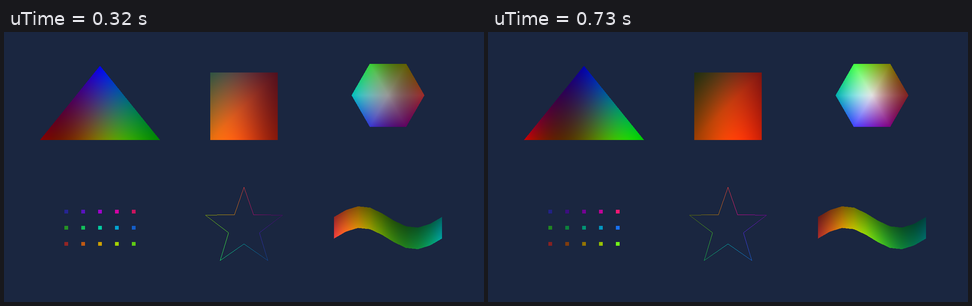
第4章の6つの図形が動き出します:
- 明るさの波が画面全体を左から右へ流れます。
- 四角形が元の色とオレンジの間で脈打ちます。
- 六角形が上下に揺れます。
此の3つの効果は全て3つのユニフォームから来ています。
フレーム全体で1つの時間と、描画毎に変わる色合い(ティント)とオフセットです。
操作:Rでシェーダーを読み直し、Pは今迄通りワイヤーフレームの切り替え、Escで終了です。
プロジェクトにはファイルが2組増えます。
file_util.hh/.ccはテキストファイルを読み、shader.hh/.ccがシェーダークラスです。
シェーダー自体は新しいshaders/フォルダに入ります。
第3章のコンパイルとリンクの補助関数はmain.ccから出て、shader.ccに移ります。
CMakeLists.txtには新しいソースを2つ足します:
add_executable(game
  src/main.cc
  src/window.cc
  src/gl_debug.cc
  src/buffer.cc
  src/mesh.cc
  src/file_util.cc
  src/shader.cc)
5.2 ファイルに入れたシェーダー
第4章の2つのシェーダーを、少し追加してshaders/shapes.vertとshaders/shapes.fragに移します。
頂点シェーダーにはオフセットが付きます:
#version 460 core
layout(location = 0) in vec3 aPosition;
layout(location = 1) in vec3 aColor;

uniform vec2 uOffset; // NDCでの移動量 / offset in NDC

out vec3 vColor;

void main() {
  vColor = aColor;
  gl_Position = vec4(aPosition.xy + uOffset, aPosition.z, 1.0);
}
フラグメントシェーダーには時間と色合いが付きます:
#version 460 core
in vec3 vColor;

uniform float uTime; // 秒 / seconds
uniform vec3 uTint;  // 図形ごとの色 / per-shape colour

layout(location = 0) out vec4 out_color;

void main() {
  // 画面を左から右へ流れる明るさの波 / a wave of brightness moving across the screen
  float wave = 0.75 + 0.25 * sin(uTime * 3.0 - gl_FragCoord.x * 0.02);
  out_color = vec4(vColor * uTint * wave, 1.0);
}
拡張子の.vertと.fragは只の慣習です(OpenGLはファイル名を見ません)。
でも多くのエディターやglslangValidator等のツールは、拡張子でステージを判断します。
新しいuniformの行は5.7で説明します。
gl_FragCoordはフラグメントシェーダーの組み込み入力で、今処理しているピクセルのウィンドウ上の位置をピクセル単位で表します。
原点は左下です(組み込み変数の一覧はGLSLシリーズにあります)。
従って明るさのwaveは、ピクセルのx座標と時間で決まります:
サインは−1から1迄なので、waveはから迄です。
つまり色は最大で半分の明るさ迄暗くなります。
x方向にはピクセル毎にサインが繰り返すので、1280ピクセルのウィンドウには明るい帯が約4本入ります。
そして波の山はが一定の場所、つまりにあります。
帯は毎秒150ピクセルの速さで右へ動きます。
作業ディレクトリ
プログラムはshaders/shapes.vertを相対パスで開く様になりました。
相対パスは、実行ファイルのフォルダではなく、プロセスの作業ディレクトリを基準に解決されます。
従って、第1章で説明した通り、プログラムはプロジェクトのルートから起動しなければなりません:
- LinuxとFreeBSD:
cd build && ./gameではなく、プロジェクトのルートから./build/gameを実行します。 - 生成したソリューションを使うVisual Studio:
CMakeLists.txtがVS_DEBUGGER_WORKING_DIRECTORYをプロジェクトのルートに設定しているので、F5だけで動きます。 - 「フォルダーを開く」を使うVisual Studio: 此のモードは其のプロパティを無視します。シェーダーが開けないと言われたら、
gameのデバッグ設定(「デバッグ」→「gameのデバッグと起動の設定」)を開き、launch.vs.jsonの其の構成に"currentDir": "${workspaceRoot}"を追加して下さい。
間違えると、ウィンドウの代わりに此れが表示されます(メッセージは此のシリーズの全ての出力と同じく2か国語です):
shaders/shapes.vert: 開けない / cannot open (プロジェクトのルートから実行した? / running from the project root?)
shaders/shapes.frag: 開けない / cannot open (プロジェクトのルートから実行した? / running from the project root?)
注意: Windowsでは、シェーダーのファイルをBOM(バイトオーダーマーク)無しのUTF-8で保存して下さい(Visual Studioなら「ファイル」→「名前を付けて保存」→「保存」の横の矢印→「エンコード付きで保存」→「Unicode (BOM なし UTF-8)」)。#versionの前の見えないBOMのバイトを受け付けないドライバーがあります。日本語のコメント自体は問題ありません。GLSL 4.20以降、ソースの文字集合はUTF-8です。
5.3 ファイルを読む
ファイルの補助関数はとても小さいです:
// ファイルの読み込み / reading files
#pragma once

#include <optional>
#include <string>

// ファイル全体を文字列として読む。開けなければstd::nullopt。
// Reads a whole file into a string. std::nullopt if it cannot be opened.
std::optional<std::string> readTextFile(const std::string &path);
#include "file_util.hh"

#include <fstream>
#include <sstream>

std::optional<std::string> readTextFile(const std::string &path) {
  // バイナリモード:Windowsで改行が変換されないように / binary mode: no newline conversion on Windows
  std::ifstream file(path, std::ios::binary);
  if (!file) return std::nullopt;
  std::ostringstream text;
  text << file.rdbuf();
  return text.str();
}
std::ifstreamがファイルを開きます。
失敗すると(パスの間違い、権限が無い等)ストリームはfalseに変換されるので、std::nulloptを返します。
此のシリーズのコードは例外を投げないので、「値があるかも知れない」はstd::optionalで表し、どうするかは呼び出し側が決めます。
text << file.rdbuf()はファイル全体を一度に文字列ストリームへコピーします。
std::ios::binaryフラグについて一言。
テキストモードでは、WindowsのC++ライブラリは読み込み中に全てのCR LFの改行をLFに変換します。
バイナリモードなら、どのプラットフォームでもディスク上のバイトを其のまま受け取れます。
GLSLのコンパイラーはどちらの改行も受け付けますし、下のエラー表示は各行の最後のLFしか見ないので、バイナリモードにすれば何処でも全く同じ動作になります。
5.4 Shaderクラス
インターフェースは次の通りです:
// シェーダープログラム / a shader program
#pragma once

#include <glad/glad.h>
#include <linalg.hh>

#include <optional>
#include <string>
#include <unordered_set>

// ファイルから読み込んだシェーダープログラム(RAII、コピー不可・移動可)。
// A shader program loaded from files (RAII, non-copyable, movable).
class Shader {
public:
  Shader() = default;
  ~Shader();
  Shader(const Shader &) = delete;
  Shader &operator=(const Shader &) = delete;
  Shader(Shader &&other) noexcept;
  Shader &operator=(Shader &&other) noexcept;

  // 頂点・フラグメントシェーダーのファイルから作る。失敗したらエラーを表示してstd::nullopt。
  // Builds a program from vertex and fragment shader files. On failure prints the errors and returns std::nullopt.
  static std::optional<Shader> load(const std::string &vertexPath, const std::string &fragmentPath);

  // ファイルを読み直す。失敗したら古いプログラムをそのまま使い続け、falseを返す。
  // Re-reads the files. On failure keeps using the old program and returns false.
  bool reload();

  void use() const { glUseProgram(program); }
  GLuint id() const { return program; }

  // ユニフォームを設定(DSA:glProgramUniform*なので use() は不要)
  // Set uniforms (DSA: glProgramUniform*, so use() is not needed)
  void set(const char *name, int value) const;
  void set(const char *name, float value) const;
  void set(const char *name, Vec2 value) const;
  void set(const char *name, Vec3 value) const;
  void set(const char *name, Vec4 value) const;
  void set(const char *name, const Mat4 &value) const;

private:
  GLint location(const char *name) const;

  GLuint program = 0;
  std::string vertexPath, fragmentPath;
  mutable std::unordered_set<std::string> warned; // 見つからない名前は一度だけ警告 / warn once per missing name
};
第4章のBufferと同じ形(RAII、コピー禁止、移動可能)ですが、違いが2つあります:
- 作成が失敗する事があります。 シェーダーがコンパイル出来ないかも知れないからです。其の為、公開コンストラクターの代わりに、
std::optional<Shader>を返すファクトリー関数Shader::loadがあります。値が返って来れば、プログラムは有効です。 - ファイルのパスを覚えています。
reload()が同じファイルをもう一度読める様にです。
此の節と次の幾つかの節で、shader.ccを下の層から順に見ていきます。
1つのステージのコンパイル、リンク、エラーの表示、読み込みと読み直し、そしてユニフォームの設定です。
1つのステージをコンパイルする
compileStageは、第3章のcompileShaderを文字列ではなくファイルから読む様にし、ログ用のバッファを丁度良い大きさにした物です:
// 一つのステージ(頂点・フラグメント…)をファイルからコンパイル。失敗したら0。
// Compiles one stage (vertex, fragment, ...) from a file. Returns 0 on failure.
static GLuint compileStage(GLenum type, const std::string &path) {
  std::optional<std::string> source = readTextFile(path);
  if (!source) {
    fprintf(stderr, "%s: 開けない / cannot open (プロジェクトのルートから実行した? / running from the project root?)\n",
            path.c_str());
    return 0;
  }
  GLuint shader = glCreateShader(type);
  const char *text = source->c_str();
  glShaderSource(shader, 1, &text, nullptr);
  glCompileShader(shader);

  GLint ok = 0;
  glGetShaderiv(shader, GL_COMPILE_STATUS, &ok);
  if (!ok) {
    GLint length = 0;
    glGetShaderiv(shader, GL_INFO_LOG_LENGTH, &length);
    std::string log(static_cast<size_t>(length > 1 ? length : 1), '\0');
    glGetShaderInfoLog(shader, length, nullptr, log.data());
    printShaderLog(path, *source, log.c_str());
    glDeleteShader(shader);
    return 0;
  }
  return shader;
}
glShaderSource(shader, count, strings, lengths)は文字列の配列を受け取り、コンパイラーが其れらを繋げます。
此処では文字列を1つ(count = 1)渡し、長さにはnullptrを渡しています。
此れは「各文字列はヌル終端で終わる」と言う意味です。
配列の形のお陰で、ソースをコピーせずに全てのシェーダーの前に共通のヘッダー(#versionや#define)を付けるエンジンもあります。
新しいのはglGetShaderiv(shader, GL_INFO_LOG_LENGTH, &length)です。
コンパイラーのログの長さを、終端のヌル文字を含めて返します。
ログが無ければ0です。
第3章では2048バイト固定の配列を使ったので、長いエラーの一覧は途中で切れていました。
今は文字列が丁度必要な大きさになります。
ログを表示するのは失敗した時だけです。
成功しても警告や「コンパイル成功」のメッセージをログに書くドライバーがあり、其れは只の雑音だからです。
リンク
buildProgramは第3章と同じ様に、両方のステージをコンパイルしてリンクします:
// 頂点とフラグメントをリンク。失敗したら0。 / links a vertex and a fragment shader. Returns 0 on failure.
static GLuint buildProgram(const std::string &vertexPath, const std::string &fragmentPath) {
  GLuint vs = compileStage(GL_VERTEX_SHADER, vertexPath);
  GLuint fs = compileStage(GL_FRAGMENT_SHADER, fragmentPath);
  if (!vs || !fs) {
    glDeleteShader(vs); // 0は無視される / 0 is silently ignored
    glDeleteShader(fs);
    return 0;
  }
  GLuint program = glCreateProgram();
  glAttachShader(program, vs);
  glAttachShader(program, fs);
  glLinkProgram(program);
  glDetachShader(program, vs);
  glDetachShader(program, fs);
  glDeleteShader(vs);
  glDeleteShader(fs);

  GLint ok = 0;
  glGetProgramiv(program, GL_LINK_STATUS, &ok);
  if (!ok) {
    char log[4096];
    glGetProgramInfoLog(program, sizeof log, nullptr, log);
    fprintf(stderr, "%s + %s: リンクエラー / link error:\n%s\n", vertexPath.c_str(), fragmentPath.c_str(), log);
    glDeleteProgram(program);
    return 0;
  }
  return program;
}
片方のステージが失敗しても、もう片方もコンパイルします。
1回の実行で全てのエラーが見える様にする為です。
glDeleteShader(0)は仕様で明示的に許されていて何もしないので、後片付けが短く書けます。
リンクエラー(例えば、どの頂点シェーダーのoutとも合わないフラグメントシェーダーのin)にはファイルも行もないので、2つのファイル名とログを其のまま表示します。
5.5 読み易いエラーメッセージ
コンパイルエラーの書式はドライバー毎に違います。
3つの大きな系統の、同じ種類のメッセージを並べます:
| ドライバー | ログの行 |
|---|---|
| Mesa(Linux、FreeBSD) | 0:12(5): error: ... |
| NVIDIA | 0(12) : error C1008: ... |
| WindowsのAMDとIntel | ERROR: 0:12: ... |
最初の数字はソース文字列の番号(文字列は1つしか渡さないので常に0)、2つ目が行で、Mesaは括弧の中に桁も付けます。
parseLogLineは単語の始まりにある0:又は0(を探し、其の後の行番号を読み、メッセージだけが残る様に位置の部分を切り取ります:
// コンパイラのログの一行から行番号を探し、位置の部分を取り除いたメッセージをmessageに入れる。行番号がなければ0。
//   Mesa:       "0:12(5): error: ..."
//   NVIDIA:     "0(12) : error C1008: ..."
//   AMD/Intel:  "ERROR: 0:12: ..."
// Finds the line number in one line of the compiler log and stores the message without the location
// in message. Returns 0 if there is no line number.
static int parseLogLine(std::string_view line, std::string &message) {
  for (size_t i = 0; i + 2 < line.size(); ++i) {
    bool startOk = (i == 0 || line[i - 1] == ' ');
    if (!startOk || line[i] != '0' || (line[i + 1] != ':' && line[i + 1] != '(')) continue;
    int number = 0;
    size_t j = i + 2;
    while (j < line.size() && line[j] >= '0' && line[j] <= '9') number = number * 10 + (line[j++] - '0');
    if (j == i + 2) continue;
    size_t rest = line.find(": ", j); // 位置の後の「: 」 / the ": " after the location
    rest = rest == std::string_view::npos ? j : rest + 2;
    message = std::string(line.substr(0, i)) + std::string(line.substr(rest));
    return number;
  }
  message = std::string(line);
  return 0;
}
Mesaの行0:12(5): error: xなら、ループはで止まり、数字の1と2をnumberに読み(、次に)、(5)の後の": "を見付けてerror: xを残します。
AMDのERROR: 0:12: xではで見付かり、其の前の文字列(ERROR: )はメッセージの前に残ります。
sourceLineは改行を個飛ばしてソースの行目を返します。
printShaderLogはログを1行ずつ処理して、全部を組み合わせます:
// ソースのn行目(1始まり) / line n of the source (1-based)
static std::string_view sourceLine(std::string_view source, int n) {
  size_t start = 0;
  for (int i = 1; i < n; ++i) {
    start = source.find('\n', start);
    if (start == std::string_view::npos) return {};
    ++start;
  }
  size_t end = source.find('\n', start);
  return source.substr(start, end == std::string_view::npos ? std::string_view::npos : end - start);
}

// エラーを「ファイル:行: メッセージ」の形で表示し、その行のソースも見せる
// Prints errors as "file:line: message" and shows that source line
static void printShaderLog(const std::string &path, std::string_view source, std::string_view log) {
  while (!log.empty()) {
    size_t end = log.find('\n');
    std::string_view line = log.substr(0, end);
    log = end == std::string_view::npos ? std::string_view{} : log.substr(end + 1);
    if (line.empty()) continue;

    std::string message;
    int n = parseLogLine(line, message);
    if (n > 0) {
      std::string_view code = sourceLine(source, n);
      fprintf(stderr, "%s:%d: %s\n  %4d | %.*s\n", path.c_str(), n, message.c_str(), n, static_cast<int>(code.size()),
              code.data());
    } else {
      fprintf(stderr, "%s: %s\n", path.c_str(), message.c_str());
    }
  }
}
書式の%.*sは、ヌル終端の無いstring_viewを表示する為の物で、先に長さをintで渡します。
vColorをvColrと打ち間違えたフラグメントシェーダーと、uniform vec2 uOffsetの後の;を消した頂点シェーダーでの結果です:
shaders/shapes.vert:7: error: syntax error, unexpected OUT_TOK, expecting ',' or ';'
     7 | out vec3 vColor;
shaders/shapes.frag:12: error: `vColr' undeclared
    12 |   out_color = vec4(vColr * uTint * wave, 1.0);
shaders/shapes.frag:12: error: operands to arithmetic operators must be numeric
    12 |   out_color = vec4(vColr * uTint * wave, 1.0);
shaders/shapes.frag:12: error: operands to arithmetic operators must be numeric
    12 |   out_color = vec4(vColr * uTint * wave, 1.0);
shaders/shapes.frag:12: error: cannot construct `vec4' from a non-numeric data type
    12 |   out_color = vec4(vColr * uTint * wave, 1.0);
此の出力から、GLSLに限らず全てのコンパイラーに当てはまる教訓が2つあります:
- 最初のエラーが本物です。
vColr' undeclaredの後の3行は其の結果に過ぎません。宣言されていない名前には型が無いので、掛け算もコンストラクターも失敗します。最初のエラーを直して、もう一度コンパイルして下さい。 ;の付け忘れは、次の合わない行で報告されます。 セミコロンが無いのは5行目ですが、6行目は空で、7行目のoutで初めてパーサーは宣言が終わっていない事に気付きます。エラーの行が正しく見える時は、其の上の行を見て下さい。
ファイル:行: メッセージの形はGCCやClangと同じなので、Vim、Emacs、VS Code等のエディターは出力からエラーの場所へ飛ぶ事が出来ます。
5.6 読み込みと読み直し
loadはプログラムを作り、Shaderに包みます:
std::optional<Shader> Shader::load(const std::string &vertexPath, const std::string &fragmentPath) {
  GLuint program = buildProgram(vertexPath, fragmentPath);
  if (!program) return std::nullopt;
  Shader shader;
  shader.program = program;
  shader.vertexPath = vertexPath;
  shader.fragmentPath = fragmentPath;
  return shader;
}
reloadは同じファイルから新しいプログラムを作り、其れが成功した時だけ古いプログラムと入れ替えます:
bool Shader::reload() {
  GLuint fresh = buildProgram(vertexPath, fragmentPath);
  if (!fresh) return false; // 古いプログラムを残す / keep the old program
  glDeleteProgram(program);
  program = fresh;
  warned.clear();
  return true;
}
何故既存のプログラムオブジェクトにコンパイルし直さないのでしょうか?
其れだと打ち間違い1つで動くプログラムが無くなり、シェーダーを直す迄画面が真っ黒になるからです。
新しいプログラムを作れば、読み直しに失敗してもエラーを表示するだけで、古いシェーダーが描き続けます。
此れでホットリロードが快適になります。
打ち間違えたまま保存してRを押し、エラーを読んで直し、もう一度Rを押す。
其の間、ウィンドウは何かを表示し続けます。
1つ覚えておくべき事があります。
新しいプログラムオブジェクトでは全てのユニフォームが0から始まり、ユニフォームのlocationも古いプログラムと違うかも知れません。
従って読み直した後は、全てのユニフォームをもう一度設定しなければなりません。
デモでは毎フレーム全てのユニフォームを設定しているので気付きませんが、起動時に1回だけ設定したユニフォームは、最初の読み直しの後で0になります。
reloadがwarnedを空にする(5.7)のも、クラスがlocationをキャッシュしないのも、此れが理由です。
デストラクターとムーブ操作はいつもの形です:
Shader::~Shader() {
  if (program) glDeleteProgram(program);
}

Shader::Shader(Shader &&other) noexcept
    : program(std::exchange(other.program, 0)), vertexPath(std::move(other.vertexPath)),
      fragmentPath(std::move(other.fragmentPath)), warned(std::move(other.warned)) {}

Shader &Shader::operator=(Shader &&other) noexcept {
  if (this != &other) {
    if (program) glDeleteProgram(program);
    program = std::exchange(other.program, 0);
    vertexPath = std::move(other.vertexPath);
    fragmentPath = std::move(other.fragmentPath);
    warned = std::move(other.warned);
  }
  return *this;
}
5.7 ユニフォーム
ユニフォームは、値がアプリケーションから来て、1回の描画コマンドの間は全ての頂点と全てのピクセルで同じになるシェーダーの変数です。
名前の由来も其処にあり、描画全体で一様(uniform)だからです。
属性は頂点毎に変わり、補間された出力はピクセル毎に変わり、ユニフォームはアプリケーションが変えた時だけ変わります。
シェーダー側から見たuniform修飾子はGLSLシリーズで扱ったので、此処ではOpenGL側を見ます。
リンクされたプログラムの各ユニフォームにはlocationがあり、C++側は此の整数でユニフォームを指定します。
値はプログラムオブジェクトの中にあります。
2つのプログラムが両方uTimeを宣言していれば、uTimeの値も別々に2つあります。
locationを探す
glGetUniformLocation(program, name)は、nameと言う名前のユニフォームのlocationを返します。
プログラムに其の名前のアクティブなユニフォームが無ければ−1です:
GLint Shader::location(const char *name) const {
  GLint loc = glGetUniformLocation(program, name);
  // -1:名前の間違い、または使われていないので最適化で消された
  // -1: a typo, or the uniform is unused and the compiler removed it
  if (loc < 0 && warned.insert(name).second)
    fprintf(stderr, "%s + %s: ユニフォーム「%s」がない / no active uniform \"%s\"\n", vertexPath.c_str(),
            fragmentPath.c_str(), name, name);
  return loc;
}
大事なのは「アクティブ」と言う言葉です。
GLSLのコンパイラーは出力に影響しないユニフォームを全て取り除くので、宣言しただけで使っていないユニフォームにはlocationがありません。
shapes.fragの式からuTintを外してRを押すと、プログラムが1回だけ教えてくれます:
shaders/shapes.vert + shaders/shapes.frag: ユニフォーム「uTint」がない / no active uniform "uTint"
名前は正しいのですが、コンパイルされたプログラムにはもう其のユニフォームが存在しません。
其の為、警告は「アクティブなユニフォームが無い」と言うだけで、打ち間違いとは決め付けません。
warnedのセットのお陰で、各名前の警告は毎秒60回ではなく1回だけ表示されます。
setはconst関数(ユニフォームを設定してもC++のオブジェクトは変わらない)なので、warnedはmutableにしてあります。
glGetUniformLocationはドライバーの中での文字列の検索です。
1フレームに数十回程度ならsetの度に呼んでも問題ありません。
課題3でlocationをキャッシュし、第19章では沢山の個別のユニフォームをユニフォームバッファに置き換えます。
値を設定する:glProgramUniform
setの各オーバーロードは、glProgramUniform系の関数を1つずつ呼びます:
// location が -1 なら glProgramUniform* は何もしない / with location -1, glProgramUniform* does nothing
void Shader::set(const char *name, int value) const { glProgramUniform1i(program, location(name), value); }
void Shader::set(const char *name, float value) const { glProgramUniform1f(program, location(name), value); }
void Shader::set(const char *name, Vec2 v) const { glProgramUniform2f(program, location(name), v.x, v.y); }
void Shader::set(const char *name, Vec3 v) const { glProgramUniform3f(program, location(name), v.x, v.y, v.z); }
void Shader::set(const char *name, Vec4 v) const { glProgramUniform4f(program, location(name), v.x, v.y, v.z, v.w); }

void Shader::set(const char *name, const Mat4 &m) const {
  // linalg.hhは列優先なので転置しない(GL_FALSE) / linalg.hh is column-major, so no transpose (GL_FALSE)
  glProgramUniformMatrix4fv(program, location(name), 1, GL_FALSE, &m.c[0].x);
}
形はglProgramUniform{個数}{型}(program, location, 値…)です:
program:ユニフォームを設定するプログラム。此れがDSAの部分です。location:glGetUniformLocationの結果。−1なら呼び出しは黙って無視されるので、ユニフォームが無くても警告だけで済み、落ちません。- 接尾辞は成分の数(1〜4)と型(
intはi、unsigned intはui、floatはf)です。従ってglProgramUniform3fはvec3を設定します。 glProgramUniformMatrix4fv(program, location, count, transpose, value)の様なv付きの関数は、代わりにcount個の値へのポインターを受け取ります。行列のtranspose = GL_FALSEは「データは列優先」と言う意味で、linalg.hhのMat4の保存の仕方と同じです。此のオーバーロードは第7章から使います。
glProgramUniform系の関数はOpenGL 4.1からあります。
古いチュートリアルの殆どは代わりにglUniform3f(location, x, y, z)を使います。
此れにはプログラムの引数が無く、glUseProgramで現在のプログラムになっている物のユニフォームを設定します。
第3章の「バインドしてから編集する」方式と同じで、罠も同じです。
glUseProgramの前にユニフォームを設定すると、前のプログラムに設定されてしまいます(プログラムが無ければGL_INVALID_OPERATIONです)。
glProgramUniformならsetは何時でも使え、use()は描画の時だけ必要です。
呼び出しの型は、シェーダーの型と完全に一致しなければなりません。
OpenGLは変換してくれないので、floatのユニフォームにintを渡すとエラーです。
shader->set("uTime", 1)と書くと(intのリテラルなのでintのオーバーロードが選ばれます)、第2章のデバッグロガーが毎フレーム報告します:
[GL ERROR] (API, high, id 1) GL_INVALID_OPERATION in glUniform1("uTime"@2 is float, not int)
(文章はMesaの物で、他のドライバーも別の言葉で同じ事を言います。)
直すには1.0fと書きます。
同じ理由で、setにはVec2、Vec3、Vec4の別々のオーバーロードがあります。
vec2のユニフォームにglProgramUniform3fを使ってもエラーです。
注意: サンプラー(第6章)はテクスチャユニットの番号を持つ整数のユニフォームなので、設定するのはintのオーバーロードです。但し此のシリーズではユニットをシェーダーのlayout(binding = N)で決めるので、其の為に使う事はありません。
ユニフォームの良くある間違いをまとめます:
- ユニフォームの設定を忘れる。 値は0のままです。色合いが(0, 0, 0)なら全てが黒くなり、拡大率が0なら全てが消えます。
- 型や成分の数の間違い。 上の通り
GL_INVALID_OPERATIONです。 - 別のプログラムに設定する。 各プログラムは自分の値を持つので、名前が同じでも、プログラムAに設定したユニフォームはプログラムBには効きません。
- 使っていないユニフォームを
glGetUniformLocationが見付けると思う。 コンパイラーが取り除いた後なので−1が返ります。
5.8 mainでクラスを使う
mainはウィンドウを作った直後にシェーダーを読み込み、失敗したら終了します:
int main() {
  Window window;
  if (!window.create(1280, 720, "OpenGL Tutorial - Chapter 5")) return 1;

  // シェーダーはファイルから読む(作業ディレクトリ=プロジェクトのルート)
  // shaders are read from files (working directory = project root)
  std::optional<Shader> shader = Shader::load("shaders/shapes.vert", "shaders/shapes.frag");
  if (!shader) return 1;
Rキーはreloadを呼び、成功を報告します。
失敗した場合はreloadが既にエラーを表示しています:
  bool wireframe = false;
  window.onKey = [&](int key, int action, int /*mods*/) {
    if (action != GLFW_PRESS) return;
    if (key == GLFW_KEY_ESCAPE) window.close();
    if (key == GLFW_KEY_R) {
      // 失敗しても古いシェーダーで描き続ける / on failure we keep drawing with the old shader
      if (shader->reload()) printf("シェーダーを読み直した / shaders reloaded\n");
    }
    if (key == GLFW_KEY_P) {
      wireframe = !wireframe;
      // 三角形を線で描く(デバッグに便利) / draw triangles as lines (handy for debugging)
      glPolygonMode(GL_FRONT_AND_BACK, wireframe ? GL_LINE : GL_FILL);
    }
  };
メッシュの作り方は第4章と全く同じです。
ユニフォームが登場するのは描画ループです:
  while (!window.shouldClose()) {
    window.pollEvents();

    glClearColor(0.10f, 0.15f, 0.25f, 1.0f);
    glClear(GL_COLOR_BUFFER_BIT);

    float t = static_cast<float>(window.time());
    const Vec3 white = {1.0f, 1.0f, 1.0f};

    shader->use();
    // フレームに一回:全ての描画で同じ値 / once per frame: the same value for every draw
    shader->set("uTime", t);

    // 描画ごと:ユニフォームは次に変えるまでプログラムに残る
    // per draw: a uniform keeps its value in the program until we change it
    shader->set("uOffset", Vec2{0.0f, 0.0f});
    shader->set("uTint", white);
    triangle.draw();
    points.draw();
    star.draw();
    ribbon.draw();

    // 四角形:色が白とオレンジの間で変わる / the quad: colour moves between white and orange
    float pulse = 0.5f + 0.5f * std::sin(t * 2.0f);
    shader->set("uTint", lerp(white, Vec3{1.0f, 0.5f, 0.1f}, pulse));
    quad.draw();

    // 六角形:上下に揺れる / the hexagon bobs up and down
    shader->set("uTint", white);
    shader->set("uOffset", Vec2{0.0f, 0.1f * std::sin(t * 3.0f)});
    hexagon.draw();

    window.swapBuffers();
  }
  return 0; // シェーダーとメッシュはここで自動的に削除される / the shader and meshes are deleted automatically here
}
window.time()は第2章のglfwGetTime()で、GLFWが始まってからの秒数をdoubleで返します。
シェーダーが使うのはfloatなので変換します。
(floatの有効数字は約7桁なので、何時間も動かし続けるとuTimeの精度が落ち、アニメーションがカクカクし始めます。エンジンは時間を一定の範囲で折り返したり、「レベルが始まってからの時間」の様な小さな値を送ったりします。此処では気にしなくて構いません。)
此のループの大事な考え方は、ユニフォームは変える迄プログラムの中に値を保つと言う事です。
ユニフォームの設定は描画コマンドの一部ではありません。
プログラムの状態を変え、其の後の全ての描画が新しい値を見ます。
従ってsetとdrawを呼ぶ順番で、各図形が受け取る値が決まります:
| 描画 | uOffset |
uTint |
|---|---|---|
| 三角形、点、星、リボン | (0, 0) | 白 |
| 四角形 | (0, 0) | 白とオレンジの間 |
| 六角形 | (0, 0.1 sin 3t) | 白 |
uTimeはフレームに1回設定され、6つ全てで同じです。
オフセットと色合いは各フレームの最初で中立の値に戻します。
そうしないと、三角形が前のフレームの六角形のオフセットを受け継いで、一緒に揺れてしまうからです。
(試してみて下さい。triangle.draw()の前のuOffsetの行を消すと、2フレーム目から6つの図形全てが六角形と一緒に揺れます。)
四角形の色合いにはlinalg.hhのlerpを使います:
白は、オレンジはです。
ではで、色合いはの明るい桃色です。
なら純粋なオレンジ、なら純粋な白で、は秒毎に繰り返します。
シェーダーの中で色合いは頂点の色と成分毎に掛け算されるので、赤のチャンネルは残り、緑と青は減ります。
四角形の青と紫の角は暗くなります。
六角形のオフセットはNDCの単位です。
NDCは縦720ピクセルで2単位なので、0.1は上下にピクセルです。
5.9 ホットリロードを使ってみる
プログラムを起動し、エディターでshaders/shapes.fragを開いて、最後の行を次の様に変えて下さい:
out_color = vec4((1.0 - vColor) * uTint * wave, 1.0);
保存して、ウィンドウでRを押します。
ターミナルにシェーダーを読み直した / shaders reloadedと表示され、アニメーションは動いたまま、全ての色が一瞬で反転します。
今度はわざと間違えて保存し、もう一度Rを押して下さい。
ターミナルにエラーが表示され、ウィンドウは最後に動いたバージョンを表示し続けます。
編集・保存・読み直し・確認の繰り返しは1秒程度で、全体をビルドし直して再起動するのとは比べ物になりません。
シェーダーの作業では此の差がとても大きいので、全てのエンジンが何らかの形で此れを持っています。
此処での実装はキーを押すだけの一番簡単な形です。
課題4で、ファイルが変わったら自動で読み直す様にします。
注意: 読み直すのはシェーダーのファイルだけです。main.ccを変えたら、やはりビルドし直す必要があります。又、シェーダーのインターフェースを変えた場合(例えば属性を追加した場合)、C++側も合わせないと意味がありません。
5.10 実際のエンジンでのやり方
- 個別のユニフォームではなくユニフォームバッファ。 描画毎に何十個ものユニフォームを1つずつ設定するのは遅いです。エンジンは其れらをブロック(フレーム毎、マテリアル毎、オブジェクト毎)にまとめ、各ブロックを1つのバッファとしてアップロードします。第19章で此れを行います。Vulkanにはブロックしかありません。
- locationのキャッシュやリフレクション。 エンジンはリンクの後に1回だけ全てのアクティブなユニフォームを問い合わせ(
glGetProgramiv(GL_ACTIVE_UNIFORMS)とglGetActiveUniform)、locationと型を保存し、アップロードの前にC++の値と型を照合します。 - インクルードファイルとパーミュテーション。 GLSLには
#includeがありません(課題6で追加します)。エンジンは共通のコードや#defineを前に付け、1つのシェーダーから沢山のバリエーション(影の有無、スキニング、霧等)をコンパイルします。 - 事前コンパイル。 起動時にGLSLのテキストをコンパイルする代わりに、多くのエンジンは事前にSPIR-Vにコンパイルするか(
glShaderBinaryとGL_SHADER_BINARY_FORMAT_SPIR_V、OpenGL 4.6)、ドライバーのバイナリをglGetProgramBinaryでキャッシュします。VulkanはSPIR-Vしか受け付けません。此のシリーズの後のSlangとVulkanのシリーズは其の方式です。 - ファイルの監視。 エディターはシェーダーのフォルダを監視し(Linuxは
inotify、FreeBSDはkqueue、WindowsはReadDirectoryChangesW)、変わったシェーダーを自動で読み直します。エラーなら古いバージョンを残すのは、此の章のreloadと同じです。
5.11 まとめ
- シェーダーは
shaders/*.vertとshaders/*.fragに置き、作業ディレクトリからの相対パスで読み込みます。必ずプロジェクトのルートから実行して下さい。 Shader::loadはstd::optional<Shader>を返します。エラーはMesa、NVIDIA、AMDのログ形式に対応して、ファイル:行: メッセージと其の行のソースで表示されます。- 最初のコンパイルエラーが本物です。
;の付け忘れは後の行に出ます。 reloadは新しいプログラムを作り、成功した時だけ入れ替えます。新しいプログラムのユニフォームは全て0なので、ユニフォームは毎フレーム設定します。- ユニフォームはプログラム毎の状態で、描画の間は一定です。
glGetUniformLocationはアクティブでない名前に−1を返し、glProgramUniform*はglUseProgram無しで値を設定します。型は完全に一致しなければなりません。 - ユニフォームは変える迄値を保つので、
setとdrawを呼ぶ順番で各描画が見る値が決まります。
5.12 課題
- ★ 波の
3.0の代わりになるuniform float uSpeed;をshapes.fragに追加し、↑と↓のキーで変えられる様にして下さい(第2章のwindow.keyDownとdtを使い、0〜10に制限します)。帯が速くなったり遅くなったりし、0で止まるはずです。 - ★ プログラムを動かしたまま、波だけを灰色で出力する様に
shapes.fragを変えて(vec4(vec3(wave), 1.0))、Rを押して下さい。明るい帯が流れる灰色の図形が見えるはずです。次に打ち間違いを残したままRを押して下さい。エラーが表示され、灰色の図形は其のまま残ります。 - ★★
Shaderの中のstd::unordered_map<std::string, GLint>にユニフォームのlocationをキャッシュして下さい。最初に使う時に登録し、reloadで空にします。出力は全く同じになるはずです。前と後で、1フレームにglGetUniformLocationが何回呼ばれるか数えて下さい(最初のフレームの後は6回から0回になります)。 - ★★ 自動の読み直しを実装して下さい。1秒に1回、両方のシェーダーファイルの
std::filesystem::last_write_timeを前回読み込んだ時刻と比べ、片方が変わっていたらreload()を呼びます。シェーダーのファイルを保存すると、Rを押さなくてもウィンドウが更新されるはずです。エディターがファイルを2段階で保存したらどうなるでしょうか? - ★★
uOffsetを使って、三角形がマウスに付いて来る様にして下さい。window.mouseX()とmouseY()をウィンドウのピクセル(原点は左上、yは下向き)からNDCのオフセット(yは上向き)に変換します。三角形がカーソルと一緒に動くはずです。縦の動きが逆なら、yの反転を忘れています。 - ★★★
compileStageに#includeの機能を追加して下さい。コンパイルの前に、#include "name.glsl"の行を全てshaders/name.glslの中身で置き換えます。其の上で、波をshaders/common.glslの関数に移します。エラーメッセージは正しいままにして下さい。インクルードしたファイルの中のエラーは、common.glslと其のファイルの中での行番号を示さなければなりません(ヒント:GLSLの#lineディレクティブ、又は繋げた後の行番号を元のファイルに戻す表)。
ファイル: a/CMakeLists.txt | b/CMakeLists.txt
| 前 | 新 | ||
|---|---|---|---|
| @@ -24,7 +24,9 @@ add_executable(game | |||
| 24 | src/window.cc | 24 | src/window.cc |
| 25 | src/gl_debug.cc | 25 | src/gl_debug.cc |
| 26 | src/buffer.cc | 26 | src/buffer.cc |
| 27 | src/mesh.cc) | 27 | src/mesh.cc |
| 28 | src/file_util.cc | ||
| 29 | src/shader.cc) | ||
| 28 | target_include_directories(game PRIVATE src external/stb external/linalg) | 30 | target_include_directories(game PRIVATE src external/stb external/linalg) |
| 29 | target_link_libraries(game PRIVATE glad glfw) | 31 | target_link_libraries(game PRIVATE glad glfw) |
| 30 | 32 | ||
ファイル: /dev/null | b/shaders/shapes.frag
| 前 | 新 | ||
|---|---|---|---|
| @@ -0,0 +1,13 @@ | |||
| 1 | #version 460 core | ||
| 2 | in vec3 vColor; | ||
| 3 | |||
| 4 | uniform float uTime; // 秒 / seconds | ||
| 5 | uniform vec3 uTint; // 図形ごとの色 / per-shape colour | ||
| 6 | |||
| 7 | layout(location = 0) out vec4 out_color; | ||
| 8 | |||
| 9 | void main() { | ||
| 10 | // 画面を左から右へ流れる明るさの波 / a wave of brightness moving across the screen | ||
| 11 | float wave = 0.75 + 0.25 * sin(uTime * 3.0 - gl_FragCoord.x * 0.02); | ||
| 12 | out_color = vec4(vColor * uTint * wave, 1.0); | ||
| 13 | } | ||
ファイル: /dev/null | b/shaders/shapes.vert
| 前 | 新 | ||
|---|---|---|---|
| @@ -0,0 +1,12 @@ | |||
| 1 | #version 460 core | ||
| 2 | layout(location = 0) in vec3 aPosition; | ||
| 3 | layout(location = 1) in vec3 aColor; | ||
| 4 | |||
| 5 | uniform vec2 uOffset; // NDCでの移動量 / offset in NDC | ||
| 6 | |||
| 7 | out vec3 vColor; | ||
| 8 | |||
| 9 | void main() { | ||
| 10 | vColor = aColor; | ||
| 11 | gl_Position = vec4(aPosition.xy + uOffset, aPosition.z, 1.0); | ||
| 12 | } | ||
ファイル: /dev/null | b/src/file_util.cc
| 前 | 新 | ||
|---|---|---|---|
| @@ -0,0 +1,13 @@ | |||
| 1 | #include "file_util.hh" | ||
| 2 | |||
| 3 | #include <fstream> | ||
| 4 | #include <sstream> | ||
| 5 | |||
| 6 | std::optional<std::string> readTextFile(const std::string &path) { | ||
| 7 | // バイナリモード:Windowsで改行が変換されないように / binary mode: no newline conversion on Windows | ||
| 8 | std::ifstream file(path, std::ios::binary); | ||
| 9 | if (!file) return std::nullopt; | ||
| 10 | std::ostringstream text; | ||
| 11 | text << file.rdbuf(); | ||
| 12 | return text.str(); | ||
| 13 | } | ||
ファイル: /dev/null | b/src/file_util.hh
| 前 | 新 | ||
|---|---|---|---|
| @@ -0,0 +1,9 @@ | |||
| 1 | // ファイルの読み込み / reading files | ||
| 2 | #pragma once | ||
| 3 | |||
| 4 | #include <optional> | ||
| 5 | #include <string> | ||
| 6 | |||
| 7 | // ファイル全体を文字列として読む。開けなければstd::nullopt。 | ||
| 8 | // Reads a whole file into a string. std::nullopt if it cannot be opened. | ||
| 9 | std::optional<std::string> readTextFile(const std::string &path); | ||
ファイル: a/src/main.cc | b/src/main.cc
| 前 | 新 | ||
|---|---|---|---|
| @@ -1,8 +1,12 @@ | |||
| 1 | // 第4章:頂点属性とインデックスバッファ | 1 | // 第5章:シェーダークラスとユニフォーム |
| 2 | // Chapter 4: vertex attributes and index buffers | 2 | // Chapter 5: a shader class and uniforms |
| 3 | // | 3 | // |
| 4 | // 操作 / Controls: P ワイヤーフレーム切り替え / toggle wireframe, Esc 終了 / quit | 4 | // 操作 / Controls: |
| 5 | // R シェーダーを読み直す / reload the shaders | ||
| 6 | // P ワイヤーフレーム切り替え / toggle wireframe | ||
| 7 | // Esc 終了 / quit | ||
| 5 | #include "mesh.hh" | 8 | #include "mesh.hh" |
| 9 | #include "shader.hh" | ||
| 6 | #include "window.hh" | 10 | #include "window.hh" |
| 7 | 11 | ||
| 8 | #include <linalg.hh> | 12 | #include <linalg.hh> |
| @@ -10,6 +14,7 @@ | |||
| 10 | #include <cmath> | 14 | #include <cmath> |
| 11 | #include <cstddef> | 15 | #include <cstddef> |
| 12 | #include <cstdio> | 16 | #include <cstdio> |
| 17 | #include <optional> | ||
| 13 | #include <vector> | 18 | #include <vector> |
| 14 | 19 | ||
| 15 | // 位置と色を交互に並べた(インターリーブ)頂点 / a vertex with position and colour interleaved | 20 | // 位置と色を交互に並べた(インターリーブ)頂点 / a vertex with position and colour interleaved |
| @@ -24,67 +29,6 @@ constexpr VertexAttrib kColorVertexLayout[] = { | |||
| 24 | {1, 3, offsetof(ColorVertex, color)}, // layout(location = 1) in vec3 aColor | 29 | {1, 3, offsetof(ColorVertex, color)}, // layout(location = 1) in vec3 aColor |
| 25 | }; | 30 | }; |
| 26 | 31 | ||
| 27 | static const char *kVertexShader = R"(#version 460 core | ||
| 28 | layout(location = 0) in vec3 aPosition; | ||
| 29 | layout(location = 1) in vec3 aColor; | ||
| 30 | |||
| 31 | out vec3 vColor; // フラグメントシェーダーへ(補間される) / to the fragment shader (interpolated) | ||
| 32 | |||
| 33 | void main() { | ||
| 34 | vColor = aColor; | ||
| 35 | gl_Position = vec4(aPosition, 1.0); | ||
| 36 | } | ||
| 37 | )"; | ||
| 38 | |||
| 39 | static const char *kFragmentShader = R"(#version 460 core | ||
| 40 | in vec3 vColor; | ||
| 41 | layout(location = 0) out vec4 out_color; | ||
| 42 | |||
| 43 | void main() { | ||
| 44 | out_color = vec4(vColor, 1.0); | ||
| 45 | } | ||
| 46 | )"; | ||
| 47 | |||
| 48 | static GLuint compileShader(GLenum type, const char *source) { | ||
| 49 | GLuint shader = glCreateShader(type); | ||
| 50 | glShaderSource(shader, 1, &source, nullptr); | ||
| 51 | glCompileShader(shader); | ||
| 52 | |||
| 53 | GLint ok = 0; | ||
| 54 | glGetShaderiv(shader, GL_COMPILE_STATUS, &ok); | ||
| 55 | if (!ok) { | ||
| 56 | char log[2048]; | ||
| 57 | glGetShaderInfoLog(shader, sizeof log, nullptr, log); | ||
| 58 | fprintf(stderr, "%sシェーダーのエラー / %s shader error:\n%s\n", type == GL_VERTEX_SHADER ? "頂点" : "フラグメント", | ||
| 59 | type == GL_VERTEX_SHADER ? "vertex" : "fragment", log); | ||
| 60 | glDeleteShader(shader); | ||
| 61 | return 0; | ||
| 62 | } | ||
| 63 | return shader; | ||
| 64 | } | ||
| 65 | |||
| 66 | static GLuint linkProgram(GLuint vertexShader, GLuint fragmentShader) { | ||
| 67 | GLuint program = glCreateProgram(); | ||
| 68 | glAttachShader(program, vertexShader); | ||
| 69 | glAttachShader(program, fragmentShader); | ||
| 70 | glLinkProgram(program); | ||
| 71 | glDetachShader(program, vertexShader); | ||
| 72 | glDetachShader(program, fragmentShader); | ||
| 73 | glDeleteShader(vertexShader); | ||
| 74 | glDeleteShader(fragmentShader); | ||
| 75 | |||
| 76 | GLint ok = 0; | ||
| 77 | glGetProgramiv(program, GL_LINK_STATUS, &ok); | ||
| 78 | if (!ok) { | ||
| 79 | char log[2048]; | ||
| 80 | glGetProgramInfoLog(program, sizeof log, nullptr, log); | ||
| 81 | fprintf(stderr, "リンクエラー / link error:\n%s\n", log); | ||
| 82 | glDeleteProgram(program); | ||
| 83 | return 0; | ||
| 84 | } | ||
| 85 | return program; | ||
| 86 | } | ||
| 87 | |||
| 88 | // NDCは横に引き伸ばされる(1280×720)ので、計算で作る図形はxを縮める。第8章で投影行列が解決する。 | 32 | // NDCは横に引き伸ばされる(1280×720)ので、計算で作る図形はxを縮める。第8章で投影行列が解決する。 |
| 89 | // NDC is stretched horizontally (1280×720), so generated shapes shrink x. Chapter 8's projection fixes this. | 33 | // NDC is stretched horizontally (1280×720), so generated shapes shrink x. Chapter 8's projection fixes this. |
| 90 | constexpr float kAspectFix = 720.0f / 1280.0f; | 34 | constexpr float kAspectFix = 720.0f / 1280.0f; |
| @@ -152,12 +96,21 @@ static Mesh makeRibbon(Vec2 center) { | |||
| 152 | 96 | ||
| 153 | int main() { | 97 | int main() { |
| 154 | Window window; | 98 | Window window; |
| 155 | if (!window.create(1280, 720, "OpenGL Tutorial - Chapter 4")) return 1; | 99 | if (!window.create(1280, 720, "OpenGL Tutorial - Chapter 5")) return 1; |
| 100 | |||
| 101 | // シェーダーはファイルから読む(作業ディレクトリ=プロジェクトのルート) | ||
| 102 | // shaders are read from files (working directory = project root) | ||
| 103 | std::optional<Shader> shader = Shader::load("shaders/shapes.vert", "shaders/shapes.frag"); | ||
| 104 | if (!shader) return 1; | ||
| 156 | 105 | ||
| 157 | bool wireframe = false; | 106 | bool wireframe = false; |
| 158 | window.onKey = [&](int key, int action, int /*mods*/) { | 107 | window.onKey = [&](int key, int action, int /*mods*/) { |
| 159 | if (action != GLFW_PRESS) return; | 108 | if (action != GLFW_PRESS) return; |
| 160 | if (key == GLFW_KEY_ESCAPE) window.close(); | 109 | if (key == GLFW_KEY_ESCAPE) window.close(); |
| 110 | if (key == GLFW_KEY_R) { | ||
| 111 | // 失敗しても古いシェーダーで描き続ける / on failure we keep drawing with the old shader | ||
| 112 | if (shader->reload()) printf("シェーダーを読み直した / shaders reloaded\n"); | ||
| 113 | } | ||
| 161 | if (key == GLFW_KEY_P) { | 114 | if (key == GLFW_KEY_P) { |
| 162 | wireframe = !wireframe; | 115 | wireframe = !wireframe; |
| 163 | // 三角形を線で描く(デバッグに便利) / draw triangles as lines (handy for debugging) | 116 | // 三角形を線で描く(デバッグに便利) / draw triangles as lines (handy for debugging) |
| @@ -193,12 +146,6 @@ int main() { | |||
| 193 | Mesh star = makeStar({0.0f, -0.45f}, 0.3f); | 146 | Mesh star = makeStar({0.0f, -0.45f}, 0.3f); |
| 194 | Mesh ribbon = makeRibbon({0.6f, -0.45f}); | 147 | Mesh ribbon = makeRibbon({0.6f, -0.45f}); |
| 195 | 148 | ||
| 196 | GLuint vs = compileShader(GL_VERTEX_SHADER, kVertexShader); | ||
| 197 | GLuint fs = compileShader(GL_FRAGMENT_SHADER, kFragmentShader); | ||
| 198 | if (!vs || !fs) return 1; | ||
| 199 | GLuint program = linkProgram(vs, fs); | ||
| 200 | if (!program) return 1; | ||
| 201 | |||
| 202 | glPointSize(10.0f); // GL_POINTSの大きさ(ピクセル) / size of GL_POINTS in pixels | 149 | glPointSize(10.0f); // GL_POINTSの大きさ(ピクセル) / size of GL_POINTS in pixels |
| 203 | 150 | ||
| 204 | while (!window.shouldClose()) { | 151 | while (!window.shouldClose()) { |
| @@ -207,17 +154,33 @@ int main() { | |||
| 207 | glClearColor(0.10f, 0.15f, 0.25f, 1.0f); | 154 | glClearColor(0.10f, 0.15f, 0.25f, 1.0f); |
| 208 | glClear(GL_COLOR_BUFFER_BIT); | 155 | glClear(GL_COLOR_BUFFER_BIT); |
| 209 | 156 | ||
| 210 | glUseProgram(program); | 157 | float t = static_cast<float>(window.time()); |
| 158 | const Vec3 white = {1.0f, 1.0f, 1.0f}; | ||
| 159 | |||
| 160 | shader->use(); | ||
| 161 | // フレームに一回:全ての描画で同じ値 / once per frame: the same value for every draw | ||
| 162 | shader->set("uTime", t); | ||
| 163 | |||
| 164 | // 描画ごと:ユニフォームは次に変えるまでプログラムに残る | ||
| 165 | // per draw: a uniform keeps its value in the program until we change it | ||
| 166 | shader->set("uOffset", Vec2{0.0f, 0.0f}); | ||
| 167 | shader->set("uTint", white); | ||
| 211 | triangle.draw(); | 168 | triangle.draw(); |
| 212 | quad.draw(); | ||
| 213 | hexagon.draw(); | ||
| 214 | points.draw(); | 169 | points.draw(); |
| 215 | star.draw(); | 170 | star.draw(); |
| 216 | ribbon.draw(); | 171 | ribbon.draw(); |
| 217 | 172 | ||
| 173 | // 四角形:色が白とオレンジの間で変わる / the quad: colour moves between white and orange | ||
| 174 | float pulse = 0.5f + 0.5f * std::sin(t * 2.0f); | ||
| 175 | shader->set("uTint", lerp(white, Vec3{1.0f, 0.5f, 0.1f}, pulse)); | ||
| 176 | quad.draw(); | ||
| 177 | |||
| 178 | // 六角形:上下に揺れる / the hexagon bobs up and down | ||
| 179 | shader->set("uTint", white); | ||
| 180 | shader->set("uOffset", Vec2{0.0f, 0.1f * std::sin(t * 3.0f)}); | ||
| 181 | hexagon.draw(); | ||
| 182 | |||
| 218 | window.swapBuffers(); | 183 | window.swapBuffers(); |
| 219 | } | 184 | } |
| 220 | 185 | return 0; // シェーダーとメッシュはここで自動的に削除される / the shader and meshes are deleted automatically here | |
| 221 | glDeleteProgram(program); | ||
| 222 | return 0; // メッシュはここで自動的に削除される / the meshes are deleted automatically here | ||
| 223 | } | 186 | } |
ファイル: /dev/null | b/src/shader.cc
| 前 | 新 | ||
|---|---|---|---|
| @@ -0,0 +1,181 @@ | |||
| 1 | #include "shader.hh" | ||
| 2 | |||
| 3 | #include "file_util.hh" | ||
| 4 | |||
| 5 | #include <cstdio> | ||
| 6 | #include <string_view> | ||
| 7 | #include <utility> | ||
| 8 | |||
| 9 | // コンパイラのログの一行から行番号を探し、位置の部分を取り除いたメッセージをmessageに入れる。行番号がなければ0。 | ||
| 10 | // Mesa: "0:12(5): error: ..." | ||
| 11 | // NVIDIA: "0(12) : error C1008: ..." | ||
| 12 | // AMD/Intel: "ERROR: 0:12: ..." | ||
| 13 | // Finds the line number in one line of the compiler log and stores the message without the location | ||
| 14 | // in message. Returns 0 if there is no line number. | ||
| 15 | static int parseLogLine(std::string_view line, std::string &message) { | ||
| 16 | for (size_t i = 0; i + 2 < line.size(); ++i) { | ||
| 17 | bool startOk = (i == 0 || line[i - 1] == ' '); | ||
| 18 | if (!startOk || line[i] != '0' || (line[i + 1] != ':' && line[i + 1] != '(')) continue; | ||
| 19 | int number = 0; | ||
| 20 | size_t j = i + 2; | ||
| 21 | while (j < line.size() && line[j] >= '0' && line[j] <= '9') number = number * 10 + (line[j++] - '0'); | ||
| 22 | if (j == i + 2) continue; | ||
| 23 | size_t rest = line.find(": ", j); // 位置の後の「: 」 / the ": " after the location | ||
| 24 | rest = rest == std::string_view::npos ? j : rest + 2; | ||
| 25 | message = std::string(line.substr(0, i)) + std::string(line.substr(rest)); | ||
| 26 | return number; | ||
| 27 | } | ||
| 28 | message = std::string(line); | ||
| 29 | return 0; | ||
| 30 | } | ||
| 31 | |||
| 32 | // ソースのn行目(1始まり) / line n of the source (1-based) | ||
| 33 | static std::string_view sourceLine(std::string_view source, int n) { | ||
| 34 | size_t start = 0; | ||
| 35 | for (int i = 1; i < n; ++i) { | ||
| 36 | start = source.find('\n', start); | ||
| 37 | if (start == std::string_view::npos) return {}; | ||
| 38 | ++start; | ||
| 39 | } | ||
| 40 | size_t end = source.find('\n', start); | ||
| 41 | return source.substr(start, end == std::string_view::npos ? std::string_view::npos : end - start); | ||
| 42 | } | ||
| 43 | |||
| 44 | // エラーを「ファイル:行: メッセージ」の形で表示し、その行のソースも見せる | ||
| 45 | // Prints errors as "file:line: message" and shows that source line | ||
| 46 | static void printShaderLog(const std::string &path, std::string_view source, std::string_view log) { | ||
| 47 | while (!log.empty()) { | ||
| 48 | size_t end = log.find('\n'); | ||
| 49 | std::string_view line = log.substr(0, end); | ||
| 50 | log = end == std::string_view::npos ? std::string_view{} : log.substr(end + 1); | ||
| 51 | if (line.empty()) continue; | ||
| 52 | |||
| 53 | std::string message; | ||
| 54 | int n = parseLogLine(line, message); | ||
| 55 | if (n > 0) { | ||
| 56 | std::string_view code = sourceLine(source, n); | ||
| 57 | fprintf(stderr, "%s:%d: %s\n %4d | %.*s\n", path.c_str(), n, message.c_str(), n, static_cast<int>(code.size()), | ||
| 58 | code.data()); | ||
| 59 | } else { | ||
| 60 | fprintf(stderr, "%s: %s\n", path.c_str(), message.c_str()); | ||
| 61 | } | ||
| 62 | } | ||
| 63 | } | ||
| 64 | |||
| 65 | // 一つのステージ(頂点・フラグメント…)をファイルからコンパイル。失敗したら0。 | ||
| 66 | // Compiles one stage (vertex, fragment, ...) from a file. Returns 0 on failure. | ||
| 67 | static GLuint compileStage(GLenum type, const std::string &path) { | ||
| 68 | std::optional<std::string> source = readTextFile(path); | ||
| 69 | if (!source) { | ||
| 70 | fprintf(stderr, "%s: 開けない / cannot open (プロジェクトのルートから実行した? / running from the project root?)\n", | ||
| 71 | path.c_str()); | ||
| 72 | return 0; | ||
| 73 | } | ||
| 74 | GLuint shader = glCreateShader(type); | ||
| 75 | const char *text = source->c_str(); | ||
| 76 | glShaderSource(shader, 1, &text, nullptr); | ||
| 77 | glCompileShader(shader); | ||
| 78 | |||
| 79 | GLint ok = 0; | ||
| 80 | glGetShaderiv(shader, GL_COMPILE_STATUS, &ok); | ||
| 81 | if (!ok) { | ||
| 82 | GLint length = 0; | ||
| 83 | glGetShaderiv(shader, GL_INFO_LOG_LENGTH, &length); | ||
| 84 | std::string log(static_cast<size_t>(length > 1 ? length : 1), '\0'); | ||
| 85 | glGetShaderInfoLog(shader, length, nullptr, log.data()); | ||
| 86 | printShaderLog(path, *source, log.c_str()); | ||
| 87 | glDeleteShader(shader); | ||
| 88 | return 0; | ||
| 89 | } | ||
| 90 | return shader; | ||
| 91 | } | ||
| 92 | |||
| 93 | // 頂点とフラグメントをリンク。失敗したら0。 / links a vertex and a fragment shader. Returns 0 on failure. | ||
| 94 | static GLuint buildProgram(const std::string &vertexPath, const std::string &fragmentPath) { | ||
| 95 | GLuint vs = compileStage(GL_VERTEX_SHADER, vertexPath); | ||
| 96 | GLuint fs = compileStage(GL_FRAGMENT_SHADER, fragmentPath); | ||
| 97 | if (!vs || !fs) { | ||
| 98 | glDeleteShader(vs); // 0は無視される / 0 is silently ignored | ||
| 99 | glDeleteShader(fs); | ||
| 100 | return 0; | ||
| 101 | } | ||
| 102 | GLuint program = glCreateProgram(); | ||
| 103 | glAttachShader(program, vs); | ||
| 104 | glAttachShader(program, fs); | ||
| 105 | glLinkProgram(program); | ||
| 106 | glDetachShader(program, vs); | ||
| 107 | glDetachShader(program, fs); | ||
| 108 | glDeleteShader(vs); | ||
| 109 | glDeleteShader(fs); | ||
| 110 | |||
| 111 | GLint ok = 0; | ||
| 112 | glGetProgramiv(program, GL_LINK_STATUS, &ok); | ||
| 113 | if (!ok) { | ||
| 114 | char log[4096]; | ||
| 115 | glGetProgramInfoLog(program, sizeof log, nullptr, log); | ||
| 116 | fprintf(stderr, "%s + %s: リンクエラー / link error:\n%s\n", vertexPath.c_str(), fragmentPath.c_str(), log); | ||
| 117 | glDeleteProgram(program); | ||
| 118 | return 0; | ||
| 119 | } | ||
| 120 | return program; | ||
| 121 | } | ||
| 122 | |||
| 123 | std::optional<Shader> Shader::load(const std::string &vertexPath, const std::string &fragmentPath) { | ||
| 124 | GLuint program = buildProgram(vertexPath, fragmentPath); | ||
| 125 | if (!program) return std::nullopt; | ||
| 126 | Shader shader; | ||
| 127 | shader.program = program; | ||
| 128 | shader.vertexPath = vertexPath; | ||
| 129 | shader.fragmentPath = fragmentPath; | ||
| 130 | return shader; | ||
| 131 | } | ||
| 132 | |||
| 133 | bool Shader::reload() { | ||
| 134 | GLuint fresh = buildProgram(vertexPath, fragmentPath); | ||
| 135 | if (!fresh) return false; // 古いプログラムを残す / keep the old program | ||
| 136 | glDeleteProgram(program); | ||
| 137 | program = fresh; | ||
| 138 | warned.clear(); | ||
| 139 | return true; | ||
| 140 | } | ||
| 141 | |||
| 142 | Shader::~Shader() { | ||
| 143 | if (program) glDeleteProgram(program); | ||
| 144 | } | ||
| 145 | |||
| 146 | Shader::Shader(Shader &&other) noexcept | ||
| 147 | : program(std::exchange(other.program, 0)), vertexPath(std::move(other.vertexPath)), | ||
| 148 | fragmentPath(std::move(other.fragmentPath)), warned(std::move(other.warned)) {} | ||
| 149 | |||
| 150 | Shader &Shader::operator=(Shader &&other) noexcept { | ||
| 151 | if (this != &other) { | ||
| 152 | if (program) glDeleteProgram(program); | ||
| 153 | program = std::exchange(other.program, 0); | ||
| 154 | vertexPath = std::move(other.vertexPath); | ||
| 155 | fragmentPath = std::move(other.fragmentPath); | ||
| 156 | warned = std::move(other.warned); | ||
| 157 | } | ||
| 158 | return *this; | ||
| 159 | } | ||
| 160 | |||
| 161 | GLint Shader::location(const char *name) const { | ||
| 162 | GLint loc = glGetUniformLocation(program, name); | ||
| 163 | // -1:名前の間違い、または使われていないので最適化で消された | ||
| 164 | // -1: a typo, or the uniform is unused and the compiler removed it | ||
| 165 | if (loc < 0 && warned.insert(name).second) | ||
| 166 | fprintf(stderr, "%s + %s: ユニフォーム「%s」がない / no active uniform \"%s\"\n", vertexPath.c_str(), | ||
| 167 | fragmentPath.c_str(), name, name); | ||
| 168 | return loc; | ||
| 169 | } | ||
| 170 | |||
| 171 | // location が -1 なら glProgramUniform* は何もしない / with location -1, glProgramUniform* does nothing | ||
| 172 | void Shader::set(const char *name, int value) const { glProgramUniform1i(program, location(name), value); } | ||
| 173 | void Shader::set(const char *name, float value) const { glProgramUniform1f(program, location(name), value); } | ||
| 174 | void Shader::set(const char *name, Vec2 v) const { glProgramUniform2f(program, location(name), v.x, v.y); } | ||
| 175 | void Shader::set(const char *name, Vec3 v) const { glProgramUniform3f(program, location(name), v.x, v.y, v.z); } | ||
| 176 | void Shader::set(const char *name, Vec4 v) const { glProgramUniform4f(program, location(name), v.x, v.y, v.z, v.w); } | ||
| 177 | |||
| 178 | void Shader::set(const char *name, const Mat4 &m) const { | ||
| 179 | // linalg.hhは列優先なので転置しない(GL_FALSE) / linalg.hh is column-major, so no transpose (GL_FALSE) | ||
| 180 | glProgramUniformMatrix4fv(program, location(name), 1, GL_FALSE, &m.c[0].x); | ||
| 181 | } | ||
ファイル: /dev/null | b/src/shader.hh
| 前 | 新 | ||
|---|---|---|---|
| @@ -0,0 +1,48 @@ | |||
| 1 | // シェーダープログラム / a shader program | ||
| 2 | #pragma once | ||
| 3 | |||
| 4 | #include <glad/glad.h> | ||
| 5 | #include <linalg.hh> | ||
| 6 | |||
| 7 | #include <optional> | ||
| 8 | #include <string> | ||
| 9 | #include <unordered_set> | ||
| 10 | |||
| 11 | // ファイルから読み込んだシェーダープログラム(RAII、コピー不可・移動可)。 | ||
| 12 | // A shader program loaded from files (RAII, non-copyable, movable). | ||
| 13 | class Shader { | ||
| 14 | public: | ||
| 15 | Shader() = default; | ||
| 16 | ~Shader(); | ||
| 17 | Shader(const Shader &) = delete; | ||
| 18 | Shader &operator=(const Shader &) = delete; | ||
| 19 | Shader(Shader &&other) noexcept; | ||
| 20 | Shader &operator=(Shader &&other) noexcept; | ||
| 21 | |||
| 22 | // 頂点・フラグメントシェーダーのファイルから作る。失敗したらエラーを表示してstd::nullopt。 | ||
| 23 | // Builds a program from vertex and fragment shader files. On failure prints the errors and returns std::nullopt. | ||
| 24 | static std::optional<Shader> load(const std::string &vertexPath, const std::string &fragmentPath); | ||
| 25 | |||
| 26 | // ファイルを読み直す。失敗したら古いプログラムをそのまま使い続け、falseを返す。 | ||
| 27 | // Re-reads the files. On failure keeps using the old program and returns false. | ||
| 28 | bool reload(); | ||
| 29 | |||
| 30 | void use() const { glUseProgram(program); } | ||
| 31 | GLuint id() const { return program; } | ||
| 32 | |||
| 33 | // ユニフォームを設定(DSA:glProgramUniform*なので use() は不要) | ||
| 34 | // Set uniforms (DSA: glProgramUniform*, so use() is not needed) | ||
| 35 | void set(const char *name, int value) const; | ||
| 36 | void set(const char *name, float value) const; | ||
| 37 | void set(const char *name, Vec2 value) const; | ||
| 38 | void set(const char *name, Vec3 value) const; | ||
| 39 | void set(const char *name, Vec4 value) const; | ||
| 40 | void set(const char *name, const Mat4 &value) const; | ||
| 41 | |||
| 42 | private: | ||
| 43 | GLint location(const char *name) const; | ||
| 44 | |||
| 45 | GLuint program = 0; | ||
| 46 | std::string vertexPath, fragmentPath; | ||
| 47 | mutable std::unordered_set<std::string> warned; // 見つからない名前は一度だけ警告 / warn once per missing name | ||
| 48 | }; | ||
コメント(0)
まだコメントはありません。
ログインするとコメント出来ます。