2. Vectors
In chapter 1 we described positions with coordinates like or .
In this chapter we'll start treating those lists of numbers as objects we can calculate with: vectors.
Vectors are the single most used thing in graphics programming.
Positions, movement, directions, colors, texture coordinates and surface normals are all vectors, and almost every line of shader code you'll ever write works with them.
2.1 Points and vectors
Before any math, let's separate two ideas that look the same on paper but mean different things.
A point is a location: "the treasure is at ".
A vector is a displacement, a movement: "walk 4 steps east and 3 steps north".
A point answers "where?", and a vector answers "which way, and how far?".
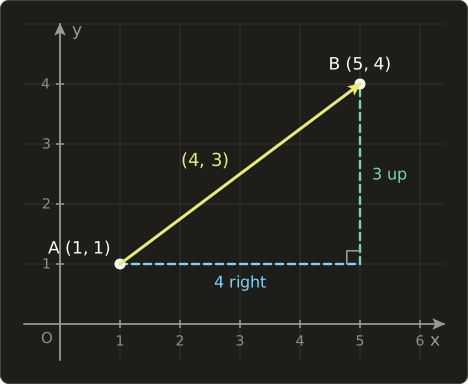
The trip from point A to point B is the vector : 4 to the right and 3 up.
The vector itself is the straight arrow from A to B; the "4 right" and "3 up" legs in the picture are its two parts.
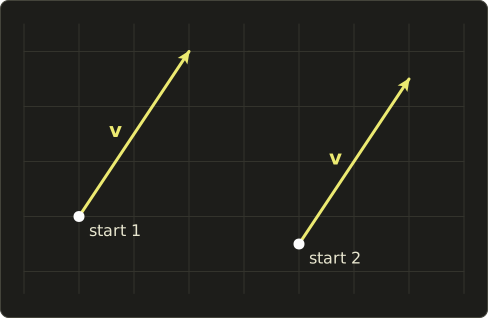
Here's the important bit: a vector has no fixed starting place.
"Walk 4 east and 3 north" is the same instruction whether you start at your house or at the station.
So the same vector can be drawn anywhere, and every copy is equally valid:
Confusingly, we write points and vectors the same way, as lists of numbers.
The trick is that a point's numbers are really the vector from the origin to that point.
The point means "where you end up if you start at the origin and move by the vector ".
In code, both are usually stored in the same Vec3 type, and it's up to you to remember which is which.
That distinction will become important again in chapter 9, where points and directions behave differently under translation.
2.2 Vectors as lists of numbers
A vector is written as a bold lowercase letter, like .
Its numbers are called its components, and we name them with subscripts: , and are the x, y and z components of .
In this series, vectors are written as columns:
Columns take up a lot of space in a sentence, so inside text I'll write the same vector as .
It still means the column.
Why columns rather than rows matters once matrices appear in chapter 6; for now, it's just how we write them.
The number of components is the vector's dimension:
- A 2D vector : positions on a screen, texture coordinates, movement on a flat map.
- A 3D vector : positions and directions in a 3D world, or an RGB color.
- A 4D vector : an RGBA color (red, green, blue and alpha, the opacity), or the special 4-component positions we'll meet in chapter 9.
When talking about vectors in general, I'll number the components instead: for a vector with components.
Nothing in this chapter cares how many components there are; every operation works the same in 2D, 3D, 4D or 100D.
One vector deserves its own name: the zero vector, with every component 0:
It's the "don't move at all" vector.
It has no direction, which will cause us some trouble in chapter 3.
2.3 What the formulas are
Here are all the operations of this chapter at once.
Take two 3D vectors and , and a single number .
A single ordinary number like is called a scalar, because, as we'll see, it scales vectors.
Addition: add matching components.
Subtraction: subtract matching components.
Negation: flip the sign of every component.
Scalar multiplication: multiply every component by the same number.
Linear interpolation (lerp): blend from to by an amount between 0 and 1.
Notice that everything works component by component.
The x components only ever talk to x components, the y components to y components, and so on.
That's what makes vectors so easy to compute with.
2.4 How it works
Addition: tip to tail
Adding two vectors means doing one movement after the other.
Walk along , then from where you ended up, walk along .
The shortcut from where you started to where you finished is :
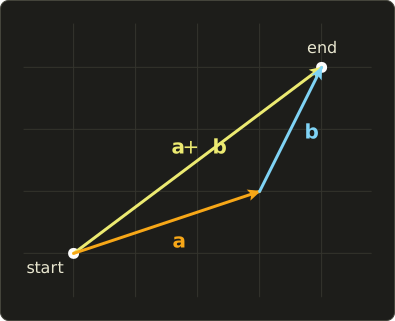
This is called the tip-to-tail rule: put the tail of at the tip of .
(The picture uses the vectors from the worked example below, but the rule is the same whichever way the arrows point.)
The horizontal moves add up with the horizontal moves, and the vertical moves add up with the vertical moves, which is exactly why addition is component-wise.
Worked example with and :
Walking 3 right and 1 up, then 1 right and 2 up, leaves you 4 right and 3 up from where you started.
The same works in 3D with and :
You can also add a vector to a point: a point plus a movement gives a new point.
Starting at the point and moving by lands you on , which is the picture from section 2.1.
Subtraction: the arrow from A to B
Subtraction answers the question "how do I get from here to there?".
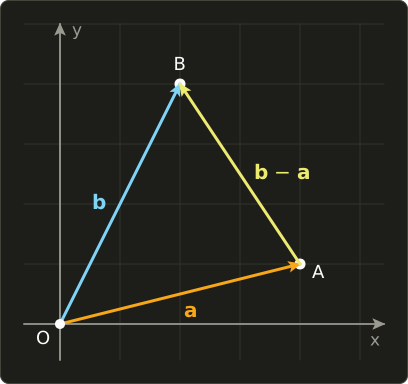
If and are the positions of two points A and B, then is the vector from A to B:
Why?
Because to get from A to B you can go from A back to the origin O (that's ), then from O to B (that's ).
Together: .
A good way to remember the order: destination minus start.
Worked example: A is at and B is at .
That's the same we saw in section 2.1.
Check it by going back the other way: , which is B.
If you subtract in the wrong order, you get : the arrow from B back to A.
Getting this order backwards is a classic bug: the enemy runs away from the player instead of towards them.
A 3D example: the player stands at and an enemy at .
The vector from the player to the enemy is
So the enemy is 4 units to the right and 3 units further away from the viewer (remember, +Z points towards the viewer, so −3 means away).
In chapter 3 we'll find out how far that is, and turn it into a direction the player can aim along.
Negation: the same arrow, backwards
Negating a vector flips every component's sign, which flips the arrow around without changing its length:
If points from the player to the enemy, points from the enemy to the player.
Subtraction is really just adding the negation: .
Scalar multiplication: stretching and flipping
Multiplying a vector by a scalar multiplies every component by .
The effect on the arrow:
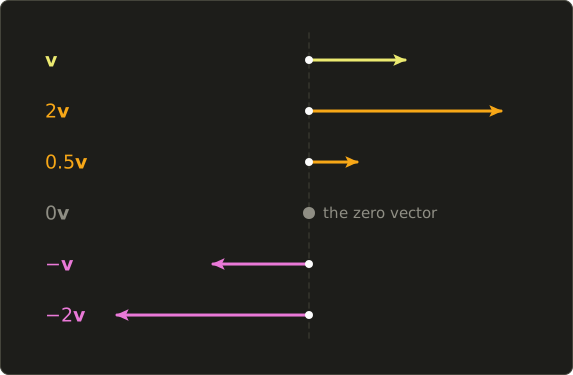
- If , the arrow gets longer.
- If , it gets shorter.
- If , it collapses into the zero vector.
- If , it flips around and points the other way.
The direction never changes other than flipping; only the length does.
That's where the word scalar comes from: it scales vectors.
Worked example with :
Dividing a vector by a scalar is the same as multiplying by one over it: .
Negation is scalar multiplication by −1: .
Notice what we don't have: there's no standard "vector times vector" in this chapter.
Multiplying two vectors can mean several different things, and the two famous ones, the dot product and the cross product, get their own chapters (4 and 5).
Properties
Because every operation is just ordinary arithmetic on each component, vectors obey the rules you already know from numbers.
For any vectors and scalars :
- (the order of adding doesn't matter)
- (neither does the grouping)
- (adding the zero vector changes nothing)
- (a vector and its negation cancel out)
- (scaling a sum is the sum of the scaled vectors)
Let's check one with numbers, , and :
Same answer.
These rules are what let us rearrange vector formulas freely, just like ordinary algebra.
2.5 Linear combinations and the standard basis
Once you can scale vectors and add them, you can combine them: scale a few vectors, then add the results.
That's called a linear combination:
Worked example with , , and :
Now pick the simplest possible vectors to combine: arrows of length 1 pointing exactly along each axis.
In 3D there are three of them, and they have their own names:
They are called the standard basis vectors: points along +X, along +Y and along +Z.
(Some books call them ; same thing.)
In 2D we only need and .
Here's the punchline: every vector is a linear combination of the basis vectors, and its components are the amounts:
In 2D, the vector is literally "three steps of , then two steps of ":
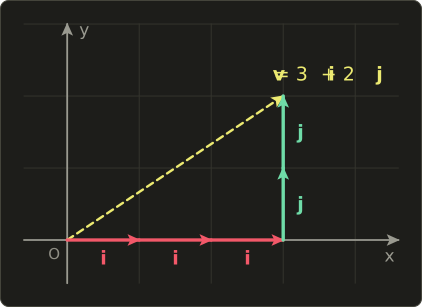
Let's verify it in 3D with , writing out every step:
This might look like a pointless way of saying the same thing twice.
It isn't: it's the seed of the most important idea in the whole series.
If you replace , and with other vectors, the same recipe moves every vector somewhere new: it rotates, stretches or skews the whole space.
Writing those replacement vectors side by side gives you a matrix, and that's exactly how we'll introduce matrices in chapter 6.
2.6 Linear interpolation
Very often in graphics we want something in between two values: a position halfway along a path, a color 30% of the way from red to blue, a camera smoothly gliding to its target.
The tool for this is linear interpolation, almost always shortened to lerp:
Read it with the tools from this chapter: is the arrow from to .
Scale it by to walk only part of the way, and add it to to start from .
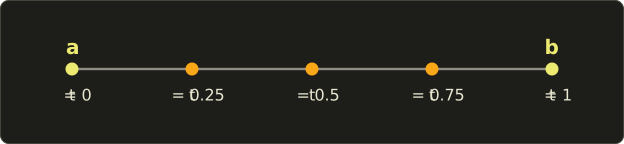
- At you get .
- At you get .
- At you get the midpoint, the average of the two.
Worked example: , and .
First the arrow from to :
Then a quarter of it:
Then add it to the start:
With the same steps give , the midpoint.
If you expand the formula, you get a second form that's just as common:
This version reads as a weighted average: "take of and of ".
Check it with our example: .
Same answer.
The two forms are equal in exact math; with floating-point numbers, the second one is guaranteed to land exactly on at , while the first can be off by a tiny rounding error.
For graphics, either is fine.
What happens outside 0 to 1?
With we get : a point past , on the same line.
That's called extrapolation.
It's sometimes useful (predicting where a moving object will be), but usually it's a bug, so code often clamps into the range 0 to 1 first.
The "linear" in lerp means moves you along a straight line at a steady rate.
If you want motion that starts slowly and speeds up, you keep the lerp and change how grows over time; that's what animation easing curves do.
2.7 Use in graphics programming
Positions and velocities
A moving object has a position (a point) and a velocity (a vector: how far it moves per second, and in which direction).
Each frame, the game moves it by its velocity times the time that has passed since the last frame, (read "delta t"; Δ is the Greek capital delta, used for "a change in"):
The arrow means "replace the old value with the new one", like = in code.
It's a scalar multiplication followed by an addition, nothing more.
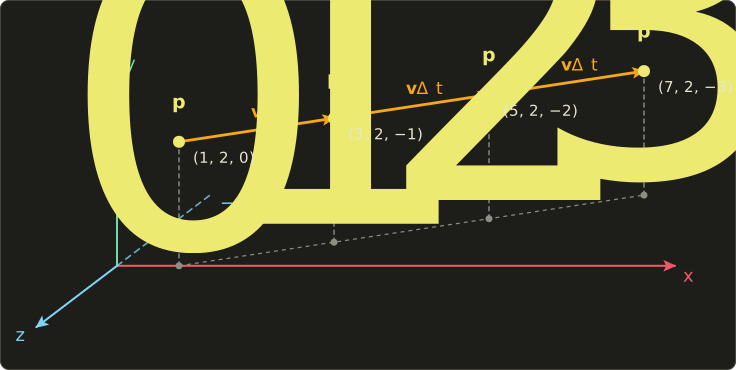
Worked example: an object starts at with velocity units per second, and we step by seconds.
The next two steps give and .
Why multiply by instead of adding every frame?
Because frame rates vary.
Say .
At 60 frames per second, and each frame moves the object by ; after 60 frames it has moved 6 units.
At 30 frames per second, , each frame moves it , and after 30 frames it has also moved 6 units.
One second of game time is the same distance regardless of how fast the computer is.
Acceleration works exactly the same way, one level up.
Gravity is the vector meters per second per second, and each frame we update the velocity first, then the position:
That's a complete (if simple) physics simulation for a thrown ball, written with nothing but this chapter's operations.
Offsets
Many positions in a game are "somewhere relative to something else": the muzzle of a gun, the spot above a character's head where the name tag goes, the camera following behind the player.
These are a point plus an offset vector.
If the player stands at and the name tag should float 2 units above them:
A name tag only needs "up", which doesn't change when the player turns.
A gun muzzle offset like "0.5 forward" does change when the player turns around; rotating offsets is what chapter 8 is for.
Colors as vectors
A color on screen is three numbers: how much red, green and blue light to emit, usually from 0 to 1.
That's a 3D vector, and our operations have direct visual meanings:
- Adding colors adds light. A dim orange plus a gray ambient light gives . This is how the contributions of several lights are combined.
- Scaling a color changes its brightness. is the same hue at half brightness.
- Lerping fades between colors. From red to blue at : , a reddish purple.
Shaders also use one more operation that isn't standard vector math: multiplying two vectors component by component.
For colors, it's called tinting or modulating, and it's how a texture color gets filtered by a light color or a tint:
A tint of keeps all the red but halves the green and blue, so the result looks redder.
Here is a small shader function that tints a sprite and then flashes it towards a color when it gets hit:
float3 shadeSprite(float3 texColor, float3 tint, float3 flashColor, float flash) {
  float3 tinted = texColor * tint; // 成分毎の掛け算 / component-wise multiplication
  return lerp(tinted, flashColor, saturate(flash));
}
vec3 shadeSprite(vec3 texColor, vec3 tint, vec3 flashColor, float flash) {
vec3 tinted = texColor * tint; // 成分毎の掛け算 / component-wise multiplication
return mix(tinted, flashColor, clamp(flash, 0.0, 1.0));
}float3 shadeSprite(float3 texColor, float3 tint, float3 flashColor, float flash) {
float3 tinted = texColor * tint; // 成分毎の掛け算 / component-wise multiplication
return lerp(tinted, flashColor, saturate(flash));
}
Slang and HLSL call linear interpolation lerp and GLSL calls it mix, but they all compute exactly .
saturate(x) in Slang and HLSL clamps a value into the range 0 to 1, which is what GLSL's clamp(x, 0.0, 1.0) does.
With the tinted color from above, a white flash and flash = 0.5:
Animate flash from 1 down to 0 over a few frames and you get the classic "damage blink".
Texture coordinates
UV coordinates (chapter 1) are 2D vectors, so all of this applies to them too.
Adding a vector that grows with time makes a texture scroll, which is how a lot of water, lava and conveyor-belt effects are done:
float2 scrollUv(float2 uv, float2 speed, float time) {
  return frac(uv + speed * time);
}
vec2 scrollUv(vec2 uv, vec2 speed, float time) {
return fract(uv + speed * time);
}float2 scrollUv(float2 uv, float2 speed, float time) {
return frac(uv + speed * time);
}
speed * time is a scalar multiplication, and adding it to uv shifts the texture.
frac (Slang and HLSL) and fract (GLSL) keep only the part after the decimal point, so the UV wraps around from 1 back to 0.
For example, , speed and time 2 gives , which wraps to .
Vectors in shaders: swizzling and component-wise math
Shading languages have vectors built in: float2, float3, float4 in Slang and HLSL, and vec2, vec3, vec4 in GLSL.
Addition, subtraction and scalar multiplication work with the ordinary +, - and * operators.
On two vectors of the same size, * and / work component by component, as in the tint example above.
Shaders also let you pick, reorder and repeat components with a feature called swizzling.
The components are named x y z w, and for colors you can use r g b a instead (the same four slots under different names):
float3 swizzleDemo(float4 v) {
  float3 a = v.xyz; // the first three components
  float3 b = v.zyx; // reversed
  float3 c = v.xxy; // components may repeat
  return a + b + c;
}

float4 makeRedder(float4 color) {
  color.r = 1.0;   // write one component
  color.gb *= 0.5; // write two components at once
  return color;
}
vec3 swizzleDemo(vec4 v) {
vec3 a = v.xyz; // the first three components
vec3 b = v.zyx; // reversed
vec3 c = v.xxy; // components may repeat
return a + b + c;
}
vec4 makeRedder(vec4 color) {
color.r = 1.0; // write one component
color.gb *= 0.5; // write two components at once
return color;
}float3 swizzleDemo(float4 v) {
float3 a = v.xyz; // the first three components
float3 b = v.zyx; // reversed
float3 c = v.xxy; // components may repeat
return a + b + c;
}
float4 makeRedder(float4 color) {
color.r = 1.0; // write one component
color.gb *= 0.5; // write two components at once
return color;
}
With : v.xyz is , v.zyx is and v.xxy is .
Adding them component by component gives .
Two rules to remember.
First, don't mix the two naming sets in one swizzle: GLSL rejects v.xg with an error, and even where a compiler accepts it, it's confusing to read.
Second, when writing to a swizzle, a component can't appear twice: v.xx = ... is an error in all three languages, because which value would win?
Swizzles are free on the GPU, so use them as much as you like.
2.8 Other uses
Vectors appear wherever several numbers belong together and get added or scaled as a group:
- Physics: forces. Forces are vectors, and when several act on an object, the total force is their sum. A box pushed with newtons, pulled down by gravity with , and dragged by a rope with feels a net force of .
- Wind and navigation. A plane flying at km/h through the air, in a wind blowing at km/h, moves over the ground at km/h. Pilots and sailors add these vectors every day.
- Machine learning: feature vectors. A house can be described as : 120 m², 3 rooms, 15 years old. Data like this is stored as vectors, often with hundreds of components. The average of two houses and is a lerp with : .
- Shopping. A basket with 3 apples, 1 bread and 2 milk is the vector . Combining it with a friend's is vector addition: . Doubling the order is scalar multiplication: . Working out the total price is the dot product of chapter 4.
- Audio. A stereo sample is a 2D vector (left, right). Mixing two sounds adds their vectors, a volume knob is a scalar multiplication, and a crossfade between two songs is a lerp.
2.9 Code
Now let's add vectors to linalg.hh.
Put the following below the angle helpers from chapter 1:
//------------------------------------------
// ベクトル / Vectors (chapters 2–5)
//------------------------------------------

struct Vec2 {
  float x = 0.0f, y = 0.0f;
};

struct Vec3 {
  float x = 0.0f, y = 0.0f, z = 0.0f;
};

struct Vec4 {
  float x = 0.0f, y = 0.0f, z = 0.0f, w = 0.0f;
};

// 足し算・引き算 / addition and subtraction (chapter 2)
inline Vec2 operator+(Vec2 a, Vec2 b) { return {a.x + b.x, a.y + b.y}; }
inline Vec2 operator-(Vec2 a, Vec2 b) { return {a.x - b.x, a.y - b.y}; }
inline Vec3 operator+(Vec3 a, Vec3 b) { return {a.x + b.x, a.y + b.y, a.z + b.z}; }
inline Vec3 operator-(Vec3 a, Vec3 b) { return {a.x - b.x, a.y - b.y, a.z - b.z}; }
inline Vec4 operator+(Vec4 a, Vec4 b) { return {a.x + b.x, a.y + b.y, a.z + b.z, a.w + b.w}; }
inline Vec4 operator-(Vec4 a, Vec4 b) { return {a.x - b.x, a.y - b.y, a.z - b.z, a.w - b.w}; }
inline Vec3 operator-(Vec3 v) { return {-v.x, -v.y, -v.z}; }

// スカラー倍 / scalar multiplication (chapter 2)
inline Vec2 operator*(float s, Vec2 v) { return {s * v.x, s * v.y}; }
inline Vec3 operator*(float s, Vec3 v) { return {s * v.x, s * v.y, s * v.z}; }
inline Vec4 operator*(float s, Vec4 v) { return {s * v.x, s * v.y, s * v.z, s * v.w}; }
inline Vec3 operator*(Vec3 v, float s) { return s * v; }
inline Vec3 operator/(Vec3 v, float s) { return {v.x / s, v.y / s, v.z / s}; }

// 線型補間 / linear interpolation (chapter 2)
inline Vec3 lerp(Vec3 a, Vec3 b, float t) { return a + t * (b - a); }
Some notes:
- Each vector is a plain
structof floats. The= 0.0fdefaults mean thatVec3 v;is the zero vector, andVec3 a{3.0f, 1.0f, 2.0f};sets the components in order. - The functions take vectors by value. A
Vec3is only 12 bytes, so copying it is as cheap as passing a pointer, and compilers optimize this very well. inlinelets us define functions in a header that's included from several.ccfiles without the linker complaining about duplicates.- Each operator is the formula from section 2.3, written out component by component.
return {a.x + b.x, a.y + b.y};builds the result vector directly. Vec3gets the most operators because it's the type we use most: unary minus, scalar multiplication from both sides (2.0f * vandv * 2.0f), and division by a scalar. ForVec2andVec4, write the scalar on the left.lerpis the formula from section 2.6, built only from operators we already have. C++20 also has astd::lerpfor single numbers in<cmath>; ours lives outside thestdnamespace and takes vectors, so the two never clash.
Here's a test program that runs through the examples of this chapter:
#include <cstdio>
#include "linalg.hh"

void print(const char *name, Vec3 v) {
  printf("%-11s = (%g, %g, %g)\n", name, v.x, v.y, v.z);
}

int main() {
  Vec3 a{3.0f, 1.0f, 2.0f};
  Vec3 b{1.0f, 2.0f, -1.0f};

  print("a + b", a + b);
  print("a - b", a - b);
  print("-a", -a);
  print("2 * a", 2.0f * a);
  print("a / 2", a / 2.0f);

  // 線型結合 / linear combination: 2i - j + 3k
  Vec3 i{1, 0, 0}, j{0, 1, 0}, k{0, 0, 1};
  print("2i - j + 3k", 2.0f * i - j + 3.0f * k);

  // 線型補間 / lerp
  Vec3 p0{2, 4, 0}, p1{10, 0, 4};
  print("lerp 0.25", lerp(p0, p1, 0.25f));
  print("lerp 0.5", lerp(p0, p1, 0.5f));

  // 位置の更新 / position update: p = p + v * dt
  Vec3 position{1, 2, 0};
  Vec3 velocity{4, 0, -2};
  float dt = 0.5f;
  for (int frame = 1; frame <= 3; ++frame) {
    position = position + dt * velocity;
    printf("frame %d: ", frame);
    print("position", position);
  }
  return 0;
}
Expected output:
a + b       = (4, 3, 1)
a - b       = (2, -1, 3)
-a          = (-3, -1, -2)
2 * a       = (6, 2, 4)
a / 2       = (1.5, 0.5, 1)
2i - j + 3k = (2, -1, 3)
lerp 0.25   = (4, 3, 1)
lerp 0.5    = (6, 2, 2)
frame 1: position    = (3, 2, -1)
frame 2: position    = (5, 2, -2)
frame 3: position    = (7, 2, -3)
Every line matches a worked example from this chapter.
%g prints a float in its shortest readable form, which is why we see 4 instead of 4.000000.
2.10 Summary
- A point is a location; a vector is a displacement (a direction and a distance) that can be drawn anywhere.
- A vector is a list of numbers called components, written as a column; is the zero vector.
- Addition, subtraction, negation and scalar multiplication all work component by component.
- is the arrow from A to B: destination minus start.
- Multiplying by a scalar stretches, shrinks or (if negative) flips a vector.
- Every vector is a linear combination of the basis vectors: . This becomes matrices in chapter 6.
- blends between two vectors; it's
lerpin Slang and HLSL andmixin GLSL. - Movement is ; multiplying by makes it independent of the frame rate.
- Shaders add swizzling (
.xyz,.rgb,.xxy) and component-wise multiplication for things like color tinting.
2.11 Challenges
- ★ With and , compute , , , and .
- ★ Point A is at and point B is at . What is the vector from A to B? From B to A? What point do you reach if you start at B and move by the vector from A to B once more?
- ★ Write as a linear combination of , and . Then find the numbers and for which .
- ★ Compute for and , using both forms of the formula.
- ★ A ball starts at with velocity , and gravity is . Using , update first the velocity and then the position, for two steps. Where is the ball, and what is its velocity, after each step?
- ★★ Add the missing operators to your copy of
linalg.hh: unary minus forVec2andVec4, and alerpoverload forVec2. Test thatlerp(Vec2{0, 0}, Vec2{10, 20}, 0.3f)prints(3, 6)and that-Vec4{1, -2, 3, 4}prints(-1, 2, -3, -4). - ★★★ Adding two points, like , gives an answer that changes if you move the origin of the coordinate system, but their average doesn't. Show this by shifting the origin by (add to both points, compute both results, and compare). Can you explain why a combination of points is only meaningful when the scalars add up to 1?
コメント(0)
まだコメントはありません。
ログインするとコメント出来ます。