| 1 | # FAQ (Frequently Asked Questions) |
| 2 | |
| 3 | You may link to this document using short form: |
| 4 | https://www.dearimgui.com/faq |
| 5 | or its real address: |
| 6 | https://github.com/ocornut/imgui/blob/master/docs/FAQ.md |
| 7 | or view this file with any Markdown viewer. |
| 8 | |
| 9 | |
| 10 | ## Index |
| 11 | |
| 12 | | **Q&A: Basics** | |
| 13 | :---------------------------------------------------------- | |
| 14 | | [Where is the documentation?](#q-where-is-the-documentation) | |
| 15 | | [What is this library called?](#q-what-is-this-library-called) | |
| 16 | | [What is the difference between Dear ImGui and traditional UI toolkits?](#q-what-is-the-difference-between-dear-imgui-and-traditional-ui-toolkits) | |
| 17 | | [Which version should I get?](#q-which-version-should-i-get) | |
| 18 | | **Q&A: Integration** | |
| 19 | | **[How to get started?](#q-how-to-get-started)** | |
| 20 | | **[How can I tell whether to dispatch mouse/keyboard to Dear ImGui or my application?](#q-how-can-i-tell-whether-to-dispatch-mousekeyboard-to-dear-imgui-or-my-application)** | |
| 21 | | [How can I enable keyboard or gamepad controls?](#q-how-can-i-enable-keyboard-or-gamepad-controls) | |
| 22 | | [How can I use this on a machine without mouse, keyboard or screen? (input share, remote display)](#q-how-can-i-use-this-on-a-machine-without-mouse-keyboard-or-screen-input-share-remote-display) | |
| 23 | | [How can I create my own backend?](#q-how-can-i-create-my-own-backend) |
| 24 | | [I integrated Dear ImGui in my engine and little squares are showing instead of text...](#q-i-integrated-dear-imgui-in-my-engine-and-little-squares-are-showing-instead-of-text) | |
| 25 | | [I integrated Dear ImGui in my engine and some elements are clipping or disappearing when I move windows around...](#q-i-integrated-dear-imgui-in-my-engine-and-some-elements-are-clipping-or-disappearing-when-i-move-windows-around) | |
| 26 | | [I integrated Dear ImGui in my engine and some elements are displaying outside their expected windows boundaries...](#q-i-integrated-dear-imgui-in-my-engine-and-some-elements-are-displaying-outside-their-expected-windows-boundaries) | |
| 27 | | **Q&A: Usage** | |
| 28 | | **[About the ID Stack system...](#q-about-the-id-stack-system)**<br>**[How can I have multiple widgets with the same label?](#q-how-can-i-have-multiple-widgets-with-the-same-label) (using `##` or `PushID()`)**<br>**[How can I have widgets with an empty label?](#q-how-can-i-have-widgets-with-an-empty-label) (using `##`)**<br>**[How can I animate the label of an existing widget?](#q-how-can-i-change-the-label-of-an-existing-widget) (using `###`)**<br>**[General description of the label and ID Stack system.](#general-description-of-the-label-and-id-stack-system)** | |
| 29 | | [How can I display an image?](#q-how-can-i-display-an-image)<br>[What are ImTextureID/ImTextureRef?](#q-what-are-imtextureidimtextureref)| |
| 30 | | [How can I use maths operators with ImVec2?](#q-how-can-i-use-maths-operators-with-imvec2) | |
| 31 | | [How can I use my own maths types instead of ImVec2/ImVec4?](#q-how-can-i-use-my-own-maths-types-instead-of-imvec2imvec4) | |
| 32 | | [How can I interact with standard C++ types (such as std::string and std::vector)?](#q-how-can-i-interact-with-standard-c-types-such-as-stdstring-and-stdvector) | |
| 33 | | [How can I display custom shapes? (using low-level ImDrawList API)](#q-how-can-i-display-custom-shapes-using-low-level-imdrawlist-api) | |
| 34 | | **Q&A: Fonts, Text** | |
| 35 | | [How should I handle DPI in my application?](#q-how-should-i-handle-dpi-in-my-application) | |
| 36 | | [How can I load a different font than the default?](#q-how-can-i-load-a-different-font-than-the-default) | |
| 37 | | [How can I easily use icons in my application?](#q-how-can-i-easily-use-icons-in-my-application) | |
| 38 | | [How can I load multiple fonts?](#q-how-can-i-load-multiple-fonts) | |
| 39 | | [How can I display and input non-Latin characters such as Chinese, Japanese, Korean, Cyrillic?](#q-how-can-i-display-and-input-non-latin-characters-such-as-chinese-japanese-korean-cyrillic) | |
| 40 | | **Q&A: Concerns** | |
| 41 | | [Who uses Dear ImGui?](#q-who-uses-dear-imgui) | |
| 42 | | [Can you create elaborate/serious tools with Dear ImGui?](#q-can-you-create-elaborateserious-tools-with-dear-imgui) | |
| 43 | | [Can you reskin the look of Dear ImGui?](#q-can-you-reskin-the-look-of-dear-imgui) | |
| 44 | | [Why using C++ (as opposed to C)?](#q-why-using-c-as-opposed-to-c) | |
| 45 | | **Q&A: Community** | |
| 46 | | [How can I help?](#q-how-can-i-help) | |
| 47 | |
| 48 | |
| 49 | # Q&A: Basics |
| 50 | |
| 51 | ### Q: Where is the documentation? |
| 52 | |
| 53 | **This library is poorly documented at the moment and expects the user to be acquainted with C/C++.** |
| 54 | - The [Wiki](https://github.com/ocornut/imgui/wiki) is a hub to many resources and links. |
| 55 | - Handy [Getting Started](https://github.com/ocornut/imgui/wiki/Getting-Started) guide to integrate Dear ImGui in an existing application. |
| 56 | - 20+ standalone example applications using e.g. OpenGL/DirectX are provided in the [examples/](https://github.com/ocornut/imgui/blob/master/examples/) folder to explain how to integrate Dear ImGui with your own engine/application. You can run those applications and explore them. |
| 57 | - See demo code in [imgui_demo.cpp](https://github.com/ocornut/imgui/blob/master/imgui_demo.cpp) and particularly the `ImGui::ShowDemoWindow()` function. The demo covers most features of Dear ImGui, so you can read the code and see its output. |
| 58 | - See pthom's online [imgui_explorer](https://pthom.github.io/imgui_explorer) which is a web version of the demo with a source code browser. |
| 59 | - See documentation: [Backends](https://github.com/ocornut/imgui/blob/master/docs/BACKENDS.md), [Examples](https://github.com/ocornut/imgui/blob/master/docs/EXAMPLES.md), [Fonts](https://github.com/ocornut/imgui/blob/master/docs/FONTS.md). |
| 60 | - See documentation and comments at the top of [imgui.cpp](https://github.com/ocornut/imgui/blob/master/imgui.cpp) + general API comments in [imgui.h](https://github.com/ocornut/imgui/blob/master/imgui.h). |
| 61 | - The [Glossary](https://github.com/ocornut/imgui/wiki/Glossary) page may be useful. |
| 62 | - The [Issues](https://github.com/ocornut/imgui/issues) and [Discussions](https://github.com/ocornut/imgui/discussions) sections can be searched for past questions and issues. |
| 63 | - Your programming IDE is your friend, find the type or function declaration to find comments associated with it. |
| 64 | - The `ImGui::ShowMetricsWindow()` function exposes lots of internal information and tools. Although it is primarily designed as a debugging tool, having access to that information tends to help understands concepts. |
| 65 | |
| 66 | ##### [Return to Index](#index) |
| 67 | |
| 68 | --- |
| 69 | |
| 70 | ### Q. What is this library called? |
| 71 | |
| 72 | **This library is called Dear ImGui**. Please refer to it as Dear ImGui (not ImGui, not IMGUI). |
| 73 | |
| 74 | (The library misleadingly started its life in 2014 as "ImGui" due to the fact that I didn't give it a proper name when I released 1.0, and had no particular expectation that it would take off. However, the term IMGUI (immediate-mode graphical user interface) was coined before and is being used in variety of other situations e.g. Unity uses it own implementation of the IMGUI paradigm. To reduce the ambiguity without affecting existing code bases, I have decided in December 2015 a fully qualified name "Dear ImGui" for this library. |
| 75 | |
| 76 | ##### [Return to Index](#index) |
| 77 | |
| 78 | --- |
| 79 | |
| 80 | ### Q: What is the difference between Dear ImGui and traditional UI toolkits? |
| 81 | |
| 82 | Here's a very simplified comparison between the approach taken by Dear ImGui vs traditional toolkits: |
| 83 | |
| 84 | | Dear ImGui | Qt/GTK/WPF... | |
| 85 | |--------------------------|--------------------------| |
| 86 | | UI fully issued on every update. | UI issued once then later modified. | |
| 87 | | UI layout is fully dynamic and can change at any time.<BR>UI is generally emitted programmatically, which empowers reflecting a dynamic set of data. | UI layout is mostly static.<BR>UI may be emitted programmatically or from data created by offline tools. UI need extra code to evolve, which is often tedious and error-prone if it needs to be reflecting dynamic data and systems. | |
| 88 | | Application can submit UI based on arbitrary logic and then forget about it. | Application needs more bookkeeping of UI elements. | |
| 89 | | UI library stores minimal amounts of data. At one point in time, it typically doesn't know or remember which other widgets are displayed and which widgets are coming next. As a result, certain layout features (alignment, resizing) are not as easy to implement or require ad-hoc code. | UI library stores entire widgets tree and state. UI library can use this retained data to easily layout things. | |
| 90 | | UI code may be added anywhere.<BR>You can even create UI to edit a local variable! | UI code needs to be added in dedicated spots. | |
| 91 | | UI layout/logic/action/data bindings are all nearby in the code. | UI layout/logic/action/data bindings in distinct functions, files or formats. | |
| 92 | | Data is naturally always synchronized. | Use callback/signal/slot for synchronizing data (error-prone). | |
| 93 | | API is simple and easy to learn. In particular, doing basic things is very easy. | API is more complex and specialized. | |
| 94 | | API is low-level (raw language types). | API are higher-level (more abstractions, advanced language features). | |
| 95 | | Less fancy look and feel. | Standard look and feel. | |
| 96 | | Compile yourself. Easy to debug, hack, modify, study. | Mostly use precompiled libraries. Compiling, modifying or studying is daunting if not impossible. | |
| 97 | | Run on every platform. | Run on limited desktop platforms. | |
| 98 | |
| 99 | Idiomatic Dear ImGui code: |
| 100 | ```cpp |
| 101 | if (ImGui::Button("Save")) |
| 102 | MySaveFunction(); |
| 103 | |
| 104 | ImGui::SliderFloat("Slider", &m_MyValue, 0.0f, 1.0f); |
| 105 | ``` |
| 106 | Idiomatic code with traditional toolkit: |
| 107 | ```cpp |
| 108 | UiButton* button = new UiButton("Save"); |
| 109 | button->OnClick = &MySaveFunction; |
| 110 | parent->Add(button); |
| 111 | |
| 112 | UiSlider* slider = new UiSlider("Slider"); |
| 113 | slider->SetRange(0.0f, 1.0f); |
| 114 | slider->BindData<float>(&m_MyValue); |
| 115 | parent->Add(slider); |
| 116 | ``` |
| 117 | This is only meant to give you a intuitive feeling of the main differences, but pros & cons go deeper than that. |
| 118 | |
| 119 | Some of those properties are typically associated to the umbrella term "IMGUI", but the term has no simple and well-agreed definition. There are many erroneous statements and misunderstandings with what IMGUI means. It is partly caused by the fact that most popular IMGUI implementations (including Dear ImGui) have originated from game industry needs and have targeted specific use cases, causing people to conflate IMGUI properties with what a specific library does. However, it is perfectly possible to implement an IMGUI library that would have very different properties than e.g. Dear ImGui. My take on defining what an IMGUI is: |
| 120 | |
| 121 | **IMGUI refers to the API: literally the interface between the application and the UI system.** |
| 122 | - An IMGUI API favors the application code owning its data and being the single source of truth for it. |
| 123 | - An IMGUI API tries to minimize the application having to retain/manage data related to the UI system. |
| 124 | - An IMGUI API tries to minimize the UI system having to retain/manage data related to the application. |
| 125 | - Synchronization between application data and UI data is natural and less error-prone. |
| 126 | |
| 127 | **IMGUI does NOT refer to the implementation. Whatever happens inside the UI library code doesn't matter.** |
| 128 | <BR>Also see: [Links to many articles about the IMGUI paradigm](https://github.com/ocornut/imgui/wiki/#about-the-imgui-paradigm). |
| 129 | |
| 130 | ##### [Return to Index](#index) |
| 131 | |
| 132 | --- |
| 133 | |
| 134 | ### Q: Which version should I get? |
| 135 | I occasionally tag [Releases](https://github.com/ocornut/imgui/releases) but it is generally safe and recommended to sync to master/latest. The library is fairly stable and regressions tend to be fixed fast when reported. |
| 136 | |
| 137 | You may use the ['docking'](https://github.com/ocornut/imgui/tree/docking) branch which includes: |
| 138 | - [Docking features](https://github.com/ocornut/imgui/wiki/Docking) |
| 139 | - [Multi-viewport features](https://github.com/ocornut/imgui/wiki/Multi-Viewports) |
| 140 | |
| 141 | Many projects are using this branch and it is kept in sync with master regularly. |
| 142 | |
| 143 | ##### [Return to Index](#index) |
| 144 | |
| 145 | ---- |
| 146 | |
| 147 | # Q&A: Integration |
| 148 | |
| 149 | ### Q: How to get started? |
| 150 | |
| 151 | Read [Getting Started](https://github.com/ocornut/imgui/wiki/Getting-Started). <BR> |
| 152 | Read [docs/EXAMPLES.md](https://github.com/ocornut/imgui/blob/master/docs/EXAMPLES.md). <BR> |
| 153 | Read [docs/BACKENDS.md](https://github.com/ocornut/imgui/blob/master/docs/BACKENDS.md). <BR> |
| 154 | Read `PROGRAMMER GUIDE` section of [imgui.cpp](https://github.com/ocornut/imgui/blob/master/imgui.cpp). <BR> |
| 155 | The [Wiki](https://github.com/ocornut/imgui/wiki) is a hub to many resources and links. |
| 156 | |
| 157 | For first-time users having issues compiling/linking/running or issues loading fonts, please use [GitHub Discussions](https://github.com/ocornut/imgui/discussions). |
| 158 | |
| 159 | ##### [Return to Index](#index) |
| 160 | |
| 161 | --- |
| 162 | |
| 163 | ### Q: How can I tell whether to dispatch mouse/keyboard to Dear ImGui or my application? |
| 164 | |
| 165 | You can read the `io.WantCaptureMouse`, `io.WantCaptureKeyboard` and `io.WantTextInput` flags from the ImGuiIO structure. |
| 166 | - When `io.WantCaptureMouse` is set, you need to discard/hide the mouse inputs from your underlying application. |
| 167 | - When `io.WantCaptureKeyboard` is set, you need to discard/hide the keyboard inputs from your underlying application. |
| 168 | - When `io.WantTextInput` is set, you can notify your OS/engine to popup an on-screen keyboard, if available (e.g. on a mobile phone, or console OS). |
| 169 | |
| 170 | Important: you should always pass your mouse/keyboard inputs to Dear ImGui, regardless of the value `io.WantCaptureMouse`/`io.WantCaptureKeyboard`. This is because e.g. we need to detect that you clicked in the void to unfocus its own windows, and other reasons. |
| 171 | |
| 172 | ```cpp |
| 173 | void MyLowLevelMouseButtonHandler(int button, bool down) |
| 174 | { |
| 175 | // (1) ALWAYS forward mouse data to ImGui! This is automatic with default backends. With your own backend: |
| 176 | ImGuiIO& io = ImGui::GetIO(); |
| 177 | io.AddMouseButtonEvent(button, down); |
| 178 | |
| 179 | // (2) ONLY forward mouse data to your underlying app/game. |
| 180 | if (!io.WantCaptureMouse) |
| 181 | my_game->HandleMouseData(...); |
| 182 | } |
| 183 | ``` |
| 184 | |
| 185 | **Note:** The `io.WantCaptureMouse` is more correct that any manual attempt to "check if the mouse is hovering a window" (don't do that!). It handles mouse dragging correctly (both dragging that started over your application or over a Dear ImGui window) and handle e.g. popup and modal windows blocking inputs. |
| 186 | |
| 187 | **Note:** Text input widget releases focus on the "KeyDown" event of the Return key, so the subsequent "KeyUp" event that your application receive will typically have `io.WantCaptureKeyboard == false`. Depending on your application logic it may or not be inconvenient to receive that KeyUp event. You might want to track which key-downs were targeted for Dear ImGui, e.g. with an array of bool, and filter out the corresponding key-ups.) |
| 188 | |
| 189 | ##### [Return to Index](#index) |
| 190 | |
| 191 | --- |
| 192 | |
| 193 | ### Q: How can I enable keyboard or gamepad controls? |
| 194 | - The gamepad/keyboard navigation is fairly functional and keeps being improved. The initial focus was to support game controllers, but keyboard is becoming increasingly and decently usable. Gamepad support is particularly useful to use Dear ImGui on a game console (e.g. PS4, Switch, XB1) without a mouse connected! |
| 195 | - Keyboard: set `io.ConfigFlags |= ImGuiConfigFlags_NavEnableKeyboard` to enable. |
| 196 | - Gamepad: set `io.ConfigFlags |= ImGuiConfigFlags_NavEnableGamepad` to enable (with a supporting backend). |
| 197 | - See [Control Sheets for Gamepads](https://www.dearimgui.com/controls_sheets) (reference PNG/PSD for PS4, XB1, Switch gamepads). |
| 198 | - See `USING GAMEPAD/KEYBOARD NAVIGATION CONTROLS` section of [imgui.cpp](https://github.com/ocornut/imgui/blob/master/imgui.cpp) for more details. |
| 199 | |
| 200 | ##### [Return to Index](#index) |
| 201 | |
| 202 | --- |
| 203 | |
| 204 | ### Q: How can I use this on a machine without mouse, keyboard or screen? (input share, remote display) |
| 205 | - You can share your computer mouse seamlessly with your console/tablet/phone using solutions such as [Synergy](https://symless.com/synergy) |
| 206 | This is the preferred solution for developer productivity. |
| 207 | In particular, the [micro-synergy-client repository](https://github.com/symless/micro-synergy-client) has simple |
| 208 | and portable source code (uSynergy.c/.h) for a small embeddable client that you can use on any platform to connect |
| 209 | to your host computer, based on the Synergy 1.x protocol. Make sure you download the Synergy 1 server on your computer. |
| 210 | Console SDK also sometimes provide equivalent tooling or wrapper for Synergy-like protocols. |
| 211 | - Game console users: consider emulating a mouse cursor with DualShock4 touch pad or a spare analog stick as a mouse-emulation fallback. |
| 212 | - You may also use a third party solution such as [netImgui](https://github.com/sammyfreg/netImgui), [Remote ImGui](https://github.com/JordiRos/remoteimgui) or [imgui-ws](https://github.com/ggerganov/imgui-ws) which sends the vertices to render over the local network, allowing you to use Dear ImGui even on a screen-less machine. See [Wiki](https://github.com/ocornut/imgui/wiki) index for most details. |
| 213 | - For touch inputs, you can increase the hit box of widgets (via the `style.TouchPadding` setting) to accommodate for the lack of precision of touch inputs, but it is recommended you use a mouse or gamepad to allow optimizing for screen real-estate and precision. |
| 214 | |
| 215 | ##### [Return to Index](#index) |
| 216 | |
| 217 | --- |
| 218 | |
| 219 | ### Q: How can I create my own backend? |
| 220 | - See [docs/BACKENDS.md](https://github.com/ocornut/imgui/blob/master/docs/BACKENDS.md). |
| 221 | - See Documentation at the top of imgui.cpp. |
| 222 | |
| 223 | ##### [Return to Index](#index) |
| 224 | |
| 225 | --- |
| 226 | |
| 227 | ### Q: I integrated Dear ImGui in my engine and little squares are showing instead of text... |
| 228 | Your renderer backend is not using the font texture correctly or it hasn't been uploaded to the GPU. |
| 229 | - If this happens using standard backends (before 1.92): A) have you modified the font atlas after `ImGui_ImplXXX_NewFrame()`? B) maybe the texture failed to upload, which **can if your texture atlas is too big**. Also see [docs/FONTS.md](https://github.com/ocornut/imgui/blob/master/docs/FONTS.md). |
| 230 | - If this happens using standard backends (after 1.92): please report. |
| 231 | - If this happens with a custom backend: make sure you have uploaded the font texture to the GPU, that all shaders are rendering states are setup properly (e.g. texture is bound). Compare your code to existing backends and use a graphics debugger such as [RenderDoc](https://renderdoc.org) to debug your rendering states. |
| 232 | |
| 233 | ##### [Return to Index](#index) |
| 234 | |
| 235 | --- |
| 236 | |
| 237 | ### Q: I integrated Dear ImGui in my engine and some elements are clipping or disappearing when I move windows around... |
| 238 | ### Q: I integrated Dear ImGui in my engine and some elements are displaying outside their expected windows boundaries... |
| 239 | You are probably mishandling the clipping rectangles in your render function. |
| 240 | Each draw command needs the triangle rendered using the clipping rectangle provided in the ImDrawCmd structure (`ImDrawCmd->CllipRect`). |
| 241 | Rectangles provided by Dear ImGui are defined as |
| 242 | `(x1=left,y1=top,x2=right,y2=bottom)` |
| 243 | and **NOT** as |
| 244 | `(x1,y1,width,height)`. |
| 245 | Refer to rendering backends in the [backends/](https://github.com/ocornut/imgui/tree/master/backends) folder for references of how to handle the `ClipRect` field. |
| 246 | For example, the [DirectX11 backend](https://github.com/ocornut/imgui/blob/master/backends/imgui_impl_dx11.cpp) does this: |
| 247 | ```cpp |
| 248 | // Project scissor/clipping rectangles into framebuffer space |
| 249 | ImVec2 clip_off = draw_data->DisplayPos; |
| 250 | ImVec2 clip_min(pcmd->ClipRect.x - clip_off.x, pcmd->ClipRect.y - clip_off.y); |
| 251 | ImVec2 clip_max(pcmd->ClipRect.z - clip_off.x, pcmd->ClipRect.w - clip_off.y); |
| 252 | if (clip_max.x <= clip_min.x || clip_max.y <= clip_min.y) |
| 253 | continue; |
| 254 | |
| 255 | // Apply scissor/clipping rectangle |
| 256 | const D3D11_RECT r = { (LONG)clip_min.x, (LONG)clip_min.y, (LONG)clip_max.x, (LONG)clip_max.y }; |
| 257 | ctx->RSSetScissorRects(1, &r); |
| 258 | ``` |
| 259 | |
| 260 | ##### [Return to Index](#index) |
| 261 | |
| 262 | --- |
| 263 | |
| 264 | # Q&A: Usage |
| 265 | |
| 266 | ## Q: About the ID Stack system... |
| 267 | |
| 268 | **USING THE SAME LABEL+ID IS THE MOST COMMON USER MISTAKE!** |
| 269 | <br>**USING AN EMPTY LABEL IS THE SAME AS USING THE SAME LABEL AS YOUR PARENT WIDGET!** |
| 270 | <br>Read the questions in this section for a more general understand of how labels and ID works in Dear ImGui. |
| 271 | |
| 272 | TL;DR; |
| 273 | - Widgets labels are also used to compute Widgets unique identifiers. |
| 274 | - Unique identifiers are hashes of the label + of the parent scope (e.g. parent window or parent tree node labels). |
| 275 | - You can use `PushID()` to append to the identifier without making it visible. |
| 276 | - You can use `"##something"` in a label to append to the identifier without making it visible. |
| 277 | - You can use `"###something"` in a label to make the identifier ignore the visible part. |
| 278 | |
| 279 | <table> |
| 280 | <tr> |
| 281 | <td><img src="https://github.com/user-attachments/assets/776a8315-1164-4178-9a8c-df52e0ff28aa"></td> |
| 282 | <td> |
| 283 | <pre lang="cpp"> |
| 284 | ImGui::Begin("Incorrect!"); |
| 285 | ImGui::DragFloat2("My value", &objects[0]->pos.x); |
| 286 | ImGui::DragFloat2("My value", &objects[1]->pos.x); |
| 287 | ImGui::DragFloat2("My value", &objects[2]->pos.x); |
| 288 | ImGui::End(); |
| 289 | |
| 290 | ImGui::Begin("Correct!"); |
| 291 | ImGui::DragFloat2("My value", &objects[0]->pos.x); |
| 292 | ImGui::DragFloat2("My value##2", &objects[1]->pos.x); |
| 293 | ImGui::DragFloat2("My value##3", &objects[2]->pos.x); |
| 294 | ImGui::End(); |
| 295 | |
| 296 | ImGui::Begin("Also Correct!"); |
| 297 | for (int n = 0; n < 3; n++) |
| 298 | { |
| 299 | ImGui::PushID(n); |
| 300 | ImGui::DragFloat2("My value", &objects[n]->pos.x); |
| 301 | ImGui::PopID(); |
| 302 | } |
| 303 | ImGui::End(); |
| 304 | </pre> |
| 305 | </td> |
| 306 | </tr> |
| 307 | </table> |
| 308 | |
| 309 | ### Q: How can I have multiple widgets with the same label? |
| 310 | |
| 311 | A. When widgets are in a same scope and finite, you can use a `"##something"` suffix which will be part of the identifier but not visible as a label. |
| 312 | |
| 313 | ```cpp |
| 314 | Button("Play"); // Label = "Play", ID = hash of ("MyWindow", "Play") |
| 315 | Button("Play##foo1"); // Label = "Play", ID = hash of ("MyWindow", "Play##foo1") // Different from other buttons |
| 316 | Button("Play##foo2"); // Label = "Play", ID = hash of ("MyWindow", "Play##foo2") // Different from other buttons |
| 317 | ``` |
| 318 | |
| 319 | B. More generally, e.g. in loops, you can use `PushID()/PopID()` to push a prefix which will be part of the identifier. |
| 320 | |
| 321 | ```cpp |
| 322 | // Using PushID() with a string |
| 323 | for (int i = 0; i < 100; i++) |
| 324 | { |
| 325 | MyObject* obj = Objects[i]; |
| 326 | PushID(obj->Name); |
| 327 | Button("Click"); // Label = "Click", ID = hash of ("Window", obj->Name, "Click") |
| 328 | PopID(); |
| 329 | } |
| 330 | ``` |
| 331 | |
| 332 | ```cpp |
| 333 | // Using PushID() with an index |
| 334 | for (int i = 0; i < 100; i++) |
| 335 | { |
| 336 | PushID(i); |
| 337 | Button("Click"); // Label = "Click", ID = hash of ("Window", i, "Click") |
| 338 | PopID(); |
| 339 | } |
| 340 | ``` |
| 341 | |
| 342 | ### Q: How can I have widgets with an empty label? |
| 343 | |
| 344 | If you want to completely hide the label, but still need an ID: |
| 345 | |
| 346 | ```cpp |
| 347 | Checkbox("##On", &b); // Label = "", ID = hash of (..., "##On") // No visible label, just a checkbox! |
| 348 | ``` |
| 349 | ##### [Return to Index](#index) |
| 350 | |
| 351 | ### Q: How can I make a label dynamic? |
| 352 | |
| 353 | Dear ImGui is very dynamic so you can submit different widgets every frame. |
| 354 | However, in order to preserve widget state (eg. which tree node is open; which button is focused) the library internaly refers to their unique ID. |
| 355 | |
| 356 | Occasionally you might want to change a label while preserving a constant ID. This allows you to change/animate labels while persisting associated state. |
| 357 | For example, you may want to include varying information in a window title bar or button label. |
| 358 | |
| 359 | Using "###" exclude the preceeding part from ID computation: |
| 360 | ```cpp |
| 361 | Button("Hello###ID"); // Label = "Enable", ID = hash of (..., "ID") |
| 362 | Button("World###ID"); // Label = "Disable", ID = hash of (..., "ID") // Same ID, different label |
| 363 | ``` |
| 364 | Using a same ID ensure that associated related e.g. weither the widget is focused, won't be lost when the label changes. |
| 365 | |
| 366 | <table> |
| 367 | <tr> |
| 368 | <td><img src="https://github.com/user-attachments/assets/2bf18756-e122-498d-bbd4-5c44bb1018d5"></td> |
| 369 | <td> |
| 370 | <pre lang="cpp"> |
| 371 | // Window label has animating FPS counter |
| 372 | // Window ID stays the same = hash of "MyGame" |
| 373 | char buf[128]; |
| 374 | sprintf(buf, "My game (%.1f FPS)###MyGame", io.Framerate); |
| 375 | ImGui::Begin(buf); |
| 376 | |
| 377 | // Label changes between "Enable" and "Disable" |
| 378 | // ID stays the same = hash of ("MyGame", "MyButton") |
| 379 | if (ImGui::Button(enabled ? "Disable###MyButton" : "Enable###MyButton", { -FLT_MIN, 0.0f })) |
| 380 | enabled = !enabled; |
| 381 | |
| 382 | ImGui::End(); |
| 383 | </pre> |
| 384 | </td> |
| 385 | </tr> |
| 386 | </table> |
| 387 | |
| 388 | (Hint: I'd suggest wrapping sprintf in something more compact to use, e.g. [ocornut/Str](https://github.com/ocornut/Str) for what I personally use). |
| 389 | |
| 390 | ##### [Return to Index](#index) |
| 391 | |
| 392 | ### General description of the label and ID Stack system |
| 393 | |
| 394 | Dear ImGui internally needs to uniquely identify UI elements. |
| 395 | Elements that are typically not clickable (such as calls to Text() functions) don't need an ID. |
| 396 | Interactive widgets (such as calls to Button() functions) need a unique ID. |
| 397 | |
| 398 | **Unique IDs are used internally to track active widgets and occasionally associate state to widgets.<BR> |
| 399 | Unique IDs are implicitly built from the hash of multiple elements that identify the "path" to the UI element.** |
| 400 | |
| 401 | You can use `Demo>Tools>ID Stack Tool` or call `ImGui::ShowIDStackToolWindow()`. The tool display intermediate values leading to the creation of a unique ID, making things easier to debug and understand. |
| 402 | |
| 403 | 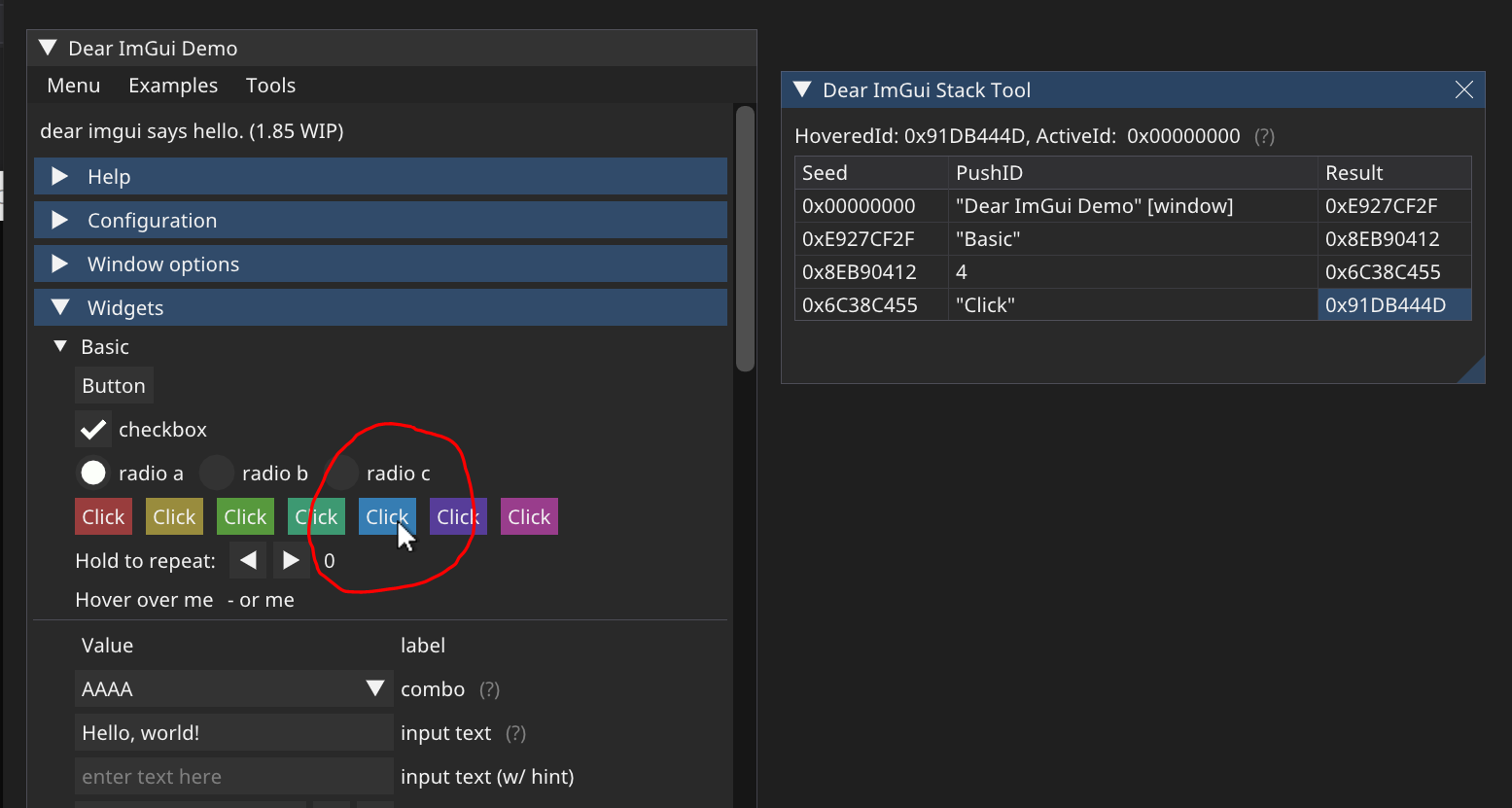 |
| 404 | |
| 405 | - Unique ID are often derived from a string label and at minimum scoped within their host window: |
| 406 | ```cpp |
| 407 | Begin("MyWindow"); |
| 408 | Button("OK"); // Label = "OK", ID = hash of ("MyWindow", "OK") |
| 409 | Button("Cancel"); // Label = "Cancel", ID = hash of ("MyWindow", "Cancel") |
| 410 | End(); |
| 411 | ``` |
| 412 | - Other elements such as tree nodes, etc. also pushes to the ID stack: |
| 413 | ```cpp |
| 414 | Begin("MyWindow"); |
| 415 | if (TreeNode("MyTreeNode")) |
| 416 | { |
| 417 | Button("OK"); // Label = "OK", ID = hash of ("MyWindow", "MyTreeNode", "OK") |
| 418 | TreePop(); |
| 419 | } |
| 420 | End(); |
| 421 | ``` |
| 422 | - Two items labeled "OK" in different windows or different tree locations won't collide: |
| 423 | ```cpp |
| 424 | Begin("MyFirstWindow"); |
| 425 | Button("OK"); // Label = "OK", ID = hash of ("MyFirstWindow", "OK") |
| 426 | End(); |
| 427 | Begin("MyOtherWindow"); |
| 428 | Button("OK"); // Label = "OK", ID = hash of ("MyOtherWindow", "OK") |
| 429 | End(); |
| 430 | ``` |
| 431 | |
| 432 | - If you have a same ID twice in the same location, you'll have a conflict: |
| 433 | ```cpp |
| 434 | Begin("MyWindow"); |
| 435 | Button("OK"); |
| 436 | Button("OK"); // ERROR: ID collision with the first button! Interacting with either button will trigger the first one. |
| 437 | Button(""); // ERROR: ID collision with Begin("MyWindow")! |
| 438 | End(); |
| 439 | ``` |
| 440 | Fear not! This is easy to solve and there are many ways to solve it! |
| 441 | |
| 442 | - Solving ID conflict in a simple/local context: |
| 443 | When passing a label you can optionally specify extra ID information within the string itself. |
| 444 | Use "##" to pass a complement to the ID that won't be visible to the end-user. |
| 445 | This helps solve the simple collision cases when you know e.g. at compilation time which items |
| 446 | are going to be created: |
| 447 | ```cpp |
| 448 | Begin("MyWindow"); |
| 449 | Button("Play"); // Label = "Play", ID = hash of ("MyWindow", "Play") |
| 450 | Button("Play##foo1"); // Label = "Play", ID = hash of ("MyWindow", "Play##foo1") // Different from other buttons |
| 451 | Button("Play##foo2"); // Label = "Play", ID = hash of ("MyWindow", "Play##foo2") // Different from other buttons |
| 452 | Button("##foo"); // Label = "", ID = hash of ("MyWindow", "##foo") // Different from window |
| 453 | End(); |
| 454 | ``` |
| 455 | |
| 456 | - Solving ID conflict in a more general manner: |
| 457 | Use `PushID()` / `PopID()` to create scopes and manipulate the ID stack, as to avoid ID conflicts |
| 458 | within the same window. This is the most convenient way of distinguishing ID when iterating and |
| 459 | creating many UI elements programmatically. |
| 460 | You can push a pointer, a string, or an integer value into the ID stack. |
| 461 | Remember that IDs are formed from the concatenation of _everything_ pushed into the ID stack. |
| 462 | At each level of the stack, we store the seed used for items at this level of the ID stack. |
| 463 | ```cpp |
| 464 | Begin("Window"); |
| 465 | for (int i = 0; i < 100; i++) |
| 466 | { |
| 467 | PushID(i); // Push i to the id tack |
| 468 | Button("Click"); // Label = "Click", ID = hash of ("Window", i, "Click") |
| 469 | PopID(); |
| 470 | } |
| 471 | for (int i = 0; i < 100; i++) |
| 472 | { |
| 473 | MyObject* obj = Objects[i]; |
| 474 | PushID(obj); |
| 475 | Button("Click"); // Label = "Click", ID = hash of ("Window", obj pointer, "Click") |
| 476 | PopID(); |
| 477 | } |
| 478 | for (int i = 0; i < 100; i++) |
| 479 | { |
| 480 | MyObject* obj = Objects[i]; |
| 481 | PushID(obj->Name); |
| 482 | Button("Click"); // Label = "Click", ID = hash of ("Window", obj->Name, "Click") |
| 483 | PopID(); |
| 484 | } |
| 485 | End(); |
| 486 | ``` |
| 487 | - You can stack multiple prefixes into the ID stack: |
| 488 | ```cpp |
| 489 | Button("Click"); // Label = "Click", ID = hash of (..., "Click") |
| 490 | PushID("node"); |
| 491 | Button("Click"); // Label = "Click", ID = hash of (..., "node", "Click") |
| 492 | PushID(my_ptr); |
| 493 | Button("Click"); // Label = "Click", ID = hash of (..., "node", my_ptr, "Click") |
| 494 | PopID(); |
| 495 | PopID(); |
| 496 | ``` |
| 497 | - Tree nodes implicitly create a scope for you by calling `PushID()`: |
| 498 | ```cpp |
| 499 | Button("Click"); // Label = "Click", ID = hash of (..., "Click") |
| 500 | if (TreeNode("node")) // <-- this function call will do a PushID() for you (unless instructed not to, with a special flag) |
| 501 | { |
| 502 | Button("Click"); // Label = "Click", ID = hash of (..., "node", "Click") |
| 503 | TreePop(); |
| 504 | } |
| 505 | ``` |
| 506 | |
| 507 | When working with trees, IDs are used to preserve the open/close state of each tree node. |
| 508 | Depending on your use cases you may want to use strings, indices, or pointers as ID. |
| 509 | - e.g. when following a single pointer that may change over time, using a static string as ID |
| 510 | will preserve your node open/closed state when the targeted object change. |
| 511 | - e.g. when displaying a list of objects, using indices or pointers as ID will preserve the |
| 512 | node open/closed state differently. See what makes more sense in your situation! |
| 513 | |
| 514 | ##### [Return to Index](#index) |
| 515 | |
| 516 | --- |
| 517 | |
| 518 | ### Q: How can I display an image? |
| 519 | ### Q: What are ImTextureID/ImTextureRef? |
| 520 | |
| 521 | **Short explanation:** |
| 522 | - You may use functions such as `ImGui::Image()`, `ImGui::ImageButton()` or lower-level `ImDrawList::AddImage()` to emit draw calls that will use your own textures. |
| 523 | - To load and display your own textures, refer to [Image Loading and Displaying Examples](https://github.com/ocornut/imgui/wiki/Image-Loading-and-Displaying-Examples) on the [Wiki](https://github.com/ocornut/imgui/wiki). |
| 524 | - Actual textures are identified in a way that is up to the user/engine. Those identifiers are stored and passed as an opaque ImTextureID value. |
| 525 | - By default ImTextureID can store up to 64-bits. You may `#define` it to a custom type/structure if you need. |
| 526 | - Loading image files from the disk and turning them into a texture is not within the scope of Dear ImGui (for a good reason), but the examples linked above may be useful references. |
| 527 | |
| 528 | **Details:** |
| 529 | |
| 530 | 1.92 introduced `ImTextureRef` in June 2025. |
| 531 | - All drawing functions using `ImTextureID` were changed to use `ImTextureRef`. |
| 532 | - You can trivially create a `ImTextureRef` from a `ImTextureID`. |
| 533 | - **If you use Image functions with textures that you have loaded/created yourself, you will mostly likely only ever store/manipulate `ImTextureID` and then pass them as `ImTextureRef`.** |
| 534 | - You only NEED to manipulate `ImTextureRef` when dealing with textures managed by the backend itself, aka mainly the atlas texture for now. |
| 535 | - We intentionally do not provide an implicit `ImTextureRef` -> `ImTextureID` cast operator because it is technically lossy to convert ImTextureRef to ImTextureID before rendering. |
| 536 | |
| 537 | **ImTextureID = backend specific, low-level identifier for a texture uploaded in GPU/graphics system.** |
| 538 | ```cpp |
| 539 | #ifndef ImTextureID |
| 540 | typedef ImU64 ImTextureID; // Default: store up to 64-bits (any pointer or integer). A majority of backends are ok with that. |
| 541 | #endif |
| 542 | ``` |
| 543 | - When a Rendered Backend creates a texture, it store its native identifier into a ImTextureID value (e.g. Used by DX11 backend to a `ID3D11ShaderResourceView*`; Used by OpenGL backends to store `GLuint`; Used by SDLGPU backend to store a `SDL_GPUTextureSamplerBinding*`, etc.). |
| 544 | - User may submit their own textures to e.g. `ImGui::Image()` function by passing this value. |
| 545 | - During the rendering loop, the Renderer Backend retrieve the ImTextureID, which stored inside a ImTextureRef, which is stored inside ImDrawCmd. |
| 546 | - Compile-time type configuration: |
| 547 | - To use something other than a 64-bit value: add '#define ImTextureID MyTextureType*' in your imconfig.h file. |
| 548 | - This can be whatever to you want it to be! read the FAQ entry about textures for details. |
| 549 | - You may decide to store a higher-level structure containing texture, sampler, shader etc. with various constructors if you like. You will need to implement ==/!= operators. |
| 550 | |
| 551 | **ImTextureRef = higher-level identifier for a texture.** |
| 552 | ```cpp |
| 553 | // Store a ImTextureID _or_ a ImTextureData*. |
| 554 | struct ImTextureRef |
| 555 | { |
| 556 | ImTextureRef() { _TexData = NULL; _TexID = ImTextureID_Invalid; } |
| 557 | ImTextureRef(ImTextureID tex_id) { _TexData = NULL; _TexID = tex_id; } |
| 558 | inline ImTextureID GetTexID() const { return _TexData ? _TexData->TexID : _TexID; } |
| 559 | |
| 560 | // Members (either are set, never both!) |
| 561 | ImTextureData* _TexData; // A texture, generally owned by a ImFontAtlas. Will convert to ImTextureID during render loop, after texture has been uploaded. |
| 562 | ImTextureID _TexID; // _OR_ Low-level backend texture identifier, if already uploaded or created by user/app. Generally provided to e.g. ImGui::Image() calls. |
| 563 | }; |
| 564 | ``` |
| 565 | - The identifier is valid even before the texture has been uploaded to the GPU/graphics system. |
| 566 | - This is what gets passed to functions such as `ImGui::Image()`, `ImDrawList::AddImage()`. |
| 567 | - This is what gets stored in draw commands (`ImDrawCmd`) to identify a texture during rendering. |
| 568 | - When a texture is created by user code (e.g. custom images), we directly store the low-level `ImTextureID`. |
| 569 | - Because of this, when displaying your own texture you are likely to ever only manage ImTextureID values on your side. |
| 570 | - When a texture is created by the backend, we store a `ImTextureData*` which becomes an indirection to extract the `ImTextureID` value during rendering, after texture upload has happened. |
| 571 | - To create a `ImTextureRef` from a `ImTextureData*` you can use `ImTextureData::GetTexRef()`. |
| 572 | We intentionally do not provide an `ImTextureRef` constructor for this: we don't expect this to be frequently useful to the end-user, and it would be erroneously called by many legacy code. |
| 573 | - There is no constructor to create a `ImTextureRef` from a `ImTextureData*` as we don't expect this to be useful to the end-user, and it would be erroneously called by many legacy code. |
| 574 | - If you want to bind the current atlas when using custom rectangles, you can use `io.Fonts->TexRef`. |
| 575 | - Binding generators for languages such as C (which don't have constructors), should provide a helper, e.g. `inline ImTextureRef ImTextureRefFromID(ImTextureID tex_id) { ImTextureRef tex_ref = { ._TexData = NULL, .TexID = tex_id }; return tex_ref; }` |
| 576 | |
| 577 | **Please read documentations or tutorials on your graphics API to understand how to display textures on the screen before moving onward.** |
| 578 | |
| 579 | Long explanation: |
| 580 | - Dear ImGui's job is to create "meshes", defined in a renderer-agnostic format made of draw commands and vertices. At the end of the frame, those meshes (ImDrawList) will be displayed by your rendering function. They are made up of textured polygons and the code to render them is generally fairly short (a few dozen lines). In the examples/ folder, we provide functions for popular graphics APIs (OpenGL, DirectX, etc.). |
| 581 | - Each rendering function decides on a data type to represent "textures". The concept of what is a "texture" is entirely tied to your underlying engine/graphics API. |
| 582 | We carry the information to identify a "texture" in the ImTextureID type, which itself tends to be stored inside a ImTextureRef. |
| 583 | ImTextureID default to ImU64 aka 8 bytes worth of data: just enough to store one pointer or integer of your choice. |
| 584 | Dear ImGui doesn't know or understand what you are storing in ImTextureID, it merely passes values until they reach your rendering function. |
| 585 | - In the [examples/](https://github.com/ocornut/imgui/tree/master/examples) backends, for each graphics API we decided on a type that is likely to be a good representation for specifying an image from the end-user perspective. This is what the _examples_ rendering functions are using: |
| 586 | ```cpp |
| 587 | OpenGL: |
| 588 | - ImTextureID should contains 'GLuint' (GL texture identifier). |
| 589 | - See ImGui_ImplOpenGL3_RenderDrawData() function in imgui_impl_opengl3.cpp |
| 590 | ``` |
| 591 | ```cpp |
| 592 | DirectX9: |
| 593 | - ImTextureID should contain a 'LPDIRECT3DTEXTURE9' (pointer). |
| 594 | - See ImGui_ImplDX9_RenderDrawData() function in imgui_impl_dx9.cpp |
| 595 | ``` |
| 596 | ```cpp |
| 597 | DirectX11: |
| 598 | - ImTextureID should contain a 'ID3D11ShaderResourceView*' (pointer) |
| 599 | - See ImGui_ImplDX11_RenderDrawData() function in imgui_impl_dx11.cpp |
| 600 | ``` |
| 601 | ```cpp |
| 602 | DirectX12: |
| 603 | - ImTextureID should contain a 'D3D12_GPU_DESCRIPTOR_HANDLE' (always 64-bits) |
| 604 | - See ImGui_ImplDX12_RenderDrawData() function in imgui_impl_dx12.cpp |
| 605 | ``` |
| 606 | For example, in the OpenGL example backend we store raw OpenGL texture identifier (GLuint) inside ImTextureID. |
| 607 | Whereas in the DirectX11 example backend we store a pointer to ID3D11ShaderResourceView inside ImTextureID, which is a higher-level structure tying together both the texture and information about its format and how to read it. |
| 608 | |
| 609 | - If you have a custom engine built over e.g. OpenGL, instead of passing GLuint around you may decide to use a high-level data type to carry information about the texture as well as how to display it (shaders, etc.). The decision of what to use as ImTextureID can always be made better by knowing how your codebase is designed. If your engine has high-level data types for "textures" and "material" then you may want to use them. |
| 610 | If you are starting with OpenGL or DirectX or Vulkan and haven't built much of a rendering engine over them, keeping the default ImTextureID representation suggested by the example backends is probably the best choice. |
| 611 | (Advanced users may also decide to keep a low-level type in ImTextureID, use ImDrawList callback and pass information to their renderer) |
| 612 | |
| 613 | User code may do: |
| 614 | ```cpp |
| 615 | // Cast our texture type to ImTextureID |
| 616 | MyTexture* texture = g_CoffeeTableTexture; |
| 617 | ImGui::Image((ImTextureID)(intptr_t)texture, ImVec2(texture->Width, texture->Height)); |
| 618 | ``` |
| 619 | The renderer function called after ImGui::Render() will receive that same value that the user code passed: |
| 620 | ```cpp |
| 621 | // Cast ImTextureID stored in the draw command as our texture type |
| 622 | MyTexture* texture = (MyTexture*)(intptr_t)pcmd->GetTexID(); |
| 623 | MyEngineBindTexture2D(texture); |
| 624 | ``` |
| 625 | Once you understand this design, you will understand that loading image files and turning them into displayable textures is not within the scope of Dear ImGui. |
| 626 | This is by design and is a good thing because it means your code has full control over your data types and how you display them. |
| 627 | If you want to display an image file (e.g. PNG file) on the screen, please refer to documentation and tutorials for the graphics API you are using. |
| 628 | |
| 629 | Refer to [Image Loading and Displaying Examples](https://github.com/ocornut/imgui/wiki/Image-Loading-and-Displaying-Examples) on the [Wiki](https://github.com/ocornut/imgui/wiki) to find simplified examples for loading textures with OpenGL, DirectX9 and DirectX11. |
| 630 | |
| 631 | C/C++ tip: a u64 is 8 bytes. You may safely store any pointer or integer into it by casting your value to ImTextureID, and vice-versa. |
| 632 | Because both end-points (user code and rendering function) are under your control, you know exactly what is stored inside the ImTextureID. |
| 633 | Here are some examples: |
| 634 | ```cpp |
| 635 | GLuint my_tex = XXX; |
| 636 | ImTextureID my_imtexid; |
| 637 | my_imtexid = (ImTextureID)(intptr_t)my_tex; // cast a GLuint into a ImTextureID (we don't take its address! we just copy the address) |
| 638 | my_tex = (GLuint)(intptr_t)my_imtexid; // cast a ImTextureID into a GLuint |
| 639 | |
| 640 | ID3D11ShaderResourceView* my_dx11_srv = XXX; |
| 641 | ImTextureID my_imtexid; |
| 642 | my_imtexid = (ImTextureID)(intptr_t)my_dx11_srv; // cast a ID3D11ShaderResourceView* into an opaque ImTextureID |
| 643 | my_dx11_srv = (ID3D11ShaderResourceView*)(intptr_t)_my_imtexid; // cast a ImTextureID into a ID3D11ShaderResourceView* |
| 644 | ``` |
| 645 | Finally, you may call `ImGui::ShowMetricsWindow()` to explore/visualize/understand how the ImDrawList are generated. |
| 646 | |
| 647 | ##### [Return to Index](#index) |
| 648 | |
| 649 | --- |
| 650 | |
| 651 | ### Q: How can I use maths operators with ImVec2? |
| 652 | |
| 653 | We do not export maths operators by default in imgui.h in order to not conflict with the use of your own maths types and maths operators. As a convenience, you may use `#define IMGUI_DEFINE_MATH_OPERATORS` + `#include "imgui.h"` to access our basic maths operators. |
| 654 | |
| 655 | ##### [Return to Index](#index) |
| 656 | |
| 657 | --- |
| 658 | |
| 659 | ### Q: How can I use my own maths types instead of ImVec2/ImVec4? |
| 660 | |
| 661 | You can setup your [imconfig.h](https://github.com/ocornut/imgui/blob/master/imconfig.h) file with `IM_VEC2_CLASS_EXTRA`/`IM_VEC4_CLASS_EXTRA` macros to add implicit type conversions to our own maths types. |
| 662 | This way you will be able to use your own types everywhere, e.g. passing `MyVector2` or `glm::vec2` to ImGui functions instead of `ImVec2`. |
| 663 | |
| 664 | ##### [Return to Index](#index) |
| 665 | |
| 666 | --- |
| 667 | |
| 668 | ### Q: How can I interact with standard C++ types (such as std::string and std::vector)? |
| 669 | - Being highly portable (backends/bindings for several languages, frameworks, programming styles, obscure or older platforms/compilers), and aiming for compatibility & performance suitable for every modern real-time game engine, Dear ImGui does not use any of std C++ types. We use raw types (e.g. char* instead of std::string) because they adapt to more use cases. |
| 670 | - To use ImGui::InputText() with a std::string or any resizable string class, see [misc/cpp/imgui_stdlib.h](https://github.com/ocornut/imgui/blob/master/misc/cpp/imgui_stdlib.h). |
| 671 | - To use combo boxes and list boxes with `std::vector` or any other data structure: the `BeginCombo()/EndCombo()` API |
| 672 | lets you iterate and submit items yourself, so does the `ListBoxHeader()/ListBoxFooter()` API. |
| 673 | Prefer using them over the old and awkward `Combo()/ListBox()` api. |
| 674 | - Generally for most high-level types you should be able to access the underlying data type. |
| 675 | You may write your own one-liner wrappers to facilitate user code (tip: add new functions in ImGui:: namespace from your code). |
| 676 | - Dear ImGui applications often need to make intensive use of strings. It is expected that many of the strings you will pass |
| 677 | to the API are raw literals (free in C/C++) or allocated in a manner that won't incur a large cost on your application. |
| 678 | Please bear in mind that using `std::string` on applications with a large amount of UI may incur unsatisfactory performances. |
| 679 | Modern implementations of `std::string` often include small-string optimization (which is often a local buffer) but those |
| 680 | are not configurable and not the same across implementations. |
| 681 | - If you are finding your UI traversal cost to be too large, make sure your string usage is not leading to an excessive amount |
| 682 | of heap allocations. Consider using literals, statically sized buffers, and your own helper functions. A common pattern |
| 683 | is that you will need to build lots of strings on the fly, and their maximum length can be easily scoped ahead. |
| 684 | One possible implementation of a helper to facilitate printf-style building of strings: https://github.com/ocornut/Str |
| 685 | This is a small helper where you can instance strings with configurable local buffers length. Many game engines will |
| 686 | provide similar or better string helpers. |
| 687 | |
| 688 | ##### [Return to Index](#index) |
| 689 | |
| 690 | --- |
| 691 | |
| 692 | ### Q: How can I display custom shapes? (using low-level ImDrawList API) |
| 693 | |
| 694 | - You can use the low-level `ImDrawList` api to render shapes within a window. |
| 695 | ```cpp |
| 696 | ImGui::Begin("My shapes"); |
| 697 | |
| 698 | ImDrawList* draw_list = ImGui::GetWindowDrawList(); |
| 699 | |
| 700 | // Get the current ImGui cursor position |
| 701 | ImVec2 p = ImGui::GetCursorScreenPos(); |
| 702 | |
| 703 | // Draw a red circle |
| 704 | draw_list->AddCircleFilled(ImVec2(p.x + 50, p.y + 50), 30.0f, IM_COL32(255, 0, 0, 255)); |
| 705 | |
| 706 | // Draw a 3 pixel thick yellow line |
| 707 | draw_list->AddLine(ImVec2(p.x, p.y), ImVec2(p.x + 100.0f, p.y + 100.0f), IM_COL32(255, 255, 0, 255), 3.0f); |
| 708 | |
| 709 | // Advance the ImGui cursor to claim space in the window (otherwise the window will appear small and needs to be resized) |
| 710 | ImGui::Dummy(ImVec2(200, 200)); |
| 711 | |
| 712 | ImGui::End(); |
| 713 | ``` |
| 714 | 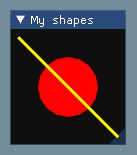 |
| 715 | |
| 716 | - Refer to "Demo > Examples > Custom Rendering" in the demo window and read the code of `ShowExampleAppCustomRendering()` in `imgui_demo.cpp` from more examples. |
| 717 | - To generate colors: you can use the macro `IM_COL32(255,255,255,255)` to generate them at compile time, or use `ImGui::GetColorU32(IM_COL32(255,255,255,255))` or `ImGui::GetColorU32(ImVec4(1.0f,1.0f,1.0f,1.0f))` to generate a color that is multiplied by the current value of `style.Alpha`. |
| 718 | - Math operators: if you have setup `IM_VEC2_CLASS_EXTRA` in `imconfig.h` to bind your own math types, you can use your own math types and their natural operators instead of ImVec2. ImVec2 by default doesn't export any math operators in the public API. You may use `#define IMGUI_DEFINE_MATH_OPERATORS` `#include "imgui.h"` to use our math operators, but instead prefer using your own math library and set it up in `imconfig.h`. |
| 719 | - You can use `ImGui::GetBackgroundDrawList()` or `ImGui::GetForegroundDrawList()` to access draw lists which will be displayed behind and over every other Dear ImGui window (one bg/fg drawlist per viewport). This is very convenient if you need to quickly display something on the screen that is not associated with a Dear ImGui window. |
| 720 | - You can also create your own empty window and draw inside it. Call Begin() with the NoBackground | NoDecoration | NoSavedSettings | NoInputs flags (The `ImGuiWindowFlags_NoDecoration` flag itself is a shortcut for NoTitleBar | NoResize | NoScrollbar | NoCollapse). Then you can retrieve the ImDrawList* via `GetWindowDrawList()` and draw to it in any way you like. |
| 721 | - You can create your own ImDrawList instance. You'll need to initialize them with `ImGui::GetDrawListSharedData()`, or create your own instancing `ImDrawListSharedData`, and then call your renderer function with your own ImDrawList or ImDrawData data. |
| 722 | - Looking for fun? The [ImDrawList coding party 2020](https://github.com/ocornut/imgui/issues/3606) thread is full of "don't do this at home" extreme uses of the ImDrawList API. |
| 723 | |
| 724 | ##### [Return to Index](#index) |
| 725 | |
| 726 | --- |
| 727 | |
| 728 | # Q&A: Fonts, Text |
| 729 | |
| 730 | ### Q: How should I handle DPI in my application? |
| 731 | |
| 732 | Since 1.92 (June 2025) fonts may be dynamically used at any size. |
| 733 | |
| 734 | **Scaling fonts** |
| 735 | |
| 736 | Select default size: |
| 737 | ```cpp |
| 738 | style.FontSizeBase = 20.0f; |
| 739 | ``` |
| 740 | Scale all fonts: |
| 741 | ```cpp |
| 742 | style.FontScaleDpi = 2.0f; |
| 743 | ``` |
| 744 | |
| 745 | To change font size: |
| 746 | ```cpp |
| 747 | ImGui::PushFont(NULL, 42.0f); // This will be multiplied by style.FontScaleDpi |
| 748 | ``` |
| 749 | To change font and font size: |
| 750 | ```cpp |
| 751 | ImGui::PushFont(new_font, 42.0f); |
| 752 | ``` |
| 753 | |
| 754 | In `docking` branch or with multi-viewports: |
| 755 | ```cpp |
| 756 | io.ConfigDpiScaleFonts = true; // (Docking branch only) Automatically overwrite style.FontScaleDpi in Begin() when Monitor DPI changes. This will scale fonts but _NOT_ scale sizes/padding for now. |
| 757 | io.ConfigDpiScaleViewports = true; // (Docking branch only) Scale Dear ImGui and Platform Windows when Monitor DPI changes. |
| 758 | ``` |
| 759 | |
| 760 | **Scaling style** (paddings, spacings, thicknesses) |
| 761 | |
| 762 | This is still massively work in progress, expect turbulence. |
| 763 | Style values are currently not easily scalable dynamically. |
| 764 | For single viewport application you can call once: |
| 765 | ```cpp |
| 766 | style.ScaleAllSizes(factor); // call once! |
| 767 | ``` |
| 768 | If you need to change the scaling factor, it is currently most practical to reset the style and call this again with a new value. |
| 769 | |
| 770 | Your UI code should avoid using hardcoded constants for size and positioning. Prefer to express values as multiple of reference values such as `ImGui::GetFontSize()` or `ImGui::GetFrameHeight()`. So e.g. instead of seeing a hardcoded height of 500 for a given item/window, you may want to use `30*ImGui::GetFontSize()` instead. |
| 771 | |
| 772 | Down the line Dear ImGui will provide a variety of standardized reference values to facilitate using this. This is expected to happen during subsequent 1.92.x releases. |
| 773 | |
| 774 | Applications in the `examples/` folder are partly DPI aware but they are unable to load a custom font from the file-system, so they look ugly (may change that in the future). |
| 775 | |
| 776 | The reason DPI is not auto-magically solved in stock examples is that we don't yet have a satisfying solution for the "multi-dpi" problem (using the `docking` branch: when multiple viewport windows are over multiple monitors using different DPI scales) specifically for the `ImGuiStyle` structure. Fonts are however now perfectly scalable. |
| 777 | |
| 778 | **On Windows, you need to inform Windows that your application is DPI aware!** |
| 779 | If this is not done, Windows will scale the application window and the UI text will be blurry. Potential solutions to indicate DPI awareness on Windows are: |
| 780 | - For SDL2: the flag `SDL_WINDOW_ALLOW_HIGHDPI` needs to be passed to `SDL_CreateWindow()` + call `::SetProcessDPIAware()`. |
| 781 | - For SDL3: the flag `SDL_WINDOW_HIGH_PIXEL_DENSITY` needs to be passed to `SDL_CreateWindow()`. |
| 782 | - For GLFW: this is done automatically. |
| 783 | - For other Windows projects with other backends, or wrapper projects: |
| 784 | - We provide a `ImGui_ImplWin32_EnableDpiAwareness()` helper method in the Win32 backend. |
| 785 | - Use an [application manifest file](https://learn.microsoft.com/en-us/windows/win32/hidpi/setting-the-default-dpi-awareness-for-a-process) to set the `<dpiAware>` property. |
| 786 | |
| 787 | ### Q: How can I load a different font than the default? |
| 788 | Use the font atlas to load the TTF/OTF file you want: |
| 789 | |
| 790 | ```cpp |
| 791 | ImGuiIO& io = ImGui::GetIO(); |
| 792 | io.Fonts->AddFontFromFileTTF("myfontfile.ttf", size_in_pixels); |
| 793 | io.Fonts->GetTexDataAsRGBA32() or GetTexDataAsAlpha8() |
| 794 | ``` |
| 795 | |
| 796 | Default is ProggyClean.ttf, monospace, rendered at size 13, embedded in dear imgui's source code. |
| 797 | |
| 798 | (Tip: monospace fonts are convenient because they allow to facilitate horizontal alignment directly at the string level.) |
| 799 | |
| 800 | (Read the [docs/FONTS.md](https://github.com/ocornut/imgui/blob/master/docs/FONTS.md) file for more details about font loading.) |
| 801 | |
| 802 | New programmers: remember that in C/C++ and most programming languages if you want to use a |
| 803 | backslash \ within a string literal, you need to write it double backslash "\\": |
| 804 | |
| 805 | ```cpp |
| 806 | io.Fonts->AddFontFromFileTTF("MyFolder\MyFont.ttf", size); // WRONG (you are escaping the M here!) |
| 807 | io.Fonts->AddFontFromFileTTF("MyFolder\\MyFont.ttf", size); // CORRECT (Windows only) |
| 808 | io.Fonts->AddFontFromFileTTF("MyFolder/MyFont.ttf", size); // ALSO CORRECT |
| 809 | ``` |
| 810 | |
| 811 | ##### [Return to Index](#index) |
| 812 | |
| 813 | --- |
| 814 | |
| 815 | ### Q: How can I easily use icons in my application? |
| 816 | The most convenient and practical way is to merge an icon font such as FontAwesome inside your |
| 817 | main font. Then you can refer to icons within your strings. |
| 818 | Read the [docs/FONTS.md](https://github.com/ocornut/imgui/blob/master/docs/FONTS.md) file for more details about icons font loading. |
| 819 | |
| 820 | ##### [Return to Index](#index) |
| 821 | |
| 822 | --- |
| 823 | |
| 824 | ### Q: How can I load multiple fonts? |
| 825 | |
| 826 | Use the font atlas to pack them into a single texture. Read [docs/FONTS.md](https://github.com/ocornut/imgui/blob/master/docs/FONTS.md) for more details. |
| 827 | |
| 828 | ##### [Return to Index](#index) |
| 829 | |
| 830 | --- |
| 831 | |
| 832 | ### Q: How can I display and input non-Latin characters such as Chinese, Japanese, Korean, Cyrillic? |
| 833 | |
| 834 | Since 1.92 (June 2025) and with an updated backend, it is not necessary to specify glyph ranges at all. |
| 835 | |
| 836 | Before 1.92, when loading a font, pass custom Unicode ranges to specify the glyphs to load. |
| 837 | ```cpp |
| 838 | // [BEFORE 1.92] |
| 839 | // Add default Japanese ranges |
| 840 | io.Fonts->AddFontFromFileTTF("myfontfile.ttf", size_in_pixels, nullptr, io.Fonts->GetGlyphRangesJapanese()); |
| 841 | |
| 842 | // Or create your own custom ranges (e.g. for a game you can feed your entire game script and only build the characters the game need) |
| 843 | ImVector<ImWchar> ranges; |
| 844 | ImFontGlyphRangesBuilder builder; |
| 845 | builder.AddText("Hello world"); // Add a string (here "Hello world" contains 7 unique characters) |
| 846 | builder.AddChar(0x7262); // Add a specific character |
| 847 | builder.AddRanges(io.Fonts->GetGlyphRangesJapanese()); // Add one of the default ranges |
| 848 | builder.BuildRanges(&ranges); // Build the final result (ordered ranges with all the unique characters submitted) |
| 849 | io.Fonts->AddFontFromFileTTF("myfontfile.ttf", 16.0f, nullptr, ranges.Data); |
| 850 | ``` |
| 851 | |
| 852 | All your strings need to use UTF-8 encoding. |
| 853 | You need to tell your compiler to use UTF-8, or in C++11 you can encode a string literal in UTF-8 by using the u8"hello" syntax. |
| 854 | Specifying literal in your source code using a local code page (such as CP-923 for Japanese or CP-1251 for Cyrillic) will NOT work! |
| 855 | See [About UTF-8 Encoding](https://github.com/ocornut/imgui/blob/master/docs/FONTS.md#about-utf-8-encoding) section |
| 856 | of [FONTS.md](https://github.com/ocornut/imgui/blob/master/docs/FONTS.md) for details about UTF-8 Encoding. |
| 857 | |
| 858 | Text input: it is up to your application to pass the right character code by calling `io.AddInputCharacter()`. |
| 859 | The applications in examples/ are doing that. |
| 860 | Windows: you can use the WM_CHAR or WM_UNICHAR or WM_IME_CHAR message (depending if your app is built using Unicode or MultiByte mode). |
| 861 | You may also use `MultiByteToWideChar()` or `ToUnicode()` to retrieve Unicode codepoints from MultiByte characters or keyboard state. |
| 862 | Windows: if your language is relying on an Input Method Editor (IME), you can write your HWND to `ImGui::GetMainViewport()->PlatformHandleRaw` |
| 863 | for the default implementation of `GetPlatformIO().Platform_SetImeDataFn()` to set your Microsoft IME position correctly. |
| 864 | |
| 865 | ##### [Return to Index](#index) |
| 866 | |
| 867 | --- |
| 868 | |
| 869 | # Q&A: Concerns |
| 870 | |
| 871 | ### Q: Who uses Dear ImGui? |
| 872 | |
| 873 | You may take a look at: |
| 874 | |
| 875 | - [Quotes](https://github.com/ocornut/imgui/wiki/Quotes) |
| 876 | - [Software using Dear ImGui](https://github.com/ocornut/imgui/wiki/Software-using-dear-imgui) |
| 877 | - [Funding & Sponsors](https://github.com/ocornut/imgui/wiki/Funding) |
| 878 | - [Gallery](https://github.com/ocornut/imgui/issues?q=label%3Agallery) |
| 879 | |
| 880 | ##### [Return to Index](#index) |
| 881 | |
| 882 | --- |
| 883 | |
| 884 | ### Q: Can you create elaborate/serious tools with Dear ImGui? |
| 885 | |
| 886 | Yes. People have written game editors, data browsers, debuggers, profilers, and all sorts of non-trivial tools with the library. In my experience, the simplicity of the API is very empowering. Your UI runs close to your live data. Make the tools always-on and everybody in the team will be inclined to create new tools (as opposed to more "offline" UI toolkits where only a fraction of your team effectively creates tools). The list of sponsors below is also an indicator that serious game teams have been using the library. |
| 887 | |
| 888 | Dear ImGui is very programmer-centric and the immediate-mode GUI paradigm might require you to readjust some habits before you can realize its full potential. Dear ImGui is about making things that are simple, efficient, and powerful. |
| 889 | |
| 890 | Dear ImGui is built to be efficient and scalable toward the needs for AAA-quality applications running all day. The IMGUI paradigm offers different opportunities for optimization than the more typical RMGUI paradigm. |
| 891 | |
| 892 | ##### [Return to Index](#index) |
| 893 | |
| 894 | --- |
| 895 | |
| 896 | ### Q: Can you reskin the look of Dear ImGui? |
| 897 | |
| 898 | Somewhat. You can alter the look of the interface to some degree: changing colors, sizes, padding, rounding, and fonts. However, as Dear ImGui is designed and optimized to create debug tools, the amount of skinning you can apply is limited. There is only so much you can stray away from the default look and feel of the interface. Dear ImGui is NOT designed to create a user interface for games, although with ingenious use of the low-level API you can do it. |
| 899 | |
| 900 | A reasonably skinned application may look like (screenshot from [#2529](https://github.com/ocornut/imgui/issues/2529#issuecomment-524281119)): |
| 901 | 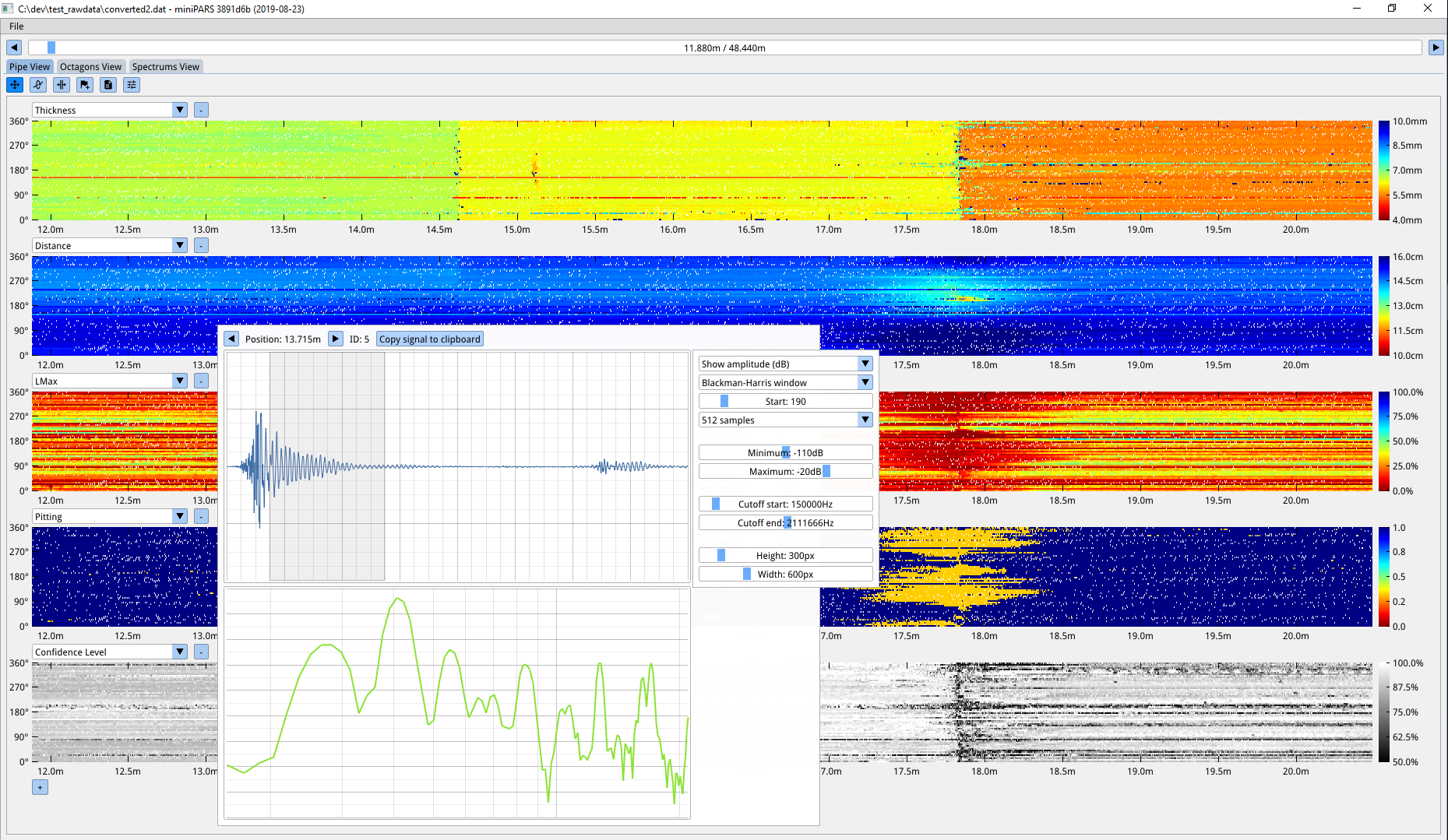 |
| 902 | |
| 903 | ##### [Return to Index](#index) |
| 904 | |
| 905 | --- |
| 906 | |
| 907 | ### Q: Why using C++ (as opposed to C)? |
| 908 | |
| 909 | Dear ImGui takes advantage of a few C++ language features for convenience but nothing anywhere Boost insanity/quagmire. Dear ImGui doesn't use any C++ header file. Dear ImGui uses a very small subset of C++11 features. In particular, function overloading and default parameters are used to make the API easier to use and code terser. Doing so I believe the API is sitting on a sweet spot and giving up on those features would make the API more cumbersome. Other features such as namespace, constructors, and templates (in the case of the ImVector<> class) are also relied on as a convenience. |
| 910 | |
| 911 | There is an auto-generated [c-api for Dear ImGui (cimgui)](https://github.com/cimgui/cimgui) by Sonoro1234 and Stephan Dilly. It is designed for creating bindings to other languages. If possible, I would suggest using your target language functionalities to try replicating the function overloading and default parameters used in C++ else the API may be harder to use. Also see [Bindings](https://github.com/ocornut/imgui/wiki/Bindings) for various third-party bindings. |
| 912 | |
| 913 | ##### [Return to Index](#index) |
| 914 | |
| 915 | --- |
| 916 | |
| 917 | # Q&A: Community |
| 918 | |
| 919 | ### Q: How can I help? |
| 920 | - Businesses: please reach out to `omar AT dearimgui.com` if you work in a place using Dear ImGui! We can discuss ways for your company to fund development via invoiced technical support, maintenance, or sponsoring contacts. This is among the most useful thing you can do for Dear ImGui. With increased funding, we can hire more people to work on this project. Please see [Funding](https://github.com/ocornut/imgui/wiki/Funding) page. |
| 921 | - Individuals: you can support continued maintenance and development via PayPal donations. See [README](https://github.com/ocornut/imgui/blob/master/docs/README.md). |
| 922 | - If you are experienced with Dear ImGui and C++, look at [GitHub Issues](https://github.com/ocornut/imgui/issues), [GitHub Discussions](https://github.com/ocornut/imgui/discussions), the [Wiki](https://github.com/ocornut/imgui/wiki), read [docs/TODO.txt](https://github.com/ocornut/imgui/blob/master/docs/TODO.txt), and see how you want to help and can help! |
| 923 | - Disclose your usage of Dear ImGui via a dev blog post, a tweet, a screenshot, a mention somewhere, etc. |
| 924 | You may post screenshots or links in the [gallery threads](https://github.com/ocornut/imgui/issues?q=label%3Agallery). Visuals are ideal as they inspire other programmers. Disclosing your use of Dear ImGui helps the library grow credibility, and helps other teams and programmers with taking decisions. |
| 925 | - If you have issues or if you need to hack into the library, even if you don't expect any support it is useful that you share your issues or sometimes incomplete PR. |
| 926 | |
| 927 | ##### [Return to Index](#index) |
| 928 | |